| 赞 | 0 |
| VIP | |
| 好人卡 | |
| 积分 | 12 |
| 经验 | |
| 最后登录 | 2026-6-22 |
| 在线时间 | 10 小时 |
- 梦石
- 0
- 星屑
- 1221
- 在线时间
- 10 小时
- 注册时间
- 2016-3-13
- 回帖
- 2
|
加入我们,或者,欢迎回来。
您需要 登录 才可以下载或查看,没有账号?注册会员
×
本脚本原来的作者:@欧买歌
不知道有人发布了没有
发布了请回复,谢谢。
脚本[pre lang="ruby"]=begin
本脚本原作者:欧买歌
现在已经修改为横板。
但是无法实现渐变
所以还需要改进(原来没有尝试,不知道可不可以渐变)
本脚本来自66RPG,请勿转载!
=end
# ■ Graphics
#------------------------------------------------------------------------------
# 图像模块
#==============================================================================
#--------------------------------------------------------------------------
# ● 更待指定帧数
#--------------------------------------------------------------------------
def Graphics.wait(n)
n.times{self.update;yield if defined? yield}
end
#--------------------------------------------------------------------------
# ● 获取窗口宽
#--------------------------------------------------------------------------
def Graphics.width
@width ||= 640
end
#--------------------------------------------------------------------------
# ● 获取窗口高
#--------------------------------------------------------------------------
def Graphics.height
@height ||= 480
end
#--------------------------------------------------------------------------
# ● 更改窗口大小
#--------------------------------------------------------------------------
def Graphics.resize_screen(width, height)
@width ||= 640
@height ||= 480
游戏ini名=".\\Game.ini"
val = "\0"*256
gps = Win32API.new('kernel32', 'GetPrivateProfileString','pppplp', 'l')
gps.call("Game", "Title", "", val, 256, 游戏ini名)
val.delete!("\0")
title = val
fw = Win32API.new('user32', 'FindWindow', 'pp', 'i')
hWnd = fw.call("RGSS Player", title)
swp = Win32API.new('user32', 'SetWindowPos', 'lliiiii', 'i')
pointwds = [0,0,0,0].pack('llll')
pointcet = [0, 0].pack('ll')
wdsrect = Win32API.new('user32.dll', 'GetWindowRect', 'lp', 'l')
client_screen = Win32API.new("user32", "ClientToScreen", 'ip', 'i')
wdsrect.call(hWnd,pointwds)
client_screen.call(hWnd, pointcet)
wds = pointwds.unpack('llll')
cet = pointcet.unpack('ll')
addw = wds[2] - wds[0] - @width
addh = wds[3] - wds[1] - @height
x = wds[0] - (width - @width) / 2
y = wds[1] - (height - @height) / 2
@width = width
@height = height
swp.call(hWnd, 0, x, y, @width + addw, @height + addh, 0x20)
end
Graphics.resize_screen(1280, 480)
#==============================================================================
# 本脚本来自www.66RPG.com,使用和转载请保留此信息
#==============================================================================
#==============================================================================
# ■ Window_Help
#------------------------------------------------------------------------------
# 特技及物品的说明、角色的状态显示的窗口。
#==============================================================================
class Window_Help < Window_Base
#--------------------------------------------------------------------------
# ● 初始化对像
#--------------------------------------------------------------------------
def initialize
super(640, 0, 640, 64)
self.contents = Bitmap.new(width - 32, height - 32)
end
end
#==============================================================================
# ■ Window_MenuStatus
#------------------------------------------------------------------------------
# 显示菜单画面和同伴状态的窗口。
#==============================================================================
class Window_MenuStatus < Window_Selectable
#--------------------------------------------------------------------------
# ● 初始化目标
#--------------------------------------------------------------------------
def initialize
super(0, 480, 480, 480)
self.contents = Bitmap.new(width - 32, height - 32)
refresh
self.active = false
self.index = -1
end
end
#==============================================================================
# ■ Window_Item
#------------------------------------------------------------------------------
# 物品画面、战斗画面、显示浏览物品的窗口。
#==============================================================================
class Window_Item < Window_Selectable
#--------------------------------------------------------------------------
# ● 初始化对像
#--------------------------------------------------------------------------
def initialize
super(640, 64, 640, 416)
@column_max = 2
refresh
self.index = 0
# 战斗中的情况下将窗口移至中央并将其半透明化
if $game_temp.in_battle
self.y = 64
self.height = 256
self.back_opacity = 160
end
end
end
#==============================================================================
# ■ Window_Skill
#------------------------------------------------------------------------------
# 特技画面、战斗画面、显示可以使用的特技浏览的窗口。
#==============================================================================
class Window_Skill < Window_Selectable
#--------------------------------------------------------------------------
# ● 初始化对像
# actor : 角色
#--------------------------------------------------------------------------
def initialize(actor)
super(640, 128, 640, 352)
@actor = actor
@column_max = 2
refresh
self.index = 0
# 战斗中的情况下将窗口移至中央并将其半透明化
if $game_temp.in_battle
self.y = 64
self.height = 256
self.back_opacity = 160
end
end
end
#==============================================================================
# ■ Window_SkillStatus
#------------------------------------------------------------------------------
# 显示特技画面、特技使用者的窗口。
#==============================================================================
class Window_SkillStatus < Window_Base
#--------------------------------------------------------------------------
# ● 初始化对像
# actor : 角色
#--------------------------------------------------------------------------
def initialize(actor)
super(640, 64, 640, 64)
self.contents = Bitmap.new(width - 32, height - 32)
@actor = actor
refresh
end
end
#==============================================================================
# ■ Window_Target
#------------------------------------------------------------------------------
# 物品画面与特技画面的、使用对像角色选择窗口。
#==============================================================================
class Window_Target < Window_Selectable
#--------------------------------------------------------------------------
# ● 初始化对像
#--------------------------------------------------------------------------
def initialize
super(640, 0, 336, 480)
self.contents = Bitmap.new(width - 32, height - 32)
self.z += 10
@item_max = $game_party.actors.size
refresh
end
end
#==============================================================================
# ■ Window_EquipLeft
#------------------------------------------------------------------------------
# 装备画面的、显示角色能力值变化的窗口。
#==============================================================================
class Window_EquipLeft < Window_Base
#--------------------------------------------------------------------------
# ● 初始化对像
# actor : 角色
#--------------------------------------------------------------------------
def initialize(actor)
super(640, 64, 272, 192)
self.contents = Bitmap.new(width - 32, height - 32)
@actor = actor
refresh
end
end
#==============================================================================
# ■ Window_EquipRight
#------------------------------------------------------------------------------
# 装备画面、显示角色现在装备的物品的窗口。
#==============================================================================
class Window_EquipRight < Window_Selectable
#--------------------------------------------------------------------------
# ● 初始化对像
# actor : 角色
#--------------------------------------------------------------------------
def initialize(actor)
super(272 + 640, 64, 368, 192)
self.contents = Bitmap.new(width - 32, height - 32)
@actor = actor
refresh
self.index = 0
end
end
#==============================================================================
# ■ Window_EquipItem
#------------------------------------------------------------------------------
# 装备画面、显示浏览变更装备的候补物品的窗口。
#==============================================================================
class Window_EquipItem < Window_Selectable
#--------------------------------------------------------------------------
# ● 初始化对像
# actor : 角色
# equip_type : 装备部位 (0~3)
#--------------------------------------------------------------------------
def initialize(actor, equip_type)
super(640, 256, 640, 224)
@actor = actor
@equip_type = equip_type
@column_max = 2
refresh
self.active = false
self.index = -1
end
end
#==============================================================================
# ■ Window_Status
#------------------------------------------------------------------------------
# 显示状态画面、完全规格的状态窗口。
#==============================================================================
class Window_Status < Window_Base
#--------------------------------------------------------------------------
# ● 初始化对像
# actor : 角色
#--------------------------------------------------------------------------
def initialize(actor)
super(640, 0, 640, 480)
self.contents = Bitmap.new(width - 32, height - 32)
@actor = actor
refresh
end
end
#==============================================================================
# ■ Window_SaveFile
#------------------------------------------------------------------------------
# 显示存档以及读档画面、保存文件的窗口。
#==============================================================================
class Window_SaveFile < Window_Base
#--------------------------------------------------------------------------
# ● 初始化对像
# file_index : 存档文件的索引 (0~3)
# filename : 文件名
#--------------------------------------------------------------------------
def initialize(file_index, filename)
super(640, 64 + file_index % 4 * 104, 640, 104)
self.contents = Bitmap.new(width - 32, height - 32)
@file_index = file_index
@filename = "Save/Save#{@file_index + 1}.Sav"
@time_stamp = Time.at(0)
@file_exist = FileTest.exist?(@filename)
if @file_exist
file = File.open(@filename, "r")
@time_stamp = file.mtime
@characters = Marshal.load(file)
@frame_count = Marshal.load(file)
@game_system = Marshal.load(file)
@game_switches = Marshal.load(file)
@game_variables = Marshal.load(file)
@total_sec = @frame_count / Graphics.frame_rate
file.close
end
refresh
@selected = false
end
end
#==============================================================================
# ■ Scene_Menu
#------------------------------------------------------------------------------
# 处理菜单画面的类。
#==============================================================================
class Scene_Menu
#--------------------------------------------------------------------------
# ● 主处理
#--------------------------------------------------------------------------
def main
# 生成命令窗口
s1 = $data_system.words.item
s2 = $data_system.words.skill
s3 = $data_system.words.equip
s4 = "状态"
s5 = "存档"
s6 = "结束游戏"
@command_window = Window_Command.new(160, [s1, s2, s3, s4, s5, s6])
@command_window.index = @menu_index
@command_window.x = 640
@command_window.y = 0
# 同伴人数为 0 的情况下
if $game_party.actors.size == 0
# 物品、特技、装备、状态无效化
@command_window.disable_item(0)
@command_window.disable_item(1)
@command_window.disable_item(2)
@command_window.disable_item(3)
end
# 禁止存档的情况下
if $game_system.save_disabled
# 存档无效
@command_window.disable_item(4)
end
# 生成游戏时间窗口
@playtime_window = Window_PlayTime.new
@playtime_window.x = 640
@playtime_window.y = 224
# 生成步数窗口
@steps_window = Window_Steps.new
@steps_window.x = 640
@steps_window.y = 320
# 生成金钱窗口
@gold_window = Window_Gold.new
@gold_window.x = 640
@gold_window.y = 416
# 生成状态窗口
@status_window = Window_MenuStatus.new
@status_window.x = 160 + 640
@status_window.y = 0
# 执行过渡
Graphics.transition
# 主循环
loop do
# 刷新游戏画面
Graphics.update
# 刷新输入信息
Input.update
# 刷新画面
update
# 如果切换画面就中断循环
if $scene != self
break
end
end
# 准备过渡
Graphics.freeze
# 释放窗口
@command_window.dispose
@playtime_window.dispose
@steps_window.dispose
@gold_window.dispose
@status_window.dispose
end
end
class Scene_End
def main
# 生成命令窗口
s1 = "返回标题画面"
s2 = "退出"
s3 = "取消"
@command_window = Window_Command.new(192, [s1, s2, s3])
@command_window.x = 320 - @command_window.width / 2 + 640
@command_window.y = 240 - @command_window.height / 2
# 执行过渡
Graphics.transition
# 主循环
loop do
# 刷新游戏画面
Graphics.update
# 刷新输入情报
Input.update
# 刷新画面
update
# 如果画面切换的话就中断循环
if $scene != self
break
end
end
# 准备过渡
Graphics.freeze
# 释放窗口
@command_window.dispose
# 如果在标题画面切换中的情况下
if $scene.is_a?(Scene_Title)
# 淡入淡出画面
Graphics.transition
Graphics.freeze
end
end
end
#==============================================================================
# ■ Window_Base
#==============================================================================
class Window_Base < Window
alias xrxs_mp7_initialize initialize
def initialize(x, y, width, height)
xrxs_mp7_initialize(x, y, width, height)
if $scene.is_a?(Scene_Menu) or
$scene.is_a?(Scene_Item) or
$scene.is_a?(Scene_Skill) or
$scene.is_a?(Scene_Equip) or
$scene.is_a?(Scene_Status) or
$scene.is_a?(Scene_Save) or
$scene.is_a?(Scene_End)
self.back_opacity = 255 #————这个数值可调,为透明程度
end
end
end
module XRXS_MP7_Module
def create_spriteset
@spriteset = Spriteset_Map.new
end
def dispose_spriteset
@spriteset.dispose
end
end
class Scene_Menu
include XRXS_MP7_Module
alias xrxs_mp7_main main
def main
create_spriteset
xrxs_mp7_main
dispose_spriteset
end
end
class Scene_Item
include XRXS_MP7_Module
alias xrxs_mp7_main main
def main
create_spriteset
xrxs_mp7_main
dispose_spriteset
end
end
class Scene_Skill
include XRXS_MP7_Module
alias xrxs_mp7_main main
def main
create_spriteset
xrxs_mp7_main
dispose_spriteset
end
end
class Scene_Equip
include XRXS_MP7_Module
alias xrxs_mp7_main main
def main
create_spriteset
xrxs_mp7_main
dispose_spriteset
end
end
class Scene_Status
include XRXS_MP7_Module
alias xrxs_mp7_main main
def main
create_spriteset
xrxs_mp7_main
dispose_spriteset
end
end
class Scene_Save
include XRXS_MP7_Module
alias xrxs_mp7_main main
def main
create_spriteset
xrxs_mp7_main
dispose_spriteset
end
end
class Scene_End
include XRXS_MP7_Module
alias xrxs_mp7_main main
def main
create_spriteset
xrxs_mp7_main
dispose_spriteset
end
end
#==============================================================================
# 本脚本来自www.66RPG.com,使用和转载请保留此信息
#==============================================================================[/pre]
能不能鼠标不要问我,我没试过加鼠标
本人第一次发帖,请踊跃批评我吧。( ^ω^) |
评分
-
查看全部评分
|


 写轮眼
写轮眼
 发表于 2016-3-16 19:23:04
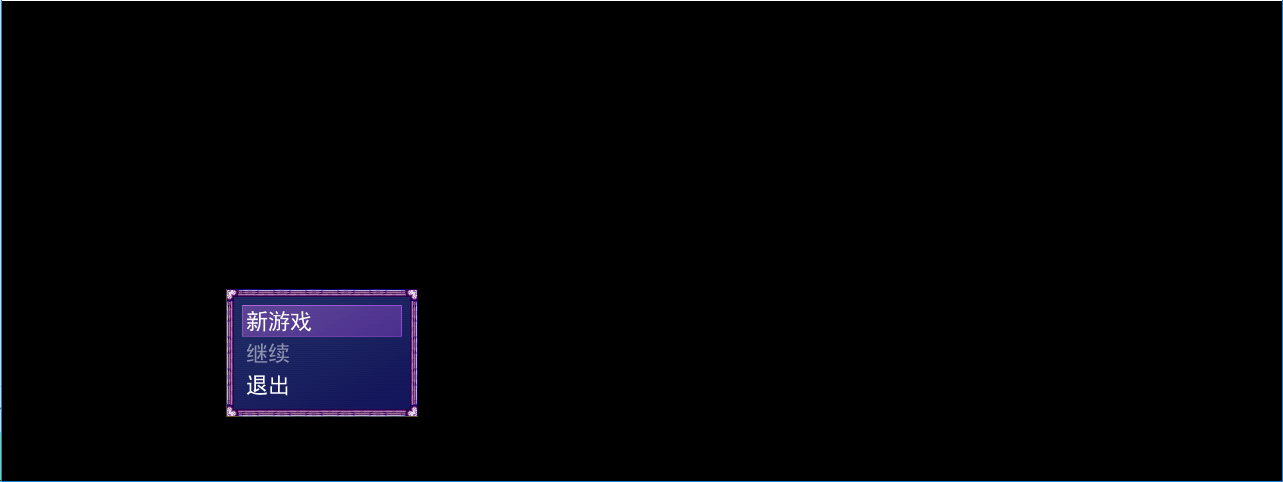
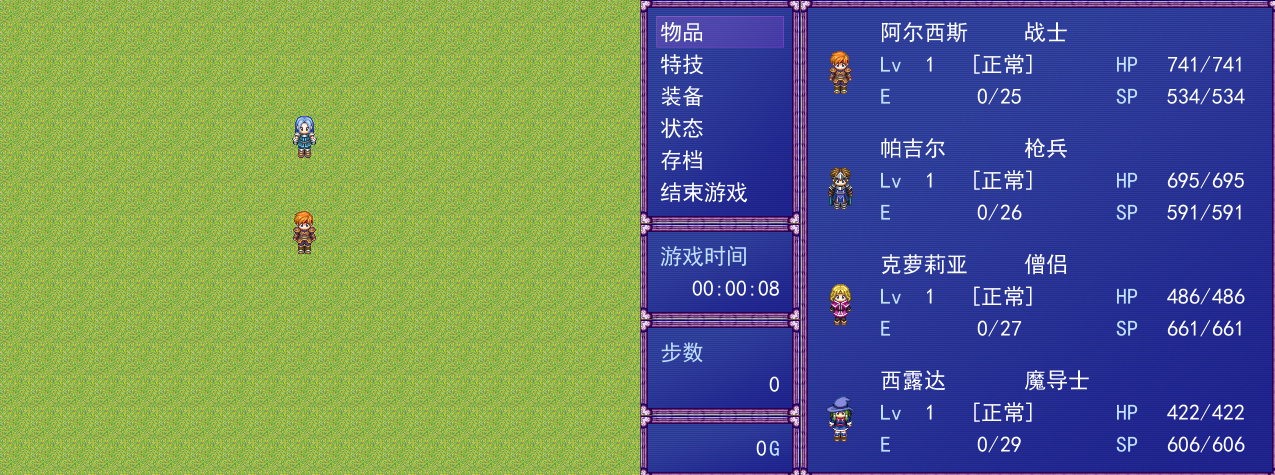
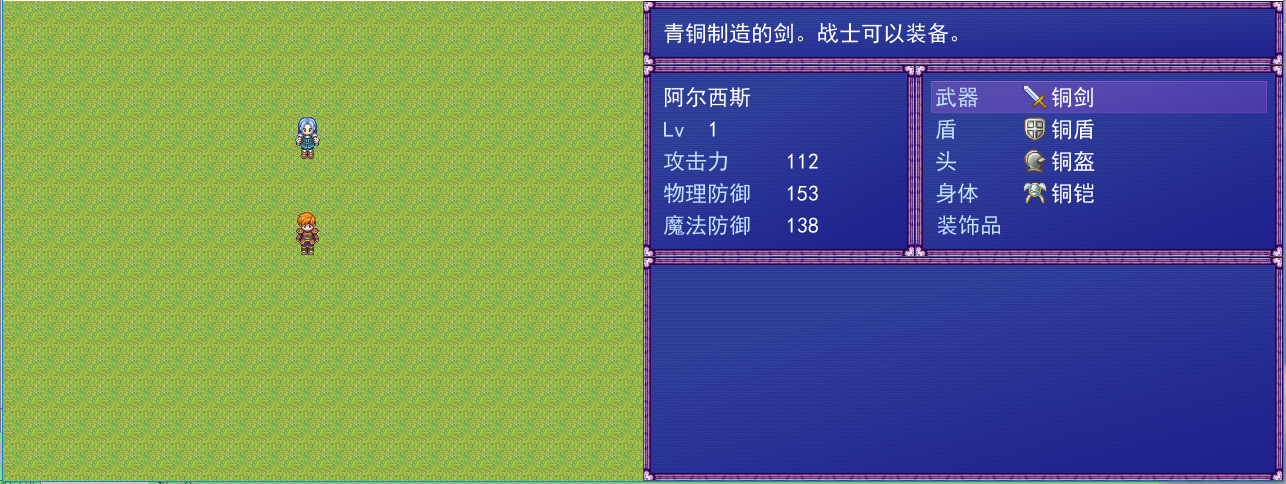

 提升卡
提升卡 沉默号角
沉默号角 喧嚣号角
喧嚣号角 变色卡
变色卡 升龙剑
升龙剑