查看: 3761|回复: 3

[已经解决] 怎样用视频作为游戏标题?

[复制链接]
梦石
0
星屑
75
在线时间
73 小时
注册时间
2015-7-10
回帖
26
发表于 2016-3-30 22:25:29 | 显示全部楼层 |阅读模式

加入我们,或者,欢迎回来。

您需要 登录 才可以下载或查看,没有账号?注册会员

×
本帖最后由 老王的忧郁 于 2016-3-31 16:46 编辑

我找到一个非常有江湖味的影片,想在标题页面播放!

http://v.yinyuetai.com/video/264348

求教要怎么达成?
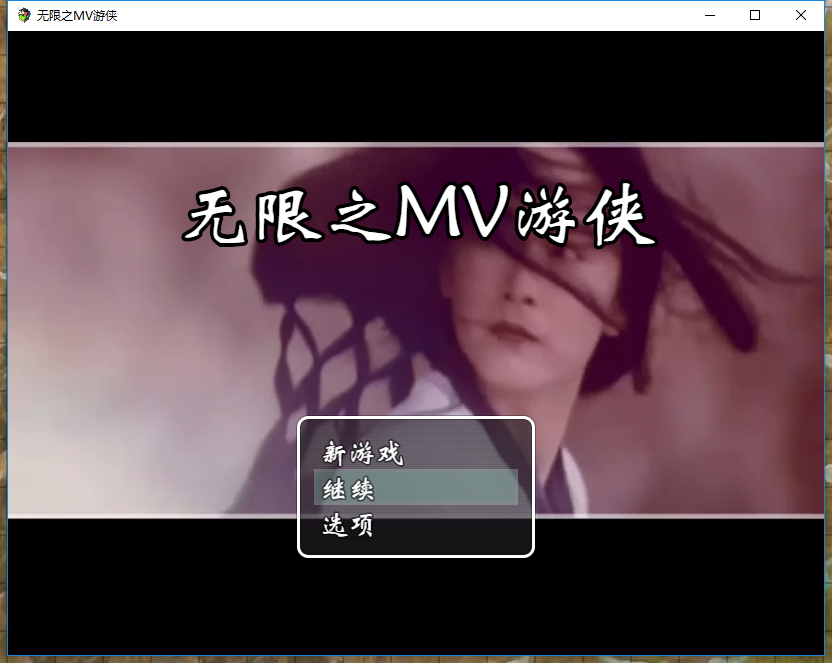
要达成下面的效果,截图是游戏播放视频的画面

想要在标题上播放视频,游戏开始选项等要显示在视频的上层。

特别感谢@siakochen ,他介绍的插件完美的解决了我的问题!

如下图,是标题播放的视频截图!!!
QQ图片20160331163358.png

现放上插件,以供同好使用!如果使用了YEP_CoreEngine这个插件,请把Scale Title 设置为false。否则会出现bitmap undefined

  1. /*:
  2. PH - Video Title
  3. @plugindesc This plugin allows you to put a video at the background of the Title Screen instead of a static image.
  4. @author PrimeHover
  5. @version 1.1
  6. @date 11/12/2015
  7. ---------------------------------------------------------------------------------------
  8. This work is licensed under the Creative Commons Attribution 4.0 International License.
  9. To view a copy of this license, visit [url]http://creativecommons.org/licenses/by/4.0/[/url]
  10. ---------------------------------------------------------------------------------------
  11. @param Video Name
  12. @desc Name of the video (See Help Section) | (E.g. "myVideo")
  13. @param Video Muted
  14. @desc Mutes the video in the title (0: No, 1: Yes)
  15. @default 0
  16. @param Video Loop
  17. @desc Makes the video plays in a loop (0: No, 1: Yes)
  18. @default 1
  19. @param Video Poster Name
  20. @desc Name and extension of the image to be shown when the video is loading (E.g. "poster.png")
  21. @param Video Width
  22. @desc Width of the video in the canvas (Default: 816)
  23. @default 816
  24. @param Video Height
  25. @desc Height of the video in the canvas (Default: 624)
  26. @default 624
  27. @param Video Coord X
  28. @desc Coordinate X of the video in the canvas (Default: 0)
  29. @default 0
  30. @param Video Coord Y
  31. @desc Coordinate Y of the video in the canvas (Default: 0)
  32. @default 0
  33. @help
  34. The video you want to play in background must be inside the "movies" folder in your project.
  35. Supported extensions: "webm"
  36. The poster you want to show while the video is not ready must be inside the "pictures" folder in your project.
  37. */

  38. (function() {

  39.     /* Getting the parameters */
  40.     var parameters = PluginManager.parameters('PH_VideoTitle');
  41.     var videoName = String(parameters['Video Name']);
  42.     var posterName = String(parameters['Video Poster Name']);
  43.     var videoMuted = Number(parameters['Video Muted']);
  44.     var videoLoop = Number(parameters['Video Loop']);
  45.     var videoWidth = Number(parameters['Video Width']);
  46.     var videoHeight = Number(parameters['Video Height']);
  47.     var videoX = Number(parameters['Video Coord X']);
  48.     var videoY = Number(parameters['Video Coord Y']);

  49.     /* Video Title Class */
  50.     var PH_VideoTitle = null;

  51.     function VideoTitle() {
  52.         this.name = videoName;
  53.         this.posterName = posterName;

  54.         /* Creating video tag */
  55.         this._video = document.createElement('video');
  56.         this._video.id = 'VideoTitle_' + this.name.replace(/[^A-Z0-9]+/ig, "_");
  57.         this._video.src = 'movies/' + this.name + '.webm';
  58.         this._video.style.width = 0;
  59.         this._video.style.height = 0;
  60.         this._video.autoPlay = false;

  61.         /* Control Options */
  62.         this.setControlOptions();

  63.         /* Appending the video at the body tag */
  64.         document.body.appendChild(this._video);

  65.         /* Starts video and creates the texture */
  66.         this.setVideoTexture();
  67.     }
  68.     VideoTitle.prototype.constructor = VideoTitle;

  69.     VideoTitle.prototype.setControlOptions = function() {
  70.         if (videoLoop == 1) {
  71.             this._video.loop = true;
  72.         } else {
  73.             this._video.loop = false;
  74.         }

  75.         if (videoMuted == 1) {
  76.             this._video.muted = true;
  77.         } else {
  78.             this._video.muted = false;
  79.         }

  80.         if (posterName.trim() != '') {
  81.             this._video.poster = 'img/pictures/' + this.posterName;
  82.         }
  83.     };

  84.     VideoTitle.prototype.setVideoTexture = function() {
  85.         this._texture = PIXI.VideoTexture.textureFromVideo(this._video);
  86.         this._spriteVideo = new PIXI.Sprite(this._texture);
  87.         this._spriteVideo.width = videoWidth;
  88.         this._spriteVideo.height = videoHeight;
  89.         this._spriteVideo.x = videoX;
  90.         this._spriteVideo.y = videoY;
  91.     };

  92.     VideoTitle.prototype.pauseVideo = function() {
  93.         this._video.pause();
  94.     };

  95.     VideoTitle.prototype.playVideo = function() {
  96.         this._video.play();
  97.     };


  98.     /* Overwritten Scene_Title methods */
  99.     Scene_Title.prototype.create = function() {

  100.         /* Prevent the video to be duplicated */
  101.         if (PH_VideoTitle === null) {
  102.             PH_VideoTitle = new VideoTitle();
  103.         }
  104.         this.videoTitle = PH_VideoTitle;
  105.         this.videoTitle.playVideo();
  106.         this.addChild(this.videoTitle._spriteVideo);
  107.         this.createForeground();
  108.         this.createWindowLayer();
  109.         this.createCommandWindow();
  110.     };

  111.     Scene_Title.prototype.start = function() {
  112.         Scene_Base.prototype.start.call(this);
  113.         SceneManager.clearStack();
  114.         if (videoMuted == 1) {
  115.             this.playTitleMusic();
  116.         }
  117.         this.startFadeIn(this.fadeSpeed(), false);
  118.     };

  119.     Scene_Title.prototype.terminate = function() {
  120.         Scene_Base.prototype.terminate.call(this);
  121.         this.videoTitle.pauseVideo();
  122.         SceneManager.snapForBackground();
  123.     };

  124. })();
复制代码
梦石
0
星屑
80
在线时间
241 小时
注册时间
2016-3-23
回帖
32
发表于 2016-3-30 23:26:47 | 显示全部楼层
歡迎參考一下我的遊戲
https://rpg.blue/thread-390613-1-1.html
我的遊戲標題選項背景就是影片
回复

使用道具 举报

梦石
0
星屑
75
在线时间
73 小时
注册时间
2015-7-10
回帖
26
 楼主| 发表于 2016-3-31 00:57:50 | 显示全部楼层
siakochen 发表于 2016-3-30 23:26
歡迎參考一下我的遊戲
https://rpg.blue/thread-390613-1-1.html
我的遊戲標題選項背景就是影片

大神,你的游戏哦下载了,感觉很棒,请问你是怎么做到的?
要用你写的插件吗?
回复

使用道具 举报

梦石
0
星屑
80
在线时间
241 小时
注册时间
2016-3-23
回帖
32
发表于 2016-3-31 11:36:37 | 显示全部楼层
老王的忧郁 发表于 2016-3-31 00:57
大神,你的游戏哦下载了,感觉很棒,请问你是怎么做到的?
要用你写的插件吗? ...

非自己寫的,此插件為作者為PrimeHover
提供你下載位置 :
http://forums.rpgmakerweb.com/in ... 338-ph-video-title/

我自己是有再編修更改成符合自己遊戲的方式

你可以去下載來試試..

点评

沒關係..有幫助道你就好  发表于 2016-3-31 16:47
抱歉,我级别太低。貌似不能给你评分。非常感谢你提供的插件!  发表于 2016-3-31 16:39

评分

参与人数 1梦石 +1 收起 理由
余烬之中 + 1 认可答案

查看全部评分

回复

使用道具 举报

您需要登录后才可以回帖 登录 | 注册会员

本版积分规则

Powered by Discuz! X5.0 © 2001-2026 Discuz! Team.

在本版发帖返回顶部