| 赞 | 1 |
| VIP | |
| 好人卡 | |
| 积分 | 2 |
| 经验 | |
| 最后登录 | 2026-11-7 |
| 在线时间 | 1452 小时 |
- 梦石
- 0
- 星屑
- 199
- 在线时间
- 1452 小时
- 注册时间
- 2010-9-23
- 回帖
- 492
|
 发表于 2016-4-2 08:41:25
|
显示全部楼层
尝试小改了一下,只保留名字和说明,不知道是不是楼主想要的。 = =
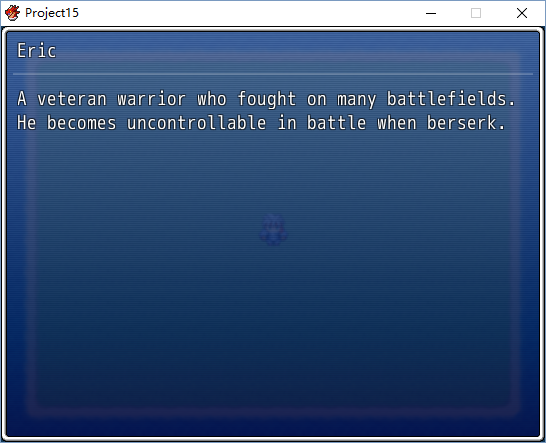
- #==============================================================================
- # ** 人物状态菜单
- #------------------------------------------------------------------------------
- # This window displays full status specs on the status screen.
- #==============================================================================
- class Window_Status < Window_Selectable
- #--------------------------------------------------------------------------
- # * Object Initialization
- #--------------------------------------------------------------------------
- def initialize(actor)
- super(0, 0, Graphics.width, Graphics.height)
- @actor = actor
- refresh
- activate
- end
- #--------------------------------------------------------------------------
- # * Set Actor
- #--------------------------------------------------------------------------
- def actor=(actor)
- return if @actor == actor
- @actor = actor
- refresh
- end
- #--------------------------------------------------------------------------
- # * Refresh
- #--------------------------------------------------------------------------
- def refresh
- contents.clear
- draw_block1 (line_height * 0)
- draw_horz_line(line_height * 1)
- draw_block2 (line_height * 2)
- end
- #--------------------------------------------------------------------------
- # * Draw Block 1
- #--------------------------------------------------------------------------
- def draw_block1(y)
- draw_actor_name(@actor, 4, y)
- end
- #--------------------------------------------------------------------------
- # * Draw Block 2
- #--------------------------------------------------------------------------
- def draw_block2(y)
- draw_basic_info(136, y)
- draw_description(4, y)
- end
- #--------------------------------------------------------------------------
- # * Draw Horizontal Line
- #--------------------------------------------------------------------------
- def draw_horz_line(y)
- line_y = y + line_height / 2 - 1
- contents.fill_rect(0, line_y, contents_width, 2, line_color)
- end
- #--------------------------------------------------------------------------
- # * Get Color of Horizontal Line
- #--------------------------------------------------------------------------
- def line_color
- color = normal_color
- color.alpha = 48
- color
- end
- #--------------------------------------------------------------------------
- # * Draw Basic Information
- #--------------------------------------------------------------------------
- def draw_basic_info(x, y)
- draw_actor_icons(@actor, x, y + line_height * 1)
- end
- #--------------------------------------------------------------------------
- # * Draw Equipment
- #--------------------------------------------------------------------------
- def draw_equipments(x, y)
- @actor.equips.each_with_index do |item, i|
- draw_item_name(item, x, y + line_height * i)
- end
- end
- #--------------------------------------------------------------------------
- # * Draw Description
- #--------------------------------------------------------------------------
- def draw_description(x, y)
- draw_text_ex(x, y, @actor.description)
- end
- end
|
评分
-
查看全部评分
|


 写轮眼

 提升卡
 沉默号角
 喧嚣号角
 变色卡
 升龙剑
 够不够诚意呢……有没有大大注意到我呢……呜呜…………