| 赞 | 1 |
| VIP | |
| 好人卡 | |
| 积分 | 2 |
| 经验 | |
| 最后登录 | 2026-5-6 |
| 在线时间 | 1452 小时 |
- 梦石
- 0
- 星屑
- 189
- 在线时间
- 1452 小时
- 注册时间
- 2010-9-23
- 回帖
- 492
|
 发表于 2016-4-20 10:15:55
|
显示全部楼层
发表于 2016-4-20 10:15:55
|
显示全部楼层
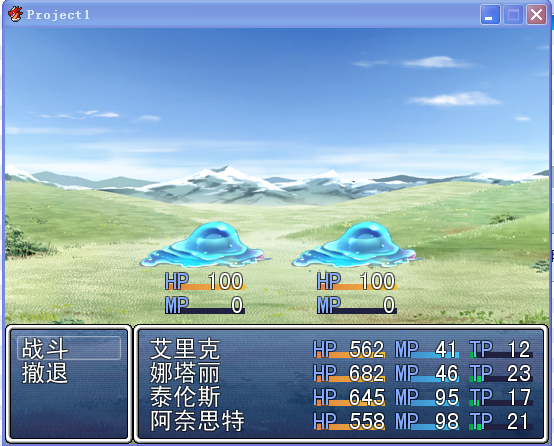
[pre lang="ruby"] #==============================================================================
# 功能:战斗中显示敌人血和蓝于敌人脚下
# 适用:RMVX Ace
# 作者:殇殃 2012.3.10
# 使用方法:复制整个脚本插入到Main之前
# 注意:由于血条是显示在敌人脚下,所以敌群的位置不能太靠底部,不然会被挡住。
# 可以自行更改坐标修改显示位置、血条的颜色等。
#==============================================================================
# ■ Window_Base
#------------------------------------------------------------------------------
# 游戏中全部窗口的超级类。
#==============================================================================
class Window_Base < Window
#--------------------------------------------------------------------------
# ● 描绘敌人HP
#--------------------------------------------------------------------------
def draw_enemy_hp(enemy, x, y, width = 80)
draw_gauge(x, y, width, enemy.hp_rate, hp_gauge_color1, hp_gauge_color2)
self.contents.font.color = system_color
self.contents.draw_text(x, y, 30, line_height, Vocab::hp_a)
self.contents.font.color = hp_color(enemy)
self.contents.draw_text(x + width - 64, y, 64, line_height, enemy.hp, 2)
#一个数字占16像素
end
#--------------------------------------------------------------------------
# ● 绘制敌人MP
#--------------------------------------------------------------------------
def draw_enemy_mp(enemy, x, y, width = 80)
draw_gauge(x, y, width, enemy.mp_rate, mp_gauge_color1, mp_gauge_color2)
self.contents.font.color = system_color
self.contents.draw_text(x, y, 30, line_height, Vocab::mp_a)
self.contents.font.color = mp_color(enemy)
self.contents.draw_text(x + width - 64, y, 64, line_height, enemy.mp, 2)
end
end
#==============================================================================
# ■ Sprite_Battler
#------------------------------------------------------------------------------
# 战斗显示用活动块。Game_Battler 类的实例监视、
# 活动块的状态的监视、活动块状态自动变化。
#==============================================================================
class Sprite_Battler < Sprite_Base
#--------------------------------------------------------------------------
# ● 初始化对象
# viewport : 视区
# battler : 战斗者 (Game_Battler)
#--------------------------------------------------------------------------
def initialize(viewport, battler = nil)
super(viewport)
@battler = battler
@battler_visible = false
@effect_type = nil
@effect_duration = 0
if @battler.is_a?(Game_Enemy)
width = 24 + 80 #边距12*2+血条的长度(在draw_enemy_hp中定义)
height = 24 + 24*2 #边距12*2+line_height*2
x = @battler.screen_x - width/2 #screen_x是怪物图片水平方向上的中点位置
y = @battler.screen_y - 12 #边距12,显示HP/MP的窗口无边框
@enemy_hpmp_window = Window_Base.new(x, y, width, height)
@enemy_hpmp_window.opacity = 0
@enemy_hpmp_window.contents = Bitmap.new(width - 24, height - 24)#位图比窗口小24像素取消边框
@enemy_hpmp_window.draw_enemy_hp(@battler, 0, 0)
@old_hp = -1
@enemy_hpmp_window.draw_enemy_mp(@battler, 0, 24)
@old_mp = -1
end
end
#--------------------------------------------------------------------------
# ● 释放
#--------------------------------------------------------------------------
def dispose
if self.bitmap != nil
self.bitmap.dispose
@enemy_hpmp_window.dispose
end
super
end
#--------------------------------------------------------------------------
# ● 更新画面
#--------------------------------------------------------------------------
def update
super
if @battler == nil
self.bitmap = nil
else
@use_sprite = @battler.use_sprite?
if @use_sprite
update_bitmap
update_origin
update_position
end
setup_new_effect
setup_new_animation
update_effect
if @enemy_hpmp_window != nil and (@old_hp != @battler.hp or @old_mp != @battler.mp)
if @battler.hp == 0
@enemy_hpmp_window.hide
else
@enemy_hpmp_window.contents.clear
@enemy_hpmp_window.draw_enemy_hp(@battler, 0, 0)
@old_hp = @battler.hp
@enemy_hpmp_window.draw_enemy_mp(@battler, 0, 24)
@old_mp = @battler.mp
@enemy_hpmp_window.show #怪物死后再被复活
end #if battler.hp == 0
end
end #if @battler == nil
end
end[/pre] |
评分
-
查看全部评分
|


 写轮眼
写轮眼
 血条的有很多,貌似没见到有蓝条的,伸手一回
 提升卡
提升卡 沉默号角
沉默号角 喧嚣号角
喧嚣号角 变色卡
变色卡 升龙剑
升龙剑


