| 赞 | 168 |
| VIP | |
| 好人卡 | |
| 积分 | 229 |
| 经验 | |
| 最后登录 | 2025-4-1 |
| 在线时间 | 8598 小时 |
- 梦石
- 0
- 星屑
- 22879
- 在线时间
- 8598 小时
- 注册时间
- 2011-12-31
- 回帖
- 3270
|
 发表于 2016-5-14 11:25:23
|
显示全部楼层
发表于 2016-5-14 11:25:23
|
显示全部楼层
本帖最后由 tseyik 于 2016-5-14 11:38 编辑
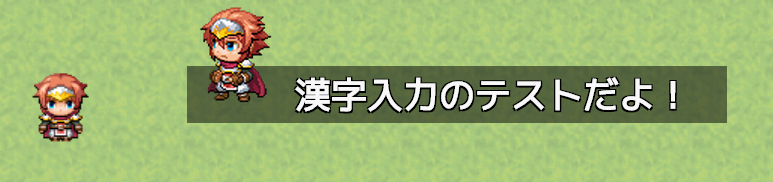
InputFrom.js
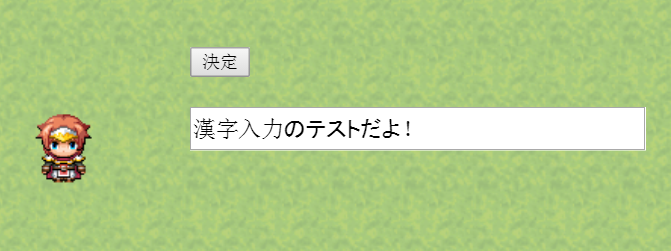
使用方法
* @help InputForm x=350;y=200;v=11;max=5;
* 這例子:表示在位置x350,y200、輸入結果存入変数11中。
* 最大文字数為5(max省略時字数無制限)
*
* 時間切れなどを作りたい時は、if_s=3;を付けると
* ”スイッチ3がONになった場合”に強制終了できます
* 並列イベントの中で、スイッチ3をONにするイベントを作りましょう
*
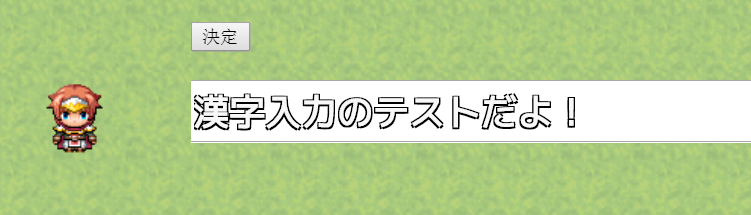
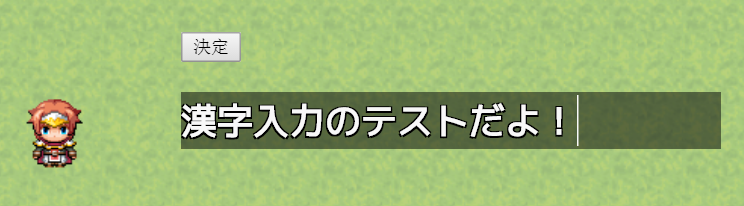
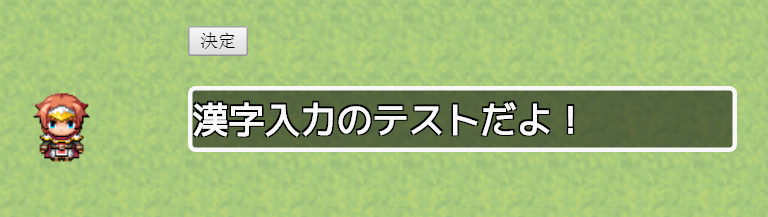
* css文件夾中可用111_InputForm.css。
* 111_InputForm.css可設定文字大小,字色,背景色,背景透明……及其他
*
* 入力が終わるまで次のイベントコマンドは読み込みません
InputFrom.js[pre lang="javascript"]//=============================================================================
// InputFrom.js
//=============================================================================
/*:
* @plugindesc フォーム作って文字入力
* @author 111
*
*
* @help InputForm x=350;y=200;v=11;max=5;
* みたいな感じで。この例だとx350,y200の位置に表示、結果を11番の変数に保存。
* 最大文字数は5(maxは省略すれば無制限にもできる)
*
* 時間切れなどを作りたい時は、if_s=3;を付けると
* ”スイッチ3がONになった場合”に強制終了できます
* 並列イベントの中で、スイッチ3をONにするイベントを作りましょう
*
* cssフォルダを作ってそこに111_InputForm.cssを入れること。
* 111_InputForm.cssをいじって文字の大きさとかも変えられる
*
* 入力が終わるまで次のイベントコマンドは読み込みません
*/
(function() {
// css追加
(function(){
var css = document.createElement('link');
css.rel = "stylesheet";
css.type = 'text/css';
css.href = './css/111_InputForm.css';
var b_top = document.getElementsByTagName('head')[0];
b_top.appendChild(css);
})();
// キー入力不可にする為に
Input.form_mode = false;
var _Input_onKeyDown = Input._onKeyDown;
Input._onKeyDown = function(event) {
if(Input.form_mode)return;
_Input_onKeyDown.call(this , event)
};
var _Input_onKeyUp = Input._onKeyUp;
Input._onKeyUp = function(event) {
if(Input.form_mode)return;
_Input_onKeyUp.call(this , event)
};
// 入力終わるまで次のイベントコマンド読み込まない
var _Game_Interpreter_updateWaitMode =
Game_Interpreter.prototype.updateWaitMode;
Game_Interpreter.prototype.updateWaitMode = function(){
if(this._waitMode == 'input_form')return true;
return _Game_Interpreter_updateWaitMode.call(this);
}
HTMLElement.prototype.postionAdjust = function(screen_postion , target_postion){
this.style.left = ((screen_postion[0] + target_postion[0]) / window.innerWidth * 100) + "%";
this.style.top = ((screen_postion[1] + target_postion[1]) / window.innerHeight * 100) + "%";
};
// 引数のx=350;y=200;みたいなのを可能にする
var argHash = function(text , arg_names){
var _args = new Array(arg_names.length);
var ary = text.split(";");
ary.forEach(function(str){
var s_ary = str.split("=");
var prop = s_ary[0].toLowerCase();
var value = s_ary[1];
_args[arg_names.indexOf(prop)] = value;
});
return _args;
}
//=============================================================================
// Game_Interpreter - register plugin commands
//=============================================================================
var _Game_Interpreter_pluginCommand =
Game_Interpreter.prototype.pluginCommand;
Game_Interpreter.prototype.pluginCommand = function(command, args) {
_Game_Interpreter_pluginCommand.call(this, command, args);
if (command === 'InputForm'){
var _ary = argHash(args[0] , ["x" , "y" , "v" , "max" , "if_s"]);
var target_x = +_ary[0];
var target_y = +_ary[1];
var variables_id = +_ary[2];
var max_count = _ary[3] || null;
var if_switch_id = Number(_ary[4]) || null;
var result_switch_id = Number(_ary[5]) || null;
var interpreter = this;
var gui = {
input : null ,
submit : null ,
is_pc : true ,
init : function(){
this.is_pc = Utils.isNwjs();
this.create();
this.input.focus();
this.screenAdjust();
} ,
create : function(){
// 入力フォーム
this.input = document.createElement('input');
this.input.setAttribute('id', '_111_input');
if(max_count)this.input.setAttribute('maxlength', max_count);
document.body.appendChild(this.input);
// 送信ボタン
this.submit = document.createElement('input');
this.submit.setAttribute('type', 'submit');
this.submit.setAttribute('id', '_111_submit');
this.submit.setAttribute('value', '決定');
document.body.appendChild(this.submit);
} ,
success : function(){
$gameVariables.setValue(variables_id , this.input.value);
this.end();
} ,
cancel : function(){
$gameVariables.setValue(variables_id , this.input.value);
this.end();
} ,
start : function(){
interpreter.setWaitMode('input_form');
Input.clear();
Input.form_mode = true;
// SceneManager._scene.stop();
} ,
end : function(){
this.input.remove(); // document.body.removeChild(this.input);
this.submit.remove();
window.removeEventListener("resize", this.screenAdjust, false);
interpreter.setWaitMode('');
Input.form_mode = false;
// SceneManager._scene.start();
} ,
screenAdjust : function(){ // canvasの左上を基準にした位置に合わせる
var screen_x , screen_y;
var _canvas = document.querySelector('#UpperCanvas');
var rect = _canvas.getBoundingClientRect();
if(! this.is_pc){ // web用座標
screen_x = rect.x;
screen_y = rect.y;
}else{ // exe用(左上0,0からでOK)
screen_x = 0;
screen_y = 0;
}
this.input.postionAdjust([screen_x,screen_y] , [target_x,target_y + 40]);
this.submit.postionAdjust([screen_x,screen_y] , [target_x,target_y]);
}
}
//
gui.init();
// 送信するイベントgui.input.onkeydown = function(e){
gui.input.addEventListener("keydown" ,function(e){
if(e.keyCode === 13){ // 決定キーで送信
Input.clear();
gui.success();
// 親へのイベント伝播を止める(documentのkeydownが反応しないように)
e.stopPropagation();
}
});
gui.submit.addEventListener("click" ,function(){ // 送信ボタンクリック
gui.success();
return false;
});
// キャンセルするイベント
var _event = setInterval(function(){
if($gameSwitches.value(if_switch_id)){
clearInterval(_event);
gui.cancel();
}
}, 1);
// webではウィンドー大きさ変わる度に%求め直すイベントもいる
if(! gui.is_pc){
window.addEventListener("resize", gui.screenAdjust.bind(gui), false);
}
//
gui.start();
}
};
})();[/pre]
111_InputForm.css[pre lang="javascript"] #_111_input{
/*位置指定*/
position: absolute;
/*重なり優先度*/
z-index:999;
/*フォントサイズ*/
font-size: 24px;
/*幅*/
width : 15em;
/*高さ*/
height : 1.5em;
/*ここからフォント定義追加*/
font-weight:bold;
color: #f8f8f8;
text-shadow: black 1px 1px 0px, black -1px 1px 0px,
black 1px -1px 0px, black -1px -1px 0px;
font-family: GameFont;
/*ここからボックス定義追加*/
border:solid 3px #f8f8f8;
border-radius:5px;
background: rgba(0,0,0, 0.5);[/pre]
css改造方法
http://qiita.com/fftfantt/items/2a8348b64d66f5816350
|
评分
-
查看全部评分
|



 写轮眼
写轮眼


 提升卡
提升卡 沉默号角
沉默号角 喧嚣号角
喧嚣号角 变色卡
变色卡 升龙剑
升龙剑


