查看: 4645|回复: 5

[已经解决] 地图菜单

[复制链接]
梦石
0
星屑
50
在线时间
168 小时
注册时间
2007-7-26
回帖
427
发表于 2016-5-24 01:20:18 | 显示全部楼层 |阅读模式
悬赏3星屑已解决
本帖最后由 cmmd1 于 2016-5-25 15:37 编辑

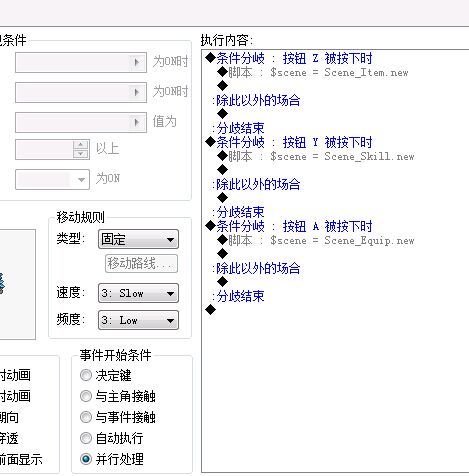
谁帮忙做个地图上按ESC键出现2个选项,退到主界面和结束游戏?其他物品栏,装备栏我都是按其他键调用的。

最佳答案

查看完整内容

用的默认效果

评分

参与人数 1星屑 +35 收起 理由
RyanBern + 35 手动认可奖励

查看全部评分

梦石
0
星屑
1788
在线时间
1313 小时
注册时间
2012-8-4
回帖
724
发表于 2016-5-24 01:20:19 | 显示全部楼层
本帖最后由 夜狠简单 于 2016-5-28 12:24 编辑

地图菜单[pre lang="ruby"]#==============================================================================
# ■ Scene_Item
#------------------------------------------------------------------------------
#  处理物品画面的类。
#==============================================================================

class Scene_Item
   alias update_item20160527 update_item
   def update_item
  update_item20160527
# 按下 B 键的情况下
     if Input.trigger?(Input::B)
       $scene = Scene_Item.new
    end
     # 按下 Z 键的情况下
    if Input.trigger?(Input::Z)
      # 演奏取消 SE
      $game_system.se_play($data_system.cancel_se)
       # 切换到地图画面
      $scene = Scene_Map.new
      return
    end
    end
end

#==============================================================================
# ■ Scene_Skill
#------------------------------------------------------------------------------
#  处理特技画面的类。
#==============================================================================

class Scene_Skill
  alias update_skill20160527 update_skill
    def update_skill
  update_skill20160527
    # 按下 B 键的情况下
     if Input.trigger?(Input::B)
       $scene = Scene_Skill.new
    end
    # 按下Y 键的情况下
    if Input.trigger?(Input::Y)
      # 演奏取消 SE
      $game_system.se_play($data_system.cancel_se)
       # 切换到地图画面
      $scene = Scene_Map.new
      return
    end
    end
end

#==============================================================================
# ■ Scene_Equip
#------------------------------------------------------------------------------
#  处理装备画面的类。
#==============================================================================

class Scene_Equip
alias update_right20160527 update_right
def update_right
update_right20160527
    # 按下 B 键的情况下
     if Input.trigger?(Input::B)
       $scene = Scene_Equip.new
    end
    # 按下 A 键的情况下
    if Input.trigger?(Input::A)
      # 演奏取消 SE
      $game_system.se_play($data_system.cancel_se)
      # 切换到地图画面
      $scene = Scene_Map.new
      return
    end
    end
end

class Scene_Map
  def update
    # 循环
    loop do
      # 按照地图、实例、主角的顺序刷新
      # (本更新顺序不会在满足事件的执行条件下成为给予角色瞬间移动
      #  的机会的重要因素)
      $game_map.update
      $game_system.map_interpreter.update
      $game_player.update
      # 系统 (计时器)、画面刷新
      $game_system.update
      $game_screen.update
      # 如果主角在场所移动中就中断循环
      unless $game_temp.player_transferring
        break
      end
      # 执行场所移动
      transfer_player
      # 处理过渡中的情况下、中断循环
      if $game_temp.transition_processing
        break
      end
    end
    # 刷新活动块
    @spriteset.update
    # 刷新信息窗口
    @message_window.update
    # 游戏结束的情况下
    if $game_temp.gameover
      # 切换的游戏结束画面
      $scene = Scene_Gameover.new
      return
    end
    # 返回标题画面的情况下
    if $game_temp.to_title
      # 切换到标题画面
      $scene = Scene_Title.new
      return
    end
    # 处理过渡中的情况下
    if $game_temp.transition_processing
      # 清除过渡处理中标志
      $game_temp.transition_processing = false
      # 执行过渡
      if $game_temp.transition_name == ""
        Graphics.transition(20)
      else
        Graphics.transition(40, "Graphics/Transitions/" +
          $game_temp.transition_name)
      end
    end
    # 显示信息窗口中的情况下
    if $game_temp.message_window_showing
      return
    end
    # 遇敌计数为 0 且、且遇敌列表不为空的情况下
    if $game_player.encounter_count == 0 and $game_map.encounter_list != []
      # 不是在事件执行中或者禁止遇敌中
      unless $game_system.map_interpreter.running? or
             $game_system.encounter_disabled
        # 确定队伍
        n = rand($game_map.encounter_list.size)
        troop_id = $game_map.encounter_list[n]
        # 队伍有效的话
        if $data_troops[troop_id] != nil
          # 设置调用战斗标志
          $game_temp.battle_calling = true
          $game_temp.battle_troop_id = troop_id
          $game_temp.battle_can_escape = true
          $game_temp.battle_can_lose = false
          $game_temp.battle_proc = nil
        end
      end
    end
    # 按下 B 键的情况下
    if Input.trigger?(Input::B)
      # 不是在事件执行中或菜单禁止中
      unless $game_system.map_interpreter.running? or
             $game_system.menu_disabled
        # 设置菜单调用标志以及 SE 演奏
        $game_temp.menu_calling = true
        $game_temp.menu_beep = true
      end
    end
    #按下键盘D键打开物品界面
     if Input.trigger?(Input::Z)
      # 不是在事件执行中
      unless $game_system.map_interpreter.running?
       # 演奏确定 SE
        $game_system.se_play($data_system.decision_se)
        # 切换到物品画面
        $scene = Scene_Item.new
      end
    end
    #按下键盘S键打开技能界面
     if Input.trigger?(Input::Y)
      # 不是在事件执行中
      unless $game_system.map_interpreter.running?
       # 演奏确定 SE
        $game_system.se_play($data_system.decision_se)
        # 切换到特技画面
        $scene = Scene_Skill.new
      end
    end
     #按下键盘Shift, Z键打开装备界面
     if Input.trigger?(Input::A)
      # 不是在事件执行中
      unless $game_system.map_interpreter.running?
       # 演奏确定 SE
        $game_system.se_play($data_system.decision_se)
        # 切换的装备画面
        $scene = Scene_Equip.new
      end
    end

    # 调试模式为 ON 并且按下 F9 键的情况下
    if $DEBUG and Input.press?(Input::F9)
      # 设置调用调试标志
      $game_temp.debug_calling = true
    end
    # 不在主角移动中的情况下
    unless $game_player.moving?
      # 执行各种画面的调用
      if $game_temp.battle_calling
        call_battle
      elsif $game_temp.shop_calling
        call_shop
      elsif $game_temp.name_calling
        call_name
      elsif $game_temp.menu_calling
        call_menu
      elsif $game_temp.save_calling
        call_save
      elsif $game_temp.debug_calling
        call_debug
      end
    end
  end
end
#==============================================================================
# ■ Scene_Menu
#------------------------------------------------------------------------------
#  处理菜单画面的类。
#==============================================================================
class Scene_Menu
  #--------------------------------------------------------------------------
  # ● 初始化对像
  #     menu_index : 命令光标的初期位置
  #--------------------------------------------------------------------------
  def initialize(menu_index = 0)
    @menu_index = menu_index
  end
  #--------------------------------------------------------------------------
  # ● 主处理
  #--------------------------------------------------------------------------
  def main
    # 生成命令窗口
    s1 = "返回主界面"
    s2 = "结束游戏"
    @command_window = Window_Command.new(160, [s1, s2])
    @command_window.x=240
    @command_window.y=180
    @command_window.opacity = 20
    @command_window.index = @menu_index
    @menu_com = Sprite.new
    @menu_com.bitmap = RPG::Cache.picture("4")
    # 执行过渡
    Graphics.transition
    # 主循环
    loop do
      # 刷新游戏画面
      Graphics.update
      # 刷新输入信息
      Input.update
      # 刷新画面
      update
      # 如果切换画面就中断循环
      if $scene != self
        break
      end
    end
    # 准备过渡
    Graphics.freeze
    # 释放窗口
    @menu_com.dispose
    @command_window.dispose
  end
  #--------------------------------------------------------------------------
  # ● 刷新画面
  #--------------------------------------------------------------------------
  def update
    # 刷新窗口
    @menu_com.update
    @command_window.update
    # 命令窗口被激活的情况下: 调用 update_command
    if @command_window.active
      update_command
      return
    end

  end
  #--------------------------------------------------------------------------
  # ● 刷新画面 (命令窗口被激活的情况下)
  #--------------------------------------------------------------------------
  def update_command
    # 按下 B 键的情况下
    if Input.trigger?(Input::B)
      # 演奏取消 SE
      $game_system.se_play($data_system.cancel_se)
      # 切换的地图画面
      $scene = Scene_Map.new
      return
    end
    # 按下 C 键的情况下
    if Input.trigger?(Input::C)
      # 命令窗口的光标位置分支
      case @command_window.index
      when 0  # 物品
         # 演奏确定 SE
          $game_system.se_play($data_system.decision_se)
         # 淡入淡出 BGM、BGS、ME
          Audio.bgm_fade(800)
          Audio.bgs_fade(800)
          Audio.me_fade(800)
         # 切换到标题画面
          $scene = Scene_Title.new
      when 1  # 特技
        # 演奏确定 SE
        $game_system.se_play($data_system.decision_se)
        # 淡入淡出 BGM、BGS、ME
        Audio.bgm_fade(800)
        Audio.bgs_fade(800)
        Audio.me_fade(800)
        # 退出
        $scene = nil
      end
      return
    end
  end

end

[/pre]

用的默认效果

点评

Graphics\Pictures下的图片,更新了  发表于 2016-5-28 12:25
背景图怎么加  发表于 2016-5-28 00:10
用脚本我弄不来,效果都不好看。还有一点我弄出来的话,选择的时候角色还是可以走动。如果你觉得那个黑色背景太枯燥可以加个背景图  发表于 2016-5-27 23:16
可以的,晚上放学才能看了  发表于 2016-5-27 19:04
那个,大神。返回标题和结束那2个选项,能不能显示在地图上呢?原本的是周围一片黑漆漆啊。  发表于 2016-5-27 17:42

评分

参与人数 1星屑 +10 收起 理由
cmmd1 + 10 认可答案

查看全部评分

回复

使用道具 举报

梦石
0
星屑
76
在线时间
1379 小时
注册时间
2012-7-5
回帖
1643

开拓者

发表于 2016-5-25 20:23:30 | 显示全部楼层
本帖最后由 kuerlulu 于 2016-5-25 22:32 编辑
  1. #--------------------------------------------------------------------------
  2. # ● 紫苏前辈的获取窗口句柄
  3. #    部分细节已修改( by 晴兰 )
  4. #--------------------------------------------------------------------------
  5. module Kernel
  6.   #--------------------------------------------------------------------------
  7.   # ● 需要的 Windows API 函数
  8.   #--------------------------------------------------------------------------
  9.   GetWindowThreadProcessId = Win32API.new("user32", "GetWindowThreadProcessId", "LP", "L")
  10.   GetWindow = Win32API.new("user32", "GetWindow", "LL", "L")
  11.   GetClassName = Win32API.new("user32", "GetClassName", "LPL", "L")
  12.   GetCurrentThreadId = Win32API.new("kernel32", "GetCurrentThreadId", "V", "L")
  13.   GetForegroundWindow = Win32API.new("user32", "GetForegroundWindow", "V", "L")
  14.   #--------------------------------------------------------------------------
  15.   # ● 获取窗口句柄
  16.   #--------------------------------------------------------------------------
  17.   def hwnd
  18.     # 获取调用线程(RM 的主线程)的进程标识
  19.     threadID = GetCurrentThreadId.call
  20.     # 获取 Z 次序中最靠前的窗口
  21.     hWnd = GetWindow.call(GetForegroundWindow.call, 0)
  22.     # 枚举所有窗口
  23.     while hWnd != 0
  24.       # 如果创建该窗口的线程标识匹配本线程标识
  25.       if threadID == GetWindowThreadProcessId.call(hWnd, 0)
  26.         # 分配一个 12 个字节的缓冲区
  27.         className = " " * 12                         # ●
  28.         # 获取该窗口的类名
  29.         GetClassName.call(hWnd, className, 12)       # ●
  30.         # 如果匹配 RGSS Player 则跳出循环
  31.         break if className[0, 11] == "RGSS Player"
  32.       end
  33.       # 获取下一个窗口
  34.       hWnd = GetWindow.call(hWnd, 2)
  35.     end
  36.     return hWnd
  37.   end
  38. end
  39. HWND = hwnd

  40. #--------------------------------------------------------------------------
  41. # ● RMXP用 Graphics.snap_to_bitmap
  42. #    就算窗口被遮盖或者显示不全也可以正常截图
  43. #    附赠: Graphics.snap_to_clipboard
  44. #          截图到剪贴板
  45. # ● 作者:晴兰 @ rpg.blue
  46. #    使用到紫苏前辈的获取窗口句柄脚本,其他部分为原创
  47. #--------------------------------------------------------------------------
  48. module SAFX
  49.   module_function
  50.   class ::Integer; def pack; self; end; def to_param; 'i'; end; def ord; self; end; end
  51.   class ::String;def pack; [self].pack('p').unpack('L').first; end; def to_param; 'p'; end; end
  52.   def api(dll,func)
  53.     lambda{|*args|
  54.        Win32API.new(dll,func,args.map{|x|x.to_param}, 'i').call *args
  55.     }
  56.   end
  57.   def callproc(addr, type = :cdecl)
  58.     stdcall = type == :stdcall
  59.     raise "addr == 0 " if addr.pack == 0
  60.     apicall = api('user32', 'CallWindowProcW')
  61.     lambda{|*args|apicall.call((code=[0x55,0xe589].pack('CS')+args.map{|x| [0x68, x.pack].pack('CL')}.reverse.join+[0xb8, addr.pack, 0xD0FF, 0xc481, (stdcall ? 0 : args.length*4) , 0x10c2c9].pack('CLSSLL')),0,0,0,0)}
  62.   end
  63.   LL  = api("kernel32", "LoadLibrary")
  64.   GPA = api("kernel32", "GetProcAddress")
  65.   def funcaddr(dll, func)
  66.      x = GPA.call(LL.call(dll), func)
  67.      x == 0 ? nil : x
  68.   end
  69.   def readmem(start, len)
  70.     api('kernel32', 'RtlMoveMemory').call buf = "\0"*len, start, len
  71.     buf
  72.   end
  73.   def writemem(start, len, value)
  74.     api('kernel32', 'RtlMoveMemory').call start, value, [len, value.length].min
  75.   end
  76. end

  77. class << Graphics
  78.   SetWindowPos = SAFX.api("user32", "SetWindowPos")
  79.   GetSystemMetrics = SAFX.api("user32", "GetSystemMetrics")
  80.   CAPTION_HEIGHT = GetSystemMetrics.call(4)
  81.   CX_FRAME, CY_FRAME = GetSystemMetrics.call(32), GetSystemMetrics.call(33)
  82.   SIZE = {:width => 640, :height => 480}
  83.   def resize_screen(width, height)
  84.     SetWindowPos.call(HWND, 0, 0, 0,
  85.       width + CX_FRAME - 2, height + CAPTION_HEIGHT + CY_FRAME - 1, 2)
  86.     SIZE[:width], SIZE[:height] = width, height
  87.   end
  88.   def width
  89.     SIZE[:width]
  90.   end
  91.   def height
  92.     SIZE[:height]
  93.   end
  94.   def do_screen_stuff
  95.     hwnd = self.hwnd
  96.     src = SAFX.api('user32', 'GetDC').call(hwnd)
  97.     memdc = SAFX.api('gdi32', 'CreateCompatibleDC').call(src)
  98.     hb = SAFX.api('gdi32', 'CreateCompatibleBitmap').call(src, width, height)
  99.     ho = SAFX.api('gdi32', 'SelectObject').call(memdc, hb)
  100.     bp = SAFX.funcaddr("user32", "GetDC")
  101.     ov = "\0"*4
  102.     str = [0xb8, memdc, 0xc2, 0x04, 0x00].pack("CLC*") # magic, touch
  103.     SAFX.api('Kernel32', 'VirtualProtect').call(bp, str.length, 0x40, ov)
  104.     oldstr = SAFX.readmem(bp, str.length)
  105.     SAFX.writemem bp, str.length, str
  106.     SAFX.api('user32', 'UpdateWindow').call(hwnd)
  107.     Graphics.update
  108.     SAFX.writemem bp, str.length, oldstr
  109.     yield hb
  110.   ensure
  111.     SAFX.api('user32', 'ReleaseDC').call(hwnd, src)
  112.     hb = SAFX.api('gdi32', 'SelectObject').call(memdc, ho)
  113.     SAFX.api('gdi32', 'DeleteObject').call(ho)
  114.     SAFX.api('gdi32', 'DeleteDC').call(memdc)
  115.   end
  116.   def snap_to_bitmap
  117.     bm = Bitmap.new(width, height)
  118.     addr  = bm.object_id * 2
  119.     addr, = SAFX.readmem(addr + 16, 4).unpack("L")
  120.     addr, = SAFX.readmem(addr +  8, 4).unpack("L")
  121.     addr, = SAFX.readmem(addr + 16, 4).unpack("L")
  122.     do_screen_stuff do |hb|
  123.       bits = "\0"*(width * height * 4)
  124.       SAFX.api('gdi32', 'GetBitmapBits').call(hb, bits.length, bits)
  125.       r = SAFX.api('kernel32', 'RtlMoveMemory')
  126.       a = bits.pack
  127.       stride = width * 4
  128.       h = height
  129.      (h-1).downto(0){|i|
  130.         r.call addr + i * stride, a + (h - i - 1)*stride, stride
  131.       }
  132.       bm
  133.     end
  134.   end
  135.   def snap_to_clipboard
  136.     return false if SAFX.api('user32', 'OpenClipboard').call(hwnd) == 0
  137.     do_screen_stuff do |hb|
  138.       SAFX.api('user32', 'SetClipboardData').call(2, hb)
  139.       SAFX.api('user32', 'CloseClipboard').call
  140.       true
  141.     end
  142.   end
  143. end

  144. #==============================================================================
  145. # ■ Bitmap
  146. #------------------------------------------------------------------------------
  147. #   位图的类。所谓位图即表示图像其本身。
  148. #==============================================================================

  149. class Bitmap
  150.   def blur(str = 3, rect = Rect.new(0, 0, self.width, self.height))
  151.     if str < 1
  152.       str = 1
  153.     elsif str > 5
  154.       str = 5
  155.     end
  156.     for x in -str..str
  157.       for y in -str..str
  158.         next if x == 0 and y == 0
  159.         self.blt(x + rect.x, y + rect.y, self, Rect.new(rect.x, rect.y, rect.width - x, rect.height - y), 10)
  160.       end
  161.     end
  162.     return self
  163.   end
  164. end

  165. module M3L
  166.   module Snaps
  167.     Stack = []
  168.     def self.<< bmp
  169.       Stack << bmp
  170.       self
  171.     end
  172.     def self.>> spr
  173.       spr.bitmap = Stack.pop
  174.       self
  175.     end
  176.     class ::Scene_Map
  177.       alias ori_call_menu call_menu
  178.       def call_menu
  179.         M3L::Snaps.<< Graphics.snap_to_bitmap.blur 2
  180.         ori_call_menu
  181.       end
  182.     end
  183.   end
  184. end

  185. class Scene_Menu
  186.   def initialize(*)
  187.   end
  188.   def main
  189.     @background = Sprite.new
  190.     M3L::Snaps >> @background
  191.     @command_window = Window_Command.new(192, ["退到主界面", "结束游戏"])
  192.     @command_window.x = 320 - @command_window.width  / 2
  193.     @command_window.y = 240 - @command_window.height / 2
  194.     Graphics.transition
  195.     loop do
  196.       Graphics.update
  197.       Input.update
  198.       update
  199.       break unless $scene == self
  200.     end
  201.     Graphics.freeze
  202.     @command_window.dispose
  203.     @background.bitmap.dispose
  204.     @background.dispose
  205.   end
  206.   def update
  207.     @command_window.update
  208.     if Input.trigger?(Input::B)
  209.       $game_system.se_play($data_system.cancel_se)
  210.       $scene = Scene_Map.new
  211.       return
  212.     end
  213.     if Input.trigger?(Input::C)
  214.       case @command_window.index
  215.       when 0 then command_to_title
  216.       when 1 then command_shutdown
  217.       end
  218.     end
  219.   end
  220.   def command_to_title
  221.     $game_system.se_play($data_system.decision_se)
  222.     Audio.bgm_fade(800)
  223.     Audio.bgs_fade(800)
  224.     Audio.me_fade(800)
  225.     $scene = Scene_Title.new
  226.   end
  227.   def command_shutdown
  228.     $game_system.se_play($data_system.decision_se)
  229.     Audio.bgm_fade(800)
  230.     Audio.bgs_fade(800)
  231.     Audio.me_fade(800)
  232.     $scene = nil
  233.   end
  234. end
复制代码
即插即用

点评

我知道 我知道!rb是RyanBerrn的缩写!!!【233  发表于 2016-5-26 20:00
.rb, 191行以上都是【前置代码】以下都是抄的默认脚本[s]除了把注释都删了[/s]  发表于 2016-5-26 17:00
.rb, 191行以上都是【前置代码】以下都是抄的默认脚本[s]除了把注释都删了[/s]  发表于 2016-5-26 16:54
现在喵喵喵写这样一个脚本都要动这么多东西了吗?触瞎  发表于 2016-5-26 08:41
第一个问题是手残已修复, 第二个我这里执行没问题啊  发表于 2016-5-25 22:32

  -fk: -azogi:
回复

使用道具 举报

梦石
0
星屑
50
在线时间
168 小时
注册时间
2007-7-26
回帖
427
 楼主| 发表于 2016-5-26 18:51:55 | 显示全部楼层
本帖最后由 cmmd1 于 2016-5-26 18:54 编辑
kuerlulu 发表于 2016-5-25 20:23
即插即用


能不能单独的生成一个?上面这些没注释,看不懂啊。改都不知道哪里改。
我的工程里面按ESC调不出菜单的。但是并不代表ESC键没用。所以能不能单独的出一个按ECS弹出退到主界面和结束游戏。

QQ图片20160526185533.jpg
回复

使用道具 举报

梦石
0
星屑
1788
在线时间
1313 小时
注册时间
2012-8-4
回帖
724
发表于 2016-5-26 22:40:43 | 显示全部楼层
本帖最后由 夜狠简单 于 2016-5-26 22:42 编辑
cmmd1 发表于 2016-5-26 18:51
能不能单独的生成一个?上面这些没注释,看不懂啊。改都不知道哪里改。
我的工程里面按ESC调不出菜单的。 ...


如果是所有地图都通用的话可以写在
Scene_map下的update里面

    判断按键是
   Input.press?(Input::Z)
#不是在事件执行中或菜单禁止中或者禁止遇敌中
   unless $game_system.map_interpreter.running? or
   $game_system.menu_disabled or $game_system.encounter_disabled
回复

使用道具 举报

梦石
0
星屑
50
在线时间
168 小时
注册时间
2007-7-26
回帖
427
 楼主| 发表于 2016-5-27 12:50:31 | 显示全部楼层
本帖最后由 cmmd1 于 2016-5-27 16:37 编辑

技能#==============================================================================
# ■ Scene_Skill
#------------------------------------------------------------------------------
#  处理特技画面的类。
#==============================================================================

class Scene_Skill
  #--------------------------------------------------------------------------
  # ● 初始化对像
  #     actor_index : 角色索引
  #--------------------------------------------------------------------------
  def initialize(actor_index = 0, equip_index = 0)
    @actor_index = actor_index
  end
  #--------------------------------------------------------------------------
  # ● 主处理
  #--------------------------------------------------------------------------
  def main
    @map_back = Spriteset_Map.new  ############建立地图背景
    # 获取角色
    @actor = $game_party.actors[@actor_index]
    # 生成帮助窗口、状态窗口、特技窗口
    @help_window = Window_Help.new
    @help_window.x = 660         #说明窗口坐标
    @help_window.y = 120
    @help_window.opacity = 0    #说明窗口透明度
    @status_window = Window_SkillStatus.new(@actor)
    @status_window.x = 200
    @status_window.y = 12
    @status_window.opacity = 0
    @skill_window = Window_Skill.new(@actor)
    # 关联帮助窗口
    @skill_window.help_window = @help_window
    # 生成目标窗口 (设置为不可见・不活动)
    @target_window = Window_Target.new
    @target_window.visible = false
    @target_window.active = false
    # 执行过渡
    Graphics.transition
    # 主循环
    loop do
      # 刷新游戏画面
      Graphics.update
      # 刷新输入信息
      Input.update
      # 刷新画面
      update
      # 如果画面切换的话就中断循环
      if $scene != self
        break
      end
    end
    # 准备过渡
    Graphics.freeze
    # 释放窗口
    @help_window.dispose
    @status_window.dispose
    @skill_window.dispose
    @target_window.dispose
    @map_back.dispose  ############释放地图背景
  end
  #--------------------------------------------------------------------------
  # ● 刷新画面
  #--------------------------------------------------------------------------
  def update
    # 刷新窗口
    @help_window.update
    @status_window.update
    @skill_window.update
    @target_window.update
    # 特技窗口被激活的情况下: 调用 update_skill
    if @skill_window.active
      update_skill
      return
    end
    # 目标窗口被激活的情况下: 调用 update_target
    if @target_window.active
      update_target
      return
    end
  end
  #--------------------------------------------------------------------------
  # ● 刷新画面 (特技窗口被激活的情况下)
  #--------------------------------------------------------------------------
  def update_skill
    # 按下 B 键的情况下
    if Input.trigger?(Input::B) or Input.trigger?(Input::Y)  ########加一个按下Z也满足的条件
      # 演奏取消 SE
      $game_system.se_play($data_system.cancel_se)
      # 切换到菜单画面
      $scene = $scene = Scene_Map.new     #改,切换到菜单改成切换到地图
      return
    end
    # 按下 C 键的情况下
    if Input.trigger?(Input::C)
      # 获取特技窗口现在选择的特技的数据
      @skill = @skill_window.skill
      # 不能使用的情况下
      if @skill == nil or not @actor.skill_can_use?(@skill.id)
        # 演奏冻结 SE
        $game_system.se_play($data_system.buzzer_se)
        return
      end
      # 演奏确定 SE
      $game_system.se_play($data_system.decision_se)
      # 效果范围是我方的情况下
      if @skill.scope >= 3
        # 激活目标窗口
        @skill_window.active = false
        @target_window.x = (@skill_window.index + 1) % 2 * 304
        @target_window.visible = true
        @target_window.active = true
        # 设置效果范围 (单体/全体) 的对应光标位置
        if @skill.scope == 4 || @skill.scope == 6
          @target_window.index = -1
        elsif @skill.scope == 7
          @target_window.index = @actor_index - 10
        else
          @target_window.index = 0
        end
      # 效果在我方以外的情况下
      else
        # 公共事件 ID 有效的情况下
        if @skill.common_event_id > 0
          # 预约调用公共事件
          $game_temp.common_event_id = @skill.common_event_id
          # 演奏特技使用时的 SE
          $game_system.se_play(@skill.menu_se)
          # 消耗 SP
          @actor.sp -= @skill.sp_cost
          # 再生成各窗口的内容
          @status_window.refresh
          @skill_window.refresh
          @target_window.refresh
          # 切换到地图画面
          $scene = Scene_Map.new
          return
        end
      end
      return
    end
    # 按下 R 键的情况下
    if Input.trigger?(Input::R)
      # 演奏光标 SE
      $game_system.se_play($data_system.cursor_se)
      # 移至下一位角色
      @actor_index += 1
      @actor_index %= $game_party.actors.size
      # 切换到别的特技画面
      $scene = Scene_Skill.new(@actor_index)
      return
    end
    # 按下 L 键的情况下
    if Input.trigger?(Input::L)
      # 演奏光标 SE
      $game_system.se_play($data_system.cursor_se)
      # 移至上一位角色
      @actor_index += $game_party.actors.size - 1
      @actor_index %= $game_party.actors.size
      # 切换到别的特技画面
      $scene = Scene_Skill.new(@actor_index)
      return
    end
  end
  #--------------------------------------------------------------------------
  # ● 刷新画面 (目标窗口被激活的情况下)
  #--------------------------------------------------------------------------
  def update_target
    # 按下 B 键的情况下
    if Input.trigger?(Input::B)
      # 演奏取消 SE
      $game_system.se_play($data_system.cancel_se)
      # 删除目标窗口
      @skill_window.active = true
      @target_window.visible = false
      @target_window.active = false
      return
    end
    # 按下 C 键的情况下
    if Input.trigger?(Input::C)
      # 因为 SP 不足而无法使用的情况下
      unless @actor.skill_can_use?(@skill.id)
        # 演奏冻结 SE
        $game_system.se_play($data_system.buzzer_se)
        return
      end
      # 目标是全体的情况下
      if @target_window.index == -1
        # 对同伴全体应用特技使用效果
        used = false
        for i in $game_party.actors
          used |= i.skill_effect(@actor, @skill)
        end
      end
      # 目标是使用者的情况下
      if @target_window.index <= -2
        # 对目标角色应用特技的使用效果
        target = $game_party.actors[@target_window.index + 10]
        used = target.skill_effect(@actor, @skill)
      end
      # 目标是单体的情况下
      if @target_window.index >= 0
        # 对目标角色应用特技的使用效果
        target = $game_party.actors[@target_window.index]
        used = target.skill_effect(@actor, @skill)
      end
      # 使用特技的情况下
      if used
        # 演奏特技使用时的 SE
        $game_system.se_play(@skill.menu_se)
        # 消耗 SP
        @actor.sp -= @skill.sp_cost
        # 再生成各窗口内容
        @status_window.refresh
        @skill_window.refresh
        @target_window.refresh
        # 全灭的情况下
        if $game_party.all_dead?
          # 切换到游戏结束画面
          $scene = Scene_Gameover.new
          return
        end
        # 公共事件 ID 有效的情况下
        if @skill.common_event_id > 0
          # 预约调用公共事件
          $game_temp.common_event_id = @skill.common_event_id
          # 切换到地图画面
          $scene = Scene_Map.new
          return
        end
      end
      # 无法使用特技的情况下
      unless used
        # 演奏冻结 SE
        $game_system.se_play($data_system.buzzer_se)
      end
      return
    end
  end
end


物品#==============================================================================
# ■ Scene_Item
#------------------------------------------------------------------------------
#  处理物品画面的类。
#==============================================================================

class Scene_Item
  #--------------------------------------------------------------------------
  # ● 主处理
  #--------------------------------------------------------------------------
  def main
    @map_back = Spriteset_Map.new  ############建立地图背景
    # 生成帮助窗口、物品窗口
    @help_window = Window_Help.new
    @help_window.x = 664 + 100        #说明窗口坐标
    @help_window.y = 70 + 100
    @help_window.opacity = 0    #说明窗口透明度
    @item_window = Window_Item.new
    # 关联帮助窗口
    @item_window.help_window = @help_window
    # 生成目标窗口 (设置为不可见・不活动)
    @target_window = Window_Target.new
    @target_window.visible = false
    @target_window.active = false
################# 这个是金银铜窗口
    # 生成金钱窗口
    @gold_window = Window_Gold.new
    @gold_window.x = 364
    @gold_window.y = 404
    @gold_window.opacity = 0  # 隐藏窗体
#################
    # 执行过度
    Graphics.transition
    # 主循环
    loop do
      # 刷新游戏画面
      Graphics.update
      # 刷新输入信息
      Input.update
      # 刷新画面
      update
      # 如果画面切换就中断循环
      if $scene != self
        break
      end
    end
    # 装备过渡
    Graphics.freeze
    # 释放窗口
    @help_window.dispose
    @item_window.dispose
    @target_window.dispose
    @map_back.dispose  ############释放地图背景
    @gold_window.dispose   ################# 这个是金银铜窗口
  end
  #--------------------------------------------------------------------------
  # ● 刷新画面
  #--------------------------------------------------------------------------
  def update
    # 刷新窗口
    @help_window.update
    @item_window.update
    @target_window.update
    @gold_window.update    ################# 这个是金银铜窗口
    # 物品窗口被激活的情况下: 调用 update_item
    if @item_window.active
      update_item
      return
    end
    # 目标窗口被激活的情况下: 调用 update_target
    if @target_window.active
      update_target
      return
    end
  end
  #--------------------------------------------------------------------------
  # ● 刷新画面 (物品窗口被激活的情况下)
  #--------------------------------------------------------------------------
  def update_item
    # 按下 B 键的情况下
    if Input.trigger?(Input::B) or Input.trigger?(Input::Z)  ########加一个按下Z也满足的条件
      # 演奏取消 SE
      $game_system.se_play($data_system.cancel_se)
      # 切换到菜单画面
      $scene = $scene = Scene_Map.new#Scene_Menu.new(0)
      return
    end
    # 按下 C 键的情况下
    if Input.trigger?(Input::C)
      # 获取物品窗口当前选中的物品数据
      @item = @item_window.item
      # 不使用物品的情况下
      unless @item.is_a?(RPG::Item)
        # 演奏冻结 SE
        $game_system.se_play($data_system.buzzer_se)
        return
      end
      # 不能使用的情况下
      unless $game_party.item_can_use?(@item.id)
        # 演奏冻结 SE
        $game_system.se_play($data_system.buzzer_se)
        return
      end
      # 演奏确定 SE
      $game_system.se_play($data_system.decision_se)
      # 效果范围是我方的情况下
      if @item.scope >= 3
        # 激活目标窗口
        @item_window.active = false
        @target_window.x = (@item_window.index + 1) % 2 * 304
        @target_window.visible = true
        @target_window.active = true
        # 设置效果范围 (单体/全体) 的对应光标位置
        if @item.scope == 4 || @item.scope == 6
          @target_window.index = -1
        else
          @target_window.index = 0
        end
      # 效果在我方以外的情况下
      else
        # 公共事件 ID 有效的情况下
        if @item.common_event_id > 0
          # 预约调用公共事件
          $game_temp.common_event_id = @item.common_event_id
          # 演奏物品使用时的 SE
          $game_system.se_play(@item.menu_se)
          # 消耗品的情况下
          if @item.consumable
            # 使用的物品数减 1
            $game_party.lose_item(@item.id, 1)
            # 再描绘物品窗口的项目
            @item_window.draw_item(@item_window.index)
          end
          # 切换到地图画面
          $scene = Scene_Map.new
          return
        end
      end
      return
    end
  end
  #--------------------------------------------------------------------------
  # ● 刷新画面 (目标窗口被激活的情况下)
  #--------------------------------------------------------------------------
  def update_target
    # 按下 B 键的情况下
    if Input.trigger?(Input::B)
      # 演奏取消 SE
      $game_system.se_play($data_system.cancel_se)
      # 由于物品用完而不能使用的场合
      unless $game_party.item_can_use?(@item.id)
        # 再次生成物品窗口的内容
        @item_window.refresh
      end
      # 删除目标窗口
      @item_window.active = true
      @target_window.visible = false
      @target_window.active = false
      return
    end
    # 按下 C 键的情况下
    if Input.trigger?(Input::C)
      # 如果物品用完的情况下
      if $game_party.item_number(@item.id) == 0
        # 演奏冻结 SE
        $game_system.se_play($data_system.buzzer_se)
        return
      end
      # 目标是全体的情况下
      if @target_window.index == -1
        # 对同伴全体应用物品使用效果
        used = false
        for i in $game_party.actors
          used |= i.item_effect(@item)
        end
      end
      # 目标是单体的情况下
      if @target_window.index >= 0
        # 对目标角色应用物品的使用效果
        target = $game_party.actors[@target_window.index]
        used = target.item_effect(@item)
      end
      # 使用物品的情况下
      if used
        # 演奏物品使用时的 SE
        $game_system.se_play(@item.menu_se)
        # 消耗品的情况下
        if @item.consumable
          # 使用的物品数减 1
          $game_party.lose_item(@item.id, 1)
          # 再描绘物品窗口的项目
          @item_window.draw_item(@item_window.index)
        end
        # 再生成目标窗口的内容
        @target_window.refresh
        # 全灭的情况下
        if $game_party.all_dead?
          # 切换到游戏结束画面
          $scene = Scene_Gameover.new
          return
        end
        # 公共事件 ID 有效的情况下
        if @item.common_event_id > 0
          # 预约调用公共事件
          $game_temp.common_event_id = @item.common_event_id
          # 切换到地图画面
          $scene = Scene_Map.new
          return
        end
      end
      # 无法使用物品的情况下
      unless used
        # 演奏冻结 SE
        $game_system.se_play($data_system.buzzer_se)
      end
      return
    end
  end
end


装备#==============================================================================
# ■ Scene_Equip
#------------------------------------------------------------------------------
#  处理装备画面的类。
#------------------------------------------------------------------------------
#   ※ 已经改得面目全非了,替换原来的脚本就好。
#==============================================================================

class Scene_Equip
  #--------------------------------------------------------------------------
  # ● 在前面设置的东西
  #--------------------------------------------------------------------------
  ACTOR_SELF_BACK = true    # 角色用自己的窗口皮肤图?(true/false)
                             # 打开的话皮肤图要加"_角色名字"
  #--------------------------------------------------------------------------
  # ● 初始化对像
  #     actor_index : 角色索引
  #     equip_index : 装备索引
  #--------------------------------------------------------------------------
  def initialize(actor_index = 0, equip_index = 0)
    @actor_index = actor_index
    @equip_index = equip_index
  end
  #--------------------------------------------------------------------------
  # ● 主处理
  #--------------------------------------------------------------------------
  def main
    # 获取角色
    @actor = $game_party.actors[@actor_index]
   
    # 地图背景
    @back = Spriteset_Map.new
   
    # 窗口皮肤图片(这是另一种显示图片窗口的方法,静态窗口的话推荐这种)
    @window_back = Sprite.new
    file_name = ACTOR_SELF_BACK ? "装备栏_#{@actor.name}" : "装备栏_阿尔西斯"
    @window_back.bitmap = RPG::Cache.picture(file_name)
    @window_back.x = 98 - 90  ########装备栏图片坐标
    @window_back.y = -27 + 40
   
    # 物品说明窗口
    @help_window = Window_Help.new
    # 坐标设置
    @help_window.x = 240
    @help_window.y = 30
    @help_window.opacity = 0
    ##########

    # 显示能力值变化等的角色状态的窗口
    @left_window = Window_EquipLeft.new(@actor)
    # 坐标设置
    @left_window.x = 548 - 90
    @left_window.y = 300 + 40
    @left_window.opacity = 0
    ##########
    # 显示身上装备的窗口
    @right_window = Window_EquipRight.new(@actor)
    # 坐标设置
    @right_window.x = 180 - 90
    @right_window.y = 94 + 40
    @right_window.opacity = 0
    ##########
   
    # 显示备用装备背包窗口
    @item_window = []
    for i in 0...12
      @item_window = Window_EquipItem.new(@actor, i)
      # 坐标设置
      @item_window.x = 548 - 90
      @item_window.y = 94 + 40
      @item_window.opacity = 0
      ##########
      @item_window.help_window = @help_window # 关联帮助窗口
    end
   
    # 声望善恶窗口
    @seibou_window = Window_SeiBou.new
    # 坐标设置
    @seibou_window.x = 548
    @seibou_window.y = 442
    @seibou_window.opacity = 0
    @seibou_window.visible = @actor.id == 1 # 1改成主角ID
    ##########
   
    # 关联帮助窗口
    @right_window.help_window = @help_window
    # 设置光标位置
    @right_window.index = @equip_index
    refresh
    # 执行过渡
    Graphics.transition
    # 主循环
    loop do
      # 刷新游戏画面
      Graphics.update
      # 刷新输入信息
      Input.update
      # 刷新画面
      update
      # 如果画面切换的话的就中断循环
      if $scene != self
        break
      end
    end
    # 准备过渡
    Graphics.freeze
    # 释放全部东西
    dispose_all
  end
  #--------------------------------------------------------------------------
  # ● 释放全部东西
  #--------------------------------------------------------------------------
  def dispose_all
    @help_window.dispose
    @left_window.dispose
    @right_window.dispose
    @item_window.delete(nil)
    @item_window.each{|item_window| item_window.dispose}
    @seibou_window.dispose
    @back.dispose
    @window_back.dispose
  end
  #--------------------------------------------------------------------------
  # ● 刷新
  #--------------------------------------------------------------------------
  def refresh
    # 设置物品窗口的可视状态
    @item_window.each{|item_window| item_window.visible = false}
    @item_window[@right_window.index].visible = true if @item_window[@right_window.index]
    # 获取当前装备中的物品
    item1 = @right_window.item
    # 右窗口被激活的情况下
    if @right_window.active
      # 删除变更装备后的能力
      @left_window.set_new_parameters(nil, nil, nil)
    end
    # 物品窗口被激活的情况下
    return # 不刷新能力值预览
    if @item_window[@right_window.index].active
      # 获取现在选中的物品
      item2 = @item_window[@right_window.index].item
      # 变更装备
      last_hp = @actor.hp
      last_sp = @actor.sp
      @actor.equip(@right_window.index, item2 == nil ? 0 : item2.id)
      # 获取变更装备后的能力值
      new_atk = @actor.atk
      new_pdef = @actor.pdef
      new_mdef = @actor.mdef
      # 返回到装备
      @actor.equip(@right_window.index, item1 == nil ? 0 : item1.id)
      @actor.hp = last_hp
      @actor.sp = last_sp
      # 描画左窗口
      @left_window.set_new_parameters(new_atk, new_pdef, new_mdef)
    end
  end
  #--------------------------------------------------------------------------
  # ● 刷新画面
  #--------------------------------------------------------------------------
  def update
    # 刷新窗口
    @left_window.update
    @right_window.update
    @item_window[@right_window.index].update unless @item_window[@right_window.index].nil?
    @seibou_window.update
    refresh
    # 右侧窗口被激活的情况下: 调用 update_right
    if @right_window.active
      update_right
      return
    end
    # 物品窗口被激活的情况下: 调用 update_item
    if @item_window[@right_window.index].active
      update_item
      return
    end
  end
  #--------------------------------------------------------------------------
  # ● 刷新画面 (右侧窗口被激活的情况下)
  #--------------------------------------------------------------------------
  def update_right
    # 按下 B 键或者 X 键的情况下
    if Input.trigger?(Input::B) || Input.trigger?(Input::A)
      # 演奏取消 SE
      $game_system.se_play($data_system.cancel_se)
      # 切换到菜单画面
      $scene = Scene_Map.new
      return
    end
    # 按下 C 键的情况下
    if Input.trigger?(Input::C)
      # 固定装备的情况下
      if @actor.equip_fix?(@right_window.index)
        # 演奏冻结 SE
        $game_system.se_play($data_system.buzzer_se)
        return
      end
      # 演奏确定 SE
      $game_system.se_play($data_system.decision_se)
      # 激活物品窗口
      @right_window.active = false
      @item_window[@right_window.index].active = true
      @item_window[@right_window.index].index = 0
      return
    end
    # 按下 R 键的情况下
    if Input.trigger?(Input::R)
      # 演奏光标 SE
      $game_system.se_play($data_system.cursor_se)
      # 移至下一位角色
      @actor_index += 1
      @actor_index %= $game_party.actors.size
      # 切换到别的装备画面
      $scene = Scene_Equip.new(@actor_index, @right_window.index)
      return
    end
    # 按下 L 键的情况下
    if Input.trigger?(Input::L)
      # 演奏光标 SE
      $game_system.se_play($data_system.cursor_se)
      # 移至上一位角色
      @actor_index += $game_party.actors.size - 1
      @actor_index %= $game_party.actors.size
      # 切换到别的装备画面
      $scene = Scene_Equip.new(@actor_index, @right_window.index)
      return
    end
  end
  #--------------------------------------------------------------------------
  # ● 刷新画面 (物品窗口被激活的情况下)
  #--------------------------------------------------------------------------
  def update_item
    # 按下 B 键的情况下
    if Input.trigger?(Input::B)
      # 演奏取消 SE
      $game_system.se_play($data_system.cancel_se)
      # 激活右侧窗口
      @right_window.active = true
      # 反激活背包
      @item_window[@right_window.index].active = false
      @item_window[@right_window.index].index = -1
      # 刷新能力值窗口
      @left_window.refresh
      return
    end
    # 按下 C 键的情况下
    if Input.trigger?(Input::C)
      # 演奏装备 SE
      $game_system.se_play($data_system.equip_se)
      # 获取物品窗口现在选择的装备数据
      item = @item_window[@right_window.index].item
      # 变更装备
      @actor.equip(@right_window.index, item == nil ? 0 : item.id)
      # 激活右侧窗口
      @right_window.active = true
      @item_window[@right_window.index].active = false
      @item_window[@right_window.index].index = -1
      # 刷新装备、能力值、背包窗口的内容
      @right_window.refresh
      @left_window.refresh
      @item_window[@right_window.index].refresh
      return
    end
  end
end

点评

是的,标题菜单。  发表于 2016-5-27 13:01
主界面是指标题界面吗  发表于 2016-5-27 12:54
回复

使用道具 举报

您需要登录后才可以回帖 登录 | 注册会员

本版积分规则

Powered by Discuz! X5.0 © 2001-2026 Discuz! Team.

在本版发帖返回顶部