查看: 3952|回复: 5

[已经解决] MV是否有这种网游风格的文字滚动脚本?求助达人

[复制链接]
梦石
0
星屑
50
在线时间
90 小时
注册时间
2006-5-22
回帖
52
发表于 2016-7-12 09:36:04 | 显示全部楼层 |阅读模式

加入我们,或者,欢迎回来。

您需要 登录 才可以下载或查看,没有账号?注册会员

×
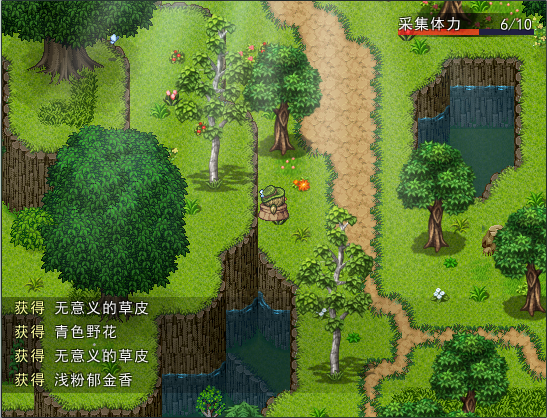
MV是否有这种网游风格的文字滚动脚本?求助达人

如下图所示,还盼高人不吝赐教啊,在此跪谢了
232934jzucgc8n7t4447i4.png
梦石
0
星屑
50
在线时间
6 小时
注册时间
2016-7-14
回帖
8
发表于 2016-7-14 15:26:53 | 显示全部楼层
本帖最后由 flax2@sina.com 于 2016-7-14 15:28 编辑

应该可以吧!
  1. <!DOCTYPE html PUBLIC "-//W3C//DTD XHTML 1.0 Transitional//EN" "http://www.w3.org/TR/xhtml1/DTD/xhtml1-transitional.dtd">
  2. <html xmlns="http://www.w3.org/1999/xhtml">
  3. <head>
  4. <meta http-equiv="Content-Type" content="text/html; charset=utf-8" />
  5. <title>test</title>
  6. <style type="text/css">
  7. #textHeight{line-height:25px; height:25px; overflow:hidden; width:150px; font-size:12px; border:solid 1px #666;}
  8. </style>
  9. <script language="javascript" type="text/javascript">
  10. function ScrollText(content){
  11. this.Delay=10;
  12. this.Amount=1;
  13. this.Direction="up";
  14. this.Timeout=1000;
  15. this.ScrollContent=this.gid(content);
  16. this.ScrollContent.innerHTML += this.ScrollContent.innerHTML;
  17. this.ScrollContent.onmouseover = this.GetFunction(this,"Stop");
  18. this.ScrollContent.onmouseout = this.GetFunction(this,"Start");
  19. }

  20. ScrollText.prototype.gid=function(element){
  21. return document.getElementById(element);
  22. }
  23. ScrollText.prototype.Stop=function(){
  24. clearTimeout(this.AutoScrollTimer);
  25. clearTimeout(this.ScrollTimer);
  26. }
  27. ScrollText.prototype.Start=function(){
  28. clearTimeout(this.AutoScrollTimer);
  29. this.AutoScrollTimer=setTimeout(this.GetFunction(this,"AutoScroll"),this.Timeout);
  30. }

  31. ScrollText.prototype.AutoScroll=function(){
  32. if(this.Direction=="up"){
  33. if(parseInt(this.ScrollContent.scrollTop)>=parseInt(this.ScrollContent.scrollHeight)/2){
  34. this.ScrollContent.scrollTop=0;
  35. clearTimeout(this.AutoScrollTimer);
  36. this.AutoScrollTimer = setTimeout(this.GetFunction(this,"AutoScroll"), this.Timeout);
  37. return;
  38. }
  39. this.ScrollContent.scrollTop += this.Amount;
  40. }else
  41. {
  42. if(parseInt(this.ScrollContent.scrollTop) <= 0)
  43. {
  44. this.ScrollContent.scrollTop = parseInt(this.ScrollContent.scrollHeight) / 2;
  45. }
  46. this.ScrollContent.scrollTop -= this.Amount;
  47. }
  48. if(parseInt(this.ScrollContent.scrollTop) % this.LineHeight != 0)
  49. {
  50. this.ScrollTimer = setTimeout(this.GetFunction(this,"AutoScroll"), this.Delay);
  51. }
  52. else
  53. {
  54. this.AutoScrollTimer = setTimeout(this.GetFunction(this,"AutoScroll"), this.Timeout);
  55. }
  56. }

  57. ScrollText.prototype.GetFunction=function(variable,method){
  58. return function()
  59. {
  60. variable[method]();
  61. }
  62. }
  63. </script>
  64. </head>

  65. <body>
  66. <div id="textHeight" title="xx">
  67. <a href="#">12345</a> <span> | </span>
  68. <a href="#">23456</a> <span> | </span>
  69. <a href="#">34567</a> <span> | </span>
  70. <a href="#">45678</a> <span> | </span>
  71. <a href="#">56789</a> <span> | </span>
  72. </div>
  73. <script>
  74. var scrollup = new ScrollText("textHeight");
  75. scrollup.Start();
  76. </script>
  77. </body>
  78. </html>
复制代码

这个拿去改改应该可以吧!我没有用Mv不清楚!

点评

唉。可惜不会改javascript……期待达人。  发表于 2016-7-15 10:57
回复

使用道具 举报

梦石
0
星屑
22879
在线时间
8598 小时
注册时间
2011-12-31
回帖
3270
发表于 2016-7-14 18:06:40 | 显示全部楼层
本帖最后由 tseyik 于 2016-7-30 13:26 编辑

有幾個巴

点评

抱歉,一不小心以为大神骂人了。。。仔细一看,原来是汉子顺序不影响阅读  发表于 2017-7-31 08:26
回复 1 1

使用道具 举报

梦石
0
星屑
50
在线时间
90 小时
注册时间
2006-5-22
回帖
52
 楼主| 发表于 2016-7-30 12:58:31 | 显示全部楼层
官方脚本里的TinyGetInfoWnd 就可以实现,虽然只是针对道具类。但是已经不错了。
回复

使用道具 举报

您需要登录后才可以回帖 登录 | 注册会员

本版积分规则

Powered by Discuz! X5.0 © 2001-2026 Discuz! Team.

在本版发帖返回顶部