查看: 4234|回复: 5

[已经过期] 如何在使用道具、观看装备等时候跳过选择队员。

[复制链接]
梦石
0
星屑
5639
在线时间
1052 小时
注册时间
2008-6-9
回帖
494

开拓者

发表于 2016-10-30 01:30:15 | 显示全部楼层 |阅读模式

加入我们,或者,欢迎回来。

您需要 登录 才可以下载或查看,没有账号?注册会员

×
由于现在的坑只需要一个角色,所以观看技能、观看装备等时候要选择队员这个事情就显得很冗杂。
那么我现在需要一个功能就是,只要我选择“技能”“装备”“状态”时,不用选择看哪位队友,直接默认进入领队(或者数据库1号角色)的详情画面。
使用道具的时候也需要直接指定一号角色。
总是没耐心做一个游戏。。
梦石
0
星屑
50
在线时间
370 小时
注册时间
2016-1-7
回帖
81
发表于 2016-11-1 23:42:32 | 显示全部楼层
脚本rpg_Scenes.js ;
下述3个函数修改一下:
Scene_Menu.prototype.commandPersonal
Scene_ItemBase.prototype.applyItem
Scene_Item.prototype.onItemOk
就可以了。
回复

使用道具 举报

梦石
0
星屑
5639
在线时间
1052 小时
注册时间
2008-6-9
回帖
494

开拓者

 楼主| 发表于 2016-11-2 17:56:34 | 显示全部楼层
在野月光 发表于 2016-11-1 23:42
脚本rpg_Scenes.js ;
下述3个函数修改一下:
Scene_Menu.prototype.commandPersonal

我找到了这几个函数然后就懵逼了。。以前RUBY还能看着改改现在这个就完全看不懂了。。。。请大神具体说说{:2_249:}
总是没耐心做一个游戏。。
回复

使用道具 举报

梦石
0
星屑
55
在线时间
112 小时
注册时间
2008-12-9
回帖
133
发表于 2016-11-3 10:23:32 | 显示全部楼层
按Q不就直接切换了吗 貌似我用了第三方菜单了。。。
回复

使用道具 举报

梦石
0
星屑
50
在线时间
370 小时
注册时间
2016-1-7
回帖
81
发表于 2016-11-3 20:14:51 | 显示全部楼层
本帖最后由 在野月光 于 2016-11-3 20:16 编辑

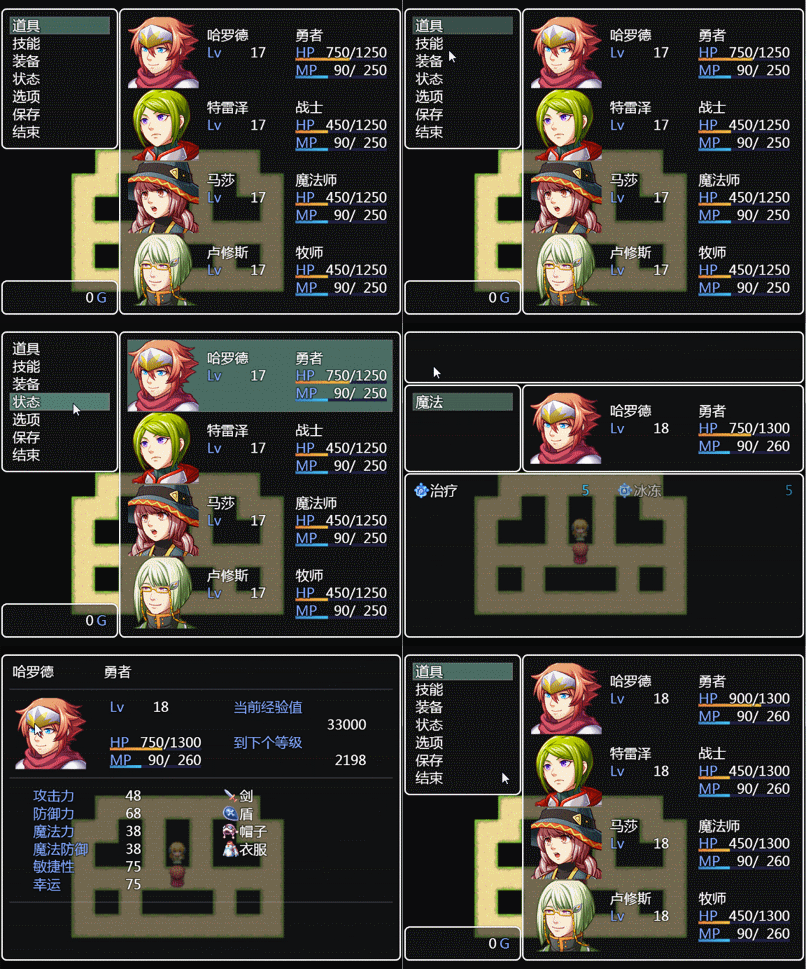
aa1.gif

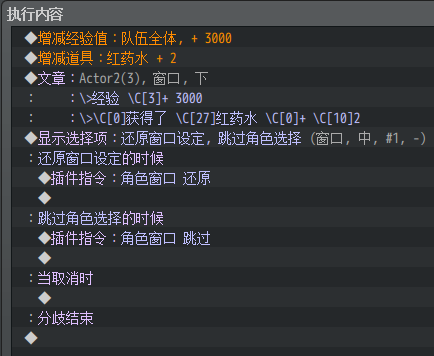
参考楼上的提议加了Q键切换模式。

截图20161103201601.png


  1. // MLC_BypassActorWindow.js


  2. /*:
  3. @plugindesc 跳过角色选择.v11-01-2016
  4. @author 在野月光族

  5. @param UsableKey_Q
  6. @desc 是否开启 Q 键切换本功能。0、不使用; 1、开启。默认为 0.
  7. @default 0

  8. @help
  9. 插件指令(非必需)。

  10. ---------------------------
  11.  指令        参数
  12. ---------------------------
  13. 角色窗口   还原 | 跳过
  14. ---------------------------

  15. 默认:
  16. 角色窗口 跳过
  17. 按键切换 关闭
  18. 注※ 为免参数接收错乱,请勿同时开启按键和指令。

  19. */


  20. /*-------------------------------------------------------------------------*/
  21. (function() {

  22. /*
  23. =============================================================================
  24. ◆ 自定义变量
  25. =============================================================================
  26. */
  27. var MLC = {};
  28. MLC.Q         = false;
  29. MLC.ActorWin  = false;
  30. MLC.update    = Window_Base.prototype.update;
  31. MLC.PC        = Game_Interpreter.prototype.pluginCommand;

  32. /*
  33. =============================================================================
  34. ◆ 自定义插件参数
  35. =============================================================================
  36. */
  37. MLC.Paras    = PluginManager.parameters('MLC_BypassActorWindow');
  38. MLC.UsableQ  = Number(MLC.Paras['UsableKey_Q']) || 0;

  39. /*
  40. =============================================================================
  41. ◆ 自定义插件指令
  42. =============================================================================
  43. */
  44. Game_Interpreter.prototype.pluginCommand = function(command, args) {
  45.         MLC.PC.call(this);
  46.         var C = /角色|窗口|ACT|WIN|555/g.test(command.toUpperCase() );
  47.     if(C){
  48.                 var A = /还原|开|ON|1/g.test(args[0].toUpperCase() );
  49.                 if(A) {MLC.ActorWin = true} else{ MLC.ActorWin = false;};
  50.         };
  51. };

  52. /*
  53. =============================================================================
  54. ◆ 自定义按键触发(默认为Q键)
  55. =============================================================================
  56. */

  57. Window_Base.prototype.update = function() {
  58.         MLC.update.call(this);
  59.         if(MLC.UsableQ){
  60.                 if(Input.isRepeated('pageup') ) MLC.Q = !MLC.Q;
  61.         };
  62. };

  63. /*
  64. =============================================================================
  65. ◆ 关联-确定与取消
  66. =============================================================================
  67. */
  68. Scene_Menu.prototype.commandPersonal = function() {
  69.         if(MLC.ActorWin || MLC.Q){  /*<<<*/
  70.                 this._statusWindow.setFormationMode(false);
  71.                 this._statusWindow.selectLast();
  72.                 this._statusWindow.activate();
  73.                 this._statusWindow.setHandler('ok',     this.onPersonalOk.bind(this));
  74.                 this._statusWindow.setHandler('cancel', this.onPersonalCancel.bind(this));               
  75.         }else{
  76.                 this.onPersonalOk();            /*<<<*/
  77.         };
  78. };

  79. /*
  80. =============================================================================
  81. ◆ 关联-物品与角色
  82. =============================================================================
  83. */
  84. Scene_ItemBase.prototype.applyItem = function() {
  85.     var action = new Game_Action(this.user());
  86.     action.setItemObject(this.item());
  87.         if(MLC.ActorWin || MLC.Q){  /*<<<*/
  88.                 this.itemTargetActors().forEach(function(target) {
  89.                         for (var i = 0; i < action.numRepeats(); i++) {
  90.                                 action.apply(target);
  91.                         }
  92.                 }, this);
  93.         }else{
  94.                 action.apply($gameParty.members()[0]); /*<<<*/
  95.         };

  96.     action.applyGlobal();
  97. };

  98. /*
  99. =============================================================================
  100. ◆ 物品确定(点击时)
  101. =============================================================================
  102. */
  103. Scene_Item.prototype.onItemOk = function() {
  104.     $gameParty.setLastItem(this.item());
  105.         if(MLC.ActorWin || MLC.Q){                /*<<<*/
  106.                 this.determineItem();
  107.         }else{
  108.                 this.useItem();              /*<<<*/
  109.                 this._itemWindow.activate(); /*<<<*/
  110.         };
  111. };


  112. /*-------------------------------------------------------------------------*/
  113. })();
复制代码

点评

直接插入会出错,我已经参照你的把 rpg_scenes改了,达成效果,唯一美中不足是会在选人物那个界面闪一下。  发表于 2016-11-3 20:43

评分

参与人数 2星屑 +45 收起 理由
79160475 + 30 精品文章
枫叶的北方 + 15 认可答案

查看全部评分

回复 1 0

使用道具 举报

您需要登录后才可以回帖 登录 | 注册会员

本版积分规则

Powered by Discuz! X5.0 © 2001-2026 Discuz! Team.

在本版发帖返回顶部