| 赞 | 15 |
| VIP | |
| 好人卡 | |
| 积分 | 19 |
| 经验 | |
| 最后登录 | 2026-5-25 |
| 在线时间 | 404 小时 |
- 梦石
- 0
- 星屑
- 1944
- 在线时间
- 404 小时
- 注册时间
- 2015-8-30
- 回帖
- 322
|
游戏发布
| 游戏类型: | 其他 |
|---|
| 版本信息: | 1.0 |
|---|
| 制作工具: | RPG Maker VX Ace |
|---|
| 游戏时长: | 0.01 小时 |
|---|
| 下载地址: | |
|---|
加入我们,或者,欢迎回来。
您需要 登录 才可以下载或查看,没有账号?注册会员
×
本帖最后由 有丘直方 于 2017-1-31 12:21 编辑
本来想附件售价3经验的……后来想想还是弄三个,第一个是纯文本的,免费;第二个是Scripts.rvdata2,售价1经验;第三个是完整的、带RGSS300.dll的发行包,售价2经验。
第一个(内容较多)请新建一个工程,游戏名定为《五子棋》,然后删除MAP001,再打开脚本编辑器,删除所有预置脚本,再把以下脚本放进脚本编辑器。
这些脚本中包含了Sion的鼠标系统的核心脚本,但没有包含其他内容,所以不算侵权之类的吧。为尊重原作者,不需要的内容并没有直接删去,而是Ctrl+Q注释掉了;自己增添的内容用“#↓-----↓”和“#↑-----↑”标示出来了
- # 白菜组基础脚本 WhiteCabbageBase)v1.02 (2013/11/16)
- #
- module APIs
- def self.new(ts); Win32API.new(*ts.split('|')) end
- #-------------------------------------------------
- ClipCursor = new 'user32|ClipCursor|p|l'
- FindWindowEx = new 'user32|FindWindowEx|llpp|i'
- GetAsyncKeyState = new 'user32|GetAsyncKeyState|i|i'
- GetCursorPos = new 'user32|GetCursorPos|p|i'
- GetKeyState = new 'user32|GetKeyState|i|i'
- GetPrvPflString = new 'kernel32|GetPrivateProfileString|pppplp|l'
- GetSysMtr = new 'user32|GetSystemMetrics|i|i'
- JoyGetPosEx = new 'winmm|joyGetPosEx|lp|l'
- KeybdEvent = new 'user32|keybd_event|iill|v'
- MultiByteToWideChar = new 'kernel32|MultiByteToWideChar|ilpipi|i'
- WideCharToMultiByte = new 'kernel32|WideCharToMultiByte|ilpipipp|i'
- RtlMoveMemory_pi = new 'kernel32|RtlMoveMemory|pii|i'
- RtlMoveMemory_ip = new 'kernel32|RtlMoveMemory|ipi|i'
- ScreenToClient = new 'user32|ScreenToClient|ip|i'
- SetCursorPos = new 'user32|SetCursorPos|ii|l'
- SetFocus = new 'user32|SetFocus|l|l'
- SetKeyBoardState = new 'user32|SetKeyboardState|i|i'
- SetWindowPos = new 'user32|SetWindowPos|liiiiip|i'
- ShellExecuteA = new 'shell32|ShellExecuteA|pppppi|i'
- ShowCursor = new 'user32|ShowCursor|i|l'
- #-----------------------------------------------
- HWnd = FindWindowEx.call(0, 0, 'RGSS Player', 0)
- end
- # §
- # Base Class~~~~~~~~~~~~~~~~~~~~~~~~~~
- class NilClass
- def +(v) return v end
- def -(v) return -v end
- def *(v) return 0 end
- def /(v) return 0 end
- end
- class Numeric
- def fpart; self - self.to_i end #获取小数部分
- def rfpart; 1 - fpart end # 1 - 小数部分
- def max(v); self > v ? self : v end # 取最大值
- def min(v); self < v ? self : v end # 取最小值
- def tide(r); self * (rand-0.5)*2 * r end #进行权值波动 ± v * (-r ~ r)
- def digits(ary=10) # 获取对应进制下的数字位数 2/8/10/16 进制
- dig = 0; num = self.abs.to_i; if ary == 10; until num == 0; dig += 1
- num /= ary; end; else ary = case ary; when 2;1; when 8;3; when 16;4 end
- until num == 0; dig += 1; num = num >> ary end; end; return dig
- end
- end
- class Array
- def iswap(a, b)
- t_ = self[a]
- self[a] = self[b]
- self[b] = t_
- end
- end
- class Hash
- def iswap(a, b)
- t_ = self[a]
- self[a] = self[b]
- self[b] = t_
- end
- def key_sort(rev = false)
- a = []; h = {}
- self.each {|k, v| a.push([v, k])}
- a.sort!
- rev ? a.reverse_each {|vk| h[vk[1]] = vk[0]} :
- a.each {|vk| h[vk[1]] = vk[0]}
- return h
- end
- end
- # ~~~~~~~~~~~~~~~~~~~~~
- # =====================
- class Font
- def marshal_dump; end
- def marshal_load(*args); end
- end
- # =====================
- class Bitmap
- include APIs
- #Bitmap marshal. by 柳之一(rpg.blue)
- # --------------------------------------
- def _dump(limit)
- data = bit_4 * width * height
- RtlMoveMemory_pi.call(data, address, data.length)
- [width, height, Zlib::Deflate.deflate(data)].pack("LLa*")
- end
- def self._load(str)
- w, h, zdata = str.unpack("LLa*"); buf = new(w, h)
- RtlMoveMemory_ip.call(buf.address, Zlib::Inflate.inflate(zdata), w*h*4)
- return buf
- end
- def address
- buf = bit_4
- ad = object_id * 2 + 16
- RtlMoveMemory_pi.call(buf, ad, 4)
- ad = buf.unpack("L")[0] + 8
- RtlMoveMemory_pi.call(buf, ad, 4)
- ad = buf.unpack("L")[0] + 16
- RtlMoveMemory_pi.call(buf, ad, 4)
- buf.unpack("L")[0]
- end
- def bit_4
- 'ccav'
- end
- # --------------------------------------
- # 绘制直线
- def blt_wu_line(x1, y1, x2, y2, r,g,b,a=255) # 抗锯齿
- dx = x2 - x1
- dy = y2 - y1
- if dx.abs < dy.abs
- t_ = x1; x1 = y1; y1 = t_
- t_ = x2; x2 = y2; y2 = t_
- t_ = dx; dx = dy; dy = t_
- end
- if x2 < x1
- t_ = x1; x1 = x2; x2 = t_
- t_ = y1; y1 = y2; y2 = t_
- end
- set_pixel(x1, y1, Color.new(r,g,b,a))
- set_pixel(x2, y2, Color.new(r,g,b,a))
- gradient = dy.fdiv(dx)
- intery = y1 + gradient
- for x in (x1 + 1)..(x2 - 1)
- y1 = intery.to_i
- y2 = intery.ceil
- set_pixel(x, y1, Color.new(r,g,b, intery.rfpart * a))
- set_pixel(x, y2, Color.new(r,g,b, intery.fpart * a)) if y1 != y2
- intery = intery + gradient
- end
- end
- def blt_line(x0, y0, x1, y1, r,g,b,a=255) # 不抗锯
- c = Color.new(r,g,b,a)
- steep = (y1 - y0).abs > (x1 - x0).abs
- if steep
- t_ = x0; x0 = y0; y0 = t_
- t_ = x1; x1 = y1; y1 = t_
- end
- if x0 > x1
- t_ = x0; x0 = x1; x1 = t_
- t_ = y0; y0 = y1; y1 = t_
- end
- deltax = x1 - x0
- deltay = (y1 - y0).abs
- error = deltax / 2
- y = y0
- ystep = y0 < y1 ? 1 : -1
- for x in x0..x1
- steep ? set_pixel(y,x,c) : set_pixel(x,y,c)
- error = error - deltay
- if error < 0
- y = y + ystep
- error = error + deltax
- end
- end
- end
- # 描边 -----------------------------
- def blt_border(w = 1, d = 0, color = Color.new(255, 255, 255))
- fill_rect(d, d, width - d*2, w, color)
- fill_rect(d, height - d - w, width - d*2, w, color)
- fill_rect(d, d, w, height - d*2 - w, color)
- fill_rect(width - d - w, d*2, w, height - d*2 - w, color)
- return self
- end
- def clear_4angle_dot
- clear_rect(0, 0, 1, 1)
- clear_rect(width - 1, 0, 1, 1)
- clear_rect(0, height - 1, 1, 1)
- clear_rect(width - 1, height - 1, 1, 1)
- return self
- end
- # 纵向中心渐变
- def vert_center_gradual(c2)
- c1 = Color.new
- self.gradient_fill_rect(0, 0, width, height/2, c1, c2, true)
- self.gradient_fill_rect(0, height/2, width, height/2, c2, c1, true)
- return self
- end
- end
- # =======================
- class Sprite
- def center_screen_xy
- self.x = Graphics.width / 2
- self.y = Graphics.height / 2
- end
- def center_origin
- self.ox = (width + 1) / 2
- self.oy = (height + 1) / 2
- end
- def set_origin_tone
- self.tone = $game_map.screen.tone.inverse
- end
- def zoom(v) # 缩放精灵
- self.zoom_x = v
- self.zoom_y = v
- end
- end
- # =====================
- class Table
- def fill(value) # 填充Table
- if ysize == 1
- xsize.times {|i| self[i] = value}
- elsif zsize == 1
- ysize.times {|j| xsize.times {|i| self[i,j] = value}}
- else
- zsize.times {|k| ysize.times {|j| xsize.times {|i| self[i,j,k] = value}}}
- end
- return self
- end
- def amend(value)
- if ysize == 1
- xsize.times {|i| self[i] += value}
- elsif zsize == 1
- ysize.times {|j| xsize.times {|i|self[i,j] += value}}
- else
- zsize.times {|k| ysize.times {|j| xsize.times {|i| self[i,j,k] += value}}}
- end
- return self
- end
- #
- def self.new_by(array) #利用数组中的16进制信息创建一个Table
- xsize = array[0].digits(16) - 1
- ysize = array.size
- table = Table.new(xsize, ysize)
- ysize.times {|y|
- bit = array[y]
- xsize.times {|x|
- table[xsize - x - 1, y] = (bit >> x*4) & 0xf
- }
- }
- return table
- end
- end
- # =====================
- class Tone
- def inverse
- Tone.new(-red, -green, -blue)
- end
- end
- # =====================
- #~ class << SceneManager
- #~ def goto(scene_class, *args)
- #~ [url=home.php?mod=space&uid=420706]@Scene[/url] = scene_class.new(*args)
- #~ end
- #~ def call(scene_class, *args)
- #~ @stack.push(@scene)
- #~ @scene = scene_class.new(*args)
- #~ end
- #~ end
- #
- class << Input
- include APIs
- def key_press?(key)
- 0 != GetAsyncKeyState.call(key)
- end
- def key_on?(key)
- 1 == GetKeyState.call(key) & 1
- end
- def key_repeat?(key) # 该方法最好每帧只调用一次
- GetAsyncKeyState.call(key) & 1 == 1
- end
- #
- def press_shift?
- key_press?(0xA0) || key_press?(0xA1)
- end
- def press_ctrl?
- key_press?(0xA2) || key_press?(0xA3)
- end
- def press_alt?
- key_press?(0xA4) || key_press?(0xA5)
- end
- def refresh_all_keys
- 255.times {|i| key_press?(i)}
- end
- end
- #~ # ============================
- #~ class Window_Base
- #~ def draw_escape_text_al(text, x = 0, y = 0) #绘制文字自动换行
- #~ reset_font_settings
- #~ pos = {:x => x, :y => y, :new_x => x, :height => calc_line_height(text)}
- #~ text = convert_escape_characters(text)
- #~ process_characters_al(text.slice!(0, 1), text, pos) until text.empty?
- #~ end
- #~ def process_characters_al(c, text, pos)
- #~ case c
- #~ when "\r", "\n"; return
- #~ when "\f"; process_new_page(text, pos)
- #~ when "\e"; process_escape_character(obtain_escape_code(text), text, pos)
- #~ else process_character_al(c, pos)
- #~ end
- #~ end
- #~ def process_character_al(c, pos) #处理自动换行
- #~ tw = text_size(c).width
- #~ process_new_line(c, pos) if pos[:x] + tw > contents.width - pos[:new_x]
- #~ draw_text(pos[:x], pos[:y], tw * 2, pos[:height], c)
- #~ pos[:x] += tw
- #~ end
- #~ end
- # 基础鼠标模组(Sion_MouseBase)v1.01 (2013/11/5)
- # 需求! 白菜组脚本基 (WhiteCabbageBase) v1.0+
- #
- # 鼠标指针图片 MouseCursor.png 放入 Graphics\System 文件夹
- # 按下 Alt + L 将鼠标锁定在屏幕内; Alt + O(字母欧) 解除锁定
-
- module Mouse end
- class << Mouse
- DCF = 15 # 判断双击间隔帧数
- include APIs
- attr_reader :left_state, :right_state
- def activate(vp = nil)
- @dk_count = 0
- hide_system_cursor
- create_cursor(vp)
- end
- def update
- update_cursor
- update_click
- update_mouse_lock
- update_right_click
- end
- def deactivate
- show_system_cursor
- dispose_cursor
- end
-
-
- def create_cursor(vp)
- dispose_cursor if @sprite
- @sprite = Sprite.new(vp)
- @sprite.z = 9999
- if File.exist?('Graphics/System/MouseCursor.png')
- @sprite.bitmap = Cache.system('MouseCursor')
- else
- @sprite.bitmap = Bitmap.new(30, 30)
- #~ @sprite.bitmap.blt(0, 0, Cache.system('Iconset'),
- #~ Rect.new(5 * 24, 24 * 24, 24, 24))
- # ↓---------------------------------------------------------------↓
- for i in 1..6
- @sprite.bitmap.fill_rect(i,i,i,i, Color.new(0,0,0))
- end
- # ↑---------------------------------------------------------------↑
- end
- update_cursor
- end
- def dispose_cursor
- return if @sprite.disposed?
- @sprite.bitmap.dispose
- @sprite.dispose
- end
-
- def update_cursor
- buf = '00000000'
- GetCursorPos.call(buf)
- ScreenToClient.call(HWnd, buf)
- x, y = buf.unpack('ll')
- @sprite.x = x
- @sprite.y = y
- end
- def update_click
- @left_state = GetAsyncKeyState.call(0x01) == 0 ? 0 : @left_state + 1
- @right_state = GetAsyncKeyState.call(0x02) == 0 ? 0 : @right_state + 1
- end
-
- #
- def x
- @sprite.x
- end
- def y
- @sprite.y
- end
- # ↓---------------------------------------------------------------↓
- def area?(x,y=nil,w=nil,h=nil)
- if y == nil
- self.x.between?(x.x,x.x+x.width) and self.y.between?(x.y,x.y+x.height)
- else
- self.x.between?(x,x+w) and self.y.between?(y,y+h)
- end
- end
- # ↑---------------------------------------------------------------↑
- def press?(sym)
- state(sym) > 0
- end
- def trigger?(sym)
- state(sym) == 1
- end
- def repeat?(sym)
- s = state(sym)
- s == 1 || s > 19 && s % 5 == 0
- end
- def state(sym)
- case sym
- when :L; @left_state
- when :R; @right_state
- end
- end
- #
- def update_right_click
- if @left_state == 1
- @ck_count = 0
- @clicked = true
- else
- @ck_count += 1
- end
- if @dk_count > 0 && @left_state == 1
- @dk_count = 0; @clicked = false
- return @double_click = true
- elsif @clicked
- if @dk_count < DCF
- @dk_count += 1
- else
- @dk_count = 0
- @clicked = false
- end
- end
- @double_click = false
- end
- def double_click?
- @double_click
- end
- def click_count
- @ck_count
- end
- #
- def update_mouse_lock # press Alt + L 锁定 Alt + O 解除锁定
- if GetAsyncKeyState.call(0xA4) != 0 || GetAsyncKeyState.call(0xA5) != 0
- return lock if GetAsyncKeyState.call(0x4C) != 0
- return unlock if GetAsyncKeyState.call(0x4F) != 0
- end
- end
- def lock
- x, y = get_window_pos
- ClipCursor.call([-x, -y, Graphics.width-x, Graphics.height-y].pack('llll'))
- end
- def unlock
- ClipCursor.call(0)
- end
- def show_system_cursor
- begin state = ShowCursor.call(1) end while state < 0
- end
- def hide_system_cursor
- begin state = ShowCursor.call(0) end while state >= 0
- end
- def set_pos(m_x, m_y)
- x, y = get_window_pos
- SetCursorPos.call(m_x - x, m_y - y)
- end
- #
- #
- def get_window_pos
- buf = [0, 0].pack('ll')#= '00000000'
- ScreenToClient.call(HWnd, buf)
- return buf.unpack('ll')
- end
- end
- #encoding:utf-8
- #==============================================================================
- # ■ Integer
- #------------------------------------------------------------------------------
- # 整数的抽象类。
- #==============================================================================
- class Integer
- #--------------------------------------------------------------------------
- # ● 判断self是否为一个偶数
- #--------------------------------------------------------------------------
- def even?
- v = self / 2.0
- case v - v.truncate
- when 0.0; return true
- when 0.5, -0.5; return false
- end
- end
- end
- #encoding:utf-8
- #==============================================================================
- # ■ Bitmap
- #------------------------------------------------------------------------------
- # 位图类。
- #==============================================================================
- class Bitmap
- #--------------------------------------------------------------------------
- # ● 将位图的圆形填充指定颜色
- # ox :圆心的x坐标
- # oy :圆心的y坐标
- # radius:圆形的半径
- # color :填充的颜色
- #--------------------------------------------------------------------------
- def fill_circle(ox, oy, radius, color)
- i_max = radius * Math.sqrt(2) / 2
- square_max = radius * radius + radius / 2
- x = radius
- fill_rect(ox - radius, oy, 2 * radius, 1, color)
- for i in 1..i_max
- if i * i + x * x > square_max
- if x > i_max
- fill_rect(ox - i + 1, oy + x, 2 * (i - 1), 1, color)
- fill_rect(ox - i + 1, oy - x, 2 * (i - 1), 1, color)
- end
- x -= 1
- end
- fill_rect(ox - x, oy + i, 2 * x, 1, color)
- fill_rect(ox - x, oy - i, 2 * x, 1, color)
- end
- end
- #--------------------------------------------------------------------------
- # ● 将位图填充指定颜色
- # color :填充的颜色
- #--------------------------------------------------------------------------
- def fill(color)
- fill_rect(0, 0, width, height, color)
- end
- end
- #encoding:utf-8
- #==============================================================================
- # ■ Con
- #------------------------------------------------------------------------------
- # 所有的常量和一些方法在这里被设置。
- #==============================================================================
- module Con
- #--------------------------------------------------------------------------
- # ● 常量
- #--------------------------------------------------------------------------
- # 画面
- Size = 480 # 棋盘大小
- GraphicsWidth = 640 # 画面宽度
- Checker = 15 # 棋盘大小(格子)
- Bulge = 3 # 棋子的凸度和连珠粗细
- Tab = 20 # 缩进值
- # 颜色
- White = Color.new(255, 255, 255) # 白色
- Black = Color.new(0, 0, 0) # 黑色
- Gray = Color.new(127, 127, 127) # 灰色
- Yellow = Color.new(204, 153, 0) # 土黄色
- Red = Color.new(255, 0, 0) # 红色
- Blue = Color.new(0, 0, 102) # 深蓝色
- # 时间
- Game = 15 * Graphics.frame_rate ** 2 # 局时(帧)
- Step = Graphics.frame_rate ** 2 # 步时(帧)
- # 文字
- Title = "五子棋" # 标题
- Author = Title + " - 有丘直方 制作" # 作者
- Nomsg = "新局开始" # 没有消息的情况
- Success = "成功" # 成功的消息
- Failure = "失败" # 失败的消息
- Alphabet = ["a", "b", "c", "d", "e", # 小写字母表
- "f", "g", "h", "i", "j", "k", "l", "m", "n", "o", "p",
- "q", "r", "s", "t", "u", "v", "w", "x", "y", "z"]
- #--------------------------------------------------------------------------
- # ● 搭建环境
- #--------------------------------------------------------------------------
- def self.environment
- Graphics.freeze
- Graphics.resize_screen(GraphicsWidth, Size)
- Mouse.activate
- Font.default_outline = false
- Font.default_size = Tab
- Font.default_color = Black
- Font.default_name = "幼圆"
- end
- #--------------------------------------------------------------------------
- # ● 运行
- #--------------------------------------------------------------------------
- def self.run
- environment
- scene = Playing.new
- rgss_main { scene.main }
- end
- end
- #encoding:utf-8
- #==============================================================================
- # ■ Checkerboard
- #------------------------------------------------------------------------------
- # 棋盘的精灵。
- #==============================================================================
- class Checkerboard < Sprite
- #--------------------------------------------------------------------------
- # ● 定义实例变量
- #--------------------------------------------------------------------------
- attr_reader(:size)
- #--------------------------------------------------------------------------
- # ● 初始化对象
- #--------------------------------------------------------------------------
- def initialize
- super()
- self.bitmap = Bitmap.new(Con::GraphicsWidth, Con::Size)
- @check = Con::Size / (Con::Checker + 1)
- draw_background # 绘制底色
- draw_board # 绘制棋盘
- draw_text # 绘制文字
- draw_pos # 绘制坐标
- @bitmap = bitmap
- end
- #--------------------------------------------------------------------------
- # ● 绘制底色
- #--------------------------------------------------------------------------
- def draw_background
- bitmap.fill(Con::Gray)
- size = Con::Size - @check * 2
- rect = Rect.new(@check, @check, size, size)
- bitmap.fill_rect(rect, Con::Yellow)
- end
- #--------------------------------------------------------------------------
- # ● 绘制棋盘
- #--------------------------------------------------------------------------
- def draw_board
- for i in 1..Con::Checker # 绘制横线
- x = @check
- y = @check * i
- width = Con::Size - @check * 2
- bitmap.fill_rect(x, y, width, 1, Con::Black)
- end
- for i in 1..Con::Checker # 绘制竖线
- x = @check * i
- y = @check
- height = Con::Size - @check * 2
- bitmap.fill_rect(x, y, 1, height, Con::Black)
- end
- for i in 1..3 # 绘制“星”
- rect = Rect.new(Con::Size / 4 * i - 2, Con::Size / 4 * (4 - i) - 2, 4, 4)
- bitmap.fill_rect(rect, Con::Black)
- rect = Rect.new(Con::Size / 4 * i - 2, Con::Size / 4 * i - 2, 4, 4)
- bitmap.fill_rect(rect, Con::Black)
- end
- end
- #--------------------------------------------------------------------------
- # ● 绘制文字
- #--------------------------------------------------------------------------
- def draw_text
- v = Con::Tab
- x = Con::Size - v
- width = Con::GraphicsWidth - Con::Size
- bitmap.draw_text(x, 10, width, v, "——指令——", 1)
- bitmap.draw_text(x, 30, width, v, "进程")
- bitmap.draw_text(x + v, 50, width, v, "悔棋(Q)")
- bitmap.draw_text(x + v, 70, width, v, "新局(W)")
- bitmap.draw_text(x, 90, width, v, "文件管理")
- bitmap.draw_text(x + v, 110, width, v, "保存棋局(F5)")
- bitmap.draw_text(x + v, 130, width, v, "复盘(F6)")
- bitmap.draw_text(x, 150, width, v, "落子步数")
- bitmap.draw_text(x + v, 170, width, v, "全部显示(A)")
- bitmap.draw_text(x + v, 190, width, v, "显示一手(S)")
- bitmap.draw_text(x + v, 210, width, v, "不显示(D)")
- bitmap.draw_text(x, 230, width, v, "坐标")
- bitmap.draw_text(x + v, 250, width, v, "全部显示(Z)")
- bitmap.draw_text(x + v, 270, width, v, "不显示(X)")
- bitmap.draw_text(x, 310, width, v, "——信息——", 1)
- bitmap.draw_text(x, 330, width, v, "消息")
- bitmap.draw_text(x, 370, width, v, "计时器")
- bitmap.font.name = "黑体"
- bitmap.draw_text(0, 460, Con::Size, v, Con::Author, 1)
- bitmap.font.name = Font.default_name
- end
- #--------------------------------------------------------------------------
- # ● 绘制坐标
- #--------------------------------------------------------------------------
- def draw_pos
- bitmap.font.color = Con::Black
- bitmap.font.name = "Times New Roman"
- size = Con::Tab
- bitmap.font.italic = true
- bitmap.font.bold = true
- for i in 1..Con::Checker # 绘制字母
- x = @check * i - Con::Tab / 2
- bitmap.draw_text(x, 0, size, size, Con::Alphabet[i - 1], 1)
- end
- bitmap.font.italic = Font.default_italic
- bitmap.font.bold = Font.default_bold
- for i in 1..Con::Checker # 绘制数字
- y = @check * i - Con::Tab / 2
- bitmap.draw_text(0, y, size, size, i, 1)
- end
- bitmap.font.color = Font.default_color
- bitmap.font.name = Font.default_name
- end
- #--------------------------------------------------------------------------
- # ● 清除坐标
- #--------------------------------------------------------------------------
- def clear_pos
- rect = Rect.new(0, 0, Con::Size, Con::Size / Con::Checker - 2)
- bitmap.clear_rect(rect)
- bitmap.fill_rect(rect, Con::Gray)
- rect = Rect.new(0, 0, Con::Size / Con::Checker - 2, Con::Size)
- bitmap.clear_rect(rect)
- bitmap.fill_rect(rect, Con::Gray)
- end
- #--------------------------------------------------------------------------
- # ● 绘制消息
- # msg:需要绘制的信息
- #--------------------------------------------------------------------------
- def draw_msg(msg)
- v = Con::Tab
- x = Con::Size - v
- width = Con::GraphicsWidth - Con::Size
- height = Con::Tab
- bitmap.font.name = "楷体_GB2312"
- bitmap.clear_rect(x + v, 350, width, height)
- bitmap.fill_rect(x + v, 350, width, height, Con::Gray)
- bitmap.draw_text(x + v, 350, width, height, msg)
- bitmap.font.name = Font.default_name
- end
- #--------------------------------------------------------------------------
- # ● 绘制计时器
- # game:局时(数组)
- # step:步时(数组)
- #--------------------------------------------------------------------------
- def draw_time(game, step)
- v = Con::Tab
- x = Con::Size - v
- width = Con::GraphicsWidth - Con::Size
- bitmap.clear_rect(rect = Rect.new(x + v, 390, width, v * 4))
- bitmap.fill_rect(rect, Con::Gray)
- rect = Rect.new(x + v, 390, width, v)
- str = "黑方:" + "局时" + time_str(game[0], Con::Game)
- bitmap.draw_text(rect, str)
- rect = Rect.new(x + v * 4, 410, width, v)
- str = "步时" + time_str(step[0], Con::Step)
- bitmap.draw_text(rect, str)
- rect = Rect.new(x + v, 430, width, v)
- str = "白方:" + "局时" + time_str(game[1], Con::Game)
- bitmap.draw_text(rect, str)
- rect = Rect.new(x + v * 4, 450, width, v)
- str = "步时" + time_str(step[1], Con::Step)
- bitmap.draw_text(rect, str)
- end
- #--------------------------------------------------------------------------
- # ● 获取时间字符串
- # time:时间(帧)
- # top :上限(帧)
- #--------------------------------------------------------------------------
- def time_str(time, top)
- rest = top - time
- rate = Graphics.frame_rate
- str = ""
- str += "0" if (v = (minute = (second = rest / rate) / rate)) < 10
- str += v.to_s
- str += ":"
- str += "0" if (v = second - minute * rate) < 10
- str += v.to_s
- return str
- end
- #--------------------------------------------------------------------------
- # ● 释放
- #--------------------------------------------------------------------------
- def dispose
- bitmap.dispose
- super
- end
- end
- #encoding:utf-8
- #==============================================================================
- # ■ Pieces
- #------------------------------------------------------------------------------
- # 棋子的精灵。
- #==============================================================================
- class Pieces < Sprite
- #--------------------------------------------------------------------------
- # ● 初始化对象
- #--------------------------------------------------------------------------
- def initialize
- super()
- self.bitmap = Bitmap.new(Con::Size, Con::Size)
- self.z = 1
- end
- #--------------------------------------------------------------------------
- # ● 绘制棋子
- # x: 棋子的位置x坐标
- # y: 棋子的位置y坐标
- # id: 棋子的ID
- # number:是否绘制落子步数,0:全部显示;1:显示一手;2:不显示
- # pieces:当前棋子的总数
- #--------------------------------------------------------------------------
- def draw_piece(x, y, id, number, pieces)
- size = 20
- v = Con::Size / (Con::Checker + 1)
- a = v * (x + 1)
- b = v * (y + 1)
- u = id
- rect = Rect.new(a - v / 2, b - v / 2, v, v)
- bitmap.clear_rect(rect)
- return if u == 0
- if u.even?
- color1 = Con::White
- color2 = Con::Black
- else
- color1 = Con::Black
- color2 = Con::White
- end
- # 绘制棋子外形
- bitmap.fill_circle(a, b, size / 2 + Con::Bulge, color1)
- bitmap.fill_circle(a, b, Con::Bulge, Con::Red) if u == pieces # 新标
- # 绘制落子步数
- unless u == 0 or number == 2
- rect = Rect.new(a - size / 2, b - size / 2, Con::Tab, Con::Tab)
- bitmap.font.color = color2
- case number
- when 0; bitmap.draw_text(rect, u, 1)
- when 1; bitmap.draw_text(rect, u, 1) if u == pieces
- end
- end
- end
- #--------------------------------------------------------------------------
- # ● 绘制线段
- # x :线段起始点的x坐标(格子)
- # y :线段起始点的y坐标(格子)
- # direct:线段方向,0:横;1:纵;2:左斜;3:右斜
- # color :线段的颜色
- #--------------------------------------------------------------------------
- def draw_line(x, y, direct, color)
- v = Con::Size / (Con::Checker + 1)
- thickness = Con::Bulge
- x0 = (x + 1.5) * v - thickness / 2
- y0 = (x + 1.5) * v - thickness / 2
- x1 = (x + 1) * v - thickness / 2
- y1 = (y + 1) * v - thickness / 2
- x2 = (x + 0.5) * v - thickness / 2
- y2 = (y + 0.5) * v - thickness / 2
- for i in 0..(v * 5)
- case direct
- when 0; bitmap.fill_rect(x2 + i, y1, thickness, thickness, color)
- when 1; bitmap.fill_rect(x1, y2 * v + i, thickness, thickness, color)
- when 2; bitmap.fill_rect(x0 - i, y2 + i, thickness, thickness, color)
- when 3; bitmap.fill_rect(x2 + i, y2 + i, thickness, thickness, color)
- end
- end
- end
- #--------------------------------------------------------------------------
- # ● 释放
- #--------------------------------------------------------------------------
- def dispose
- bitmap.dispose
- super
- end
- end
- #encoding:utf-8
- #==============================================================================
- # ■ Playing
- #------------------------------------------------------------------------------
- # 下棋的场景的类。
- #==============================================================================
- class Playing
- #--------------------------------------------------------------------------
- # ● 主逻辑
- #--------------------------------------------------------------------------
- def main
- start # 开始
- post_start # 开始后
- loop { update } # 更新
- end
- #--------------------------------------------------------------------------
- # ● 开始
- #--------------------------------------------------------------------------
- def start
- @board = Checkerboard.new # 棋盘
- init_board # 初始化棋盘
- @pieces = Pieces.new # 棋子
- @number = 0 # 显示数字
- @pos = 0 # 显示坐标
- @sign = false # 棋子更新标志
- @msg = Con::Nomsg # 消息
- end
- #--------------------------------------------------------------------------
- # ● 开始后
- #--------------------------------------------------------------------------
- def post_start
- Graphics.transition
- end
- #--------------------------------------------------------------------------
- # ● 更新
- #--------------------------------------------------------------------------
- def update
- update_basic
- update_all_sprites
- last_msg = @msg.clone
- judge_mouse # 判断鼠标
- judge_key # 判断键盘
- update_pieces if @sign # 更新棋子
- unless @lock
- update_time if @game # 更新计时器
- draw_time # 绘制计时器
- end
- if @msg != last_msg or @msg == Con::Nomsg
- draw_msg # 绘制信息
- end
- end
- #--------------------------------------------------------------------------
- # ● 基础更新
- #--------------------------------------------------------------------------
- def update_basic
- Graphics.update
- Mouse.update
- Input.update
- end
- #--------------------------------------------------------------------------
- # ● 棋盘初始化
- #--------------------------------------------------------------------------
- def init_board
- @msg = "新局开始" + Con::Success
- @table = Table.new(Con::Checker, Con::Checker)
- @board.bitmap.font.color = Font.default_color
- for i in 0...Con::Checker
- for j in 0...Con::Checker
- @table[i, j] = 0
- end
- end
- @game_time = [0, 0] # 局时
- @step_time = [0, 0] # 步时
- @pieces_number = 0
- @lock = false
- @game = false
- end
- #--------------------------------------------------------------------------
- # ● 落子
- #--------------------------------------------------------------------------
- def go
- v = Con::Size / (Con::Checker + 1)
- x = (Mouse.x - v / 2) / v
- y = (Mouse.y - v / 2) / v
- if @lock or @table[x, y] != 0
- @msg = "落子" + Con::Failure
- else
- @sign = true
- @pieces_number += 1
- index = nil
- if (@table[x, y] = @pieces_number).even?
- @msg = "白方落子" + Con::Success
- index = 1
- else
- @msg = "黑方落子" + Con::Success
- index = 0
- end
- @step_time[index] = 0 # 步时归零
- end
- end
- #--------------------------------------------------------------------------
- # ● 悔棋
- #--------------------------------------------------------------------------
- def regret
- if @pieces_number - 1 != -1
- @sign = true
- sign = false
- for i in 0...Con::Checker
- for j in 0...Con::Checker
- if @table[i, j] == @pieces_number
- sign = true
- @table[i, j] = 0
- break
- end
- end
- break if sign
- end
- @pieces_number -= 1
- if @pieces_number.even?
- @msg = "黑方悔棋" + Con::Success
- else
- @msg = "白方悔棋" + Con::Success
- end
- @lock = false
- else
- @msg = "悔棋" + Con::Failure
- end
- end
- #--------------------------------------------------------------------------
- # ● 新局
- #--------------------------------------------------------------------------
- def new_game
- @sign = true
- init_board
- end
- #--------------------------------------------------------------------------
- # ● 保存棋局
- #--------------------------------------------------------------------------
- def save
- File.open("Save.rvdata2", "wb") do |file|
- Marshal.dump(@table, file)
- end
- @msg = "棋局保存" + Con::Success
- end
- #--------------------------------------------------------------------------
- # ● 复盘
- #--------------------------------------------------------------------------
- def load
- @sign = true
- @msg = "复盘"
- begin
- File.open("Save.rvdata2", "rb") do |file|
- @table = Marshal.load(file)
- v = 0
- for i in 0...Con::Checker
- for j in 0...Con::Checker
- v = @table[i, j] if v < @table[i, j]
- end
- end
- @pieces_number = v
- end
- @msg += Con::Success
- rescue
- @msg += Con::Failure
- end
- end
- #--------------------------------------------------------------------------
- # ● 落子步数
- # number: 显示状态,0:全部显示;1:显示一手;2:不显示
- #--------------------------------------------------------------------------
- def number(number)
- @sign = true
- @number = number
- end
- #--------------------------------------------------------------------------
- # ● 坐标
- # pos: 显示状态,0:全部显示;1:不显示
- #--------------------------------------------------------------------------
- def pos(pos)
- @pos = pos
- draw_pos
- end
- #--------------------------------------------------------------------------
- # ● 判断鼠标
- #--------------------------------------------------------------------------
- def judge_mouse
- if Mouse.trigger?(:L)
- x = Con::Size
- width = Con::GraphicsWidth - Con::Size
- height = Con::Tab
- if Mouse.area?(0, 0, x, x); go
- elsif Mouse.area?(x, 50, width, height); regret
- elsif Mouse.area?(x, 70, width, height); new_game
- elsif Mouse.area?(x, 110, width, height); save
- elsif Mouse.area?(x, 130, width, height); load
- elsif Mouse.area?(x, 170, width, height); number(0)
- elsif Mouse.area?(x, 190, width, height); number(1)
- elsif Mouse.area?(x, 210, width, height); number(2)
- elsif Mouse.area?(x, 250, width, height); pos(0)
- elsif Mouse.area?(x, 270, width, height); pos(1)
- end
- elsif Mouse.trigger?(:R)
- regret
- end
- end
- #--------------------------------------------------------------------------
- # ● 判断键盘
- #--------------------------------------------------------------------------
- def judge_key
- if Input.trigger?(:L); regret
- elsif Input.trigger?(:R); new_game
- elsif Input.trigger?(:F5); save
- elsif Input.trigger?(:F6); load
- elsif Input.trigger?(:X); number(0)
- elsif Input.trigger?(:Y); number(1)
- elsif Input.trigger?(:Z); number(2)
- elsif Input.trigger?(:C); pos(0)
- elsif Input.trigger?(:B); pos(1)
- end
- end
- #--------------------------------------------------------------------------
- # ● 更新棋子
- #--------------------------------------------------------------------------
- def update_pieces
- for i in 0...Con::Checker
- for j in 0...Con::Checker
- draw_piece(i, j)
- end
- end
- v = judge_winner
- if v[0] != 0
- if v[0] != 3
- @pieces.draw_line(v[1], v[2], v[3], Con::Red)
- end
- case v[0]
- when 1; @msg = "黑方获胜"
- when 2; @msg = "白方获胜"
- when 3; @msg = "双方和棋"
- end
- @lock = true
- end
- @game = true if @pieces_number != 0
- @sign = false
- end
- #--------------------------------------------------------------------------
- # ● 更新计时器
- #--------------------------------------------------------------------------
- def update_time
- if @pieces_number.even?
- @game_time[0] += 1
- @step_time[0] += 1
- else
- @game_time[1] += 1
- @step_time[1] += 1
- end
- end
- #--------------------------------------------------------------------------
- # ● 绘制棋子
- # x:棋子的位置x坐标
- # y:棋子的位置y坐标
- #--------------------------------------------------------------------------
- def draw_piece(x, y)
- @pieces.draw_piece(x, y, @table[x, y], @number, @pieces_number)
- end
- #--------------------------------------------------------------------------
- # ● 绘制消息
- #--------------------------------------------------------------------------
- def draw_msg
- @board.draw_msg(@msg)
- end
- #--------------------------------------------------------------------------
- # ● 绘制计时器
- #--------------------------------------------------------------------------
- def draw_time
- @board.draw_time(@game_time, @step_time)
- if @game_time.include?(Con::Game)
- i = 0
- @game_time.each do |j|
- if j == Con::Game
- @lock = true
- @msg = ((i == 1) ? "黑方获胜" : "白方获胜")
- end
- i += 1
- end
- elsif @step_time.include?(Con::Step)
- i = 0
- @step_time.each do |j|
- if j == Con::Step
- @lock = true
- @msg = ((i == 1) ? "黑方获胜" : "白方获胜")
- end
- i += 1
- end
- end
- end
- #--------------------------------------------------------------------------
- # ● 绘制坐标
- #--------------------------------------------------------------------------
- def draw_pos
- case @pos
- when 0; @board.draw_pos
- when 1; @board.clear_pos
- end
- end
- #--------------------------------------------------------------------------
- # ● 判断胜负
- #--------------------------------------------------------------------------
- def judge_winner
- return [0] if @pieces_number < 9 # 目前没到9个棋子则未决胜负
- return [3] if @pieces_number == 15 ** 2 # 棋盘下满则和棋
- for i in 0...Con::Checker
- for j in 0...Con::Checker
- if @table[i, j] != 0
- if i <= Con::Checker - 5 # 横向
- for k in 1..4
- break if @table[i, j].even? != @table[i + k, j].even?
- break if @table[i + k, j] == 0
- if k == 4
- if @table[i, j].even?
- return [2, i, j, 0]
- else
- return [1, i, j, 0]
- end
- end
- end
- end
- if j <= Con::Checker - 5 # 纵向
- for k in 1..4
- break if @table[i, j].even? != @table[i, j + k].even?
- break if @table[i, j + k] == 0
- if k == 4
- if @table[i, j].even?
- return [2, i, j, 1]
- else
- return [1, i, j, 1]
- end
- end
- end
- end
- if i >= 4 and j <= Con::Checker - 5 # 左斜向
- for k in 1..4
- break if @table[i, j].even? != @table[i - k, j + k].even?
- break if @table[i - k, j + k] == 0
- if k == 4
- if @table[i, j].even?
- return [2, i, j, 2]
- else
- return [1, i, j, 2]
- end
- end
- end
- end
- if i <= Con::Checker - 5 and j <= Con::Checker - 5 # 右斜向
- for k in 1..4
- break if @table[i, j].even? != @table[i + k, j + k].even?
- break if @table[i + k, j + k] == 0
- if k == 4
- if @table[i, j].even?
- return [2, i, j, 3]
- else
- return [1, i, j, 3]
- end
- end
- end
- end
- end
- end
- end
- return [0]
- end
- #--------------------------------------------------------------------------
- # ● 更新所有精灵
- #--------------------------------------------------------------------------
- def update_all_sprites
- instance_variables.each do |varname|
- ivar = instance_variable_get(varname)
- ivar.update if ivar.is_a?(Sprite)
- end
- end
- end
- #encoding:utf-8
- #==============================================================================
- # ■ Main
- #------------------------------------------------------------------------------
- # 各种定义结束后,从这里开始实际运行。
- #==============================================================================
- Con.run
第二个请新建一个工程,游戏名定为《五子棋》,然后删除MAP001,保存并退出,解压此文件并覆盖目录Data\下的Scripts.rvdata2。
 Scripts.zip
(11.37 KB, 下载次数: 8)
Scripts.zip
(11.37 KB, 下载次数: 8)
第三个莫名其妙,为什么360会说这个Game.exe有病毒?如果不放心的话,换一个确认无毒的RGSS3的引擎即可。
Gobang.zip
(1.34 MB, 下载次数: 29)
感谢@Mr.Jin @Sion
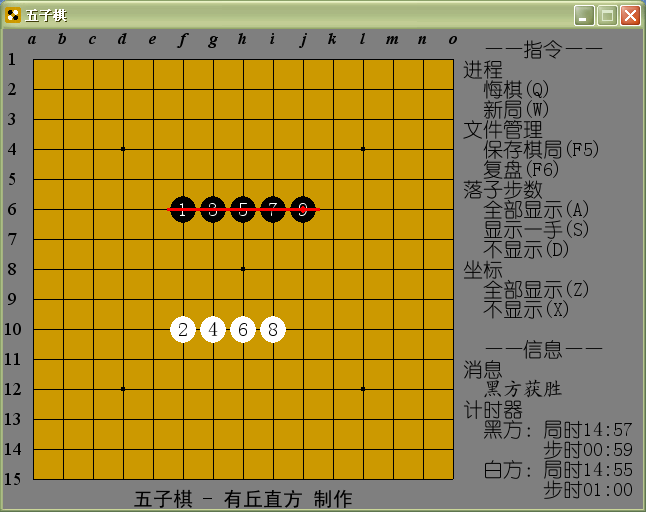
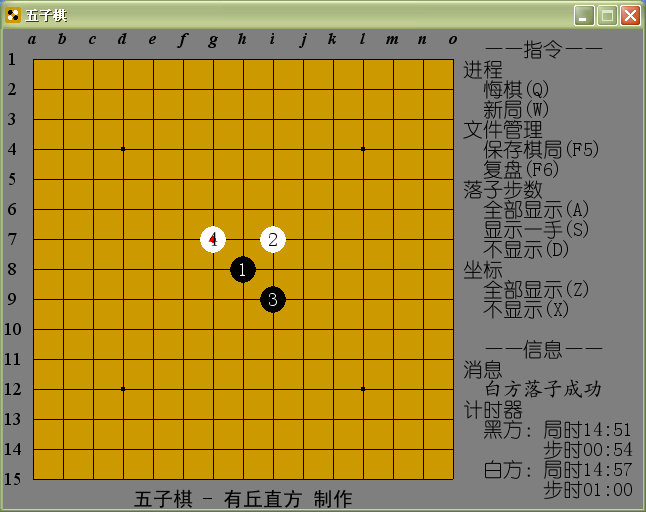
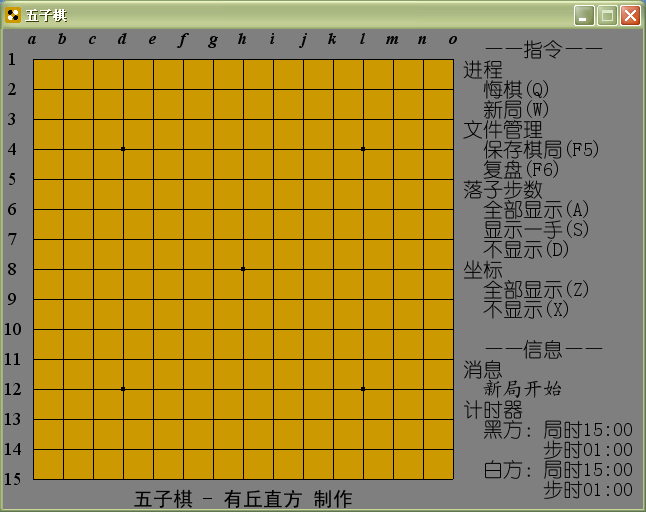
图
|
评分
-
查看全部评分
|


 写轮眼
写轮眼
 发表于 2017-1-29 17:00:01

 提升卡
提升卡 沉默号角
沉默号角 喧嚣号角
喧嚣号角 变色卡
变色卡 升龙剑
升龙剑


 发表于 2017-1-30 12:08:09

