| 赞 | 95 |
| VIP | |
| 好人卡 | |
| 积分 | 69 |
| 经验 | |
| 最后登录 | 2025-2-12 |
| 在线时间 | 7027 小时 |
- 梦石
- 0
- 星屑
- 6891
- 在线时间
- 7027 小时
- 注册时间
- 2013-11-2
- 回帖
- 1263
 
|
 发表于 2017-2-2 15:57:13
|
显示全部楼层
发表于 2017-2-2 15:57:13
|
显示全部楼层
本帖最后由 RaidenInfinity 于 2017-2-2 16:00 编辑
如果只是左右黑边,这是正常现象。因为RM窗口的分辨率比例是4:3(宽:高)而电脑的屏幕是16:9。
这个宽度的差距就被黑边替代了。如果是强硬地拉伸到全屏幕的话,那根本难看得不行。
如果连上下也有黑边,或者黑边的宽度不均匀,这大概是显卡驱动的问题。
我自己的电脑(显卡是 nVidia GeForce 7050 集显)有这种问题,但是别的电脑却不会这样。
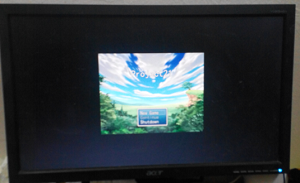
这是无解的,因为牵涉到了硬件和驱动。
不过,有一个插件脚本可以以另类的方式解决这个问题:
[pre lang="ruby"]
# Fullscreen++ v2.2 for VX and VXace by Zeus81
# Free for non commercial and commercial use
# Licence : http://creativecommons.org/licenses/by-sa/3.0/
# Contact : zeusex81@gmail.com
# (fr) Manuel d'utilisation : http://pastebin.com/raw.php?i=1TQfMnVJ
# (en) User Guide : http://pastebin.com/raw.php?i=EgnWt9ur
$imported ||= {}
$imported[:Zeus_Fullscreen] = __FILE__
class << Graphics
Disable_VX_Fullscreen = false
CreateWindowEx = Win32API.new('user32' , 'CreateWindowEx' , 'ippiiiiiiiii', 'i')
GetClientRect = Win32API.new('user32' , 'GetClientRect' , 'ip' , 'i')
GetDC = Win32API.new('user32' , 'GetDC' , 'i' , 'i')
GetSystemMetrics = Win32API.new('user32' , 'GetSystemMetrics' , 'i' , 'i')
GetWindowRect = Win32API.new('user32' , 'GetWindowRect' , 'ip' , 'i')
FillRect = Win32API.new('user32' , 'FillRect' , 'ipi' , 'i')
FindWindow = Win32API.new('user32' , 'FindWindow' , 'pp' , 'i')
ReleaseDC = Win32API.new('user32' , 'ReleaseDC' , 'ii' , 'i')
SendInput = Win32API.new('user32' , 'SendInput' , 'ipi' , 'i')
SetWindowLong = Win32API.new('user32' , 'SetWindowLong' , 'iii' , 'i')
SetWindowPos = Win32API.new('user32' , 'SetWindowPos' , 'iiiiiii' , 'i')
ShowWindow = Win32API.new('user32' , 'ShowWindow' , 'ii' , 'i')
SystemParametersInfo = Win32API.new('user32' , 'SystemParametersInfo' , 'iipi' , 'i')
UpdateWindow = Win32API.new('user32' , 'UpdateWindow' , 'i' , 'i')
GetPrivateProfileString = Win32API.new('kernel32', 'GetPrivateProfileString' , 'ppppip' , 'i')
WritePrivateProfileString = Win32API.new('kernel32', 'WritePrivateProfileString', 'pppp' , 'i')
CreateSolidBrush = Win32API.new('gdi32' , 'CreateSolidBrush' , 'i' , 'i')
DeleteObject = Win32API.new('gdi32' , 'DeleteObject' , 'i' , 'i')
unless method_defined?(:zeus_fullscreen_update)
HWND = FindWindow.call('RGSS Player', 0)
BackHWND = CreateWindowEx.call(0x08000008, 'Static', '', 0x80000000, 0, 0, 0, 0, 0, 0, 0, 0)
alias zeus_fullscreen_resize_screen resize_screen
alias zeus_fullscreen_update update
end
private
def initialize_fullscreen_rects
@borders_size ||= borders_size
@fullscreen_rect ||= screen_rect
@workarea_rect ||= workarea_rect
end
def borders_size
GetWindowRect.call(HWND, wrect = [0, 0, 0, 0].pack('l4'))
GetClientRect.call(HWND, crect = [0, 0, 0, 0].pack('l4'))
wrect, crect = wrect.unpack('l4'), crect.unpack('l4')
Rect.new(0, 0, wrect[2]-wrect[0]-crect[2], wrect[3]-wrect[1]-crect[3])
end
def screen_rect
Rect.new(0, 0, GetSystemMetrics.call(0), GetSystemMetrics.call(1))
end
def workarea_rect
SystemParametersInfo.call(0x30, 0, rect = [0, 0, 0, 0].pack('l4'), 0)
rect = rect.unpack('l4')
Rect.new(rect[0], rect[1], rect[2]-rect[0], rect[3]-rect[1])
end
def hide_borders() SetWindowLong.call(HWND, -16, 0x14000000) end
def show_borders() SetWindowLong.call(HWND, -16, 0x14CA0000) end
def hide_back() ShowWindow.call(BackHWND, 0) end
def show_back
ShowWindow.call(BackHWND, 3)
UpdateWindow.call(BackHWND)
dc = GetDC.call(BackHWND)
rect = [0, 0, @fullscreen_rect.width, @fullscreen_rect.height].pack('l4')
brush = CreateSolidBrush.call(0)
FillRect.call(dc, rect, brush)
ReleaseDC.call(BackHWND, dc)
DeleteObject.call(brush)
end
def resize_window(w, h)
if @fullscreen
x, y, z = (@fullscreen_rect.width-w)/2, (@fullscreen_rect.height-h)/2, -1
else
w += @borders_size.width
h += @borders_size.height
x = @workarea_rect.x + (@workarea_rect.width - w) / 2
y = @workarea_rect.y + (@workarea_rect.height - h) / 2
z = -2
end
SetWindowPos.call(HWND, z, x, y, w, h, 0)
end
def release_alt
inputs = [1,18,2, 1,164,2, 1,165,2].pack('LSx2Lx16'*3)
SendInput.call(3, inputs, 28)
end
public
def load_fullscreen_settings
buffer = [].pack('x256')
section = 'Fullscreen++'
filename = './Game.ini'
get_option = Proc.new do |key, default_value|
l = GetPrivateProfileString.call(section, key, default_value, buffer, buffer.size, filename)
buffer[0, l]
end
@fullscreen = get_option.call('Fullscreen' , '0') == '1'
@fullscreen_ratio = get_option.call('FullscreenRatio', '0').to_i
@windowed_ratio = get_option.call('WindowedRatio' , '1').to_i
toggle_vx_fullscreen if Disable_VX_Fullscreen and vx_fullscreen?
fullscreen? ? fullscreen_mode : windowed_mode
end
def save_fullscreen_settings
section = 'Fullscreen++'
filename = './Game.ini'
set_option = Proc.new do |key, value|
WritePrivateProfileString.call(section, key, value.to_s, filename)
end
set_option.call('Fullscreen' , @fullscreen ? '1' : '0')
set_option.call('FullscreenRatio', @fullscreen_ratio)
set_option.call('WindowedRatio' , @windowed_ratio)
end
def fullscreen?
@fullscreen or vx_fullscreen?
end
def vx_fullscreen?
rect = screen_rect
rect.width == 640 and rect.height == 480
end
def toggle_fullscreen
fullscreen? ? windowed_mode : fullscreen_mode
end
def toggle_vx_fullscreen
windowed_mode if @fullscreen and !vx_fullscreen?
inputs = [1,18,0, 1,13,0, 1,13,2, 1,18,2].pack('LSx2Lx16'*4)
SendInput.call(4, inputs, 28)
zeus_fullscreen_update
self.ratio += 0 # refresh window size
end
def vx_fullscreen_mode
return if vx_fullscreen?
toggle_vx_fullscreen
end
def fullscreen_mode
return if vx_fullscreen?
initialize_fullscreen_rects
show_back
hide_borders
@fullscreen = true
self.ratio += 0 # refresh window size
end
def windowed_mode
toggle_vx_fullscreen if vx_fullscreen?
initialize_fullscreen_rects
hide_back
show_borders
@fullscreen = false
self.ratio += 0 # refresh window size
end
def toggle_ratio
return if vx_fullscreen?
self.ratio += 1
end
def ratio
return 1 if vx_fullscreen?
@fullscreen ? @fullscreen_ratio : @windowed_ratio
end
def ratio=(r)
return if vx_fullscreen?
initialize_fullscreen_rects
r = 0 if r < 0
if @fullscreen
@fullscreen_ratio = r
w_max, h_max = @fullscreen_rect.width, @fullscreen_rect.height
else
@windowed_ratio = r
w_max = @workarea_rect.width - @borders_size.width
h_max = @workarea_rect.height - @borders_size.height
end
if r == 0
w, h = w_max, w_max * height / width
h, w = h_max, h_max * width / height if h > h_max
else
w, h = width * r, height * r
return self.ratio = 0 if w > w_max or h > h_max
end
resize_window(w, h)
save_fullscreen_settings
end
def update
release_alt if Disable_VX_Fullscreen and Input.trigger?(Input::ALT)
zeus_fullscreen_update
toggle_fullscreen if Input.trigger?(Input::F5)
toggle_ratio if Input.trigger?(Input::F6)
end
def resize_screen(width, height)
zeus_fullscreen_resize_screen(width, height)
self.ratio += 0 # refresh window size
end
end
Graphics.load_fullscreen_settings
[/pre]
安装这个脚本之后,按F5是开/关全屏,F6则是调整窗口模式的窗口大小。
Alt+Enter全屏就别用了,劝告玩家别用它吧。
如果要根本地禁用Alt+Enter,请参考这个帖子:https://rpg.blue/forum.php?mod=v ... amp;_dsign=39cc3b36 |
|



 写轮眼
写轮眼
 发表于 2017-2-2 15:43:02
 提升卡
提升卡 沉默号角
沉默号角 喧嚣号角
喧嚣号角 变色卡
变色卡 升龙剑
升龙剑