| 赞 | 95 |
| VIP | |
| 好人卡 | |
| 积分 | 69 |
| 经验 | |
| 最后登录 | 2025-2-12 |
| 在线时间 | 7027 小时 |
- 梦石
- 0
- 星屑
- 6891
- 在线时间
- 7027 小时
- 注册时间
- 2013-11-2
- 回帖
- 1263
 
|
 发表于 2017-2-10 14:32:25
|
显示全部楼层
发表于 2017-2-10 14:32:25
|
显示全部楼层
[pre lang="ruby"]
#-------------------------------------------------------------------------------
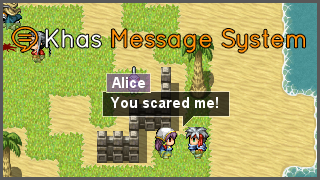
# * [ACE] Khas Message System #Khas对话系统
#-------------------------------------------------------------------------------
# * By Nilo K. (Khas) #作者名
# * Version: 1.0 #版本号
# * Released on: 12.07.2016 #发布日期
#
# * Social Media #作者网站链接
# Blog: arcthunder.blogspot.com #部落格
# Facebook: facebook.com/khasarc #脸书
# Twitter: twitter.com/arcthunder #推特
# Youtube: youtube.com/c/khasarc #YouTube频道
#
# * Khas Scripts @ RPG Maker Web forums (official support!) #论坛链接
# forums.rpgmakerweb.com/index.php?/forum/132-khas-scripts
#
#-------------------------------------------------------------------------------
# * Terms of Use #使用规章
#-------------------------------------------------------------------------------
# When using KHAS MESSAGE SYSTEM (the script), you agree with the following terms:
# 在使用这个脚本的时候,你需要遵守以下的规章:
# 1. If you purchased a license to one of my scripts, credit is not required.
# Otherwise, you must give credit to Khas (if you want, a link to my blog is
# always appreciated);
# 如果你有购买Khas的任何一个付费脚本,你不需要加入鸣谢名单/声明素材来源。
# 否则请在鸣谢名单里面写Khas,最好是附上部落格的链接
# 2. You can use the script for free in both non-commercial and commercial
# projects;
# 这个脚本可以无偿使用在免费或商业游戏内。
# 4. You can edit the script for using in your own project. However, you are
# not allowed to share/distribute any modified version;
# 你可以修改这个脚本,但是你不能发布修改后的脚本。
# 5. If you want to share a Khas script, don’t post the direct download link,
# redirect the user to my blog instead;
# 如果你要分享Khas的脚本,请不要直连,而是发部落格的链接。
# 6. The script can not be ported to any RPG Maker version than VX Ace.
# 此脚本只适合RMVA使用。
#-------------------------------------------------------------------------------
# * Instructions #使用说明
#-------------------------------------------------------------------------------
# This script changes the original message system design and adds some new
# commands that can be used when displaying messages. Below you will find a
# list of these commands.
# 这个脚本将完全更改默认对话系统的显示风格和增加新的控制符/指令。
# 下面附上了指令的列表。
#
# Due to the unique design of this script, it's recommended to think carefully
# about the windowskin that you will use (it's used for menus and choices).
# 由于这个脚本会更改对话框的显示风格,所以窗口皮肤只用于菜单和选项。
#
# The Khas Message System is plug'n'play, you will need to import to your
# project only the voice SE files of the actors.
# 这个脚本是即插即用的插件脚本。你只需要导入角色的声音(SE)文件就行了。
#
#-------------------------------------------------------------------------------
# * Commands #指令
#-------------------------------------------------------------------------------
# EXISTING COMMANDS #原有的指令(RMVA自带的)
# \v[x] Variable X (int) #显示变量(x是变量ID)
# \n[x] Actor X name (int) #角色的名字(x是角色ID)
# \p[x] Party member X name (int) #队友的名字(x是队员序号)
# \i[x] Draw icon X (int) #绘制x号图标
# \g Currency unit #显示金钱符号
# \{ Increase text size #增大字体
# \} Decrease text size #减小字体
# \$ Open money window #打开金钱窗
# \. Pause (1/4 second) #等待四分之一秒
# \| Pause (1 second) #等待一秒
# \! Wait for button #等待输入确认键
# \> Instantly display (line) #立刻显示整行
# \< Cancel above #取消立刻显示
# \^ Do not wait for next page #下一页不等待
# \\ Backslash #输入\符号
#
# NEW COMMANDS #新增指令
# \c[color] Change text color (can be an hex color like #ffffff or
# a color declared on the configuration part. Examples:
# \c[#00ff00]
# \c[green]
# 改变文字颜色,可以是十六进制的颜色代码,或者颜色的名字(在下面的设置部分定义)
# \a[actor] Change the actor who's speaking. The actor must be declared
# on the configuration part. Examples:
# \a[Alice]
# \c[Ernest]
# 改变对话的角色(影响文字颜色和声效),角色必须在下面的设定里面定义
# \s[time] Shake the screen/balloon by the given time (in frames).
# Example:
# \s[20]
# 摇晃屏幕/对话框数帧
# \e[x] Place the balloon over the event X.
# Example:
# \e[12]
# 将对话框放在x号事件头上(0是当前事件)
# \p Place the balloon over the player.
# 将对话框放在玩家角色头上
# \f Make the balloon float (useful for a narrator).
# 让对话框浮着(适合给旁白使用)
# \t[se] Change the typing sound to the given sound effect.
# Example:
# \t[female]
# #改变打字的声效
# \x[se] Play the given sound effect.
# Example:
# \x[Cat]
# #播放声效
#-------------------------------------------------------------------------------
# * Message Core (configuration) #系统设置
#-------------------------------------------------------------------------------
module Message_Core
# ACTORS
# Declare your actors here, using the following format:
# "Actor Name" => ["color", "voice"]
# Actor Name: the actor name to be used with \a[Actor Name]
# color: the color name declared below
# voice: the voice file inside Audio/SE
# 角色
# 在这里定义角色,格式是 "角色名字" => ["颜色","声效"]
# 颜色是在下面定义的颜色,声效是Audio/SE里面声音文件的名字
Actors = {
"Eric" => ["blue", "male"],
"Natalie" => ["pink", "female"],
"Terence" => ["yellow", "male"],
"Ernest" => ["darkorange", "male"],
"Ryoma" => ["teal", "male"],
"Brenda" => ["gray", "female"],
"Rick" => ["green", "male"],
"Alice" => ["purple", "female"],
"Isabelle" => ["purple", "female"],
"Noah" => ["darkred", "male"],
"Old Man" => ["gray", "male"],
"Old Lady" => ["gray", "male"],
"Monster" => ["darkred", "male"],
"Boy" => ["blue", "male"],
"Girl" => ["pink", "female"],
"Lady" => ["purple", "female"],
"Man" => ["green", "male"],
}
# COLORS
# Declare your colors here, using the following format:
# "colorname" => Color.new(R, G, B),
# The colorname can be used with \c[colorname]
# 颜色
# 在这里定义\c[颜色名字]使用的颜色
# 格式是 "颜色名字" => Color.new(红, 绿, 蓝, 不透明度)
# 不透明度如果是满的话不需要写也可以
Colors = {
"white" => Color.new(255, 255, 255),
"black" => Color.new(0, 0, 0),
"orange" => Color.new(255, 144, 9),
"blue" => Color.new(111, 147, 191),
"pink" => Color.new(189, 74, 99),
"yellow" => Color.new(222, 164, 86),
"darkorange" => Color.new(171, 86, 36),
"teal" => Color.new(39, 89, 97),
"darkred" => Color.new(171, 61, 86),
"purple" => Color.new(121, 83, 145),
"green" => Color.new(92, 154, 75),
"gray" => Color.new(135, 156, 176),
}
# MESSAGE BALLOON CONFIGURATION #对话气泡的设置
# Background color #背景颜色
Background = Color.new(0,0,0,180)
# Outline color #外框颜色
Outline = Color.new(255,255,255,120)
# Minimum width #最低宽度
Minimum_Width = 80
# Font properties #字体设定
Font_Name = "Arial" #字体名字
Font_Size = 18 #字体大小
Font_Bold = true #是否加粗 (true - 是, false - 否)
Font_Italic = false #是否斜体
Font_Outline = false #是否描线
# SE VOLUME #声效音量 - 用于播放角色声音
# Volume used to play voices
SE_Volume = 80
# PAUSE CYCLE #暂停循环 - 光标闪动的帧数
# Number of frames to blink the cursor
Pause_Cycle = 30
# Change these only if you're having trouble with your font
# 对话气泡的边框设定 - 如果字体有问题才来设置
Standard_Padding = 4 #基本填充距离
New_Line_X = 4 + Standard_Padding #新一行的X值(横向)位置
New_Page_Y = 3 #新一页的Y值(直向)位置
end
#-------------------------------------------------------------------------------
# * Default Font #默认字体
#-------------------------------------------------------------------------------
Font.default_name = [Message_Core::Font_Name]
Font.default_size = Message_Core::Font_Size
Font.default_bold = Message_Core::Font_Bold
Font.default_outline = Message_Core::Font_Outline
Font.default_italic = Message_Core::Font_Italic
#-------------------------------------------------------------------------------
# * Sprite Message #对话气泡的图像精灵
#-------------------------------------------------------------------------------
class Sprite_Message < Sprite
include Message_Core
# - - - - - - - - - - - - - - - - - - - - - - - - - - - - - - - - - - - - - -
# * Initialize (Executed once) #初始化(只执行一次)
# - - - - - - - - - - - - - - - - - - - - - - - - - - - - - - - - - - - - - -
def initialize
super(nil)
initialize_sprite
initialize_pause
create_all_windows
clear_instance_variables
end
def initialize_sprite
self.bitmap = Bitmap.new(1,1)
self.opacity = 0
self.visible = false
self.z = 200
end
def initialize_pause
@pause_sprite = Sprite.new
@pause_sprite.bitmap = Bitmap.new(3,3)
@pause_sprite.bitmap.fill_rect(0,0,3,3,Colors["white"])
@pause_sprite.visible = false
@pause_sprite.z = self.z + 1
end
def create_all_windows
@gold_window = Window_Gold.new
@gold_window.x = Graphics.width - @gold_window.width
@gold_window.y = 0
@gold_window.openness = 0
@choice_window = Window_ChoiceList.new(self)
@number_window = Window_NumberInput.new(self)
@item_window = Window_KeyItem.new(self)
end
def clear_instance_variables
@fiber = nil
@opening = false
@closing = false
@pause = false
clear_flags
end
# - - - - - - - - - - - - - - - - - - - - - - - - - - - - - - - - - - - - - -
# * Dispose (Executed once) #释放(只执行一次)
# - - - - - - - - - - - - - - - - - - - - - - - - - - - - - - - - - - - - - -
def dispose
dispose_all_windows
dispose_pause
dispose_bitmap
super
end
def dispose_all_windows
@gold_window.dispose
@choice_window.dispose
@number_window.dispose
@item_window.dispose
end
def dispose_bitmap
self.bitmap.dispose if self.bitmap
end
def dispose_pause
@pause_sprite.bitmap.dispose
@pause_sprite.dispose
end
# - - - - - - - - - - - - - - - - - - - - - - - - - - - - - - - - - - - - - -
# * Update #更新
# - - - - - - - - - - - - - - - - - - - - - - - - - - - - - - - - - - - - - -
def update
update_effects
update_all_windows
update_fiber
end
def update_effects
update_open if @opening
update_close if @closing
update_pause if @pause
update_shake if @shake > 0
end
def update_all_windows
@gold_window.update
@choice_window.update
@number_window.update
@item_window.update
end
def update_fiber
if @fiber
@fiber.resume
elsif $game_message.busy? && !$game_message.scroll_mode
@fiber = Fiber.new { fiber_main }
@fiber.resume
else
$game_message.visible = false
end
end
def update_open
self.opacity += 32
@opening = (self.opacity < 255)
end
def update_close
self.opacity -= 32
@closing = (self.opacity > 0)
end
def update_pause
if @pause_timer > 0
@pause_timer -= 1
else
@pause_sprite.visible = !@pause_sprite.visible
@pause_timer = Pause_Cycle
end
end
def update_shake
if @shake > 1
self.ox = rand(17) - 8
self.oy = rand(17) - 8
@shake -= 1
else
stop_shake
end
end
# - - - - - - - - - - - - - - - - - - - - - - - - - - - - - - - - - - - - - -
# * Effect Control #效果控制
# - - - - - - - - - - - - - - - - - - - - - - - - - - - - - - - - - - - - - -
def open_and_wait
@opening = true
Fiber.yield while @opening
end
def close_and_wait
@closing = true
Fiber.yield until all_close?
end
def show_pause
@pause_sprite.visible = true
@pause = true
@pause_timer = Pause_Cycle
end
def hide_pause
@pause_sprite.visible = false
@pause = false
end
def shake(duration)
@shake = duration
end
def stop_shake
self.ox = 0
self.oy = 0
@shake = 0
end
# - - - - - - - - - - - - - - - - - - - - - - - - - - - - - - - - - - - - - -
# * Main Processing #主处理过程
# - - - - - - - - - - - - - - - - - - - - - - - - - - - - - - - - - - - - - -
def fiber_main
$game_message.visible = true
self.visible = true
loop do
process_all_text if $game_message.has_text?
process_input
$game_message.clear
@gold_window.close
Fiber.yield
break unless text_continue?
end
close_and_wait
clear_balloon
self.visible = false
$game_message.visible = false
@fiber = nil
end
# - - - - - - - - - - - - - - - - - - - - - - - - - - - - - - - - - - - - - -
# * Drawing processes #绘制过程
# - - - - - - - - - - - - - - - - - - - - - - - - - - - - - - - - - - - - - -
def draw_balloon
# Reset stuff for new balloon #重置气泡设置
reset_font_settings
reset_character_actor
# Process text #处理文字
text = convert_escape_characters($game_message.all_text)
scan_special_commands(text)
text = remove_escape_characters(text)
# Should the balloon float? #判定气泡是否需要悬浮
@Float = true if @character.nil?
# Check if the balloon will have a namebox #判定是否加姓名框
@namebox_yplus = (@actor ? text_size(@actor).height : 0)
@voice = (@actor ? Actors[@actor][1] : nil)
# Check if the balloon will have a detail #处理悬浮
@detail_yplus = (@float ? 0 : 10)
# Calculate text dimensions #计算文字大小
tw = fitting_width(text)
th = fitting_height(text) + @namebox_yplus + @detail_yplus
# Check if the balloon needs to be inverted #检查是否需要反转气泡
if invert_balloon?(th)
@inverted = true
@margin_top = @detail_yplus
@margin_bottom = @namebox_yplus
else
@inverted = false
@margin_top = @namebox_yplus
@margin_bottom = @detail_yplus
end
# Calculate balloon dimensions #计算气泡位置和大小
balloon = Rect.new
balloon.x = 0
balloon.y = @margin_top
balloon.width = tw > Minimum_Width ? tw : Minimum_Width
balloon.height = th - @margin_top - @margin_bottom
# Create a new bitmap #创建新的位图
self.bitmap.dispose if self.bitmap
self.bitmap = Bitmap.new(balloon.width, th)
reset_font_settings
# Draw the balloon #绘制气泡
self.bitmap.fill_rect(balloon.x, balloon.y, balloon.width, balloon.height, Outline)
self.bitmap.fill_rect(balloon.x+1, balloon.y+1, balloon.width-2, balloon.height-2, Background)
# Draw the namebox #绘制姓名框
draw_namebox(@inverted ? (th - @namebox_yplus - 2) : 0) if @actor
end
def clear_balloon
self.bitmap.clear
end
def draw_namebox(y)
rect = text_size(@actor)
color = Colors[Actors[@actor][0]]
color.alpha = Background.alpha
self.bitmap.fill_rect(4,y,rect.width+10,rect.height+2,Outline)
self.bitmap.fill_rect(5,y+1,rect.width+8,rect.height,color)
self.bitmap.draw_text(9,y+1,rect.width,rect.height,@actor)
end
def draw_detail(x, y, reverse, upside_down)
dx = (reverse ? 1 : 0)
dy = (upside_down ? -1 : 1)
x -= 12 if reverse
for i in 12.downto(2)
fill_line(x, y, i)
x += dx
y += dy
end
end
def fill_rect(x, y, sx, sy)
self.bitmap.fill_rect(x, y, sx, sy, Outline)
self.bitmap.fill_rect(x+1, y+1, sx-2, sy-2, Background)
end
def fill_line(x, y, sx)
self.bitmap.fill_rect(x, y, sx, 1, Outline)
self.bitmap.fill_rect(x+1, y, sx-2, 1, Background)
end
# - - - - - - - - - - - - - - - - - - - - - - - - - - - - - - - - - - - - - -
# * Size/Position processing #位置和大小处理
# - - - - - - - - - - - - - - - - - - - - - - - - - - - - - - - - - - - - - -
def move_balloon
if @float
x = (Graphics.width - width)/2
y = Graphics.height - height - self.bitmap.font.size
else
# Get the actual character and its height
# 获取实际角色图像和高度
bitmap = Cache.character(@character.character_name)
sign = @character.character_name[/^[\!\$]./]
if sign && sign.include?('$')
cw = bitmap.width / 6
ch = bitmap.height / 4
else
cw = bitmap.width / 24
ch = bitmap.height / 8
end
# Calc initial position #计算初始位置
x = @character.screen_x - width / 2
y = @character.screen_y - height - ch
# Check if the ballon is out of the screen #检查气泡是否超出屏幕外
x = 2 if x < 2
x = Graphics.width - width - 2 if (x + width) > (Graphics.width - 2)
y = @character.screen_y if y < 0
# Draw the detail #绘制细节
reverse = @character.direction < 5
sx = @character.screen_x - x + (reverse ? -cw : cw)
if sx < 0
reverse = !reverse
sx = @character.screen_x - x + (reverse ? -cw : cw)
elsif sx > self.bitmap.width
reverse = !reverse
sx = @character.screen_x - x + (reverse ? -cw : cw)
end
sy = (@inverted ? @margin_top : (self.bitmap.height - @margin_bottom - 1))
draw_detail(sx, sy, reverse, @inverted)
end
# Set the position #设置位置
self.x = x
self.y = y
# Set the pause sprite position #设置暂停光标的位置
@pause_sprite.x = self.x + self.width - 6
@pause_sprite.y = self.y + self.height - @margin_bottom - 6
end
def invert_balloon?(h)
return false if @float
bitmap = Cache.character(@character.character_name)
sign = @character.character_name[/^[\!\$]./]
char_height = bitmap.height / (sign && sign.include?('$') ? 4 : 8)
@character.screen_y - h - char_height < 0
end
def width
self.bitmap ? self.bitmap.width : 1
end
def height
self.bitmap ? self.bitmap.height : 1
end
def text_width(text)
result = 0
text.each_line do |line|
lw = text_size(line).width
result = lw if lw > result
end
result
end
def text_height(text)
result = 0
text.each_line do |line|
result += line_height(line)
end
result
end
def line_height(text)
result = self.bitmap.font.size
last_font_size = self.bitmap.font.size
text.slice(/^.*$/).scan(/\e[\{\}]/).each do |esc|
make_font_bigger if esc == "\e{"
make_font_smaller if esc == "\e}"
result = [result, self.bitmap.font.size].max
end
self.bitmap.font.size = last_font_size
result
end
def fitting_height(text)
text_height(text) + Standard_Padding * 2
end
def fitting_width(text)
text_width(text) + Standard_Padding * 2
end
# - - - - - - - - - - - - - - - - - - - - - - - - - - - - - - - - - - - - - -
# * Text processing #文字处理
# - - - - - - - - - - - - - - - - - - - - - - - - - - - - - - - - - - - - - -
def process_all_text
text = convert_escape_characters($game_message.all_text)
pos = {}
new_page(text, pos)
until text.empty?
Fiber.yield if @skip_frame
@skip_frame = !@skip_frame
process_character(text.slice!(0, 1), text, pos)
end
end
def new_page(text, pos)
draw_balloon
move_balloon
open_and_wait if self.opacity < 255
pos[:x] = New_Line_X
pos[:y] = New_Page_Y + @margin_top
pos[:new_x] = New_Line_X
pos[:height] = line_height(text)
clear_flags
end
def clear_flags
@show_fast = false
@pause_skip = false
@skip_frame = false
@sound = true
@shake = 0
end
def text_continue?
$game_message.has_text?
end
def update_show_fast
@show_fast = true if Input.trigger?(:C)
end
def wait_for_one_character
update_show_fast
Fiber.yield unless @show_fast
end
def need_new_page?(text, pos)
pos[:y] + pos[:height] > self.bitmap.height && !text.empty?
end
def process_new_page(text, pos)
text.slice!(/^\n/)
input_pause
new_page(text, pos)
end
def process_draw_icon(icon_index, pos)
bitmap = Cache.system("Iconset")
rect = Rect.new(icon_index % 16 * 24, icon_index / 16 * 24, 24, 24)
self.bitmap.blt(pos[:x], pos[:y], bitmap, rect)
pos[:x] += 24
wait_for_one_character
end
def process_escape_character(code, text, pos)
case code.upcase
when '$'
@gold_window.open
when '.'
wait(15)
when '|'
wait(60)
when '!'
input_pause
when '>'
@show_fast = true
when '<'
@show_fast = false
when '^'
@pause_skip = true
when 'C'
change_color(text.slice!(/^\[#?\w+\]/)[/#?\w+/])
when 'I'
process_draw_icon(text.slice!(/^\[\d+\]/)[/\d+/].to_i, pos)
when '{'
make_font_bigger
when '}'
make_font_smaller
when 'A'
text.slice!(/^\[[\w\s]+\]/)
when 'S'
shake(text.slice!(/^\[\d+\]/)[/\d+/].to_i)
when 'E'
text.slice!(/^\[\d+\]/)
when 'T'
@voice = text.slice!(/^\[\w*\]/)[/\w*/]
@voice = nil unless @voice.size > 0
when 'X'
Audio.se_play("Audio/se/#{text.slice!(/^\[\w+\]/)[/\w+/]}", SE_Volume)
end
end
def convert_escape_characters(text)
result = text.to_s.clone
result.gsub!(/\\/) { "\e" }
result.gsub!(/\e\e/) { "\\" }
result.gsub!(/\eV\[(\d+)\]/i) { $game_variables[$1.to_i] }
result.gsub!(/\eV\[(\d+)\]/i) { $game_variables[$1.to_i] }
result.gsub!(/\eN\[(\d+)\]/i) { actor_name($1.to_i) }
result.gsub!(/\eP\[(\d+)\]/i) { party_member_name($1.to_i) }
result.gsub!(/\eG/i) { Vocab::currency_unit }
result
end
def remove_escape_characters(text)
result = text.to_s.clone
result.gsub!(/\ec\[#?\w+\]/i,"")
result.gsub!(/\es\[\d+\]/i,"")
result.gsub!(/\ee\[\d+\]/i,"")
result.gsub!(/\ea\[[\w\s]+\]/i,"")
result.gsub!(/\et\[\w*\]/i,"")
result.gsub!(/\ex\[\w+\]/i,"")
result.gsub!(/\ep/i, "")
result.gsub!(/\ef/i, "")
result.gsub!(/\e\|/, "")
result.gsub!(/\e\./, "")
result.gsub!(/\e\</, "")
result.gsub!(/\e\>/, "")
result.gsub!(/\e\^/, "")
result
end
def scan_special_commands(text)
if text =~ /\ep/i
@character = $game_player
end
if text =~ /\ef/i
@float = true
end
if text =~ /\ea\[([\w\s]+)\]/i
@actor = $1 if Actors[$1]
end
if text =~ /\ee\[(\d+)\]/i
@character = $game_map.events[$1.to_i] if $game_map.events[$1.to_i]
end
end
def text_size(str)
self.bitmap.text_size(str)
end
def process_character(c, text, pos)
case c
when "\n" # New line
process_new_line(text, pos)
when "\f" # New page
process_new_page(text, pos)
when "\e" # Control character
process_escape_character(obtain_escape_code(text), text, pos)
else # Normal character
process_normal_character(c, pos)
end
end
def process_normal_character(c, pos)
char_width = text_size(c).width
self.bitmap.draw_text(pos[:x], pos[:y], char_width * 2, pos[:height], c)
pos[:x] += char_width
Audio.se_play("Audio/se/#{@voice}") if @sound && c != " " && @voice
@sound = !@sound
wait_for_one_character
end
def process_new_line(text, pos)
pos[:x] = pos[:new_x]
pos[:y] += pos[:height]
pos[:height] = line_height(text)
if need_new_page?(text, pos)
input_pause
new_page(text, pos)
end
end
def obtain_escape_code(text)
text.slice!(/^[\$\.\|\^!><\{\}\\]|^[A-Z]/i)
end
# - - - - - - - - - - - - - - - - - - - - - - - - - - - - - - - - - - - - - -
# * Font #字体
# - - - - - - - - - - - - - - - - - - - - - - - - - - - - - - - - - - - - - -
def reset_font_settings
change_color("white")
self.bitmap.font.size = Font.default_size
self.bitmap.font.bold = Font.default_bold
self.bitmap.font.italic = Font.default_italic
end
def change_color(code)
if Colors[code]
self.bitmap.font.color.set(Colors[code])
elsif code =~ /#(..)(..)(..)/
self.bitmap.font.color.set(Color.new($1.hex, $2.hex, $3.hex))
end
end
def make_font_bigger
self.bitmap.font.size += 8 if self.bitmap.font.size <= 64
end
def make_font_smaller
self.bitmap.font.size -= 8 if self.bitmap.font.size >= 16
end
# - - - - - - - - - - - - - - - - - - - - - - - - - - - - - - - - - - - - - -
# * Input processing #输入处理
# - - - - - - - - - - - - - - - - - - - - - - - - - - - - - - - - - - - - - -
def process_input
if $game_message.choice?
input_choice
elsif $game_message.num_input?
input_number
elsif $game_message.item_choice?
input_item
else
input_pause unless @pause_skip
end
end
def input_pause
show_pause
wait(10)
Fiber.yield until Input.trigger?(:B) || Input.trigger?(:C)
Input.update
hide_pause
end
def input_choice
@choice_window.start
Fiber.yield while @choice_window.active
end
def input_number
@number_window.start
Fiber.yield while @number_window.active
end
def input_item
@item_window.start
Fiber.yield while @item_window.active
end
# - - - - - - - - - - - - - - - - - - - - - - - - - - - - - - - - - - - - - -
# * Other processing #其他处理
# - - - - - - - - - - - - - - - - - - - - - - - - - - - - - - - - - - - - - -
def close?
(self.opacity == 0)
end
def all_close?
close? && @choice_window.close? && @number_window.close? && @item_window.close?
end
def wait(duration)
duration.times { Fiber.yield }
end
def reset_character_actor
@float = false
@actor = nil
@character = nil
if $game_map.interpreter.event_id && $game_map.events[$game_map.interpreter.event_id]
@character = $game_map.events[$game_map.interpreter.event_id]
end
end
end
#-------------------------------------------------------------------------------
# * Scene Map #地图场景
#-------------------------------------------------------------------------------
class Scene_Map < Scene_Base
def create_message_window
@message_window = Sprite_Message.new
end
def update_all_windows
@message_window.update
super
end
def dispose_all_windows
@message_window.dispose
super
end
end
#-------------------------------------------------------------------------------
# * End #结束
#-------------------------------------------------------------------------------
[/pre]
基本上原有的指令(如显示变量)和默认的差不多。要注意的是新增的指令,和设置的方法。 |
评分
-
查看全部评分
|



 写轮眼
写轮眼
 发表于 2017-2-8 09:17:34


 提升卡
提升卡 沉默号角
沉默号角 喧嚣号角
喧嚣号角 变色卡
变色卡 升龙剑
升龙剑


