| 赞 | 14 |
| VIP | |
| 好人卡 | |
| 积分 | 6 |
| 经验 | |
| 最后登录 | 2026-8-9 |
| 在线时间 | 797 小时 |
- 梦石
- 0
- 星屑
- 606
- 在线时间
- 797 小时
- 注册时间
- 2014-7-1
- 回帖
- 501

|
加入我们,或者,欢迎回来。
您需要 登录 才可以下载或查看,没有账号?注册会员
×
本帖最后由 jiushiainilip19 于 2017-2-25 15:09 编辑
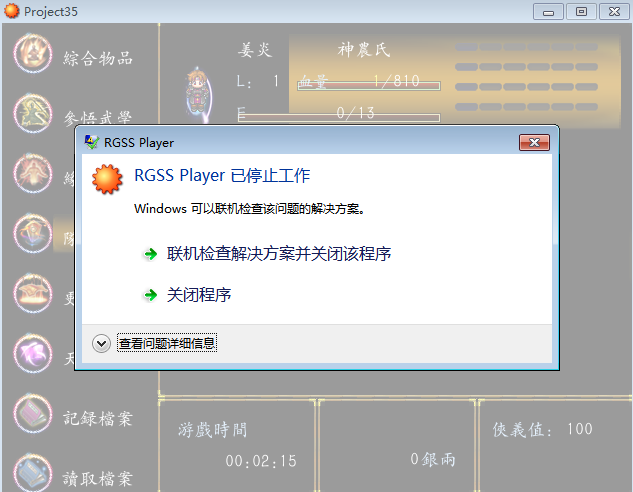
这个应该是电脑内存问题 还是游戏脚本导致的。 或者是因为状态画面图片载图存在的问题呢?
图片大小是648*480 png格式!
我是加入了烛光脚本出现的
状态脚本
[pre lang="ruby"]
class Window_Status < Window_Base
def initialize(actor)
super(0, 0, 640, 480)
self.contents = Bitmap.new(width - 32, height - 32)
@actor = actor
@Fas = Sprite.new
@column_max = 2
self.opacity = 0
refresh
end
def skill
return @data[self.index]
end
def refresh
self.contents.clear
@fas.bitmap = RPG::Cache.autotile("#{@actor.id}")
if self.contents != nil
self.contents.dispose
self.contents = nil
end
@data = []
for i in 0...@actor.skills.size
skill = $data_skills[@actor.skills]
if skill != nil
@data.push(skill)
end
end
# 如果项目数不是 0 就生成位图、重新描绘全部项目
@item_max = @data.size
if @item_max > 0
self.contents = Bitmap.new(width - 40, height * 40)
for i in 0...@item_max
draw_item(i)
end
end
end
def draw_item(index)
skill = @data[index]
x = 280 + index % 2 * 160
#x = 4 + index % 4
y = 310 + index / 2 * 90
rect = Rect.new(x, y, self.width / @column_max - 40, 40)
self.contents.fill_rect(rect, Color.new(0, 0, 0, 0))
bitmap = RPG::Cache.icon(skill.icon_name)
opacity = self.contents.font.color == normal_color ? 255 : 128
self.contents.blt(x, y + 4, bitmap, Rect.new(0, 0, 40, 40), opacity)
self.contents.draw_text(x + 40, y, 204, 40, skill.name, 0)
self.contents.font.size = 26
draw_actor_名(@actor,20,310)
draw_actor_号(@actor,20,350)
draw_actor_战(@actor,20,385)
draw_actor_位(@actor,20,424)
self.contents.font.size = 20
draw_actor_parameter(@actor, 90,330, 3)
draw_actor_parameter(@actor, 90,380, 4)
draw_actor_parameter(@actor, 90,426, 6)
end
def dispose
super
@fas.bitmap.dispose
@fas.dispose
end
end
[/pre]
VA烛光
[pre lang="ruby"]
# coding: utf-8
=begin
= Bitmap類拡張 (DLL版)
RPGツクールXP/VX共用
添加功能 Bitmap 類。
- Marshaldump 啟用
- 保存為PNG文件
-色調變化
-馬賽克效果
-反相顏色
-模糊效果
-使用遮罩-切除
-混合
■ 注意
這個腳本需要"tktk_bitmap.dll"(ver0.1.2.6以上)。
Author:: 半生
Date:: 2010/12/13
Version:: 0.1.2.6
URL:: http://www.tktkgame.com/
################更新########################
2010/12/13 ver 0.1.2.6
dll名稱從"hn_rg_bitmap.dll"變更為"tktk_bitmap.dll"
LARGE_BITMAP機能でメモリを確保できなかった場合の処理を追加
2010/10/12 ver 0.1.2.5(デンジャラスベータ版)
大きいサイズのBitmapオブジェクトを機能を試験的に実装(危険)
2010/03/24 ver 0.1.2.2
ブレンディング機能関連の軽量化。
画像連結系メソッドの分離。
2010/03/24 ver 0.1.2.1
ブレンディング機能関連のバグフィックス
2010/03/22 ver 0.1.2.0
加算合成等のブレンディング機能の追加
2010/02/07 ver 0.1.1.0
マーシャル化の処理の一部をDLLに移動
2010/01/17 ver 0.1.0.0
dllの名称を"hn_rx_bitmap.dll"から"hn_rg_bitmap.dll"に変更
モザイク効果・色反転・ぼかし効果の追加
############################################
=end
module TKTK_Bitmap
LARGE_BITMAP = true # 是否使用大型點陣圖的功能
DLL_NAME = 'tktk_bitmap'
ERROR_ALLOCATE_FAILED = -110002
@@png_save = Win32API.new(DLL_NAME, 'PngSaveA', 'p n i i', 'i')
@@blur = Win32API.new(DLL_NAME, 'Blur', 'n i', 'i')
@@change_tone = Win32API.new(DLL_NAME, 'ChangeTone', 'n i i i i', 'i')
@@clip_mask = Win32API.new(DLL_NAME, 'ClipMask', 'n n i i i', 'i')
@@invert = Win32API.new(DLL_NAME, 'InvertColor', 'n', 'i')
@@mosaic = Win32API.new(DLL_NAME, 'Mosaic', 'n i i i i i i', 'i')
@@address = Win32API.new(DLL_NAME, 'GetAddress', 'n', 'n')
@@get_pixel_data = Win32API.new(DLL_NAME, 'GetPixelData', 'n p i', 'i')
@@set_pixel_data = Win32API.new(DLL_NAME, 'SetPixelData', 'n p i', 'i')
@@blend_blt = Win32API.new(DLL_NAME, 'BlendBlt', 'n i i n i i i i i i', 'i')
#@@get_hwnd = Win32API.new(DLL_NAME, 'GetGameHWND', 'v', 'l')
@@change_size = Win32API.new(DLL_NAME, 'ChangeSize', 'n i i', 'i')
module_function
# PNG形式儲存
def png_save(bitmap,file_name,compression_level,filter)
return @@png_save.call(file_name, bitmap.object_id, compression_level, filter)
end
# 模糊效果
def blur(bitmap, r = 1)
return @@blur.call(bitmap.object_id, r)
end
# 更改顏色平衡?
def change_tone(bitmap, red = 0, green = 0, blue = 0, simplify = 1)
return @@change_tone.call(bitmap.object_id, red, green, blue, simplify)
end
# 剪貼蒙版圖像(α乘法)
def clip_mask(g_bitmap, m_bitmap, x=0, y=0, outer=0)
return @@clip_mask.call(g_bitmap.object_id, m_bitmap.object_id, x, y, outer)
end
# 色的反轉
def invert(bitmap)
return @@invert.call(bitmap.object_id)
end
# 馬賽克效果
def mosaic(bitmap, msw=5, msh=5)
return self.mosaic_rect(bitmap, bitmap.rect, msw, msh)
end
# 馬賽克效果(範圍指定)
def mosaic_rect(bitmap, rect, msw=5, msh=5)
return @@mosaic.call(bitmap.object_id,
rect.x, rect.y, rect.width, rect.height, msw, msh)
end
# 獲取Bitmap資料位址
def address(bitmap)
return @@address.call(bitmap.object_id)
end
# 二進位資料獲取點Bitmap陣圖
def get_pixel_data(bitmap)
buffer = "bgra" * bitmap.width * bitmap.height
@@get_pixel_data.call(bitmap.object_id, buffer, buffer.size)
return buffer
end
#替換為Bitmap中的二進位資料
def set_pixel_data(bitmap, data)
return @@set_pixel_data.call(bitmap.object_id, data, data.size)
end
def blend_blt(dest_bmp, x, y, src_bmp, rect, blend_type=0, opacity=255)
@@blend_blt.call(dest_bmp.object_id, x, y, src_bmp.object_id,
rect.x, rect.y, rect.width, rect.height,
blend_type, opacity)
end
# 改變Bitmap的大小(風險)
def change_size(bitmap, new_width, new_height)
return -1 if (new_width <=0 or new_height <= 0)
result = @@change_size.call(bitmap.object_id, new_width, new_height)
if result == ERROR_ALLOCATE_FAILED
raise("tktk_bitmap:ERROR ALLOCATE FAILED")
end
return result
end
end
class Font
def marshal_dump;end
def marshal_load(obj);end
end
class Bitmap
# PNG 壓縮篩檢程式
PNG_NO_FILTERS = 0x00
PNG_FILTER_NONE = 0x08
PNG_FILTER_SUB = 0x10
PNG_FILTER_UP = 0x20
PNG_FILTER_AVG = 0x40
PNG_FILTER_PAETH = 0x80
PNG_ALL_FILTERS = (PNG_FILTER_NONE | PNG_FILTER_SUB | PNG_FILTER_UP |
PNG_FILTER_AVG | PNG_FILTER_PAETH)
# Marshal_dump
def _dump(limit)
return "" if self.disposed?
data = TKTK_Bitmap.get_pixel_data(self)
[width, height, Zlib::Deflate.deflate(data)].pack("LLa*") # ついでに圧縮
end
# Marshal_load
def self._load(str)
if str == ""
b = Bitmap.new(1,1)
b.dispose
return b
end
w, h, zdata = str.unpack("LLa*"); b = new(w, h)
TKTK_Bitmap.set_pixel_data(b, Zlib::Inflate.inflate(zdata))
return b
end
def address
TKTK_Bitmap.address(self)
end
# 模糊效果
def blur2(r=1)
TKTK_Bitmap.blur(self, r)
end
# 色調變化
def change_tone(red, green, blue, simplify = 1)
TKTK_Bitmap.change_tone(self, red, green, blue, simplify)
end
# 剪切
def clip_mask(bitmap, x=0, y=0, outer=0)
TKTK_Bitmap.clip_mask(self, bitmap, x, y, outer)
end
# 反相顏色
def invert
TKTK_Bitmap.invert(self)
end
# 馬賽克效果
def mosaic(msw=5, msh=5)
TKTK_Bitmap.mosaic(self, msw, msh)
end
# 馬賽克效果 (指定區域)
def mosaic_rect(rect=self.rect, msw=5, msh=5)
TKTK_Bitmap.mosaic_rect(self, rect, msw, msh)
end
# 混合
def blend_blt(x, y, src_bmp, rect, blend_type=0, opacity=255)
return if opacity <= 0
TKTK_Bitmap.blend_blt(self, x, y, src_bmp, rect, blend_type, opacity)
end
#Png 格式保存
def png_save(outp, level = 9, filter = PNG_NO_FILTERS)
if (TKTK_Bitmap.png_save(self, outp, level, filter) != 0)
raise("Bitmap\#png_save failed")
end
end
# 允許更大的 bitmap.new (危険)
# 寬度 * 高度大約是1073741823
if TKTK_Bitmap::LARGE_BITMAP
class << self
unless method_defined?(:_hn_large_bm__new)
alias :_hn_large_bm__new :new
end
def new(*args)
if args.size == 2 && args[0] * args[1] >= 4194304
new_width = args[0]
new_height = args[1]
# 暫時以小尺寸作成
bitmap = _hn_large_bm__new(16, 16)
TKTK_Bitmap.change_size(bitmap, new_width, new_height)
return bitmap
else
_hn_large_bm__new(*args)
end
end
end # Bitmap.new
end
end # CLASS Bitmap
[/pre]
烛光
[pre lang="ruby"]
=begin
HN_Light version 1.0.1.0 for VX Ace
by 半生
http://www.tktkgame.com
要HN_RG_BITMAP(ver 0.1.2.1以降)
2012/01/08 ver 1.0.1.2
队列歩行の仲间に対応
2015/04/25 Xp移植(ver 1.0)
By RyanBern
2015/12/20 ver 1.1
Z 坐标修正 && 战斗测试 BUG 修复
=end
# ----- 在这里设定-----
module HN_Light
# 简略化0:(精细)~2:(粗暴,负荷轻)
SIMPLIFY = 2
# 表示黑暗处的不透明度,数值为0-255,越大则不可见度越高
DARK_OPACITY = 100
# 玩家的烛光类型使用的变量号码
PLAYER_LIGHT_TYPE = 35
# 黑暗判断上使用的开关
DARK_SWITCH = 35
# 烛光事件识别用的正规表达式
REGEX_LIGHT = /@LIGHT(\d+)/
# 烛光图像的目录
LIGHT_IMG_DIR = "Graphics/Pictures/"
# 烛光Bitmap设定
LIGHTS = [
# [文件名 ,格栅数, 放大率, Y偏移值, 色相]
["light5", 1, 2.0, 0, 0],
["light2", 1, 1.0, 0, 0],
["light3", 1, 0.8, 0, 0],
["light4", 1, 1.0, -16, 0],
["light5", 1, 2.0, 0, 0],
["light6", 1, 1.0, 0, 0],
["light7", 1, 3.0, -16, 0],
["light1", 1, 0.5, 0, 0],
["light6", 1, 2.0, 0, 0],
]
end
# ----- 在这里设定 -----
module HN_Light
# 事件mix-in用
module LightEvent
attr_reader :light_type
def initialize
super()
@light_type = 0
end
def check_light
@light_type = 0
return if @list.nil?
@list.each do |command|
break if @light_type > 0
if command.code == 108 or command.code == 408
command.parameters.each do |line|
if line =~ REGEX_LIGHT
@light_type = $1.to_i
break
end
end
end
end # END @list.each
end
end # END module LightEvent
class Light
attr_reader :bitmap
attr_reader :cells
attr_reader :width
attr_reader :height
attr_reader :ox
attr_reader :oy
def initialize(light_type, s_zoom = 1)
light = LIGHTS[light_type - 1]
if light.nil?
# 本来不应该来这里
@bitmap = Bitmap.new(32, 32)
@cells = 1
@zoom = 1.0
@oy = 16
@ox = 16
@width = 32
@height = 32
else
@bitmap = Bitmap.new(LIGHT_IMG_DIR + light[0])
@bitmap.invert()
@cells = light[1].to_i
@cells = 1 if (@cells < 1 or @cells > @bitmap.width)
@zoom = light[2].to_f
@zoom = 1.0 if @zoom <= 0.0
@zoom /= s_zoom
@width = @bitmap.width / @cells
@height = @bitmap.height
# 缩放处理
if @zoom != 1.0
new_width = (@width * @zoom).round
new_height = (@height * @zoom).round
if new_width * new_height < 1
@zoom = 1.0
else
@width = new_width
@height = new_height
new_bitmap = Bitmap.new(@width * @cells, @height)
new_bitmap.stretch_blt(new_bitmap.rect,@bitmap, @bitmap.rect)
@bitmap.dispose
@bitmap = new_bitmap
end
end
@ox = @width / 2
@oy = @height / 2 - light[3].to_i / s_zoom
# 色相変换
if ( (hue = light[4].to_i) != 0)
@bitmap.hue_change(hue)
end
end
end # End def initialize
# 色调转换
def dispose
@bitmap.dispose
@bitmap = nil
end
end
end
class Game_Event
include HN_Light::LightEvent
alias :_hn_light__setup :refresh unless method_defined?(:_hn_light__setup)
def refresh
_hn_light__setup
check_light()
end
end
class Game_Player
def light_type
return $game_variables[HN_Light::PLAYER_LIGHT_TYPE]
end
end
class Game_Map
attr_reader :light_events
# 更新烛光事件列表
def refresh_lights
@light_events = []
@events.values.each do |event|
if (event.light_type > 0)
@light_events.push(event)
end
end
end
alias :_hn_light__setup_events :setup unless method_defined?(:_hn_light__setup_events)
def setup(map_id)
_hn_light__setup_events(map_id)
refresh_lights() if @map_id > 0
end
alias :_hn_light__refresh :refresh unless method_defined?(:_hn_light__refresh)
def refresh
_hn_light__refresh()
refresh_lights() if @map_id > 0
end
end
class Sprite_Dark < Sprite
@@base_color = Color.new(255,255,255,HN_Light::DARK_OPACITY)
def initialize(viewport = nil)
super(viewport)
@width = 640
@height = 480
case HN_Light::SIMPLIFY
when 1
@zoom = 2
when 2
@zoom = 4
else
@zoom = 1
end
@width /= @zoom
@height /= @zoom
self.zoom_x = @zoom.to_f
self.zoom_y = @zoom.to_f
self.bitmap = Bitmap.new(@width, @height)
self.bitmap.fill_rect(self.bitmap.rect, @@base_color)
self.blend_type = 2 # 混合型(减算)
self.z = 800
self.visible = false
@light_cache = {}
end
# 追加烛光
def add_light(charactor)
return if charactor.nil?
light_type = charactor.light_type
return if (light_type < 1 or light_type > HN_Light::LIGHTS.size)
unless @light_cache.key?(light_type)
@light_cache[light_type] = HN_Light::Light.new(light_type, @zoom)
end
light = @light_cache[light_type]
# 画面外什麽都不做
if @zoom == 1
return if (charactor.screen_x < 0 - light.width + light.ox)
return if (charactor.screen_x > @width + light.ox)
return if (charactor.screen_y < 0 - light.height + light.oy)
return if (charactor.screen_y > @height + light.oy)
else
return if (charactor.screen_x < 0 - (light.width + light.ox) * @zoom)
return if (charactor.screen_x > (@width + light.ox) * @zoom)
return if (charactor.screen_y < 0 - (light.height + light.oy) * @zoom)
return if (charactor.screen_y > (@height + light.oy) * @zoom)
end
# 动画判定
if light.cells > 1
index = (Graphics.frame_count / 4) % light.cells
rect = Rect.new(index * light.width , 0, light.width, light.height)
else
rect = light.bitmap.rect
end
if @zoom != 1
p_x = charactor.screen_x / @zoom - light.ox
p_y = (charactor.screen_y - 16) / @zoom - light.oy
else
p_x = charactor.screen_x - light.ox
p_y = charactor.screen_y - 16 - light.oy
end
# 乗算合成(3)
self.bitmap.blend_blt(p_x, p_y, light.bitmap, rect, 3)
end
def refresh
self.bitmap.fill_rect(self.bitmap.rect, @@base_color)
$game_map.light_events.each do |event|
next if HN_Light::LIGHTS[event.light_type - 1].nil?
add_light(event)
end
add_light($game_player)
end
# 更新
def update
super
refresh()
end
#--------------------------------------------------------------------------
# ● 解放
#--------------------------------------------------------------------------
def dispose
self.bitmap.dispose
@light_cache.values.each do |light|
light.dispose
end
super
end
end
class Spriteset_Map
# 动画判定
def create_dark
@dark_sprite = Sprite_Dark.new(@viewport1)
end
# 更新黑暗Sprite
def update_dark
if (@dark_sprite.visible = $game_switches[HN_Light::DARK_SWITCH])
@dark_sprite.update
end
end
# 破弃黑暗Sprite
def dispose_dark
@dark_sprite.dispose
end
# 初期化
alias :_dark__initialize :initialize unless private_method_defined?(:_dark__initialize)
def initialize
_dark__initialize()
create_dark()
update_dark()
end
# 更新
alias :_dark__update :update unless method_defined?(:_dark__update)
def update
_dark__update()
update_dark() if !@dark_sprite.nil? and !@dark_sprite.disposed?
end
# 结束处理
alias :_dark__dispose :dispose unless method_defined?(:_dark__dispose)
def dispose
dispose_dark()
_dark__dispose()
end
end[/pre]
|
-
|


 写轮眼
写轮眼
 发表于 2017-2-25 14:58:41


 提升卡
提升卡 沉默号角
沉默号角 喧嚣号角
喧嚣号角 变色卡
变色卡 升龙剑
升龙剑
 发表于 2017-2-25 15:37:24
