| 赞 | 35 |
| VIP | |
| 好人卡 | |
| 积分 | 64 |
| 经验 | |
| 最后登录 | 2025-12-12 |
| 在线时间 | 1473 小时 |
- 梦石
- 0
- 星屑
- 6375
- 在线时间
- 1473 小时
- 注册时间
- 2015-7-25
- 回帖
- 609
 
|
 发表于 2017-4-9 15:26:54
|
显示全部楼层
发表于 2017-4-9 15:26:54
|
显示全部楼层
首先,使用木星ペンギン大大的脚本
[pre lang="ruby"]=begin
▼ 簡易マップ表示 ver. 1.5
RPGツクールVXAce用スクリプト
制作 : 木星ペンギン
URL : http://woodpenguin.blog.fc2.com/
------------------------------------------------------------------------------
概要
□ 簡易マップを画面に表示させます。
□ 乗り物擬似3D化と併用する場合、こちらのスクリプトを下にしてください。
------------------------------------------------------------------------------
各タイプの説明
□ タイプ 1
・プレイヤーの周辺を表示するタイプ。表示範囲は四角形。
□ タイプ 2
・指定した範囲に収まるように縮小された全体マップを表示するタイプ。
□ タイプ 3
・プレイヤーの周辺を表示するタイプ。表示範囲は円形。若干処理重め。
・<マップ側回転フラグ>はさらに重くなるので注意。
・<マップ側回転フラグ>を使用する場合は、高さと幅を同じにしてください。
=end
#//////////////////////////////////////////////////////////////////////////////
#
# 設定項目
#
#//////////////////////////////////////////////////////////////////////////////
module WdTk
module SimpMap
#--------------------------------------------------------------------------
# ● 画像を参照するフォルダ名
#--------------------------------------------------------------------------
DirName = "Graphics/System/"
#--------------------------------------------------------------------------
# ● 使用するマップ画像
# マップ ID をキーとして、マップ画像のファイル名を指定してください。
# マップ画像名を "" (空の文字列) にした場合は自動生成されます。
# 設定していないマップでは、簡易マップは標示されません。
#--------------------------------------------------------------------------
Map = {1 => "MAP001.png", 3 => "", 4 => "", 5 => "", 6 => ""}
#--------------------------------------------------------------------------
# ● 使用する変数 ID
# この変数の値で簡易マップの表示タイプを変えることが出来ます。
# 変数の値が 0 で非表示。他は各設定を参照。
#--------------------------------------------------------------------------
VariableID = 1
#--------------------------------------------------------------------------
# ● 基本設定
# 変数に入っている数値をキーとして、各パラメータを設定します。
#--------------------------------------------------------------------------
Data = {}
Data[0] = nil # 非表示
# 変数の値が 1 の場合 (タイプ 1 サンプル)
params = {}
params[:type] = 1 # タイプ
params[:width] = 128 # 幅
params[:height] = 96 # 高さ
params[:x] = Graphics.width - params[:width] - 16 # X 座標
params[:y] = Graphics.height - params[:height] - 16 # Y 座標
params[:opacity] = 200 # 不透明度
params[:zoom] = 1.0 # 拡大率
params[:frame] = "" # フレームの画像ファイル名
Data[1] = params # 1 に設定
# 変数の値が 2 の場合 (タイプ 2 サンプル)
params = {}
params[:type] = 2 # タイプ
params[:x] = 16 # X 座標
params[:y] = 16 # Y 座標
params[:width] = Graphics.width - params[:x] * 2 # 幅
params[:height] = Graphics.height - params[:y] * 2 # 高さ
params[:opacity] = 224 # 不透明度
params[:frame] = "" # フレームの画像ファイル名
Data[2] = params # 2 に設定
# 変数の値が 3 の場合 (タイプ 3 サンプル)
params = {}
params[:type] = 3 # タイプ
params[:width] = 128 # 幅
params[:height] = 128 # 高さ
params[:x] = Graphics.width - params[:width] / 2 - 16 # X 座標
params[:y] = Graphics.height - params[:height] / 2 - 16 # Y 座標
params[:opacity] = 200 # 不透明度
params[:zoom] = 1.0 # 拡大率
params[:turnmap] = true # マップ回転フラグ(乗り物擬似3D化中のみ)
params[:frame] = "map_frame.png" # フレームの画像ファイル名
Data[3] = params # 3 に設定
#--------------------------------------------------------------------------
# ● マーカー設定
# 配列に以下の順で設定してください。
#
# 画像ファイル名 => 空の文字列("")の場合、自動生成されます。
# Y 軸原点位置 => 基準となる位置。(0 : 上 / 1 : 中心 / 2 : 下)
# Y 軸原点補正値 => 基準となる位置からの補正値。
#--------------------------------------------------------------------------
Player = "" # プレイヤーの画像ファイル名
PlyOrPos = 1 # プレイヤー画像の Y 軸原点位置
PlyOrPlus = 0 # プレイヤー画像の Y 軸原点補正値
TurnPly = false # プレイヤーの向きにあわせて画像を回転させるかどうか
Vehicle = "" # 乗り物搭乗時の画像ファイル名
VehOrPos = 2 # 乗り物画像の Y 軸原点位置
VehOrPlus = -2 # 乗り物画像の Y 軸原点補正値
TurnVeh = true # 乗り物の向きにあわせて画像を回転させるかどうか
#--------------------------------------------------------------------------
# ● マーカー自動生成用の設定
#--------------------------------------------------------------------------
Radius = 2.0 # マーカーの半径
#--------------------------------------------------------------------------
# ● マップ自動生成用の設定
#--------------------------------------------------------------------------
# タイルの色
Land = Color.new(192, 192, 192) # 陸地
Sea = Color.new( 0, 0, 0, 128) # 深海
Ford = Color.new( 64, 64, 64, 192) # 浅瀬・沼
Mtn = Color.new( 96, 96, 96) # 高い山
Hill = Color.new(128, 128, 128) # 低い山
Fst = Color.new(160, 160, 160) # 森
TileSize = 4 # 1 タイルの大きさ
MapBlur = true # ぼかし処理
StartInit = false # ゲーム起動時にマップ生成
#//////////////////////////////////////////////////////////////////////////////
#
# 以降、変更する必要なし
#
#//////////////////////////////////////////////////////////////////////////////
def self.init
Data.each_value do |params|
next unless params && params[:type] == 3
params[:cal] = []
w = params[:width] / params[:zoom] / 2
h = params[:height] / params[:zoom] / 2
(h * 2).to_i.times do |i|
params[:cal] << (Math.sqrt(h ** 2 - (h - i - 0.5) ** 2) * w / h).to_i
end
end
return unless StartInit
Map.each do |map_id, name|
WdTk.save_simplemap(map_id, create_simplemap(map_id)) if name.empty?
end
end
def self.create_simplemap(map_id)
map = load_data(sprintf("Data/Map%03d.rvdata2", map_id))
bitmap = Bitmap.new(map.width * TileSize, map.height * TileSize)
map.width.times do |x|; map.height.times do |y|
index0 = (map.data[x, y, 0] - 2048) / 48
index1 = (map.data[x, y, 1] - 2048) / 48
if index0 < 16
color = (index1 == 1 ? Sea : Ford)
else
case index1
when 20,21,28,36,44; color = Fst
when 22,30,38,46; color = Hill
when 23,31,39,47; color = Mtn
else color = Land
end
end
bitmap.fill_rect(x * TileSize, y * TileSize, TileSize, TileSize, color)
end; end
bitmap.blur if MapBlur
bitmap
end
end
@Cache ||= {}
def self.load_simplemap(map_id)
key = sprintf("SimpleMap/%03d", map_id)
@cache.delete(key) if @cache.include?(key) && @cache[key].disposed?
@cache[key] ||= SimpMap.create_simplemap(map_id)
end
def self.save_simplemap(map_id, bitmap)
key = sprintf("SimpleMap/%03d", map_id)
@cache[key] = bitmap
end
def self.delete_simplemap(map_id)
key = sprintf("SimpleMap/%03d", map_id)
@cache.delete(key)
end
@material ||= []
@material << :SimpMap
def self.include?(sym)
@material.include?(sym)
end
end
#==============================================================================
# ■ Bitmap
#==============================================================================
class Bitmap
#--------------------------------------------------------------------------
# ● 円の描写
#--------------------------------------------------------------------------
def draw_circle(x, y, radius, color)
r = radius.ceil
(x - r).upto(x + r) do |dx|
(y - r).upto(y + r) do |dy|
color.alpha = 192 * (radius + 0.5 - Math.hypot(x - dx - 0.5, y - dy - 0.5))
set_pixel(dx, dy, color)
end
end
end
end
#==============================================================================
# ■ DataManager
#==============================================================================
class << DataManager
#--------------------------------------------------------------------------
# ◯ モジュール初期化
#--------------------------------------------------------------------------
alias _wdtk_simpmap_init init
def init
_wdtk_simpmap_init
WdTk::SimpMap.init
end
end
#==============================================================================
# ■ Game_Player
#==============================================================================
class Game_Player
#--------------------------------------------------------------------------
# ● マーカーの色
#--------------------------------------------------------------------------
def mark_index
return 0
end
end
#==============================================================================
# ■ Game_Vehicle
#==============================================================================
class Game_Vehicle
#--------------------------------------------------------------------------
# ● マーカーの色
#--------------------------------------------------------------------------
def mark_index
return 6
end
end
#==============================================================================
# ■ Game_Event
#==============================================================================
class Game_Event
#--------------------------------------------------------------------------
# ● 公開インスタンス変数
#--------------------------------------------------------------------------
attr_reader :mark_index
#--------------------------------------------------------------------------
# ◯ イベントページの設定をセットアップ
#--------------------------------------------------------------------------
alias _wdtk_simpmap_setup_page_settings setup_page_settings
def setup_page_settings
_wdtk_simpmap_setup_page_settings
clear_simpmap_params
setup_simpmap_params
end
#--------------------------------------------------------------------------
# ● イベント内容から設定をセットアップ
#--------------------------------------------------------------------------
def setup_simpmap_params
@list.each do |cmd|
case cmd.code
when 108,408
case cmd.parameters[0]
when /マーカー\s*[::]\s*(\d+)/
@mark_index = $1.to_i
end
else
return
end
end
end
#--------------------------------------------------------------------------
# ● イベント立体表示の設定をクリア
#--------------------------------------------------------------------------
def clear_simpmap_params
@mark_index = nil
end
end
#==============================================================================
# ■ Spriteset_SimpleMap
#==============================================================================
class Spriteset_SimpleMap
#--------------------------------------------------------------------------
# ● モジュール
#--------------------------------------------------------------------------
include WdTk::SimpMap
#--------------------------------------------------------------------------
# ● オブジェクト初期化
#--------------------------------------------------------------------------
def initialize
@update_count = 0
@marker_bitmaps = {}
@rect = Rect.new
create_simpmap
create_marker
create_player
create_frame
create_map_bitmap
update
end
#--------------------------------------------------------------------------
# ● 簡易マップの作成
#--------------------------------------------------------------------------
def create_simpmap
@simpmap_sprite = Sprite.new
@simpmap_sprite.z = 150
end
#--------------------------------------------------------------------------
# ● マーカーの作成
#--------------------------------------------------------------------------
def create_marker
@marker_sprite = Sprite.new
@marker_sprite.z = 151
end
#--------------------------------------------------------------------------
# ● プレイヤーの作成
#--------------------------------------------------------------------------
def create_player
@player_sprite = Sprite.new
@player_sprite.z = 152
if Player.empty?
i = $game_player.mark_index
@player_bitmap = make_marker(get_color(i), Radius)
else
@player_bitmap = Cache.load_bitmap(DirName, Player)
end
if !Vehicle.empty?
@vehicle_bitmap = Cache.load_bitmap(DirName, Vehicle)
elsif TurnVeh
i = $game_player.mark_index
@vehicle_bitmap = make_marker(get_color(i), Radius, 1)
else
@vehicle_bitmap = @player_bitmap
end
end
#--------------------------------------------------------------------------
# ● フレームの作成
#--------------------------------------------------------------------------
def create_frame
@frame_sprite = Sprite.new
@frame_sprite.z = 152
end
#--------------------------------------------------------------------------
# ● マップ画像の作成
#--------------------------------------------------------------------------
def create_map_bitmap
@loop_bitmap.dispose if @loop_bitmap
if !Map.include?($game_map.map_id)
@loop_bitmap = nil
return
elsif !Map[$game_map.map_id].empty?
map_bitmap = Cache.load_bitmap(DirName, Map[$game_map.map_id])
else
map_bitmap = WdTk.load_simplemap($game_map.map_id)
end
@map_width = map_bitmap.width
@map_height = map_bitmap.height
width = $game_map.loop_horizontal? ? @map_width * 2 : @map_width
height = $game_map.loop_vertical? ? @map_height * 2 : @map_height
@loop_bitmap = Bitmap.new(width, height)
@loop_bitmap.blt(0, 0, map_bitmap, map_bitmap.rect)
@loop_bitmap.blt(@map_width, 0, map_bitmap, map_bitmap.rect)
@loop_bitmap.blt(0, @map_height, @loop_bitmap, @loop_bitmap.rect)
end
#--------------------------------------------------------------------------
# ● 色の取得
#--------------------------------------------------------------------------
def get_color(index)
bitmap = Cache.system("Window")
bitmap.get_pixel(64 + (index % 8) * 8, 96 + (index / 8) * 8)
end
#--------------------------------------------------------------------------
# ● マーカー画像の取得
#--------------------------------------------------------------------------
def make_marker(color, radius, type=0)
r = radius.ceil
case type
when 0
bitmap = Bitmap.new(r * 2, r * 2)
bitmap.draw_circle(r, r, radius, color)
when 1
bitmap = Bitmap.new(r * 2, r * 4)
bitmap.draw_circle(r, r, radius / 2.0, color)
bitmap.draw_circle(r, r * 3, radius, color)
end
bitmap
end
#--------------------------------------------------------------------------
# ● 解放
#--------------------------------------------------------------------------
def dispose
@simpmap_sprite.dispose
@loop_bitmap.dispose if @loop_bitmap
@marker_sprite.bitmap.dispose if @marker_sprite.bitmap
@marker_sprite.dispose
@player_sprite.dispose
@frame_sprite.dispose
@player_bitmap.dispose
@vehicle_bitmap.dispose
@marker_bitmaps.each_value {|bitmap| bitmap.dispose }
end
#--------------------------------------------------------------------------
# ● ビューポートの設定
#--------------------------------------------------------------------------
def viewport=(v)
@simpmap_sprite.viewport = v
@marker_sprite.viewport = v
@player_sprite.viewport = v
@frame_sprite.viewport = v
end
#--------------------------------------------------------------------------
# ● セットアップ
#--------------------------------------------------------------------------
def setup
@simpmap_sprite.bitmap.dispose if @params && @params[:type] == 3
@marker_sprite.bitmap.dispose if @marker_sprite.bitmap
@params = (@loop_bitmap ? Data[@index] : nil)
case (@params ? @params[:type] : 0)
when 1 # 一部拡大四角表示
@zoom = @params[:zoom]
@rect.width = [@params[:width], @map_width * @zoom].min
@rect.height = [@params[:height], @map_height * @zoom].min
@rect.x = @params[:x] + (@params[:width] - @rect.width) / 2
@rect.y = @params[:y] + (@params[:height] - @rect.height) / 2
setup_square
when 2 # 全体表示
@zoom = [@params[:width].to_f / @map_width,
@params[:height].to_f / @map_height].min
@rect.width = @map_width * @zoom
@rect.height = @map_height * @zoom
@rect.x = @params[:x] + (@params[:width] - @rect.width) / 2
@rect.y = @params[:y] + (@params[:height] - @rect.height) / 2
setup_square
when 3 # 一部拡大円形表示
@zoom = @params[:zoom]
@rect.set(@params[:x], @params[:y], @params[:width], @params[:height])
setup_circle
else # 表示しない
@simpmap_sprite.visible = @marker_sprite.visible =
@player_sprite.visible = @frame_sprite.visible = false
return
end
@update_count = 71
end
#--------------------------------------------------------------------------
# ● 共通のセットアップ
#--------------------------------------------------------------------------
def setup_base
@simpmap_sprite.visible = true
@simpmap_sprite.x = @rect.x
@simpmap_sprite.y = @rect.y
@simpmap_sprite.zoom_x = @simpmap_sprite.zoom_y = @zoom
@marker_sprite.visible = true
@marker_sprite.x = @rect.x
@marker_sprite.y = @rect.y
@player_sprite.visible = true
if @params[:frame] && !@params[:frame].empty?
@frame_sprite.visible = true
@frame_sprite.bitmap = Cache.load_bitmap(DirName, @params[:frame])
else
@frame_sprite.visible = false
end
@simpmap_sprite.opacity = @params[:opacity]
end
#--------------------------------------------------------------------------
# ● 四角タイプのセットアップ
#--------------------------------------------------------------------------
def setup_square
setup_base
@simpmap_sprite.bitmap = @loop_bitmap
@simpmap_sprite.ox = @simpmap_sprite.oy = 0
@simpmap_sprite.angle = 0
w = (@rect.width / @zoom).ceil
h = (@rect.height / @zoom).ceil
@simpmap_sprite.src_rect.set(0, 0, w, h)
w = @map_width * @zoom * 2
h = @map_height * @zoom * 2
@marker_sprite.bitmap = Bitmap.new(w, h)
@marker_sprite.ox = @marker_sprite.oy = 0
@marker_sprite.src_rect.set(@rect)
@frame_sprite.x = @rect.x + (@rect.width - @frame_sprite.width) / 2
@frame_sprite.y = @rect.y + (@rect.height - @frame_sprite.height) / 2
@frame_sprite.ox = @frame_sprite.oy = 0
end
#--------------------------------------------------------------------------
# ● 円形タイプのセットアップ
#--------------------------------------------------------------------------
def setup_circle
setup_base
w = (@rect.width / @zoom).ceil
h = (@rect.height / @zoom).ceil
@simpmap_sprite.bitmap = Bitmap.new(w, h)
@simpmap_sprite.ox = w / 2
@simpmap_sprite.oy = h / 2
@simpmap_sprite.zoom_x = @simpmap_sprite.zoom_y = @zoom
@marker_sprite.bitmap = Bitmap.new(@rect.width, @rect.height)
@marker_sprite.ox = @rect.width / 2
@marker_sprite.oy = @rect.height / 2
@marker_sprite.opacity = 255
@frame_sprite.x = @rect.x
@frame_sprite.y = @rect.y
@frame_sprite.ox = @frame_sprite.width / 2
@frame_sprite.oy = @frame_sprite.height / 2
end
#--------------------------------------------------------------------------
# ● フレーム更新
#--------------------------------------------------------------------------
def update
if @map_id != $game_map.map_id || @index != $game_variables[VariableID]
create_map_bitmap if @map_id != $game_map.map_id
@map_id = $game_map.map_id
@index = $game_variables[VariableID]
setup
end
if @params
case @params[:type]
when 1; update_all_marker(true)
when 2; update_all_marker(false)
when 3; update_type3
end
end
end
#--------------------------------------------------------------------------
# ● 全マーカーの更新
#--------------------------------------------------------------------------
def update_all_marker(loop = true)
@update_count = (@update_count + 1) % 72
player = vehicle? ? $game_player.vehicle : $game_player
px = (player.real_x + 0.5) * @map_width / $game_map.width
py = (player.real_y + 0.5) * @map_height / $game_map.height
ox = px - (@rect.width / @zoom / 2).ceil
unless loop && $game_map.loop_horizontal?
ox = [[ox, @map_width - @simpmap_sprite.width].min, 0].max
end
ox %= @map_width
oy = py - (@rect.height / @zoom / 2).ceil
unless loop && $game_map.loop_vertical?
oy = [[oy, @map_height - @simpmap_sprite.height].min, 0].max
end
oy %= @map_height
update_player(px - ox, py - oy)
update_simpmap(ox, oy)
update_marker(ox, oy)
end
#--------------------------------------------------------------------------
# ● プレイヤーの更新
#--------------------------------------------------------------------------
def update_player(x, y)
if vehicle?
@player_sprite.bitmap = @vehicle_bitmap
case VehOrPos
when 0; @player_sprite.oy = VehOrPlus
when 1; @player_sprite.oy = @player_sprite.height / 2 + VehOrPlus
when 2; @player_sprite.oy = @player_sprite.height + VehOrPlus
end
if WdTk.include?(:Veh3D)
@player_sprite.angle = TurnVeh ? $game_player.vehicle.angle : 0
else
@player_sprite.angle = TurnVeh ? player_angle : 0
end
else
@player_sprite.bitmap = @player_bitmap
case PlyOrPos
when 0; @player_sprite.oy = PlyOrPlus
when 1; @player_sprite.oy = @player_sprite.height / 2 + PlyOrPlus
when 2; @player_sprite.oy = @player_sprite.height + PlyOrPlus
end
@player_sprite.angle = (TurnPly ? player_angle : 0)
end
@player_sprite.ox = @player_sprite.width / 2
@player_sprite.x = @rect.x + x % @map_width * @zoom
@player_sprite.y = @rect.y + y % @map_height * @zoom
end
#--------------------------------------------------------------------------
# ● 簡易マップの更新
#--------------------------------------------------------------------------
def update_simpmap(x, y)
@simpmap_sprite.src_rect.x = x
@simpmap_sprite.src_rect.y = y
end
#--------------------------------------------------------------------------
# ● マーカーの更新
#--------------------------------------------------------------------------
def update_marker(x, y)
@marker_sprite.opacity = 256 - @update_count * 3
redraw_marker if @update_count == 0
@marker_sprite.src_rect.x = x * @zoom
@marker_sprite.src_rect.y = y * @zoom
end
#--------------------------------------------------------------------------
# ● マーカーの再描写
#--------------------------------------------------------------------------
def redraw_marker
bitmap = @marker_sprite.bitmap
bitmap.clear
x_rate = bitmap.width / 2.0 / $game_map.width
y_rate = bitmap.height / 2.0 / $game_map.height
all_events.each do |event|
i = event.mark_index
next unless i
@marker_bitmaps ||= make_marker(get_color(i), Radius)
marker = @marker_bitmaps
ex = (event.x + 0.5) * x_rate - marker.width / 2
ey = (event.y + 0.5) * y_rate - marker.height / 2
bitmap.blt(ex, ey, marker, marker.rect)
end
bitmap.blt(bitmap.width / 2, 0, bitmap, bitmap.rect)
bitmap.blt(0, bitmap.height / 2, bitmap, bitmap.rect)
end
#--------------------------------------------------------------------------
# ● 全てのイベントを取得
#--------------------------------------------------------------------------
def all_events
$game_map.events.values +
$game_map.vehicles.reject {|v| v.transparent || v.driving }
end
#--------------------------------------------------------------------------
# ● 乗り物に乗っているかどうか
#--------------------------------------------------------------------------
def vehicle?
if WdTk.include?(:Veh3D)
$game_player.in_vehicle
else
$game_player.vehicle && $game_player.vehicle.movable?
end
end
#--------------------------------------------------------------------------
# ● プレイヤーの向きから角度を取得
#--------------------------------------------------------------------------
def player_angle
case $game_player.direction
when 2; 180
when 4; 90
when 6; 270
when 8; 0
end
end
#--------------------------------------------------------------------------
# ● フレーム更新 (タイプ 3)
#--------------------------------------------------------------------------
def update_type3
@update_count = (@update_count + 1) % 72
if WdTk.include?(:Veh3D) && $game_player.in_vehicle
return unless WdTk::Veh3D.update_even?
else
return if @update_count.odd?
end
player = vehicle? ? $game_player.vehicle : $game_player
px = (player.real_x + 0.5) * @map_width / $game_map.width
py = (player.real_y + 0.5) * @map_height / $game_map.height
ox = (px - @rect.width / @zoom / 2)
ox %= @map_width if $game_map.loop_horizontal?
oy = (py - @rect.height / @zoom / 2)
oy %= @map_height if $game_map.loop_vertical?
update_player(0, 0)
update_simpmap_t3(ox, oy)
update_marker_t3(player)
if turn_map?
@player_sprite.angle = 0
@simpmap_sprite.angle = -player.angle
@frame_sprite.angle = -player.angle
end
end
#--------------------------------------------------------------------------
# ● 簡易マップの更新(タイプ 3 用)
#--------------------------------------------------------------------------
def update_simpmap_t3(x, y)
bitmap = @simpmap_sprite.bitmap
bitmap.clear
rect = Rect.new
@params[:cal].each_with_index do |n, i|
m = (@rect.width / 2 / @zoom).ceil - n
rect.set(x + m, y + i, n * 2, 1)
bitmap.blt(m, i, @loop_bitmap, rect)
end
end
#--------------------------------------------------------------------------
# ● マーカーの更新(タイプ 3 用)
#--------------------------------------------------------------------------
def update_marker_t3(player)
@marker_sprite.opacity = 256 - @update_count * 3
bitmap = @marker_sprite.bitmap
bitmap.clear
x_rate = @map_width / $game_map.width * @zoom
y_rate = @map_height / $game_map.height * @zoom
psx = $game_map.adjust_x(player.real_x)
psy = $game_map.adjust_y(player.real_y)
cx = bitmap.width / 2
cy = bitmap.height / 2
radian = turn_map? ? -player.angle * Math::PI / 180 : 0
all_events.each do |event|
i = event.mark_index
next unless i
dx = (($game_map.adjust_x(event.real_x) - psx) * x_rate).to_i
dy = (($game_map.adjust_y(event.real_y) - psy) * y_rate).to_i
next unless dy.between?(-cy, cy)
m = Math.sqrt(cy ** 2 - dy ** 2) * cx / cy
next unless dx.between?(-m, m)
@marker_bitmaps ||= make_marker(get_color(i), Radius)
marker = @marker_bitmaps
if radian != 0 && (dx != 0 || dy != 0)
rr = Math.atan2(dx, dy) + radian
ed = Math.hypot(dx, dy)
dx = (ed * Math.sin(rr)).to_i
dy = (ed * Math.cos(rr)).to_i
end
mx = cx + dx - marker.width / 2
my = cy + dy - marker.height / 2
bitmap.blt(mx, my, marker, marker.rect)
end
end
#--------------------------------------------------------------------------
# ● マップ側を回転させるかどうか
#--------------------------------------------------------------------------
def turn_map?
WdTk.include?(:Veh3D) && $game_player.in_vehicle && @params[:turnmap]
end
end
#==============================================================================
# ■ Spriteset_Map
#==============================================================================
class Spriteset_Map
#--------------------------------------------------------------------------
# ○ オブジェクト初期化
#--------------------------------------------------------------------------
alias _wdtk_simpmap_initialize initialize
def initialize
create_simpmap
_wdtk_simpmap_initialize
end
#--------------------------------------------------------------------------
# ○ 解放
#--------------------------------------------------------------------------
alias _wdtk_simpmap_dispose dispose
def dispose
@spriteset_simpmap.dispose
_wdtk_simpmap_dispose
end
#--------------------------------------------------------------------------
# ○ フレーム更新
#--------------------------------------------------------------------------
alias _wdtk_simpmap_update update
def update
_wdtk_simpmap_update
@spriteset_simpmap.update
end
#--------------------------------------------------------------------------
# ● 簡易マップの作成
#--------------------------------------------------------------------------
def create_simpmap
@spriteset_simpmap = Spriteset_SimpleMap.new
end
end
if WdTk.include?(:Veh3D)
module WdTk::Veh3D
def self.update_even?
need_update? && @@frame_count.even?
end
end
#==============================================================================
# ■ Scene_Vehicle
#==============================================================================
class Scene_Vehicle
#--------------------------------------------------------------------------
# ● 簡易マップの作成
#--------------------------------------------------------------------------
def create_simpmap
super
@spriteset_simpmap.viewport = @window_viewport
end
end
end
[/pre]
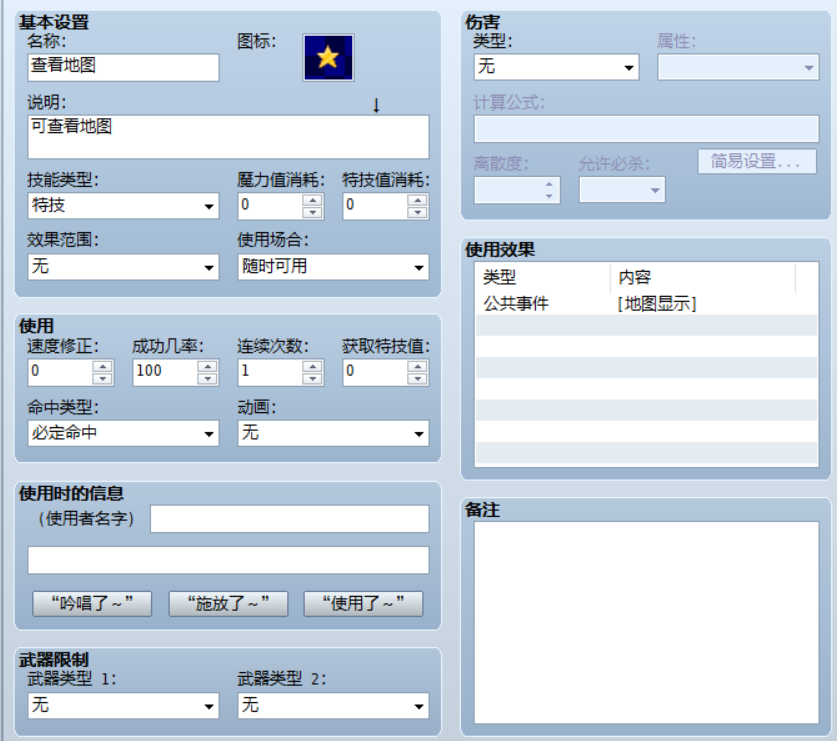
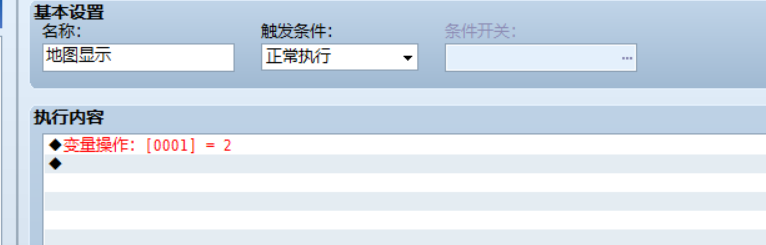
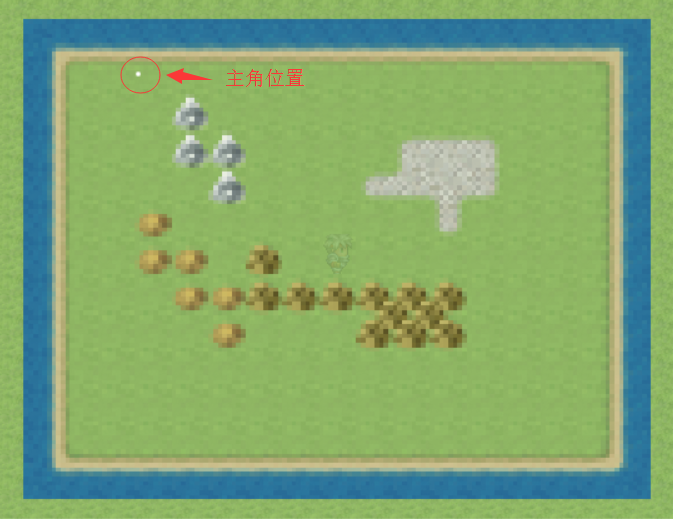
然后,先看这个脚本的注释得知了使用方法是通过改变变量1的值来显示地图,而地图文件则需要放进Graphics/System/文件夹里
那么变量1的值为2的时候则在正中央显示整张地图(具体看注释)
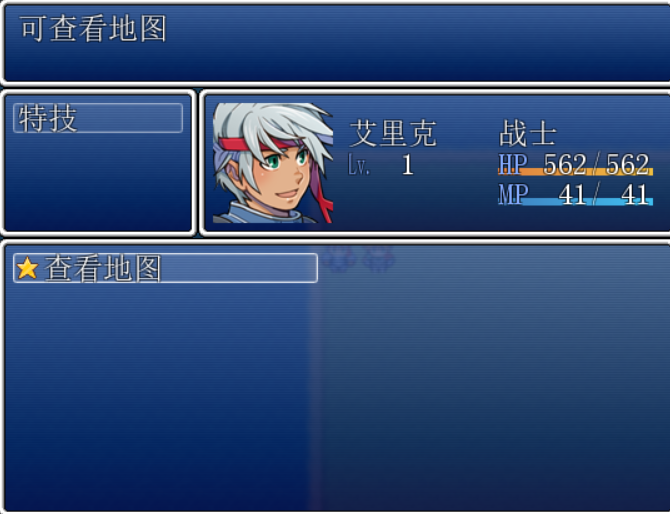
于是,我们就开始制作技能了。
|
评分
-
查看全部评分
|




 写轮眼
写轮眼

 提升卡
提升卡 沉默号角
沉默号角 喧嚣号角
喧嚣号角 变色卡
变色卡 升龙剑
升龙剑




