| 赞 | 8 |
| VIP | |
| 好人卡 | |
| 积分 | 24 |
| 经验 | |
| 最后登录 | 2026-11-23 |
| 在线时间 | 1014 小时 |
- 梦石
- 0
- 星屑
- 2378
- 在线时间
- 1014 小时
- 注册时间
- 2012-4-30
- 回帖
- 1459

|
加入我们,或者,欢迎回来。
您需要 登录 才可以下载或查看,没有账号?注册会员
×
本帖最后由 铅笔描绘的思念 于 2017-6-11 12:25 编辑
前几天提问的本体哈自己瞎糊解决了 是createLinearGradient参数给常数了= =b
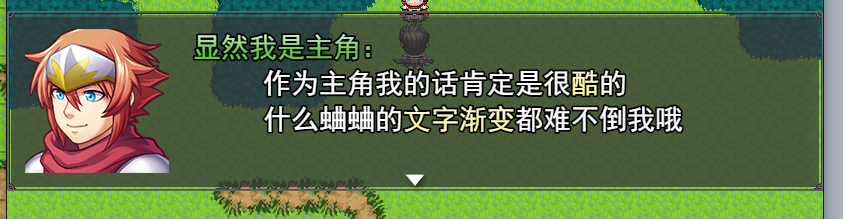
其实想要这个效果是因为VX上有描绘有颜色的渐变文字的效果很惊艳的
记得那时候VS开始都很多优质的VX游戏都会加上这个效果 MV有canvas非常简单的糊出来
还有位dalao提醒PIXI.Text也能做出渐变的效果 然后并没有研究出来=。=
就把瞎糊的贴出来好了效果配合全局控制字符调教的好的话其实很棒的。。
全局控制字符的话发现其实网上很多况且我糊的也不怎么样
效果图
- //=============================================================================
- // Bitmap&DrawTextEx.js
- //=============================================================================
- (function() {
- Bitmap.prototype._drawTextBody = function(text, tx, ty, maxWidth) {
- this.gradientFillText(text, tx, ty, maxWidth, "#fff", this.textColor)
- };
- Bitmap.prototype.gradientFillText = function(text, x, y, mWidth, color1,
- color2) {
- var context = this._context;
- var grad;
- grad = context.createLinearGradient(x, y-this.fontSize, x, y);
- grad.addColorStop(0, color1);
- grad.addColorStop(0.8, color2);
- context.save();
- context.fillStyle = grad;
- context.fillText(text, x, y, mWidth);
- context.restore();
- this._setDirty();
- };
- var _bitmapDrawTextEx_initialize =Bitmap.prototype.initialize;
- Bitmap.prototype.initialize = function(width,height) {
- _bitmapDrawTextEx_initialize.call(this,width,height)
- this.outlineColor = '#000';
- }
- })();
如果不需要修改文字描边不透明的话吧initizlize那段删了就好 color1的话白色效果最好不建议改
addColorStop(0.8, color2) 0.8这个参数我也是试了好多次觉得0.8效果最好 |
评分
-
查看全部评分
|




 写轮眼

 发表于 2017-6-11 12:23:15


 提升卡
 沉默号角
 喧嚣号角
 变色卡
 升龙剑

