| 赞 | 12 |
| VIP | |
| 好人卡 | |
| 积分 | 13 |
| 经验 | |
| 最后登录 | 2023-9-26 |
| 在线时间 | 378 小时 |
- 梦石
- 0
- 星屑
- 1345
- 在线时间
- 378 小时
- 注册时间
- 2015-6-16
- 回帖
- 526
|
加入我们,或者,欢迎回来。
您需要 登录 才可以下载或查看,没有账号?注册会员
×
本帖最后由 300英雄 于 2017-7-31 11:57 编辑
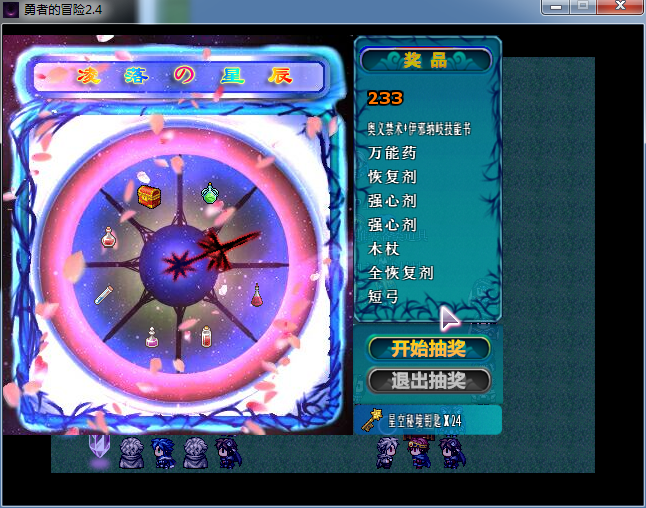
■ 转转乐(转盘式抽奖游戏)<VA> ■ -> by 芯☆淡茹水
[pre lang="ruby"]#==============================================================================
# ■ 转转乐(转盘式抽奖游戏)<VA> ■ -> by 芯☆淡茹水
#==============================================================================
#
# ■ 使用方法:复制该脚本,插入到 main 前,并复制范例工程 Graphics\Pictures
# 文件夹下所有图片到目标游戏工程。
#
# 呼出抽奖场景方法:事件 -> 脚本:SceneManager.call(Scene_Prize)
#
#==============================================================================
#
# ■ 说明: 1,该转盘抽奖为随机,制作者不能控制(作弊)。制作者需要把可以抽奖
# 的物品ID对应的填入下面的设置项即可。
#
# 2,每一盘抽奖的物品不会重复,得到的物品数量为 1 。
#
# 3,该范例仅支持 24 X 24 的物品图标 。
#
# 4,该范例的图片来源于网络。
#==============================================================================
module X☆R
#==============================================================================
# ■ 设置:↓
#-------------------------------------------------------------------------
# 消耗方式(0 固定金钱; 1 变量指定金钱; 2 消耗物品<数量为1>)。
Consumption_mode = 2
#-------------------------------------------------------------------------
# 消耗方式为 0 时,抽奖一次需要的金钱。
Need_gold = 1000
#-------------------------------------------------------------------------
# 消耗方式为 1 时,抽奖一次需要的指定金钱的变量ID。
Need_gold_var = 67
#-------------------------------------------------------------------------
# 消耗方式为 2 时,抽奖一次需要的物品ID。
Need_item_id = 119
#-------------------------------------------------------------------------
# 场景BGM(不需要就写空白引号 "" )。
Bgm_name = "英灵召唤"
#-------------------------------------------------------------------------
# 转针转动时播放的SE。
Change_se = "Coin"
#-------------------------------------------------------------------------
# 转针停止时播放的SE。
Stop_se = "Item2"
#-------------------------------------------------------------------------
# 可以出现在转盘里的普通物品ID。
Prize_items1 = [1,2,3,4,5,6,7,8,182]
#-------------------------------------------------------------------------
# 可以出现在转盘里的珍贵物品ID。
Prize_items2 = [70,71,72,78,84,85,114,56,80,81,82,83,84,103,97,120,121,22,23,24,25,26,27,28,29,43,45,123,124,125,126,127,140,141,142,143,144,145,146,147,148,149,150,151,152,153,154,155,172,173,174,175,176,177,178,179,180]
#-------------------------------------------------------------------------
# 可以出现在转盘里的普通武器ID。
Prize_weapons1 = [19,7,13,25,31,37,49]
#-------------------------------------------------------------------------
# 可以出现在转盘里的珍贵武器ID。
Prize_weapons2 = [72,73,74,75,78,80,76,77,79,81,85,86,81,82,83,84]
#-------------------------------------------------------------------------
# 可以出现在转盘里的普通防具ID。
Prize_armors1 = [1]
#-------------------------------------------------------------------------
# 可以出现在转盘里的珍贵防具ID。
Prize_armors2 = [82,83,84,85,86,87,88,89,105,106,107,108,109,110,111,112,113,114,115,116,117,118,119,120,121,122,123,124,125,126,127,128,129,130,131]
#-------------------------------------------------------------------------
# 物品在转盘里出现的几率(百分比)。
Item_rate = 95
#-------------------------------------------------------------------------
# 珍贵物品出现的概率为总物品数的(百分比)。
Precious_item_rate = 10
#-------------------------------------------------------------------------
# 武器在转盘里出现的几率(百分比)。
Weapon_rate = 10
#-------------------------------------------------------------------------
# 珍贵武器出现的概率为总武器数的(百分比)。
Precious_weapon_rate = 25
#-------------------------------------------------------------------------
# 防具在转盘里出现的几率(百分比)。
Armor_rate = 10
#-------------------------------------------------------------------------
# 珍贵防具出现的概率为总防具数的(百分比)。
Precious_armor_rate = 25
#==========================================================================
#==========================================================================
# ■ 脚本正文 ↓
#==========================================================================
def self.can_start?
case Consumption_mode
when 0
return ($game_party.gold >= Need_gold)
when 1
return ($game_party.gold >= $game_variables[Need_gold_var])
when 2
return ($game_party.item_number($data_items[Need_item_id]) >= 1)
end
end
#-------------------------------------------------------------------------
def self.consumption
case Consumption_mode
when 0
$game_party.lose_gold(Need_gold)
when 1
$game_party.lose_gold($game_variables[Need_gold_var])
when 2
$game_party.lose_item($data_items[Need_item_id], 1)
end
end
end
#==============================================================================
class Game_System
attr_accessor :prize_items
end
#==============================================================================
class Change < Sprite
#-------------------------------------------------------------------------
def initialize
super()
self.bitmap = Bitmap.new("Graphics/Pictures/转盘背景")
self.x = 0; self.y = 10; self.z = 500
@tit = Sprite.new
@tit.bitmap = Bitmap.new("Graphics/Pictures/转盘标题")
@tit.x = self.x + 50; @tit.y = self.y + 24; @tit.z = 600
@item_sprite = []
for i in 0..7
@item_sprite = Sprite.new
@item_sprite.bitmap = Bitmap.new(24,24)
@item_sprite.x, @item_sprite.y = get_item_place(i)
@item_sprite.x += self.x; @item_sprite.y += self.y
@item_sprite.z = 600
end
@zhen = Sprite.new
@zhen.bitmap = Bitmap.new("Graphics/Pictures/转盘指针")
@zhen.ox = @zhen.bitmap.width / 2; @zhen.oy = @zhen.bitmap.height / 2
@zhen.x = self.x + 176; @zhen.y = self.y + 230; @zhen.z = 700
@zhen.angle = 337.5
@item_index = 0
end
#-------------------------------------------------------------------------
def dispose
@item_sprite.each{|w| w.bitmap.dispose; w.dispose}
@tit.bitmap.dispose
@zhen.bitmap.dispose
self.bitmap.dispose
@tit.dispose
@zhen.dispose
super
end
#-------------------------------------------------------------------------
def get_item_place(index)
case index
when 0
return 195, 146
when 1
return 238, 186
when 2
return 242, 248
when 3
return 192, 290
when 4
return 138, 290
when 5
return 90, 247
when 6
return 94, 190
when 7
return 134, 150
end
end
#-------------------------------------------------------------------------
def item_index
return @item_index
end
#-------------------------------------------------------------------------
def set_items(items)
@item_sprite.each{|w| w.bitmap.clear}
return if items == []
for i in 0..7
item = items
bitmap = Cache.system("Iconset")
rect = Rect.new(item.icon_index % 16 * 24, item.icon_index / 16 * 24, 24, 24)
@item_sprite.bitmap.blt(0, 0, bitmap, rect)
end
end
#-------------------------------------------------------------------------
def zhuan
Audio.se_play("Audio/SE/#{X☆R::Change_se}", 100, 100)
@zhen.angle -= 45
@item_index = (@item_index+1) % 8
end
end
#==============================================================================
class Prize < Sprite
#-------------------------------------------------------------------------
def initialize
super()
self.x = 350; self.y = 10; self.z = 500
@messages = []
end
#-------------------------------------------------------------------------
def dispose
self.bitmap.dispose if self.bitmap
super
end
#-------------------------------------------------------------------------
def add_mess(txt)
@messages.unshift(txt)
end
#-------------------------------------------------------------------------
def set_messages
self.bitmap.dispose if self.bitmap
self.bitmap = Bitmap.new("Graphics/Pictures/奖品背景")
return if @messages == []
x = 14; y = 52
self.bitmap.font.bold = true
for i in 0...@messages.size
self.bitmap.font.size = (i == 0 ? 20 : 16)
txt = @messages
if i == 0
self.bitmap.font.color = Color.new(0,0,0)
self.bitmap.draw_text(x-1, y-1, 120, 22, txt)
self.bitmap.draw_text(x-1, y+1, 120, 22, txt)
self.bitmap.draw_text(x-1, y-1, 120, 22, txt)
self.bitmap.draw_text(x+1, y-1, 120, 22, txt)
end
self.bitmap.font.color = (i == 0 ? Color.new(255,120,0) : Color.new(255,255,255))
self.bitmap.draw_text(x, y, 120, 22, txt)
y += (i == 0 ? 32 : 24)
end
end
#-------------------------------------------------------------------------
def update
super
@messages.pop until @messages.size <= 9
if @data_mes != @messages
@data_mes = @messages.clone
set_messages
end
end
end
#==============================================================================
class Prize_Cam < Sprite
#--------------------------------------------------------------------------
def initialize
super()
self.x = 350; self.y = 299; self.z = 500
@cm_index = 0
end
#-------------------------------------------------------------------------
def dispose
self.bitmap.dispose if self.bitmap
super
end
#--------------------------------------------------------------------------
def set_cam
self.bitmap.dispose if self.bitmap
self.bitmap = Bitmap.new("Graphics/Pictures/抽奖选择#{@cm_index}")
end
#--------------------------------------------------------------------------
def index
return @cm_index
end
#--------------------------------------------------------------------------
def update
super
if Input.trigger?(:DOWN)
@cm_index = (@cm_index + 1) % 2
elsif Input.trigger?(:UP)
@cm_index -= 1
@cm_index = 1 if @cm_index < 0
end
if @data_index != @cm_index
Sound.play_cursor unless @data_index.nil?
@data_index = @cm_index
set_cam
end
end
end
#==============================================================================
class Prize_Gold < Sprite
#-------------------------------------------------------------------------
def initialize
super()
self.x = 349; self.y = 378; self.z = 500
end
#-------------------------------------------------------------------------
def dispose
self.bitmap.dispose if self.bitmap
super
end
#-------------------------------------------------------------------------
def set_show
self.bitmap.dispose if self.bitmap
self.bitmap = Bitmap.new("Graphics/Pictures/金钱窗口背景")
self.bitmap.font.bold = true
self.bitmap.font.color = Color.new(255,255,255)
if X☆R::Consumption_mode == 2
self.bitmap.font.size = 18
item = $data_items[X☆R::Need_item_id]
bitmap = Cache.system("Iconset")
rect = Rect.new(item.icon_index % 16 * 24, item.icon_index / 16 * 24, 24, 24)
self.bitmap.blt(8, 5, bitmap, rect)
txt = "#{item.name} X #{$game_party.item_number(item)}"
self.bitmap.draw_text(36, 2, 110, 32, txt)
else
self.bitmap.font.size = 20
self.bitmap.draw_text(0, 2, 100, 32, $game_party.gold.to_s, 2)
self.bitmap.font.color = Color.new(192, 224, 255)
self.bitmap.draw_text(102, 2, 48, 32, $data_system.currency_unit, 1)
end
end
#-------------------------------------------------------------------------
def update
super
if X☆R::Consumption_mode == 2
if @data_num != $game_party.item_number($data_items[X☆R::Need_item_id])
@data_num = $game_party.item_number($data_items[X☆R::Need_item_id])
set_show
end
else
if @data_gold != $game_party.gold
@data_gold = $game_party.gold
set_show
end
end
end
end
#==============================================================================
class Scene_Prize < Scene_Base
#--------------------------------------------------------------------------
def start
@spriteset = Spriteset_Map.new
@zhuan = Change.new
@prize = Prize.new
@command = Prize_Cam.new
@gold = Prize_Gold.new
@wait_count = 0
@zhuan_count = 0
@count = 0
@speed = 1
set_prize_items
if X☆R::Bgm_name != ""
Audio.bgm_play("Audio/BGM/#{X☆R::Bgm_name}", 100, 100)
end
end
#--------------------------------------------------------------------------
def pre_terminate
@zhuan.dispose
@prize.dispose
@command.dispose
@gold.dispose
@spriteset.dispose
end
#--------------------------------------------------------------------------
def dispose_main_viewport
end
#--------------------------------------------------------------------------
def update
super
@zhuan.update
@prize.update
@command.update
@gold.update
if @wait_count > 0
@wait_count -= 1
return
end
if @zhuan_count > 0
@mess = ""
update_zhuan
return
end
if Input.trigger?(Input::C)
case @command.index
when 0
unless X☆R::can_start?
Sound.play_buzzer
return
end
Sound.play_ok
X☆R::consumption
set_prize_items if @count > 0
@zhuan_count = rand(150) + 150
when 1
Sound.play_cancel
SceneManager.call(Scene_Map)
end
end
end
#--------------------------------------------------------------------------
def update_zhuan
if @zhuan_count % @speed == 0
@speed = [@speed + [(100 - @zhuan_count) / 20, 0].max, 6].min
@zhuan.zhuan
end
@zhuan_count -= 1
if @zhuan_count == 0
Audio.se_play("Audio/SE/#{X☆R::Stop_se}", 100, 100)
@speed = 1
@count += 1
get_prize
@wait_count = 60
end
end
#--------------------------------------------------------------------------
def get_prize
item = @prize_items[@zhuan.item_index]
return if item.nil?
$game_party.gain_item(item, 1)
$game_system.prize_items = []
@prize.add_mess(item.name)
end
#--------------------------------------------------------------------------
def set_prize_items
@prize_items = []
if $game_system.prize_items != nil and $game_system.prize_items != []
@prize_items = $game_system.prize_items.clone
else
set_item_mod until @prize_items.size >= 8
$game_system.prize_items = @prize_items.clone
end
@zhuan.set_items(@prize_items)
end
#--------------------------------------------------------------------------
def set_item_mod
case rand (100)
when 0...X☆R::Item_rate
if rand(100) < X☆R::Precious_item_rate
mod = X☆R::Prize_items1 + X☆R::Prize_items2
else
mod = X☆R::Prize_items1.clone
end
item = $data_items[mod[rand(mod.size)]]
@prize_items << item unless @prize_items.include?(item)
when X☆R::Item_rate...(X☆R::Item_rate + X☆R::Weapon_rate)
if rand(100) < X☆R::Precious_weapon_rate
mod = X☆R::Prize_weapons1 + X☆R::Prize_weapons2
else
mod = X☆R::Prize_weapons1.clone
end
item = $data_weapons[mod[rand(mod.size)]]
@prize_items << item unless @prize_items.include?(item)
else
if rand(100) < X☆R::Precious_armor_rate
mod = X☆R::Prize_armors1 + X☆R::Prize_armors2
else
mod = X☆R::Prize_armors1.clone
end
item = $data_armors[mod[rand(mod.size)]]
@prize_items << item unless @prize_items.include?(item)
end
end
end
#==============================================================================[/pre]
1.请问怎么做到多个转盘呢:一个地方我可以设置很多个不同的转盘
A——转盘是一个独立的
B——转盘又是一一个独立的
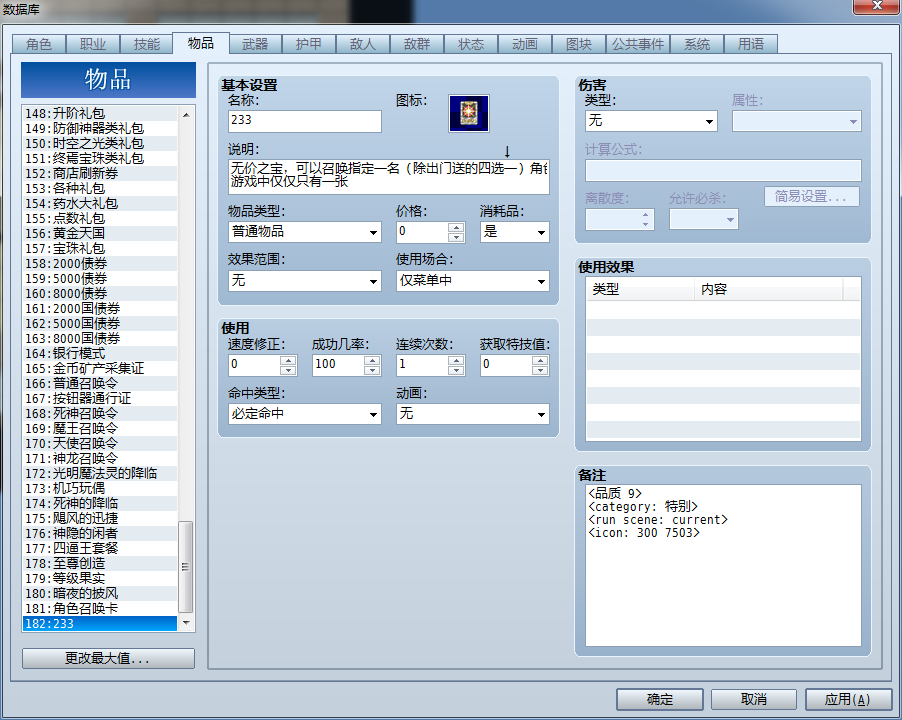
2.兼容一下下面脚本<图标支援>(转盘里面无法显示图标支援指定的图标,只能显示默认数据库的)<icon: 300 8051> (300这个ICON文件名中8051号ID图标) <icon: name index>这个是格式
系统本身是使用IconSet的,我又添加了另一个叫做300的IconSet。脚本Icon_Sheets这个地方设定"300" = > [24,24],然后物品/技能/装备/状态设置<icon: 300 8051>然后去转盘里运行发现一个空白的,抽到以后就是我数据库设定ICON的物品。所以想问问怎么让转盘也能显示
[pre lang="ruby"]=begin
#===============================================================================
Title: Custom Icon Sheets
Author: Hime
Date: Jun 1, 2016
--------------------------------------------------------------------------------
** Change log
Jun 1, 2015
- added patch for yanfly's ace item menu
May 27, 2015
- fixed bug with yanfly's shop options
Jun 13, 2013
- icon width and height is now specified for each sheet individually
Mar 31, 2013
- now correctly draws icons of non-default sizes
Mar 25, 2013
- Initial release
--------------------------------------------------------------------------------
** Terms of Use
* Free to use in non-commercial projects
* Contact me for commercial use
* No real support. The script is provided as-is
* Will do bug fixes, but no compatibility patches
* Features may be requested but no guarantees, especially if it is non-trivial
* Credits to Hime Works in your project
* Preserve this header
--------------------------------------------------------------------------------
** Description
This script allows you to designate which icon sheet you want to draw your
icon from. This allows you to organize your icons so that you don't need
to load one large iconset just to draw one icon.
--------------------------------------------------------------------------------
** Installation
Place this script below Materials and above Main
--------------------------------------------------------------------------------
** Usage
-- Installation --
Place this script below Materials and above Main.
-- Setting up custom icon sheets --
Place any custom icon sheets in your Graphics/System folder.
In the configuration below, add the filenames (without extensions) to the
`Icon_Sheets` array. You must also include the default icon sheet to use,
which is "Iconset"
-- Using custom icon indices --
Now that you have set up your icon sheets, you can begin using them.
In your database, note-tag objects with
<icon: name index>
Where
`name` is the exact filename of the icon index, without extensions
`index` is the index of the icon in the specified file.
--------------------------------------------------------------------------------
** Compatibility
This script overwrites the following methods:
Window_Base
draw_icon
#===============================================================================
=end
$imported = {} if $imported.nil?
$imported["TH_CustomIconSheets"] = true
#===============================================================================
# ** Configuration
#===============================================================================
module TH
module Custom_Icon_Sheets
# List of icon sheets to load. Case-insensitive.
# All icon sheets must be placed in the System folder
# You must provide the dimensions of the icons as well
Icon_Sheets = {
"Iconset" => [24, 24],
"300" => [24, 24],
"最终" => [24, 24],
"TLX" => [24, 24],
#"CustomIcons" => [24, 24],
#"LargeIcons" => [65, 65]
}
# The default sheet to use if none is specified
Default_Sheet = "Iconset"
# Note-tag format.
Regex = /<icon:\s*(\w+)\s*(\d+)>/i
#===============================================================================
# ** Rest of script
#===============================================================================
#---------------------------------------------------------------------------
# Each sheet starts at a specific icon index.
#---------------------------------------------------------------------------
def self.icon_offsets
@icon_offsets
end
#---------------------------------------------------------------------------
# Load all icon sheets. This script uses a look-up table to map icon
# indices to specific icon sheets.
#---------------------------------------------------------------------------
def self.load_sheets
@icon_offsets = {}
@icon_table = []
icon_count = 0
Icon_Sheets.each {|sheet, (width, height)|
sheet = sheet.downcase
bmp = Cache.system(sheet)
# update the "icon index offset" for the current icon sheet.
# This is used by the look-up table to determine how the icon index
# is offset
@icon_offsets[sheet] = icon_count
@icon_table.push([sheet, icon_count, width, height])
# number of icons per sheet is given by the number of icons per row
# times the number of icons per height, including empty spaces.
icon_count += (bmp.width / width) * (bmp.height / height)
}
# store the icon table in reverse order
@icon_table.reverse!
end
def self.load_icon_sheet(index)
@icon_table.each {|sheet, offset, width, height|
if index >= offset
index -= offset
return Cache.system(sheet), index, width, height
end
}
end
end
end
module RPG
class BaseItem
def icon_sheet
return @icon_sheet unless @icon_sheet.nil?
load_notetag_custom_icon_sheet
return @icon_sheet
end
def load_notetag_custom_icon_sheet
res = self.note.match(TH::Custom_Icon_Sheets::Regex)
if res
@icon_sheet = res[1].downcase
@custom_icon_index = res[2].to_i
else
@icon_sheet = TH::Custom_Icon_Sheets::Default_Sheet.downcase
@custom_icon_index = @icon_index
end
end
alias :th_custom_icon_sheets_icon_index :icon_index
def icon_index
parse_custom_icon_index unless @custom_icon_index_checked
th_custom_icon_sheets_icon_index
end
#---------------------------------------------------------------------------
# Automatically updates the icon index based on the appropriate icon sheet
# to use.
#---------------------------------------------------------------------------
def parse_custom_icon_index
# offset the index as necessary, using the icon sheet to look up the offset
self.icon_index = TH::Custom_Icon_Sheets.icon_offsets[self.icon_sheet] + @custom_icon_index
@custom_icon_index_checked = true
end
end
end
module DataManager
class << self
alias :th_custom_icon_sheets_load_database :load_database
end
#-----------------------------------------------------------------------------
# Prepare the custom icon database
#-----------------------------------------------------------------------------
def self.load_database
th_custom_icon_sheets_load_database
TH::Custom_Icon_Sheets.load_sheets
end
end
class Window_Base < Window
#-----------------------------------------------------------------------------
# Overwrite. Get the appropriate bitmap to draw from.
#-----------------------------------------------------------------------------
def draw_icon(icon_index, x, y, enabled = true)
bitmap, icon_index, icon_width, icon_height = TH::Custom_Icon_Sheets.load_icon_sheet(icon_index)
rect = Rect.new(icon_index % 16 * icon_width, icon_index / 16 * icon_height, icon_width, icon_height)
contents.blt(x, y, bitmap, rect, enabled ? 255 : translucent_alpha)
end
end
#===============================================================================
# Compatibility patches. This script must be placed under the other scripts
#===============================================================================
class CSCA_Window_EncyclopediaInfo < Window_Base
def csca_draw_icon(item)
if item.csca_custom_picture == ""
bitmap, icon_index, icon_width, icon_height = TH::Custom_Icon_Sheets.load_icon_sheet(icon_index)
rect = Rect.new(icon_index % 16 * icon_width, icon_index / 16 * icon_height, icon_width, icon_height)
target = Rect.new(0,0,72,72)
contents.stretch_blt(target, bitmap, rect)
else
bitmap = Bitmap.new("Graphics/Pictures/"+item.csca_custom_picture+".png")
target = Rect.new(0,0,72,72)
contents.stretch_blt(target, bitmap, bitmap.rect, 255)
end
end
end if $imported["CSCA-Encyclopedia"]
#===============================================================================
# Compatibility with Yanfly Ace Shop Options: drawing custom icon in shop
#===============================================================================
class Window_ShopData < Window_Base
def draw_item_image
colour = Color.new(0, 0, 0, translucent_alpha/2)
rect = Rect.new(1, 1, 94, 94)
contents.fill_rect(rect, colour)
if @item.image.nil?
bitmap, icon_index, icon_width, icon_height = TH::Custom_Icon_Sheets.load_icon_sheet(@item.icon_index)
rect = Rect.new(icon_index % 16 * icon_width, icon_index / 16 * icon_height, icon_width, icon_height)
target = Rect.new(0, 0, 96, 96)
contents.stretch_blt(target, bitmap, rect)
else
bitmap = Cache.picture(@item.image)
contents.blt(0, 0, bitmap, bitmap.rect, 255)
end
end
end if $imported["YEA-ShopOptions"]
#===============================================================================
# Compatibility with Yanfly Ace Item Menu: drawing custom icon in item menu
#===============================================================================
class Window_ItemStatus < Window_Base
def draw_item_image
colour = Color.new(0, 0, 0, translucent_alpha/2)
rect = Rect.new(1, 1, 94, 94)
contents.fill_rect(rect, colour)
if @item.image.nil?
bitmap, icon_index, icon_width, icon_height = TH::Custom_Icon_Sheets.load_icon_sheet(@item.icon_index)
rect = Rect.new(icon_index % 16 * icon_width, icon_index / 16 * icon_height, icon_width, icon_height)
target = Rect.new(0, 0, 96, 96)
contents.stretch_blt(target, bitmap, rect)
else
bitmap = Cache.picture(@item.image)
contents.blt(0, 0, bitmap, bitmap.rect, 255)
end
end
end if $imported["YEA-ItemMenu"][/pre]
|
|



 写轮眼
写轮眼
 发表于 2017-7-31 11:51:42
 提升卡
提升卡 沉默号角
沉默号角 喧嚣号角
喧嚣号角 变色卡
变色卡 升龙剑
升龙剑