| 赞 | 0 |
| VIP | |
| 好人卡 | |
| 积分 | 1 |
| 经验 | |
| 最后登录 | 2017-8-20 |
| 在线时间 | 8 小时 |
- 梦石
- 0
- 星屑
- 50
- 在线时间
- 8 小时
- 注册时间
- 2017-8-6
- 回帖
- 4
|
楼主 |
发表于 2017-8-6 21:54:18
|
显示全部楼层
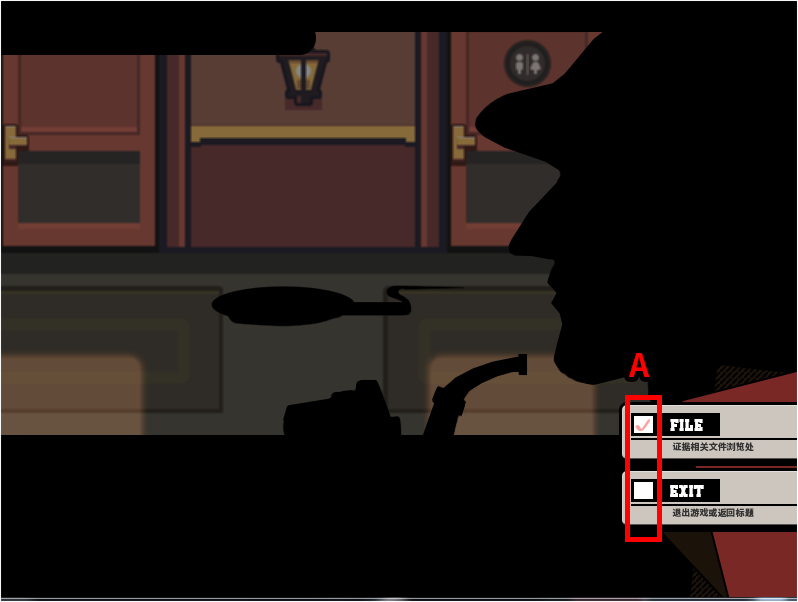
--------------------------------------------------------------【关于主菜单的插入脚本】-----------------------------------------------------------------------------------------------------------------------------
[pre lang="ruby"]class Window_Selectable < Window_Base
#--------------------------------------------------------------------------
# ● 更新光标
#--------------------------------------------------------------------------
def update_cursor
if @cursor_all
cursor_rect.set(0, 0, 24, row_max * item_height)#(0, 0, contents.width, row_max * item_height)
self.top_row = 0
elsif @index < 0
cursor_rect.empty
else
ensure_cursor_visible
cursor_rect.set(0, index / col_max * item_height, 24, item_height)#(item_rect(@index))
end
end
def item_rect(index)
rect = Rect.new
rect.width = item_width
rect.height = item_height
rect.x = index % col_max * (item_width + spacing) + 24
rect.y = index / col_max * item_height
rect
end
end
#-----------------------------------------------
class Window_MenuCommand < Window_Command
#--------------------------------------------------------------------------
# ● 初始化指令选择位置(类方法)
#--------------------------------------------------------------------------
def self.init_command_position
@@last_command_symbol = nil
end
#--------------------------------------------------------------------------
# ● 初始化对象(备注初始630 520)
#--------------------------------------------------------------------------
def initialize
super(619, 404)
select_last
self.opacity = 0
end
#--------------------------------------------------------------------------
# ● 获取窗口的宽度
#--------------------------------------------------------------------------
def window_width
return 260
end
#--------------------------------------------------------------------------
# ● 获取显示行数
#--------------------------------------------------------------------------
def visible_line_number
item_max
end
#--------------------------------------------------------------------------
# ● 生成指令列表
#--------------------------------------------------------------------------
def make_command_list
add_main_commands
add_game_end_command
end
#--------------------------------------------------------------------------
# ● 向指令列表添加主要的指令
#--------------------------------------------------------------------------
def add_main_commands
add_command((""), :item, main_commands_enabled)
end
#--------------------------------------------------------------------------
# ● 独自添加指令用
#--------------------------------------------------------------------------
#--------------------------------------------------------------------------
# ● 添加存档指令
#--------------------------------------------------------------------------
def add_save_command
add_command(Vocab::save, :save, save_enabled)
end
#--------------------------------------------------------------------------
# ● 添加游戏结束指令
#--------------------------------------------------------------------------
def add_game_end_command
add_command((""), :game_end)
end
#--------------------------------------------------------------------------
# ● 获取主要指令的有效状态
#--------------------------------------------------------------------------
def main_commands_enabled
$game_party.exists
end
#--------------------------------------------------------------------------
# ● 获取存档的有效状态
#--------------------------------------------------------------------------
def save_enabled
!$game_system.save_disabled
end
#--------------------------------------------------------------------------
# ● 按下确定键时的处理
#--------------------------------------------------------------------------
def process_ok
Audio.se_play("Audio/SE/进入菜单.OGG")
@@last_command_symbol = current_symbol
super
end
#--------------------------------------------------------------------------
# ● 返回最后一个选项的位置
#--------------------------------------------------------------------------
def select_last
select_symbol(@@last_command_symbol)
end
end
#---------------------------------------
class Window_GameEnd < Window_Command
#--------------------------------------------------------------------------
# ● 初始化对象
#--------------------------------------------------------------------------
def initialize
super(0, 0)
update_placement
self.openness = 0
self.opacity = 0
open
end
#--------------------------------------------------------------------------
# ● 获取窗口的宽度
#--------------------------------------------------------------------------
def window_width
return 160
end
#--------------------------------------------------------------------------
# ● 更新窗口的位置[225 213]
#--------------------------------------------------------------------------
def update_placement
self.x = 225
self.y = 213
end
#--------------------------------------------------------------------------
# ● 生成指令列表
#--------------------------------------------------------------------------
def make_command_list
add_command((""), :to_title)
add_command((""), :shutdown)
add_command((""), :cancel)
end
end
#encoding:utf-8
#==============================================================================
# ■ Window_ItemList
#------------------------------------------------------------------------------
# 物品画面中,显示持有物品的窗口。
#==============================================================================
class Window_ItemList < Window_Selectable
#--------------------------------------------------------------------------
# ● 初始化对象
#--------------------------------------------------------------------------
def initialize(x, y, width, height)
super
self.opacity = 0
@category = :none
@data = []
end
#--------------------------------------------------------------------------
# ● 设置分类
#--------------------------------------------------------------------------
def category=(category)
return if @category == category
@category = category
refresh
self.oy = 0
end
#--------------------------------------------------------------------------
# ● 获取列数
#--------------------------------------------------------------------------
def col_max
return 1
end
#--------------------------------------------------------------------------
# ● 获取项目数
#--------------------------------------------------------------------------
def item_max
@data ? @data.size : 1
end
#--------------------------------------------------------------------------
# ● 获取物品
#--------------------------------------------------------------------------
def item
@data && index >= 0 ? @data[index] : nil
end
#--------------------------------------------------------------------------
# ● 获取选择项目的有效状态
#--------------------------------------------------------------------------
def current_item_enabled?
enable?(@data[index])
end
#--------------------------------------------------------------------------
# ● 查询列表中是否含有此物品
#--------------------------------------------------------------------------
def include?(item)
case @category
when :item
item.is_a?(RPG::Item) && !item.key_item?
when :weapon
item.is_a?(RPG::Weapon)
when :armor
item.is_a?(RPG::Armor)
when :key_item
item.is_a?(RPG::Item) && item.key_item?
else
false
end
end
#--------------------------------------------------------------------------
# ● 查询此物品是否可用
#--------------------------------------------------------------------------
def enable?(item)
$game_party.usable?(item)
end
#--------------------------------------------------------------------------
# ● 生成物品列表
#--------------------------------------------------------------------------
def make_item_list
@data = $game_party.all_items.select {|item| include?(item) }
@data.push(nil) if include?(nil)
end
#--------------------------------------------------------------------------
# ● 返回上一个选择的位置
#--------------------------------------------------------------------------
def select_last
select(@data.index($game_party.last_item.object) || 0)
end
#--------------------------------------------------------------------------
# ● 绘制项目 4
#--------------------------------------------------------------------------
def draw_item(index)
item = @data[index]
if item
rect = item_rect(index)
rect.width -= 4
draw_item_name(item, rect.x, rect.y, enable?(item))
end
end
#--------------------------------------------------------------------------
# ● 绘制物品个数
#--------------------------------------------------------------------------
def draw_item_number(rect, item)
draw_text(rect, sprintf(":%2d", $game_party.item_number(item)), 2)
end
#--------------------------------------------------------------------------
# ● 更新帮助内容
#--------------------------------------------------------------------------
def update_help
@help_window.set_item(item)
end
#--------------------------------------------------------------------------
# ● 刷新
#--------------------------------------------------------------------------
def refresh
make_item_list
create_contents
draw_all_items
end
end
#————————————————————————
class Window_ItemList < Window_Selectable
def process_ok
if current_item_enabled?
Audio.se_play("Audio/SE/确定.OGG")
Input.update
deactivate
call_ok_handler
else
Audio.se_play("Audio/SE/退出.OGG")
end
end
def process_cancel
Audio.se_play("Audio/SE/关ITEM菜单.OGG")
Input.update
deactivate
call_cancel_handler
end
end
#----------------物品名称的颜色更改------------------------
class Window_Base < Window
def draw_item_name(item, x, y, enabled = true, width = 172)
return unless item
self.contents.font.color = Color.new(0, 0, 0, 255)
self.contents.font.outline = false
draw_text(x + 2, y, width, line_height, item.name)
end
end
#---------------------------
class Window_ItemPicture < Window_Selectable
def initialize(x, y, width, height)
super
self.opacity = 0
refresh
end
def set_item(item)
@item = item
refresh
end
def refresh
return unless @item
self.contents.clear
bitmap = Cache.system(@item.name)
rect = Rect.new(0, 0,bitmap.width, bitmap.height)
contents.blt(0, 0, bitmap, rect, 255)
bitmap.dispose
end
def process_ok
if current_item_enabled?
Audio.se_play("Audio/SE/确定.OGG")
Input.update
deactivate
call_ok_handler
else
Audio.se_play("Audio/SE/退出.OGG")
end
def process_cancel
Audio.se_play("Audio/SE/退出.OGG")
Input.update
deactivate
call_cancel_handler
end
end
end
#encoding:utf-8
#==============================================================================
# ■ Scene_Menu
#------------------------------------------------------------------------------
# 菜单画面
#==============================================================================
class Scene_Menu < Scene_MenuBase
#--------------------------------------------------------------------------
# ● 开始处理
#--------------------------------------------------------------------------
def start
super
create_command_window
end
#--------------------------------------------------------------------------
# ● 生成指令窗口
#--------------------------------------------------------------------------
def create_command_window
@command_window = Window_MenuCommand.new
@command_window.set_handler(:item, method(:command_item))
@command_window.set_handler(:game_end, method(:command_game_end))
@command_window.set_handler(:cancel, method(:return_scene))
end
#--------------------------------------------------------------------------
# ● 指令“存档”
#--------------------------------------------------------------------------
def command_save
SceneManager.call(Scene_Save)
end
#--------------------------------------------------------------------------
# ● 指令“物品”
#--------------------------------------------------------------------------
def command_item
create_status_window
create_pic_window
create_itemback
end
#225,213,210,160 物品名字的坐标 (横、纵、 窗口大小)
#230,400,338,198
def create_status_window
@status_window = Window_ItemList.new(5,155,200,255)
@status_window.viewport = @viewport
@status_window.help_window = @help_window
@status_window.category = :item
@status_window.activate
@status_window.index = 0
@status_window.select_last
@status_window.set_handler(:cancel, method(:on_personal_cancel))
end
def create_pic_window
@pic_window = Window_ItemPicture.new(167,74,500,500)
@pic_window.viewport = @viewport
end
def create_itemback
@background_sprite3 = Sprite.new
@background_sprite3.bitmap = Cache.system("itemback")
end
def on_personal_cancel
@status_window.unselect
@pic_window.close
@status_window.close
@command_window.activate
@background_sprite3.dispose
end
#------------------------
# 指令“结束”
#------------------------
def command_game_end
create_end_window
create_endback
end
def create_end_window
@end_window = Window_GameEnd.new
@end_window.viewport = @viewport
@end_window.activate
@end_window.index = 0
@end_window.set_handler(:to_title, method(:command_to_title))
@end_window.set_handler(:shutdown, method(:command_shutdown))
@end_window.set_handler(:cancel, method(:on_end_cancel))
end
def create_endback
@background_sprite4 = Sprite.new
@background_sprite4.bitmap = Cache.system("endback")
end
def command_to_title
@end_window.unselect
@end_window.close
@background_sprite4.dispose
fadeout_all
SceneManager.goto(Scene_Title)
end
def command_shutdown
fadeout_all
SceneManager.exit
end
def on_end_cancel
@end_window.unselect
@end_window.close
@background_sprite4.dispose
@command_window.activate
end
#--------------------------------------------------------------------------
# *更新“帮助图片”
#--------------------------------------------------------------------------
def update
super
pic_item if @status_window
end
def pic_item
if @status_window.item != @pic_item
@pic_item = @status_window.item
@pic_window.set_item(@pic_item)
end
end
def create_background
@background_sprite = Sprite.new
@background_sprite.bitmap = SceneManager.background_bitmap
@background_sprite.color.set(16, 16, 16, 128)
@background_sprite2 = Sprite.new
@background_sprite2.bitmap = Cache.system("menuback")
end
#--------------------------------------------------------------------------
# ● 释放背景
#--------------------------------------------------------------------------
def dispose_background
@background_sprite.dispose
@background_sprite2.dispose
end
end[/pre]
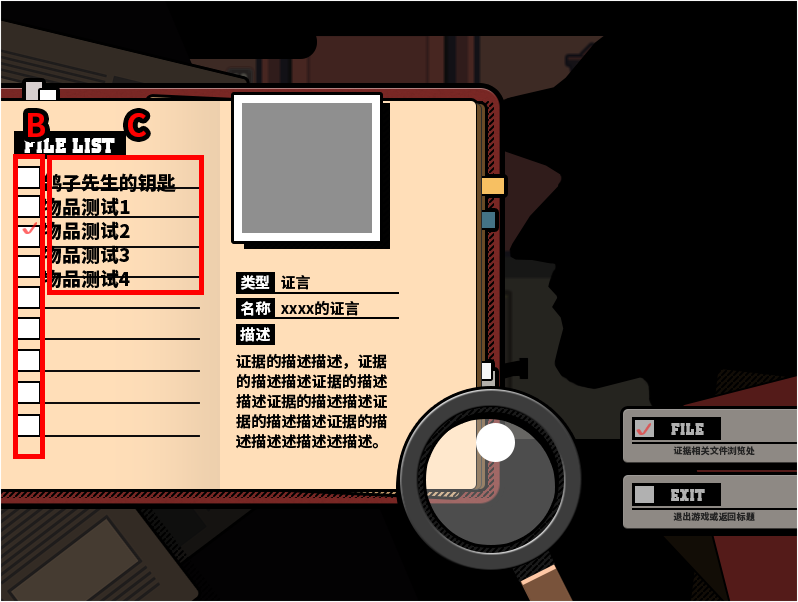
---------------------------------------------------------------【关于滚动窗口】-----------------------------------------------------------------------------------------------------------------------------
[pre lang="ruby"]#encoding:utf-8
#==============================================================================
# ■ Window_Selectable
#------------------------------------------------------------------------------
# 拥有光标移动、滚动功能的窗口
#==============================================================================
class Window_Selectableforfile < Window_Base
#--------------------------------------------------------------------------
# ● 定义实例变量
#--------------------------------------------------------------------------
attr_reader :index # 光标位置
attr_reader :help_window # 帮助窗口
attr_accessor :cursor_fix # 光标固定的标志
attr_accessor :cursor_all # 光标全选择的标志
#--------------------------------------------------------------------------
# ● 初始化对象
#-------------------------------------------------------------------------
def initialize(x, y, width, height)
super
@index = -1
@handler = {}
@cursor_fix = false
@cursor_all = false
update_padding
deactivate
end
#--------------------------------------------------------------------------
# ● 获取列数
#--------------------------------------------------------------------------
def col_max
return 1
end
#--------------------------------------------------------------------------
# ● 获取行间距的宽度32
#--------------------------------------------------------------------------
def spacing
return 32
end
#--------------------------------------------------------------------------
# ● 获取项目数
#--------------------------------------------------------------------------
def item_max
return 0
end
#--------------------------------------------------------------------------
# ● 获取项目的宽度
#--------------------------------------------------------------------------
def item_width
(width - standard_padding * 2 + spacing) / col_max - spacing
end
#--------------------------------------------------------------------------
# ● 获取项目的高度
#--------------------------------------------------------------------------
def item_height
line_height
end
#--------------------------------------------------------------------------
# ● 获取行数
#--------------------------------------------------------------------------
def row_max
[(item_max + col_max - 1) / col_max, 1].max
end
#--------------------------------------------------------------------------
# ● 计算窗口内容的高度
#--------------------------------------------------------------------------
def contents_height
[super - super % item_height, row_max * item_height].max
end
#--------------------------------------------------------------------------
# ● 更新边距
#--------------------------------------------------------------------------
def update_padding
super
update_padding_bottom
end
#--------------------------------------------------------------------------
# ● 更新下端边距
#--------------------------------------------------------------------------
def update_padding_bottom
surplus = (height - standard_padding * 2) % item_height
self.padding_bottom = padding + surplus
end
#--------------------------------------------------------------------------
# ● 设置高度
#--------------------------------------------------------------------------
def height=(height)
super
update_padding
end
#--------------------------------------------------------------------------
# ● 更改启用状态
#--------------------------------------------------------------------------
def active=(active)
super
update_cursor
call_update_help
end
#--------------------------------------------------------------------------
# ● 设置光标位置
#--------------------------------------------------------------------------
def index=(index)
@index = index
update_cursor
call_update_help
end
#--------------------------------------------------------------------------
# ● 选择项目
#--------------------------------------------------------------------------
def select(index)
self.index = index if index
end
#--------------------------------------------------------------------------
# ● 解除项目的选择
#--------------------------------------------------------------------------
def unselect
self.index = -1
end
#--------------------------------------------------------------------------
# ● 获取当前行
#--------------------------------------------------------------------------
def row
index / col_max
end
#--------------------------------------------------------------------------
# ● 获取顶行位置
#--------------------------------------------------------------------------
def top_row
oy / item_height
end
#--------------------------------------------------------------------------
# ● 设置顶行位置
#--------------------------------------------------------------------------
def top_row=(row)
row = 0 if row < 0
row = row_max - 1 if row > row_max - 1
self.oy = row * item_height
end
#--------------------------------------------------------------------------
# ● 获取一页內显示的行数
#--------------------------------------------------------------------------
def page_row_max
(height - padding - padding_bottom) / item_height
end
#--------------------------------------------------------------------------
# ● 获取一页內显示的项目数
#--------------------------------------------------------------------------
def page_item_max
page_row_max * col_max
end
#--------------------------------------------------------------------------
# ● 判定是否横向选择
#--------------------------------------------------------------------------
def horizontal?
page_row_max == 1
end
#--------------------------------------------------------------------------
# ● 获取末行位置
#--------------------------------------------------------------------------
def bottom_row
top_row + page_row_max - 1
end
#--------------------------------------------------------------------------
# ● 设置末行位置
#--------------------------------------------------------------------------
def bottom_row=(row)
self.top_row = row - (page_row_max - 1)
end
#--------------------------------------------------------------------------
# ● 获取项目的绘制矩形
#--------------------------------------------------------------------------
def item_rect(index)
rect = Rect.new
rect.width = item_width
rect.height = item_height
rect.x = index % col_max * (item_width + spacing)
rect.y = index / col_max * item_height
rect
end
#--------------------------------------------------------------------------
# ● 获取项目的绘制矩形(内容用)
#--------------------------------------------------------------------------
def item_rect_for_text(index)
rect = item_rect(index)
rect.x += 4
rect.width -= 8
rect
end
#--------------------------------------------------------------------------
# ● 设置帮助窗口
#--------------------------------------------------------------------------
def help_window=(help_window)
@help_window = help_window
call_update_help
end
#--------------------------------------------------------------------------
# ● 设置动作对应的处理方法
# method : 设置的处理方法 (Method 实例)
#--------------------------------------------------------------------------
def set_handler(symbol, method)
@handler[symbol] = method
end
#--------------------------------------------------------------------------
# ● 确认处理方法是否存在
#--------------------------------------------------------------------------
def handle?(symbol)
@handler.include?(symbol)
end
#--------------------------------------------------------------------------
# ● 调用处理方法
#--------------------------------------------------------------------------
def call_handler(symbol)
@handler[symbol].call if handle?(symbol)
end
#--------------------------------------------------------------------------
# ● 判定光标是否可以移动
#--------------------------------------------------------------------------
def cursor_movable?
active && open? && !@cursor_fix && !@cursor_all && item_max > 0
end
#--------------------------------------------------------------------------
# ● 光标向下移动1
#--------------------------------------------------------------------------
def cursor_down(wrap = false)
if index < item_max - col_max || (wrap && col_max == 1)
select((index + col_max) % item_max)
end
end
#--------------------------------------------------------------------------
# ● 光标向上移动
#--------------------------------------------------------------------------
def cursor_up(wrap = false)
if index >= col_max || (wrap && col_max == 1)
select((index - col_max + item_max) % item_max)
end
end
#--------------------------------------------------------------------------
# ● 光标向右移动
#--------------------------------------------------------------------------
def cursor_right(wrap = false)
if col_max >= 2 && (index < item_max - 1 || (wrap && horizontal?))
select((index + 1) % item_max)
end
end
#--------------------------------------------------------------------------
# ● 光标向左移动
#--------------------------------------------------------------------------
def cursor_left(wrap = false)
if col_max >= 2 && (index > 0 || (wrap && horizontal?))
select((index - 1 + item_max) % item_max)
end
end
#--------------------------------------------------------------------------
# ● 光标移至下一页
#--------------------------------------------------------------------------
def cursor_pagedown
if top_row + page_row_max < row_max
self.top_row += page_row_max
select([@index + page_item_max, item_max - 1].min)
end
end
#--------------------------------------------------------------------------
# ● 光标移至上一页
#--------------------------------------------------------------------------
def cursor_pageup
if top_row > 0
self.top_row -= page_row_max
select([@index - page_item_max, 0].max)
end
end
#--------------------------------------------------------------------------
# ● 更新画面
#--------------------------------------------------------------------------
def update
super
process_cursor_move
process_handling
end
#--------------------------------------------------------------------------
# ● 处理光标的移动
#--------------------------------------------------------------------------
def process_cursor_move
return unless cursor_movable?
last_index = @index
cursor_down (Input.trigger?(:DOWN)) if Input.repeat?(:DOWN)
cursor_up (Input.trigger?(:UP)) if Input.repeat?(:UP)
cursor_right(Input.trigger?(:RIGHT)) if Input.repeat?(:RIGHT)
cursor_left (Input.trigger?(:LEFT)) if Input.repeat?(:LEFT)
cursor_pagedown if !handle?(:pagedown) && Input.trigger?(:R)
cursor_pageup if !handle?(:pageup) && Input.trigger?(:L)
Sound.play_cursor if @index != last_index
end
#--------------------------------------------------------------------------
# ● “确定”和“取消”的处理
#--------------------------------------------------------------------------
def process_handling
return unless open? && active
return process_ok if ok_enabled? && Input.trigger?(:C)
return process_cancel if cancel_enabled? && Input.trigger?(:B)
return process_pagedown if handle?(:pagedown) && Input.trigger?(:R)
return process_pageup if handle?(:pageup) && Input.trigger?(:L)
end
#--------------------------------------------------------------------------
# ● 获取确定处理的有效状态
#--------------------------------------------------------------------------
def ok_enabled?
handle?(:ok)
end
#--------------------------------------------------------------------------
# ● 获取取消处理的有效状态
#--------------------------------------------------------------------------
def cancel_enabled?
handle?(:cancel)
end
#--------------------------------------------------------------------------
# ● 按下确定键时的处理
#--------------------------------------------------------------------------
def process_ok
if current_item_enabled?
Sound.play_ok
Input.update
deactivate
call_ok_handler
else
Sound.play_buzzer
end
end
#--------------------------------------------------------------------------
# ● 调用“确定”的处理方法
#--------------------------------------------------------------------------
def call_ok_handler
call_handler(:ok)
end
#--------------------------------------------------------------------------
# ● 按下取消键时的处理
#--------------------------------------------------------------------------
def process_cancel
Sound.play_cancel
Input.update
deactivate
call_cancel_handler
end
#--------------------------------------------------------------------------
# ● 调用“取消”的处理方法
#--------------------------------------------------------------------------
def call_cancel_handler
call_handler(:cancel)
end
#--------------------------------------------------------------------------
# ● 按下 L 键(PageUp)时的处理
#--------------------------------------------------------------------------
def process_pageup
Sound.play_cursor
Input.update
deactivate
call_handler(:pageup)
end
#--------------------------------------------------------------------------
# ● 按下 R 键(PageDown)时的处理
#--------------------------------------------------------------------------
def process_pagedown
Sound.play_cursor
Input.update
deactivate
call_handler(:pagedown)
end
#--------------------------------------------------------------------------
# ● 更新光标
#--------------------------------------------------------------------------
def update_cursor
if @cursor_all
cursor_rect.set(0, 0, contents.width, row_max * item_height)
self.top_row = 0
elsif @index < 0
cursor_rect.empty
else
ensure_cursor_visible
cursor_rect.set(item_rect(@index))
end
end
#--------------------------------------------------------------------------
# ● 确保光标在画面范围内滚动
#--------------------------------------------------------------------------
def ensure_cursor_visible
self.top_row = row if row < top_row
self.bottom_row = row if row > bottom_row
end
#--------------------------------------------------------------------------
# ● 调用帮助窗口的更新方法
#--------------------------------------------------------------------------
def call_update_help
update_help if active && @help_window
end
#--------------------------------------------------------------------------
# ● 更新帮助窗口
#--------------------------------------------------------------------------
def update_help
@help_window.clear
end
#--------------------------------------------------------------------------
# ● 获取选择项目的有效状态
#--------------------------------------------------------------------------
def current_item_enabled?
return true
end
#--------------------------------------------------------------------------
# ● 绘制所有项目
#--------------------------------------------------------------------------
def draw_all_items
item_max.times {|i| draw_item(i) }
end
#--------------------------------------------------------------------------
# ● 绘制项目
#--------------------------------------------------------------------------
def draw_item(index)
end
#--------------------------------------------------------------------------
# ● 消除项目
#--------------------------------------------------------------------------
def clear_item(index)
contents.clear_rect(item_rect(index))
end
#--------------------------------------------------------------------------
# ● 重绘项目
#--------------------------------------------------------------------------
def redraw_item(index)
clear_item(index) if index >= 0
draw_item(index) if index >= 0
end
#--------------------------------------------------------------------------
# ● 重绘选择项目
#--------------------------------------------------------------------------
def redraw_current_item
redraw_item(@index)
end
#--------------------------------------------------------------------------
# ● 刷新
#--------------------------------------------------------------------------
def refresh
contents.clear
draw_all_items
end
end
[/pre]
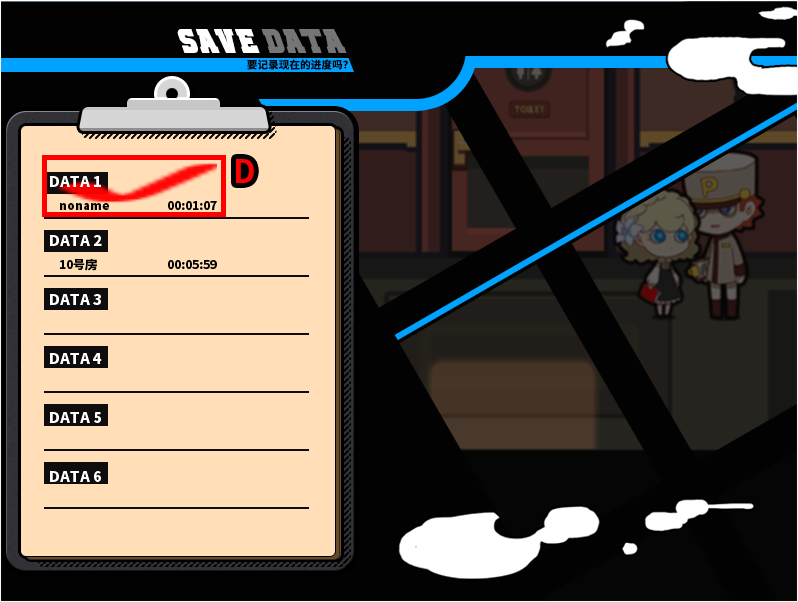
---------------------------------------------------------------【存读档界面脚本】-----------------------------------------------------------------------------------------------------------------------------
[pre lang="ruby"]class Window_Base < Window
def draw_savebust(savebust_name, x, y)
bitmap = Cache.savebust(savebust_name)
rect = Rect.new(0,0,0,0)
contents.blt(x,y,bitmap,rect)
end
end
module Cache
def self.savebust(filename)
load_bitmap("Graphics/savebust/", filename)
end
end
#==============================================================================
# ■ セーブ&ロード画面をカスタマイズするスクリプト
# Ver 0.02 2012/01/21 Sceneクラス関連を修正、イベントコマンド「セーブ画面を
# 開く」に未対応だった不具合を修正
# Ver 0.01 2011/12/25
#------------------------------------------------------------------------------
#==============================================================================
module DataManager
#--------------------------------------------------------------------------
# ◎ セーブファイルの最大数(上書き定義)
#--------------------------------------------------------------------------
def self.savefile_max
return 6 # 大きすぎないこと!
end
#--------------------------------------------------------------------------
# ● セーブフォルダ名の取得
#--------------------------------------------------------------------------
def self.save_folder_name
return "Save"
end
#--------------------------------------------------------------------------
# ◎ セーブファイルの存在判定(上書き定義)
#--------------------------------------------------------------------------
def self.save_file_exists?
if save_folder_name == ""
path = 'Save*.rvdata2'
else
path = save_folder_name + '/Save*.rvdata2'
end
!Dir.glob(path).empty?
end
#--------------------------------------------------------------------------
# ◎ ファイル名の作成(上書き定義)
# index : ファイルインデックス
#--------------------------------------------------------------------------
def self.make_filename(index)
file_name = sprintf("Save%03d.rvdata2", index + 1)
if save_folder_name == ""
return file_name
else
return save_folder_name + '/' + file_name
end
end
#--------------------------------------------------------------------------
# ● セーブの実行・プレビューあり
#--------------------------------------------------------------------------
def self.save_game_with_preview(index)
begin
save_game_without_rescue2(index)
rescue
delete_save_file(index)
false
end
end
#--------------------------------------------------------------------------
# ● ロードの実行・プレビューあり
#--------------------------------------------------------------------------
def self.load_game2(index)
load_game_without_rescue2(index) rescue false
end
#--------------------------------------------------------------------------
# ● プレビューのロード
#--------------------------------------------------------------------------
def self.load_preview(index)
load_preview_without_rescue(index) rescue nil
end
#--------------------------------------------------------------------------
# ● セーブの実行・プレビューあり(例外処理なし)
#--------------------------------------------------------------------------
def self.save_game_without_rescue2(index)
unless FileTest.directory?(save_folder_name)
if FileTest.exist?(save_folder_name)
msgbox "セーブ処理で異常が発生しました。ゲームを再インストールして下さい。"
return false
end
Dir::mkdir(save_folder_name)
unless FileTest.directory?(save_folder_name)
msgbox "セーブに失敗しました。HDDの空き容量等を確認して下さい。"
return false
end
end
File.open(make_filename(index), "wb") do |file|
$game_system.on_before_save
Marshal.dump(make_save_header2, file)
Marshal.dump(make_save_preview, file)
Marshal.dump(make_save_contents, file)
@last_savefile_index = index
end
return true
end
#--------------------------------------------------------------------------
# ● ロードの実行・プレビューあり(例外処理なし)
#--------------------------------------------------------------------------
def self.load_game_without_rescue2(index)
File.open(make_filename(index), "rb") do |file|
Marshal.load(file)
Marshal.load(file)
extract_save_contents(Marshal.load(file))
reload_map_if_updated
@last_savefile_index = index
end
return true
end
#--------------------------------------------------------------------------
# ● セーブヘッダの作成・拡張
#--------------------------------------------------------------------------
def self.make_save_header2
header = {}
header[:characters] = $game_party.characters_for_savefile
header[:playtime_s] = $game_system.playtime_s
header[:savetitle] = $game_map.display_name
header
end
#--------------------------------------------------------------------------
# ● プレビューのロード(例外処理なし)
#--------------------------------------------------------------------------
def self.load_preview_without_rescue(index)
File.open(make_filename(index), "rb") do |file|
Marshal.load(file)
return array_to_bitmap(Marshal.load(file))
end
return nil
end
#--------------------------------------------------------------------------
# ● プレビューの作成
#--------------------------------------------------------------------------
def self.make_save_preview
preview = bitmap_to_array($game_temp.save_preview_bmp)
preview
end
#--------------------------------------------------------------------------
# ● プレビュー用ビットマップをセーブ可能な配列形式に変換する
# bitmap : ビットマップ
#--------------------------------------------------------------------------
def self.bitmap_to_array(bitmap)
return unless bitmap
data = []
for i in 0...bitmap.width
data = []
for j in 0...bitmap.height
color = bitmap.get_pixel(i, j)
value = (color.red.floor << 16) + (color.green.floor << 8) + color.blue.floor
data[j] = value
end
end
return data
end
#--------------------------------------------------------------------------
# ● プレビュー用ビットマップを配列形式からビットマップに復元する
#--------------------------------------------------------------------------
def self.array_to_bitmap(data)
return unless data
bitmap = Bitmap.new(data.size, data[0].size)
for i in 0...data.size
for j in 0...data[0].size
red = (data[j] >> 16) & 0xff
green = (data[j] >> 8) & 0xff
blue = data[j] & 0xff
color = Color.new(red, green, blue)
bitmap.set_pixel(i, j, color)
end
end
return bitmap
end
end
class Game_Temp
#--------------------------------------------------------------------------
# ● 公開インスタンス変数
#--------------------------------------------------------------------------
attr_accessor :save_preview_bmp # セーブプレビュー用BMP
#--------------------------------------------------------------------------
# ● オブジェクト初期化
#--------------------------------------------------------------------------
alias _old001_initialize initialize
def initialize
_old001_initialize
@save_preview_bmp = Bitmap.new(1, 1)
end
#--------------------------------------------------------------------------
# ● セーブプレビュー用
#--------------------------------------------------------------------------
def create_save_preview
@save_preview_bmp.dispose if @save_preview_bmp
@save_preview_bmp = Bitmap.new(224, 160)
rect = Rect.new(0, 0, 224, 160)
rect.x = $game_player.screen_x - 0
rect.y = $game_player.screen_y - 0 - 0
bitmap = Graphics.snap_to_bitmap
@save_preview_bmp.blt(0, 0, bitmap, rect)
bitmap.dispose
end
end
class Game_Party < Game_Unit
#--------------------------------------------------------------------------
# ◎ セーブファイル表示用のキャラクター画像情報(上書き定義)
#--------------------------------------------------------------------------
def characters_for_savefile
battle_members.collect do |actor|
[actor.character_name, actor.character_index, actor.level, actor.name]
end
end
end
#==============================================================================
# ■ Window_SaveFileList
#------------------------------------------------------------------------------
# セーブ&ロード画面で表示する、セーブファイル一覧のウィンドウです。
#==============================================================================
class Window_SaveFileList < Window_Selectableforfile
#--------------------------------------------------------------------------
# ● オブジェクト初期化 【Q】
#--------------------------------------------------------------------------
def initialize(x, y)
super(33, 140, 200, 400)#(x, y,(Graphics.width - x) / 2, Graphics.height)
load_savefileheader
self.opacity = 0
self.windowskin = Cache.system("Window2")
self.contents.font.outline = false
refresh
activate
end
#--------------------------------------------------------------------------
# ● 項目数の取得
#--------------------------------------------------------------------------
def item_max
DataManager.savefile_max
end
#--------------------------------------------------------------------------
# ● 項目の高さを取得
#--------------------------------------------------------------------------
def item_height
(height - standard_padding * 2 - 20)/ 6
end
#--------------------------------------------------------------------------
# ● 項目の描画(normal_color)self.contents.font.color = Color.new(0, 0, 0, 255)
#--------------------------------------------------------------------------
def draw_item(index)
rect = item_rect_for_text(index)
text_h = rect.y + (rect.height - line_height * 2) / 2 + 10
name = "DATA" + " #{index + 1}"
contents.font.name = "思源黑体 CN Heavy"
contents.font.size = 22
self.contents.font.color = Color.new(255, 255, 255, 255)
draw_text(rect.x, text_h, rect.width, line_height, name)
return unless @data[index]
contents.font.name = "思源黑体 CN Heavy"
contents.font.size = 18
self.contents.font.color = Color.new(0, 0, 0, 255)
draw_playtime(rect.x, text_h+24, rect.width, line_height, index)
contents.font.name = "思源黑体 CN Heavy"
contents.font.size = 18
draw_savetitle(rect.x+10, text_h+24, rect.width-20, line_height, index)
end
#--------------------------------------------------------------------------
# ● 決定ボタンが押されたときの処理
#--------------------------------------------------------------------------
def process_ok
call_ok_handler # シーンクラスで処理する
end
#--------------------------------------------------------------------------
# ● 全セーブファイルのヘッダーを読み込み
#--------------------------------------------------------------------------
def load_savefileheader
@data = []
for i in 0...item_max do @data = DataManager.load_header(i) end
end
#--------------------------------------------------------------------------
# ● プレイ時間の描画
#--------------------------------------------------------------------------
def draw_playtime(x, y, width, height, i)
draw_text(x, y, width, height, @data[:playtime_s], 2)
end
#--------------------------------------------------------------------------
# ● セーブのタイトルの描画
#--------------------------------------------------------------------------
def draw_savetitle(x, y, width, height, i)
title = @data[:savetitle]
title = "noname" if title == ""
draw_text(x, y, width, height, title)
end
end
#==============================================================================
# ■ Window_SaveFilePreview
#------------------------------------------------------------------------------
# セーブ&ロード画面で表示する、セーブファイルの詳細ウィンドウです。
#==============================================================================
class Window_SaveFilePreview < Window_Base
#--------------------------------------------------------------------------
# ● オブジェクト初期化 修改主角+主角名坐标
#--------------------------------------------------------------------------
def initialize(x, y)
super(999, y, Graphics.width - x, Graphics.height - y)
@file_no = -1
@bmps = []
@data = []
self.opacity = 0
end
#--------------------------------------------------------------------------
# ● 解放
#--------------------------------------------------------------------------
def dispose
for bmp in @bmps
next if bmp == nil or bmp.disposed?
bmp.dispose
end
super
end
#--------------------------------------------------------------------------
# ● セーブファイルをロードしてプレビューを表示
# file_no : セーブファイル番号
#--------------------------------------------------------------------------
def set_preview(file_no)
return if @file_no == file_no
@file_no = file_no
refresh
end
#--------------------------------------------------------------------------
# ● リフレッシュ玩家坐标位置
#--------------------------------------------------------------------------
def refresh
self.contents.clear
load_preview(@file_no)
return unless @data[@file_no]
bitmap = @bmps[@file_no]
start_x = 0
header = @data[@file_no]
header[:characters].each_with_index do |data, i|
break if i >= 4
character_y = bitmap.height + 22 + i * 40
draw_savebust(data[3],start_x+16,character_y + 28)
draw_name_for_preview(data[3], start_x + 100, character_y, bitmap.width - start_x - 100)
draw_logo(0,0)
end
end
#--------------------------------------------------------------------------
# ● プレビュー用のデータを読み込む
#--------------------------------------------------------------------------
def load_preview(file_no)
return if @data[file_no]
@bmps[file_no] = DataManager.load_preview(file_no)
return unless @bmps[file_no]
@data[file_no] = DataManager.load_header(file_no)
end
#--------------------------------------------------------------------------
# ● レベルの描画
#--------------------------------------------------------------------------
def draw_level_for_preview(level, x, y)
change_color(system_color)
draw_text(x, y, 24, line_height, Vocab::level_a)
change_color(normal_color)
draw_text(x + 24, y, 24, line_height, level, 2)
end
#--------------------------------------------------------------------------
# ● アクター名の描画
#--------------------------------------------------------------------------
def draw_name_for_preview(name, x, y, width)
change_color(normal_color)
draw_text(x, y, width, line_height, name)
end
def draw_logo(x,y)
if $game_variables[50] == 0
bitmap = Cache.system("logo1")
rect = Rect.new(0,0,224,160)
contents.blt(x,y,bitmap,rect)
end
if $game_variables[50] == 1
bitmap = Cache.system("logo1")
rect = Rect.new(0,0,224,160)
contents.blt(x,y,bitmap,rect)
end
if $game_variables[50] >= 2
bitmap = Cache.system("logo1")
rect = Rect.new(0,0,224,160)
contents.blt(x,y,bitmap,rect)
end
end
end
class Scene_File < Scene_MenuBase
#--------------------------------------------------------------------------
# ◎ 開始処理(上書き定義)
#--------------------------------------------------------------------------
def start
super
create_help_window
@filelist_window = Window_SaveFileList.new(100, 50)
@filelist_window.set_handler(:ok, method(:on_savefile_ok))
@filelist_window.set_handler(:cancel, method(:on_savefile_cancel))
@preview_window = Window_SaveFilePreview.new(@filelist_window.width, @help_window.height)
init_selection
create_fileback
end
def create_help_window
@help_window = Window_Help.new
@help_window.viewport = @viewport
end
def create_fileback
@filebackground_sprite1 = Sprite.new
@filebackground_sprite1.bitmap = Cache.system("fileback")
end
#--------------------------------------------------------------------------
# ◎ 終了処理(上書き定義)
#--------------------------------------------------------------------------
def terminate
super
end
#--------------------------------------------------------------------------
# ◎ 選択状態の初期化(上書き定義)
#--------------------------------------------------------------------------
def init_selection
index = first_savefile_index
@filelist_window.select(index)
@preview_window.set_preview(index)
end
#--------------------------------------------------------------------------
# ◎ フレーム更新(上書き定義)
#--------------------------------------------------------------------------
def update
super
@preview_window.set_preview(@filelist_window.index)
end
end
class Scene_Save < Scene_File
#--------------------------------------------------------------------------
# ◎ セーブファイルの決定(上書き定義)
#--------------------------------------------------------------------------
def on_savefile_ok
super
if DataManager.save_game_with_preview(@filelist_window.index)
on_save_success
else
Sound.play_buzzer
end
end
end
class Scene_Load < Scene_File
#--------------------------------------------------------------------------
# ◎ セーブファイルの決定(上書き定義)
#--------------------------------------------------------------------------
def on_savefile_ok
super
if DataManager.load_game2(@filelist_window.index)
on_load_success
else
Sound.play_buzzer
end
end
end
class Scene_Map < Scene_Base
#--------------------------------------------------------------------------
# ◎ 終了処理
#--------------------------------------------------------------------------
alias _old001_terminate terminate
def terminate
$game_temp.create_save_preview
_old001_terminate
end
end[/pre]
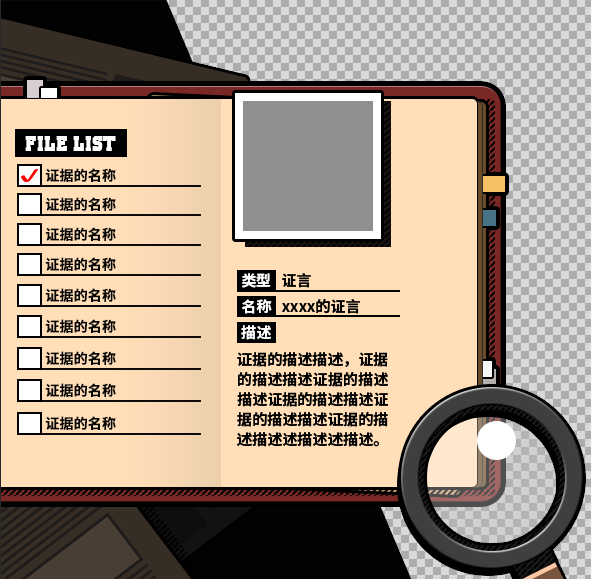
因为这是个隔了2年的企划……有些脚本的调用和调整已经忘的差不多了QQAQQ,如有冒犯深表歉意……
(PS 如果有遗漏的植入脚本请告诉我QAQ 我看着他们真的不知道怎么搞了……) |
|


 写轮眼
写轮眼
 发表于 2017-8-6 21:51:39
 提升卡
提升卡 沉默号角
沉默号角 喧嚣号角
喧嚣号角 变色卡
变色卡 升龙剑
升龙剑


