查看: 3502|回复: 13

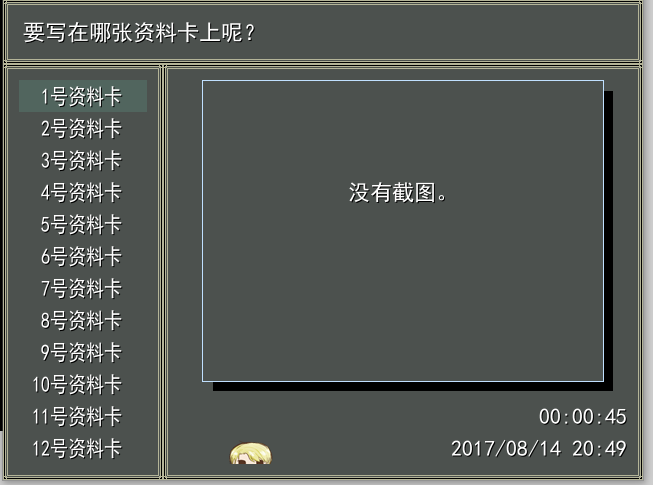
[已经解决] 用了截图存档脚本,但是并不能截图,求大佬解救!

[复制链接]
梦石
0
星屑
50
在线时间
11 小时
注册时间
2017-7-27
回帖
7
发表于 2017-8-14 20:59:44 | 显示全部楼层 |阅读模式

加入我们,或者,欢迎回来。

您需要 登录 才可以下载或查看,没有账号?注册会员

×
楼下放图和脚本。
梦石
0
星屑
50
在线时间
11 小时
注册时间
2017-7-27
回帖
7
 楼主| 发表于 2017-8-14 21:01:39 | 显示全部楼层
脚本是这个#-----------------------------------------------------------------------------#
# 脚本设定                                                                    #
#-----------------------------------------------------------------------------#
# 说明:                                                                      #
# ①主要采用了Snap To Bitmap这脚本省去了DLL。                                  #
# ②采用了禁术,各位不用到处改脚本了,不过冲突率也大增==                       #
# ③脚本当中采用的脚本归原作者所有。                                           #
# ④设置区域的变量请自行更改。                                                 #
# ⑤调整了截图的API,解决一些潜在的截图BUG。                                   #
#-----------------------------------------------------------------------------#
SaveSettings = Struct.new(:max_save_file,:save_file_dir,:slot_name_format,
:save_help,:load_help,:override_question,:snap_no_found,:no_save_file).new
#-----------------------------------------------------------------------------#
# 设置区域
#-----------------------------------------------------------------------------#
# 最大的存档量
SaveSettings.max_save_file = 20
# 存档所在文件夹
SaveSettings.save_file_dir = "Save/"
# 存档槽的名称的格式,具体请参考sprintf
SaveSettings.slot_name_format = "%3d号资料卡"
# 存档界面所显示的字符串
SaveSettings.save_help = "要写在哪张资料卡上呢?"
# 读档界面所显示的字符串
SaveSettings.load_help = "要读取哪张资料卡呢?"
# 需要覆盖存档时所发问的问题
SaveSettings.override_question = "确定要涂改吗?"
# 找不到截图时的信息
SaveSettings.snap_no_found = "没有截图。"
# 存档槽没有存档时显示的信息
SaveSettings.no_save_file = "这里还没存档"

#-----------------------------------------------------------------------------#
# 创建存档文件夹                                                              #
#-----------------------------------------------------------------------------#
Dir.mkdir(SaveSettings.save_file_dir) unless FileTest.directory?(SaveSettings.save_file_dir)

#-----------------------------------------------------------------------------#
# 游戏核心处理类                                                              #
#-----------------------------------------------------------------------------#
class Game_System
  #---------------------------------------------------------------------------#
  # 实例变量                                                                  #
  #---------------------------------------------------------------------------#
  attr_accessor :snap_bitmap
end

#-----------------------------------------------------------------------------#
# 强改存档界面                                                                #
#-----------------------------------------------------------------------------#
class Scene_Save
  def self.new(*a)
    return Scene_Save_Load.new
  end
end

#-----------------------------------------------------------------------------#
# 强改读档界面                                                                #
#-----------------------------------------------------------------------------#
class Scene_Load
  def self.new(*a)
    return Scene_Save_Load.new(1)
  end
end

#-----------------------------------------------------------------------------#
# 地图界面钩子                                                                #
#-----------------------------------------------------------------------------#
Scene_Map = Class.new(Scene_Map) {
  superclass.constants.each{|c|const_set(c, superclass.const_get(c))}
  const_set(:NoDllSLHook, true)
  define_method(:main) do
    super
    $game_system.snap_bitmap = Graphics.snap_to_bitmap if $scene.is_a?(Scene_Menu)
  end
} unless Scene_Map.const_defined?(:NoDllSLHook)

#-----------------------------------------------------------------------------#
# 移花接木大法                                                                #
#-----------------------------------------------------------------------------#
class Scene_Title
  attr_accessor :command_window, :continue_enabled
  class Window_Command < ::Window_Command
    def disable_item(*a)
      super(*a) unless $scene.any_save? or a[0] != 1
    end
  end
  module Graphics
    def self.transition(*a)
      $scene.command_window.index = ($scene.continue_enabled = $scene.any_save?) ? 1 : 0
      begin
        ::Graphics.transition(*a)
      rescue Exception
        raise $!.class, $!.message, caller
      end
    end
    def self.method_missing(m, *args, &block)
      begin
        ::Graphics.send(m, *args, &block)
      rescue Exception
        raise $!.class, $!.message, caller
      end
    end
  end
  def any_save?
    for i in 1..SaveSettings.max_save_file
      return true if File.exist?(SaveSettings.save_file_dir + "Save#{i}.rxdata")
    end
    return false
  end
end

#-----------------------------------------------------------------------------#
# 存档界面用窗口                                                              #
#-----------------------------------------------------------------------------#
class Window_Save < Window_Base
  #---------------------------------------------------------------------------#
  # 初始化                                                                    #
  #---------------------------------------------------------------------------#
  def initialize
    super(160,64,480,416)
    self.contents = Bitmap.new(width-32,height-32)
    @_index = -1
    refresh(0)
  end
  #---------------------------------------------------------------------------#
  # 刷新                                                                      #
  #---------------------------------------------------------------------------#
  def refresh(index)
    if index != @_index
      # 清除原有资料
      self.contents.clear
      @sprite.dispose if @sprite != nil
      @sprite = nil
      # 开始读取资料
      @file_index = index
      @filename = SaveSettings.save_file_dir + "Save#{@file_index + 1}.rxdata"
      @time_stamp = Time.at(0)
      @file_exist = FileTest.exist?(@filename)
      if @file_exist
        file = File.open(@filename, "r")
        @time_stamp         = file.mtime
        @characters         = Marshal.load(file)
        @frame_count        = Marshal.load(file)
        @game_system        = Marshal.load(file)
        @game_switches      = Marshal.load(file)
        @game_variables     = Marshal.load(file)
        @game_self_switches = Marshal.load(file)
        @game_screen        = Marshal.load(file)
        @game_actors        = Marshal.load(file)
        @game_party         = Marshal.load(file)
        @game_troop         = Marshal.load(file)
        @game_map           = Marshal.load(file)
        @game_player        = Marshal.load(file)
        @bitmap             = @game_system.snap_bitmap
        @total_sec = @frame_count / Graphics.frame_rate
        file.close
        # 描绘截图的框与影子
        self.contents.fill_rect(34,11,400,300,Color.new(0,0,0))
        self.contents.fill_rect(23,0,402,302,system_color)
        self.contents.fill_rect(24,1,400,300,Color.new(0,0,0,0))
        # 如截图不为空的话
        if @bitmap != nil
          # 描绘截图
          @sprite = Sprite.new
          @sprite.bitmap = @bitmap
          @sprite.x = 160+16+24
          @sprite.y = 64+16+1
          @sprite.zoom_x = @sprite.zoom_y = 0.625
          @sprite.z = 99999
        else
          self.contents.draw_text(0,96,448,32,SaveSettings.snap_no_found,1)
        end
        # 描绘角色
        @characters.size.times do |i|
          x = i*56 + 24
          bitmap = RPG::Cache.character(@characters[0], @characters[1])
          self.contents.blt(x,328,bitmap,Rect.new(0,0,bitmap.width/4,bitmap.height/4))
        end
        # 描绘游戏时间
        hour = @total_sec / 60 / 60
        min = @total_sec / 60 % 60
        sec = @total_sec % 60
        time_string = sprintf("%02d:%02d:%02d", hour, min, sec)
        self.contents.font.color = normal_color
        self.contents.draw_text(0,320,448,32,time_string,2)
        # 描绘时间标记
        self.contents.font.color = normal_color
        time_string = @time_stamp.strftime("%Y/%m/%d %H:%M")
        self.contents.draw_text(0,352,448,32,time_string, 2)
      else
        self.contents.draw_text(0,320,448,32,SaveSettings.no_save_file,1)
      end
      @_index = index
    end
  end
  #---------------------------------------------------------------------------#
  # 释放                                                                      #
  #---------------------------------------------------------------------------#
  def dispose
    super
    @sprite.dispose if @sprite != nil
    @sprite = nil
  end
end

#-----------------------------------------------------------------------------#
# 存档界面                                                                    #
#-----------------------------------------------------------------------------#
class Scene_Save_Load
  #---------------------------------------------------------------------------#
  # 初始化                                                                    #
  #---------------------------------------------------------------------------#
  def initialize(type=0)
    @type = type == 0 ? "save" : "load"
    case @type
    when "save"
      @WORD = SaveSettings.save_help
    when "load"
      @word = SaveSettings.load_help
      $game_temp = Game_Temp.new
    end
  end
  #---------------------------------------------------------------------------#
  # 主执行                                                                    #
  #---------------------------------------------------------------------------#
  def main
    # 生成帮助窗口
    @help_window = Window_Help.new
    @help_window.set_text(@word)
    # 选项窗口
    choose = []
    for i in 1..SaveSettings.max_save_file
      choose.push(SaveSettings.slot_name_format % i)
    end
    @command_window = Window_Command.new(160,choose)
    @command_window.height = 416
    @command_window.y = 64
    @command_window.active = true
    # 存档资料窗口
    @save_window = Window_Save.new
    # 确认窗口
    @confirm_window = Window_Base.new(80,176,480,128)
    @confirm_window.contents = Bitmap.new(448,96)
    @confirm_window.contents.draw_text(0,0,448,32,SaveSettings.override_question,1)
    @confirm_window.contents.draw_text(0,64,216,32,"确定",1)
    @confirm_window.contents.draw_text(232,64,216,32,"取消",1)
    @confirm_window.cursor_rect.set(232,64,216,32)
    @confirm_window.z = 999999
    @confirm_window.visible = false
    @confirm_ok = false
    # 执行过渡
    Graphics.transition
    # 主循环
    loop do
      # 刷新游戏画面
      Graphics.update
      # 刷新输入信息
      Input.update
      # 刷新画面
      update
      # 如果画面切换的话的就中断循环
      if $scene != self
        break
      end
    end
    # 准备过渡
    Graphics.freeze
    # 释放窗口
    @help_window.dispose
    @save_window.dispose
    @command_window.dispose
    @confirm_window.dispose
  end
  #---------------------------------------------------------------------------#
  # 刷新                                                                      #
  #---------------------------------------------------------------------------#
  def update
    # 选择存档窗口激活
    unless @confirm_window.visible
      update_command
    else
      update_confirm
    end
  end
  #---------------------------------------------------------------------------#
  # 选择存档窗口刷新                                                          #
  #---------------------------------------------------------------------------#
  def update_command
    @command_window.update
    @save_window.refresh(@command_window.index)
    # 按下取消键
    if Input.trigger?(Input::B)
      case @type
      when "save"
        # 演奏取消 SE
        $game_system.se_play($data_system.cancel_se)
        # 如果被事件调用
        if $game_temp.save_calling
          # 清除存档调用标志
          $game_temp.save_calling = false
          # 切换到地图画面
          $scene = Scene_Map.new
          return
        end
        # 切换到菜单画面
        $scene = Scene_Menu.new(4)
      when "load"
        # 演奏取消 SE
        $game_system.se_play($data_system.cancel_se)
        # 切换到标题画面
        $scene = Scene_Title.new
      end
    end
    # 按下确定键
    if Input.trigger?(Input::C)
      # 计算存档编号
      filename = SaveSettings.save_file_dir + "Save#{@command_window.index+1}.rxdata"
      case @type
      when "save"
        if File.exist?(filename)
          @confirm_window.visible = true
          @confirm_window.cursor_rect.set(232,64,216,32)
          @confirm_ok = false
        else
          process_save
        end
      when "load"
        # 文件不存在的情况下
        unless FileTest.exist?(filename)
          # 演奏冻结 SE
          $game_system.se_play($data_system.buzzer_se)
          return
        end
        # 演奏读档 SE
        $game_system.se_play($data_system.load_se)
        # 写入存档数据
        file = File.open(filename, "rb")
        read_save_data(file)
        file.close
        # 还原 BGM、BGS
        $game_system.bgm_play($game_system.playing_bgm)
        $game_system.bgs_play($game_system.playing_bgs)
        # 刷新地图 (执行并行事件)
        $game_map.update
        # 切换到地图画面
        $scene = Scene_Map.new
      end
    end
  end
  #---------------------------------------------------------------------------#
  # 确认窗口刷新                                                              #
  #---------------------------------------------------------------------------#
  def update_confirm
    @confirm_window.update
    if Input.trigger?(Input::LEFT) or Input.trigger?(Input::UP)
      $game_system.se_play($data_system.cursor_se)
      @confirm_ok = true
    elsif Input.trigger?(Input::RIGHT) or Input.trigger?(Input::DOWN)
      $game_system.se_play($data_system.cursor_se)
      @confirm_ok = false
    elsif Input.trigger?(Input::C)
      $game_system.se_play($data_system.decision_se)
      process_save if @confirm_ok
      @confirm_window.visible = false
    elsif Input.trigger?(Input::B)
      $game_system.se_play($data_system.cancel_se)
      @confirm_window.visible = false
    end
    @confirm_window.cursor_rect.set(232,64,216,32)
    @confirm_window.cursor_rect.set(0,64,216,32) if @confirm_ok
  end
  #---------------------------------------------------------------------------#
  # 执行存档                                                                  #
  #---------------------------------------------------------------------------#
  def process_save
    # 计算存档编号
    filename = SaveSettings.save_file_dir + "Save#{@command_window.index+1}.rxdata"
    # 演奏存档 SE
    $game_system.se_play($data_system.save_se)
    # 写入存档数据
    file = File.open(filename, "wb")
    write_save_data(file)
    file.close
    # 如果被事件调用
    if $game_temp.save_calling
      # 清除存档调用标志
      $game_temp.save_calling = false
      # 切换到地图画面
      $scene = Scene_Map.new
      return
    end
    # 切换到菜单画面
    $scene = Scene_Menu.new(4)
  end
  #---------------------------------------------------------------------------#
  # 存档                                                                      #
  #---------------------------------------------------------------------------#
  def write_save_data(file)
    # 生成描绘存档文件用的角色图形
    characters = []
    for i in 0...$game_party.actors.size
      actor = $game_party.actors
      characters.push([actor.character_name, actor.character_hue])
    end
    # 写入描绘存档文件用的角色数据
    Marshal.dump(characters, file)
    # 写入测量游戏时间用画面计数
    Marshal.dump(Graphics.frame_count, file)
    # 增加 1 次存档次数
    $game_system.save_count += 1
    # 保存魔法编号
    # (将编辑器保存的值以随机值替换)
    $game_system.magic_number = $data_system.magic_number
    # 写入各种游戏对像
    Marshal.dump($game_system, file)
    Marshal.dump($game_switches, file)
    Marshal.dump($game_variables, file)
    Marshal.dump($game_self_switches, file)
    Marshal.dump($game_screen, file)
    Marshal.dump($game_actors, file)
    Marshal.dump($game_party, file)
    Marshal.dump($game_troop, file)
    Marshal.dump($game_map, file)
    Marshal.dump($game_player, file)
  end
  #---------------------------------------------------------------------------#
  # 读档                                                                      #
  #---------------------------------------------------------------------------#
  def read_save_data(file)
    # 读取描绘存档文件用的角色数据
    characters = Marshal.load(file)
    # 读取测量游戏时间用画面计数
    Graphics.frame_count = Marshal.load(file)
    # 读取各种游戏对像
    $game_system        = Marshal.load(file)
    $game_switches      = Marshal.load(file)
    $game_variables     = Marshal.load(file)
    $game_self_switches = Marshal.load(file)
    $game_screen        = Marshal.load(file)
    $game_actors        = Marshal.load(file)
    $game_party         = Marshal.load(file)
    $game_troop         = Marshal.load(file)
    $game_map           = Marshal.load(file)
    $game_player        = Marshal.load(file)
    # 魔法编号与保存时有差异的情况下
    # (加入编辑器的编辑过的数据)
    if $game_system.magic_number != $data_system.magic_number
      # 重新装载地图
      $game_map.setup($game_map.map_id)
      $game_player.center($game_player.x, $game_player.y)
    end
    # 刷新同伴成员
    $game_party.refresh
  end
end

#-----------------------------------------------------------------------------#
# Graphics.snap_to_bitmap(优化版)                                           #
# 作者:神思                                                                  #
# 优化:釣到一隻猴子@_@  (  AAM@_@  )                                         #
#-----------------------------------------------------------------------------#
#-----------------------------------------------------------------------------#
# Graphics                                                                    #
#-----------------------------------------------------------------------------#
class << Graphics
  SRCCOPY = 0xCC0020
  BitBlt = Win32API.new("gdi32", "BitBlt", "lllllllll", "l")
  CreateCompatibleBitmap = Win32API.new("gdi32", "CreateCompatibleBitmap", "lll", "l")
  CreateCompatibleDC = Win32API.new("gdi32", "CreateCompatibleDC", "l", "l")
  DeleteDC = Win32API.new("gdi32", "DeleteDC", "l", "l")
  DeleteObject = Win32API.new("gdi32", "DeleteObject", "l", "l")
  SelectObject = Win32API.new("gdi32", "SelectObject", "ll", "l")
  GetBitmapBits = Win32API.new("gdi32", "GetBitmapBits", "llp", "l")

  GetWindowDC = Win32API.new("user32", "GetWindowDC", "l", "l")
  ReleaseDC = Win32API.new("user32", "ReleaseDC", "ll", "l")
  GetWindowRect = Win32API.new("user32", "GetWindowRect", "lp", "l")
  GetClientRect = Win32API.new("user32", "GetClientRect", "lp", "l")
  ClientToScreen = Win32API.new("user32", "ClientToScreen", "ip", "i")

  RtlMoveMemory = Win32API.new('kernel32', 'RtlMoveMemory', 'ipi', 'i')
  HWnd = Win32API.new("user32", "GetActiveWindow", nil, 'l').call
  #---------------------------------------------------------------------------#
  # snap_to_bitmap                                                            #
  #---------------------------------------------------------------------------#
  def snap_to_bitmap
    width, height, rgbs = self.bitmap_data
    hb = Bitmap.new(width, height)
    len = width * 4
    ptr = [rgbs].pack("p").unpack("l")[0]
    ptrs = []
    height.times{|i| ptrs[height -1 -i] = ptr + (len * i)}
    pdest = hb.address
    height.times do |y|
      RtlMoveMemory.call(pdest, ptrs[y], len)
      pdest += len
    end
    return hb
  end
  #---------------------------------------------------------------------------#
  # bitmap_data                                                               #
  #---------------------------------------------------------------------------#
  def bitmap_data
    hdcSrc = GetWindowDC.call(HWnd)
    wrect = [0,0,0,0].pack("l*")
    crect = wrect.clone
    point = [0, 0].pack("l*")
    GetWindowRect.call(HWnd, wrect)
    GetClientRect.call(HWnd, crect)
    ClientToScreen.call(HWnd, point)
    wrect = wrect.unpack("l*")
    crect = crect.unpack("l*")
    point = point.unpack("l*")
    wrect[0] -= point[0]
    wrect[1] -= point[1]
    hdcDest = CreateCompatibleDC.call(hdcSrc)
    hBitmap = CreateCompatibleBitmap.call(hdcSrc, crect[2], crect[3])
    hOld = SelectObject.call(hdcDest, hBitmap)
    BitBlt.call(hdcDest, wrect[0], wrect[1], crect[2] - wrect[0], crect[3] - wrect[1], hdcSrc, 0, 0, SRCCOPY)
    SelectObject.call(hdcDest, hOld)
    DeleteDC.call(hdcDest)
    ReleaseDC.call(HWnd, hdcSrc)
    dwCount = crect[2] * crect[3]
    lpBits = ([0] * dwCount).pack("l*")
    GetBitmapBits.call(hBitmap, dwCount * 4, lpBits)
    DeleteObject.call(hBitmap)
    return crect[2], crect[3], lpBits
  end
end

#-----------------------------------------------------------------------------#
# Font                                                                        #
#-----------------------------------------------------------------------------#
class Font
  #---------------------------------------------------------------------------#
  # marshal_dump                                                              #
  #---------------------------------------------------------------------------#
  def marshal_dump
  end
  #---------------------------------------------------------------------------#
  # marshal_load                                                              #
  #---------------------------------------------------------------------------#
  def marshal_load(obj)
  end
end

#-----------------------------------------------------------------------------#
# Bitmap                                                                      #
#-----------------------------------------------------------------------------#
class Bitmap
  RtlMoveMemory = Win32API.new('kernel32', 'RtlMoveMemory', 'pii', 'i')
  # 传送到内存的API函数
  RtlMoveMemory_pi = Win32API.new('kernel32', 'RtlMoveMemory', 'pii', 'i')
  RtlMoveMemory_ip = Win32API.new('kernel32', 'RtlMoveMemory', 'ipi', 'i')
  #---------------------------------------------------------------------------#
  # _dump                                                                     #
  #---------------------------------------------------------------------------#
  def _dump(limit)
    data = "rgba" * width * height
    RtlMoveMemory_pi.call(data, address, data.length)
    [width, height, Zlib::Deflate.deflate(data)].pack("LLa*") # 压缩
  end
  #---------------------------------------------------------------------------#
  # _load                                                                     #
  #---------------------------------------------------------------------------#
  def self._load(str)
    w, h, zdata = str.unpack("LLa*")
    b = self.new(w, h)
    RtlMoveMemory_ip.call(b.address, Zlib::Inflate.inflate(zdata), w * h * 4)
    return b
  end
  #---------------------------------------------------------------------------#
  # address                                                                   #
  #---------------------------------------------------------------------------#
  def address
    # [[[bitmap.object_id * 2 + 16] + 8] + 16] == 数据的开头
    buffer, ad = "xxxx", object_id * 2 + 16
    RtlMoveMemory.call(buffer, ad, 4)
    ad = buffer.unpack("L")[0] + 8
    RtlMoveMemory.call(buffer, ad, 4)
    ad = buffer.unpack("L")[0] + 16
    RtlMoveMemory.call(buffer, ad, 4)
    return buffer.unpack("L")[0]
  end
end


就是不能截图,其他都正常的样子
捕获.PNG

点评

好的好的,以后不会再犯了  发表于 2017-8-15 16:34
截图的方法大概得问一些专业人士,或者是用DLL之类的,还有就算不连贴第一楼也算纯水违规  发表于 2017-8-14 23:11
抱歉,一直以为连帖是连续发两个主题帖的意思.... 那还有办法截图吗?  发表于 2017-8-14 22:41
这免dll截图有时会因为电脑配置的关系而截不了图,另外你连贴违规了  发表于 2017-8-14 22:11
回复

使用道具 举报

梦石
1
星屑
24088
在线时间
3339 小时
注册时间
2011-7-8
回帖
3862

开拓者

发表于 2017-8-15 08:13:43 | 显示全部楼层
用dll截图是没有问题的……如果没找到合适的话我给你发一份我现在正在用的吧
熟悉rgss和ruby,xp区版主~
正在填坑:《膜拜组传奇》讲述膜拜组和学霸们的故事。
已上steam:与TXBD合作的Reformers《变革者》
* 战斗调用公共事件 *
* RGSOS 网络脚本 *
回复

使用道具 举报

梦石
0
星屑
608
在线时间
48 小时
注册时间
2017-8-11
回帖
5
发表于 2017-8-15 15:49:51 | 显示全部楼层
guoxiaomi 发表于 2017-8-15 08:13
用dll截图是没有问题的……如果没找到合适的话我给你发一份我现在正在用的吧 ...

那你发啊!正好我也看看
回复

使用道具 举报

梦石
0
星屑
50
在线时间
11 小时
注册时间
2017-7-27
回帖
7
 楼主| 发表于 2017-8-15 16:35:06 | 显示全部楼层
guoxiaomi 发表于 2017-8-15 08:13
用dll截图是没有问题的……如果没找到合适的话我给你发一份我现在正在用的吧 ...

好的,谢谢!
回复

使用道具 举报

梦石
1
星屑
24088
在线时间
3339 小时
注册时间
2011-7-8
回帖
3862

开拓者

发表于 2017-8-15 22:22:08 | 显示全部楼层
本帖最后由 guoxiaomi 于 2017-10-20 00:54 编辑

dll :
screenshot.zip (52.02 KB, 下载次数: 165)

我自己把原来的脚本修改过,加了一些蛋疼功能,使用说明:
1. dll放在根目录下,根目录建立 save 文件夹
2. 只会截取一部分
3. 这个脚本会验证存档,如果存档在外部被修改了,就会失效。
4. 事件脚本里用:
  1. command_autosave
复制代码
会自动存档到 save0
5. 如果建立了 ScreenShot 文件夹,事件脚本调用
  1. Screen::shot_fast
复制代码
会截图到此文件夹

脚本:
  1. #==============================================================================
  2. # 本脚本来自[url=http://www.66RPG.com]www.66RPG.com[/url],转载和使用请保留此信息
  3. #===============================================================================

  4. BBS_66RPG_DIR = "Save/"  # 储存文件夹名,请制作游戏时自行建立此文件夹

  5. # 若想使用自定义背景图,脚本62行的井号去掉,并放置一张相应图形。

  6. # 在你的Scene_Title中找到这一段(如果使用其他插件脚本,在插件中找):
  7. #    for i in 0..3
  8. #      if FileTest.exist?("Save#{i+1}.rxdata")
  9. # 请自行把0..3改为0..最大进度号,比如0..9
  10. # "Save#{i+1}.rxdata" 改为"Save/Save#{i}.rxdata"

  11. # 增加进度的方法:138,258行,继续添加。你也可以改“进度X”为“回忆X”或者“红/绿/蓝笔记本”

  12. #===============================================================================
  13. module Screen  
  14.   @screen = Win32API.new 'screenshot', 'Screenshot', %w(l l l l p l l), ''
  15.   @readini = Win32API.new 'kernel32', 'GetPrivateProfileStringA', %w(p p p p l p), 'l'
  16.   @findwindow = Win32API.new 'user32', 'FindWindowA', %w(p p), 'l'
  17.   module_function
  18.   #-----------------------------------------------------------------------------
  19.   # here comes the stuff...
  20.   # i add here the stuff for automatic change of the number for the screenshot
  21.   # so it wont overrite the old one...
  22.   # if you want to change so stuff change them in this line below
  23.   # or you can change them in your command line... like
  24.   # Screen::shot("screenshot", 2)
  25.   # this change the name and the type of the screenshot
  26.   # (0 = bmp, 1 = jpg and 2 = png)
  27.   # ----------------------------------------------------------------------------
  28.   def shot(file = "shot", typ = 2)
  29.     # to add the right extension...
  30.     if typ == 0
  31.       typname = ".bmp"
  32.     elsif typ == 1
  33.       typname = ".jpg"
  34.     elsif typ == 2
  35.       typname = ".png"
  36.     end   
  37.     file_index = 0   
  38.     dir = "Save/"   
  39.     # make the filename....
  40.     file_name = dir + file.to_s + typname.to_s   
  41.     # make the screenshot.... Attention dont change anything from here on....
  42.     # @screen.call(0,0,640,480,file_name,handel,typ)
  43.     # 角色在不同的位置,选取不同的截图框
  44.     x = (($game_player.x > $game_map.width - 6)? 1:0) + (($game_player.x < 5)? 0:1)
  45.     y = (($game_player.y > $game_map.height - 4)? 1:0) + (($game_player.y < 4)? 0:1)
  46.     @screen.call(112*x,112*y,416,256,file_name,handel,typ)
  47.   end
  48.   # find the game window...
  49.   def handel
  50.     game_name = "\0" * 256
  51.     @readini.call('Game','Title','',game_name,255,".\\Game.ini")
  52.     game_name.delete!("\0")
  53.     return @findwindow.call('RGSS Player',game_name)
  54.   end
  55.   # 全图截图
  56.   def shot_fast
  57.     dir = "ScreenShot/"   
  58.     # make the filename....   
  59.     file = Time.now.strftime("%Y%m%d_%H%M%S")
  60.     file_name = dir + file + '.png'
  61.     # make the screenshot.... Attention dont change anything from here on....
  62.     @screen.call(0,0,640,480,file_name,handel,2)   
  63.   end
  64. end

  65. class Window_File < Window_Base
  66.   attr_accessor :index
  67.   def initialize(index = 0)
  68.     @backsp = Sprite.new
  69.     #@backsp.bitmap = Bitmap.new("Graphics/Pictures/存盘背景.jpg")
  70.     @backsp.z = 99
  71.     super(160,64,480,416)
  72.     #这行可以不用
  73.     self.contents = Bitmap.new(width - 32, height - 32)
  74.     @index = index
  75.     #这里我要说明一句,之所以用sprite是为了放缩图片
  76.     @sprite = Sprite.new
  77.     @sprite.visible = false
  78.     @sprite.z = 100
  79.     @sp_ch = []
  80.     for i in 0..4
  81.       @sp_ch[i] = Sprite.new
  82.       @sp_ch[i].z = 101
  83.     end
  84.     # 刷新
  85.     refresh
  86.   end
  87.   def refresh
  88.     self.contents.clear
  89.     for i in @sp_ch
  90.       i.visible = false
  91.     end
  92.     @sprite.visible = false
  93.     if FileTest.exist?(BBS_66RPG_DIR+"Save#{@index}.rxdata")         
  94.       @sprite.visible = true
  95.       if FileTest.exist?(BBS_66RPG_DIR+"Save#{@index}.png")
  96.         @sprite.bitmap = Bitmap.new(BBS_66RPG_DIR+"Save#{@index}.png")
  97.       else
  98.         self.contents.draw_text(32,64,400,32,"截图似乎有点问题……")
  99.       end
  100.       @sprite.x = 192
  101.       @sprite.y = 96
  102.       #@sprite.zoom_x = 0.7
  103.       #@sprite.zoom_y = 0.7
  104.       file = File.open(BBS_66RPG_DIR+"Save#{@index}.rxdata", "r")
  105.       @time_stamp = file.mtime
  106.       @characters = Marshal.load(file)
  107.       @frame_count = Marshal.load(file)
  108.       @game_system = Marshal.load(file)
  109.       @game_switches = Marshal.load(file)
  110.       @game_variables = Marshal.load(file)
  111.       Marshal.load(file)
  112.       Marshal.load(file)
  113.       Marshal.load(file)
  114.       @game_party = Marshal.load(file)
  115.       Marshal.load(file)
  116.       @game_map = Marshal.load(file)
  117.       Marshal.load(file)
  118.       @total_sec = @frame_count / Graphics.frame_rate      
  119.       file.close
  120.       # 描绘角色
  121.       i = 0
  122.       @characters.each do |ch_ary|
  123.         character_name, character_hue = ch_ary[0], ch_ary[1]
  124.         bitmap = RPG::Cache.character(character_name, character_hue)
  125.         cw = bitmap.width / 4
  126.         ch = bitmap.height / 4
  127.         @sp_ch[i].bitmap = bitmap
  128.         @sp_ch[i].src_rect = Rect.new(0, 0, cw, ch)
  129.         @sp_ch[i].x = 192 + 40 * i
  130.         @sp_ch[i].y = 456 - ch
  131.         @sp_ch[i].visible = true
  132.         i = i + 1
  133.       end
  134.       # 设置文字颜色
  135.       self.contents.font.color = normal_color
  136.       # 描绘游戏时间
  137.       hour = @total_sec / 60 / 60
  138.       min = @total_sec / 60 % 60
  139.       sec = @total_sec % 60
  140.       time_string = sprintf("%02d:%02d:%02d", hour, min, sec)
  141.       self.contents.draw_text(4, 318, 420, 32, time_string, 2)      
  142.       # 描绘时间标记
  143.       time_string = @time_stamp.strftime("%Y/%m/%d %H:%M")
  144.       self.contents.draw_text(4, 348, 420, 32, time_string, 2)
  145.       # 描绘地图名
  146.       @mapinfos = load_data("Data/MapInfos.rxdata")
  147.       map_string = @mapinfos[@game_map.map_id].name
  148.       self.contents.draw_text(20, 288, 224, 32, map_string, 0)
  149.     else
  150.       self.contents.draw_text(32,32,420,32,"这个记录是空的")
  151.     end
  152.   end
  153.   def dispose
  154.     super
  155.     @sprite.dispose
  156.     @backsp.dispose
  157.     for i in @sp_ch
  158.       i.dispose
  159.     end
  160.   end
  161. end


  162. class Scene_Save
  163.   def main
  164.     # 档案文件名数组
  165.     ary = ["快速存档"]
  166.     for i in 1..20
  167.       ary.push sprintf("%s %02d", "档案", i)
  168.     end
  169.     # 创建档案窗口
  170.     @command_window = Window_Command.new(160,ary)
  171.     @command_window.y = 64
  172.     @command_window.height = 416
  173.     @command_window.index = $game_temp.last_file_index
  174.     @content_window = Window_File.new($game_temp.last_file_index)
  175.     # 添加帮助窗口
  176.     @help_window = Window_Help.new
  177.     @help_window.set_text("请选择要存入的档案")
  178.     # 执行过渡
  179.     Graphics.transition
  180.     # 主循环
  181.     loop do
  182.       # 刷新游戏画面
  183.       Graphics.update
  184.       # 刷新输入信息
  185.       Input.update
  186.       # 刷新画面
  187.       update
  188.       # 如果画面被切换的话就中断循环
  189.       if $scene != self
  190.         break
  191.       end
  192.     end
  193.     # 准备过渡
  194.     Graphics.freeze
  195.     @command_window.dispose
  196.     @content_window.dispose
  197.     # 释放帮助窗口
  198.     @help_window.dispose
  199.   end
  200.   def update
  201.     @command_window.update   
  202.     if @command_window.index != @content_window.index
  203.       @content_window.index = @command_window.index
  204.       @content_window.refresh
  205.     end   
  206.     #——————下面这一部分是原装脚本——————#
  207.     if Input.trigger?(Input::B)  
  208.       $game_system.se_play($data_system.cancel_se)
  209.       if $game_temp.save_calling
  210.         $game_temp.save_calling = false
  211.         $scene = Scene_Map.new
  212.         return
  213.       end
  214.       $scene = Scene_Menu.new(4)
  215.     end   
  216.     #———————————————————————#   
  217.     if Input.trigger?(Input::C)
  218.       # 演奏存档 SE
  219.       $game_system.se_play($data_system.cancel_se)
  220.       # 写入存档数据
  221.       file = File.open(BBS_66RPG_DIR+"Save#{@command_window.index}.rxdata", "wb")
  222.       write_save_data(file)
  223.       if FileTest.exist?(BBS_66RPG_DIR+"shot.png")
  224.         File.rename(BBS_66RPG_DIR+"shot.png", BBS_66RPG_DIR+"Save#{@command_window.index}.png")
  225.       end
  226.       file.close
  227.       #----------------------------------------------
  228.       # 将存档数据 Hash 写入 SaveHash
  229.       #----------------------------------------------
  230.       f = Game_Global.new("Save/SaveHash")
  231.       f.set "hash-#{@command_window.index}", File.open("Save/Save#{@command_window.index}.rxdata").read.hash
  232.       #----------------------------------------------
  233.       $game_temp.last_file_index = @command_window.index
  234.       # 如果被事件调用
  235.       if $game_temp.save_calling
  236.         # 清除存档调用标志
  237.         $game_temp.save_calling = false
  238.         # 切换到地图画面
  239.         $scene = Scene_Map.new
  240.         return
  241.       end
  242.       # 切换到菜单画面
  243.       $scene = Scene_Map.new
  244.     end
  245.     #———————————————————————#
  246.   end
  247.   #--------------------------------------------------------------------------
  248.   # ● 写入存档数据
  249.   #     file : 写入用文件对像 (已经打开)
  250.   #--------------------------------------------------------------------------
  251.   def write_save_data(file)
  252.     # 生成描绘存档文件用的角色图形
  253.     characters = []
  254.     for i in 0...$game_party.actors.size
  255.       actor = $game_party.actors[i]
  256.       characters.push([actor.character_name, actor.character_hue, actor.id, actor.battler_name, actor.battler_hue])
  257.     end
  258.     # 写入描绘存档文件用的角色数据
  259.     Marshal.dump(characters, file)
  260.     # 写入测量游戏时间用画面计数
  261.     Marshal.dump(Graphics.frame_count, file)
  262.     # 增加 1 次存档次数
  263.     $game_system.save_count += 1
  264.     # 保存魔法编号
  265.     # (将编辑器保存的值以随机值替换)
  266.     $game_system.magic_number = $data_system.magic_number
  267.     # 写入各种游戏对像
  268.     Marshal.dump($game_system, file)
  269.     Marshal.dump($game_switches, file)
  270.     Marshal.dump($game_variables, file)
  271.     Marshal.dump($game_self_switches, file)
  272.     Marshal.dump($game_screen, file)
  273.     Marshal.dump($game_actors, file)
  274.     Marshal.dump($game_party, file)
  275.     Marshal.dump($game_troop, file)
  276.     Marshal.dump($game_map, file)
  277.     Marshal.dump($game_player, file)
  278.   end
  279. end


  280. class Scene_Load
  281.   def initialize
  282.     # 再生成临时对像
  283.     $game_temp = Game_Temp.new
  284.     # 选择存档时间最新的文件
  285.     $game_temp.last_file_index = 0
  286.     latest_time = Time.at(0)
  287.     for i in 0..20
  288.       filename = BBS_66RPG_DIR+"Save#{i}.rxdata"
  289.       if FileTest.exist?(filename)
  290.         file = File.open(filename, "r")
  291.         if file.mtime > latest_time
  292.           latest_time = file.mtime
  293.           $game_temp.last_file_index = i
  294.         end
  295.         file.close
  296.       end
  297.     end
  298.   end  
  299.   def main
  300.     # 档案文件名数组
  301.     ary = ["快速存档"]
  302.     for i in 1..20
  303.       ary.push sprintf("%s %02d", "档案", i)
  304.     end
  305.     # 创建档案窗口
  306.     @command_window = Window_Command.new(160,ary)
  307.     @command_window.y = 64
  308.     @command_window.height = 416
  309.     @command_window.index = $game_temp.last_file_index
  310.     @content_window = Window_File.new($game_temp.last_file_index)
  311.     # 添加帮助窗口
  312.     @help_window = Window_Help.new
  313.     @help_window.set_text("请选择要读取的档案")
  314.     # 执行过渡
  315.     Graphics.transition
  316.     # 主循环
  317.     loop do
  318.       # 刷新游戏画面
  319.       Graphics.update
  320.       # 刷新输入信息
  321.       Input.update
  322.       # 刷新画面
  323.       update
  324.       # 如果画面被切换的话就中断循环
  325.       if $scene != self
  326.         break
  327.       end
  328.     end
  329.     # 准备过渡
  330.     Graphics.freeze
  331.     @command_window.dispose
  332.     @content_window.dispose
  333.     # 释放帮助窗口
  334.     @help_window.dispose
  335.   end
  336.   def update
  337.     @command_window.update   
  338.     if @command_window.index != @content_window.index
  339.       @content_window.index = @command_window.index
  340.       @content_window.refresh
  341.     end   
  342.     #——————下面这一部分是原装脚本——————#
  343.     if Input.trigger?(Input::B)  
  344.     # 演奏取消 SE
  345.     $game_system.se_play($data_system.cancel_se)
  346.     # 切换到标题画面
  347.     $scene = Scene_Title.new
  348.     end   
  349.     #———————————————————————#   
  350.     if Input.trigger?(Input::C)
  351.       # 文件不存在的情况下
  352.       unless FileTest.exist?(BBS_66RPG_DIR+"Save#{@command_window.index}.rxdata")
  353.         # 演奏冻结 SE
  354.         $game_system.se_play($data_system.buzzer_se)
  355.         return
  356.       end
  357.       #----------------------------------------------------------
  358.       # 验证存档是否被篡改
  359.       #----------------------------------------------------------
  360.       f = Game_Global.new("Save/SaveHash")
  361.       if f.data["hash-#{@command_window.index}"] != File.open("Save/Save#{@command_window.index}.rxdata").read.hash
  362.         p '存档验证失败!无法读取此存档!'
  363.         return
  364.       end
  365.       #----------------------------------------------------------
  366.       # 演奏读档 SE
  367.       $game_system.se_play($data_system.cancel_se)
  368.       # 写入存档数据
  369.       file = File.open(BBS_66RPG_DIR+"Save#{@command_window.index}.rxdata", "rb")
  370.       read_save_data(file)
  371.       file.close
  372.       # 还原 BGM、BGS
  373.       $game_system.bgm_play($game_system.playing_bgm)
  374.       $game_system.bgs_play($game_system.playing_bgs)
  375.       # 刷新地图 (执行并行事件)
  376.       $game_map.update
  377.       # 切换到地图画面
  378.       $scene = Scene_Map.new
  379.     end
  380.     #———————————————————————#
  381.   end
  382.   #--------------------------------------------------------------------------
  383.   # ● 写入存档数据
  384.   #     file : 写入用文件对像 (已经打开)
  385.   #--------------------------------------------------------------------------
  386.   def read_save_data(file)
  387.     # 读取描绘存档文件用的角色数据
  388.     characters = Marshal.load(file)
  389.     # 读取测量游戏时间用画面计数
  390.     Graphics.frame_count = Marshal.load(file)
  391.     # 读取各种游戏对像
  392.     $game_system        = Marshal.load(file)
  393.     $game_switches      = Marshal.load(file)
  394.     $game_variables     = Marshal.load(file)
  395.     $game_self_switches = Marshal.load(file)
  396.     $game_screen        = Marshal.load(file)
  397.     $game_actors        = Marshal.load(file)
  398.     $game_party         = Marshal.load(file)
  399.     $game_troop         = Marshal.load(file)
  400.     $game_map           = Marshal.load(file)
  401.     $game_player        = Marshal.load(file)
  402.     # 魔法编号与保存时有差异的情况下
  403.     # (加入编辑器的编辑过的数据)
  404.     if $game_system.magic_number != $data_system.magic_number
  405.       # 重新装载地图
  406.       $game_map.setup($game_map.map_id)
  407.       $game_player.center($game_player.x, $game_player.y)
  408.     end
  409.     # 刷新同伴成员
  410.     $game_party.refresh
  411.   end
  412. end

  413. class Scene_Menu
  414.   alias bbs_66rpg_shotsave_main main
  415.   def main
  416.     if @menu_index == 0
  417.       Screen::shot
  418.     end   
  419.     bbs_66rpg_shotsave_main
  420.   end
  421. end

  422. class Interpreter
  423.   #--------------------------------------------------------------------------
  424.   # ● 调用存档画面
  425.   #--------------------------------------------------------------------------
  426.   def command_352
  427.     # 设置战斗中断标志
  428.     $game_temp.battle_abort = true
  429.     # 设置调用存档标志
  430.     $game_temp.save_calling = true
  431.     # 推进索引
  432.     @index += 1
  433.     # 结束
  434.     Screen::shot
  435.     return false
  436.   end
  437.   # 自动存档
  438.   def command_autosave
  439.     Screen::shot("Save0")
  440.     file = File.open(BBS_66RPG_DIR+"Save0.rxdata", "wb")
  441.     Scene_Save.new.write_save_data(file)
  442.     file.close
  443.     #--------------------------------------------
  444.     # 将存档数据 Hash 写入 SaveHash
  445.     #--------------------------------------------
  446.     f = Game_Global.new("Save/SaveHash")
  447.     f.set "hash-0", File.open('Save/Save0.rxdata').read.hash
  448.     #----------------------------------------------
  449.   end
  450. end
复制代码


看上去我为了验证存档,还用了全局存档:
  1. #==============================================================================
  2. # ■ 二周目类 v2
  3. #------------------------------------------------------------------------------
  4. #  简单的保存与读取二周目数据的类,其中仅包含了key-value对
  5. #
  6. #   使用方法:
  7. #   0. 在根目录下创建 Global 文件夹,将脚本插到 main 前
  8. #   1. 创建实例 $game_save = Game_Global.new(filename,init_hash)
  9. #   注:filename 参数是存档文件名,init_hash 参数是初始的hash值
  10. #   2. 实例调用 $game_save.set(key, value) 设置key-value对
  11. #   3. 实例调用 $game_save.key 即可获取对应的value值
  12. #
  13. #   对key的值要求是字符串,不是Symbol对象
  14. #   对value的值没有任何限制,任意对象都可以
  15. #
  16. #   特点:
  17. #   创造不同的Global文件分别保存数据,避免对所有的Global内容进行频繁读写
  18. #==============================================================================
  19. class Game_Global
  20.         def initialize(name,init_hash={})
  21.                 @filename = name + '.rxdata'
  22.                 # 初始化 Hash 的各默认值
  23.                 @data = init_hash
  24.                 # 存档文件存在时则读取
  25.                 if exist?
  26.                         read
  27.                 end
  28.         end
  29.         
  30.         def write
  31.                 file = File.open(@filename, "wb")
  32.     Marshal.dump(Graphics.frame_count, file) # 总帧数
  33.                 Marshal.dump(@data, file)
  34.                 file.close
  35.         end
  36.         
  37.         def read
  38.                 file = File.open(@filename, "rb")
  39.                 Marshal.load(file) # 总帧数
  40.                 @data = Marshal.load(file)
  41.                 file.close
  42.         end
  43.         
  44.         def exist?
  45.                 return FileTest.exist?(@filename)
  46.         end
  47.         
  48.         def set(key,value)
  49.                 @data[key] = value
  50.                 write
  51.         end
  52.         
  53.         def method_missing(name)
  54.                 return @data[name.to_s]
  55.         end
  56.         
  57.         def data
  58.                 return @data
  59.         end
  60. end
  61. #==============================================================================
  62. # 本脚本由guoxiaomi制作,使用和转载请保留此信息
  63. #==============================================================================
复制代码

评分

参与人数 2星屑 +100 梦石 +2 收起 理由
RyanBern + 2 认可答案
b565185756 + 100 郭兄大人宇宙无敌天下第一0.0

查看全部评分

熟悉rgss和ruby,xp区版主~
正在填坑:《膜拜组传奇》讲述膜拜组和学霸们的故事。
已上steam:与TXBD合作的Reformers《变革者》
* 战斗调用公共事件 *
* RGSOS 网络脚本 *
回复 1 0

使用道具 举报

梦石
0
星屑
50
在线时间
11 小时
注册时间
2017-7-27
回帖
7
 楼主| 发表于 2017-8-16 16:48:20 | 显示全部楼层

非常非常感谢!但是下面那个二周目脚本使用方法里的创建实例是要怎么弄?而且添加上两个脚本后,游戏测试时速度变得很慢

点评

是什么原因?  发表于 2017-8-17 08:20
我刚刚弄了一下,解决帧数的问题了,非常非常感谢!  发表于 2017-8-16 22:33
我看了看应该不需要主动创建实例。帧率下降的原因我暂时还不知道,毕竟我的游戏还在开发……有空了测试一下。这个存档脚本应该和新建工程是.....  发表于 2017-8-16 21:59
回复

使用道具 举报

您需要登录后才可以回帖 登录 | 注册会员

本版积分规则

Powered by Discuz! X5.0 © 2001-2026 Discuz! Team.

在本版发帖返回顶部