| 赞 | 301 |
| VIP | |
| 好人卡 | |
| 积分 | 340 |
| 经验 | |
| 最后登录 | 2026-9-27 |
| 在线时间 | 1744 小时 |
- 梦石
- 20
- 星屑
- 13965
- 在线时间
- 1744 小时
- 注册时间
- 2017-1-12
- 回帖
- 1667
 
|
加入我们,或者,欢迎回来。
您需要 登录 才可以下载或查看,没有账号?注册会员
×
himework的菜单动态效果脚本。
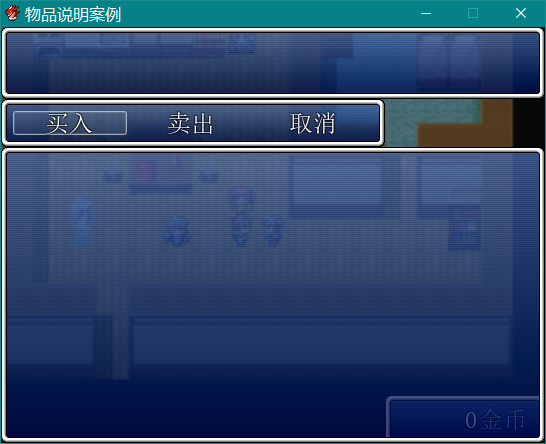
在商店界面(或者其他相似布局的窗口,比如合成系统的窗口),金钱窗口的会从原本的位置滑动到菜单右下角,
可能是我没看懂后面几行的说明所以把它们贴错位置或者设定错了,但是改了一下还是不行。
所以想请教一下
下图为错误效果图
脚本本体(或说元本体加效果)=begin
================================================================================
Title: Window Animation Designer
Author: Hime
Date: Sep 24, 2013
--------------------------------------------------------------------------------
** Change log
Sep 24, 2013
- renamed script, cleaned up documentation
Oct 21, 2012
- implemented window exit animations
May 11, 2012
- initial release
--------------------------------------------------------------------------------
** Terms of Use
* Free to use in non-commercial projects
* Contact me for commercial use
* No real support. The script is provided as-is
* Will do bug fixes, but no compatibility patches
* Features may be requested but no guarantees, especially if it is non-trivial
* Credits to Hime Works in your project
* Preserve this header
--------------------------------------------------------------------------------
** Description
This script provides animation properties that allow you to easily design
window animations.
Rather than writing how the animation should be performed, you simply
write what you expect it to do.
There are two types of animations
1. opening animations
2. closing animations
Opening animations are run whenever a window is opened, while closing
animations are run whenever a window is closed.
The following animation options are available, which you can use to design
your animations
-Window moving
-Window resizing
-Window fading
For example, (0,0) is the position of the upper-left corner of the screen.
If you want a window to slide to the right side of the screen, (544, 0), you
would write something that looks like "@new_x = 544", which tells the
engine that you want to move the window from its current x-position to a
new x-position.
--------------------------------------------------------------------------------
** Installation
Place this script below Materials and above Main
--------------------------------------------------------------------------------
** Usage
To create an opening animation, define the following method in your window:
def opening_animation
# animation options
end
To create a closing animation, define the following method in your window
def closing_animation
# animation options
end
The following variables are used to specify animation options:
@new_x - moves the window to the new x coord
@new_y - moves the window to the new y coord
@new_width - adjusts the width of the window
@new_height - adjusts the height of the window
@new_opacity - adjust the opacity of the window
@fade_speed - how fast the opacity changes
@slide_speed - how fast the size and position change
See the examples for some idea how to use them
================================================================================
=end
$imported = {} if $imported.nil?
$imported["TH_WindowAnimationDesigner"] = true
#===============================================================================
# Rest of Script
#===============================================================================
class Window_Base < Window
alias tsuki_animated_window_initialize initialize
def initialize(x, y, width, height)
tsuki_animated_window_initialize(x, y, width, height)
@show_x = x #for convenience
@show_y = y #for convenience
@new_x = nil
@new_y = nil
@new_width = nil
@new_height = nil
@new_opacity = nil
@slide_speed = 10
@fade_speed = 20
@animating = false
opening_animation
end
# define opening animation values here in your own window
def opening_animation
end
# define closing animation values here in your own window
def closing_animation
end
alias tsuki_animated_window_update update
def update
tsuki_animated_window_update
update_position
end
def animating?
@animating
end
def move_window(x=self.x, y=self.y, width=self.width, height=self.height)
@new_x = x
@new_y = y
@new_width = width
@new_height = height
end
def resize_window(width=self.width, height=self.height)
@new_width = width
@new_height = height
end
def shift_window(x, y)
@new_x = self.x + x
@new_y = self.y + y
end
def resize_width(width)
@new_width = width
end
def resize_height(height)
@new_height = height
end
def update_x
if (self.x - @new_x).abs <= @slide_speed
self.x = @new_x
@animating = false
else
self.x = self.x > @new_x ? self.x - @slide_speed : self.x + @slide_speed
@animating = true
end
end
def update_y
if (self.y - @new_y).abs <= @slide_speed
self.y = @new_y
@animating = false
else
self.y = self.y > @new_y ? self.y - @slide_speed : self.y + @slide_speed
@animating = true
end
end
def update_height
if (self.height - @new_height).abs <= @slide_speed
self.height = @new_height
@animating = false
else
self.height = self.height > @new_height ? self.height - @slide_speed : self.height + @slide_speed
@animating = true
end
end
def update_width
if (self.width - @new_width).abs <= @slide_speed
self.width = @new_width
@animating = false
else
self.width = self.width > @new_width ? self.width - @slide_speed : self.width + @slide_speed
@animating = true
end
end
def update_opacity
if (self.opacity - @new_opacity).abs <= @fade_speed
self.opacity = @new_opacity
self.back_opacity = self.opacity
self.contents_opacity = self.opacity
@animating = false
else
self.opacity = self.opacity > @new_opacity ? self.opacity - @fade_speed : self.opacity + @fade_speed
self.contents_opacity = self.opacity
self.back_opacity = self.opacity
@animating = true
end
end
def update_position
@animating = false
update_x if @new_x && self.x != @new_x
update_y if @new_y && self.y != @new_y
update_width if @new_width && self.width != @new_width
update_height if @new_height && self.height != @new_height
update_opacity if @new_opacity
end
end
class Scene_Base
alias :th_animated_windows_pre_terminate :pre_terminate
def pre_terminate
th_animated_windows_pre_terminate
update_closing_animations
end
def update_closing_animations
windows = []
instance_variables.each do |varname|
ivar = instance_variable_get(varname)
if ivar.is_a?(Window)
ivar.closing_animation
windows.push(ivar)
end
end
animating = true
while animating
animating = false
Graphics.update
Input.update
windows.each {|window|
window.update
animating = true if window.animating?
}
end
end
end
class Window_MenuCommand < Window_Command
def opening_animation
@new_x = self.x
self.x = self.x - self.width
end
def closing_animation
@slide_speed = 30
@new_x = self.x - self.width
end
end
class Window_Gold < Window_Base
def opening_animation
@new_y = Graphics.height - self.height
self.y = Graphics.height
end
def closing_animation
@slide_speed = 5
@new_y = self.y + self.height
end
end
class Window_MainMenuStatus < Window_MenuStatus
def opening_animation
@new_x = self.x
@slide_speed = 40
self.x = self.x + self.width
end
def closing_animation
@slide_speed = 30
@new_x = self.x + self.width
end
end
class Scene_Menu < Scene_MenuBase
# Need to use its own window
def create_status_window
@status_window = Window_MainMenuStatus.new(@command_window.width, 0)
end
#why would you re-position it after you create it?
def create_gold_window
@gold_window = Window_Gold.new
end
end |
|


 写轮眼
写轮眼
 发表于 2017-9-1 18:59:33

 提升卡
提升卡 沉默号角
沉默号角 喧嚣号角
喧嚣号角 变色卡
变色卡 升龙剑
升龙剑