| 赞 | 15 |
| VIP | |
| 好人卡 | |
| 积分 | 18 |
| 经验 | |
| 最后登录 | 2022-3-17 |
| 在线时间 | 80 小时 |
- 梦石
- 0
- 星屑
- 1829
- 在线时间
- 80 小时
- 注册时间
- 2017-9-28
- 回帖
- 89
|
 发表于 2017-10-1 15:23:47
|
显示全部楼层
发表于 2017-10-1 15:23:47
|
显示全部楼层
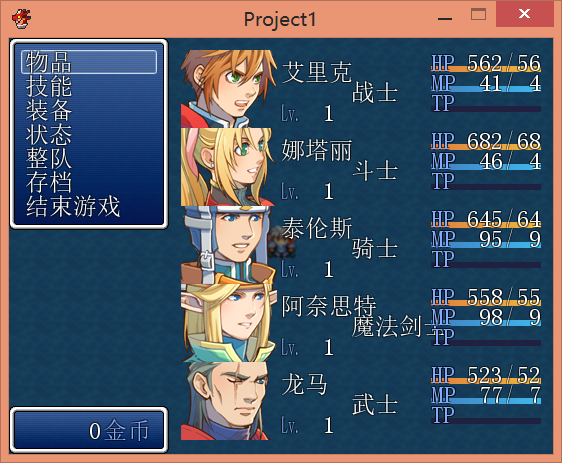
这个效果如何?四个字的称号看起来会和TP条和MP条层叠,如果要继续改进字体大小,我可以尝试一下。
我在76至85行列添加了脚本,能够调整脸图大小,使用方法在82行列。
脚本内容[pre lang="ruby"]#encoding:utf-8
#==============================================================================
# ■ Window_MenuStatus
#------------------------------------------------------------------------------
# 菜单画面中,显示队伍成员状态的窗口
#==============================================================================
class Window_MenuStatus < Window_Selectable
#--------------------------------------------------------------------------
# ● 定义实例变量
#--------------------------------------------------------------------------
attr_reader :pending_index # 保留位置(整队用)
#--------------------------------------------------------------------------
# ● 初始化对象
#--------------------------------------------------------------------------
def initialize(x, y)
super(x, y, window_width, window_height)
@pending_index = -1
self.opacity = 0
refresh
end
#--------------------------------------------------------------------------
# ● 获取窗口的宽度
#--------------------------------------------------------------------------
def window_width
Graphics.width - 160
end
#--------------------------------------------------------------------------
# ● 获取窗口的高度
#--------------------------------------------------------------------------
def window_height
Graphics.height
end
#--------------------------------------------------------------------------
# ● 获取列数
#--------------------------------------------------------------------------
#def col_max
#return 5 #跟据分辨率的不同可以改
#end
#--------------------------------------------------------------------------
# ● 获取项目数
#--------------------------------------------------------------------------
def item_max
$game_party.members.size
end
#--------------------------------------------------------------------------
# ● 获取项目的高度
#--------------------------------------------------------------------------
def item_height
height - standard_padding * 0.01
end
#--------------------------------------------------------------------------
# ● 获取项目的宽度
#--------------------------------------------------------------------------
def item_width
(width - standard_padding * 2 + spacing) /col_max - spacing
end
#--------------------------------------------------------------------------
# ● 获取行间距的宽度
#--------------------------------------------------------------------------
def spacing
return 0
end
#--------------------------------------------------------------------------
# ● 获取项目数
#--------------------------------------------------------------------------
def item_max
$game_party.members.size
end
#--------------------------------------------------------------------------
# ● 获取项目的高度
#--------------------------------------------------------------------------
def item_height
(height - standard_padding * 2) / 5
end
#--------------------------------------------------------------------------
# ● 绘制角色窗口用的肖像图 ☆借鉴芙蕾娅战斗显示脸图脚本
#--------------------------------------------------------------------------
def draw_face(face_name, face_index, x, y, enabled = true)
bitmap = Cache.face(face_name)
rect = Rect.new(face_index % 4 * 96, face_index / 4 * 96 + 18, 96, 84 )
#使用方法 #不清楚*不清楚+脸图起点,脸图宽度,脸图终点
contents.blt(x, y, bitmap, rect, enabled ? 255 : translucent_alpha)
bitmap.dispose
end
#--------------------------------------------------------------------------
# ● 绘制项目
#--------------------------------------------------------------------------
def draw_item(index)
actor = $game_party.members[index]
enabled = $game_party.battle_members.include?(actor)
rect = item_rect(index)
draw_item_background(index)
draw_actor_face(actor, rect.x, rect.y, +1)
draw_actor_name(actor,rect.x+100, rect.y+10)
draw_actor_class(actor,rect.x+170, rect.y+30)
draw_actor_icons(actor,rect.x+250,rect.y+50)
draw_actor_level(actor,rect.x+100, rect.y+50)
draw_actor_hp(actor,rect.x+250, rect.y+0)
draw_actor_mp(actor,rect.x+250,rect.y+20)
draw_actor_tp(actor,rect.x+250,rect.y+40)
end
#--------------------------------------------------------------------------
# ● 绘制项目的背景
#--------------------------------------------------------------------------
def draw_item_background(index)
if index == @pending_index
contents.fill_rect(item_rect(index), pending_color)
end
end
def contents_height
[super - super % item_height, row_max * item_height].max
end
#--------------------------------------------------------------------------
# ● 按下确定键时的处理
#--------------------------------------------------------------------------
def process_ok
super
$game_party.menu_actor = $game_party.members[index]
end
#--------------------------------------------------------------------------
# ● 返回上一个选择的位置
#--------------------------------------------------------------------------
def select_last
select($game_party.menu_actor.index || 0)
end
#--------------------------------------------------------------------------
# ● 设置保留位置(整队用)
#--------------------------------------------------------------------------
def pending_index=(index)
last_pending_index = @pending_index
@pending_index = index
redraw_item(@pending_index)
redraw_item(last_pending_index)
end
end
[/pre]
|
|


 写轮眼
写轮眼
 提升卡
提升卡 沉默号角
沉默号角 喧嚣号角
喧嚣号角 变色卡
变色卡 升龙剑
升龙剑


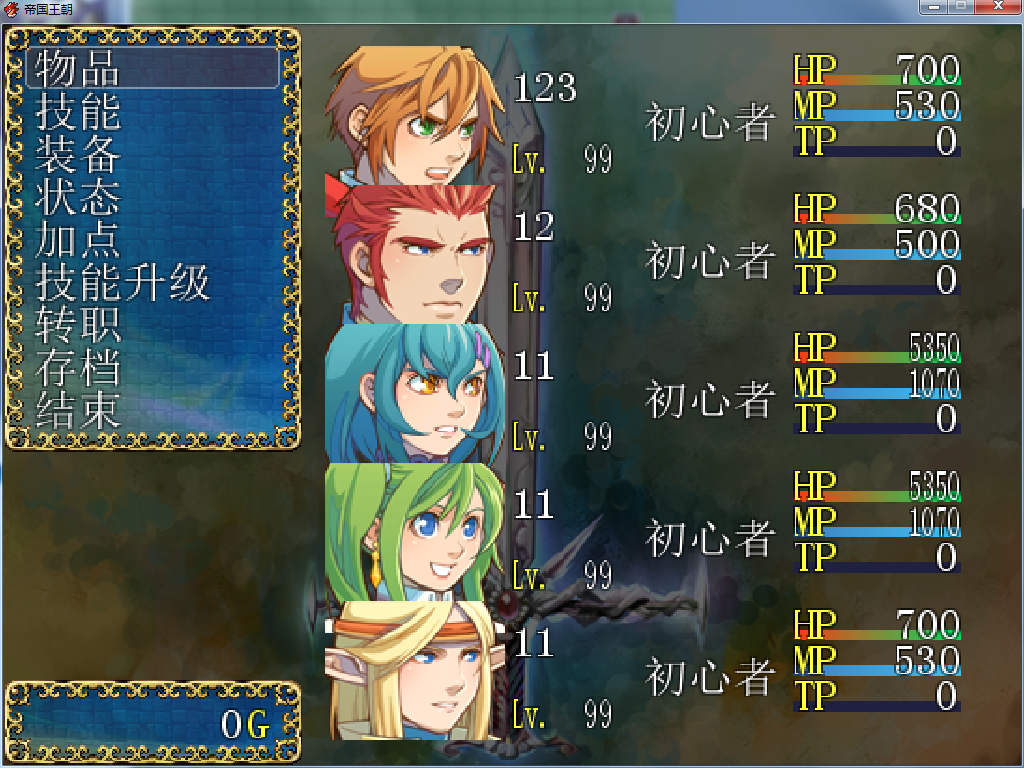
 我就是要显示5个人才改成5的…………貌似是不是可以把头像按比例缩小一下就可以了呢