| 赞 | 15 |
| VIP | |
| 好人卡 | |
| 积分 | 18 |
| 经验 | |
| 最后登录 | 2022-3-17 |
| 在线时间 | 80 小时 |
- 梦石
- 0
- 星屑
- 1829
- 在线时间
- 80 小时
- 注册时间
- 2017-9-28
- 回帖
- 89
|
 发表于 2017-10-19 22:36:54
|
显示全部楼层
发表于 2017-10-19 22:36:54
|
显示全部楼层
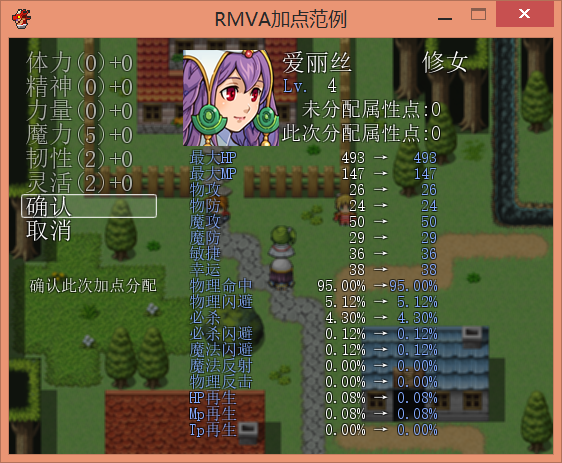
不知道有没有理解到楼主的意思,尽我所能帮助楼主...,楼主是想要窗口透明化吗?根据数字君的教程和我一点点地观察:在initialize和super的下面添加self.opacity = 0 就能获得窗口完全透明的效果。
initialize为初始化
super好像是超级的意思...我不是很懂
self.opacity为自己的不透明度,如果等于的数字越小透明度越高。
例子:救世小树写的升级自由属性加点系统
救世小树上传的图片,原本的效果 |
把窗口透明化的效果 |
添加透明化的加点脚本·点这里- #encoding:utf-8
- #=============================================================================
- #-----------RMVA加点系统正常向-v1.03---By:救世小树--------转载请注明出处-------
- #=============================================================================
- module Point_Tree
-
- POINT_KIND = 6 #设定加点种类
- LEVEL_UP_POINT = 3 #每升一级自由属性点增加数
- RESET_ITEM = 20 #洗点水编号
-
- STR_POINT = ["体力","精神","力量","魔力","韧性","灵活","???"]
-
- #分别对应增加 [MHP,MMP,物攻,物防,魔攻,魔防,敏捷,幸运]
- POINT_ADD_PARAM = [[12 , 0, 0, 0, 0, 0, 0, 0], #体力
- [0 , 12, 0, 0, 0, 0, 0, 0], #精神
- [0 , 0, 5, 0, 0, 0, 0, 0], #力量
- [0 , 0, 0, 0, 5, 0, 0, 0], #魔力
- [0 , 0, 0, 3, 0, 2, 0, 1], #韧性
- [0 , 0, 0, 0, 0, 0, 3, 0], #灵活
-
- [0,0,0,0,0,0,0,0]]
- #可以按上面的格式添加下去,不过要改POINT_KIND,STR_ALL,不然加了也白加
-
- #分别对应增加 [物理命中,物理闪避,必杀,必杀闪避,魔法闪避,魔法反射,物理反击,HP再生,Mp再生,Tp再生]
- POINT_ADD_XPARAM = [[0 , 0, 0, 0, 0, 0, 0, 6, 0, 0],
- [0 , 0, 0, 0, 0, 0, 0, 0, 6, 0],
- [6 , 6, 0, 0, 0, 0, 0, 0, 0, 0],
- [0 , 0, 6, 0, 0, 0, 0, 0, 0, 0],
- [0 , 0, 0, 0, 0, 0, 0, 4, 4, 0],
- [0 , 6, 0, 6, 6, 0, 0, 0, 0, 0],
-
- [0,0,0,0,0,0,0,0,0,0]]
- #这里的单位是万分之一数值也就是0.01%,我随便填了下【别嫌小,够大了,有心情你可以算算看平衡性】
-
- #各种名称
-
- ADDPOINT = "加点" #菜单中选项
- POINT_NAME = "属性点" #未分配点数
-
- XARAM_NAME = ["物理命中","物理闪避","必杀","必杀闪避","魔法闪避","魔法反射","物理反击","HP再生","Mp再生","Tp再生"]
-
- def temp_all
- r = 0
- for i in 0 .. POINT_KIND-1
- r+=$temp_point[i]
- end
- return r
- end
-
- def reset(actor_id)
- for i in 1..6
- $game_actors[actor_id].point[0] += $game_actors[actor_id].point[i]
- $game_actors[actor_id].point[i] =0
- end
- end
-
- end
- $temp_point = []
- for i in 0 .. Point_Tree::POINT_KIND-1
- $temp_point.push(0)
- end
- class Game_Actor < Game_Battler
- include Point_Tree
- attr_accessor :point
-
- alias setup_tre setup
- def setup(actor_id)
- @point = []
- for i in 0 .. POINT_KIND
- @point.push(0)
- end
- setup_tre(actor_id)
- end
-
-
-
-
- alias level_up_tre level_up
- def level_up
- level_up_tre
- @hp += mhp
- @mp += mmp
- @point[0] += LEVEL_UP_POINT
- end
-
-
-
- def point_plus(param_id)
- r=0
- for i in 1 .. POINT_KIND
- r+=@point[i]*POINT_ADD_PARAM[i-1][param_id]
- end
- return r
- end
- alias point_base_param param
-
- def param(param_id)
- value = param_base(param_id) + param_plus(param_id) + point_plus(param_id)
- value *= param_rate(param_id) * param_buff_rate(param_id)
- [[value, param_max(param_id)].min, param_min(param_id)].max.to_i
- end
- def xparam(xparam_id,extra_add = 0)
- xp = super(xparam_id)
- for i in 0 .. POINT_KIND-1
- xp+=(@point[i+1]*POINT_ADD_XPARAM[i][xparam_id]/10000.0)
- end
- return xp
- end
- def item_apply(user, item)
- super(user, item)
- if item.id == RESET_ITEM and item.is_a?(RPG::Item)
- reset(@actor_id)
- self.hp = [self.hp,self.mhp].min
- self.mp = [self.mp,self.mmp].min
- end
- end
-
- end
- class Window_Point_Command < Window_Command
-
- include Point_Tree
- #--------------------------------------------------------------------------
- # ● 初始化指令选择位置(类方法)
- #--------------------------------------------------------------------------
- def self.init_command_position
- @@last_command_symbol = nil
- end
- #--------------------------------------------------------------------------
- # ● 初始化对象
- #--------------------------------------------------------------------------
- def initialize(actor)
- @status_window = nil
- @actor = actor
- super(0,0)
- self.opacity = 0
- select_last
- end
- def actor=(actor)
- return if @actor == actor
- @actor = actor
- refresh
- end
- def status_window=(status_window)
- return if @status_window == status_window
- @status_window = status_window
- end
- #--------------------------------------------------------------------------
- # ● 获取窗口的宽度
- #--------------------------------------------------------------------------
- def window_width
- return 160
- end
- #--------------------------------------------------------------------------
- # ● 获取显示行数
- #--------------------------------------------------------------------------
- def visible_line_number
- item_max
- end
- def get_actor_point(index)
- s = @actor.point[index+1].to_s
- return "("+s+")+"+$temp_point[index].to_s
- end
- #--------------------------------------------------------------------------
- # ● 生成指令列表
- #--------------------------------------------------------------------------
- def make_command_list
- for i in 0 .. POINT_KIND-1
- add_command(STR_POINT[i] + get_actor_point(i) , :point_add ,add_enabled)
- end
- add_command("确认", :point_ok)
- add_command("取消", :point_cancle)
- end
- #--------------------------------------------------------------------------
- # ● 按下确定键时的处理
- #--------------------------------------------------------------------------
- def process_ok
- @@last_command_symbol = current_symbol
- super
- end
- #--------------------------------------------------------------------------
- # ● 返回最后一个选项的位置
- #--------------------------------------------------------------------------
- def select_last
- select_symbol(@@last_command_symbol)
- end
-
- def add_enabled
- temp_all < @actor.point[0]
- end
- def update_help
- @help_window.set_text(self.index+1) if @help_window
- @status_window.index = self.index if @status_window
- end
- end
- #帮助窗口
- class Window_Point_Help < Window_Base
- include Point_Tree
- def initialize(x,y,w,h)
- super(x, y, w, h)
- self.opacity = 0
-
- end
- def set_text(id)
- contents.clear
- if id <= POINT_KIND
- text = "\\}提升一点该属性"
- elsif id == POINT_KIND+1
- text = "\\}确认此次加点分配"
- elsif id == POINT_KIND+2
- text = "\\}取消此次加点分配"
- end
- draw_text_ex(8, 8, text)
- end
- end
- #角色状态窗口
- class Window_Point_Actor < Window_Base
- include Point_Tree
-
-
- def initialize(actor)
- super(160, 0, Graphics.width - 160, Graphics.height)
- self.opacity = 0
- @actor = actor
- @index = 0
- refresh
- end
- def actor=(actor)
- return if @actor == actor
- @actor = actor
- refresh
- end
- def index=(index)
- return if @index == index
- @index = index
- refresh
- end
- def line_height
- return 24
- end
- def refresh
- contents.clear
- contents.font.size = 24
- draw_actor_name(@actor, 100, 0)
- draw_actor_class(@actor, 240, 0)
- draw_actor_face(@actor, 2, 0)
- contents.font.size = 20
- draw_actor_level(@actor, 102, 24)
- draw_actor_point(100,48)
- contents.font.size = 16
- draw_actor_param_point(8,16 * 6)
- draw_actor_xparam_point(8,16 * 14)
- end
- def draw_actor_point(x,y)
- draw_text(x,y,200,line_height," 未分配"+POINT_NAME + ":" + @actor.point[0].to_s)
- draw_text(x,y+line_height,200,line_height,"此次分配"+POINT_NAME + ":" + temp_all.to_s)
- end
- def draw_actor_param_point(x,y)
- 8.times {|i| draw_actor_param_to_s(x,y,i)}
- end
- def draw_actor_xparam_point(x,y)
- 10.times {|i| draw_actor_xparam_to_s(x,y,i)}
- end
-
- def draw_actor_param_to_s(x,y,param_id)
- a=0
- for i in 0 .. POINT_KIND-1
- a+=$temp_point[i]*POINT_ADD_PARAM[i][param_id]
- end
- s1 = Vocab::param(param_id)
- s2 = @actor.param(param_id).to_s
- s3 = (@actor.param(param_id)+a).to_s
- if @index < POINT_KIND
- if POINT_ADD_PARAM[@index][param_id]==0
- s4 = ""
- else
- s4 = "+" + POINT_ADD_PARAM[@index][param_id].to_s
- end
- else
- s4 = ""
- end
-
- change_color(system_color)
- draw_text(x,y+16*param_id,100,line_height,s1)
- change_color(normal_color)
- s2+= " →"
- draw_text(x+82,y+16*param_id,120,line_height,s2,2)
- change_color(system_color)
- draw_text(x+150,y+16*param_id,100,line_height,s3,2)
- change_color(normal_color)
- contents.font.size = 14
- draw_text(x+266,y+16*param_id,100,line_height,s4)
- contents.font.size = 16
- end
- def draw_actor_xparam_to_s(x,y,xparam_id)
- a=0.00
- for i in 0 .. POINT_KIND-1
- a+=($temp_point[i]*POINT_ADD_XPARAM[i][xparam_id]/10000.0)
- end
- s1 = XARAM_NAME[xparam_id]
- s2 = sprintf("%02.2f%%",@actor.xparam(xparam_id)*100)
- s3 = sprintf("%02.2f%%",(@actor.xparam(xparam_id) + a)*100)
- if @index < POINT_KIND
- if POINT_ADD_XPARAM[@index][xparam_id]==0
- s4=""
- else
- s4 = sprintf("+%02.2f%%",POINT_ADD_XPARAM[@index][xparam_id]/100.0)
- end
- else
- s4 = ""
- end
-
- change_color(system_color)
- draw_text(x,y+16*xparam_id,100,line_height,s1)
- change_color(normal_color)
- s2+= " →"
- draw_text(x+82,y+16*xparam_id,120,line_height,s2,2)
- change_color(system_color)
- draw_text(x+150,y+16*xparam_id,100,line_height,s3,2)
- change_color(normal_color)
- contents.font.size = 14
- draw_text(x+266,y+16*xparam_id,100,line_height,s4)
- contents.font.size = 16
-
-
- end
- end
- class Scene_Point < Scene_Base
- include Point_Tree
- def start
- super
- create_background
- @actor = $game_party.menu_actor
- create_command_window
- create_status_window
- create_help_window
- @command_window.activate
- end
- def terminate
- super
- dispose_background
- end
- def create_background
- @background_sprite = Sprite.new
- @background_sprite.bitmap = SceneManager.background_bitmap
- @background_sprite.color.set(16, 16, 16, 128)
- end
- def dispose_background
- @background_sprite.dispose
- end
-
- def create_command_window
- @command_window = Window_Point_Command.new(@actor)
- @command_window.set_handler(:cancel, method(:return_scene))
- @command_window.set_handler(:pagedown, method(:next_actor))
- @command_window.set_handler(:pageup, method(:prev_actor))
- @command_window.set_handler(:point_add, method(:add_point))
- @command_window.set_handler(:point_ok, method(:add_ok))
- @command_window.set_handler(:point_cancle,method(:add_cancle))
-
- end
- def return_scene
- add_cancle
- SceneManager.return
- end
- def create_status_window
- @status_window = Window_Point_Actor.new(@actor)
- @command_window.status_window = @status_window
- end
- def create_help_window
- @help_window = Window_Point_Help.new(0,@command_window.height,160,Graphics.height-@command_window.height)
- #(0, 216, 160, 200)
- @help_window.viewport = @viewport
- @command_window.help_window = @help_window
- end
-
- def add_point
- if temp_all >= @actor.point[0]
- @command_window.activate
- return
- end
- $temp_point[@command_window.index] += 1
- @status_window.refresh
- @command_window.refresh
- @command_window.activate
- end
-
- def add_ok
- for i in 0 .. POINT_KIND-1
- @actor.point[i+1] += $temp_point[i]
- end
- @actor.point[0]-= temp_all
- add_cancle
- end
-
- def add_cancle
- for i in 0 .. POINT_KIND-1
- $temp_point[i]=0
- end
- @status_window.refresh
- @command_window.refresh
- @command_window.activate
- end
-
-
- def next_actor
- @actor = $game_party.menu_actor_next
- on_actor_change
- end
- #--------------------------------------------------------------------------
- # ● 切换到上一个角色
- #--------------------------------------------------------------------------
- def prev_actor
- @actor = $game_party.menu_actor_prev
- on_actor_change
- end
- #--------------------------------------------------------------------------
- # ● 切换角色
- #--------------------------------------------------------------------------
- def on_actor_change
- add_cancle
- @status_window.actor = @actor
- @command_window.actor = @actor
- @command_window.activate
- end
-
- end
- class Window_MenuCommand < Window_Command
- alias add_original_commands_old add_original_commands
- def add_original_commands
- add_original_commands_old
- add_command(Point_Tree::ADDPOINT, :addpoint)
- end
- end
- class Scene_Menu < Scene_MenuBase
- alias create_command_window_old create_command_window
- def create_command_window
- create_command_window_old
- @command_window.set_handler(:addpoint,method(:add_point))
- end
- def add_point
- @status_window.select_last
- @status_window.activate
- @status_window.set_handler(:ok, method(:on_ok))
- @status_window.set_handler(:cancel, method(:on_personal_cancel))
- end
- def on_ok
- SceneManager.call(Scene_Point)
- Window_Point_Command::init_command_position
- end
- end
- class Scene_ItemBase < Scene_MenuBase
- def item_usable?
- if item.id == Point_Tree::RESET_ITEM and item.is_a?(RPG::Item)
- return true
- end
- user.usable?(item) && item_effects_valid?
- end
- end
- class Window_Status < Window_Selectable
- include Point_Tree
- alias draw_parameters_old draw_parameters
- def draw_parameters(x, y)
- draw_parameters_old(x,y)
- draw_point(x,y)
- end
- def draw_point(x,y)
- for i in 0..5
- change_color(system_color)
- draw_text(x+100, y+ line_height * i, 80, line_height, STR_POINT[i])
- change_color(normal_color)
- draw_text(x+180, y+ line_height * i, 36, line_height,@actor.point[i+1].to_s, 2)
- end
- end
-
- end
- class Window_Base < Window
- def draw_actor_param(actor, x, y, param_id)
- change_color(system_color)
- draw_text(x-30, y, 80, line_height, Vocab::param(param_id))
- change_color(normal_color)
- draw_text(x+ 50, y, 36, line_height, actor.param(param_id), 2)
- end
- end
|
评分
-
查看全部评分
|


 写轮眼
写轮眼
 提升卡
提升卡 沉默号角
沉默号角 喧嚣号角
喧嚣号角 变色卡
变色卡 升龙剑
升龙剑


 发表于 2017-10-19 19:58:24