| 赞 | 15 |
| VIP | |
| 好人卡 | |
| 积分 | 19 |
| 经验 | |
| 最后登录 | 2026-5-25 |
| 在线时间 | 404 小时 |
- 梦石
- 0
- 星屑
- 1944
- 在线时间
- 404 小时
- 注册时间
- 2015-8-30
- 回帖
- 322
|
加入我们,或者,欢迎回来。
您需要 登录 才可以下载或查看,没有账号?注册会员
×
本帖最后由 有丘直方 于 2018-8-23 15:21 编辑
老是觉得RGSS这个系统太弱了,要拓展要增强
Enterbrain就是不走心
我就觉得特别想做一个物理引擎
而且物理引擎还有个好处就是可以做力学模型的模拟
物理作业做不出来或许可以模拟一下之类的(大雾)
不过我多半肯定会弃坑……
就来水区胡扯一下
没别的
[fold=二维向量]OK我觉得平面上的经典力学里面二维向量是不可缺少的
先写个Vector类再说[pre lang="ruby"]class Vector
end[/pre]唔,作为二维向量,我们要有x和y[pre lang="ruby"]attr_accessor :x, :y[/pre]定义一下正负号[pre lang="ruby"]def +@
self
end
def -@
Vector.new -x, -y
end[/pre]上帝说要有加法,就有了加法;上帝说要有减法,就有了减法[pre lang="ruby"]def + other
raise TypeError, "can't convert #{other.class} to Vector" if !other.is_a? Vector
Vector.new x + other.x, y + other.y
end
def - other
self + -other
end[/pre]还有乘除法[pre lang="ruby"]def * other
case other
when Vector
x * other.x + y * other.y
when Numeric
Vector.new x * other, y * other
else
raise TypeError, "can't convert #{other.class} to Vector or Numeric"
end
end
def / other
if other.is_a? Numeric
Vector x / other, y / other
else
raise TypeError, "can't convert #{other.class} to Numeric"
end
end[/pre]虽然偷懒,但是没有忘记检测TypeError(逃)
Ruby为数不多的坏处之一就是需要自己在方法内部写Type检测,蛮麻烦的
不过其实作为开发者自己写不写应该都一样,反正都是自己用的,不用考虑那些刁钻的用户
虽然力矩分析的时候需要用到叉乘的运算,但是我不写了,毕竟平面内的力矩分析也不一定要用叉乘
接下来要有个方法来获取长度[pre lang="ruby"]def length
(x * x + y * y) ** 0.5
end[/pre]不过我一点也不推荐用这个方法,因为开方运算是个超级耗时的玩意,我们不妨这么写[pre lang="ruby"]def length
square_length ** 0.5
end[/pre]实际到要计算向量长度的时候,就不要用那个需要开方运算的方法,用这个[pre lang="ruby"]def square_length
self * self
end[/pre]我就用点乘偷个懒(逃)
有大小有方向[pre lang="ruby"]def slope
y / x
end
def angle
Math.atan slope
end[/pre]也不推荐用angle方法,尽量能用slope就用slope,算反正切也很耗时的
由于我们还需要计算点间距,还需要通过位置向量来获取距离的方法[pre lang="ruby"]def distance target
(self - target).length
end
def square_distance target
(self - target).square_length
end[/pre]同理,不推荐使用distance方法,推荐使用square_distance
最后,做一些细小的完善[pre lang="ruby"]def inspect
"(#{x}, #{y})"
end
def == other
x == other.x && y == other.y
end[/pre]还有污染一下标准库[pre lang="ruby"]module Kernel
def Vector x, y
Vector.new x, y
end
end
[Fixnum, Bignum, Float].each do |klass|
klass.send :alias_method, :ulysses201808181049_times, :*
klass.send :define_method, :*, &proc { |other|
if other.is_a? Vector
other * self
else
ulysses201808181049_times other
end
}
end[/pre][/fold][fold=AABB]好的接下来我们来讨论一下AABB(Axis Aligned Bounding Box)[pre lang="ruby"]class AABB
end[/pre]名字挺长的,其实就跟RGSS里面的Rect一样一样的
但我不想用内置的Rect类,因为Rect是以x, y, width, height为标签来存储数据的
而我想用min_x, min_y, max_x, max_y这样的形式,进行碰撞检测会方便得多
这样的话,初始化的时候就需要一个min向量和一个max向量[pre lang="ruby"]attr_accessor :min_vector, :max_vector[/pre]这玩意的initialize方法需要吐槽一下[pre lang="ruby"]def initialize *args
case args.size
when 2
@min_vector, @max_vector = args
when 4
@min_vector = Vector.new args[0], args[1]
@max_vector = Vector.new args[2], args[3]
else
raise ArgumentError, "wrong number of arguments, #{args.size} for 2 or 4"
end
end[/pre]Ruby是不支持定义不同的参数列表的同名方法的,它会把方法覆盖掉,所以如果参数列表会变动的话,只能自己检测参数的数量
这个很麻烦啊好吗,而且由于定义方法的时候写的参数列表就一个*args,你对于这个方法到底需要什么参数完全摸不着头脑,这个时候就必须写点注释之类的
我这人就是讨厌写注释[pre lang="ruby"]def min_x
min_vector.x
end
def min_y
min_vector.y
end
def max_x
max_vector.x
end
def max_y
max_vector.y
end[/pre]这里没啥好讲的[pre lang="ruby"]def diagonal
max_vector - min_vector
end
def diameter
min_vector distance max_vector
end
def square_diameter
min_vector square_distance max_vector
end
def center
(min_vector + max_vector) / 2
end
def rect
Rect.new min_vector.x, min_vector.y, diagonal.x, diagonal.y
end[/pre]这里也没啥好讲的(逃)
对角线和直径
哦对了,任何一个点集其实都有直径的,被定义为属于此点集的两点之间的距离的最大值
接下来就是碰撞检测
由于AABB的边与坐标轴都是平行的,所以碰撞检测贼简单[pre lang="ruby"]def collide? other
if other.is_a? AABB
(max_x > other.mix_x || min_x < other.max_x) && (max_y > other.min_y || min_y < other.max_y)
else
raise TypeError, "can't convert #{other.class} to AABB or Circle"
end
end[/pre]AABB就这样水过去了(逃)[/fold][fold=Circle]除了方,还有圆[pre lang="ruby"]class Circle
end[/pre]圆的话只需要圆心位置和半径两个成员[pre lang="ruby"]attr_accessor :position, :radius
def initialize *args
case args.size
when 2
@position, @radius = args
when 3
@position = Vector args[0], args[1]
@radius = args[2]
else
raise ArgumentError, "wrong number of arguments: #{args.size} for 2 or 3"
end
end[/pre]然后是一些没啥技术含量的东西[pre lang="ruby"]def pos_x
position.x
end
def pos_y
position.y
end
def diameter
radius * 2
end[/pre]圆与圆之间的碰撞检测还是很简单的,主要是检测圆心距是否小于半径之和
只不过计算圆心距的耗时太长,不如计算它们的平方[pre lang="ruby"]def collide? other
case other
when Circle
position.square_distance(other.position) < (radius + other.radius) ** 2
when AABB
# TODO
else
raise TypeError, "can't convert #{other.class} to AABB or Circle"
end
end[/pre]看到这个大大的TODO就知道,我们还有AABB与Circle的碰撞检测没有完成[pre lang="ruby"]def collide? other
if other.is_a? AABB
(max_x > other.mix_x || min_x < other.max_x) && (max_y > other.min_y || min_y < other.max_y)
elsif other.is_a? Circle
other.collide? self
else
raise TypeError, "can't convert #{other.class} to AABB or Circle"
end
end
[/pre][/fold][fold=Circle与AABB的碰撞检测]Circle与AABB的碰撞检测有点复杂,得画点图来讲
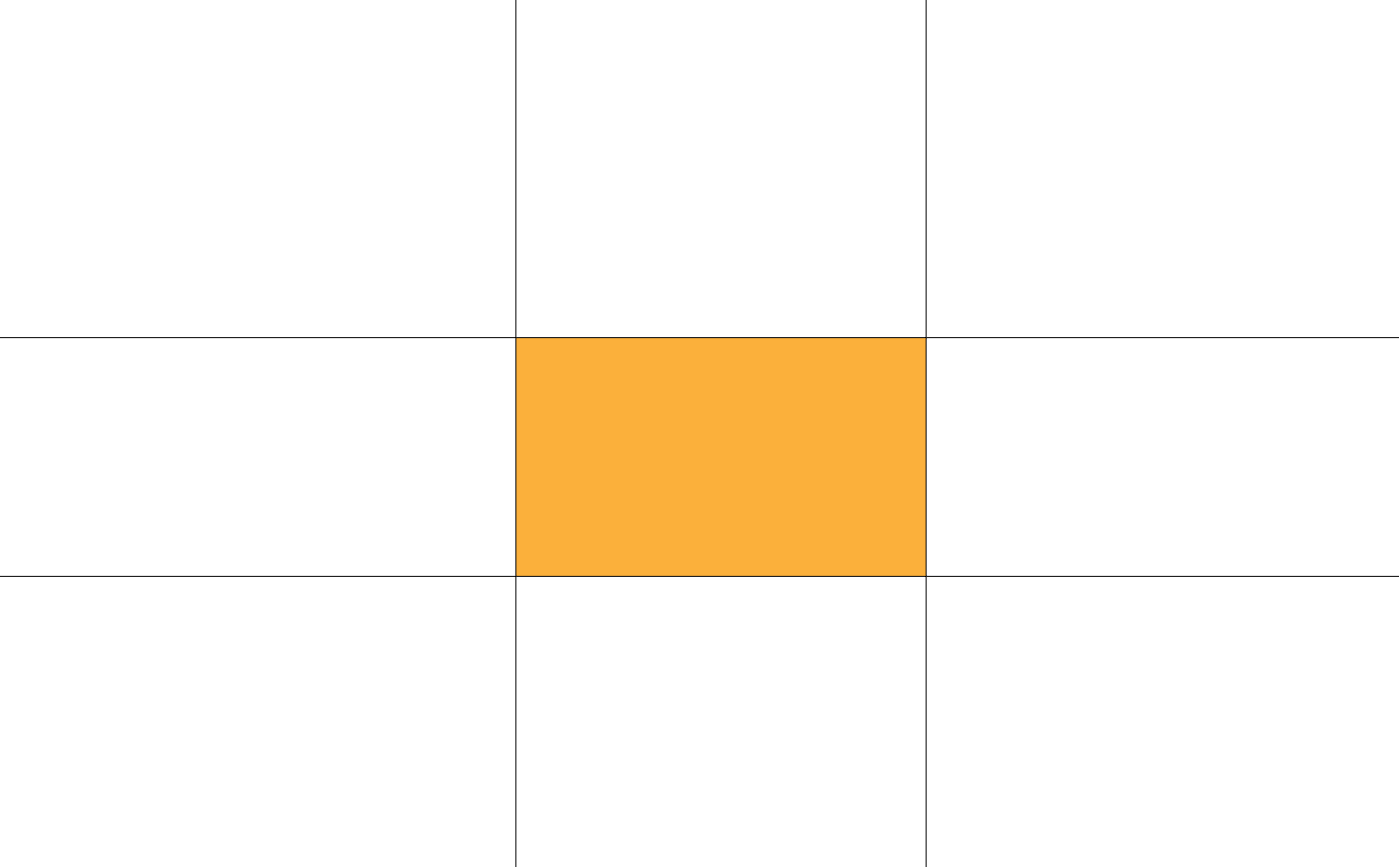
中间屎黄色的那个是一个AABB,可以看到它将一个平面划分为九个区域
这九个区域的边界用黑色的线标示出来了
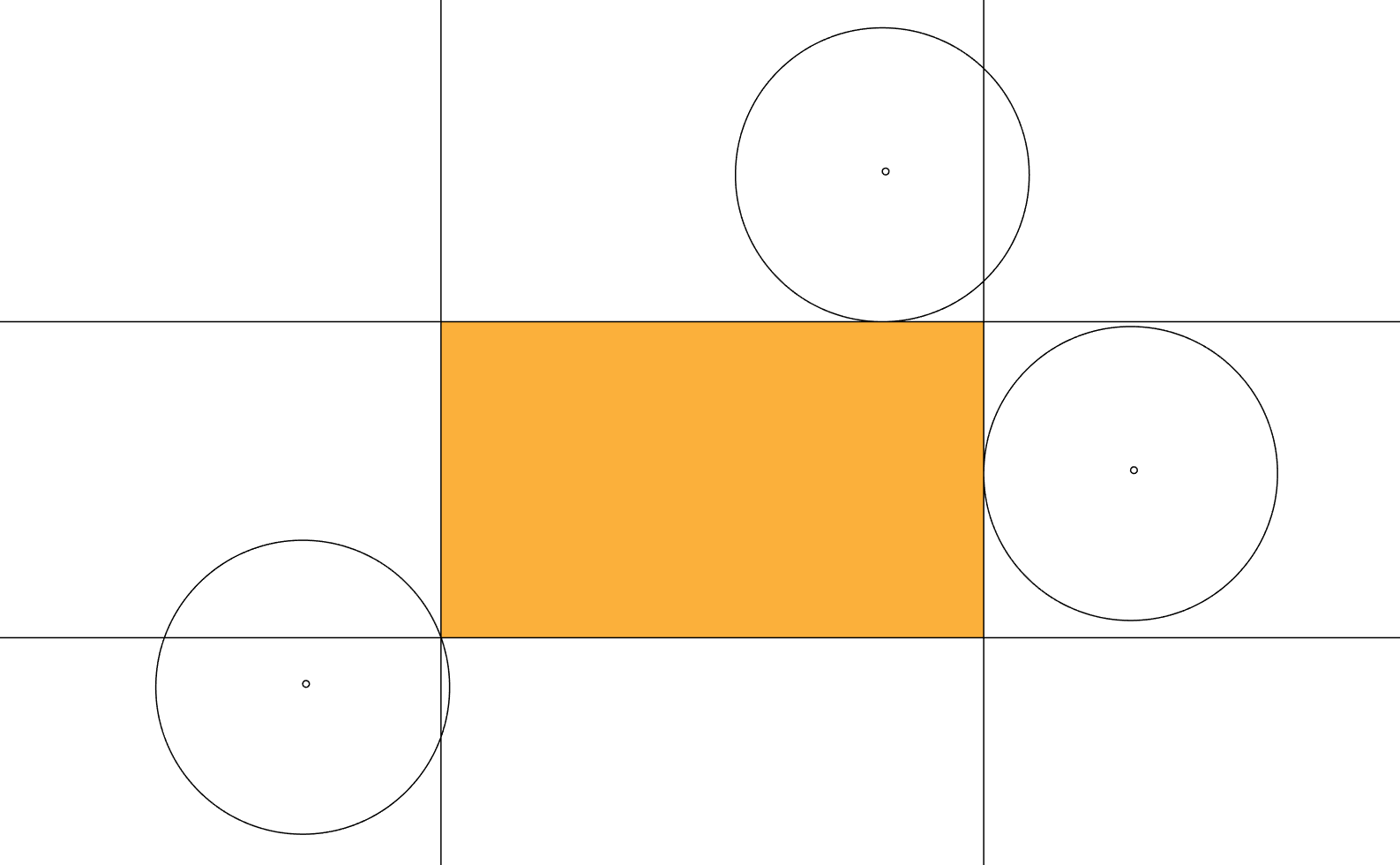
可以看到,在与AABB相邻的区域中,我们需要检测的是Circle与边的关系,而在不相邻的区域,我们检测的是与顶点的关系
理清楚之后我们可以得到下面的代码[pre lang="ruby"]if pos_x < other.min_x
if pos_y < other.min_x # 左上方
position.square_distance other.min_vector < radius * radius
elsif pos_y.between? other.min_y, other.max_y # 左方
other.min_x - pos_x < radius
elsif pos_y > other.max_y # 左下方
position.square_distance Vector(other.min_x, other.max_y) < radius * radius
end
elsif pos_x.between? other.min_x, other.max_x
if pos_y < other.min_y # 上方
other.min_y - pos_y < radius
elsif pos_y.between? other.min_y, other.max_y # 中间
true
elsif pos_y > other.max_y # 下方
pos_y - other.max_y < radius
end
elsif pos_x > other.max_x
if pos_y < other.min_y # 右上方
position.square_distance Vector(other.max_x, other.min_y) < radius * radius
elsif pos_y.between? other.min_y, other.max_y # 右方
pos_x - other.max_x < radius
elsif pos_y > other.max_y # 右下方
position.square_distance other.max_vector < radius * radius
end
end[/pre][/fold][fold=# 标准库是个好东西]在标准库里面发现了一个matrix.rb文件,里面居然有线性代数相关的各种API
然后我就好奇地把这个文件以及它所require的e2mmap.rb文件复制到RM工程下面,运行测试代码[pre lang="ruby"]require 'matrix'
p Vector[1, 2] * 3[/pre]然后……成功了……
或许我得考虑一下要不要放弃自己的Vector类,用标准库[/fold][fold=# Discuz!为啥不支持数学公式]要是能像Wikipedia那样有LaTeX风格的公式编辑器就好了
在这里放公式的话,我得弄成图片,再上传进来,特别麻烦[/fold][fold=质量和速度]接下来我们需要让这些物体拥有质量和速度这些最基本的属性
由于任何物体都有质量和速度,所以不妨给AABB和Circle类提供一个共同父类Entity[pre lang="ruby"]class Entity
attr_accessor :mass, :velocity
end[/pre]Entity类中还需要包含的方法应该有collide?和update
collide?方法的作用在之前已经讲过,至于update,则是用于根据速度来更新物体的位置的
[pre lang="ruby"]def collide?
end
def update
end[/pre]我们不妨再让Entity类提供一个计算动量的方法[pre lang="ruby"]def momentum
mass * velocity
end[/pre]现在我们可以让AABB和Circle对象具有移动的功能了[pre lang="ruby"]class AABB < Entity
def update
super
min_vector += velocity
max_vector += velocity
if collide?
# TODO
end
end
end
class Circle < Entity
def update
super
min_vector += velocity
max_vector += velocity
if collide?
# TODO
end
end
end[/pre]而这个大大的TODO是用于处理碰撞的[/fold][fold=一种更好的Circle与AABB的碰撞检测方法]来自@dearake 的分享的链接:怎样判断平面上一个矩形和一个圆形是否有重叠?-知乎
在以下代码中,other是AABB,self是Circle[pre lang="ruby"]relative_position = position - other.center
relative_position.x = relative_position.x.abs
relative_position.y = relative_position.y.abs
outer = relative_position - other.diagonal / 2
outer.x, outer.y = [0, outer.x].max, [0, outer.y].max
outer.double_length < radius * radius[/pre]代码量着实被大大减小了
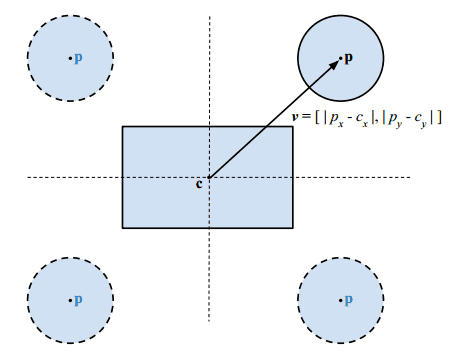
我在这里引用一下那篇回答设c为矩形中心,h为矩形半長,p为圆心,r为半径。
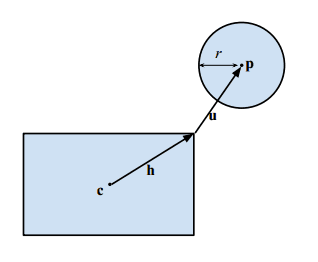
方法是计算圆心与矩形的最短距离u,若u的长度小于r则两者相交。
1.首先利用绝对值把p-c转移到第一象限,下图显示不同象限的圆心也能映射至第一象限,这不影响相交测试的结果:
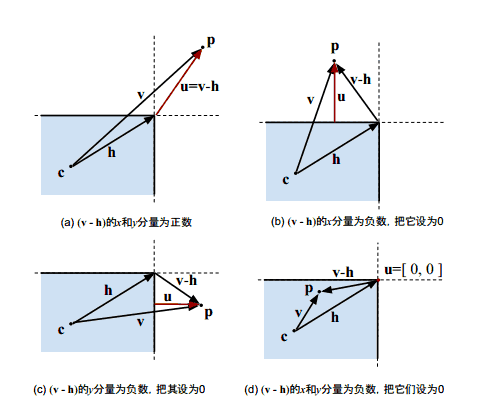
2.然后,把v减去h,负数的分量设置为0,就得到圆心与矩形最短距离的矢量u。下图展示了4种情况,红色的u是结果。
3.最后要比较u和r的长度,若距离少于r,则两者相交。可以只求u的长度平方是否小于r的平方。
- bool BoxCircleIntersect(Vector2 c, Vector2 h, Vector2 p, float r) {
- Vector2 v = abs(p - c); // 第1步:转换至第1象限
- Vector2 u = max(v - h, 0); // 第2步:求圆心至矩形的最短距离矢量
- return dot(u, u) <= r * r; // 第3步:长度平方与半径平方比较
- }
[/fold][fold=匀速直线运动测试]这次我们要进行第一次测试
为了能让物体在画面上显示出来,我们让Entity类继承Sprite类[pre lang="ruby"]class Entity < Sprite
def initialize viewport = nil
super
@mass = 0
@velocity = Vector.new
end
end[/pre]为AABB的初始化方法添加下面代码[pre lang="ruby"]self.x, self.y = min_x, min_y
self.bitmap = Bitmap.new diagonal.x, diagonal.y
bitmap.fill_rect 0, 0, width, height, Color.new(255, 255, 255, 255)[/pre]这样AABB就会呈现一个白方块
对于Circle也可以这样处理,不过RGSS没有内置画圆的方法,我们只好自己写一个[pre lang="ruby"]class Bitmap
def fill_circle ox, oy, radius, color = Color.new(*[255] * 4)
for i in (ox - radius)..(ox + radius)
h = (ox - i).abs
x = i < ox ? ox - h : i == ox ? ox : ox + h
y = (radius ** 2 - h ** 2) ** 0.5
fill_rect x, oy - y, 1, y * 2, color
end
end
end[/pre]原理是不停地拿竖直的线段去填。因为要用到开方运算,所以效率不太高。经过测试,对于半径为1024的圆需要花费4帧左右的时间
我们在Circle类的初始化方法的最后添上[pre lang="ruby"]self.x, self.y = pos_x, pos_y
self.bitmap = Bitmap.new diameter, diameter
bitmap.fill_circle *[radius] * 3[/pre]同时,在update方法中要这么写[pre lang="ruby"]def update
super
self.position += velocity
self.x, self.y = pos_x - radius, pos_y - radius
end[/pre]AABB的update方法同理
接下来我们就可以用以下代码进行测试[pre lang="ruby"]aabb = AABB.new 0, 0, 50, 50
aabb.velocity = Vector 0.5, 1.8
circle = Circle.new 400, 400, 30
circle.velocity = Vector -2, -1.2
loop do
Graphics.update
aabb.update
circle.update
end[/pre]效果如图
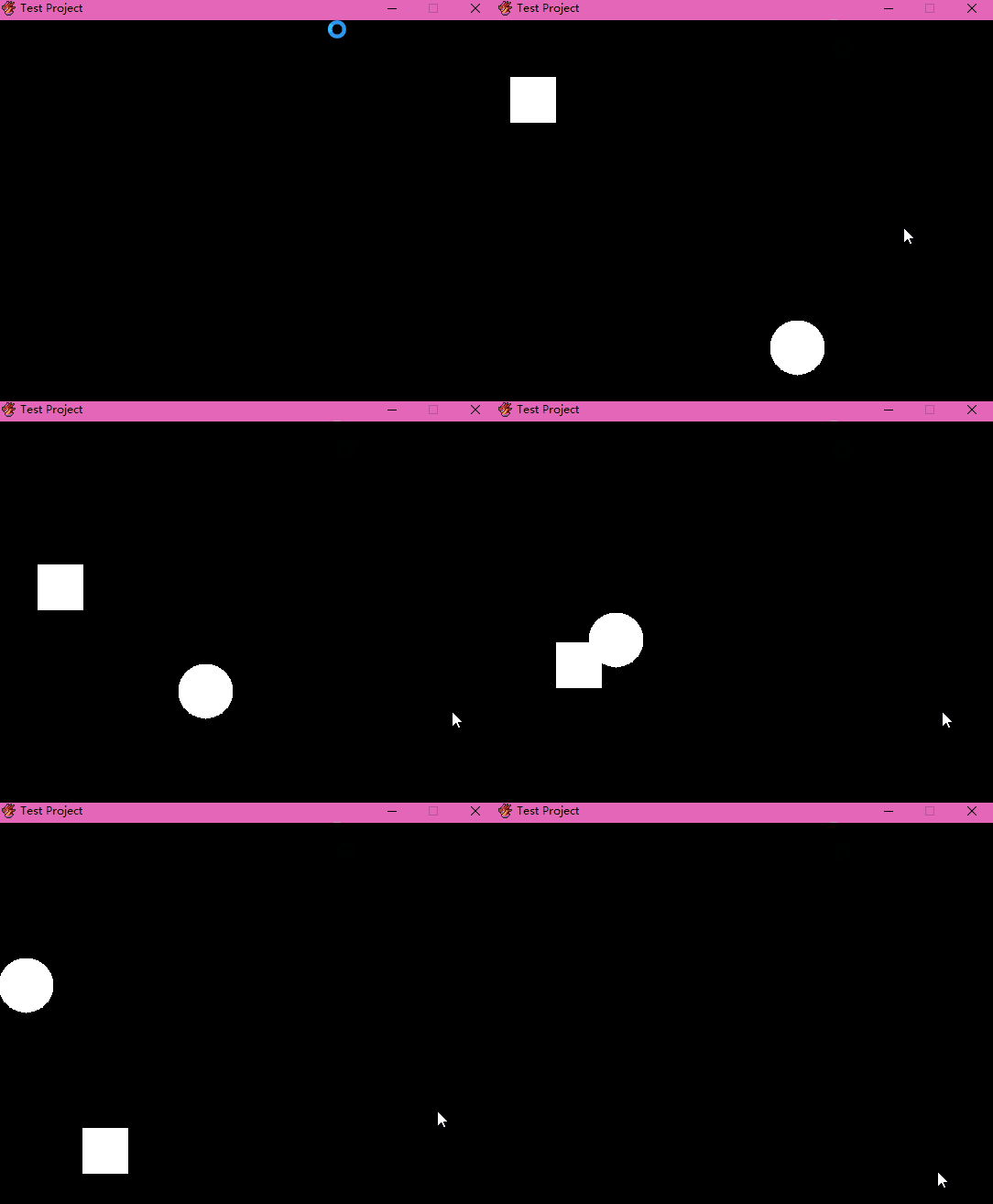
请忽略鼠标[/fold][fold=重力、加速度和斜抛测试]首先在Entity里面添上acceleration属性来代表加速度[pre lang="ruby"]attr_accessor :acceleration[/pre]然后在AABB和Circle的初始化方法中添上[pre lang="ruby"]self.acceleration = G[/pre]在update方法中添上[pre lang="ruby"]self.velocity += acceleration[/pre]就完成啦!是不是非常简单!
此处的G是重力加速度,我们把它的大小设为2。注意在RGSS中y轴正方向是朝下的,所以G的竖直分量不需要设为负数
测试代码也很简单:[pre lang="ruby"]aabb = AABB.new 50, 450, 100, 500
aabb.velocity = Vector 10, -40
loop do
Graphics.update
aabb.update
end[/pre]效果如图
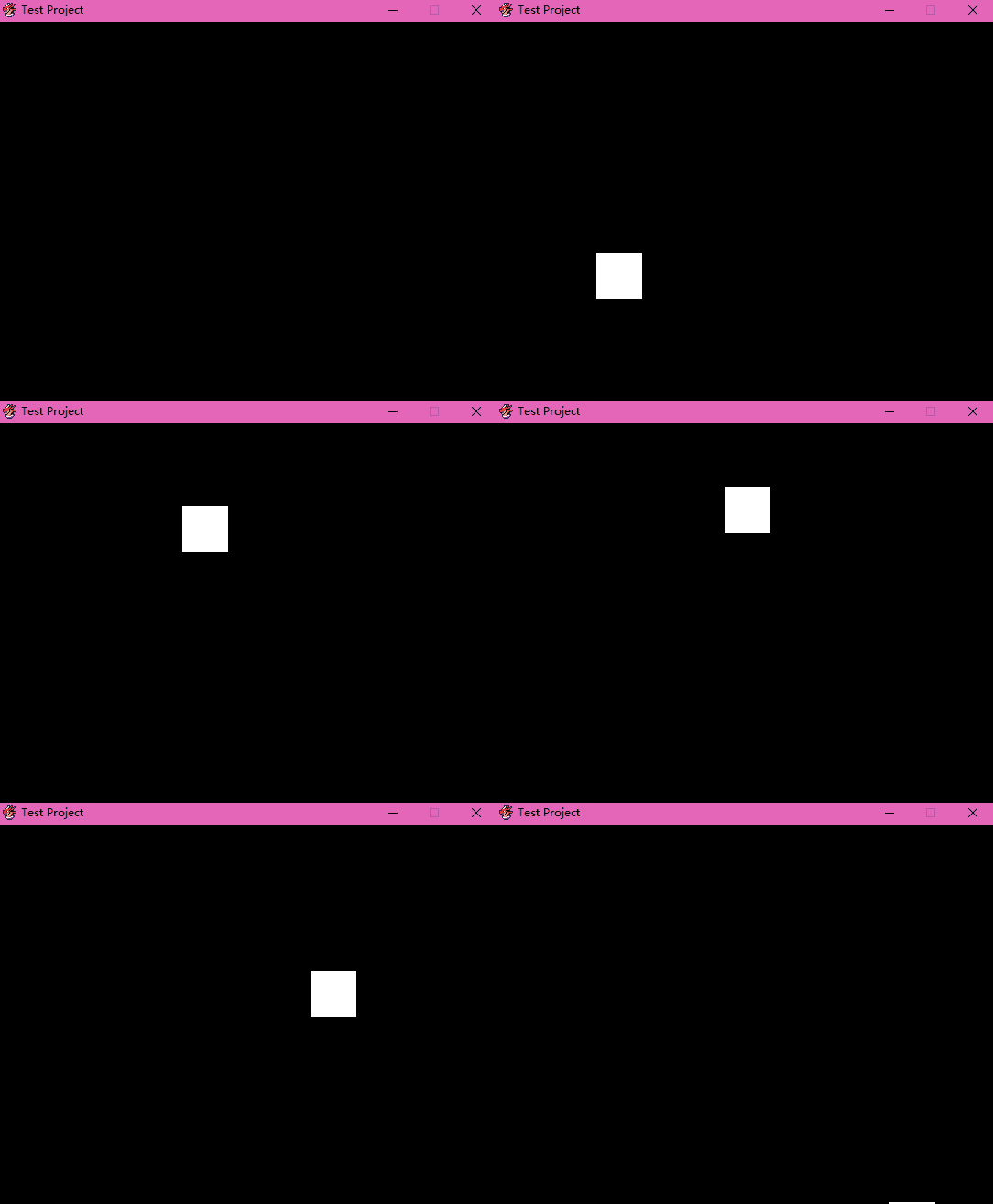
我们还可以用它画出抛物线,只要把代码这么写[pre lang="ruby"]aabb = AABB.new 50, 450, 100, 500
aabb.velocity = Vector 10, -40
back = Sprite.new
back.bitmap = Bitmap.new Graphics.width, Graphics.height
loop do
Graphics.update
aabb.update
back.bitmap.set_pixel aabb.center.x, aabb.center.y, Color.new(*[255] * 4)
end[/pre]效果如图
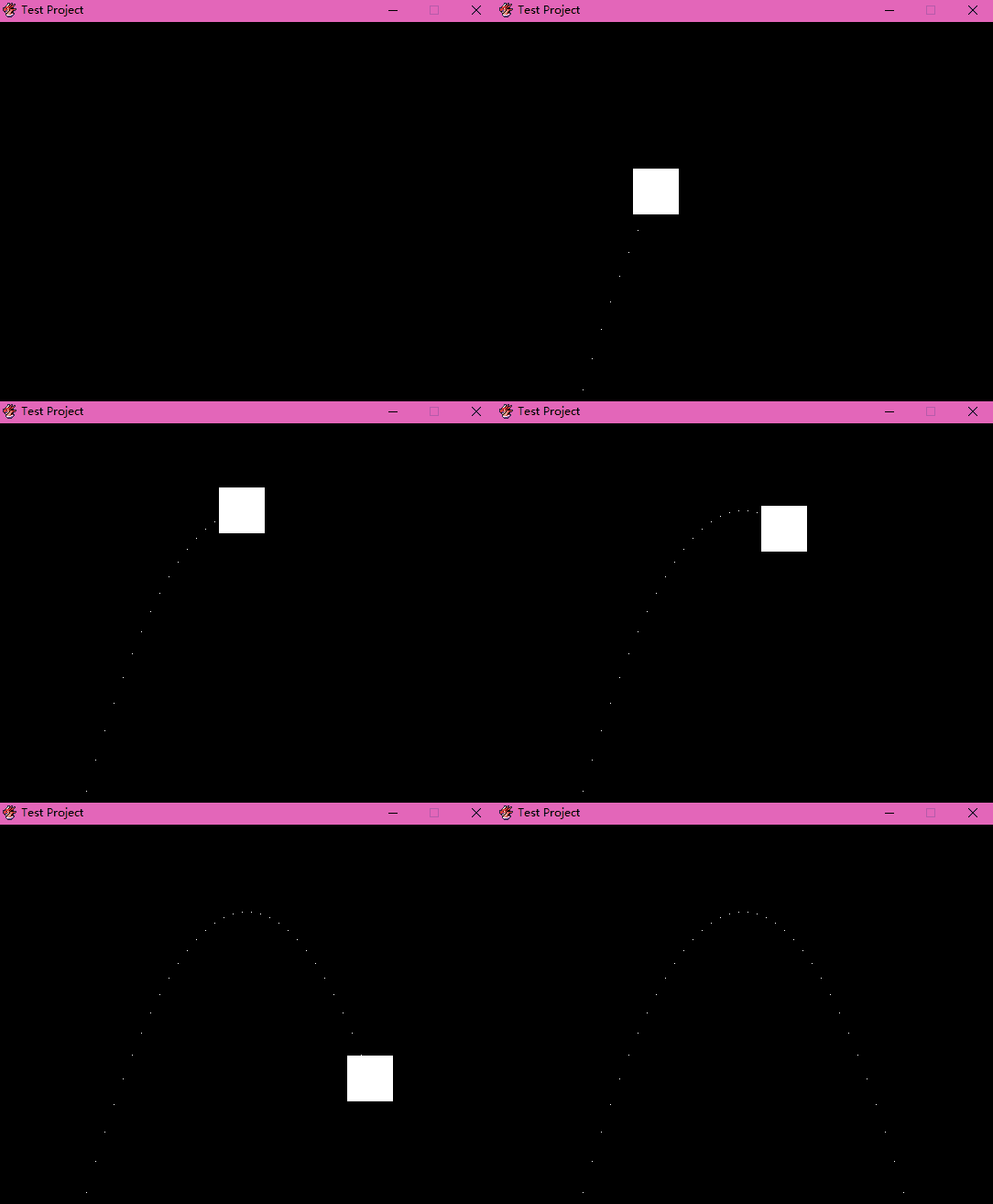 [/fold][fold=向量的投影]接下来我们做点为了以后的物理研究而不得不做的数学研究,就是向量的投影。
考虑u和v两个向量,现在我们要求u在v上的投影u1以及u1的长度
非常简单的事实是[pre lang="ruby"]u1.length == u.length * u.cos_theta v[/pre]此处cos_theta是一个待定义的方法
那么cos_theta方法如何实现?这里就用到一个非常重要的性质[pre lang="ruby"]u * v == u.length * v.length * u.cos_theta v[/pre]通过这个性质我们可以写出[pre lang="ruby"]def cos_theta other
self * other / (square_length * other.square_length) ** 0.5
end[/pre]为了少算一次开方来节省时间消耗,我还是选用了square_length方法而不是length方法
其实为了节省时间消耗还有一种方法,就是利用另一个性质[pre lang="ruby"]u1.length == u * v.unit[/pre]此处unit是另一个待定义的方法,用于获得单位向量
对于单位向量,我们可以这样写[pre lang="ruby"]def unit
self / self.length
end[/pre]这样也只需要算一次开方
那么获取投影长度的方法就可以写出来了:[pre lang="ruby"]def scalar_projection other
raise TypeError, "can't convert #{other.class} to Vector" if !other.is_a? Vector
self * other.unit
end[/pre]接下来利用另一个性质[pre lang="ruby"]u1 == u1.length * u1.unit[/pre]我们可以写出获取投影的方法
然而可以看到,在scalar_projection方法中已经乘了一次other.unit,在projection方法中又乘了一次other.unit,这两个东西乘起来看似可以把内部的根号消去,加快计算时间
然而实际上多个向量点乘是没有分配律的,所以我们还是只能写成[pre lang="ruby"]def projection other
scalar_projection other * other.unit
end[/pre][/fold][fold=弹性碰撞]首先我们复习一下弹性碰撞的公式
(假设这里有公式)
那么这个公式是用机械能守恒和动量守恒推导出来的
我想让AABB类和Circle类共同继承Rigid类,Rigid类再继承Entity类,这是因为我发现AABB和Circle对象将有很多共同点
目前Rigid类的内容是这样的[pre lang="ruby"]class Rigid < Entity
def initialize viewport = nil
super
self.acceleration = G
draw_shape
end
def draw_shape
end
def update
super
self.velocity += acceleration
end
def collide other, direction = Vector(1, 1)
self.velocity = (velocity.projection(direction) * (mass - other.mass) + 2 * other.mass * other.velocity.projection(direction)) / (mass + other.mass) + velocity.projection(direction.normal)
end
end[/pre]当然有了Rigid类之后AABB类和Circle类也需要做出相应的改变,不过这不是重点,重点是这个collide方法
刚刚给的公式是一维碰撞,意味着两个互相碰撞的物体的速度是平行的,而且接触面是与速度垂直的
那么可以看到这里有个叫direction的参数,它就是那个接触面的法向量
接下来我们把velocity分解为平行于direction和垂直于direction的两个向量之和,然后我们将平行于direction的分量代入公式,得出新的分量,再加上不受影响的垂直于direction的分量,就得到了最终的velocity
注意这个normal方法,它是Vector类的方法,用来获取垂直于self的向量[pre lang="ruby"]class Vector
def normal
Vector y, -x
end
end[/pre]接下来的难点就是这个direction
AABB与AABB的碰撞是简单的,接触面容易获得,这里就略了……
Circle与Circle的碰撞也是简单的,法向量就是两个Circle的position之差,略了……
Circle与AABB的碰撞,比较复杂。不过受上面的更好的检测Circle与AABB的碰撞的方法的启发,就简单很多了
具体看代码[pre lang="ruby"]class AABB < Rigid
def collide other
return unless collide? other
case other
when AABB
super(other, min_x > other.max_x || max_x < other.min_x ? Vector(1, 0) : Vector(0, 1))
when Circle
relative_position = other.position - center
relative_position.x = relative_position.x.abs
relative_position.y = relative_position.y.abs
outer = relative_position - diagonal / 2
outer.x, outer.y = [0, outer.x].max, [0, outer.y].max
outer.x *= other.position.x > center.x ? 1 : -1
outer.y *= other.position.y > center.y ? 1 : -1
super(other, outer)
end
end
end
class Circle < Rigid
def collide other
return unless collide? other
case other
when Circle
super(other, other.position - position)
when AABB
relative_position = position - other.center
relative_position.x = relative_position.x.abs
relative_position.y = relative_position.y.abs
outer = relative_position - other.diagonal / 2
outer.x, outer.y = [0, outer.x].max, [0, outer.y].max
outer.x *= position.x > other.center.x ? 1 : -1
outer.y *= position.y > other.center.y ? 1 : -1
super(other, outer)
end
end
end[/pre]测试代码:[pre lang="ruby"]aabb = AABB.new 50, 450, 100, 500
aabb.mass = 10
aabb.velocity = Vector 10, -30
circle = Circle.new 500, 400, 50
circle.mass = 2.5
circle.velocity = Vector -20, -21
back = Sprite.new
back.bitmap = Bitmap.new Graphics.width, Graphics.height
loop do
aabb.update
circle.update
aabb.collide circle
circle.collide aabb
back.bitmap.set_pixel aabb.center.x, aabb.center.y, Color.new(*[255] * 4)
back.bitmap.set_pixel circle.pos_x, circle.pos_y, Color.new(*[255] * 4)
Graphics.update
end[/pre]效果:
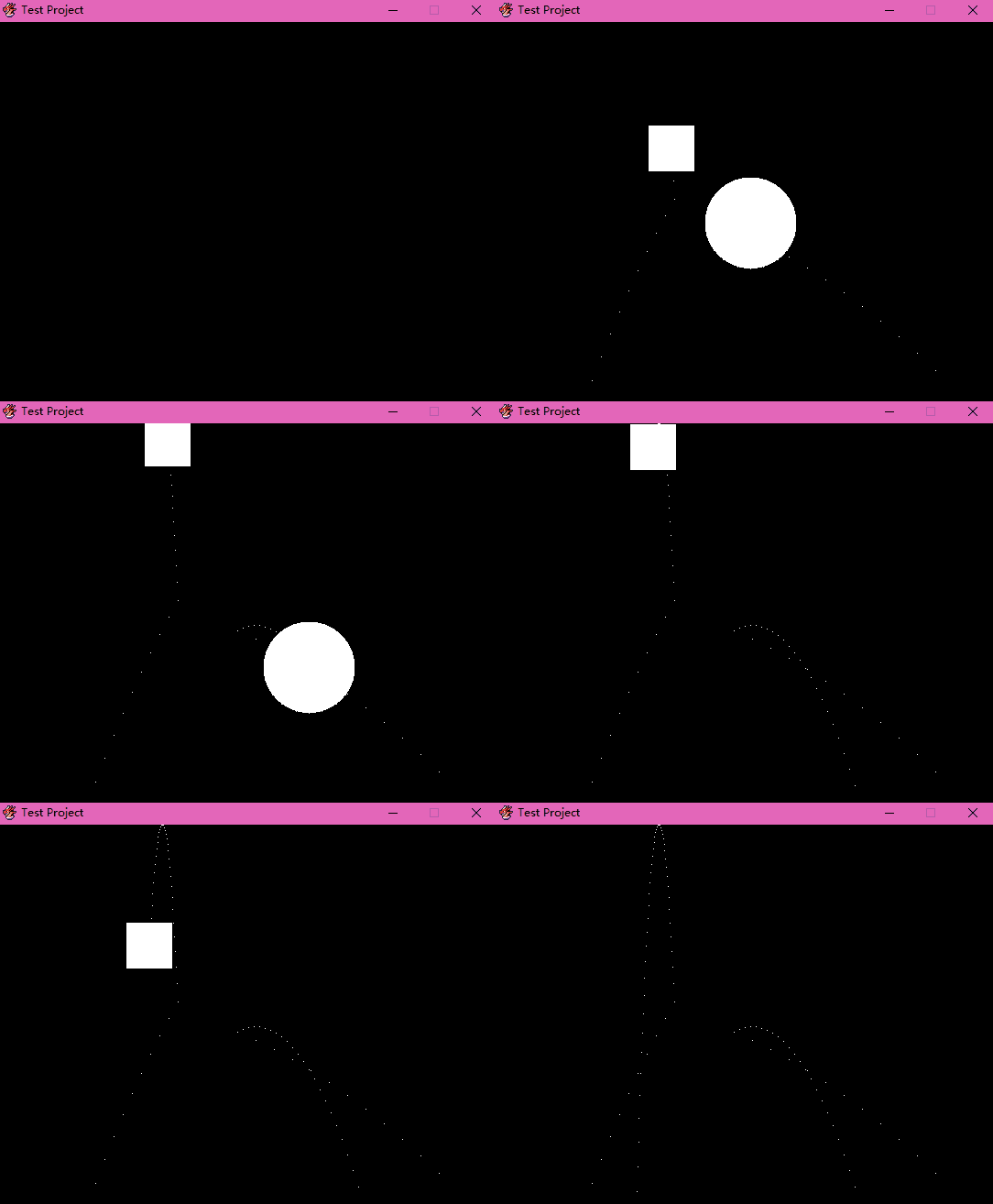 [/fold][fold=固定的物体和地面]现在我们来定义一些“任尔风吹浪打,我自巍然不动”的物体……
这种东西可以用来做地面之类的东西
暂且命名为Board吧[pre lang="ruby"]class Board < Entity
end[/pre]由于其不动如山的特性,update方法应该这么写[pre lang="ruby"]def update
super
self.acceleration = 0
self.velocity = 0
self.mass = Infinity
end[/pre]不过光是个Board没啥用啊,我们再定义另一个类AABBoard
AABBoard跟AABB很像,也是边界平行于坐标轴的矩形,所以有很多方法都是共用的
不如将这些方法扔到一个模块AAB中,这样除了包含这个模块之外,我们只需要重写一下初始化方法就行[pre lang="ruby"]class AABBoard < Board
include AAB
def other_initialize
draw_shape
end
end[/pre]这里的other_initialize在模块中是被initialize调用的
接下来我们写一个地面类[pre lang="ruby"]class Ground < AABBoard
def initialize y
super(0, y, Graphics.width, Graphics.height)
end
def y
min_y
end
def y= y
super
min_vector.y = y
draw_shape
end
end[/pre]由于程序对包含无穷大这类的量的计算是有错误的,所以在Rigid类中的碰撞处理对于无穷大质量的物体要另外讨论[pre lang="ruby"]tangential = velocity.projection direction
normal = velocity.projection direction.normal
if other.mass == Float::INFINITY
self.velocity = normal - tangential
else
self.velocity = (tangential * (mass - other.mass) + 2 * other.mass * other.velocity.projection(direction)) / (mass + other.mass) + normal
end[/pre]然后只要把AABB和Circle类中的碰撞处理中的AABB换成AAB就行了
测试代码:[pre lang="ruby"]aabb = AABB.new 50, 300, 100, 350
aabb.mass = 10
aabb.velocity = Vector 10, -25
circle = Circle.new 500, 300, 50
circle.mass = 2.5
circle.velocity = Vector -20, -21
ground = Ground.new 400
back = Sprite.new
back.bitmap = Bitmap.new Graphics.width, Graphics.height
loop do
aabb.update
circle.update
ground.update
[aabb, circle, ground].permutation(2) {|p| p[0].collide p[1] }
back.bitmap.set_pixel aabb.center.x, aabb.center.y, Color.new(*[255] * 4)
back.bitmap.set_pixel circle.pos_x, circle.pos_y, Color.new(*[255] * 4)
Graphics.update
end[/pre]效果:
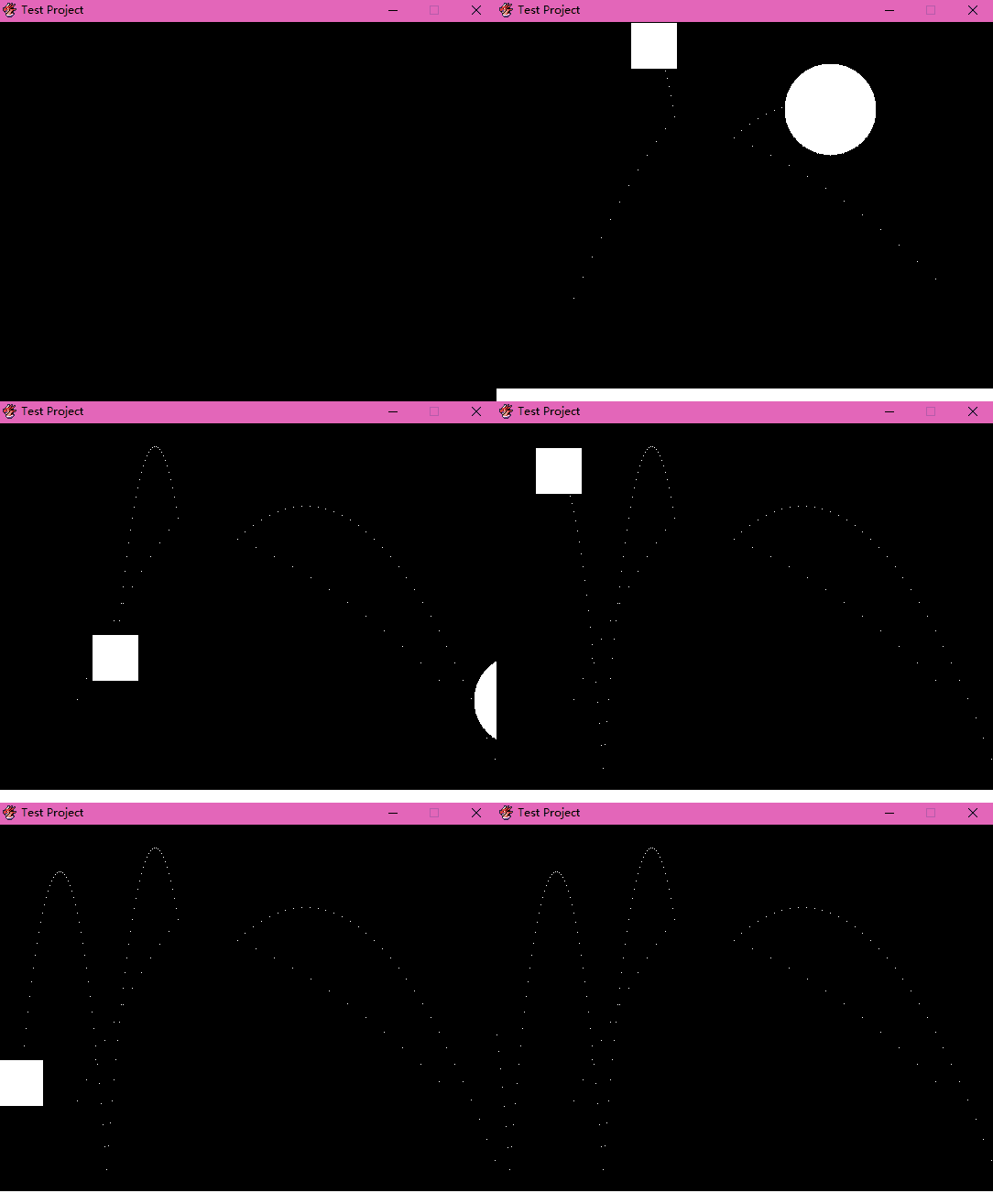 [/fold][fold=向量叉积]看来向量的叉乘是逃不掉了
两个向量的叉积是一个与它们都垂直的向量,而显然二维世界已经容不下叉积这尊大佛了
不过巧妙的是,由于在二维平面上的两个向量的叉积始终与这个平面垂直,也就是在考虑正负的情况下方向是不变的,所以我们可以把它当标量处理
[pre lang="ruby"]def cross other
x * other.y - other.x * y
end[/pre]不过光有这个不行。由于我们规定了戳出平面的向量的正方向,所以一个标量在这里也能代表一个向量[pre lang="ruby"]alias dot *
def cross other
case other
when Vector
x * other.y - other.x * y
when Numeric
Vector -other * y, other * x
else
raise TypeError, "can't convert #{other.class} to Vector or Numeric"
end
end[/pre]接下来再污染一下标准库[pre lang="ruby"][Fixnum, Bignum, Float].each do |klass|
klass.module_eval do
alias ulysses201808181049_times *
def * other
if other.is_a? Vector
other * self
else
ulysses201808181049_times other
end
end
def dot other
raise TypeError, "can't convert #{other.class} to Vector" if !other.is_a? Vector
other.dot self
end
def cross other
raise TypeError, "can't convert #{other.class} to Vector" if !other.is_a? Vector
-other.cross(self)
end
end
end[/pre][/fold][fold=# 完了,写崩了……]完蛋了完蛋了
刚刚新写了个力矩和角加速度的算法
然后就是一开始测试,过了几帧就“RGSS3 Player停止运行”
rescue捕捉不到任何错误
完蛋了完蛋了[/fold][fold=优化碰撞处理]我发现一个问题
我对于两个物体的碰撞检测是静态的,就是每帧检测一次
这样的话如果两个物体在一帧的时间内互相穿过,就检测不到碰撞
而且一般情况下,当你检测到两个物体碰撞的时候,实际上它们已经互相嵌入了一段距离,就存在严重的误差
而且如果碰撞后两物体的速度很相近,很有可能下一帧依然检测到碰撞,于是速度就越来越接近,最后这俩物体就黏一起了
所以现在我们要解决的问题是,当静态检测到两个物体碰撞时,计算出实际上到底应该在什么时候发生的碰撞,并作出正确的反弹
那么我的方法就是,发生碰撞时,把时间向前回溯,直到它们刚好接触,然后通过回溯了多少时间,算出碰撞的真正时间,再进行修正
现在的难点就是如何回溯到恰好碰撞的时间
我们设实际碰撞发生在空间位置s0和时间位置t0,而检测到碰撞发生的空间和时间位置在s1和t1,其中t1>t0
作出物体运动的s-t图像,标出s0,t0,s1,t1,得到下面的图
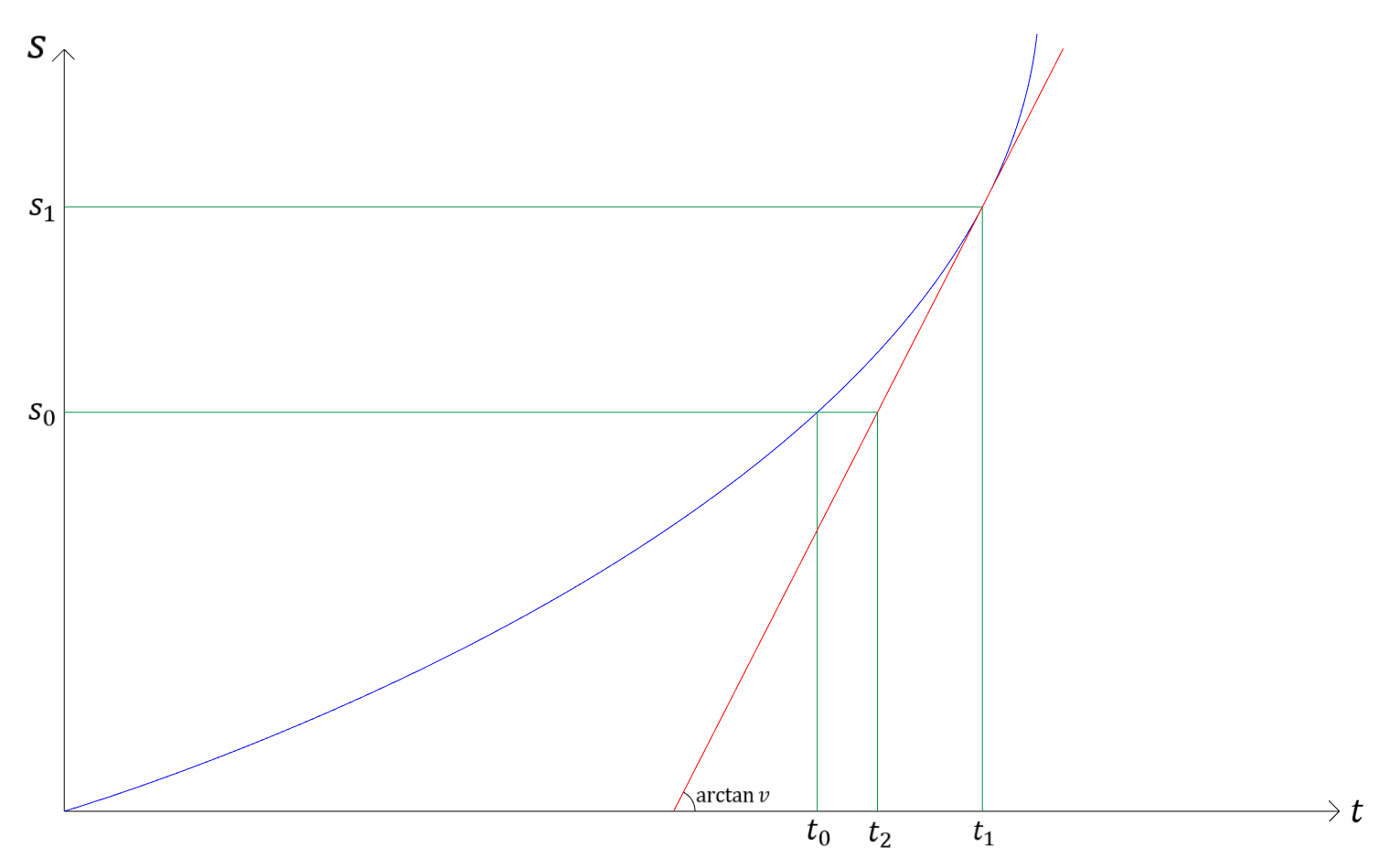
纵轴代表空间运动,横轴代表时间,蓝色的线是描述物体的运动的图像
注意到t1与t0的差是一个不到一帧的极小量,因此从(t0,s0)到(t1,s1)的这段蓝线可以用(t1,s1)处的切线代替,即红线
如果你学过微分,那么你就能很轻松地理解这一点
而对于红线我们是清楚的,因为它的斜率就是速度v
(严格来说不能写arctan v,不过这里所有的量都是没有量纲的,就无所谓了)
接下来我们再通过分析物体的形状计算出s1和s0的差,结合v,就可以算出t0的近似值t2
接下来我们讨论一下如何算出s1和s0的差
首先讨论AABB与AABB碰撞的情况
现在有两个AABB嵌入在一起了,如图所示
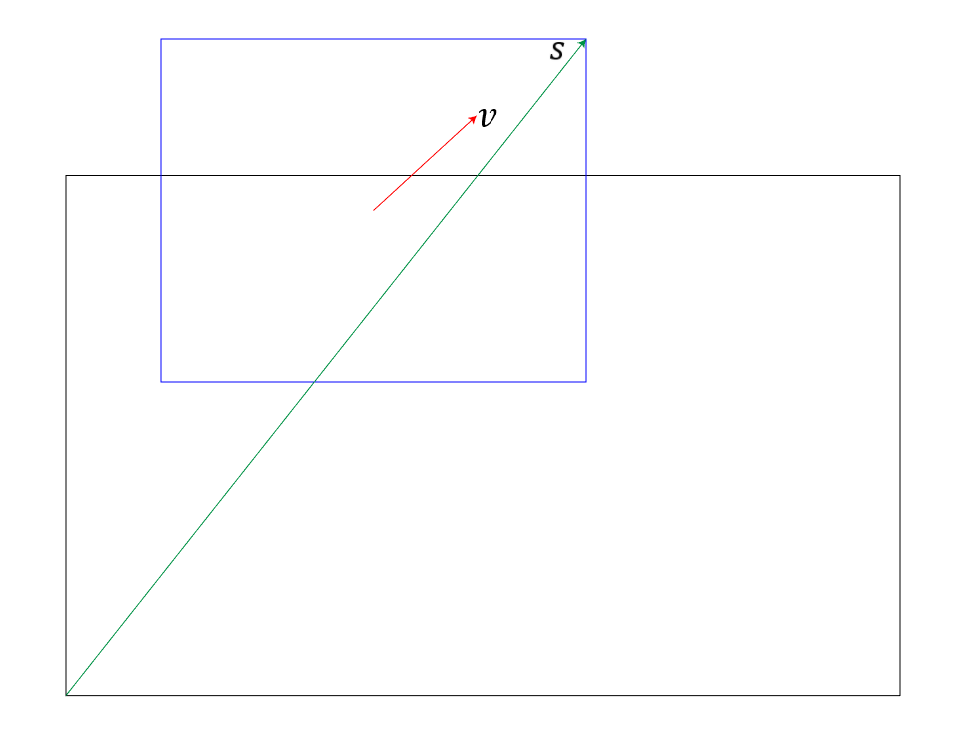
已知它们的相对速度为v,现在我们要知道如何根据v回溯到它们刚刚碰撞的时候
一个很自然地想法就是,顺着v挪动它们,直到它们就要完全分开的时候,就是它们刚刚碰撞的时候
现在我们把黑色的AABB1固定不动,沿着与v相反的方向移动蓝色的AABB2
由于v是指向右上的,所以我们要回溯的话,得把它向左下移动
把v的反向量-v分解为-vx和-vy,一个方向向左,一个方向向下
可以看到,如果把AABB2向左移动,需要移动的距离是[pre lang="ruby"]AABB2.max_x - AABB1.min_x[/pre]而向下移动需要的距离是[pre lang="ruby"]AABB2.max_y - AABB1.min_y[/pre]把这两个量合起来,就是[pre lang="ruby"]Vector AABB2.max_x - AABB1.min_x, AABB2.max_y - AABB1.min_y[/pre]而这个向量就是图中标出来的绿色的s
那么到底顺着-v回溯需要多少时间?答案是[pre lang="ruby"][s.x / v.x, s.y / v.y].min[/pre]那么这只是一种情况,实际上还有很多其他情况
不过所有的情况都有一个共同点:分别从AABB1的左上、左下、右上、右下指向AABB2的右下、右上、左下、左上的四个向量s1、s2、s3、s4分处四个象限,而我们需要用到的永远是与v处在同一象限的s
那么AABB与AABB之间的碰撞优化的思路就完成了
接下来我们讨论Circle与Circle的情况
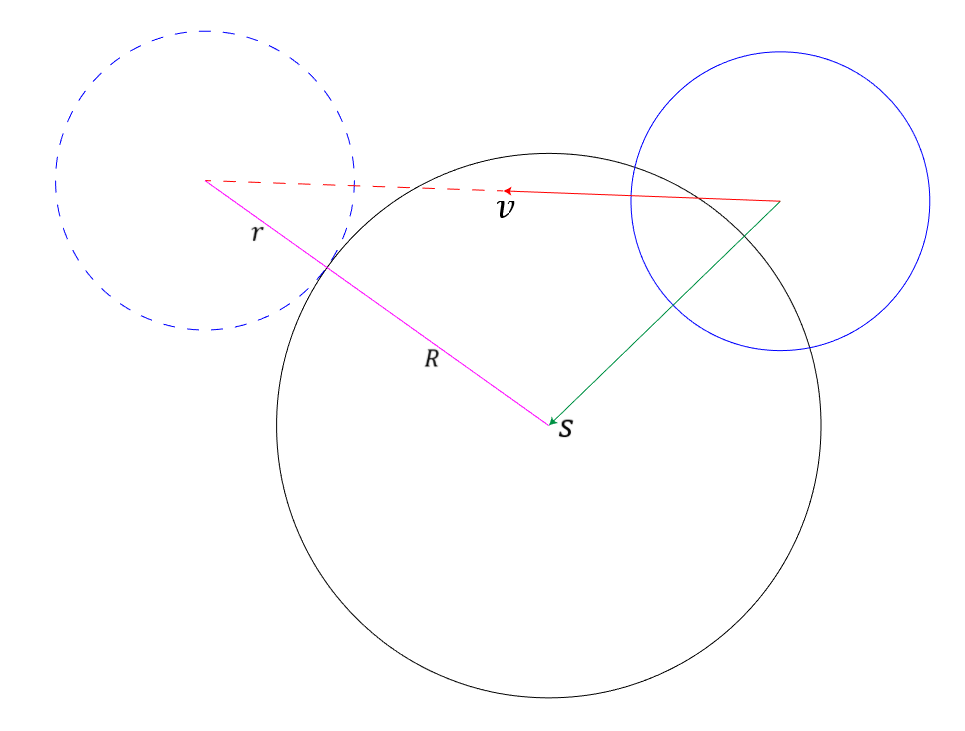
现在我们要求的回溯时间,就是向量v占整根红色线段的比例,我们设整根红色线段为[pre lang="ruby"]Vector t * v.x, t * v.y[/pre]通过观察图片,我们知道这根线段与Circle1相对于Circle2的位置s的向量差的长度是r+R
于是我们可以列出方程[pre lang="ruby"](t * v.x - s.x) ** 2 + (t * v.y - s.y) ** 2 == (r + R) ** 2[/pre]用MATLAB解一下,可以得到一个很复杂的式子,而化简后的结果是[pre lang="ruby"]t1 = (s.dot(v) + ((r + R) ** 2 * v.square_length - (s.cross v) ** 2) ** 0.5) / v.square_length
t2 = (s.dot(v) - ((r + R) ** 2 * v.square_length - (s.cross v) ** 2) ** 0.5) / v.square_length[/pre]其中负数解要舍去[/fold][fold=# 快开学了!]最近要补作业,而且开学后变成初三狗还要准备中考,多半是没法继续更新
但我目前没有弃坑的打算,有空还是会更新[/fold]原标题:特别想做一个RGSS的物理引擎! |
评分
-
查看全部评分
|

 无视VIP
无视VIP

 写轮眼
写轮眼
 发表于 2018-8-17 20:10:39

 提升卡
提升卡 沉默号角
沉默号角 喧嚣号角
喧嚣号角 变色卡
变色卡 升龙剑
升龙剑





 发表于 2018-8-18 00:57:43
 以前为了做弹球弄过类似的,不过现在不知道扔哪去了。
 RGDirect -

 发表于 2018-8-18 08:57:35