| 赞 | 168 |
| VIP | |
| 好人卡 | |
| 积分 | 229 |
| 经验 | |
| 最后登录 | 2025-4-1 |
| 在线时间 | 8598 小时 |
- 梦石
- 0
- 星屑
- 22879
- 在线时间
- 8598 小时
- 注册时间
- 2011-12-31
- 回帖
- 3270
|
 发表于 2019-5-2 10:36:58
|
显示全部楼层
发表于 2019-5-2 10:36:58
|
显示全部楼层
本帖最后由 tseyik 于 2019-5-2 13:15 编辑
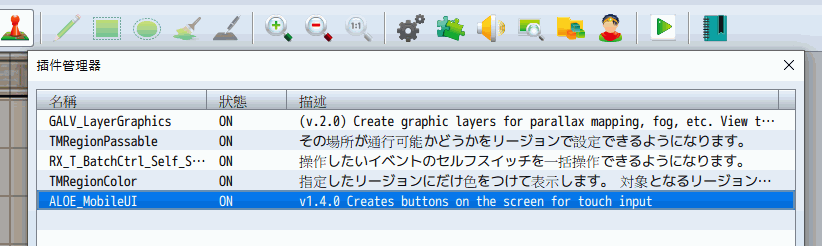
https://forums.rpgmakerweb.com/i ... ons-and-dpad.94196/
Virtual Buttons and DPad[pre lang="javascript"]"use strict";
/*:
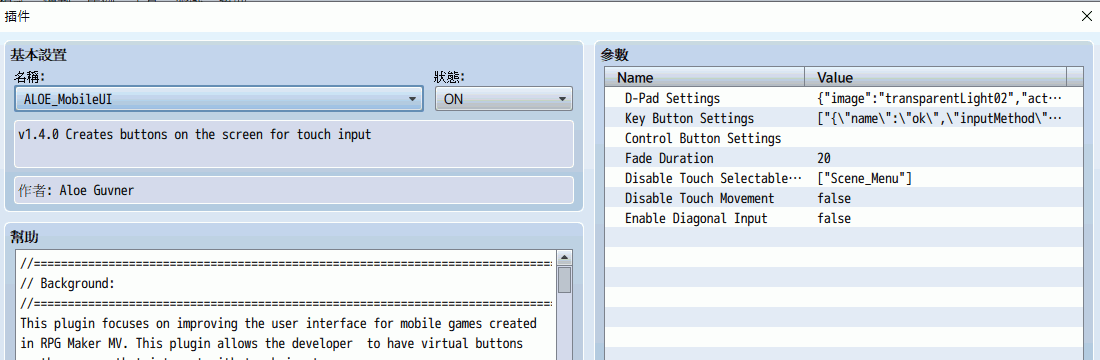
* @plugindesc v1.4.0 Creates buttons on the screen for touch input
* @author Aloe Guvner
*
*
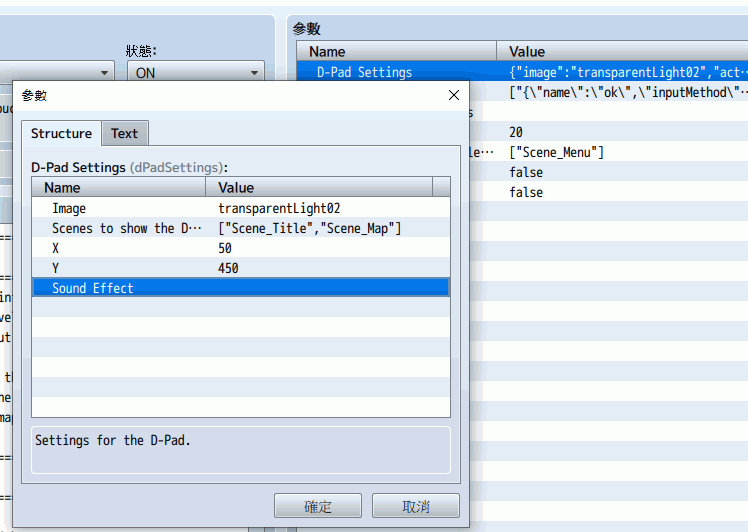
* @param dPadSettings
* @text D-Pad Settings
* @type struct<dpad>
* @desc Settings for the D-Pad.
*
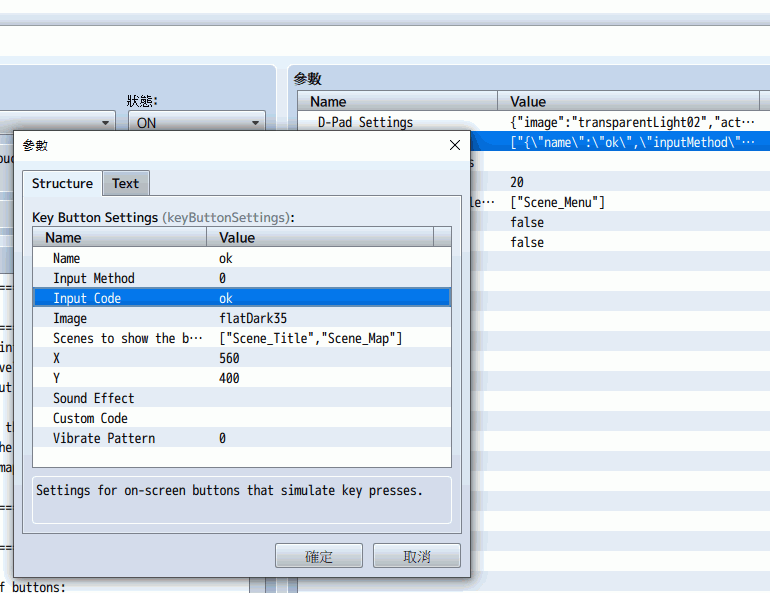
* @param keyButtonSettings
* @text Key Button Settings
* @type struct<keyButton>[]
* @desc Settings for on-screen buttons that simulate key presses.
*
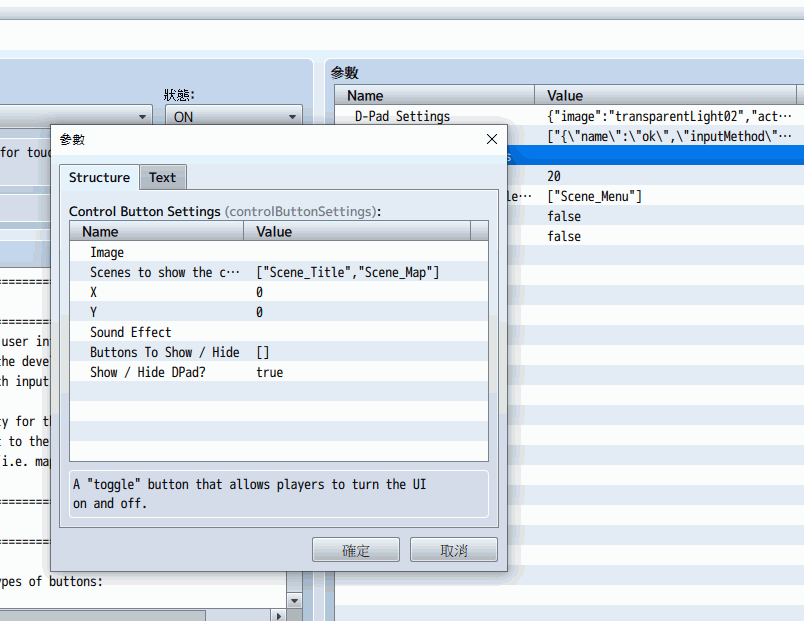
* @param controlButtonSettings
* @text Control Button Settings
* @type struct<controlButton>
* @desc A "toggle" button that allows players to turn the UI
* on and off.
*
* @param fadeDuration
* @text Fade Duration
* @desc Duration of hiding the buttons (number of frames)
* for the buttons to fade and un-fade.
* @default 20
*
* @param disableTouchWindows
* @text Disable Touch Selectable Windows
* @type text[]
* @desc Disable the touch input for selectable windows
* in these scenes.
* @default ["Scene_Menu"]
*
* @param disableTouchMovement
* @text Disable Touch Movement
* @type boolean
* @desc Disable touch movement on the map when a DPad is active.
* @default false
*
* @param enableDiagonalInput
* @text Enable Diagonal Input
* @type boolean
* @desc If the player touches in the corners of the D-Pad, both
* direction inputs are recorded. See info in help file.
* @default false
*
* @help
*
* //=============================================================================
* // Background:
* //=============================================================================
* This plugin focuses on improving the user interface for mobile games created
* in RPG Maker MV. This plugin allows the developer to have virtual buttons
* on the screen that interact with touch input.
*
* This plugin allows maximum flexibility for the developer, you can add
* as many or as few buttons as you want to the screen, and you can add these buttons
* on whichever screens you would like (i.e. map, menu, credits, title, etc.).
*
* //=============================================================================
* // Functionality:
* //=============================================================================
*
* This plugin can create 3 different types of buttons:
* -Directional Pad
* --A single picture which is used for up, left, right, and down movement.
* --The picture is divided into 9 sections. The top 3 sections trigger the "up"
* input, the left 3 sections trigger the "left" input, the right 3 sections
* trigger the "right" input, and the bottom 3 section triggers the "down" input.
* --The middle section does not trigger any input.
* --The scenes that this button appears in can be defined.
* --This button is not mandatory.
*
* -Key buttons
* --These buttons can be used to represent any key. Common keys to use would be
* "ok" , "escape", "pagedown", "pageup".
* --However, these can be any key, and there can be as many or as few as the developer
* would like.
* --Additionally, the scenes that these buttons appear in can be controlled individually.
*
*
* -Control button
* --The control button, if pressed, will collapse and hide other buttons on the screen.
* --If pressed again, it will expand and show other buttons on the screen.
* --You can configure which other buttons are affected. This can allow you to create
* a dynamic menu where pressing this button opens other buttons for "Items", "Save",
* etc., while leaving the DPad or any other button active all of the time.
* --The scenes that this button appears in can be defined.
* --This button is not mandatory.
*
* //=============================================================================
* // Touch Input Methods:
* //=============================================================================
*
* The following methods can be chosen for any of the key buttons. The default
* method is "triggered".
*
* Triggered:
* This input method occurs when the button is just pressed down. It occurs only
* once, in the same frame that the button was pressed.
*
* Pressed:
* This input method occurs every frame while the button is pressed down. Any action
* that this button is doing will execute every frame (60 frames per second)
*
* Repeated:
* This input method occurs after 24 frames from when the button is pressed, and
* then occurs every 6 frames while the button is still pressed.
*
* Long Pressed:
* This input method occurs after 24 frames from when the button is pressed, and
* then occurs every frame while the button is still pressed.
*
* Released:
* This input method occurs when the button is no longer being pressed.
*
* //=============================================================================
* // Setup:
* //=============================================================================
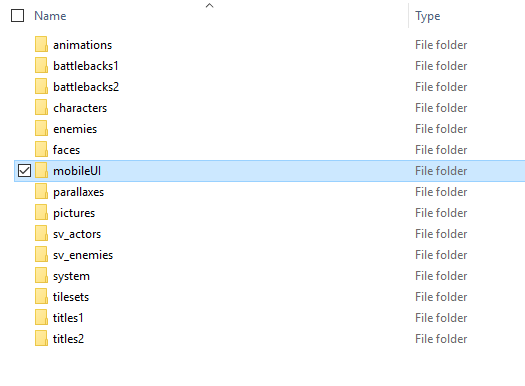
* This plugin requires a new folder to be created within the project "img" folder.
* The folder must be titled "mobileUI".
* Place all UI button images into this folder, and they can be accessed from the
* plugin parameters.
*
* //=============================================================================
* // Vibrate Parameter
* //=============================================================================
* Buttons can trigger a vibrate on the mobile device when pressed, controlled by
* a parameter.
* This parameter follows a pattern of vibrate,pause,vibrate,pause, etc.
* Separate each time interval by a comma.
* Examples:
* 200 --> vibrate for 200ms
* 100,30,100,30,100,30 --> vibrate for 100ms, pause for 30ms; repeat 2 more times
*
* Note that most devices support the Vibration API, but not all.
* Additionally, this may not work in all methods of deployment.
*
* //=============================================================================
* // Plugin Commands:
* //=============================================================================
* All plugin commands begin with MobileUI.
* All plugin commands are not case sensitive (i.e. DPad is the same as dpad)
*
* //=============================================================================
* hide: hides the specified button
* //=============================================================================
* Allowed first arguments:
* -DPad
* -Control
* -Any key button defined in the parameters
*
* Allowed second arguments:
* -instant (optional, this will hide the button instantly)
*
* Examples:
* MobileUI hide DPad
* mobileui hide Ok instant
* MobileUI hide PageDown
*
* //=============================================================================
* show: shows the specified button
* //=============================================================================
* Allowed first arguments:
* -DPad
* -Control
* -Any key button defined in the parameters
*
* Allowed second arguments:
* -instant (optional, this will show the button instantly)
*
* Examples:
* MobileUI show dpad
* mobileui show ok
* MobileUI show PageUp instant
*
* //=============================================================================
* Diagonal Movement Parameter
* //=============================================================================
*
* There is a parameter that controls whether diagonal input is recorded from the
* D-Pad. This is not a diagonal movement plugin! This parameter merely controls
* whether touching on the top left will add the input values of both "top" and
* "left" to the input state. Other diagonal movement plugins would consume these
* input values to move the character diagonally.
*
* If your game uses diagonal movement, this parameter must be on. If your game
* does not use diagonal movement, it is recommended to turn this parameter off.
*
* //=============================================================================
* Terms of Use:
* //=============================================================================
* Free for use in commercial or non-commercial projects.
* Credits required to: Aloe Guvner
*
* //=============================================================================
* Version History:
* //=============================================================================
* v1.4.0 (December 13 2018)
* --Added ability to configure which buttons are affected by the "control" button
* Can be used to create dynamic menus.
* v1.3.1 (October 30 2018)
* --Added a parameter to control whether diagonal movement is detected as a
* possible fix for a hard to reproduce movement bug.
* v1.3.0 (September 27 2018)
* --Added a parameter to choose to disable the normal touch input on any chosen
* scene. The only touch input enabled on these scenes is the mobile UI.
* v1.2.3 (September 27 2018)
* --Fixed a bug where buttons that the player had chosen to hide would reappear
* after a game message.
* v1.2.2 (September 27 2018)
* --Fixed a bug where buttons could be pressed before they were fully visible
* v1.2.1 (September 27 2018)
* --Added an "instant" feature to hide/show for smoother cutscene transitions
* v1.2.0 (August 26 2018)
* --Added ability to vibrate when button is pressed
* v1.1.0 (June 27 2018)
* --Fixed bug with awkward player movement on the DPad
* --Added ability to specify the type of touch input on key buttons
* v1.0.3 (May 14 2018)
* --Added ability to run custom code when a key button is pressed
* v1.0.2 (May 9 2018)
* --Added ability to play a sound effect when a button is pressed
* --Fixed a bug where the parameters weren't read correctly due to plugin name change
* --Fixed a bug where the control button didn't hide the dpad properly
* v1.0.1 (May 8 2018)
* --Added a version compatible with MV earlier than 1.6.0 using Babel.js
* v1.0.0 (April 17 2018)
* --Initial release
*
* //=============================================================================
* End of Help File
* //=============================================================================
*/
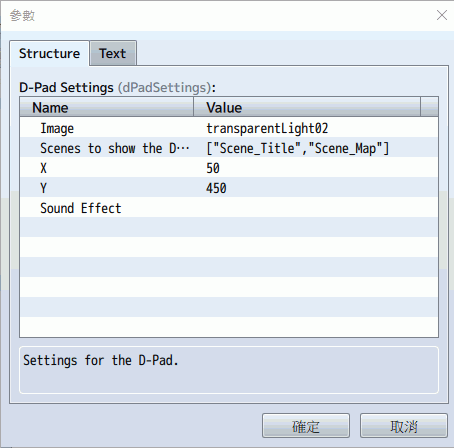
/*~struct~dpad:
* @param image
* @text Image
* @type file
* @dir img/mobileUI
* @desc File path for the D-Pad image
* @require 1
*
* @param activeScenes
* @text Scenes to show the D-Pad
* @type text[]
* @desc A list of scenes where the D-Pad will be active.
* Ex. Scene_Map, Scene_Title, etc.
* @default ["Scene_Title","Scene_Map"]
*
* @param x
* @text X
* @desc X position of the D-Pad. Formulas are allowed.
* (ex. Graphics.width - 96)
* @type text
* @default 0
*
* @param y
* @text Y
* @desc Y position of the D-Pad. Formulas are allowed.
* (ex. Graphics.height - 96)
* @type text
* @default 0
*
* @param soundEffect
* @text Sound Effect
* @type struct<soundEffect>
* @desc Sound Effect to play when button is pressed.
* Depending on scenario, SE might already play. Test first.
*
*/
/*~struct~keyButton:
* @param name
* @text Name
* @type text
* @desc The name of the button
*
* @param inputMethod
* @text Input Method
* @type select
* @option Triggered
* @value 0
* @option Pressed
* @value 1
* @option Repeated
* @value 2
* @option Long Pressed
* @value 3
* @option Released
* @value 4
* @desc The type of touch input that will trigger the button.
* See the help file for full descriptions of the options.
* @default 0
*
* @param inputTrigger
* @text Input Code
* @type text
* @desc The input code triggered when the button is pressed.
* ex. ok / escape / pagedown / pageup
*
* @param image
* @text Image
* @type file
* @dir img/mobileUI
* @desc File path for the button image
* @require 1
*
* @param activeScenes
* @text Scenes to show the button
* @type text[]
* @desc A list of scenes where the button will be active.
* Ex. Scene_Map, Scene_Title, etc.
* @default ["Scene_Title","Scene_Map"]
*
* @param x
* @text X
* @type text
* @desc X position of the button. Formulas are allowed.
* (ex. Graphics.width - 96)
* @default 0
*
* @param y
* @text Y
* @type text
* @desc Y position of the button. Formulas are allowed.
* (ex. Graphics.height - 96)
* @default 0
*
* @param soundEffect
* @text Sound Effect
* @type struct<soundEffect>
* @desc Sound Effect to play when button is pressed.
* Depending on scenario, SE might already play. Test first.
*
* @param customCode
* @text Custom Code
* @type note
* @desc Custom Javascript code to run on button press.
* Use the 'this' keyword to refer to the current scene.
*
* @param vibratePattern
* @text Vibrate Pattern
* @type text
* @default 0
* @desc Pattern of miliseconds to vibrate on press.
* Use 0 for no vibration. See help for more info.
*/
/*~struct~controlButton:
* @param image
* @text Image
* @type file
* @dir img/mobileUI
* @desc File path for the button image
* @require 1
*
* @param activeScenes
* @text Scenes to show the control button
* @type text[]
* @desc A list of scenes where the button will be active.
* Ex. Scene_Map, Scene_Title, etc.
* @default ["Scene_Title","Scene_Map"]
*
* @param x
* @text X
* @type text
* @desc X position of the button. Formulas are allowed.
* (ex. Graphics.width - 96)
* @default 0
*
* @param y
* @text Y
* @type text
* @desc Y position of the button. Formulas are allowed.
* (ex. Graphics.height - 96)
* @default 0
*
* @param soundEffect
* @text Sound Effect
* @type struct<soundEffect>
* @desc Sound Effect to play when button is pressed.
* Depending on scenario, SE might already play. Test first.
*
* @param buttonsToHide
* @text Buttons To Show / Hide
* @type text[]
* @desc A list of the Key Buttons to show and hide when
* this button is pressed. Leave empty to hide all.
* @default []
*
* @param hideDPad
* @text Show / Hide DPad?
* @type boolean
* @desc Controls whether the DPad is affected when
* this button is pressed.
* @default true
*
*/
/*~struct~soundEffect:
* @param name
* @text Sound Effect Name
* @type file
* @dir audio/se
* @desc Sound effect to play when the button is pressed.
* @default
* @require 1
*
* @param volume
* @text Volume
* @type number
* @min 0
* @max 100
* @desc Volume of the sound effect, in %
* Allowed values: 0% - 100%
* @default 90
*
* @param pitch
* @text Pitch
* @type number
* @min 50
* @max 150
* @desc Pitch of the sound effect, in %
* Allowed values: 50% - 150%
* @default 100
*
* @param pan
* @text Pan
* @type number
* @min -100
* @max 100
* @desc Pan of the sound effect
* Allowed values: -100 - 100
* @default 0
*
*/
(function () {
"use strict";
var Alias = {};
var Parameters = {};
//=============================================================================
// Utils
//=============================================================================
// Create a utility function to parse complex parameters.
//=============================================================================
Utils.recursiveParse = function (param) {
try {
return JSON.parse(param, function (key, value) {
try {
return this.recursiveParse(value);
} catch (e) {
return value;
}
}.bind(this));
} catch (e) {
return param;
}
};
//=============================================================================
// Parameters
//=============================================================================
// Read and parse parameters into a locally scoped Parameters object.
//=============================================================================
Object.keys(PluginManager.parameters("ALOE_MobileUI")).forEach(function (a) {
return Parameters[a] = Utils.recursiveParse(PluginManager.parameters("ALOE_MobileUI")[a]);
});
//=============================================================================
// ImageManager
//=============================================================================
// Load and reserve mobile UI images.
//=============================================================================
ImageManager.loadMobileUI = function (filename, hue) {
return this.loadBitmap('img/mobileUI/', filename, hue, true);
};
ImageManager.reserveMobileUI = function (filename, hue, reservationId) {
return this.reserveBitmap('img/mobileUI/', filename, hue, true, reservationId);
};
//=============================================================================
// Sprite_Button
//=============================================================================
// Sprite for the UI button(s)
// Parent class for Sprite_DirectionalPad, Sprite_KeyButton, Sprite_ControlButton
//=============================================================================
function Sprite_Button() {
this.initialize.apply(this, arguments);
}
Sprite_Button.prototype = Object.create(Sprite_Base.prototype);
Sprite_Button.prototype.constructor = Sprite_Button;
Sprite_Button.prototype.initialize = function (x, y, normalImage, soundEffect, vibratePattern) {
Sprite_Base.prototype.initialize.call(this);
if (normalImage) {
this.bitmap = ImageManager.loadMobileUI(normalImage);
}
if (soundEffect) {
this._soundEffect = soundEffect;
}
if (vibratePattern) {
if (!window.navigator.vibrate) {
this._vibratePattern = 0;
} else if (typeof vibratePattern === 'number') {
this._vibratePattern = vibratePattern;
} else {
this._vibratePattern = vibratePattern.split(',').map(function (num) {
return parseInt(num);
});
}
}
if (isNaN(x)) {
x = eval(x);
}
if (isNaN(y)) {
y = eval(y);
}
this.move(x, y);
this._start = new Point(null, null);
this._distance = new Point(null, null);
this._destination = new Point(null, null);
this._velocity = new Point(null, null);
this._origin = new Point(x, y);
this._hiding = false;
this._duration = Parameters["fadeDuration"];
this.active = true;
this.z = 5;
};
Sprite_Button.prototype.update = function () {
Sprite_Base.prototype.update.call(this);
if (this.active) {
this.updateTouchInput();
}
if (this.moving) {
this.updatePosition();
}
if (!this.active) {
this.updateActive();
}
};
Sprite_Button.prototype.updateTouchInput = function () {};
Sprite_Button.prototype.updateVisibility = function () {
if (this._hiding && this.opacity > 0) {
this.opacity -= 255 / this._duration;
} else if (!this._hiding && this.opacity < 255) {
this.opacity += 255 / this._duration;
}
};
Sprite_Button.prototype.updateActive = function () {
if (this.opacity === 255) {
this.active = true;
}
};
Sprite_Button.prototype.updatePosition = function () {
this.x += this._velocity.x;
this.y += this._velocity.y;
var currentPos = new Point(this.x, this.y);
var currentDistance = this.absDistance(this._start, currentPos);
if (currentDistance >= this._distance.abs) {
this.x = this._destination.x;
this.y = this._destination.y;
this._velocity.x = 0;
this._velocity.y = 0;
this.moving = false;
}
};
Sprite_Button.prototype.hide = function () {
this._hiding = true;
this.active = false;
};
Sprite_Button.prototype.show = function () {
this._hiding = false;
};
Sprite_Button.prototype.hideInstant = function () {
this._hiding = true;
this.opacity = 0;
this.active = false;
};
Sprite_Button.prototype.showInstant = function () {
this._hiding = false;
this.opacity = 255;
this.active = true;
};
Sprite_Button.prototype.collapse = function (x, y) {
this._destination.x = x;
this._destination.y = y;
this._start.x = this.x;
this._start.y = this.y;
this._distance.x = this._destination.x - this._start.x;
this._distance.y = this._destination.y - this._start.y;
this._distance.abs = this.absDistance(this._destination, this._start);
this._velocity.x = this._distance.x / this._duration;
this._velocity.y = this._distance.y / this._duration;
this.moving = true;
};
Sprite_Button.prototype.expand = function () {
this._destination.x = this._origin.x;
this._destination.y = this._origin.y;
this._start.x = this.x;
this._start.y = this.y;
this._distance.x = this._destination.x - this._start.x;
this._distance.y = this._destination.y - this._start.y;
this._distance.abs = this.absDistance(this._destination, this._start);
this._velocity.x = this._distance.x / this._duration;
this._velocity.y = this._distance.y / this._duration;
this.moving = true;
};
Sprite_Button.prototype.absDistance = function (pos1, pos2) {
return Math.sqrt(Math.pow(pos1.x - pos2.x, 2) + Math.pow(pos1.y - pos2.y, 2));
};
//=============================================================================
// Sprite_DirectionalPad
//=============================================================================
// Sprite for the Directional Pad
//=============================================================================
function Sprite_DirectionalPad() {
this.initialize.apply(this, arguments);
}
Sprite_DirectionalPad.prototype = Object.create(Sprite_Button.prototype);
Sprite_DirectionalPad.prototype.constructor = Sprite_DirectionalPad;
Sprite_DirectionalPad.prototype.initialize = function (x, y, image, soundEffect) {
Sprite_Button.prototype.initialize.call(this, x, y, image, soundEffect);
this._lastInput = '';
this._hiding = false;
};
Sprite_DirectionalPad.prototype.updateTouchInput = function () {
this.clearLastDirection();
if (TouchInput.isPressed()) {
var point = new Point(TouchInput.x, TouchInput.y);
if (this.containsPoint(point)) {
if (this._soundEffect) {
AudioManager.playSe(this._soundEffect);
}
var index = this.whichIndex(point);
switch (index) {
case 0:
if (Parameters.enableDiagonalInput) {
Input._currentState["up"] = true;
Input._currentState["left"] = true;
this._lastInput = "up-left";
}
break;
case 1:
Input._currentState["up"] = true;
this._lastInput = "up";
break;
case 2:
if (Parameters.enableDiagonalInput) {
Input._currentState["right"] = true;
Input._currentState["up"] = true;
this._lastInput = "up-right";
}
break;
case 3:
Input._currentState["left"] = true;
this._lastInput = "left";
break;
case 4:
break;
case 5:
Input._currentState["right"] = true;
this._lastInput = "right";
break;
case 6:
if (Parameters.enableDiagonalInput) {
Input._currentState["left"] = true;
Input._currentState["down"] = true;
this._lastInput = "down-left";
}
break;
case 7:
Input._currentState["down"] = true;
this._lastInput = "down";
break;
case 8:
if (Parameters.enableDiagonalInput) {
Input._currentState["down"] = true;
Input._currentState["right"] = true;
this._lastInput = "down-right";
}
break;
default:
break;
}
}
}
};
Sprite_DirectionalPad.prototype.whichIndex = function (point) {
var index = 0;
index += point.x - this.x > this.width / 3 ? point.x - this.x > this.width * 2 / 3 ? 2 : 1 : 0;
index += point.y - this.y > this.height / 3 ? point.y - this.y > this.height * 2 / 3 ? 6 : 3 : 0;
return index;
};
Sprite_DirectionalPad.prototype.clearLastDirection = function () {
if (this._lastInput) {
this._lastInput.split("-").forEach(function (a) {
return Input._currentState[a] = false;
});
this._lastInput = '';
}
};
//=============================================================================
// Sprite_KeyButton
//=============================================================================
// Sprite for the buttons that simulate a key input (besides arrow keys).
// Ex. "ok", "cancel", "pageup", "pagedown"
//=============================================================================
function Sprite_KeyButton() {
this.initialize.apply(this, arguments);
}
Sprite_KeyButton.prototype = Object.create(Sprite_Button.prototype);
Sprite_KeyButton.prototype.constructor = Sprite_KeyButton;
Sprite_KeyButton.prototype.initialize = function (x, y, image, soundEffect, inputTrigger, customCode, vibratePattern) {
var inputMethod = arguments.length > 7 && arguments[7] !== undefined ? arguments[7] : 0;
Sprite_Button.prototype.initialize.call(this, x, y, image, soundEffect, vibratePattern);
if (inputTrigger) {
this._inputTrigger = inputTrigger;
}
if (customCode) {
this._customCode = customCode;
this._customFunction = new Function(customCode).bind(SceneManager._scene);
}
this._inputMethod = inputMethod;
};
Sprite_KeyButton.prototype.isTouchTriggered = function () {
switch (this._inputMethod) {
case 0:
// Was just pressed
return TouchInput.isTriggered();
case 1:
//Currently pressed down
return TouchInput.isPressed();
case 2:
//Is repeated
return TouchInput.isRepeated();
case 3:
//Is kept pressed
return TouchInput.isLongPressed();
case 4:
//Was just released
return TouchInput.isReleased();
default:
return TouchInput.isTriggered();
}
};
Sprite_KeyButton.prototype.updateTouchInput = function () {
if (this.isTouchTriggered()) {
var point = new Point(TouchInput.x, TouchInput.y);
if (this.containsPoint(point)) {
if (this._soundEffect) {
AudioManager.playSe(this._soundEffect);
}
if (this._vibratePattern) {
window.navigator.vibrate(this._vibratePattern);
}
if (this._customFunction) {
this._customFunction();
}
if (this._inputTrigger) {
Input._currentState[this._inputTrigger] = true;
}
} else {
Input._currentState[this._inputTrigger] = false;
}
} else {
Input._currentState[this._inputTrigger] = false;
}
};
//=============================================================================
// Sprite_ControlButton
//=============================================================================
// Sprite for the button that activates / deactivates all other buttons.
//=============================================================================
function Sprite_ControlButton() {
this.initialize.apply(this, arguments);
}
Sprite_ControlButton.prototype = Object.create(Sprite_Button.prototype);
Sprite_ControlButton.prototype.constructor = Sprite_ControlButton;
Sprite_ControlButton.prototype.initialize = function (x, y, image, soundEffect) {
Sprite_Button.prototype.initialize.call(this, x, y, image, soundEffect);
this._inputTrigger = "control";
this._buttonsHidden = false;
};
Sprite_ControlButton.prototype.updateTouchInput = function () {
if (TouchInput.isTriggered()) {
var point = new Point(TouchInput.x, TouchInput.y);
if (this.containsPoint(point)) {
if (this._soundEffect) {
AudioManager.playSe(this._soundEffect);
}
if (this._buttonsHidden) {
this.showAllButtons();
} else {
this.hideAllButtons();
}
}
}
};
Sprite_ControlButton.prototype.showAllButtons = function () {
var _this = this;
var params = Parameters["controlButtonSettings"];
if (params.buttonsToHide.length > 0) {
params.buttonsToHide.forEach(function (buttonName) {
if (!_this._keyButtons[buttonName]) {
console.error(buttonName + " is not a key button, check your Mobile UI plugin configuration.");
return;
}
_this._keyButtons[buttonName].show();
_this._keyButtons[buttonName].expand();
});
} else {
Object.values(this._keyButtons).forEach(function (button) {
button.show();
button.expand();
});
}
if (params.hideDPad && this._directionalPad) {
this._directionalPad.show();
this._directionalPad.expand();
}
this._buttonsHidden = false;
};
Sprite_ControlButton.prototype.hideAllButtons = function () {
var _this2 = this;
var params = Parameters["controlButtonSettings"];
if (params.buttonsToHide.length > 0) {
params.buttonsToHide.forEach(function (buttonName) {
if (!_this2._keyButtons[buttonName]) {
console.error(buttonName + " is not a key button, check your Mobile UI plugin configuration.");
return;
}
_this2._keyButtons[buttonName].hide();
_this2._keyButtons[buttonName].collapse(_this2.x, _this2.y);
});
} else {
Object.values(this._keyButtons).forEach(function (button) {
button.hide();
button.collapse(_this2.x, _this2.y);
});
}
if (params.hideDPad && this._directionalPad) {
this._directionalPad.hide();
this._directionalPad.collapse(this.x, this.y);
}
this._buttonsHidden = true;
};
//=============================================================================
// Scene_Base
//=============================================================================
// Methods to create the buttons in any scene.
//=============================================================================
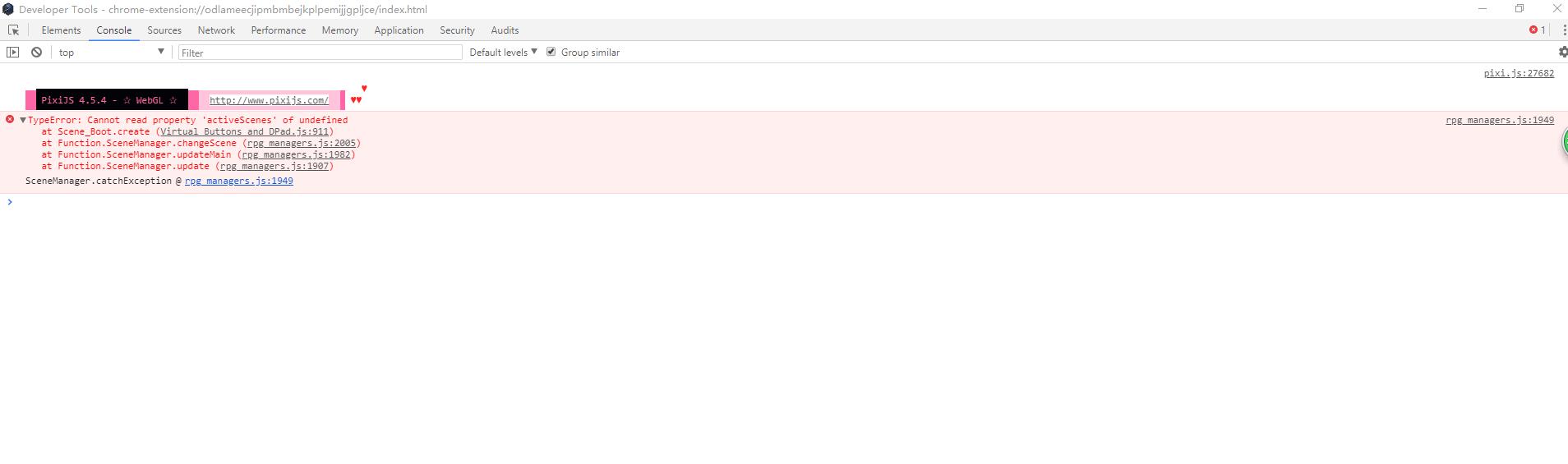
Alias.Scene_Boot_create = Scene_Boot.prototype.create;
Scene_Boot.prototype.create = function () {
Alias.Scene_Boot_create.call(this);
if (Parameters["dPadSettings"].activeScenes) {
Parameters["dPadSettings"].activeScenes = Parameters["dPadSettings"].activeScenes.map(function (a) {
return eval(a);
});
}
if (Parameters["keyButtonSettings"]) {
Parameters["keyButtonSettings"].forEach(function (a) {
return a.activeScenes = a.activeScenes.map(function (b) {
return b = eval(b);
});
});
}
if (Parameters["controlButtonSettings"].activeScenes) {
Parameters["controlButtonSettings"].activeScenes = Parameters["controlButtonSettings"].activeScenes.map(function (a) {
return eval(a);
});
}
};
Alias.Scene_Base_start = Scene_Base.prototype.start;
Scene_Base.prototype.start = function () {
Alias.Scene_Base_start.call(this);
this.createDirPad();
this.createKeyButtons();
this.createControlButton();
};
Scene_Base.prototype.createDirPad = function () {
var params = Parameters["dPadSettings"];
if (params) {
if (params.activeScenes.length > 0 && params.activeScenes.contains(this.constructor)) {
var x = params.x;
var y = params.y;
var image = params.image || "";
var soundEffect = params.soundEffect;
this._directionalPad = new Sprite_DirectionalPad(x, y, image, soundEffect);
this.addChild(this._directionalPad);
}
}
};
Scene_Base.prototype.createKeyButtons = function () {
var params = Parameters["keyButtonSettings"];
if (params) {
if (params.length > 0) {
this._keyButtons = {};
for (var i = 0; i < params.length; i++) {
if (params.activeScenes.length > 0 && params.activeScenes.contains(this.constructor)) {
var a = params;
this._keyButtons[a.name.toLowerCase()] = new Sprite_KeyButton(a.x, a.y, a.image, a.soundEffect, a.inputTrigger.toLowerCase(), a.customCode, a.vibratePattern, a.inputMethod);
this.addChild(this._keyButtons[a.name.toLowerCase()]);
}
}
}
}
};
Scene_Base.prototype.createControlButton = function () {
var params = Parameters["controlButtonSettings"];
if (params) {
if (params.activeScenes.length > 0 && params.activeScenes.contains(this.constructor)) {
var x = params.x;
var y = params.y;
var image = params.image || "";
var soundEffect = params.soundEffect;
this._controlButton = new Sprite_ControlButton(x, y, image, soundEffect);
this.addChild(this._controlButton);
this._controlButton._keyButtons = this._keyButtons;
this._controlButton._directionalPad = this._directionalPad;
}
}
};
Scene_Base.prototype.hideMobileUI = function () {
var _this3 = this;
if (this._directionalPad) {
this._directionalPad.hide();
}
if (this._keyButtons) {
Object.keys(this._keyButtons).forEach(function (a) {
return _this3._keyButtons[a].hide();
});
}
if (this._controlButton) {
this._controlButton.hide();
}
};
Scene_Base.prototype.showMobileUI = function () {
var _this4 = this;
if (this._directionalPad) {
this._directionalPad.show();
}
if (this._keyButtons) {
Object.keys(this._keyButtons).forEach(function (a) {
return _this4._keyButtons[a].show();
});
}
if (this._controlButton) {
this._controlButton.show();
}
};
Alias.Scene_Base_terminate = Scene_Base.prototype.terminate;
Scene_Base.prototype.terminate = function () {
var _this5 = this;
Alias.Scene_Base_terminate.call(this);
if (this._directionalPad) {
this.removeChild(this._directionalPad);
}
if (this._keyButtons) {
Object.keys(this._keyButtons).forEach(function (a) {
return _this5.removeChild(_this5._keyButtons[a]);
});
}
if (this._controlButton) {
this.removeChild(this._controlButton);
}
};
//=============================================================================
// Scene_Map
//=============================================================================
// If map movement is disabled from the parameters, return.
// If an active button is pressed, don't do the usual map movement.
//=============================================================================
Alias.Scene_Map_processMapTouch = Scene_Map.prototype.processMapTouch;
Scene_Map.prototype.processMapTouch = function () {
var _this6 = this;
if (Parameters['disableTouchMovement'] && this._directionalPad && this._directionalPad.active) {
return;
}
if (TouchInput.isTriggered()) {
var point = new Point(TouchInput.x, TouchInput.y);
if (!!this._controlButton) {
if (this._controlButton.containsPoint(point)) {
return;
}
}
if (this._directionalPad) {
if (this._directionalPad.active && this._directionalPad.containsPoint(point)) {
return;
}
}
if (this._keyButtons) {
if (Object.keys(this._keyButtons).some(function (a) {
return _this6._keyButtons[a].containsPoint(point);
})) {
return;
}
}
}
Alias.Scene_Map_processMapTouch.call(this);
};
//=============================================================================
// Window_Selectable
//=============================================================================
// Disable Touch Input on selectable windows if configured in the parameters.
//=============================================================================
Alias.Window_Selectable_processTouch = Window_Selectable.prototype.processTouch;
Window_Selectable.prototype.processTouch = function () {
if (Parameters['disableTouchWindows'].contains(SceneManager._scene.constructor.name)) {
return;
}
Alias.Window_Selectable_processTouch.call(this);
};
//=============================================================================
// Window_Message
//=============================================================================
// Control UI visibility when the dialogue window is activated.
//=============================================================================
Alias.Window_Message_startMessage = Window_Message.prototype.startMessage;
Window_Message.prototype.startMessage = function () {
SceneManager._scene.hideMobileUI();
Alias.Window_Message_startMessage.call(this);
};
Alias.Window_Message_terminateMessage = Window_Message.prototype.terminateMessage;
Window_Message.prototype.terminateMessage = function () {
Alias.Window_Message_terminateMessage.call(this);
if (SceneManager._scene._controlButton && SceneManager._scene._controlButton._buttonsHidden) {
SceneManager._scene._controlButton.show();
} else {
SceneManager._scene.showMobileUI();
}
};
//=============================================================================
// Game_Interpreter
//=============================================================================
// Plugin commands
//=============================================================================
Alias.Game_Interpreter_pluginCommand = Game_Interpreter.prototype.pluginCommand;
Game_Interpreter.prototype.pluginCommand = function (command, args) {
Alias.Game_Interpreter_pluginCommand.call(this, command, args);
if (command.toLowerCase() === "mobileui") {
var scene = SceneManager._scene;
switch (args[0].toLowerCase()) {
case "hide":
switch (args[1].toLowerCase()) {
case "dpad":
if (scene._directionalPad) {
if (args[2] && args[2].toLowerCase() === 'instant') {
scene._directionalPad.hideInstant();
} else {
scene._directionalPad.hide();
}
}
break;
case "control":
if (scene._controlButton) {
if (args[2] && args[2].toLowerCase() === 'instant') {
scene._controlButton.hideInstant();
} else {
scene._controlButton.hide();
}
}
break;
default:
if (scene._keyButtons[args[1].toLowerCase()]) {
if (args[2] && args[2].toLowerCase() === 'instant') {
scene._keyButtons[args[1].toLowerCase()].hideInstant();
} else {
scene._keyButtons[args[1].toLowerCase()].hide();
}
}
break;
}
break;
case "show":
switch (args[1].toLowerCase()) {
case "dpad":
if (scene._directionalPad) {
if (args[2] && args[2].toLowerCase() === 'instant') {
scene._directionalPad.showInstant();
} else {
scene._directionalPad.show();
}
}
break;
case "control":
if (scene._controlButton) {
if (args[2] && args[2].toLowerCase() === 'instant') {
scene._controlButton.showInstant();
} else {
scene._controlButton.show();
}
}
break;
default:
if (scene._keyButtons[args[1].toLowerCase()]) {
if (args[2] && args[2].toLowerCase() === 'instant') {
scene._keyButtons[args[1].toLowerCase()].showInstant();
} else {
scene._keyButtons[args[1].toLowerCase()].show();
}
}
break;
}
break;
}
}
};
})();
[/pre]
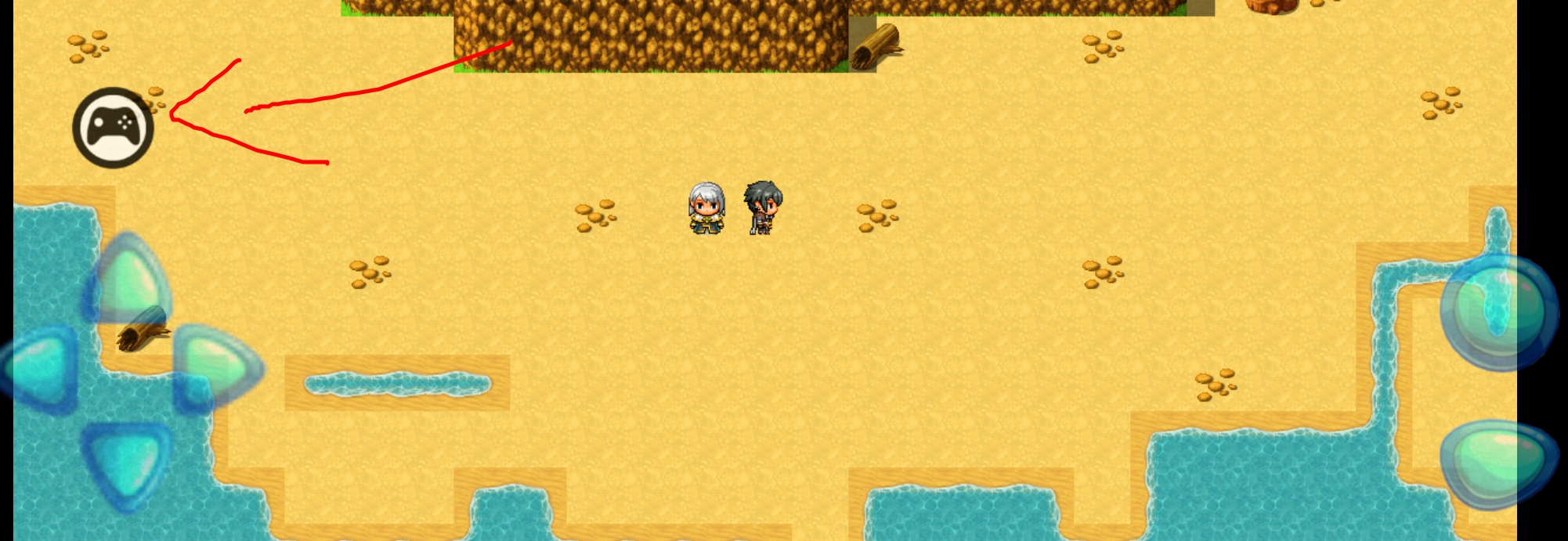
功能:
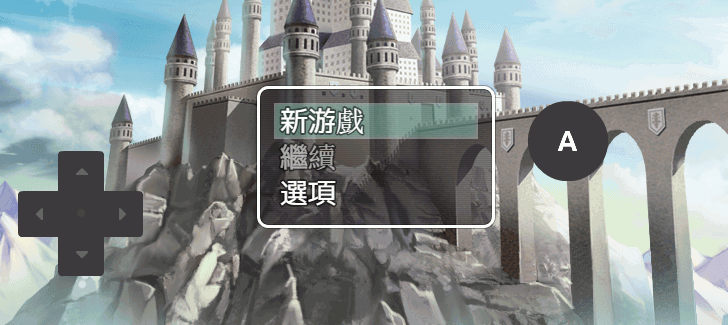
這個插件可以創建3種不同類型的按鈕:
1.)定向墊
單張圖片,用於向上,向左,向右和向下移動。
可以定義此按鈕出現的場景。
此按鈕是可選的。
2.)按鍵
這些按鈕可用於表示任何鍵。使用的常用鍵是“ok”,“escape”,“pagedown”,“pageup”。
這些可以是任何密鑰,並且可以有開發人員想要的那麼多或幾個。
此外,可以單獨控制這些按鈕出現的場景。
您還可以編寫在按下按鈕時運行的自定義代碼!
這可以與其他插件(如Yanfly Button Common Events)結合使用,從虛擬按鈕調用公共事件。
您可以指定此按鈕響應的輸入類型:
觸發:按下時執行一次(默認)
按下:按下時執行每一幀
重複:24幀後,按下時每6幀執行一次
長按:24幀後,按下時執行每一幀
發布:釋放按鈕時執行一次
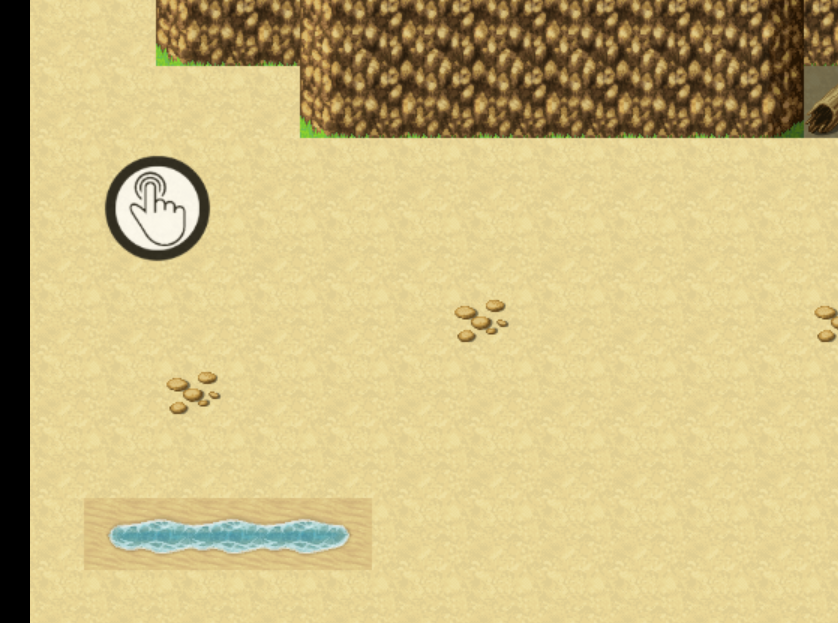
3.)控制按鈕
按下控制按鈕將折疊並隱藏屏幕上的所有其他按鈕。
如果再次按下,它將展開並顯示屏幕上的所有其他按鈕。
這允許玩家在使用Mobile UI按鈕或標準觸摸輸入之間做出決定。
可以定義此按鈕出現的場景。
此按鈕是可選的。
|
|




 写轮眼
写轮眼

 提升卡
提升卡 沉默号角
沉默号角 喧嚣号角
喧嚣号角 变色卡
变色卡 升龙剑
升龙剑


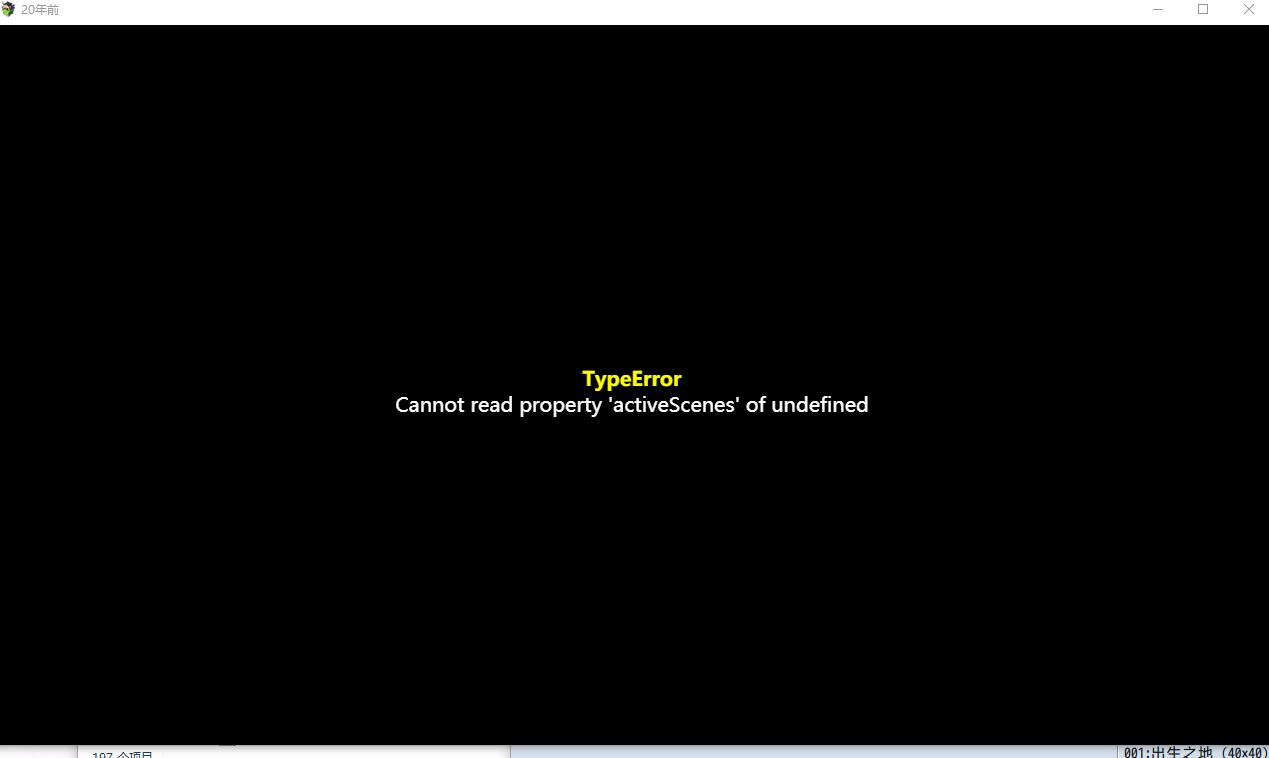

 。问几个问题,


