查看: 4041|回复: 7

[已经解决] 请问如何能在对话中通过按键执行公共事件(已解决)

[复制链接]
梦石
1
星屑
14389
在线时间
2110 小时
注册时间
2017-9-28
回帖
607
发表于 2019-6-27 13:56:35 | 显示全部楼层 |阅读模式

加入我们,或者,欢迎回来。

您需要 登录 才可以下载或查看,没有账号?注册会员

×
本帖最后由 Nil2018 于 2019-6-29 23:39 编辑

demo:

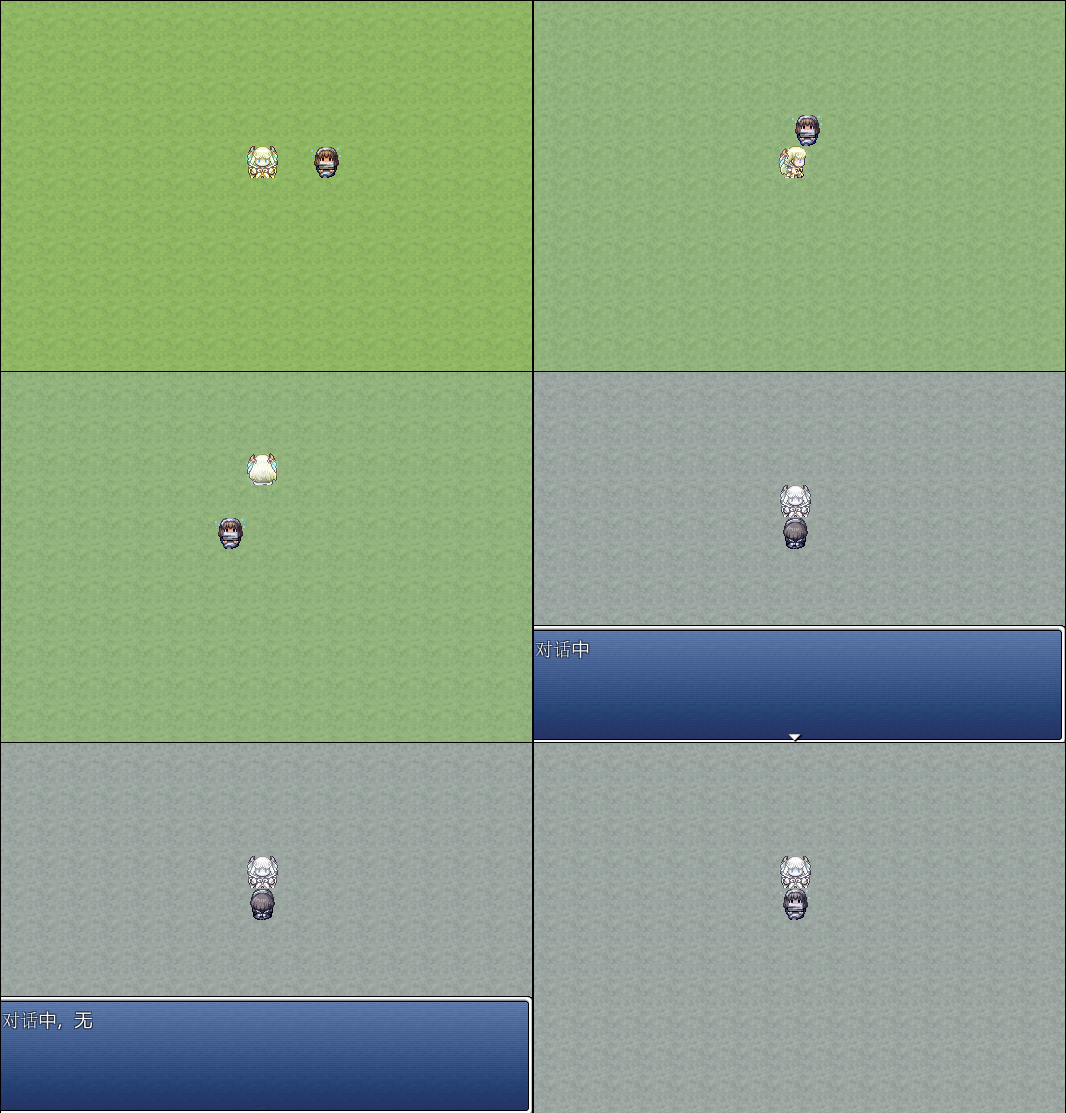
里面使用到脚本: YEA - 按键触发公共事件  按下A键可以执行一个公共事件,效果是画面闪烁+色调切换,可是对话中无法执行。
有什么办法能解决这个问题吗?

GI2F.gif
VA外站脚本汉化群:226308173   |    部分远古文件备份:https://wwzv.lanzoue.com/b02rac5pc  密码:acgm
梦石
10
星屑
39550
在线时间
1919 小时
注册时间
2010-11-14
回帖
3214

R考场第七期纪念奖

发表于 2019-6-27 15:00:12 | 显示全部楼层
根据RM的设计,对话窗口运行时会中止事件解释器(Game_Interpreter)
所以,默认情况下,是没有办法一边对话一边进行公共事件的。

当然,你这个公共事件的内容比较简单,不涉及并行操作,因此可以手动实现。
你可以插入下面这段脚本。

  1. #encoding:utf-8
  2. #==============================================================================
  3. # ■ Window_Message
  4. #------------------------------------------------------------------------------
  5. #  显示文字信息的窗口。
  6. #==============================================================================

  7. class Window_Message < Window_Base
  8.   #--------------------------------------------------------------------------
  9.   # ● [覆盖]处理输入等待
  10.   #--------------------------------------------------------------------------
  11.   def input_pause
  12.     self.pause = true
  13.     wait(10)
  14.     #==================================================================
  15.     while !(Input.trigger?(:B) || Input.trigger?(:C))
  16.       if Scene_Map === (s = SceneManager.scene)
  17.         CLD99::COMMON_EVENT[15] if Input.trigger?(:X)
  18.       end
  19.       Fiber.yield
  20.     end   
  21.     #==================================================================
  22.     Input.update
  23.     self.pause = false
  24.   end
  25. end

  26. module CLD99
  27.   module COMMON_EVENT
  28.     class << self
  29.       def [](n)
  30.         send(sprintf("event_%03d", n))
  31.       end
  32.    
  33.       def event_015
  34.         RPG::SE.new("Battle1", 90, 110).play
  35.         $game_map.screen.start_flash(Color.new(255,255,255), 10)
  36.         10.times { Graphics.update }
  37.         if $game_switches[180]
  38.           $game_map.screen.start_tone_change(Tone.new(0,0,17,34), 1)
  39.         else        
  40.           $game_map.screen.start_tone_change(Tone.new(0,0,17,187), 1)
  41.         end
  42.         $game_switches[180] = !$game_switches[180]
  43.       end
  44.     end
  45.   end
  46. end
复制代码


这段脚本的原理也很简单,就是把你的公共事件"翻译”成脚本直接运行。
当然,如果有更多这样的需求,就需要找人帮你了。

点评

呜呜呜,好不容易找到这里,发现版本不对......如果大佬还能看到的话,能给一个MV版本的脚本吗  发表于 2023-8-15 23:15
阿我知道了...谢谢日历大佬!  发表于 2019-6-27 15:28
用头画头像,用脚写脚本
回复

使用道具 举报

梦石
1
星屑
14389
在线时间
2110 小时
注册时间
2017-9-28
回帖
607
 楼主| 发表于 2019-6-27 16:01:07 | 显示全部楼层
本帖最后由 Nil2018 于 2019-6-29 23:39 编辑
KB.Driver 发表于 2019-6-27 15:00
根据RM的设计,对话窗口运行时会中止事件解释器(Game_Interpreter)
所以,默认情况下,是没有办法一边对 ...


..又要麻烦大佬一下,
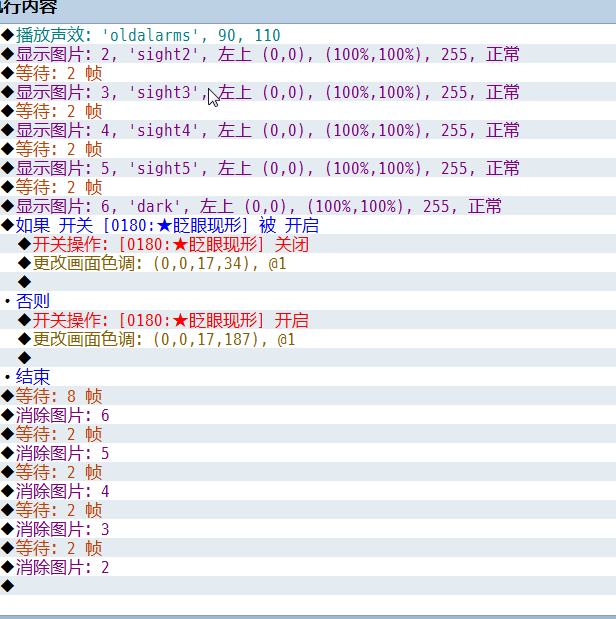
游戏里有个公共事件需要显示图片,事件指令:
Snipaste_2019-06-27_15-20-36.png

我修改以后..发现图片的显示有问题...日历大佬可以帮修正一下吗 ..
VA外站脚本汉化群:226308173   |    部分远古文件备份:https://wwzv.lanzoue.com/b02rac5pc  密码:acgm
回复

使用道具 举报

梦石
10
星屑
39550
在线时间
1919 小时
注册时间
2010-11-14
回帖
3214

R考场第七期纪念奖

发表于 2019-6-27 17:46:46 | 显示全部楼层
Nil2018 发表于 2019-6-27 16:01
..又要麻烦大佬一下,
游戏里有个公共事件需要显示图片,事件指令:
  1. #encoding:utf-8
  2. #==============================================================================
  3. # ■ Window_Message
  4. #------------------------------------------------------------------------------
  5. #  显示文字信息的窗口。
  6. #==============================================================================

  7. class Window_Message < Window_Base
  8.   #--------------------------------------------------------------------------
  9.   # ● [覆盖]处理输入等待
  10.   #--------------------------------------------------------------------------
  11.   def input_pause
  12.     self.pause = true
  13.     wait(10)
  14.     #==================================================================
  15.     while !(Input.trigger?(:B) || Input.trigger?(:C))
  16.       if Scene_Map === (s = SceneManager.scene)
  17.         CLD99::COMMON_EVENT[15] if Input.trigger?(:X)
  18.       end
  19.       Fiber.yield
  20.     end   
  21.     #==================================================================
  22.     Input.update
  23.     self.pause = false
  24.   end
  25. end

  26. class Scene_Map
  27.   def update_spriteset(duration)
  28.     duration.times do
  29.       Graphics.update
  30.       @spriteset.update  
  31.     end
  32.   end
  33. end

  34. module CLD99
  35.   module COMMON_EVENT
  36.     class << self
  37.       def [](n)
  38.         send(sprintf("event_%03d", n))
  39.       end

  40.       def event_015
  41.         RPG::SE.new("Absorb1", 90, 100).play
  42.         
  43.       
  44.         $game_map.screen.pictures[2].show("sight2", 0, 0, 0, 100, 100, 255, 0)
  45.         SceneManager.scene.update_spriteset(2)           
  46.         $game_map.screen.pictures[3].show("sight3", 0, 0, 0, 100, 100, 255, 0)
  47.         SceneManager.scene.update_spriteset(2)
  48.         $game_map.screen.pictures[4].show("sight4", 0, 0, 0, 100, 100, 255, 0)
  49.         SceneManager.scene.update_spriteset(2)
  50.         $game_map.screen.pictures[5].show("sight5", 0, 0, 0, 100, 100, 255, 0)
  51.         SceneManager.scene.update_spriteset(2)
  52.         $game_map.screen.pictures[6].show("dark", 0, 0, 0, 100, 100, 255, 0)
  53.         SceneManager.scene.update_spriteset(2)
  54.         
  55.         if $game_switches[180]
  56.           $game_map.screen.start_tone_change(Tone.new(0,0,17,34), 1)
  57.         else        
  58.           $game_map.screen.start_tone_change(Tone.new(0,0,17,187), 1)
  59.         end
  60.         $game_switches[180] = !$game_switches[180]
  61.         
  62.         $game_map.screen.pictures[6].erase
  63.         SceneManager.scene.update_spriteset(2)
  64.         $game_map.screen.pictures[5].erase
  65.         SceneManager.scene.update_spriteset(2)
  66.         $game_map.screen.pictures[4].erase
  67.         SceneManager.scene.update_spriteset(2)
  68.         $game_map.screen.pictures[3].erase
  69.         SceneManager.scene.update_spriteset(2)
  70.         $game_map.screen.pictures[2].erase

  71.       end
  72.     end
  73.   end
  74. end
复制代码


所以情况复杂了以后就没那么简单了。
因为一次执行中涉及到图像的动态变化(需要不断更新才能显示出变化),必须手动在流程中加入update

为了防止代码太长,我把update做成了Scene_Map里的方法
如果不好理解的话,只要把SceneManager.scene.update_spriteset(n)当做刷新图片显示 并等待n帧 就好

另外,由于Game_Picture规定的图片z值最大不能超过100,而对话框的z值是200
所以你的“眨眼”图片会被对话框盖住。
这是RM机制的问题,如果不想这样的话就只能自己弄精灵自己设定更大的Z值。

点评

醋虾,感谢日历大佬!  发表于 2019-6-27 18:31
如果想了解更多关于精灵刷新的知识,可以看看这篇教程 https://rpg.blue/thread-477333-1-1.html  发表于 2019-6-27 17:48

评分

参与人数 1星屑 +50 收起 理由
VIPArcher + 50 认可答案

查看全部评分

用头画头像,用脚写脚本
回复

使用道具 举报

您需要登录后才可以回帖 登录 | 注册会员

本版积分规则

Powered by Discuz! X5.0 © 2001-2026 Discuz! Team.

在本版发帖返回顶部