查看: 4146|回复: 18

[已经解决] 更新:修改“超级横版战斗”脚本成功了,不会结贴

[复制链接]
梦石
0
星屑
431
在线时间
43 小时
注册时间
2009-5-6
回帖
58
发表于 2019-8-22 18:07:29 | 显示全部楼层 |阅读模式

加入我们,或者,欢迎回来。

您需要 登录 才可以下载或查看,没有账号?注册会员

×
本帖最后由 yumeyuuya 于 2019-8-31 14:15 编辑

造福大家,现在放上修改过的完全脚本。(我不会把帖子编辑成【已经解决】,是否需要版主帮忙??)
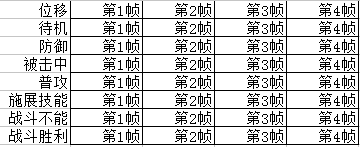
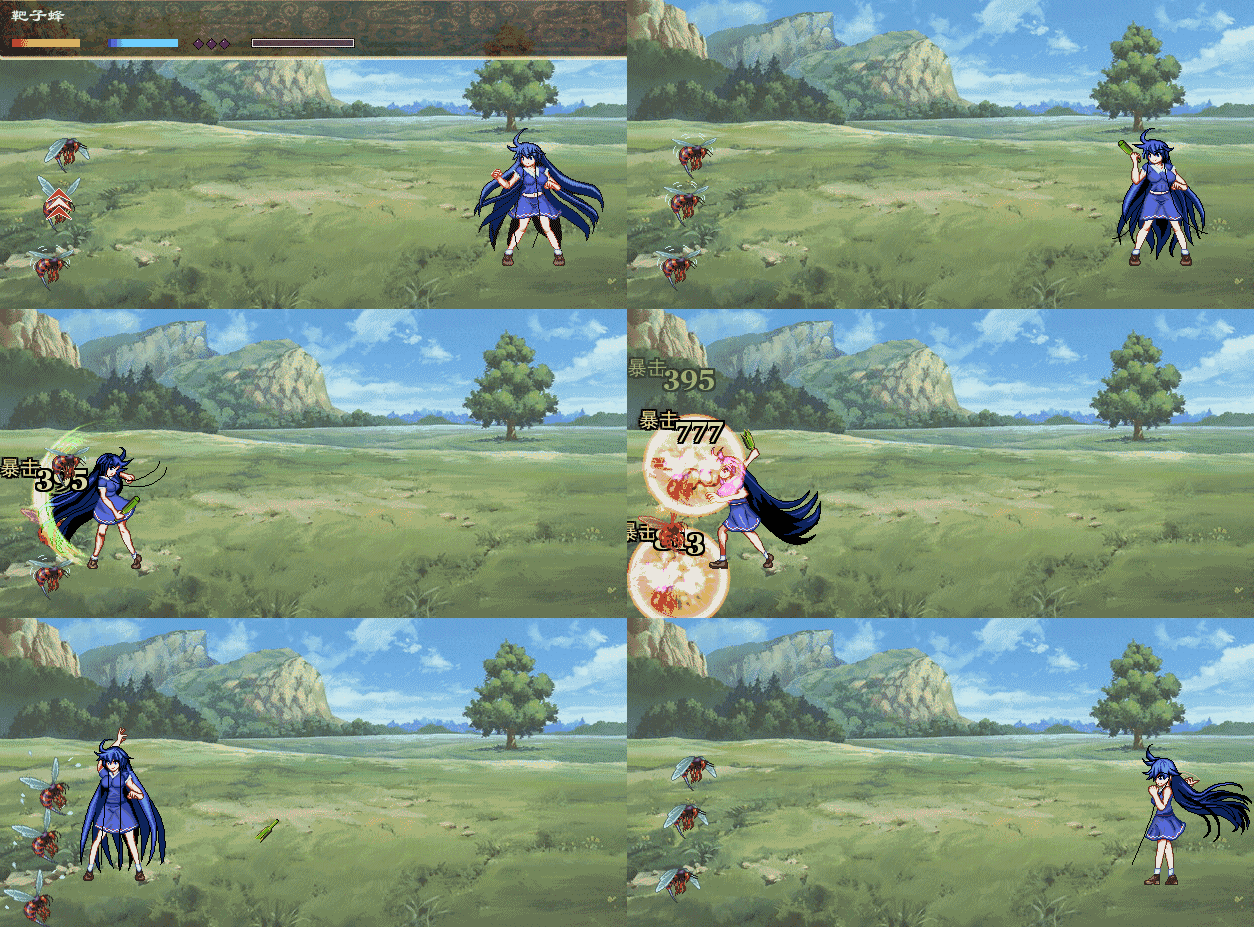
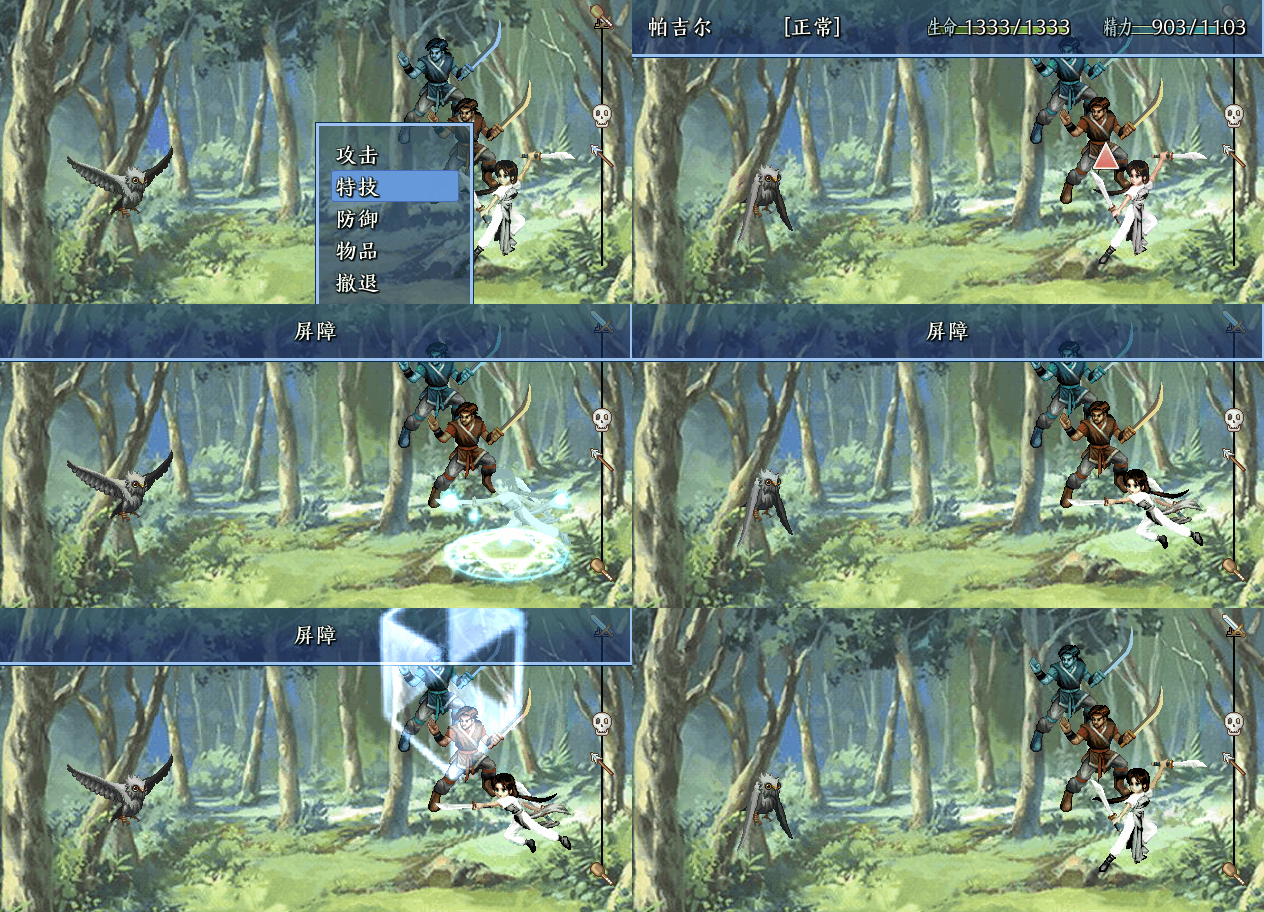
这个脚本要用到的战斗图是4列8行的,这是示意图。
如果懒得画动态的,你可以一行都是同一张图片,就静止了比较呆。
战斗图示范.png
[fold=修改过的超级横版战斗脚本][pre lang="ruby"]#==============================================================================
# * Animated_Sprite           Scripted by: SiR_VaIlHoR
#                             Edited by: 柳柳   修改by:yumeyuuya
#------------------------------------------------------------------------------
#  A class for animated sprites.
#==============================================================================

#66RPG,超级横版战斗脚本简要说明:
#默认情况下,把一张战斗图截成4列,>8行,如果感觉4列4帧的动画还不能满足要求,看
#def pose(number,frame = 4),更改=4,以及相关部分。
#战斗图从上到下:前进图,等待图,防御图,挨打图,普通攻击图(默认的武器),
#施展技能,战斗不能,胜利姿势,自定义武器1,自定义武器2……
#
#这个脚本的模型是老外编写的,其中参考了XMXS的一个方法,我添加了一些功能,去掉素材限制
#不同职业拥有的图片数可以不一样,参考工程和录像教学
#
#修改后在使用技能的时候,敌方双方角色不再是原地不动的施展技能啦~~~
#可以有近身(位移)与远程(原地不动)的效果。
#包含 【敌方】远程回复/辅助技能、远程攻击技能、近身攻击技能
#     【我方】远程回复/辅助技能、远程攻击技能、近身攻击技能
#具体修改请看脚本的1010~1052行的注释。

#==============================================================================
# □ RPG::Class
#==============================================================================
module RPG

  class Class

    def name
      name = @name.split(/,/)[0]
      return name != nil ? name : ''
    end

    def name2
      name = @name.split(/,/)[1]
      return name != nil ? name : ''
    end
  end

  class Weapon

    def name
      name = @name.split(/,/)[0]
      return name != nil ? name : ''
    end

    def name2
      name = @name.split(/,/)[1]
      return name != nil ? name : ''
    end   
  end  

end


class Game_Actor

  #--------------------------------------------------------------------------
  # ● 更改名称
  #     name : 新的名称
  #--------------------------------------------------------------------------

  def picturephase
    name = $data_classes[class_id].name2
    return name != nil ? name : "66RPG"
  end
end


class Game_Enemy

  #--------------------------------------------------------------------------
  # ● 获取名称
  #--------------------------------------------------------------------------

  def name
    name = $data_enemies[@enemy_id].name.split(/,/)[0]
    return name != nil ? name : ''
  end

  def picturephase
    name = $data_enemies[@enemy_id].name.split(/,/)[1]
    return name != nil ? name : "66RPG"
  end  

end


class Animated_Sprite < RPG::Sprite
#--------------------------------------------------------------------------
# - Accessible instance variables.
#--------------------------------------------------------------------------
attr_accessor :frames        # Number of animation frames
attr_accessor :delay         # Delay time between frames (speed)
attr_accessor :frame_width   # Width of each frame
attr_accessor :frame_height  # Height of each frame
attr_accessor :offset_x      # X coordinate of the 1st frame
attr_accessor :offset_y      # Y coordinate of all frames
attr_accessor :current_frame # Current animation frame
attr_accessor :moving        # Is the sprite moving?

#--------------------------------------------------------------------------
# - Initialize an animated sprite
#   viewport : Sprite viewport
#--------------------------------------------------------------------------
def initialize(viewport = nil)
   super(viewport)
   @frame_width, @frame_height = 0, 0
   change    # A basic change to set initial variables
   @old = Graphics.frame_count  # For the delay method
   @goingup = true    # Increasing animation? (if @rm2k_mode is true)
   @once = false      # Is the animation only played once?
   @animated = true   # Used to stop animation when @once is true
end

#--------------------------------------------------------------------------
# Comment by RPG
#   - Change the source rect (change the animation)
#   frames : Number of animation frames
#   delay : Frame delay, controls animation speed
#   offx : X coordinate of the 1st frame
#   offy : Y coordinate of all frames
#   startf : Starting frame for animation
#   once : Is the animation only played once?
#   rm2k_mode : Animation pattern: 1-2-3-2 if true, 1-2-3-1 if false
#
# Comment by cybersam
#
# the rm2k_mode isnt pressent anymore...
# if you want that feature then use rm2k or use RPG's scrîpt...
#--------------------------------------------------------------------------
def change(frames = 0, delay = 0, offx = 0, offy = 0,
            startf = 0, once = false)
   @frames = frames
   @delay = delay
   @offset_x, @offset_y = offx, offy
   @current_frame = startf
   @once = once
   x = @current_frame * @frame_width + @offset_x
   self.src_rect = Rect.new(x, @offset_y, @frame_width, @frame_height)
   @goingup = true
   @animated = true
end
  

#--------------------------------------------------------------------------
# - Update animation and movement 更新动画和运动
#--------------------------------------------------------------------------
def update
   super
   if self.bitmap != nil and delay(@delay) and @animated
     x = @current_frame * @frame_width + @offset_x
     self.src_rect = Rect.new(x, @offset_y, @frame_width, @frame_height)
       @current_frame = (@current_frame + 1) unless @frames == 0
       @animated = false if @current_frame == @frames and @once
       @current_frame %= @frames
   end
end
  

#--------------------------------------------------------------------------
# - Move the sprite 移动精灵
#   x : X coordinate of the destination point #终点X:X坐标
#   y : Y coordinate of the destination point #终点Y:Y坐标
#   speed : Speed of movement (0 = delayed, 1+ = faster) #速度:移动速度(0=延迟,1+=更快)
#   delay : Movement delay if speed is at 0 #延迟:速度为0时的移动延迟
#--------------------------------------------------------------------------
def move(x, y, speed = 1, delay = 0)
   @destx = x
   @desty = y
   @move_speed = speed
   @move_delay = delay
   @move_old = Graphics.frame_count
   @moving = true
end
  

#--------------------------------------------------------------------------
# - Move sprite to destx and desty  将sprite移动到destx和desty
#--------------------------------------------------------------------------
def update_move
   return unless @moving
   movinc = @move_speed == 0 ? 1 : @move_speed
   if Graphics.frame_count - @move_old > @move_delay or @move_speed != 0
     self.x += movinc if self.x < @destx
     self.x -= movinc if self.x > @destx
     self.y += movinc if self.y < @desty
     self.y -= movinc if self.y > @desty
     @move_old = Graphics.frame_count
   end
   if @move_speed > 1  # Check if sprite can't reach that point检查精灵是否达不到那个点
     self.x = @destx if (@destx - self.x).abs % @move_speed != 0 and
                        (@destx - self.x).abs <= @move_speed
     self.y = @desty if (@desty - self.y).abs % @move_speed != 0 and
                        (@desty - self.y).abs <= @move_speed
   end
   if self.x == @destx and self.y == @desty
     @moving = false
   end
end
  

#--------------------------------------------------------------------------
# - Pause animation, but still updates movement 暂停动画,但仍更新运动
#   frames : Number of frames 帧:帧数
#--------------------------------------------------------------------------
def delay(frames)
   update_move
   if (Graphics.frame_count - @old >= frames)
     @old = Graphics.frame_count
     return true
   end
   return false
end
end

#=============================================================================
#
# here we go...
# this makes the scrîpt very easy to implement
# just add a new scrîpt above the "Main" scrîpt
# and insert this whole thing in there
#
# as you can see the sprite changing code is from the japanese scrîpt
# so the credits for the sprite changin goes to them....
# i edit it a little so it can show more sprites and sprite animations
# and added some other stuff... the next things are player movement...
#
#
#
# i got the battler changing scrîpt in this scrîpt...
# the credits for this goes to the guy who made this...
#
# ▼▲▼ XRXS11. 戦闘・バトラーモーション ver.0 ▼▲▼
#
# since this isnt used anymore... it isnt need for credit anymore...
# but i'll let it here since it helped me a lot...
#
#
# as for the ideas... missy provided me with really good ideas
# that helped me alot when i didnt find a way to some of these features...
#
# here one more Credit to place...
# its RPG's scrîpt...
# not the whole thing here...
# but some snipplet you'll know witch one when read the comments
#
#
# if you want some more explaines about this scrîpt...
# the most stuff are commented... but if you still have questions or
# sugestions then you can contact me
#
# how or where you can contact me...
# at the http://www.rmxp.net forum via pm, email: cybersam@club-anime.de
# or via AIM: cych4n or ICQ: 73130840
#
# remember this is still in testing phase...
# and i'm trying to work on some other additions... like character movements...
# but that wont be added now... couse i need to figure it out first...
#
#
#
# oh hehe.... before i forget...
# sorry for the bad english... ^-^''''
#
#
#==============================================================================
#
# here i'm going to tell you what names you need to give for your chara
# battle sprites....
#
# ok... here... since i'm using RPG's movement scrîpt...
# there are a lot of changes...
#
# when you look at the scrîpt you'll find line with "pose(n)" or "enemy_pose(n)"
# since i want my sprites have different sprites... i added one more option
# to these...
# so now if you add a number after the n (the n stands for witch sprite is used)
# fo example 8... ("pose(4, 8)") this will tell the scrîpt that the 4th animation
# have 8 frames...
# pose is used for the player... and enemy_pose for the enemy...
# there is nothing more to this...
# i used my old sprite numbers... (this time in only one sprite...)
#
# explains about the animation sprites... (the digits)
#
#
# 0 = move (during battle) 移动
# 1 = standby 待机
# 2 = defend 防御
# 3 = hit (being attacked)被击中
# 4 = attack 攻击
# 5 = skill use 使用技能
# 6 = dead 死亡
# 7 = winning pose... this idea is from RPG....胜利
#
#
# of course this is just the begining of the code...
# so more animations can be implemented...
# but for now this should be enough...
#
# alot has changed here... and now it looks like it is done...
# of course the fine edit needs to be done so it looks and works great with your
# game too...
#
#
#
# 1st character movement...                             done
# 2nd character movement during attack...               done
# 3rd character apears at the enemy while attacking...  done
#
# 4th enemies movement...                               done
# 5th enemy movement during attack...                   done
# 6th enemy apears at the enemy while attacking...      done
#
# 7th each weapon has its own animation...              done
# 8th each skill has its own animation...               done
#
#
#
# for the ones interisted... my nex project is an Movie player
# (that actualy plays avi, mpgs and such...
# but dont think this will be done soon... ^-^''
#
# but i'll may be try something else before i begin to code that one...
#==============================================================================


class Game_Actor < Game_Battler
  

# you dont have to change your game actor to let the characters schows
# from the side...
# this will do it for you... ^-^
  
def screen_x
   if self.index != nil
      return self.index * 30 + 450
     #return self.index * 30 + 430
   else
     return 0
   end
end

def screen_y
    return self.index * 60 + 150
   #return self.index * 40 + 150
end
  

def screen_z
   if self.index != nil
     return self.index
   else
     return 0
   end
end
end


# RPG's snipplet...
class Spriteset_Battle
attr_accessor :actor_sprites
attr_accessor :enemy_sprites


alias original_initialize initialize
def initialize
   #@start_party_number = $game_party.actors.size
   # ビューポートを作成
   @viewport0 = Viewport.new(0, 0, 640, 480)
   @viewport1 = Viewport.new(0, 0, 640, 480)
   @viewport2 = Viewport.new(0, 0, 640, 480)
   @viewport3 = Viewport.new(0, 0, 640, 480)
   @viewport4 = Viewport.new(0, 0, 640, 480)
   @viewport1.z = 50
   @viewport2.z = 50
   @viewport3.z = 200
   @viewport4.z = 5000

   @battleback_sprite = Sprite.new(@viewport0)
   
   @enemy_sprites = []
   for enemy in $game_troop.enemies #.reverse
     @enemy_sprites.push(Sprite_Battler.new(@viewport1, enemy))
   end
   
   @actor_sprites = []
   @actor_sprites.push(Sprite_Battler.new(@viewport2,$game_party.actors[0]))
   @actor_sprites.push(Sprite_Battler.new(@viewport2,$game_party.actors[1]))
   @actor_sprites.push(Sprite_Battler.new(@viewport2,$game_party.actors[2]))
   @actor_sprites.push(Sprite_Battler.new(@viewport2,$game_party.actors[3]))
   
   @weather = RPG::Weather.new(@viewport1)
   @picture_sprites = []
   for i in 51..100
     @picture_sprites.push(Sprite_Picture.new(@viewport3,
       $game_screen.pictures))
   end
   @timer_sprite = Sprite_Timer.new
   update
end


alias original_update update
def update
   @viewport1.z = 50 and @viewport2.z = 51 if $actor_on_top == true
   @viewport1.z = 51 and @viewport2.z = 50 if $actor_on_top == false
    # 刷新角色的活动块 (对应角色的替换)
    @actor_sprites[0].battler = $game_party.actors[0]
    @actor_sprites[1].battler = $game_party.actors[1]
    @actor_sprites[2].battler = $game_party.actors[2]
    @actor_sprites[3].battler = $game_party.actors[3]

    # 战斗背景的文件名与现在情况有差异的情况下
    if @battleback_name != $game_temp.battleback_name
      @battleback_name = $game_temp.battleback_name
      if @battleback_sprite.bitmap != nil
        @battleback_sprite.bitmap.dispose
      end

      @battleback_sprite.bitmap = RPG::Cache.battleback(@battleback_name)
      @battleback_sprite.src_rect.set(0, 0, 640, 480)
    end

    # 刷新战斗者的活动块
    for sprite in @enemy_sprites + @actor_sprites
      sprite.update
    end

    # 刷新天气图形
    @weather.type = $game_screen.weather_type
    @weather.max = $game_screen.weather_max
    @weather.update

    # 刷新图片活动块
    for sprite in @picture_sprites
      sprite.update
    end

    # 刷新计时器活动块
    @timer_sprite.update
       
    # 设置画面的色调与震动位置
    @viewport1.tone = $game_screen.tone
    @viewport1.ox = $game_screen.shake

    # 设置画面的闪烁色
    @viewport4.color = $game_screen.flash_color

    # 刷新显示端口
    @viewport1.update
    @viewport2.update
    @viewport4.update

end
end
# end

#==============================================================================
# Sprite Battler for the Costum Battle System
#==============================================================================
# here we are making some animations and stuff...
# i know its not the best way...
# but this is the first working way that i found....
# this needs propper understanding how the animation works...
# if you want to change some stuff...
# in this i'll not explain much couse its realy easy if you know what you do
# otherwise it will take you time to understand it, but i think the one who
# is trying to edit this will know what he/she do... ^-^
#
#
#
# here i'll completely replace the "Sprite_Battler" class...
# so if you've changed something in there you need to change it here as well
# (i think... i didnt tested it... so its up to you)
# i'll mark the stuff i added just with --> #
# something that need to be explained have a comment...
# but its not all commented...
# so if you dont know what it means or you just want to know why it is there and
# what it does then you need to contact me or anyone who understand this... ^-^
# how you can contact me see above... at the top of this scrîpt...


class Sprite_Battler < Animated_Sprite

attr_accessor :battler
attr_reader   :index
attr_accessor :target_index
attr_accessor :frame_width


def initialize(viewport, battler = nil)
   super(viewport)
   @battler = battler
   @pattern_b = 0 #
   @counter_b = 0 #
   @index = 0     #
   if @battler != nil

     tempbitmap = RPG::Cache.battler(@battler.battler_name, @battler.battler_hue)

     @frame_width = tempbitmap.width/4

     picturephase = @battler.picturephase

     if picturephase == "66RPG"

       @frame_height = tempbitmap.height/8

     else

       @frame_height = tempbitmap.height/8.to_i

     end     

   else

     @frame_width, @frame_height = 1,1

   end   

   # start sprite
   @battler.is_a?(Game_Enemy) ? enemy_pose(1) : pose(1)
   @battler_visible = false
   if $target_index == nil
     $target_index = 0
   end
end
  

def index=(index) #
   @index = index  #
   update          #
end               #
  

def dispose
   if self.bitmap != nil
     self.bitmap.dispose
   end
   super
end
  

def enemy                                             #
   $target_index += $game_troop.enemies.size
   $target_index %= $game_troop.enemies.size
   return $game_troop.enemies[$target_index]           #
end                                                   #
  

def actor                                             #
   $target_index += $game_party.actors.size
   $target_index %= $game_party.actors.size
   return $game_party.actors[$target_index]            #
end            


#==============================================================================
# here is a snipplet from RPG's scrîpt...
# i changed only to lines from this...
#
# here you can add more sprite poses... if you have more... ^-^
#==============================================================================
def pose(number, frames = 4)
    case number
    when 0  # run
    change(frames, 5, 0, 0, 0)
    when 1  # standby
    change(frames, 5, 0, @frame_height)
    when 2 # defend
    change(frames, 5, 0, @frame_height * 2)
    when 3 # Hurt, loops
    change(frames, 5, 0, @frame_height * 3)
    when 4 # attack no loop
    change(frames, 5, 0, @frame_height * 4, 0, true)
    when 5 # skill
    change(frames, 5, 0, @frame_height * 5)
    when 6 # death
    change(frames, 5, 0, @frame_height * 6)
    when 7 # winning pose
    change(frames, 5, 0, @frame_height * 7)
    when 8 # no sprite
    change(frames, 5, 0, @frame_height * 8)
    when 9 # no sprite
    change(frames, 5, 0, @frame_height * 9)

    when 10 # no sprite
    change(frames, 5, 0, @frame_height * 10)
    when 11 # no sprite
    change(frames, 5, 0, @frame_height * 11)

    when 12 # no sprite
    change(frames, 5, 0, @frame_height * 12)
    when 13 # no sprite
    change(frames, 5, 0, @frame_height * 13)

    when 14 # no sprite
    change(frames, 5, 0, @frame_height * 14)
    when 15 # no sprite
    change(frames, 5, 0, @frame_height * 15)

    when 16 # no sprite
    change(frames, 5, 0, @frame_height * 16)

    when 17 # no sprite
    change(frames, 5, 0, @frame_height * 17)

    when 18 # no sprite
    change(frames, 5, 0, @frame_height * 18)

    when 19 # no sprite
    change(frames, 5, 0, @frame_height * 19)

    when 20 # no sprite
    change(frames, 5, 0, @frame_height * 20)

    # ...etc.
   else
     change(frames, 5, 0, @frame_height * number, 0)
   end
end
  

#--------------------------------------------------------------------------
# - Change the battle pose for an enemy
#   number : pose' number
#--------------------------------------------------------------------------
def enemy_pose(number ,enemy_frames = 4)
   case number
   when 0  # run
     change(enemy_frames, 5, 0, 0, 0)
   when 1  # standby
     change(enemy_frames, 5, 0, @frame_height)
   when 2 # defend
     change(enemy_frames, 5, 0, @frame_height * 2)
   when 3 # Hurt, loops
     change(enemy_frames, 5, 0, @frame_height * 3)
   when 4 # attack
     change(enemy_frames, 5, 0, @frame_height * 4, 0, true)
   when 5 # skill
     change(enemy_frames, 5, 0, @frame_height * 5)
   when 6 # death
     change(enemy_frames, 5, 0, @frame_height * 6)
   when 7 # no sprite
     change(enemy_frames, 5, 0, @frame_height * 7)
     # ...etc.
   else
     change(enemy_frames, 5, 0, @frame_height * number, 0)
   end
end
#==============================================================================
# sniplet end...
#==============================================================================  


def update
   super
   
   if @battler == nil                                                      

     self.bitmap = nil                                                      

     loop_animation(nil)                                                   
     return                                                               
   end                                                                     
   if @battler.battler_name != @battler_name or
      @battler.battler_hue != @battler_hue

     @battler_name = @battler.battler_name
     @battler_hue = @battler.battler_hue
     self.bitmap = RPG::Cache.battler(@battler_name, @battler_hue)
     @width = bitmap.width
     @height = bitmap.height
     self.ox = @frame_width / 2
     self.oy = @frame_height

     if @battler.dead? or @battler.hidden
       self.opacity = 0
     end
     self.x =  @battler.screen_x
     self.y =  @battler.screen_y
     self.z = @battler.screen_z
   end

   if @battler.damage == nil and
      @battler.state_animation_id != @state_animation_id
     @state_animation_id = @battler.state_animation_id
     loop_animation($data_animations[@state_animation_id])
   end

   if @battler.is_a?(Game_Actor) and @battler_visible
     if $game_temp.battle_main_phase
       self.opacity += 3 if self.opacity < 255
     else
       self.opacity -= 3 if self.opacity > 207
     end
   end

   if @battler.blink
     blink_on
   else
     blink_off
   end

   unless @battler_visible
     if not @battler.hidden and not @battler.dead? and
        (@battler.damage == nil or @battler.damage_pop)
       appear
       @battler_visible = true
     end
     if not @battler.hidden and
        (@battler.damage == nil or @battler.damage_pop) and
        @battler.is_a?(Game_Actor)
       appear
       @battler_visible = true
     end
   end
   if @battler_visible
     if @battler.hidden
       $game_system.se_play($data_system.escape_se)
       escape
       @battler_visible = false
     end
     if @battler.white_flash
       whiten
       @battler.white_flash = false
     end
     if @battler.animation_id != 0
       animation = $data_animations[@battler.animation_id]
       animation(animation, @battler.animation_hit)
       @battler.animation_id = 0
     end
     if @battler.damage_pop
       damage(@battler.damage, @battler.critical)
       @battler.damage = nil
       @battler.critical = false
       @battler.damage_pop = false
     end
     if @battler.damage == nil and @battler.dead?
       if @battler.is_a?(Game_Enemy)
         $game_system.se_play($data_system.enemy_collapse_se)
         collapse
         @battler_visible = false
       else
         $game_system.se_play($data_system.actor_collapse_se) unless @dead
         @dead = true
         pose(6)
       end
     else
       @dead = false
     end
   end                                                                #
end
end


#==============================================================================
# Scene_Battle Costum  Battle System
#==============================================================================

class Scene_Battle
  

def update_phase4
   case @phase4_step
   when 1
     update_phase4_step1
   when 2
     update_phase4_step2
   when 3
     update_phase4_step3
   when 4
     update_phase4_step4
   when 5
     update_phase4_step5
   when 6
     update_phase4_step6
   when 7
     update_phase4_step7
   when 8
    update_phase4_step8   
   end
end


def make_basic_action_result
   if @active_battler.is_a?(Game_Actor)
     $actor_on_top = true
   elsif @active_battler.is_a?(Game_Enemy)
     $actor_on_top = false
   end
   
   if @active_battler.current_action.basic == 0
#=WEAPONS START... ==========================================================
#=Different Weapons with different animations
# 不同的武器,不同的动画
# this is quite simple as you can see... 这很简单,你可以看到…
# if you want to add a weapon to the animation list then look at the scrîpt below...
# 如果你想在动画列表中添加武器,那么看看下面的scr_pt…
# and i hope you'll find out how this works... #我希望你能知道这是怎么回事…
#
#
# if not...
# here is the way...
# first thing...
# just copy and paste "elseif @active_battler_enemy.weapon_id == ID..."
# 只需复制并粘贴"elseif @active_battler_enemy.weapon_id == ID..."
# just after the last @weapon_sprite....
# 就在最后一个“武器精灵”之后……
#
# here the ID is you need to look in you game databse the number that stands before
# 这里的ID是你需要在你的游戏数据中查找之前的号码
# your weapon name is the ID you need to input here...
# 你的武器名称是你需要在这里输入的ID…
#
# same thing goes for the monster party... ^-^ 怪物队伍也一样…^ ^
# monster normaly dont need more sprites for weapons....
# 怪物一般不需要更多的精灵来制造武器……
# if you want to use more... then replace the "@weapon_sprite_enemy = 4"
# 如果你想使用更多…然后替换"@weapon_sprite_enemy = 4"
# with these lines... (but you need to edit them)
# 用这些线条…(但你需要编辑它们)
#
#        if @active_battler.weapon_id == 1 # <--  weapon ID number
#          @weapon_sprite_enemy = 4 # <-- battle animation
#        elsif @active_battler.weapon_id == 5 # <-- weapon ID number
#          @weapon_sprite_enemy = 2 # <-- battle animation
#        elsif @active_battler.weapon_id == 9 # <-- weapon ID number
#          @weapon_sprite_enemy = 0 # <-- battle animation
#        elsif @active_battler.weapon_id == 13 # <-- weapon ID number
#          @weapon_sprite_enemy = 6 # <-- battle animation
#        else
#          @weapon_sprite_enemy = 4
#        end
#
#================================= END

     if @active_battler.is_a?(Game_Actor)
       if $data_weapons[@active_battler.weapon_id] == nil

         @weapon_sprite = 4
       else

         if $data_weapons[@active_battler.weapon_id].name2 == nil or

           $data_weapons[@active_battler.weapon_id].name2 == ""
           @weapon_sprite = 4
         else
           @weapon_sprite = $data_weapons[@active_battler.weapon_id].name2.to_i

         end
       end


# monster section is here... ^-^

     else # @active_battler.is_a?(Game_Enemy)
         @weapon_sprite_enemy = 4
     end
        

#
#=============================================================================
# WEAPONS END....
#=============================================================================

     @animation1_id = @active_battler.animation1_id #行动方ID
     @animation2_id = @active_battler.animation2_id #对象方ID
     if @active_battler.is_a?(Game_Enemy)
       if @active_battler.restriction == 3 #限制为[敌人为普通攻击]的情况下
         target = $game_troop.random_target_enemy
       elsif @active_battler.restriction == 2 #限制为[我方为普通攻击]的情况下
         target = $game_party.random_target_actor
       else
         index = @active_battler.current_action.target_index
         target = $game_party.smooth_target_actor(index)
       end
#======== here is the setting for the movement & animation...
#======== 这是武器攻击时关于移动和动画的设置…
         x = target.screen_x - RPG::Cache.battler(@active_battler.battler_name, @active_battler.battler_hue).width/6

         @spriteset.enemy_sprites[@active_battler.index].enemy_pose(0)
         @spriteset.enemy_sprites[@active_battler.index].move(x, target.screen_y, 10)
#========= here if you look at the RPG's movement settings you'll see
#========= that he takes the number 40 for the speed of the animation...
#========= i thing thats too fast so i settet it down to 10 so looks smoother...
   end
     if @active_battler.is_a?(Game_Actor)
       if @active_battler.restriction == 3 #限制为[我方为普通攻击]的情况下
         target = $game_party.random_target_actor  
       elsif @active_battler.restriction == 2 #限制为[敌人为普通攻击]的情况下
         target = $game_troop.random_target_enemy
       else
         index = @active_battler.current_action.target_index
         target = $game_troop.smooth_target_enemy(index)
       end
#======= the same thing for the player... ^-^
       x = target.screen_x + RPG::Cache.battler(@active_battler.battler_name, @active_battler.battler_hue).width/8
       @spriteset.actor_sprites[@active_battler.index].pose(0)
       @spriteset.actor_sprites[@active_battler.index].move(x, target.screen_y, 10)
     end
     @target_battlers = [target]
     for target in @target_battlers
       target.attack_effect(@active_battler)
     end
     return
   end
   if @active_battler.current_action.basic == 1 # 防御的情况下
     if @active_battler.is_a?(Game_Actor)
       @spriteset.actor_sprites[@active_battler.index].pose(2) #defence 防御
     else
       @spriteset.enemy_sprites[@active_battler.index].enemy_pose(2) #defence
     end
     @help_window.set_text($data_system.words.guard, 1)
     return
   end
   if @active_battler.is_a?(Game_Enemy) and # 逃跑的情况下
      @active_battler.current_action.basic == 2
     @help_window.set_text("逃走", 1)
     @active_battler.escape
     return
   end
   if @active_battler.current_action.basic == 3 # 什么也不做的情况下
     $game_temp.forcing_battler = nil
     @phase4_step = 1
     return
   end
   
   if @active_battler.current_action.basic == 4
     if $game_temp.battle_can_escape == false #逃跑失败
       $game_system.se_play($data_system.buzzer_se)
       return
     end
     $game_system.se_play($data_system.decision_se)
     update_phase2_escape
     return
   end
end


#--------------------------------------------------------------------------
# skill aktion... ● 生成特技行动结果
#--------------------------------------------------------------------------
def make_skill_action_result
   # 获取特技
   @skill = $data_skills[@active_battler.current_action.skill_id]
   # 如果不是强制行动
   unless @active_battler.current_action.forcing
     # 因为 SP 耗尽而无法使用的情况下
     unless @active_battler.skill_can_use?(@skill.id)
       # 清除强制行动对像的战斗者
       $game_temp.forcing_battler = nil
       # 移至步骤 1(准备行动)
       @phase4_step = 1
       return
     end
   end
   @active_battler.sp -= @skill.sp_cost    # 消耗 SP
   @status_window.refresh # 刷新状态窗口
   @help_window.set_text(@skill.name, 1) # 在帮助窗口显示特技名
   
#=============================================================================
# SKILL SPRITES START
#=============================================================================
# this one is the same as the one for the weapons...这个和武器的那个一样
# for the one who have this for the first time 对于第一次看到这个的人来说,
# look at the scrîpt i hope it is easy to understand... 我希望它很容易理解。
#
# the other one that have the earlier versions of this scrîpt they dont need explenation
# ... i think.... 另一个有这个脚本的早期版本,他们不需要解释。
# the think that changed is the line where the animation ID is given to the sprite...
# 认为改变的是动画ID被赋予精灵的线条…
# the number after the "pose" is the animation ID... it goes for every other animation as well..
# 在“姿势”之后的数字是动画ID…它也适用于其他动画。
# if you have an animation for a skill that have more frames...
# 如果你有一个动画的技能有更多的帧…
# then just insert the number of frames after the first number...
# 然后在第一个数字后面插入帧的数目…
# so it looks like this.... "pose(5, 8)" <-- 5 is the animation...
# 所以看起来像这样……”姿势(5,8)“<--5是动画…
# 8 is the max frame (that means your animation have 8 frames...) ^-^
# 8是最大帧(这意味着动画有8帧…)^-^
     @animation1_id = @active_battler.animation1_id #行动方ID
     @animation2_id = @active_battler.animation2_id #对象方ID
    #--------------敌方施展技能的位移----------------------------     
   if @active_battler.is_a?(Game_Enemy)
      if @active_battler.restriction == 3 #限制为[敌人为普通攻击]的情况下
         target = $game_troop.random_target_enemy
       elsif @active_battler.restriction == 2 #限制为[我方为普通攻击]的情况下
         target = $game_party.random_target_actor
       else
        case @skill.id
        #敌方的远距离治疗/辅助技能id,不位移,id请对照数据库
        when 1,2,3,4,5,6,53,54
          index = @active_battler.current_action.target_index
          target = $game_troop.smooth_target_enemy(index)
          @moving = false
          @spriteset.enemy_sprites[@active_battler.index].pose(5)
        #敌方的远距离攻击技能id,不位移,id请对照数据库
        when 7,8,9,10,11,12,13,14,15,16,17,18,19,20
          index = @active_battler.current_action.target_index
          target = $game_party.smooth_target_actor(index)
          @moving = false
          @spriteset.enemy_sprites[@active_battler.index].pose(5)
        #敌方的近身攻击技能id,id请对照数据库
        when 57,58,9,60,61,62,63,64,70
          index = @active_battler.current_action.target_index
          target = $game_party.smooth_target_actor(index)
         x = target.screen_x - RPG::Cache.battler(@active_battler.battler_name, @active_battler.battler_hue).width/6
         @spriteset.enemy_sprites[@active_battler.index].enemy_pose(5)
         @spriteset.enemy_sprites[@active_battler.index].move(x, target.screen_y, 10)
       end
     end
    end
     #--------------我方施展技能的位移----------------------------     
   if @active_battler.is_a?(Game_Actor)
      if @active_battler.restriction == 3 #限制为[我方为普通攻击]的情况下
        target = $game_party.random_target_actor
      elsif @active_battler.restriction == 2 #限制为[敌人为普通攻击]的情况下
        target = $game_troop.random_target_enemy
      else
        case @skill.id
        #我方的远距离治疗/辅助技能id,不位移,id请对照数据库
        when 1,2,3,4,5,6,53,54
          index = @active_battler.current_action.target_index
          target = $game_party.smooth_target_actor(index)
          @moving = false
          @spriteset.actor_sprites[@active_battler.index].pose(5)
        #我方的远距离攻击技能id,不位移,id请对照数据库
        when 7,8,9,10,11,12,13,14,15,16,17,18,19,20
          index = @active_battler.current_action.target_index
          target = $game_troop.smooth_target_enemy(index)
          @moving = false
          @spriteset.actor_sprites[@active_battler.index].pose(5)
        #我方的近身攻击技能id,id请对照数据库
        when 57,58,9,60,61,62,63,64
          index = @active_battler.current_action.target_index
          target = $game_troop.smooth_target_enemy(index)
          x = target.screen_x + RPG::Cache.battler(@active_battler.battler_name, @active_battler.battler_hue).width/8
          @spriteset.actor_sprites[@active_battler.index].pose(5)
          @spriteset.actor_sprites[@active_battler.index].move(x, target.screen_y, 10)
        end
      end
    end
#=============================================================================
# SKILL SPRITES END
#=============================================================================
   # 设置动画 ID
   @animation1_id = @skill.animation1_id
   @animation2_id = @skill.animation2_id
   # 设置公共事件 ID
   @common_event_id = @skill.common_event_id
   # 设置对像侧战斗者
   set_target_battlers(@skill.scope)
   # 应用特技效果
   for target in @target_battlers
     target.skill_effect(@active_battler, @skill)
   end
end

#--------------------------------------------------------------------------
# how here we make the item use aktions 当使用物品时的行动
#--------------------------------------------------------------------------
def make_item_action_result
   # sorry i didnt work on this...
   # couse i dont have a sprite that uses items....
   # so i just added the standby sprite here...
   # when i get more time for this i'll try what i can do for this one... ^-^
   # its the same as the ones above...
   if @active_battler.is_a?(Game_Actor)
     @spriteset.actor_sprites[@active_battler.index].pose(1)
   else
     @spriteset.enemy_sprites[@active_battler.index].enemy_pose(1)
   end
   # 获取物品
   @item = $data_items[@active_battler.current_action.item_id]
   # 因为物品耗尽而无法使用的情况下
   unless $game_party.item_can_use?(@item.id)
     # 移至步骤 1
     @phase4_step = 1
     return
   end
   # 消耗品的情况下
   if @item.consumable
     # 使用的物品减 1
     $game_party.lose_item(@item.id, 1)
   end
   # 在帮助窗口显示物品名
   @help_window.set_text(@item.name, 1)
   # 设置动画 ID
   @animation1_id = @item.animation1_id
   @animation2_id = @item.animation2_id
   # 设置公共事件 ID
   @common_event_id = @item.common_event_id
   # 确定对像
   index = @active_battler.current_action.target_index
   target = $game_party.smooth_target_actor(index)
   # 设置对像侧战斗者
   set_target_battlers(@item.scope)
   # 应用物品效果
   for target in @target_battlers
     target.item_effect(@item)
   end
end
  

#==============================================================================
# here again.... snipplet from RPG's scrîpt
#==============================================================================


# this one here is for the winning pose... #这一个是为了胜利的姿态…
# if you happen to use my old costum level scrîpt then you need to add the
# 如果你碰巧用了我的老版本的脚本
# marked line to you "def start_phase5" in  "Scene_Battle 2" and delete this one...
# 那么你需要添加在 "Scene_Battle 2"中标记"def start_phase5"并删除注释有“=*****=”的这一行…
# the ->  =*****=
# marks the end where you need to delete... #标记需要删除的结尾和“{=====} ”
# and -> {=====}
# marks the line you need to copy and paste in the other one...
# 标记需要复制并粘贴到另一行的行…#你需要在同一个位置添加它…
# you need to add it at the same position...

def start_phase5
   @phase = 5
   $game_system.me_play($game_system.battle_end_me)
   $game_system.bgm_play($game_temp.map_bgm)
   exp = 0
   gold = 0
   treasures = []
   for enemy in $game_troop.enemies
     unless enemy.hidden
       exp += enemy.exp
       gold += enemy.gold
       if rand(100) < enemy.treasure_prob
         if enemy.item_id > 0
           treasures.push($data_items[enemy.item_id])
         end
         if enemy.weapon_id > 0
           treasures.push($data_weapons[enemy.weapon_id])
         end
         if enemy.armor_id > 0
           treasures.push($data_armors[enemy.armor_id])
         end
       end
     end
   end
   treasures = treasures[0..5]
   for i in 0...$game_party.actors.size
     actor = $game_party.actors
     @spriteset.actor_sprites.pose(7) unless actor.dead? # {=====}
     if actor.cant_get_exp? == false
       last_level = actor.level
       actor.exp += exp
       if actor.level > last_level
         @status_window.level_up(i)
       end
     end
   end
   $game_party.gain_gold(gold)
   for item in treasures
     case item
     when RPG::Item
       $game_party.gain_item(item.id, 1)
     when RPG::Weapon
       $game_party.gain_weapon(item.id, 1)
     when RPG::Armor
       $game_party.gain_armor(item.id, 1)
     end
   end
   @result_window = Window_BattleResult.new(exp, gold, treasures)
   @phase5_wait_count = 100
end
#   =*****=


#--------------------------------------------------------------------------
# updating the movement 更新运动
# since RPG isnt used to comments... i'll comment it again...
# 因为RPG不用于注释…我再评论一下…
#--------------------------------------------------------------------------
def update_phase4_step3  #行动方动画
   if @active_battler.current_action.kind == 0 and
      @active_battler.current_action.basic == 0
      # in this one... we have our weapon animations... for player and monster
      # 在这里…我们有我们的武器动画…对于玩家和怪物
      if @active_battler.is_a?(Game_Actor)
       @spriteset.actor_sprites[@active_battler.index].pose(@weapon_sprite)
     elsif @active_battler.is_a?(Game_Enemy)
       @spriteset.enemy_sprites[@active_battler.index].enemy_pose(@weapon_sprite_enemy)
     end
   end
   if @animation1_id == 0
     @active_battler.white_flash = true
   else
     @active_battler.animation_id = @animation1_id
     @active_battler.animation_hit = true
   end
   @phase4_step = 4
end

def update_phase4_step4 #对象方动画
   # this here is for the hit animation... 这是击打动画
   for target in @target_battlers
     if target.is_a?(Game_Actor) and !@active_battler.is_a?(Game_Actor)
       if target.guarding?
         @spriteset.actor_sprites[target.index].pose(2) #防御
       else
         @spriteset.actor_sprites[target.index].pose(3)
       end
       elsif target.is_a?(Game_Enemy) and !@active_battler.is_a?(Game_Enemy)
       if target.guarding?
         @spriteset.enemy_sprites[target.index].enemy_pose(2) #防御
       else
         @spriteset.enemy_sprites[target.index].enemy_pose(3)
       end
     end
     target.animation_id = @animation2_id
     target.animation_hit = (target.damage != "Miss")
   end
   @wait_count = 8
   @phase4_step = 5
end

def update_phase4_step5 #显示伤害
   if @active_battler.hp > 0 and @active_battler.slip_damage?
     @active_battler.slip_damage_effect
     @active_battler.damage_pop = true
   end

   @help_window.visible = false
   @status_window.refresh
   # here comes the guard animations.... 这是防御动画
   if @active_battler.is_a?(Game_Actor)
     @spriteset.actor_sprites[@active_battler.index].pose(1)
   else
     @spriteset.enemy_sprites[@active_battler.index].enemy_pose(1)
   end
   for target in @target_battlers
     if target.damage != nil
       target.damage_pop = true
       if @active_battler.is_a?(Game_Actor)
         @spriteset.actor_sprites[@active_battler.index].pose(1)
       else
         @spriteset.enemy_sprites[@active_battler.index].enemy_pose(1)
       end
     end
   end
   @phase4_step = 6
end
#--------------------------------------------------------------------------
# ● フレーム更新 (メインフェーズ ステップ 6 : リフレッシュ)
# 帧更新(主阶段6 :刷新)
#--------------------------------------------------------------------------
def update_phase4_step6
   
   # here we are asking if the player is dead and is a player or an enemy...
   # these lines are for the running back and standby animation....
   #这里我们问的是玩家是死了还是敌人…
   #这些行用于运行返回和待机动画….
   if @active_battler.is_a?(Game_Actor) and !@active_battler.dead?
     @spriteset.actor_sprites[@active_battler.index].move(@active_battler.screen_x, @active_battler.screen_y, 20)
     @spriteset.actor_sprites[@active_battler.index].pose(0)
   elsif !@active_battler.dead?
     @spriteset.enemy_sprites[@active_battler.index].move(@active_battler.screen_x, @active_battler.screen_y, 20)
     @spriteset.enemy_sprites[@active_battler.index].enemy_pose(0)
   end
   for target in @target_battlers
     if target.is_a?(Game_Actor) and !target.dead?
         @spriteset.actor_sprites[target.index].pose(1)
       elsif !target.dead?
         @spriteset.enemy_sprites[target.index].enemy_pose(1)
     end
   end
   $game_temp.forcing_battler = nil
   if @common_event_id > 0
     common_event = $data_common_events[@common_event_id]
     $game_system.battle_interpreter.setup(common_event.list, 0)
   end
   @phase4_step = 7
end

def update_phase4_step7
   
   # here we are asking if the player is dead and is a player or an enemy...
   # these lines are for the running back and standby animation....
   #这里我们问的是玩家是死了还是敌人…
   #这些行用于运行返回和待机动画….
   if @active_battler.is_a?(Game_Actor) and !@active_battler.dead?
     @spriteset.actor_sprites[@active_battler.index].pose(1)
   elsif !@active_battler.dead?
     @spriteset.enemy_sprites[@active_battler.index].enemy_pose(1)
   end

   $game_temp.forcing_battler = nil
   if @common_event_id > 0
     common_event = $data_common_events[@common_event_id]
     $game_system.battle_interpreter.setup(common_event.list, 0)
   end
   @phase4_step = 1
end
  

# this one is an extra... without this the animation whill not work correctly...
# 这个是额外的(转场动画,或称淡入淡出)…没有这个动画就不能正常工作…
def update
   if $game_system.battle_interpreter.running?
     $game_system.battle_interpreter.update
     if $game_temp.forcing_battler == nil
       unless $game_system.battle_interpreter.running?
         unless judge
           setup_battle_event
         end
       end
       if @phase != 5
         @status_window.refresh
       end
     end
   end
   $game_system.update
   $game_screen.update
   if $game_system.timer_working and $game_system.timer == 0
     $game_temp.battle_abort = true
   end
   @help_window.update
   @party_command_window.update
   @actor_command_window.update
   @status_window.update
   @message_window.update
   @spriteset.update
   if $game_temp.transition_processing
     $game_temp.transition_processing = false
     if $game_temp.transition_name == ""
       Graphics.transition(20)
     else
       Graphics.transition(40, "Graphics/Transitions/" +
         $game_temp.transition_name)
     end
   end
   if $game_temp.message_window_showing
     return
   end
   if @spriteset.effect?
     return
   end
   if $game_temp.gameover
     $scene = Scene_Gameover.new
     return
   end
   if $game_temp.to_title
     $scene = Scene_Title.new
     return
   end
   if $game_temp.battle_abort
     $game_system.bgm_play($game_temp.map_bgm)
     battle_end(1)
     return
   end
   if @wait_count > 0
     @wait_count -= 1
     return
   end

   # this one holds the battle while the player moves
   #这一个在玩家移动时保持战斗
   for actor in @spriteset.actor_sprites
     if actor.moving
       return
     end
   end
   # and this one is for the enemy...
   #这是给敌人的……
   for enemy in @spriteset.enemy_sprites
     if enemy.moving# and $game_system.animated_enemy
       return
     end
   end
   
   if $game_temp.forcing_battler == nil and
      $game_system.battle_interpreter.running?
     return
   end
   case @phase
   when 1
     update_phase1
   when 2
     update_phase2
   when 3
     update_phase3
   when 4
     update_phase4
   when 5
     update_phase5
   end
end
  

#==============================================================================
# end of the snipplet
# if you want the comments that where here just look at the scene_battle 4...
# 如果你想得到评论,在这里你只需看看scene_battle 4…
# i added some comments since RPG hasnt add any....
#==============================================================================

end

[/pre][/fold]

—————————原帖子的问题—————————————
很久以前保存的了,以前觉得不用设置太多动画,它一张图4*8每行都有动作,普攻也能位移,横版效果挺省事的,文件夹里也不用1个角色/怪物就放很多图片。

但是现在发现这个脚本有这个问题:技能使用时,人物图像是位于原地不动的。

这种情况如果人物的职业是远程类的那还好,但如果是近战类职业使用技能却还站在原地,就很违和啊!!!!
本人是脚本小白,想法是有了,在脚本里搜索了move、attack、skill这种关键词了,但是读不懂……

是否有大佬能修改,让这个脚本可以根据设置,让人物在使用技能时可以有位移施展与原地施展的两种效果???


[fold=未改的超级横版战斗][pre lang="ruby"]#==============================================================================
# * Animated_Sprite                                Scripted by: SiR_VaIlHoR
#                                                  Edited by: 柳柳

#------------------------------------------------------------------------------
#  A class for animated sprites.
#==============================================================================

#66RPG,超级横版战斗脚本简要说明:


#默认情况下,把一张战斗图截成4列,>8行,如果感觉4列4帧的动画还不能满足要求,看

#def pose(number,frame = 4),更改=4,以及相关部分。


#战斗图从上到下:前进图,等待图,防御图,挨打图,普通攻击图(默认的武器),施展魔法,

#倒地不行了,胜利姿势,自定义武器1,自定义武器2……


#这个脚本的模型是老外编写的,其中参考了XMXS的一个方法,我添加了一些功能,去掉素材限制。


#不同职业拥有的图片数可以不一样,参考工程和录像教学


#==============================================================================

# □ RPG::Class

#==============================================================================

module RPG

  class Class

    def name

      name = @name.split(/,/)[0]

      return name != nil ? name : ''

    end

    def name2

      name = @name.split(/,/)[1]

      return name != nil ? name : ''

    end
  end

  class Weapon

    def name

      name = @name.split(/,/)[0]

      return name != nil ? name : ''

    end

    def name2

      name = @name.split(/,/)[1]

      return name != nil ? name : ''

    end   
  end  

end


class Game_Actor

  #--------------------------------------------------------------------------

  # ● 更改名称

  #     name : 新的名称

  #--------------------------------------------------------------------------

  def picturephase

    name = $data_classes[class_id].name2

    return name != nil ? name : "66RPG"

  end

end


class Game_Enemy

  #--------------------------------------------------------------------------

  # ● 获取名称

  #--------------------------------------------------------------------------

  def name

    name = $data_enemies[@enemy_id].name.split(/,/)[0]

    return name != nil ? name : ''

  end

  def picturephase

    name = $data_enemies[@enemy_id].name.split(/,/)[1]

    return name != nil ? name : "66RPG"

  end  

end


class Animated_Sprite < RPG::Sprite
#--------------------------------------------------------------------------
# - Accessible instance variables.
#--------------------------------------------------------------------------
attr_accessor :frames        # Number of animation frames
attr_accessor :delay         # Delay time between frames (speed)
attr_accessor :frame_width   # Width of each frame
attr_accessor :frame_height  # Height of each frame
attr_accessor :offset_x      # X coordinate of the 1st frame
attr_accessor :offset_y      # Y coordinate of all frames
attr_accessor :current_frame # Current animation frame
attr_accessor :moving        # Is the sprite moving?

#--------------------------------------------------------------------------
# - Initialize an animated sprite
#   viewport : Sprite viewport
#--------------------------------------------------------------------------
def initialize(viewport = nil)
   super(viewport)
   @frame_width, @frame_height = 0, 0
   change    # A basic change to set initial variables
   @old = Graphics.frame_count  # For the delay method
   @goingup = true    # Increasing animation? (if @rm2k_mode is true)
   @once = false      # Is the animation only played once?
   @animated = true   # Used to stop animation when @once is true
end

#--------------------------------------------------------------------------
# Comment by RPG
#   - Change the source rect (change the animation)
#   frames : Number of animation frames
#   delay : Frame delay, controls animation speed
#   offx : X coordinate of the 1st frame
#   offy : Y coordinate of all frames
#   startf : Starting frame for animation
#   once : Is the animation only played once?
#   rm2k_mode : Animation pattern: 1-2-3-2 if true, 1-2-3-1 if false
#
# Comment by cybersam
#
# the rm2k_mode isnt pressent anymore...
# if you want that feature then use rm2k or use RPG's scrîpt...
#--------------------------------------------------------------------------
def change(frames = 0, delay = 0, offx = 0, offy = 0,
            startf = 0, once = false)
   @frames = frames
   @delay = delay
   @offset_x, @offset_y = offx, offy
   @current_frame = startf
   @once = once
   x = @current_frame * @frame_width + @offset_x
   self.src_rect = Rect.new(x, @offset_y, @frame_width, @frame_height)
   @goingup = true
   @animated = true
end


#--------------------------------------------------------------------------
# - Update animation and movement
#--------------------------------------------------------------------------
def update
   super
   if self.bitmap != nil and delay(@delay) and @animated
     x = @current_frame * @frame_width + @offset_x
     self.src_rect = Rect.new(x, @offset_y, @frame_width, @frame_height)
       @current_frame = (@current_frame + 1) unless @frames == 0
       @animated = false if @current_frame == @frames and @once
       @current_frame %= @frames
   end
end


#--------------------------------------------------------------------------
# - Move the sprite
#   x : X coordinate of the destination point
#   y : Y coordinate of the destination point
#   speed : Speed of movement (0 = delayed, 1+ = faster)
#   delay : Movement delay if speed is at 0
#--------------------------------------------------------------------------
def move(x, y, speed = 1, delay = 0)
   @destx = x
   @desty = y
   @move_speed = speed
   @move_delay = delay
   @move_old = Graphics.frame_count
   @moving = true
end


#--------------------------------------------------------------------------
# - Move sprite to destx and desty
#--------------------------------------------------------------------------
def update_move
   return unless @moving
   movinc = @move_speed == 0 ? 1 : @move_speed
   if Graphics.frame_count - @move_old > @move_delay or @move_speed != 0
     self.x += movinc if self.x < @destx
     self.x -= movinc if self.x > @destx
     self.y += movinc if self.y < @desty
     self.y -= movinc if self.y > @desty
     @move_old = Graphics.frame_count
   end
   if @move_speed > 1  # Check if sprite can't reach that point
     self.x = @destx if (@destx - self.x).abs % @move_speed != 0 and
                        (@destx - self.x).abs <= @move_speed
     self.y = @desty if (@desty - self.y).abs % @move_speed != 0 and
                        (@desty - self.y).abs <= @move_speed
   end
   if self.x == @destx and self.y == @desty
     @moving = false
   end
end


#--------------------------------------------------------------------------
# - Pause animation, but still updates movement
#   frames : Number of frames
#--------------------------------------------------------------------------
def delay(frames)
   update_move
   if (Graphics.frame_count - @old >= frames)
     @old = Graphics.frame_count
     return true
   end
   return false
end
end

#=============================================================================
#
# here we go...
# this makes the scrîpt very easy to implement
# just add a new scrîpt above the "Main" scrîpt
# and insert this whole thing in there
#
# as you can see the sprite changing code is from the japanese scrîpt
# so the credits for the sprite changin goes to them....
# i edit it a little so it can show more sprites and sprite animations
# and added some other stuff... the next things are player movement...
#
#
#
# i got the battler changing scrîpt in this scrîpt...
# the credits for this goes to the guy who made this...
#
# ▼▲▼ XRXS11. 戦闘・バトラーモーション ver.0 ▼▲▼
#
# since this isnt used anymore... it isnt need for credit anymore...
# but i'll let it here since it helped me a lot...
#
#
# as for the ideas... missy provided me with really good ideas
# that helped me alot when i didnt find a way to some of these features...
#
# here one more Credit to place...
# its RPG's scrîpt...
# not the whole thing here...
# but some snipplet you'll know witch one when read the comments
#
#
# if you want some more explaines about this scrîpt...
# the most stuff are commented... but if you still have questions or
# sugestions then you can contact me
#
# how or where you can contact me...
# at the http://www.rmxp.net forum via pm, email: cybersam@club-anime.de
# or via AIM: cych4n or ICQ: 73130840
#
# remember this is still in testing phase...
# and i'm trying to work on some other additions... like character movements...
# but that wont be added now... couse i need to figure it out first...
#
#
#
# oh hehe.... before i forget...
# sorry for the bad english... ^-^''''
#
#
#==============================================================================
#
# here i'm going to tell you what names you need to give for your chara
# battle sprites....
#
# ok... here... since i'm using RPG's movement scrîpt...
# there are a lot of changes...
#
# when you look at the scrîpt you'll find line with "pose(n)" or "enemy_pose(n)"
# since i want my sprites have different sprites... i added one more option
# to these...
# so now if you add a number after the n (the n stands for witch sprite is used)
# fo example 8... ("pose(4, 8)") this will tell the scrîpt that the 4th animation
# have 8 frames...
# pose is used for the player... and enemy_pose for the enemy...
# there is nothing more to this...
# i used my old sprite numbers... (this time in only one sprite...)
#
# explains about the animation sprites... (the digits)
#
#
# 0 = move (during battle) 移动
# 1 = standby 待机
# 2 = defend 防御
# 3 = hit (being attacked)被击中
# 4 = attack 攻击
# 5 = skill use 使用技能
# 6 = dead 死亡
# 7 = winning pose... this idea is from RPG....胜利
#
#
# of course this is just the begining of the code...
# so more animations can be implemented...
# but for now this should be enough...
#
# alot has changed here... and now it looks like it is done...
# of course the fine edit needs to be done so it looks and works great with your
# game too...
#
#
#
# 1st character movement...                             done
# 2nd character movement during attack...               done
# 3rd character apears at the enemy while attacking...  done
#
# 4th enemies movement...                               done
# 5th enemy movement during attack...                   done
# 6th enemy apears at the enemy while attacking...      done
#
# 7th each weapon has its own animation...              done
# 8th each skill has its own animation...               done
#
#
#
# for the ones interisted... my nex project is an Movie player
# (that actualy plays avi, mpgs and such...
# but dont think this will be done soon... ^-^''
#
# but i'll may be try something else before i begin to code that one...
#==============================================================================


class Game_Actor < Game_Battler


# you dont have to change your game actor to let the characters schows
# from the side...
# this will do it for you... ^-^

def screen_x
   if self.index != nil
      return self.index * 30 + 450
     #return self.index * 30 + 430
   else
     return 0
   end
end

def screen_y
    return self.index * 60 + 150
   #return self.index * 40 + 150
end


def screen_z
   if self.index != nil
     return self.index
   else
     return 0
   end
end
end


# RPG's snipplet...
class Spriteset_Battle
attr_accessor :actor_sprites
attr_accessor :enemy_sprites


alias original_initialize initialize
def initialize
   #@start_party_number = $game_party.actors.size
   # ビューポートを作成
   @viewport0 = Viewport.new(0, 0, 640, 480)
   @viewport1 = Viewport.new(0, 0, 640, 480)
   @viewport2 = Viewport.new(0, 0, 640, 480)
   @viewport3 = Viewport.new(0, 0, 640, 480)
   @viewport4 = Viewport.new(0, 0, 640, 480)
   @viewport1.z = 50
   @viewport2.z = 50
   @viewport3.z = 200
   @viewport4.z = 5000

   @battleback_sprite = Sprite.new(@viewport0)

   @enemy_sprites = []
   for enemy in $game_troop.enemies #.reverse
     @enemy_sprites.push(Sprite_Battler.new(@viewport1, enemy))
   end

   @actor_sprites = []
   @actor_sprites.push(Sprite_Battler.new(@viewport2,$game_party.actors[0]))
   @actor_sprites.push(Sprite_Battler.new(@viewport2,$game_party.actors[1]))
   @actor_sprites.push(Sprite_Battler.new(@viewport2,$game_party.actors[2]))
   @actor_sprites.push(Sprite_Battler.new(@viewport2,$game_party.actors[3]))

   @weather = RPG::Weather.new(@viewport1)
   @picture_sprites = []
   for i in 51..100
     @picture_sprites.push(Sprite_Picture.new(@viewport3,
       $game_screen.pictures))
   end
   @timer_sprite = Sprite_Timer.new
   update
end


alias original_update update
def update
   @viewport1.z = 50 and @viewport2.z = 51 if $actor_on_top == true
   @viewport1.z = 51 and @viewport2.z = 50 if $actor_on_top == false
    # 刷新角色的活动块 (对应角色的替换)

    @actor_sprites[0].battler = $game_party.actors[0]

    @actor_sprites[1].battler = $game_party.actors[1]

    @actor_sprites[2].battler = $game_party.actors[2]

    @actor_sprites[3].battler = $game_party.actors[3]

    # 战斗背景的文件名与现在情况有差异的情况下

    if @battleback_name != $game_temp.battleback_name

      @battleback_name = $game_temp.battleback_name

      if @battleback_sprite.bitmap != nil

        @battleback_sprite.bitmap.dispose

      end

      @battleback_sprite.bitmap = RPG::Cache.battleback(@battleback_name)

      @battleback_sprite.src_rect.set(0, 0, 640, 480)

    end

    # 刷新战斗者的活动块

    for sprite in @enemy_sprites + @actor_sprites

      sprite.update

    end

    # 刷新天气图形

    @weather.type = $game_screen.weather_type

    @weather.max = $game_screen.weather_max

    @weather.update

    # 刷新图片活动块

    for sprite in @picture_sprites

      sprite.update

    end

    # 刷新计时器活动块

    @timer_sprite.update

    # 设置画面的色调与震动位置

    @viewport1.tone = $game_screen.tone

    @viewport1.ox = $game_screen.shake

    # 设置画面的闪烁色

    @viewport4.color = $game_screen.flash_color

    # 刷新显示端口

    @viewport1.update

    @viewport2.update

    @viewport4.update

end
end
# end

#==============================================================================
# Sprite Battler for the Costum Battle System
#==============================================================================
# here we are making some animations and stuff...
# i know its not the best way...
# but this is the first working way that i found....
# this needs propper understanding how the animation works...
# if you want to change some stuff...
# in this i'll not explain much couse its realy easy if you know what you do
# otherwise it will take you time to understand it, but i think the one who
# is trying to edit this will know what he/she do... ^-^
#
#
#
# here i'll completely replace the "Sprite_Battler" class...
# so if you've changed something in there you need to change it here as well
# (i think... i didnt tested it... so its up to you)
# i'll mark the stuff i added just with --> #
# something that need to be explained have a comment...
# but its not all commented...
# so if you dont know what it means or you just want to know why it is there and
# what it does then you need to contact me or anyone who understand this... ^-^
# how you can contact me see above... at the top of this scrîpt...


class Sprite_Battler < Animated_Sprite

attr_accessor :battler
attr_reader   :index
attr_accessor :target_index
attr_accessor :frame_width


def initialize(viewport, battler = nil)
   super(viewport)
   @battler = battler
   @pattern_b = 0 #
   @counter_b = 0 #
   @index = 0     #
   if @battler != nil

     tempbitmap = RPG::Cache.battler(@battler.battler_name, @battler.battler_hue)

     @frame_width = tempbitmap.width/4

     picturephase = @battler.picturephase

     if picturephase == "66RPG"

       @frame_height = tempbitmap.height/8

     else

       @frame_height = tempbitmap.height/8.to_i

     end     

   else

     @frame_width, @frame_height = 1,1

   end   

   # start sprite
   @battler.is_a?(Game_Enemy) ? enemy_pose(1) : pose(1)
   @battler_visible = false
   if $target_index == nil
     $target_index = 0
   end
end


def index=(index) #
   @index = index  #
   update          #
end               #


def dispose
   if self.bitmap != nil
     self.bitmap.dispose
   end
   super
end


def enemy                                             #
   $target_index += $game_troop.enemies.size
   $target_index %= $game_troop.enemies.size
   return $game_troop.enemies[$target_index]           #
end                                                   #


def actor                                             #
   $target_index += $game_party.actors.size
   $target_index %= $game_party.actors.size
   return $game_party.actors[$target_index]            #
end            


#==============================================================================
# here is a snipplet from RPG's scrîpt...
# i changed only to lines from this...
#
# here you can add more sprite poses... if you have more... ^-^
#==============================================================================
def pose(number, frames = 4)
    case number
    when 0  # run
    change(frames, 5, 0, 0, 0)
    when 1  # standby
    change(frames, 5, 0, @frame_height)
    when 2 # defend
    change(frames, 5, 0, @frame_height * 2)
    when 3 # Hurt, loops
    change(frames, 5, 0, @frame_height * 3)
    when 4 # attack no loop
    change(frames, 5, 0, @frame_height * 4, 0, true)
    when 5 # skill
    change(frames, 5, 0, @frame_height * 5)
    when 6 # death
    change(frames, 5, 0, @frame_height * 6)
    when 7 # winning pose
    change(frames, 5, 0, @frame_height * 7)
    when 8 # no sprite
    change(frames, 5, 0, @frame_height * 8)
    when 9 # no sprite
    change(frames, 5, 0, @frame_height * 9)

    when 10 # no sprite
    change(frames, 5, 0, @frame_height * 10)
    when 11 # no sprite
    change(frames, 5, 0, @frame_height * 11)

    when 12 # no sprite
    change(frames, 5, 0, @frame_height * 12)
    when 13 # no sprite
    change(frames, 5, 0, @frame_height * 13)

    when 14 # no sprite
    change(frames, 5, 0, @frame_height * 14)
    when 15 # no sprite
    change(frames, 5, 0, @frame_height * 15)

    when 16 # no sprite
    change(frames, 5, 0, @frame_height * 16)

    when 17 # no sprite
    change(frames, 5, 0, @frame_height * 17)

    when 18 # no sprite
    change(frames, 5, 0, @frame_height * 18)

    when 19 # no sprite
    change(frames, 5, 0, @frame_height * 19)

    when 20 # no sprite
    change(frames, 5, 0, @frame_height * 20)

    # ...etc.
   else
     change(frames, 5, 0, @frame_height * number, 0)
   end
end


#--------------------------------------------------------------------------
# - Change the battle pose for an enemy
#   number : pose' number
#--------------------------------------------------------------------------
def enemy_pose(number ,enemy_frames = 4)
   case number
   when 0  # run
     change(enemy_frames, 5, 0, 0, 0)
   when 1  # standby
     change(enemy_frames, 5, 0, @frame_height)
   when 2 # defend
     change(enemy_frames, 5, 0, @frame_height * 2)
   when 3 # Hurt, loops
     change(enemy_frames, 5, 0, @frame_height * 3)
   when 4 # attack
     change(enemy_frames, 5, 0, @frame_height * 4, 0, true)
   when 5 # skill
     change(enemy_frames, 5, 0, @frame_height * 5)
   when 6 # death
     change(enemy_frames, 5, 0, @frame_height * 6)
   when 7 # no sprite
     change(enemy_frames, 5, 0, @frame_height * 7)
     # ...etc.
   else
     change(enemy_frames, 5, 0, @frame_height * number, 0)
   end
end
#==============================================================================
# sniplet end...
#==============================================================================  


def update
   super

   if @battler == nil                                                      

     self.bitmap = nil                                                      

     loop_animation(nil)                                                   
     return                                                               
   end                                                                     
   if @battler.battler_name != @battler_name or
      @battler.battler_hue != @battler_hue

     @battler_name = @battler.battler_name
     @battler_hue = @battler.battler_hue
     self.bitmap = RPG::Cache.battler(@battler_name, @battler_hue)
     @width = bitmap.width
     @height = bitmap.height
     self.ox = @frame_width / 2
     self.oy = @frame_height

     if @battler.dead? or @battler.hidden
       self.opacity = 0
     end
     self.x =  @battler.screen_x
     self.y =  @battler.screen_y
     self.z = @battler.screen_z
   end

   if @battler.damage == nil and
      @battler.state_animation_id != @state_animation_id
     @state_animation_id = @battler.state_animation_id
     loop_animation($data_animations[@state_animation_id])
   end

   if @battler.is_a?(Game_Actor) and @battler_visible
     if $game_temp.battle_main_phase
       self.opacity += 3 if self.opacity < 255
     else
       self.opacity -= 3 if self.opacity > 207
     end
   end

   if @battler.blink
     blink_on
   else
     blink_off
   end

   unless @battler_visible
     if not @battler.hidden and not @battler.dead? and
        (@battler.damage == nil or @battler.damage_pop)
       appear
       @battler_visible = true
     end
     if not @battler.hidden and
        (@battler.damage == nil or @battler.damage_pop) and
        @battler.is_a?(Game_Actor)
       appear
       @battler_visible = true
     end
   end
   if @battler_visible
     if @battler.hidden
       $game_system.se_play($data_system.escape_se)
       escape
       @battler_visible = false
     end
     if @battler.white_flash
       whiten
       @battler.white_flash = false
     end
     if @battler.animation_id != 0
       animation = $data_animations[@battler.animation_id]
       animation(animation, @battler.animation_hit)
       @battler.animation_id = 0
     end
     if @battler.damage_pop
       damage(@battler.damage, @battler.critical)
       @battler.damage = nil
       @battler.critical = false
       @battler.damage_pop = false
     end
     if @battler.damage == nil and @battler.dead?
       if @battler.is_a?(Game_Enemy)
         $game_system.se_play($data_system.enemy_collapse_se)
         collapse
         @battler_visible = false
       else
         $game_system.se_play($data_system.actor_collapse_se) unless @dead
         @dead = true
         pose(6)
       end
     else
       @dead = false
     end
   end                                                                #
end
end


#==============================================================================
# Scene_Battle Costum  Battle System
#==============================================================================

class Scene_Battle


def update_phase4
   case @phase4_step
   when 1
     update_phase4_step1
   when 2
     update_phase4_step2
   when 3
     update_phase4_step3
   when 4
     update_phase4_step4
   when 5
     update_phase4_step5
   when 6
     update_phase4_step6
   when 7
     update_phase4_step7
   when 8
    update_phase4_step8   
   end
end


def make_basic_action_result

   if @active_battler.is_a?(Game_Actor)
     $actor_on_top = true
   elsif @active_battler.is_a?(Game_Enemy)
     $actor_on_top = false
   end

   if @active_battler.current_action.basic == 0
#============================================================================
# WEAPONS START...
#============================================================================
#
#================================= Different Weapons with different animations
#
# this is quite simple as you can see...
# if you want to add a weapon to the animation list then look at the scrîpt below...
# and i hope you'll find out how this works...
#
#
# if not...
# here is the way...
# first thing...
# just copy and paste "elseif @active_battler_enemy.weapon_id == ID..."
# just after the last @weapon_sprite....
#
# here the ID is you need to look in you game databse the number that stands before
# your weapon name is the ID you need to input here...
#
# same thing goes for the monster party... ^-^
# monster normaly dont need more sprites for weapons....
#
# if you want to use more... then replace the "@weapon_sprite_enemy = 4"
# with these lines... (but you need to edit them)
#
#        if @active_battler.weapon_id == 1 # <--  weapon ID number
#          @weapon_sprite_enemy = 4 # <-- battle animation
#        elsif @active_battler.weapon_id == 5 # <-- weapon ID number
#          @weapon_sprite_enemy = 2 # <-- battle animation
#        elsif @active_battler.weapon_id == 9 # <-- weapon ID number
#          @weapon_sprite_enemy = 0 # <-- battle animation
#        elsif @active_battler.weapon_id == 13 # <-- weapon ID number
#          @weapon_sprite_enemy = 6 # <-- battle animation
#        else
#          @weapon_sprite_enemy = 4
#        end
#
#================================= END

     if @active_battler.is_a?(Game_Actor)
       if $data_weapons[@active_battler.weapon_id] == nil

         @weapon_sprite = 4
       else

         if $data_weapons[@active_battler.weapon_id].name2 == nil or

           $data_weapons[@active_battler.weapon_id].name2 == ""
           @weapon_sprite = 4
         else
           @weapon_sprite = $data_weapons[@active_battler.weapon_id].name2.to_i

         end
       end


# monster section is here... ^-^

     else # @active_battler.is_a?(Game_Enemy)
         @weapon_sprite_enemy = 4
     end


#
#=============================================================================
# WEAPONS END....
#=============================================================================


     @animation1_id = @active_battler.animation1_id
     @animation2_id = @active_battler.animation2_id
     if @active_battler.is_a?(Game_Enemy)
       if @active_battler.restriction == 3
         target = $game_troop.random_target_enemy
       elsif @active_battler.restriction == 2
         target = $game_party.random_target_actor
       else
         index = @active_battler.current_action.target_index
         target = $game_party.smooth_target_actor(index)
       end
#======== here is the setting for the movement & animation...
         x = target.screen_x - RPG::Cache.battler(@active_battler.battler_name, @active_battler.battler_hue).width/6

         @spriteset.enemy_sprites[@active_battler.index].enemy_pose(0)
         @spriteset.enemy_sprites[@active_battler.index].move(x, target.screen_y, 10)
#========= here if you look at the RPG's movement settings you'll see
#========= that he takes the number 40 for the speed of the animation...
#========= i thing thats too fast so i settet it down to 10 so looks smoother...
     end
     if @active_battler.is_a?(Game_Actor)
       if @active_battler.restriction == 3
         target = $game_party.random_target_actor
       elsif @active_battler.restriction == 2
         target = $game_troop.random_target_enemy
       else
         index = @active_battler.current_action.target_index
         target = $game_troop.smooth_target_enemy(index)
       end
#======= the same thing for the player... ^-^
       x = target.screen_x + RPG::Cache.battler(@active_battler.battler_name, @active_battler.battler_hue).width/8
       @spriteset.actor_sprites[@active_battler.index].pose(0)
       @spriteset.actor_sprites[@active_battler.index].move(x, target.screen_y, 10)
     end
     @target_battlers = [target]
     for target in @target_battlers
       target.attack_effect(@active_battler)
     end
     return
   end
   if @active_battler.current_action.basic == 1
     if @active_battler.is_a?(Game_Actor)
       @spriteset.actor_sprites[@active_battler.index].pose(2) #defence
     else
       @spriteset.enemy_sprites[@active_battler.index].enemy_pose(2) #defence
     end
     @help_window.set_text($data_system.words.guard, 1)
     return
   end
   if @active_battler.is_a?(Game_Enemy) and
      @active_battler.current_action.basic == 2
     @help_window.set_text("逃走", 1)
     @active_battler.escape
     return
   end
   if @active_battler.current_action.basic == 3
     $game_temp.forcing_battler = nil
     @phase4_step = 1
     return
   end

   if @active_battler.current_action.basic == 4
     if $game_temp.battle_can_escape == false
       $game_system.se_play($data_system.buzzer_se)
       return
     end
     $game_system.se_play($data_system.decision_se)
     update_phase2_escape
     return
   end
end
#--------------------------------------------------------------------------
# skill aktion...
#--------------------------------------------------------------------------
def make_skill_action_result
   @skill = $data_skills[@active_battler.current_action.skill_id]
   unless @active_battler.current_action.forcing
     unless @active_battler.skill_can_use?(@skill.id)
       $game_temp.forcing_battler = nil
       @phase4_step = 1
       return
     end
   end
   @active_battler.sp -= @skill.sp_cost
   @status_window.refresh
   @help_window.set_text(@skill.name, 1)

#=============================================================================
# SKILL SPRITES START
#=============================================================================
# this one is the same as the one for the weapons...
# for the one who have this for the first time
# look at the scrîpt i hope it is easy to understand...
#
# the other one that have the earlier versions of this scrîpt they dont need explenation
# ... i think....
# the think that changed is the line where the animation ID is given to the sprite...
# the number after the "pose" is the animation ID... it goes for every other animation as well..
# if you have an animation for a skill that have more frames...
# then just insert the number of frames after the first number...
# so it looks like this.... "pose(5, 8)" <-- 5 is the animation...
# 8 is the max frame (that means your animation have 8 frames...) ^-^

   if @active_battler.is_a?(Game_Actor)
     if @skill.name != "one of the skills" # <--skill doesn't exist => all the skills have the skill animation!
       @spriteset.actor_sprites[@active_battler.index].pose(5) # <-- sprite number
     end
   else
     if @skill.name != "one of the skills" # <-- first skill name
       @spriteset.enemy_sprites[@active_battler.index].enemy_pose(5) # <-- sprite number
     end
   end
#=============================================================================
# SKILL SPRITES END
#=============================================================================

   @animation1_id = @skill.animation1_id
   @animation2_id = @skill.animation2_id
   @common_event_id = @skill.common_event_id
   set_target_battlers(@skill.scope)
   for target in @target_battlers
     target.skill_effect(@active_battler, @skill)
   end
end
#--------------------------------------------------------------------------
# how here we make the item use aktions
#--------------------------------------------------------------------------
def make_item_action_result
   # sorry i didnt work on this...
   # couse i dont have a sprite that uses items....
   # so i just added the standby sprite here...
   # when i get more time for this i'll try what i can do for this one... ^-^
   # its the same as the ones above...
   if @active_battler.is_a?(Game_Actor)
     @spriteset.actor_sprites[@active_battler.index].pose(1)
   else
     @spriteset.enemy_sprites[@active_battler.index].enemy_pose(1)
   end

   @item = $data_items[@active_battler.current_action.item_id]
   unless $game_party.item_can_use?(@item.id)
     @phase4_step = 1
     return
   end
   if @item.consumable
     $game_party.lose_item(@item.id, 1)
   end
   @help_window.set_text(@item.name, 1)
   @animation1_id = @item.animation1_id
   @animation2_id = @item.animation2_id
   @common_event_id = @item.common_event_id
   index = @active_battler.current_action.target_index
   target = $game_party.smooth_target_actor(index)
   set_target_battlers(@item.scope)
   for target in @target_battlers
     target.item_effect(@item)
   end
end


#==============================================================================
# here again.... snipplet from RPG's scrîpt
#==============================================================================


# this one here is for the winning pose...
# if you happen to use my old costum level scrîpt then you need to add the
# marked line to you "def start_phase5" in  "Scene_Battle 2" and delete this one...
# the ->  =*****=
# marks the end where you need to delete...
# and -> {=====}
# marks the line you need to copy and paste in the other one...
# you need to add it at the same position...

def start_phase5
   @phase = 5
   $game_system.me_play($game_system.battle_end_me)
   $game_system.bgm_play($game_temp.map_bgm)
   exp = 0
   gold = 0
   treasures = []
   for enemy in $game_troop.enemies
     unless enemy.hidden
       exp += enemy.exp
       gold += enemy.gold
       if rand(100) < enemy.treasure_prob
         if enemy.item_id > 0
           treasures.push($data_items[enemy.item_id])
         end
         if enemy.weapon_id > 0
           treasures.push($data_weapons[enemy.weapon_id])
         end
         if enemy.armor_id > 0
           treasures.push($data_armors[enemy.armor_id])
         end
       end
     end
   end
   treasures = treasures[0..5]
   for i in 0...$game_party.actors.size
     actor = $game_party.actors
     @spriteset.actor_sprites.pose(7) unless actor.dead? # {=====}
     if actor.cant_get_exp? == false
       last_level = actor.level
       actor.exp += exp
       if actor.level > last_level
         @status_window.level_up(i)
       end
     end
   end
   $game_party.gain_gold(gold)
   for item in treasures
     case item
     when RPG::Item
       $game_party.gain_item(item.id, 1)
     when RPG::Weapon
       $game_party.gain_weapon(item.id, 1)
     when RPG::Armor
       $game_party.gain_armor(item.id, 1)
     end
   end
   @result_window = Window_BattleResult.new(exp, gold, treasures)
   @phase5_wait_count = 100
end
#   =*****=
#--------------------------------------------------------------------------
# updating the movement
# since RPG isnt used to comments... i'll comment it again...
#--------------------------------------------------------------------------
def update_phase4_step3
   if @active_battler.current_action.kind == 0 and
      @active_battler.current_action.basic == 0
      # in this one... we have our weapon animations... for player and monster
     if @active_battler.is_a?(Game_Actor)
       @spriteset.actor_sprites[@active_battler.index].pose(@weapon_sprite)
     elsif @active_battler.is_a?(Game_Enemy)
       @spriteset.enemy_sprites[@active_battler.index].enemy_pose(@weapon_sprite_enemy)
     end
   end
   if @animation1_id == 0
     @active_battler.white_flash = true
   else
     @active_battler.animation_id = @animation1_id
     @active_battler.animation_hit = true
   end
   @phase4_step = 4
end

def update_phase4_step4
   # this here is for the hit animation...
   for target in @target_battlers
     if target.is_a?(Game_Actor) and !@active_battler.is_a?(Game_Actor)
       if target.guarding?
         @spriteset.actor_sprites[target.index].pose(2)
       else
         @spriteset.actor_sprites[target.index].pose(3)
       end
       elsif target.is_a?(Game_Enemy) and !@active_battler.is_a?(Game_Enemy)
       if target.guarding?
         @spriteset.enemy_sprites[target.index].enemy_pose(2)
       else
         @spriteset.enemy_sprites[target.index].enemy_pose(3)
       end
     end
     target.animation_id = @animation2_id
     target.animation_hit = (target.damage != "Miss")
   end
   @wait_count = 8
   @phase4_step = 5
end

def update_phase4_step5
   if @active_battler.hp > 0 and @active_battler.slip_damage?
     @active_battler.slip_damage_effect
     @active_battler.damage_pop = true
   end

   @help_window.visible = false
   @status_window.refresh
   # here comes the guard animations....
   if @active_battler.is_a?(Game_Actor)
     @spriteset.actor_sprites[@active_battler.index].pose(1)
   else
     @spriteset.enemy_sprites[@active_battler.index].enemy_pose(1)
   end
   for target in @target_battlers
     if target.damage != nil
       target.damage_pop = true
       if @active_battler.is_a?(Game_Actor)
         @spriteset.actor_sprites[@active_battler.index].pose(1)
       else
         @spriteset.enemy_sprites[@active_battler.index].enemy_pose(1)
       end
     end
   end
   @phase4_step = 6
end
#--------------------------------------------------------------------------
# ● フレーム更新 (メインフェーズ ステップ 6 : リフレッシュ)
#--------------------------------------------------------------------------
def update_phase4_step6

   # here we are asking if the player is dead and is a player or an enemy...
   # these lines are for the running back and standby animation....
   if @active_battler.is_a?(Game_Actor) and !@active_battler.dead?
     @spriteset.actor_sprites[@active_battler.index].move(@active_battler.screen_x, @active_battler.screen_y, 20)
     @spriteset.actor_sprites[@active_battler.index].pose(0)
   elsif !@active_battler.dead?
     @spriteset.enemy_sprites[@active_battler.index].move(@active_battler.screen_x, @active_battler.screen_y, 20)
     @spriteset.enemy_sprites[@active_battler.index].enemy_pose(0)
   end
   for target in @target_battlers
     if target.is_a?(Game_Actor) and !target.dead?
         @spriteset.actor_sprites[target.index].pose(1)
       elsif !target.dead?
         @spriteset.enemy_sprites[target.index].enemy_pose(1)
     end
   end
   $game_temp.forcing_battler = nil
   if @common_event_id > 0
     common_event = $data_common_events[@common_event_id]
     $game_system.battle_interpreter.setup(common_event.list, 0)
   end
   @phase4_step = 7
end

def update_phase4_step7

   # here we are asking if the player is dead and is a player or an enemy...
   # these lines are for the running back and standby animation....
   if @active_battler.is_a?(Game_Actor) and !@active_battler.dead?
     @spriteset.actor_sprites[@active_battler.index].pose(1)
   elsif !@active_battler.dead?
     @spriteset.enemy_sprites[@active_battler.index].enemy_pose(1)
   end

   $game_temp.forcing_battler = nil
   if @common_event_id > 0
     common_event = $data_common_events[@common_event_id]
     $game_system.battle_interpreter.setup(common_event.list, 0)
   end
   @phase4_step = 1
end


# this one is an extra... without this the animation whill not work correctly...

def update
   if $game_system.battle_interpreter.running?
     $game_system.battle_interpreter.update
     if $game_temp.forcing_battler == nil
       unless $game_system.battle_interpreter.running?
         unless judge
           setup_battle_event
         end
       end
       if @phase != 5
         @status_window.refresh
       end
     end
   end
   $game_system.update
   $game_screen.update
   if $game_system.timer_working and $game_system.timer == 0
     $game_temp.battle_abort = true
   end
   @help_window.update
   @party_command_window.update
   @actor_command_window.update
   @status_window.update
   @message_window.update
   @spriteset.update
   if $game_temp.transition_processing
     $game_temp.transition_processing = false
     if $game_temp.transition_name == ""
       Graphics.transition(20)
     else
       Graphics.transition(40, "Graphics/Transitions/" +
         $game_temp.transition_name)
     end
   end
   if $game_temp.message_window_showing
     return
   end
   if @spriteset.effect?
     return
   end
   if $game_temp.gameover
     $scene = Scene_Gameover.new
     return
   end
   if $game_temp.to_title
     $scene = Scene_Title.new
     return
   end
   if $game_temp.battle_abort
     $game_system.bgm_play($game_temp.map_bgm)
     battle_end(1)
     return
   end
   if @wait_count > 0
     @wait_count -= 1
     return
   end

   # this one holds the battle while the player moves
   for actor in @spriteset.actor_sprites
     if actor.moving
       return
     end
   end
   # and this one is for the enemy...
   for enemy in @spriteset.enemy_sprites
     if enemy.moving# and $game_system.animated_enemy
       return
     end
   end

   if $game_temp.forcing_battler == nil and
      $game_system.battle_interpreter.running?
     return
   end
   case @phase
   when 1
     update_phase1
   when 2
     update_phase2
   when 3
     update_phase3
   when 4
     update_phase4
   when 5
     update_phase5
   end
end


#==============================================================================
# end of the snipplet
# if you want the comments that where here just look at the scene_battle 4...
# i added some comments since RPG hasnt add any....
#==============================================================================
end
[/pre][/fold]

现在我改了,我模仿的是武器攻击那一段,仿照之后角色施展技能是可以跑到对面敌人那边去了,但是使用类似“治疗”这种,也一样跑过去了……
技能施放有误.gif
[fold=我改的部分][pre lang="ruby"]     @animation1_id = @active_battler.animation1_id #行动方ID
     @animation2_id = @active_battler.animation2_id #对象方ID
#--------------敌方施展技能的位移----------------------------     
     if @active_battler.is_a?(Game_Enemy)
       if @active_battler.restriction == 3 #限制为[敌人为普通攻击]的情况下
         target = $game_troop.random_target_enemy
       elsif @active_battler.restriction == 2 #限制为[我方为普通攻击]的情况下
         target = $game_party.random_target_actor
       else
         index = @active_battler.current_action.target_index
         target = $game_party.smooth_target_actor(index)
       end
      
       x = target.screen_x - RPG::Cache.battler(@active_battler.battler_name, @active_battler.battler_hue).width/6
       @spriteset.enemy_sprites[@active_battler.index].enemy_pose(5)
       @spriteset.enemy_sprites[@active_battler.index].move(x, target.screen_y, 10)
      end
#--------------我方施展技能的位移----------------------------     
      if @active_battler.is_a?(Game_Actor)
       if @active_battler.restriction == 3 #限制为[我方为普通攻击]的情况下
         target = $game_party.random_target_actor  
       elsif @active_battler.restriction == 2 #限制为[敌人为普通攻击]的情况下
         target = $game_troop.random_target_enemy
       else
          index = @active_battler.current_action.target_index
          target = $game_troop.smooth_target_enemy(index)
       end
       x = target.screen_x + RPG::Cache.battler(@active_battler.battler_name, @active_battler.battler_hue).width/8
       @spriteset.actor_sprites[@active_battler.index].pose(5)
       @spriteset.actor_sprites[@active_battler.index].move(x, target.screen_y, 10)
      end
end
[/pre][/fold]

评分

参与人数 1赞 +1 收起 理由
larbi + 1 我很赞同

查看全部评分

梦石
0
星屑
431
在线时间
43 小时
注册时间
2009-5-6
回帖
58
 楼主| 发表于 2019-8-26 19:03:35 | 显示全部楼层
过了几天也没有人回复我的帖子啊……那我只能硬着头皮尝试自己瞎改这个脚本了?
回复

使用道具 举报

梦石
0
星屑
476
在线时间
30 小时
注册时间
2019-8-23
回帖
42
发表于 2019-8-26 19:34:49 | 显示全部楼层
本帖最后由 guoxiaomi 于 2019-9-1 00:46 编辑

[pre lang="ruby"]=begin
###############################################################################

全局行走图战斗+连击美化 v1.0
本版本只经低测试,可能存在某些bug。


###############################################################################
------------------------------------------------------------------------------
经过了两次的修改,终于完全实现了远距离攻击的效果(弓箭、铳类)
另外,也实现了简单的回旋攻击(类似回力镖的攻击)和攻击道具(类似石头或炸弹)

这个脚本的更动分为2部分:
1)战斗动作 - 新加了数个动作,如:“弓箭攻击”、“远距离发动”等等
2)战斗动画 - 基本上是脚本原带的。只是这个功能被隐藏起来了。现在已恢复。

用法:
在相应的脚本行加入武器/技能/道具的数据库id(id之间要用“,”来分开)
如果不要某些功能的话就随便填一个外太空id就行了(没有用到的id)
1)战斗动作(角色/行走图的动作)
脚本723行:  远程武器的id  (普通攻击时使用远程射击)
脚本725行:  回旋武器的id  (普通攻击时会飞回手上的武器,如:回力镖)
脚本738行:  远程技能的id  (使用技能时是远程射击)
脚本740行:  回旋技能的id  (使用技能时,飞出的武器会飞回手上)

2)战斗动画(显示‘对象方的动画’之前先显示‘飞行武器射去敌人身上’的动画)
脚本821行:  回旋武器的id  (攻击时会显示一段类似回力镖的动画)
脚本823行:  弓箭武器的id  (攻击时会显示箭射去敌人身上的动画)
脚本825行:  铳类武器的id  (攻击时会显示子弹射去敌人身上的动画)
脚本838行:  回旋技能的id  (技能使用时会显示一段类似回力镖的动画)
脚本840行:  弓箭技能的id  (技能使用时会显示箭射去敌人身上的动画)
脚本842行:  铳类技能的id  (技能使用时会显示子弹射去敌人身上的动画)
脚本854行:  抛击道具的id  (使用该道具时,道具被丢到敌人身上)

〉注意:
〉‘飞行武器射去敌人身上’的动画是在设定id之后的那句脚本里面设置
〉例子:(脚本第455和456行)
〉       when 17,18,19,20    #远程武器1(弓箭类)的id
〉       return [101,32,false,false]
〉这样,武器17~20(都是弓箭)在显示‘对象方的动画’之前会先显示第101号动画
〉而动画的轨道是从使用者身上直到敌人身上(实现子弹射出的效果)
  
还有:
战斗队伍的画面位置已经被修改过,
让角色的位置与默认的战斗背景图不会有视觉上的冲突。
如果要更改请去脚本第113-116行改改就行了。

脚本‘Arrow_Enemy’和‘Arrow_Actor’被稍微修改过(可以无视)

这个范例附带了
一张经过修改的战斗背景图(027-castle03),其他的战斗背景图可以使用默认的。
一套横版的默认敌人的战斗图(从行走图改过来的)

                                                           #modify by darkten
=end
###############################################################################

=begin

此版本更新了以下几点:
1.支持敌人行走图战斗
2.修正与RTAB并用的bug。
3.支持敌人也玩小石头

使用方法:
1.敌人的战斗图名称要与敌人的行走图名称相一致,具体查看本范例编号为2的敌人。
2.请自行设置 495 行的内容。

                                                                  by ONEWateR
=end

###############################################################################

=begin

此版本更新了以下几点:
1.加入了连击效果
2.美化伤害(需把有关图片COPY到游戏\Graphics\Pictures文件夹下)

连击使用方法:
1.输入需要连击技能的ID及要显示连击动画的ID,数据库里设置的对像方动画为最后
   显示的动画。
2.请自行设置 505 行的内容。

                                                                  by Robert
=end

###############################################################################

module RPG

  class Sprite < ::Sprite
    def initialize(viewport = nil)
      super(viewport)
      @_whiten_duration = 0
      @_appear_duration = 0
      @_escape_duration = 0
      @_collapse_duration = 0
      @_damage_duration = 0
      @_damagetemp_duration = 0
      @_hits_duration = 0
      @_animation_duration = 0
      @_blink = false
      @hits = 0
      @hits_way = 0
      @_damage = []
      @_total_damage = 0
      @_total_duration = 0
    end
    def dispose
      dispose_damage
      dispose_damagetemp
      dispose_animation
      dispose_loop_animation
      dispose_hit
      super
    end   
    # hit数的美化描绘
    def hit(hits)
      dispose_hit
      # 转为字符串
      hits_string = hits.to_s
      # 初始化位图
      bitmap = Bitmap.new(320, 64)
      bitmap.font.name = "Arial Black"
      bitmap.font.size = 32
      # 分割伤害值字符串
      hits_array = hits_string.scan(/./)
      hits_x = 81 - hits_string.size * 18.1
      rect_y = 0
      # 循环伤害值字符串
      for char in hits_array
        number = char.to_i
        # 显示伤害数字
        bitmap.blt(hits_x, 0, RPG::Cache.picture("Number"),
        Rect.new(number * 36.2, rect_y, 36.2, 50))
        # 后移一位
        hits_x += 36.2
      end
      bitmap.blt(hits_x, 0, RPG::Cache.picture("HITS"),
      Rect.new(0, -21, 90, 50))
      # 伤害值定位
      @_hits_sprite = ::Sprite.new(self.viewport)
      @_hits_sprite.bitmap = bitmap
      @_hits_sprite.ox = 81
      @_hits_sprite.oy = 20
      @_hits_sprite.x = 500
      @_hits_sprite.y = 100
      @_hits_sprite.z = 3001
      @_hits_duration = 50
    end
    #美化的伤害处理
    def damagetemp(value, critical)
      dispose_damagetemp
      # 如果伤害值是数值
      if value.is_a?(Numeric)
        # 绝对值转为字符串
        damagetemp_string = value.abs.to_s
      else
        # 转为字符串
        damagetemp_string = value.to_s
      end
      # 初始化位图
      bitmap = Bitmap.new(162, 64)
      bitmap.font.name = ["黑体","华文行楷", "宋体"]
      bitmap.font.size = 32
      # 伤害值是数值的情况下
      if value.is_a?(Numeric)
        # 分割伤害值字符串
        damagetemp_array = damagetemp_string.scan(/./)
        damagetemp_x = 81 - damagetemp_string.size * 9
        # 伤害值为负的情况下
        if value < 0
          # 调用回复数字表
          rect_y = 32
        else
          # 调用伤害数字表
          rect_y = 0
        end
        # 循环伤害值字符串
        for char in damagetemp_array
          number = char.to_i
          # 显示伤害数字
          bitmap.blt(damagetemp_x, 32, RPG::Cache.picture("Damage"),
          Rect.new(number * 18, rect_y, 18, 32))
          # 后移一位
          damagetemp_x += 18
        end
      # 伤害值不是数值的情况
      else
        # 如果伤害值不是 Miss
        unless value == "Miss"
          # 系统默认描画字符串
          bitmap.font.color.set(0, 0, 0)
          bitmap.draw_text(-1, 27, 162, 36, damagetemp_string, 1)
          bitmap.draw_text(+1, 27, 162, 36, damagetemp_string, 1)
          bitmap.draw_text(-1, 29, 162, 36, damagetemp_string, 1)
          bitmap.draw_text(+1, 29, 162, 36, damagetemp_string, 1)
          bitmap.font.color.set(255, 255, 255)
          bitmap.draw_text(0, 28, 162, 36, damagetemp_string, 1)
        # Miss 的情况下
        else
          # 显示未击中图画
          bitmap.blt(36, 28, RPG::Cache.picture("Damage"), Rect.new(90, 64, 90, 32))
        end
      end
      # 会心一击标志打开的情况
      if critical
        # 显示会心一击图画
        bitmap.blt(36, 0, RPG::Cache.picture("Damage"), Rect.new(0, 64, 90, 32))
      end
      # 伤害值定位
      @_damagetemp_sprite = ::Sprite.new(self.viewport)
      @_damagetemp_sprite.bitmap = bitmap
      @_damagetemp_sprite.ox = 81
      @_damagetemp_sprite.oy = 40
      @_damagetemp_sprite.x = self.x
      @_damagetemp_sprite.y = self.y - self.oy / 2
      @_damagetemp_sprite.z = 2999
      @_damagetemp_duration = 20
    end
    #美化的总伤害处理
    def damage(value, critical)
      dispose_damage
      # 如果伤害值是数值
      if value.is_a?(Numeric)
        # 绝对值转为字符串
        damage_string = value.abs.to_s
      else
        # 转为字符串
        damage_string = value.to_s
      end
      # 初始化位图
      bitmap = Bitmap.new(162, 64)
      bitmap.font.name = "Arial Black"
      bitmap.font.size = 32
      # 伤害值是数值的情况下
      if value.is_a?(Numeric)
        # 分割伤害值字符串
        damage_array = damage_string.scan(/./)
        damage_x = 81 - damage_string.size * 9
        # 伤害值为负的情况下
        if value < 0
          # 调用回复数字表
          name="Number+"
        else
          # 调用伤害数字表
          name="Number-"
        end
        # 循环伤害值字符串
        for char in damage_array
          number = char.to_i
          # 显示伤害数字
          bitmap.blt(damage_x, 28, RPG::Cache.picture(name),
          Rect.new(number * 18, 0, 18, 32))
          # 后移一位
          damage_x += 18
        end
      # 伤害值不是数值的情况
      else
        # 如果伤害值不是 Miss
        unless value == "Miss"
          # 系统默认描画字符串
          bitmap.font.color.set(0, 0, 0)
          bitmap.draw_text(-1, 27, 162, 36, damage_string, 1)
          bitmap.draw_text(+1, 27, 162, 36, damage_string, 1)
          bitmap.draw_text(-1, 29, 162, 36, damage_string, 1)
          bitmap.draw_text(+1, 29, 162, 36, damage_string, 1)
          bitmap.font.color.set(255, 255, 255)
          bitmap.draw_text(0, 28, 162, 36, damage_string, 1)
        # Miss 的情况下
        else
          name = "Numbermiss"
          # 显示未击中图画
          bitmap.blt(36, 32, RPG::Cache.picture(name), Rect.new(0, 0, 90, 32))
        end
      end
      # 会心一击标志打开的情况
      if critical
        # 显示会心一击图画
        bitmap.blt(36, 0, RPG::Cache.picture("Damage"), Rect.new(0, 64, 90, 32))
      end
      # 伤害值定位
      @_damage_sprite = ::Sprite.new(self.viewport)
      @_damage_sprite.bitmap = bitmap
      @_damage_sprite.ox = 81
      #@_damage_sprite.oy = 20
      @_damage_sprite.oy = 40
      @_damage_sprite.x = self.x
      @_damage_sprite.y = self.y - self.oy / 2
      @_damage_sprite.z = 3000
      @_damage_duration = 40
    end
    def dispose_hit
      if @_hits_sprite != nil
        @_hits_sprite.bitmap.dispose
        @_hits_sprite.dispose
        @_hits_sprite = nil
        @_hits_duration = 0
      end
    end
    def dispose_damagetemp
      if @_damagetemp_sprite != nil
        @_damagetemp_sprite.bitmap.dispose
        @_damagetemp_sprite.dispose
        @_damagetemp_sprite = nil
        @_damagetemp_duration = 0
      end
    end
    def effect?
      @_whiten_duration > 0 or
      @_appear_duration > 0 or
      @_escape_duration > 0 or
      @_collapse_duration > 0 or
      @_damage_duration > 0 or
      @_damagetemp_duration > 0 or
      @_hits_duration > 0 or
      @_animation_duration > 0
    end
    def update
      super
      if @_whiten_duration > 0
        @_whiten_duration -= 1
        self.color.alpha = 128 - (16 - @_whiten_duration) * 10
      end
      if @_appear_duration > 0
        @_appear_duration -= 1
        self.opacity = (16 - @_appear_duration) * 16
      end
      if @_escape_duration > 0
        @_escape_duration -= 1
        self.opacity = 256 - (32 - @_escape_duration) * 10
      end
      if @_collapse_duration > 0
        @_collapse_duration -= 1
        self.opacity = 256 - (48 - @_collapse_duration) * 6
      end
      if @_damage_duration > 0
        @_damage_duration -= 1
        case @_damage_duration
        when 38..39
          @_damage_sprite.y -= 4
        when 36..37
          @_damage_sprite.y -= 2
        when 34..35
          @_damage_sprite.y += 2
        when 28..33
          @_damage_sprite.y += 4
        end
        @_damage_sprite.opacity = 256 - (12 - @_damage_duration) * 32
        if @_damage_duration == 0
          dispose_damage
        end
      end
      if @_hits_duration > 0
        @_hits_duration -= 1
        if @_hits_duration == 0
          dispose_hit
        end
      end
      if @_damagetemp_duration > 0
        @_damagetemp_duration -= 1
        case @_damagetemp_duration
        when 10..19
          @_damagetemp_sprite.y -= 4
        when 1..9
          @_damagetemp_sprite.y += 2
        end
        if @hits == 0
          @_damagetemp_sprite.x -= 2
        else
          @_damagetemp_sprite.x += 2
        end
        @_damagetemp_sprite.opacity = 256 - (10 - @_damagetemp_duration) * 32
        if @_damagetemp_duration == 0
          dispose_damagetemp
          case @hits
          when 0
            @hits = 1
          when 1
            @hits = 0
          end
        end
      end
      if @_animation != nil and (Graphics.frame_count % 2 == 0)
        @_animation_duration -= 1
        update_animation
      end
      if @_loop_animation != nil and (Graphics.frame_count % 2 == 0)
        update_loop_animation
        @_loop_animation_index += 1
        @_loop_animation_index %= @_loop_animation.frame_max
      end
      if @_blink
        @_blink_count = (@_blink_count + 1) % 32
        if @_blink_count < 16
          alpha = (16 - @_blink_count) * 6
        else
          alpha = (@_blink_count - 16) * 6
        end
        self.color.set(255, 255, 255, alpha)
      end
      @@_animations.clear
    end
  end
end

module Side_view
  #--------------------------------------------------------------------------
  # ● 是否与RATB并用 ☆自动识别(这到是不错~省了~)
  #    在Scene_Battle计算方法是否是方法synthe?
  #    在自动不想认识的时候,请重写。
  #--------------------------------------------------------------------------
  if Scene_Battle.method_defined?("synthe?")
    RTAB = true
  else
    RTAB = false
  end
  #--------------------------------------------------------------------------
  # ● 改正RATB中的位置误差 ☆自动识别
  #    在自动不想认识的时候,请重写。
  #--------------------------------------------------------------------------
  def camera_correctness
    return false if !RTAB
    begin
      return $scene.drive
    rescue
      return false
    end
  end
  #--------------------------------------------------------------------------
  # ● 队伍中的最大人数
  #--------------------------------------------------------------------------
  Party_max = 4
  #--------------------------------------------------------------------------
  # ● 战斗图的扩大率(1.0的时候是保持原有大小)
  #--------------------------------------------------------------------------
  CHAR_ZOOM = 1.0
  #--------------------------------------------------------------------------
  # ● 光标的位置修正(基本不需要改~)
  #--------------------------------------------------------------------------
  ARROW_OX = 0
  ARROW_OY = 64
  #--------------------------------------------------------------------------
  # ● 飞行状态命名
  #--------------------------------------------------------------------------
  FLY_STATES = ["飞行"]
  #--------------------------------------------------------------------------
  # ● 战斗画面的位置
  #--------------------------------------------------------------------------
  PARTY_X = 455     # 队伍 X 位置
  PARTY_Y = 100     # 队伍 Y 位置 原200
  FORMATION_X = 15  # 各个角色之间的间隔 X
  FORMATION_Y = 65  # 各个角色之间的间隔 Y 原35
  #--------------------------------------------------------------------------
  # ● 自定义常数
  #--------------------------------------------------------------------------
  NORMAL   = "NORMAL"
  WALK_R   = "WALK_R"
  WALK_L   = "WALK_L"
  ATTACK   = "ATTACK"
  ATTACK_R = "ATTACK_R"
  ATTACK_L = "ATTACK_L"
  MAGIC    = "MAGIC"
  ITEM     = "ITEM"
  # 动画的设定
  ANIME = {
    # [画像ID,是否循环,アニメスピード,动画速度,不能指向动画,武器放在右手or左手]
    NORMAL            => [1,true , 0,false, true ,""    ], # 通常待击
    WALK_R            => [2,true , 2,false, false,""    ], # 右移动
    WALK_L            => [1,true , 2,false, false,""    ], # 左移动
    ATTACK_R          => [1,false, 2,true , false,"右手"], # 右手攻击
    ATTACK_L          => [1,false, 2,true , false,"左手"], # 左手攻击
    MAGIC             => [1,false, 2,false, false,""    ], # 右手攻击
    ITEM              => [1,false, 2,false, false,""    ], # 左手攻击
    }
   
  # 债务不履行声明价值的设定(一个字一个字翻译的,不知道啥意思)  
  ANIME.default = [1,false,12,false,"",""]
  
  # 在行动设定的时候 右手攻击 or 左手攻击 辨别を(这个不知道什么意思)的ANIME
  # "角色动画变更#ATTACK"在玩了と(还是不知道啥意思..)的时候,辨别ATTACK_R或者ATTACK_L
  DUAL_WEAPONS_ANIME = [ATTACK]
  
  
  #--------------------------------------------------------------------------
  # ● 战斗图不是行走图的敌人编号
  #--------------------------------------------------------------------------
  NOT_CHARACTER_EMEMY = [111]
  #--------------------------------------------------------------------------
  # ● 敌人使用的武器
  #    敌人编号=>武器编号
  #--------------------------------------------------------------------------
  EMEMY_WEAPO = {1=>1,7=>17}
  #--------------------------------------------------------------------------
  # ● 敌人使用的武器 (二刀流)
  #    敌人编号=>武器编号
  #--------------------------------------------------------------------------
  EMEMY_WEAPO2 = {}
  #--------------------------------------------------------------------------
  # ● 多段连击技能
  #    技能编号=>动画编号
  #--------------------------------------------------------------------------
  RT_SKILL_ANIMATION =
  $rt_animation_id = []
  $rt_hits = 0
  $rt_damage = {}
  #--------------------------------------------------------------------------
  # ● 摇晃的设定
  #--------------------------------------------------------------------------
  SHAKE_FILE = "摇晃"  # 文件名
  SHAKE_POWER = 5          # 强度
  SHAKE_SPEED = 5          # 速度
  SHAKE_DURATION = 5      # 时间
  #--------------------------------------------------------------------------
  # ● 上下反转地的设定
  #--------------------------------------------------------------------------
  UPSIDE_DOWN_FILE = "上下反转" # 文件名
  #--------------------------------------------------------------------------
  # ● 左右反转地的设定
  #--------------------------------------------------------------------------
  REVERSE_FILE = "左右反转" # 文件名
  #--------------------------------------------------------------------------
  # ● 回转地的设定
  #--------------------------------------------------------------------------
  TURNING_FILE = "回转" # 文件名
  TURNING_DIRECTION = 1 # 方向(1.逆时针,-1.顺时针)(|||-_-汗..怎么还有用-1做带入值的...)
  TURNING_SPEED = 40    # 速度
  TURNING_DURATION = 1  # 回转数
  #--------------------------------------------------------------------------
  # ● 移动的设定
  #--------------------------------------------------------------------------
  MOVE_FILE = "移动"             # 文件名
  MOVE_RETURN = 1                # 回到原来的位置吗?(光写了个1,也不知道不回到该怎么写?0?)
  MOVE_SPEED = 32                # 速度
  MOVE_COORDINATES = [0,-640]    # 原来位置的相对坐标
  #--------------------------------------------------------------------------
  # ● 动画追加的设定
  #--------------------------------------------------------------------------
  ADD_ANIME_FILE = "动画追加"  # 文件名
  ADD_ANIME_ID = 0               # 动画的ID
  #--------------------------------------------------------------------------
  # ● 债务不履行声明和RTAB的数据转换
  #--------------------------------------------------------------------------
  def convert_battler
    return RTAB ? @active_actor : @active_battler
  end
  #--------------------------------------------------------------------------
  # ● 债务不履行声明和RTAB的数据转换2
  #--------------------------------------------------------------------------
  def convert_battler2(*arg)
    return RTAB ? arg[0] : @active_battler
  end
end

#--------------------------------------------------------------------------
# ● 行动設定
#--------------------------------------------------------------------------
module BattleActions
  
  # 下のものはあくまでも一例なので
  # 独自に作ってください。

  Actions = {

  "通常攻撃" => [
  
  "閃きアニメ",
  "アクターアニメ変更#WALK_L",
  "移動#target,32,0,64,0",
  "行動アニメ",
  "アクターアニメ変更#ATTACK",
  "遠距離アニメ",
  "対象アニメ",
  "アクターアニメ変更#WALK_L",
  "SEの演奏#016-Jump02,80,100",
  "移動#self,0,0,48,32",
  "終了"
  ],

  "エネミー攻撃" => [
  
  "閃きアニメ",
  "アクターアニメ変更#WALK_L",
  "移動#target,32,0,64,0",
  "行動アニメ",
  "アクターアニメ変更#ATTACK",
  "遠距離アニメ",
  "対象アニメ",
  "アクターアニメ変更#WALK_L",
  "SEの演奏#016-Jump02,80,100",
  "移動#self,0,0,48,32",
  "終了"
  ],
  
  "術発動" => [
  
  "閃きアニメ",
  "アクターアニメ変更#WALK_L",
  "移動#self,-32,0,4,0",
  "アクターアニメ変更#MAGIC",
  "行動アニメ",
  "ウエイト#15",
  "遠距離アニメ",
  "技能#target",
  "ウエイト#1",
  "対象アニメ",
  "アクターアニメ変更#WALK_L",
  "移動#self,0,0,4,2",
  "終了"
  ],

  "アイテム使用" => [
  
  "閃きアニメ",
  "アクターアニメ変更#WALK_L",
  "移動#self,-32,0,4,0",
  "行動アニメ",
  "アクターアニメ変更#ITEM",
  "ウエイト#15",
  "遠距離アニメ",
  "対象アニメ",
  "アクターアニメ変更#WALK_L",
  "移動#self,0,0,4,2",
  "終了"
  ],
  
  "払い抜け" => [
  
  "閃きアニメ",
  "アクターアニメ変更#WALK_L",
  "移動#target_near,50,0,48,30",  
  "左右反転",
  "アクターアニメ固定#ATTACK#3",
  "行動アニメ",
  "左右反転",
  "残像表示",
  "移動#target_far,-50,0,48,0",
  "技能#target",
  "ウエイト#1",
  "対象アニメ",
  "残像消去",
  "アニメ固定解除",
  "アクターアニメ変更#WALK_L",
  "移動#self,0,0,48,1,0",
  "終了"
  ],

  "弓箭攻撃" => [
  
  "閃きアニメ",
  "アクターアニメ変更#WALK_L",
  "移動#self,-32,0,4,0",
  "行動アニメ",
  "アクターアニメ変更#ATTACK",
  "遠距離アニメ",
  "対象アニメ",
  "アクターアニメ変更#WALK_L",
  "移動#self,0,0,4,2",
  "終了"
  ],

  "回旋攻撃" => [
  
  "閃きアニメ",
  "アクターアニメ変更#WALK_L",
  "移動#self,-32,0,4,0",
  "行動アニメ",
  "アクターアニメ変更#STAND_L",  
  "遠距離アニメ",
  "対象アニメ",
  "アクターアニメ変更#WALK_L",
  "移動#self,0,0,4,2",
  "終了"
  ],
  
  "远距离発動" => [
  
  "閃きアニメ",
  "アクターアニメ変更#WALK_L",
  "移動#self,-32,0,4,0",
  "アクターアニメ変更#MAGIC",
  "行動アニメ",
  "アクターアニメ変更#ATTACK",
  "遠距離アニメ",
  "技能#target",
  "ウエイト#1",
  "対象アニメ",
  "アクターアニメ変更#WALK_L",
  "移動#self,0,0,4,2",
  "終了"
  ],
  
  "回旋発動" => [
  
  "閃きアニメ",
  "アクターアニメ変更#WALK_L",
  "移動#self,-32,0,4,0",
  "アクターアニメ変更#MAGIC",
  "行動アニメ",
  "アクターアニメ変更#STAND_L",  
  "遠距離アニメ",
  "技能#target",
  "ウエイト#1",
  "対象アニメ",
  "アクターアニメ変更#WALK_L",
  "移動#self,0,0,4,2",
  "終了"
  ],

  } # ここで終わり 消さないでください

end
  
module RPG
  class Weapon
    #--------------------------------------------------------------------------
    # ● アクション設定
    #--------------------------------------------------------------------------
    def battle_actions
      case @id
      when 171,181,191,201,211,221,231,241  # 远程武器的id回旋攻撃
        return BattleActions::Actions["弓箭攻撃"]
      when 341                       # 回旋武器的id
        return BattleActions::Actions["回旋攻撃"]
      end
      else
      return BattleActions::Actions["通常攻撃"]
    end
  end
  class Skill
    #--------------------------------------------------------------------------
    # ● アクション設定
    #--------------------------------------------------------------------------
    def battle_actions
      case @id
      when 86,85,84,82,173,174,175,176,177,178,179,180  # 远程技能的id
        return BattleActions::Actions["远距离発動"]
      when 182                       # 回旋技能的id
        return BattleActions::Actions["回旋発動"]
      end
      else
      if self.magic?
        return BattleActions::Actions["術発動"]
      else
        return BattleActions::Actions["払い抜け"]
      end
    end
  end
  class Item
    #--------------------------------------------------------------------------
    # ● アクション設定
    #--------------------------------------------------------------------------
    def battle_actions
      return BattleActions::Actions["アイテム使用"]
    end
  end
end
#class Game_Enemy < Game_Battler
  #--------------------------------------------------------------------------
  # ● アクション設定
  #--------------------------------------------------------------------------
#~  def battle_actions
#~    return BattleActions::Actions["エネミー攻撃"]
#~  end
#end
=begin
#--------------------------------------------------------------------------
# ● 遠距離アニメーション
#--------------------------------------------------------------------------
 ☆ 説明
  
   行動者から対象者にアニメを飛ばします。
   飛ばすアニメを データベース‐アニメーション で作ります。
    [アニメーションID, スピード, 往復するか?,直線(false)or曲線(true)] で指定します。


  ● カスタマイズ方法
   
    case @id
    when 17,18,19,20
      return [101,32,false,false]
    when 21,22,23,24
      return [102,32,false,false]
    end
    return 0
   
    のように描くとID別に指定可能です。
   
   
  ● アニメーションID
  
  飛ばすアニメーションIDです。短い場合は繰り返しで表示されます。
  
   
  ● スピード
  
  大きいほうが早い(0だとアニメは移動しません)
  
  1 = 1フレームで1ドット進むと考えてください。
  
  ● 往復するか?
  
  true とした場合、ブーメランのようにアニメが戻ります。
  
  ● 直線(false)or曲線(true)
  
  true  = 対象に向かって曲線で、アニメが飛びます。(修正の余地ありですが・・・)
  false = 対象に向かって直線で、アニメが飛びます。
   
=end
module RPG
  class Weapon
    #--------------------------------------------------------------------------
    # ● 遠距離アニメーション
    #--------------------------------------------------------------------------
    def flying_anime
      # ID 指定 の例(武器的id,分类是根据飞行武器的动画id)
      case @id
      when 341             #回旋武器(类似回力镖)的id
        return [103,32,true,true]
      when 171,181,191,201    #远程武器1(弓箭类)的id
        return [101,32,false,false]
      when 211,221,231,241    #远程武器2(铳类)的id
        return [102,32,false,false]
      end
      return [0,0,false,false]
    end
  end
  class Skill
    #--------------------------------------------------------------------------
    # ● 遠距離アニメーション
    #--------------------------------------------------------------------------
    def flying_anime
      # ID 指定 の例(技能的id,分类是根据飞行武器的动画id)
      case @id
      when 182             #回旋技能(类似回力镖)的id
        return [103,32,true,true]
      when 173,174,175,176    #远程技能1(弓箭类)的id
        return [101,32,false,false]
      when 177,178,179,180    #远程技能2(铳类)的id
        return [102,32,false,false]
      end
      return [0,0,false,false]
    end
  end
  class Item
    #--------------------------------------------------------------------------
    # ● 遠距離アニメーション
    #--------------------------------------------------------------------------
    def flying_anime
      case @id
      when 341    #抛击类道具(如炸弹一类)的id
        return [104,32,false,true]
      end
      return [0,0,false,false]
    end
  end
end

#class Game_Enemy < Game_Battler
  #--------------------------------------------------------------------------
  # ● 遠距離アニメーション
  #--------------------------------------------------------------------------
#~  def flying_anime
#~    return [0,0,false,false]
#~  end
#end


#==============================================================================
# ■ Game_Battler
#==============================================================================
class Game_Battler
  include Side_view
  #--------------------------------------------------------------------------
  # ● 追加・公開インスタンス変数
  #--------------------------------------------------------------------------
  attr_accessor :height                  # 画像の高さ
  attr_accessor :real_x                  # X座標補正
  attr_accessor :real_y                  # Y座標補正
  attr_accessor :real_zoom               # 拡大率
  attr_accessor :wait_count              # アニメーション 待ち時間
  attr_accessor :wait_count2             # アニメーション 待ち時間2
  attr_accessor :pattern                 # アニメーション カウント(キャラ)
  attr_accessor :shake                   # シェイク開始フラッグ
  attr_accessor :reverse                 # 左右反転フラッグ
  attr_accessor :shadow                  # 残像フラッグ
  attr_accessor :flash_flag              # 閃きフラッグ
  attr_accessor :damagetemp_pop          # 显示临时伤害标志
  attr_accessor :hit_pop                 # 显示连击标志
  attr_reader   :ox                      # X座標補正
  attr_reader   :oy                      # Y座標補正
  attr_reader   :flying_x                # 遠距離アニメX座標
  attr_reader   :flying_y                # 遠距離アニメY座標
  attr_reader   :flying_anime            # 遠距離アニメ
  attr_reader   :animation1_on           # 行動アニメ開始フラッグ
  attr_reader   :animation2_on           # 対象アニメ開始フラッグ
  #--------------------------------------------------------------------------
  # ● デフォルトのアニメーション待ち時間を取得
  #--------------------------------------------------------------------------
  def animation_duration=(animation_duration)
    @_animation_duration = animation_duration
  end
  #--------------------------------------------------------------------------
  # ● バトル開始時のセットアップ
  #--------------------------------------------------------------------------
  def start_battle
    @height = 0
    @real_x = 0
    @real_y = 0
    @real_zoom = 1.0
    @battler_condition = ""
    @action = nil
    @battle_actions = []
    @battler_action = false
    @step = 0
    @anime_on = false
    @wait_count = 0
    @wait_count2 = 0
    @ox = 0
    @oy = 0
    @pattern = 0
    @pattern_log = true
    @pattern_freeze = false
    @condition_freeze = false
    @active = false
    @move_distance = nil
    @move_wait = 0
    @move_coordinates = [0,0,0,0]
    @flying_distance = nil
    @flying_wait = 0
    @flying_x = 0
    @flying_y = 0
    @flash_flag = {}
    self.flying_clear
  end
  #--------------------------------------------------------------------------
  # ● 移動中判定
  #--------------------------------------------------------------------------
  def moving?
    # X座標補正または、Y座標補正が0でなければ、移動中
    return (@ox != 0 or @oy != 0)
  end
  #--------------------------------------------------------------------------
  # ● 移動終了判定
  #--------------------------------------------------------------------------
  def move_end?
    return (@ox == @move_coordinates[0] and @oy == @move_coordinates[1])
  end
  #--------------------------------------------------------------------------
  # ● アクション開始設定
  #--------------------------------------------------------------------------
  def action(flag = true)
    @battler_action = flag
    @animation1_on = false
    @animation2_on = false
    @step = "setup"
  end   
  #--------------------------------------------------------------------------
  # ● アクション中判定
  #--------------------------------------------------------------------------
  def action?
    return @battler_action
  end
  #--------------------------------------------------------------------------
  # ● 閃き判定
  #--------------------------------------------------------------------------
  def flash?
    return @flash_flg
  end
  #--------------------------------------------------------------------------
  # ● 戦闘不能判定
  #--------------------------------------------------------------------------
  def anime_dead?
    if $game_temp.in_battle and !RTAB
      if [2,3,4,5].include?($scene.phase4_step)
        return @last_dead
      end
    end
    return @last_dead = self.dead?
  end
  #--------------------------------------------------------------------------
  # ● ピンチ状態判定
  #--------------------------------------------------------------------------
  def crisis?
    if $game_temp.in_battle and !RTAB
      if [2,3,4,5].include?($scene.phase4_step)
        return @last_crisis
      end
    end
    return @last_crisis = (self.hp <= self.maxhp / 4 or badstate?)
  end
  #--------------------------------------------------------------------------
  # ● バッドステート判定
  #--------------------------------------------------------------------------
  def badstate?
    for i in @states
      unless $data_states.nonresistance
        return true
      end
    end
    return false
  end
  #--------------------------------------------------------------------------
  # ● 飛行
  #--------------------------------------------------------------------------
  def fly
    if @fly != nil
      return @fly
    end
    for id in @states
      if FLY_STATES.include?($data_states[id].name)
        return 60
      end
    end
    return 0
  end
  #--------------------------------------------------------------------------
  # ● 遠距離アニメ目標座標の計算
  #--------------------------------------------------------------------------
  def flying_setup
    # 二度目は実行しない
    return if @flying_distance != nil && !camera_correctness
    if RTAB
      targets = @target
    else
      targets = $scene.target_battlers
    end
    # 目的座標を計算
    @f_target_x = 0
    @f_target_y = 0
    for t in targets
      @f_target_x += t.screen_x
      @f_target_y += t.screen_y
    end
    if targets != []
      @f_target_x /= targets.size
      @f_target_y /= targets.size
    else
      @flying_distance = 0
      return
    end
    # 距離の計算
    @flying_distance = (self.screen_x - @f_target_x).abs + (self.screen_y - @f_target_y).abs
  end
  #--------------------------------------------------------------------------
  # ● 遠距離アニメ
  #--------------------------------------------------------------------------
  def flying_animation
    # 戻る
    if @step != "flying" or @flying_distance.nil?
      return [false,true]
    end
    # あらかじめ計算
    self_x = self.screen_x
    self_y = self.screen_y
    @flying_distance = @flying_distance == 0 ? 1 : @flying_distance
    n1 = @flying_wait / @flying_distance.to_f
    if @flying_distance - @flying_wait > @flying_distance / 2
      n2 = 1.0 + 10.0 * @flying_wait / @flying_distance.to_f
    else
      n2 = 1.0 + 10.0 * (@flying_distance - @flying_wait) / @flying_distance.to_f
    end
    if !@flying_anime[4]
      # 直線移動
      x = (self_x + 1.0 * (@f_target_x - self_x) * n1).to_i
      y = (self_y + 1.0 * (@f_target_y - self_y) * n1).to_i
    else
      # 曲線移動
      if !@flying_proceed_end
        x = (self_x + 1.0 * (@f_target_x - self_x) * n1).to_i
        y = (self_y + 1.0 * (@f_target_y - self_y) * n1 - n2**2).to_i
      else
        x = (self_x + 1.0 * (@f_target_x - self_x) * n1).to_i
        y = (self_y + 1.0 * (@f_target_y - self_y) * n1 + n2**2).to_i
      end
    end
    # 座標代入
    @flying_x = x
    @flying_y = y
    # ウエイト
    if !@flying_proceed_end
      # 開始
      @flying_proceed_start = @flying_wait == 0
      @flying_wait += @flying_anime[1]
      @flying_wait = [@flying_wait,@flying_distance].min
      @flying_proceed_end = @flying_wait == @flying_distance
    else
      # 開始
      @flying_return_start = @flying_wait == @flying_distance
      @flying_wait -= @flying_anime[1]
      @flying_wait = [@flying_wait,0].max
      @flying_return_end = @flying_wait == 0
    end
    if @flying_anime[1] == 0
      @flying_end = true
    elsif !@flying_anime[2]
      @flying_end = @flying_proceed_end
    else
      @flying_end = @flying_return_end
    end
    # 値を返す(アニメ開始,アニメ終了)
    return [@flying_proceed_start,@flying_end]
  end
  #--------------------------------------------------------------------------
  # ● 遠距離アニメ初期化
  #--------------------------------------------------------------------------
  def flying_clear
    @flying_proceed_start = false
    @flying_proceed_end = false
    @flying_return_start = false
    @flying_return_end = false
    @flying_end = false
    @flying_anime = [0,0,false]
  end
  #--------------------------------------------------------------------------
  # ● 移動
  #--------------------------------------------------------------------------
  def move
    # 距離の計算
    @move_distance = (@move_coordinates[2] - @move_coordinates[0]).abs +
                     (@move_coordinates[3] - @move_coordinates[1]).abs
    if @move_distance > 0
      return if @ox == @move_coordinates[0] and @oy == @move_coordinates[1]
      array = @move_coordinates
      # ジャンプ補正値の計算
      if @move_distance - @move_wait > @move_distance / 2
        jump = (@move_action[4] * @move_wait / @move_distance.to_f)**2        
      else
        jump = (@move_action[4] * (@move_distance - @move_wait) / @move_distance.to_f)**2
      end
      jump = @move_action[4] > 0 ? -jump : jump
      @ox = (array[2] + 1.0 * (array[0] - array[2]) * (@move_distance - @move_wait) / @move_distance.to_f).to_i
      
      @oy = (array[3] + 1.0 * (array[1] - array[3]) * (@move_distance - @move_wait) / @move_distance.to_f + jump).to_i
      # ウエイト
      @move_wait -= @move_action[3]
      @move_wait = [@move_wait,0].max
    end
  end
  #--------------------------------------------------------------------------
  # ● 移動アクションの取得
  #--------------------------------------------------------------------------
  def get_move_action
    string = @action.split(/#/)[1]
    string = string.split(/,/)
    @move_action = [string[0],string[1].to_i,string[2].to_i,string[3].to_i,string[4].to_i,string[5].to_i]
  end
  #--------------------------------------------------------------------------
  # ● アクションの取得
  #--------------------------------------------------------------------------
  def get_step
    if @action.nil?
      @step = "finish"
      return
    end
    string = @action.split(/#/)[0]
    if string =~ "移動"
      @step = "moving_setup"
    elsif string =~ "アクターアニメ実行"
      @step = "action"
    elsif string =~ "遠距離アニメ"
      @step = "flying"
    elsif string =~ "アクターアニメ変更"
      @step = "change"
    elsif string =~ "行動アニメ"
      @step = "animation1"
    elsif string =~ "対象アニメ"
      @step = "animation2"
    elsif string =~ "ウエイト"
      @step = "wait"
    elsif string =~ "左右反転"
      @step = "reverse"
    elsif string =~ "閃きアニメ"
      @step = "flash"
    elsif string =~ "残像表示"
      @step = "shadow_on"
    elsif string =~ "残像消去"
      @step = "shadow_off"
    elsif string =~ "アクターアニメ固定"
      @step = "freeze"
    elsif string =~ "アニメ固定解除"
      @step = "freeze_lifting"
    elsif string =~ "アニメーションの表示"
      @step = "animation_start"
    elsif string =~ "技能"
      @step = "skill_start"
    elsif string =~ "SEの演奏"
      @step = "play_se"
    else
      @step = "finish"
    end
  end
  #--------------------------------------------------------------------------
  # ● フレーム更新 (次のアクションへ)
  #--------------------------------------------------------------------------
  def update_next
    @action = @battle_actions.shift
    @step = get_step
  end
  #--------------------------------------------------------------------------
  # ● フレーム更新 (動作取得)
  #--------------------------------------------------------------------------
  def update_setup
    # アクションの取得
    self.get_actions
    @action = @battle_actions.shift
    @step = get_step
  end
  #--------------------------------------------------------------------------
  # ● フレーム更新 (移動取得)
  #--------------------------------------------------------------------------
  def update_moving_setup
    # 移動アクションの取得
    self.get_move_action
    # 移動目標の設定
    self.move_setup
    @step = "moving"
  end
  #--------------------------------------------------------------------------
  # ● フレーム更新 (移動)
  #--------------------------------------------------------------------------
  def update_moving
    # 移動
    self.move
    self.condition = @battler_condition
    # 移動完了したら次のステップへ
    if move_end?
      @wait_count = 2
      @action = @battle_actions.shift
      @step = get_step
    end
  end
  #--------------------------------------------------------------------------
  # ● フレーム更新 (アニメ実行)
  #--------------------------------------------------------------------------
  def update_action
    con = @action.split(/#/)[1]
    # 右手・左手を分ける
    if DUAL_WEAPONS_ANIME.include?(con)
      if !@first_weapon and @second_weapon
        con = con + "_L"
      else
        con = con + "_R"
      end
    end
    # アニメ変更
    self.condition = con
    # ループか否か
    if !ANIME[@battler_condition][1]
      self.anime_on
    end
    @action = @battle_actions.shift
    @step = get_step
  end
  #--------------------------------------------------------------------------
  # ● フレーム更新 (遠距離アニメ)
  #--------------------------------------------------------------------------
  def update_flying
    # 目標の設定
    self.flying_setup
    # 遠距離アニメ終了
    if @flying_end
      self.flying_clear
      @action = @battle_actions.shift
      @step = get_step
    end
  end
  #--------------------------------------------------------------------------
  # ● フレーム更新 (アニメ変更)
  #--------------------------------------------------------------------------
  def update_change
    con = @action.split(/#/)[1]
    # 右手・左手を分ける
    if DUAL_WEAPONS_ANIME.include?(con)
      if !@first_weapon and @second_weapon
        con = con + "_L"
      else
        con = con + "_R"
      end
    end
    # アニメ変更
    self.condition = con
    # ループか否か
    if !ANIME[@battler_condition][1]
      self.anime_on
    end
    @action = @battle_actions.shift
    @step = get_step
  end
  #--------------------------------------------------------------------------
  # ● フレーム更新 (行動アニメ)
  #--------------------------------------------------------------------------
  def update_animation1
    @animation1_on = true
    # 行動アニメの後に行動を開始する
    if $scene.phase4_step == 3
      id = RTAB ? @anime1 : $scene.animation1_id
      animation = $data_animations[id]
      frame_max = animation != nil ? animation.frame_max : 0
      @wait_count2 = frame_max * 2
      return
    end
    @action = @battle_actions.shift
    @step = get_step
  end
  #--------------------------------------------------------------------------
  # ● フレーム更新 (対象アニメ)
  #--------------------------------------------------------------------------
  def update_animation2
    @animation2_on = true
    # 行動アニメの後に行動を開始する
    if $scene.phase4_step == 4
      id = RTAB ? @anime2 : $scene.animation2_id
      animation = $data_animations[id]
      frame_max = animation != nil ? animation.frame_max : 0
      @wait_count2 = frame_max * 2
      return
    end
    @action = @battle_actions.shift
    @step = get_step
  end
  #--------------------------------------------------------------------------
  # ● フレーム更新 (ウエイト)
  #--------------------------------------------------------------------------
  def update_wait
    @wait_count2 = @action.split(/#/)[1].to_i
    @action = @battle_actions.shift
    @step = get_step
  end
  #--------------------------------------------------------------------------
  # ● フレーム更新 (残像表示)
  #--------------------------------------------------------------------------
  def update_shadow_on
    @shadow = true
    @action = @battle_actions.shift
    @step = get_step
  end
  #--------------------------------------------------------------------------
  # ● フレーム更新 (残像消去)
  #--------------------------------------------------------------------------
  def update_shadow_off
    @shadow = false
    @action = @battle_actions.shift
    @step = get_step
  end
  #--------------------------------------------------------------------------
  # ● フレーム更新 (左右反転)
  #--------------------------------------------------------------------------
  def update_reverse
    @reverse = @reverse ? false : true
    @action = @battle_actions.shift
    @step = get_step
  end
  #--------------------------------------------------------------------------
  # ● フレーム更新 (閃きアニメ)
  #--------------------------------------------------------------------------
  def update_flash
    # 閃きアニメの後に行動を開始する
    if @flash_flag["normal"]
      @wait_count = $scene.flash_duration
      @flash_flag["normal"] = false
      return
    end
    @action = @battle_actions.shift
    @step = get_step
  end
  #--------------------------------------------------------------------------
  # ● フレーム更新 (SEの演奏)
  #--------------------------------------------------------------------------
  def update_play_se
    data = @action.split(/#/)[1]
    data = data.split(/,/)
    # SE を演奏
    Audio.se_play("Audio/SE/" + data[0], data[1].to_i, data[2].to_i)
    @action = @battle_actions.shift
    @step = get_step
  end
  #--------------------------------------------------------------------------
  # ● フレーム更新 (アクターアニメ固定)
  #--------------------------------------------------------------------------
  def update_freeze
    con = @action.split(/#/)[1]
    # 右手・左手を分ける
    if DUAL_WEAPONS_ANIME.include?(con)
      if !@first_weapon and @second_weapon
        con = con + "_L"
      else
        con = con + "_R"
      end
    end
    # アニメ変更
    self.condition = con
    @pattern = @action.split(/#/)[2].to_i
    @pattern_freeze = true
    @condition_freeze = true
    @action = @battle_actions.shift
    @step = get_step
  end
  #--------------------------------------------------------------------------
  # ● フレーム更新 (アクターアニメ固定解除)
  #--------------------------------------------------------------------------
  def update_freeze_lifting
    @pattern_freeze = false
    @condition_freeze = false
    @action = @battle_actions.shift
    @step = get_step
  end
  #--------------------------------------------------------------------------
  # ● フレーム更新 (アニメーションの表示)
  #--------------------------------------------------------------------------
  def update_animation_start
    data = @action.split(/#/)[1]
    data = data.split(/,/)
    target = data[0]
    animation_id = data[1].to_i
    if RTAB
      case target
      when "self"
        @animation.push([animation_id,true])
      when "target"
        for tar in @target
          tar.animation.push([animation_id, true])
        end
      end
    else
      case target
      when "self"
        @animation_id = animation_id
        @animation_hit = true
      when "target"
        for tar in $scene.target_battlers
          tar.animation_id = animation_id
          tar.animation_hit = true
        end
      end
    end
    @action = @battle_actions.shift
    @step = get_step
  end
  #--------------------------------------------------------------------------
  # ● フレーム更新 (技能)
  #--------------------------------------------------------------------------
  def update_skill_start
    target = @action.split(/#/)[1]
    animation_id = $rt_animation_id.shift
    if $rt_hits > 0
      $rt_hit += 1
      $scene.target_battlers[0].hit_pop = true
      case target
      when "self"
        @animation_id = animation_id
        @animation_hit = true
      when "target"
        for tar in $scene.target_battlers
          tar.animation_id = animation_id
          tar.animation_hit = true
          @wait_count = $data_animations[animation_id].frame_max * 2 + 12
          tar.damage = $rt_damage[tar].pop
          tar.damagetemp_pop = true
        end
      end
      $rt_hits -= 1
    end
    return if $rt_hits > 0
    @action = @battle_actions.shift
    @step = get_step
  end
  #--------------------------------------------------------------------------
  # ● フレーム更新 (動作終了)
  #--------------------------------------------------------------------------
  def update_finish
    # 動作終了
    @battler_action = false
    @step = "setup"
  end
  #--------------------------------------------------------------------------
  # ● バトラーの状態 変更(バトラーグラフィックのタイプ)
  #--------------------------------------------------------------------------
  def condition=(condition)
    return if @condition_freeze
    @battler_condition = condition
    @wait_count = ANIME[condition][2]
  end
  #--------------------------------------------------------------------------
  # ● バトラーの状態(バトラーグラフィックのタイプ)
  #--------------------------------------------------------------------------
  def condition
    return @battler_condition
  end
  #--------------------------------------------------------------------------
  # ● フレーム更新
  #--------------------------------------------------------------------------
  def update
    # ウェイト中の場合
    if @wait_count > 0
      return
    end
    # パターン更新
    self.char_animation
    # ウェイト中の場合
    if @wait_count2 > 0
      return
    end
   
    # 行動アニメーション
    if @battler_action
      method("update_" + @step).call
      return
    end
   
    # データ初期化
    @animation1_on = false
    @animation2_on = false
    @action = nil
    @battle_actions = []
    @move_wait = 0
    @move_distance = nil
    @flying_wait = 0
    @flying_distance = nil
    @flash = false

    # RTAB対応
    # 通常・待機
    return self.condition = NORMAL
  end
  #--------------------------------------------------------------------------
  # ● アクションの取得
  #--------------------------------------------------------------------------
  def get_actions
    skill = $data_skills[self.current_action.skill_id]
    item = $data_items[self.current_action.item_id]
    kind = self.current_action.kind
    # 動作取得
    @battle_actions = []
    # スキル
    if skill != nil && kind == 1
      @battle_actions = skill.battle_actions.dup
      @flying_anime = skill.flying_anime
    # アイテム
    elsif item != nil && kind == 2
      @battle_actions = item.battle_actions.dup
      @flying_anime = item.flying_anime
    # 左手攻撃
    elsif !@first_weapon and @second_weapon and (self.is_a?(Game_Actor) or (!self.is_a?(Game_Actor) and !self.nce))

      @battle_actions = self.battle_actions2.dup
      @flying_anime = self.flying_anime2
    # 右手攻撃
    elsif self.current_action.basic == 0 and
      (self.is_a?(Game_Actor) or (!self.is_a?(Game_Actor) and !self.nce)) and self.current_action.kind == 0
      @battle_actions = self.battle_actions1.dup
      @flying_anime = self.flying_anime1
    # 通常攻撃
    elsif self.current_action.basic == 0 and self.current_action.kind == 0
      # 这里啊~~ =。=b
      if !self.is_a?(Game_Actor) and !self.nce
        @battle_actions = self.battle_actions1.dup
      else
        @battle_actions = BattleActions::Actions["エネミー攻撃"].dup
      end
      @flying_anime = self.flying_anime
    else
      @battle_actions = ["終了"]
      @flying_anime = [0,0,false,false]
    end
  end
  #--------------------------------------------------------------------------
  # ● ループしないアニメのセット
  #--------------------------------------------------------------------------
  def anime_on
    @pattern = 0
    @pattern_log = true
    return
  end
  #--------------------------------------------------------------------------
  # ● パターン更新
  #--------------------------------------------------------------------------
  def char_animation
    # パタン固定の場合もどる
    return if @pattern_freeze
    # ループしないアニメの場合 1234 で止まる
    if !ANIME[@battler_condition][1] && @pattern == 3
      return
    end
    # アニメさせない場合 1 で止まる
    if ANIME[@battler_condition][4]
      @pattern = 0
      return
    end
    @pattern = (@pattern + 1) % 4
  end
  #--------------------------------------------------------------------------
  # ● アニメタイプ
  #--------------------------------------------------------------------------
  def anime_type
    return ANIME[self.condition] != nil ? ANIME[self.condition][0] : 0
  end
end
#==============================================================================
# ■ Game_Actor
#==============================================================================
class Game_Actor < Game_Battler
  include Side_view
  #--------------------------------------------------------------------------
  # ● セットアップ
  #--------------------------------------------------------------------------
  alias side_view_setup setup
  def setup(actor_id)
    side_view_setup(actor_id)
    start_battle
  end
  #--------------------------------------------------------------------------
  # ● 二刀武器のID取得 ※エラー回避用
  #--------------------------------------------------------------------------
  def weapon2_id
    return @weapon2_id != nil ? @weapon2_id : 0
  end
  #--------------------------------------------------------------------------
  # ● X方向 ポジション 取得 (陣形スクリプト拡張用)
  #--------------------------------------------------------------------------
  def position
    return $data_classes[@class_id].position
  end
  #--------------------------------------------------------------------------
  # ● Y方向 ポジション 取得 (陣形スクリプト拡張用)
  #--------------------------------------------------------------------------
  def position2
    return self.index
  end
  #--------------------------------------------------------------------------
  # ● 武器アニメタイプ
  #--------------------------------------------------------------------------
  def weapon_anime_type(type)
    file_name  = weapon_anime_type0(type)
    visible   = weapon_anime_type1(type)
    z         = weapon_anime_type2(type)
    return [file_name,visible,z]
  end
  # 武器アイコン取得
  def weapon_anime_type0(type)
    type = ANIME[type][5]
    return weapon_anime1 if type == "右手"
    return weapon_anime2 if type == "左手"
    return nil
  end
  # 表示・非表示の取得
  def weapon_anime_type1(type)
    return ANIME[type][3]
  end
  # バトラーより上に表示するかどうか
  def weapon_anime_type2(type)
    type = ANIME[type][5]
    return true if type == "左手"
    return false
  end
  #--------------------------------------------------------------------------
  # ● バトル画面 X 座標の取得(カメラ補正無し)
  #--------------------------------------------------------------------------
  def true_x
    return PARTY_X + position * FORMATION_X + @ox
  end
  #--------------------------------------------------------------------------
  # ● バトル画面 Y 座標の取得(カメラ補正無し)
  #--------------------------------------------------------------------------
  def true_y
    # パーティ内の並び順から Y 座標を計算して返す
    if self.index != nil
      y = position2 * FORMATION_Y + PARTY_Y + @oy - @height / 2
      return y
    else
      return 0
    end
  end
  #--------------------------------------------------------------------------
  # ● バトル画面 X 座標の取得
  #--------------------------------------------------------------------------
  def screen_x(true_x = self.true_x)
    return 320 + (true_x - 320) * @real_zoom + @real_x
  end
  #--------------------------------------------------------------------------
  # ● バトル画面 Y 座標の取得
  #--------------------------------------------------------------------------
  def screen_y(true_y = self.true_y)
    return true_y * @real_zoom + @real_y
  end
  #--------------------------------------------------------------------------
  # ● バトル画面 Z 座標の取得
  #--------------------------------------------------------------------------
  def screen_z
    return screen_y + 1000
  end
  #--------------------------------------------------------------------------
  # ● バトル画面 X 座標の取得(移動などしていない場合)
  #--------------------------------------------------------------------------
  def base_x
    return 320 + (true_x - @ox - 320) * @real_zoom + @real_x
  end
  #--------------------------------------------------------------------------
  # ● バトル画面 Y 座標の取得
  #--------------------------------------------------------------------------
  def base_y
    return (true_y - @oy) * @real_zoom + @real_y
  end
  #--------------------------------------------------------------------------
  # ● バトル画面 拡大率の取得
  #--------------------------------------------------------------------------
  def zoom
    return ($scene.zoom_rate[1] - $scene.zoom_rate[0]) *
                          (true_x + @fly) / 480 + $scene.zoom_rate[0]
  end
  #--------------------------------------------------------------------------
  # ● 攻撃用、バトル画面 X 座標の取得
  #--------------------------------------------------------------------------
  def attack_x(z)
    return (320 - true_x) * z * 0.75
  end
  #--------------------------------------------------------------------------
  # ● 攻撃用、バトル画面 Y 座標の取得
  #--------------------------------------------------------------------------
  def attack_y(z)
    return (160 - (true_y + fly / 4) * z + @height * zoom * z / 2) * 0.75
  end
  #--------------------------------------------------------------------------
  # ● 閃き待ち時間
  #--------------------------------------------------------------------------
  def flash_duration
    return $scene.flash_duration
  end
  #--------------------------------------------------------------------------
  # ● アニメーション取得
  #--------------------------------------------------------------------------
  def battle_actions1
    weapon = $data_weapons[@weapon_id]
    return weapon != nil ? weapon.battle_actions : BattleActions::Actions["通常攻撃"]
  end
  #--------------------------------------------------------------------------
  # ● アニメーション取得
  #--------------------------------------------------------------------------
  def battle_actions2
    weapon = $data_weapons[@weapon2_id]
    return weapon != nil ? weapon.battle_actions : BattleActions::Actions["通常攻撃"]
  end
  #--------------------------------------------------------------------------
  # ● 武器アニメーション取得
  #--------------------------------------------------------------------------
  def weapon_anime1
    weapon = $data_weapons[@weapon_id]
    return weapon != nil ? weapon.icon_name : ""
  end
  #--------------------------------------------------------------------------
  # ● 武器アニメーション取得
  #--------------------------------------------------------------------------
  def weapon_anime2
    weapon = $data_weapons[@weapon2_id]
    return weapon != nil ? weapon.icon_name : ""
  end
  #--------------------------------------------------------------------------
  # ● 遠距離アニメーション取得
  #--------------------------------------------------------------------------
  def flying_anime1
    weapon = $data_weapons[@weapon_id]
    return weapon != nil ? weapon.flying_anime : [0,0,false,false]
  end
  #--------------------------------------------------------------------------
  # ● 遠距離アニメーション取得
  #--------------------------------------------------------------------------
  def flying_anime2
    weapon = $data_weapons[@weapon2_id]
    return weapon != nil ? weapon.flying_anime : [0,0,false,false]
  end
  #--------------------------------------------------------------------------
  # ● 移動目標座標の計算
  #--------------------------------------------------------------------------
  def move_setup
    if RTAB
      targets = @target
    else
      targets = $scene.target_battlers
    end
    case @move_action[0]
    when "self" # 自分
      @target_x = self.base_x
      @target_y = self.base_y
    when "target_near" # 一番近くのターゲット
      targets.sort!{|a,b| a.screen_x<=>b.screen_x }
      targets.reverse!
      if targets != []
        @target_x = targets[0].screen_x
        @target_y = targets[0].screen_y
      else
        @target_x = self.base_x
        @target_y = self.base_y
      end
    when "target_far" # 一番遠くのターゲット
      targets.sort!{|a,b| a.screen_x<=>b.screen_x }
      if targets != []
        @target_x = targets[0].screen_x
        @target_y = targets[0].screen_y
      else
        @target_x = self.base_x
        @target_y = self.base_y
      end
    when "target" # ターゲット中央
      @target_x = 0
      @target_y = 0
      for t in targets
        @target_x += t.screen_x
        @target_y += t.screen_y
      end
      if targets != []
        @target_x /= targets.size
        @target_y /= targets.size
      end
    when "troop" # "トループ中央"
      @target_x = 0
      @target_y = 0
      for t in $game_troop.enemies
        @target_x += t.screen_x
        @target_y += t.screen_y
      end
      if $game_troop.enemies != []
        @target_x /= $game_troop.enemies.size
        @target_y /= $game_troop.enemies.size
      end
    when "party" # "パーティ中央"
      @target_x = 0
      @target_y = 0
      for t in $game_party.actors
        @target_x += t.screen_x
        @target_y += t.screen_y
      end
      if $game_party.actors != []
        @target_x /= $game_party.actors.size
        @target_y /= $game_party.actors.size
      end
    when "screen" # "画面"
      @target_x = self.base_x
      @target_y = self.base_y
    end
    # 補正
    @target_x += @move_action[1] - self.base_x
    @target_y += @move_action[2] - self.base_y
    # 移動目標の座標をセット
    @move_coordinates = [@target_x.to_i,@target_y.to_i,@move_coordinates[0],@move_coordinates[1]]
    # 距離の計算(ウエイトの設定)
    @move_wait     = (@move_coordinates[2] - @move_coordinates[0]).abs +
                     (@move_coordinates[3] - @move_coordinates[1]).abs
  end
end
#==============================================================================
# ■ Game_Enemy
#==============================================================================
class Game_Enemy < Game_Battler
  attr_reader   :nce
  #--------------------------------------------------------------------------
  # ● セットアップ
  #--------------------------------------------------------------------------
  alias side_view_initialize initialize
  def initialize(troop_id, member_index)
    side_view_initialize(troop_id, member_index)
    start_battle
    @nce = NOT_CHARACTER_EMEMY.include? @enemy_id
    @weapon_id  = EMEMY_WEAPO[@enemy_id] != nil ? EMEMY_WEAPO[@enemy_id] : 0
    @weapon_id2  = EMEMY_WEAPO2[@enemy_id] != nil ? EMEMY_WEAPO2[@enemy_id] : 0
  end
  def character_name
    return self.battler_name
  end
  def character_hue
    return self.battler_hue
  end
  #--------------------------------------------------------------------------
  # ● 移動
  #--------------------------------------------------------------------------
  def move
    # 距離の計算
    @move_distance = (@move_coordinates[2] - @move_coordinates[0]).abs +
                     (@move_coordinates[3] - @move_coordinates[1]).abs
    if @move_distance > 0
      return if @ox == @move_coordinates[0] and @oy == @move_coordinates[1]
      array = @move_coordinates
      # ジャンプ補正値の計算
      if @move_distance - @move_wait > @move_distance / 2
        jump = (@move_action[4] * @move_wait / @move_distance.to_f)**2        
      else
        jump = (@move_action[4] * (@move_distance - @move_wait) / @move_distance.to_f)**2
      end
      jump = @move_action[4] > 0 ? -jump : jump
      #jump = 0 if @weapon_id + @weapon_id2 == 0 #去除敌人判断跳跃
      @ox = (array[2] + 1.0 * (array[0] - array[2]) * (@move_distance - @move_wait) / @move_distance.to_f).to_i
      @oy = (array[3] + 1.0 * (array[1] - array[3]) * (@move_distance - @move_wait) / @move_distance.to_f + jump).to_i
      # ウエイト
      @move_wait -= @move_action[3]
      @move_wait = [@move_wait,0].max
    end
  end
  #--------------------------------------------------------------------------
  # ● 武器アニメタイプ
  #--------------------------------------------------------------------------
  def weapon_anime_type(type)
    file_name  = weapon_anime_type0(type)
    visible   = weapon_anime_type1(type)
    z         = weapon_anime_type2(type)
    return [file_name,visible,z]
  end
  # 武器アイコン取得
  def weapon_anime_type0(type)
    type = ANIME[type][5]
    return weapon_anime1 if type == "右手"
    return weapon_anime2 if type == "左手"
    return nil
  end
  # 表示・非表示の取得
  def weapon_anime_type1(type)
    return ANIME[type][3]
  end
  # バトラーより上に表示するかどうか
  def weapon_anime_type2(type)
    type = ANIME[type][5]
    return true if type == "左手"
    return false
  end

  #--------------------------------------------------------------------------
  # ● 移動目標座標の計算
  #--------------------------------------------------------------------------
  def move_setup
    if RTAB
      targets = @target
    else
      targets = $scene.target_battlers
    end
    case @move_action[0]
    when "self" # 自分
      @target_x = self.base_x
      @target_y = self.base_y
    when "target_near" # 一番近くのターゲット
      targets.sort!{|a,b| a.screen_x<=>b.screen_x }
      if targets != []
        @target_x = targets[0].screen_x
        @target_y = targets[0].screen_y
      else
        @target_x = self.base_x
        @target_y = self.base_y
      end
    when "target_far" # 一番遠くのターゲット
      targets.sort!{|a,b| a.screen_x<=>b.screen_x }
      targets.reverse!
      if targets != []
        @target_x = targets[0].screen_x
        @target_y = targets[0].screen_y
      else
        @target_x = self.base_x
        @target_y = self.base_y
      end
    when "target" # ターゲット中央
      @target_x = 0
      @target_y = 0
      for t in targets
        @target_x += t.screen_x
        @target_y += t.screen_y
      end
      if targets != []
        @target_x /= targets.size
        @target_y /= targets.size
      end
    when  "party" # "トループ中央"
      @target_x = 0
      @target_y = 0
      for t in $game_troop.enemies
        @target_x += t.screen_x
        @target_y += t.screen_y
      end
      if $game_troop.enemies != []
        @target_x /= $game_troop.enemies.size
        @target_y /= $game_troop.enemies.size
      end
    when "troop" # "パーティ中央"
      @target_x = 0
      @target_y = 0
      for t in $game_party.actors
        @target_x += t.screen_x
        @target_y += t.screen_y
      end
      if $game_party.actors != []
        @target_x /= $game_party.actors.size
        @target_y /= $game_party.actors.size
      end
    when "screen" # "画面"
      @target_x = self.base_x
      @target_y = self.base_y
    end
    # 補正
    @target_x -= @move_action[1] + self.base_x
    @target_y -= @move_action[2] + self.base_y
    # 移動目標の座標をセット
    @move_coordinates = [@target_x.to_i,@target_y.to_i,@move_coordinates[0],@move_coordinates[1]]
    # 距離の計算(ウエイトの設定)
    @move_wait     = (@move_coordinates[2] - @move_coordinates[0]).abs +
                     (@move_coordinates[3] - @move_coordinates[1]).abs
  end
  if RTAB
  alias original_x true_x
  alias original_y true_y
  else
  alias original_x screen_x
  alias original_y screen_y
  end
  #--------------------------------------------------------------------------
  # ● バトル画面 X 座標の取得(カメラ補正無し)
  #--------------------------------------------------------------------------
  def true_x
    return original_x + @ox
  end
  #--------------------------------------------------------------------------
  # ● バトル画面 Y 座標の取得(カメラ補正無し)
  #--------------------------------------------------------------------------
  def true_y
    return original_y - @height / 2 + @oy
  end
  #--------------------------------------------------------------------------
  # ● バトル画面 X 座標の取得
  #--------------------------------------------------------------------------
  def screen_x(true_x = self.true_x)
    return true_x * @real_zoom + @real_x
  end
  #--------------------------------------------------------------------------
  # ● バトル画面 Y 座標の取得
  #--------------------------------------------------------------------------
  def screen_y(true_y = self.true_y)
    return true_y * @real_zoom + @real_y
  end
  #--------------------------------------------------------------------------
  # ● バトル画面 X 座標の取得(移動などしていない場合)
  #--------------------------------------------------------------------------
  def base_x(true_x = self.true_x)
    return (true_x - @ox) * @real_zoom + @real_x
  end
  #--------------------------------------------------------------------------
  # ● バトル画面 Y 座標の取得(移動などしていない場合)
  #--------------------------------------------------------------------------
  # ● アニメーション取得
  #--------------------------------------------------------------------------
  def battle_actions1
    weapon = $data_weapons[@weapon_id]
    return weapon != nil ? weapon.battle_actions : BattleActions::Actions["通常攻撃"]
  end
  #--------------------------------------------------------------------------
  # ● アニメーション取得
  #--------------------------------------------------------------------------
  def battle_actions2
    weapon = $data_weapons[@weapon2_id]
    return weapon != nil ? weapon.battle_actions : BattleActions::Actions["通常攻撃"]
  end
  #--------------------------------------------------------------------------
  # ● 武器アニメーション取得
  #--------------------------------------------------------------------------
  def weapon_anime1
    weapon = $data_weapons[@weapon_id]
    return weapon != nil ? weapon.icon_name : ""
  end
  #--------------------------------------------------------------------------
  # ● 武器アニメーション取得
  #--------------------------------------------------------------------------
  def weapon_anime2
    weapon = $data_weapons[@weapon2_id]
    return weapon != nil ? weapon.icon_name : ""
  end
  #--------------------------------------------------------------------------
  # ● 遠距離アニメーション取得
  #--------------------------------------------------------------------------
  def flying_anime1
    weapon = $data_weapons[@weapon_id]
    return weapon != nil ? weapon.flying_anime : [0,0,false,false]
  end
  #--------------------------------------------------------------------------
  # ● 遠距離アニメーション取得
  #--------------------------------------------------------------------------
  def flying_anime2
    weapon = $data_weapons[@weapon2_id]
    return weapon != nil ? weapon.flying_anime : [0,0,false,false]
  end
  def base_y(true_y = self.true_y)
    return (true_y - @oy) * @real_zoom + @real_y
  end
  #--------------------------------------------------------------------------


  #--------------------------------------------------------------------------
  # ● アニメーション取得
  #--------------------------------------------------------------------------
  def battle_actions1
    weapon = $data_weapons[@weapon_id]
    return weapon != nil ? weapon.battle_actions : BattleActions::Actions["通常攻撃"]
  end
  #--------------------------------------------------------------------------
  # ● アニメーション取得
  #--------------------------------------------------------------------------
  def battle_actions2
    weapon = $data_weapons[@weapon2_id]
    return weapon != nil ? weapon.battle_actions : BattleActions::Actions["通常攻撃"]
  end
  #--------------------------------------------------------------------------
  # ● 武器アニメーション取得
  #--------------------------------------------------------------------------
  def weapon_anime1
    weapon = $data_weapons[@weapon_id]
    return weapon != nil ? weapon.icon_name : ""
  end
  #--------------------------------------------------------------------------
  # ● 武器アニメーション取得
  #--------------------------------------------------------------------------
  def weapon_anime2
    weapon = $data_weapons[@weapon2_id]
    return weapon != nil ? weapon.icon_name : ""
  end
  #--------------------------------------------------------------------------
  # ● 遠距離アニメーション取得
  #--------------------------------------------------------------------------
  def flying_anime1
    weapon = $data_weapons[@weapon_id]
    return weapon != nil ? weapon.flying_anime : [0,0,false,false]
  end
  #--------------------------------------------------------------------------
  # ● 遠距離アニメーション取得
  #--------------------------------------------------------------------------
  def flying_anime2
    weapon = $data_weapons[@weapon2_id]
    return weapon != nil ? weapon.flying_anime : [0,0,false,false]
  end  
end
#==============================================================================
# ■ Game_Party
#==============================================================================
class Game_Party
  #--------------------------------------------------------------------------
  # ● アクターを加える
  #     actor_id : アクター ID
  #--------------------------------------------------------------------------
  alias side_view_add_actor add_actor
  def add_actor(actor_id)
    # アクターを取得
    actor = $game_actors[actor_id]
    # サイドビューデータの初期化
    actor.start_battle
    # 戻す
    side_view_add_actor(actor_id)
  end
end

class Spriteset_Battle
  include Side_view
  #--------------------------------------------------------------------------
  # ● オブジェクト初期化
  #--------------------------------------------------------------------------
  alias side_veiw_initialize initialize
  def initialize
    side_veiw_initialize
    # アクタースプライトを解放
    for sprite in @actor_sprites
      sprite.dispose
    end
    # アクタースプライトを作成
    @actor_sprites = []
    for i in 1..Party_max
      @actor_sprites.push(Sprite_Battler.new(@viewport1))
    end
    update
  end
  #--------------------------------------------------------------------------
  # ● 画面のスクロール
  #--------------------------------------------------------------------------
  if method_defined?("screen_scroll")
  alias side_view_screen_scroll screen_scroll
  def screen_scroll
    side_view_screen_scroll
    # アクターの位置補正
    for actor in $game_party.actors
      actor.real_x = @real_x
      actor.real_y = @real_y
      actor.real_zoom = @real_zoom
    end
  end
  end
end

class Sprite_Battler < RPG::Sprite
  include Side_view
  #--------------------------------------------------------------------------
  # ● オブジェクト初期化
  #     viewport : ビューポート
  #     battler  : バトラー (Game_Battler)
  #--------------------------------------------------------------------------
  def initialize(viewport, battler = nil)
    super(viewport)
    @battler = battler
    @battler_visible = false
    @weapon = Sprite_Weapon.new(viewport, battler)
    @flying = Sprite_Flying.new(viewport, battler)
    @shadow = []
    @fly = 0
    @fly_direction = 1
    @rand = rand(10)
    self.effect_clear
  end
  #--------------------------------------------------------------------------
  # ● 解放
  #--------------------------------------------------------------------------
  alias side_view_dispose dispose
  def dispose
    side_view_dispose
    @weapon.dispose
    @flying.dispose
    if @_target_sprite != nil
      @_target_sprite.bitmap.dispose
      @_target_sprite.dispose
      @_target_sprite = nil
    end
  end
  #--------------------------------------------------------------------------
  # ● フレーム更新
  #--------------------------------------------------------------------------
  def update
    super
    # バトラーが nil の場合
    if @battler == nil
      self.bitmap = nil
      @weapon.bitmap = nil
      loop_animation(nil)
      return
    end
    # バトラー更新
    @battler.update
    # バトラーアニメのデータ取得
    @anime_type = @battler.anime_type
    # ファイル名か色相が現在のものと異なる場合
    if @battler.is_a?(Game_Actor) or (!@battler.is_a?(Game_Actor) and !@battler.nce)
      change = (@battler.character_name != @battler_name or @battler.character_hue != @battler_hue)
    elsif @battler.is_a?(Game_Enemy)
      change = (@battler.battler_name != @battler_name or @battler.battler_hue != @battler_hue)
    else
      return
    end
    if change
      # ビットマップを取得、設定
      if @battler.is_a?(Game_Actor) or (!@battler.is_a?(Game_Actor) and !@battler.nce)
        @battler_name = @battler.character_name
        @battler_hue = @battler.character_hue
        self.bitmap = RPG::Cache.character(@battler_name, @battler_hue)
        @width = bitmap.width / 4
        @height = bitmap.height / 4
      else
        @battler_name = @battler.battler_name
        @battler_hue = @battler.battler_hue
        self.bitmap = RPG::Cache.battler(@battler_name, @battler_hue)
        @width = bitmap.width
        @height = bitmap.height
      end
      self.ox = @width / 2
      self.oy = @height / 2
      @battler.height = @height
      @flag = true
      # 戦闘不能または隠れ状態なら不透明度を 0 にする
      if @battler.dead? or @battler.hidden
        self.opacity = 0
      end
    end
    if (@battler.is_a?(Game_Actor) and
      (@battler.anime_type != @anime_type or @battler.pattern != @pattern or @flag)) or
      (!@battler.is_a?(Game_Actor) and !@battler.nce)
      # ビットマップを取得、設定
      @pattern = @battler.pattern
      self.ox = @width / 2
      self.oy = @height / 2
      @sx = @pattern * @width
      sy = @anime_type % 4 * @height
      x   = sy / (@height * 2) + 4
      if !@battler.is_a?(Game_Actor) and !@battler.nce and x == 4
        x = 6
      end    # here!!
      @sy = (x - 2) / 2 * @height
      self.src_rect.set(@sx, @sy, @width, @height)
      self.zoom_x = CHAR_ZOOM
      self.zoom_y = CHAR_ZOOM
      @battler.height = @height
      @flag = false
    end
    # 飛行
    update_fly
    # シェイク
    update_shake
    # 回転
    update_turning
    # 反転
    update_reverse   
    # 移動
    update_moving
    # 追加アニメ
    update_add_anime
    # エフェクト効果の適用
    update_effect
    # アニメーション ID が現在のものと異なる場合
    flag = RTAB ? true : @battler.damage == nil
    if flag and @battler.state_animation_id != @state_animation_id
      @state_animation_id = @battler.state_animation_id
      loop_animation($data_animations[@state_animation_id])
    end
    # シェイク
    if @battler.shake
      self.start_shake(5, 5, 5)
      @battler.shake = false
    end
    # 明滅
    if @battler.blink
      blink_on
    else
      blink_off
    end
    # 不可視の場合
    unless @battler_visible
      flag = RTAB ? (@battler.damage.size < 2 or @battler.damage_pop.size < 2) :
                    (@battler.damage == nil or @battler.damage_pop)
      # 出現
      if not @battler.hidden and not @battler.dead? and flag
        appear
        @battler_visible = true
      end
    end
    if RTAB
    # ダメージ
    for battler in @battler.damage_pop
      if battler[0].class == Array
        if battler[0][1] >= 0
          $scene.skill_se
        else
          $scene.levelup_se
        end
        damage(@battler.damage[battler[0]], false, 2)
      else
        damage(@battler.damage[battler[0]], @battler.critical[battler[0]])
      end
      if @battler.damage_sp.include?(battler[0])
        damage(@battler.damage_sp[battler[0]],
                @battler.critical[battler[0]], 1)
        @battler.damage_sp.delete(battler[0])
      end
      @battler.damage_pop.delete(battler[0])
      @battler.damage.delete(battler[0])
      @battler.critical.delete(battler[0])
    end
    end
    # 可視の場合
    if @battler_visible
      # 武器アニメ
      @weapon.battler = @battler
      @weapon.update
      # 遠距離アニメ
      @flying.battler = @battler
      @flying.update
      # 逃走
      if @battler.hidden
        $game_system.se_play($data_system.escape_se)
        escape
        @battler_visible = false
      end
      # 白フラッシュ
      if @battler.white_flash
        whiten
        @battler.white_flash = false
      end
      if RTAB
        # アニメーション
        if !@battler.animation.empty?
          for animation in @battler.animation.reverse
            if animation[2]
              animation($data_animations[animation[0]], animation[1], true)
            else
              animation($data_animations[animation[0]], animation[1])
            end
            @battler.animation.delete(animation)
          end
        end
        else
        # アニメーション
        if @battler.animation_id != 0
          animation = $data_animations[@battler.animation_id]
          if !$rt_damage.empty?
            animation(animation , @battler.animation_hit)
          else
            animation(animation , @battler.animation_hit)
          end
          @battler.animation_id = 0
        end
      end
      # 技能
      if !RTAB and @battler.damagetemp_pop
        damagetemp(@battler.damage, @battler.critical)
        @battler.damagetemp_pop = false
      end
      # hit
      if !RTAB and @battler.hit_pop
        hit($rt_hit)
        @battler.hit_pop = false
      end
      # ダメージ
      if !RTAB and @battler.damage_pop
        damage(@battler.damage, @battler.critical)
        @battler.damage = nil
        @battler.critical = false
        @battler.damage_pop = false
      end
      flag = RTAB ? (@battler.damage.empty? and $scene.dead_ok?(@battler)) :
                     @battler.damage == nil
      # コラプス
      if flag and @battler.dead?
        if @battler.is_a?(Game_Actor)
          $game_system.se_play($data_system.actor_collapse_se)
        elsif @battler.is_a?(Game_Enemy)
          $game_system.se_play($data_system.enemy_collapse_se)
        end
        collapse
        @battler_visible = false
      end
    end
    # スプライトの座標を設定
    self.x = @battler.screen_x + @effect_ox
    self.y = @battler.screen_y + @effect_oy
    self.z = @battler.screen_z
    self.zoom_x = @battler.real_zoom
    self.zoom_y = @battler.real_zoom
    # ウェイトカウントを減らす
    @battler.wait_count -= 1
    @battler.wait_count2 -= 1
    # アニメーション待ち時間取得
    @battler.animation_duration = @_animation_duration
    if @battler.is_a?(Game_Actor) or (!@battler.is_a?(Game_Actor) and !@battler.nce)
      self.zoom_x *= CHAR_ZOOM
      self.zoom_y *= CHAR_ZOOM
      @weapon.x = self.x + 2
      @weapon.y = self.y + 6
      @weapon.angle = 75 - (4 - @battler.pattern) * 45
      if self.mirror
        @weapon.angle += @weapon.angle - 180
      end
      if (!@battler.is_a?(Game_Actor) and !@battler.nce)
        @weapon.angle = -@weapon.angle-90
      end
    end
    # 残像
    if @battler.shadow
      if Graphics.frame_count % 2 == 0
        shadow = ::Sprite.new(self.viewport)
        shadow.bitmap = self.bitmap.dup
        shadow.x = self.x
        shadow.y = self.y
        shadow.ox = self.ox
        shadow.oy = self.oy
        shadow.mirror = self.mirror
        shadow.angle = self.angle
        shadow.opacity = 160
        shadow.zoom_x = self.zoom_x
        shadow.zoom_y = self.zoom_y
        if @battler.is_a?(Game_Actor) or (!@battler.is_a?(Game_Actor) and !@battler.nce)
          shadow.src_rect.set(@sx, @sy, @width, @height)
        else
          shadow.src_rect.set(0, 0, @width, @height)
        end
        @shadow.push([shadow,duration = 10,@battler.true_x + @effect_ox,@battler.true_y + @effect_oy])
      end
    end
    for s in @shadow
      if !s[0].disposed?
        s[0].update
        s[1] -= 1
        if s[1] < 1
          if s[0].bitmap != nil
            s[0].bitmap.dispose
          end
          s[0].dispose
        else
          s[0].x = @battler.screen_x(s[2])
          s[0].y = @battler.screen_y(s[3])
        end
      else
        s = nil
      end
    end
    @shadow.compact!
  end
  #--------------------------------------------------------------------------
  # ● エフェクトによる座標系の更新
  #--------------------------------------------------------------------------
  def update_effect
    # 角度の修正
    if @_upside_down
      self.angle = (@_turning + 180) % 360
    else
      self.angle = @_turning
    end
    # X 座標の修正値
    @effect_ox = @_shake + @_moving[0]
    # Y 座標の修正値
    @effect_oy = -@fly + @_moving[1]
    if  @_animation == nil or (RTAB and @_animation.empty?)
      self.effect_clear
    end
  end
  #--------------------------------------------------------------------------
  # ● シェイク更新
  #--------------------------------------------------------------------------
  def update_shake
    if @_shake_duration >= 1 or @_shake != 0
      delta = (@_shake_power * @_shake_speed * @_shake_direction) / 10.0
      if @_shake_duration <= 1 and @_shake * (@_shake + delta) < 0
        @_shake = 0
      else
        @_shake += delta
      end
      if @_shake > @_shake_power * 2
        @_shake_direction = -1
      end
      if @_shake < - @_shake_power * 2
        @_shake_direction = 1
      end
      if @_shake_duration >= 1
        @_shake_duration -= 1
      end
    end
  end
  #--------------------------------------------------------------------------
  # ● 飛行更新
  #--------------------------------------------------------------------------
  def update_fly
    if @rand > 0
      @rand -= 1
      return
    end
    if @battler.fly != 0
      if @fly < @battler.fly / 4
        @fly_direction = 1
      elsif @fly > @battler.fly / 2
        @fly_direction = -1
      end
      @fly += 0.5 * @fly_direction
    end
  end
  #--------------------------------------------------------------------------
  # ● 回転更新
  #--------------------------------------------------------------------------
  def update_turning
    if @_turning_duration > 0 or @_turning != 0
      @_turning += @_turning_direction * @_turning_speed / 2.0
      # 残り回転数を減らす
      if @_turning_direction == -1
        if @_turning_duration > 0 and @_turning < 0
          @_turning_duration -= 1
        end
      elsif @_turning_direction == 1
        if @_turning_duration > 0 and @_turning >= 360
          @_turning_duration -= 1
        end
      end
      # 以下補正
      while @_turning < 0
        @_turning += 360
      end
      if @_turning_duration <= 0
        @_turning = 0
      end
      @_turning %= 360
    end
  end
  #--------------------------------------------------------------------------
  # ● 左右反転更新
  #--------------------------------------------------------------------------
  def update_reverse
    if @last_reverse != (@_reverse or @battler.reverse)
      self.mirror = (@_reverse or @battler.reverse)
      @last_reverse = (@_reverse or @battler.reverse)
    end
  end
  #--------------------------------------------------------------------------
  # ● 移動更新
  #--------------------------------------------------------------------------
  def update_moving
    @move_distance = (@_move_coordinates[2] - @_move_coordinates[0]).abs +
                     (@_move_coordinates[3] - @_move_coordinates[1]).abs
    if @move_distance > 0
      return if @_moving[0] == @_move_coordinates[0] and @_moving[1] == @_move_coordinates[1]
      array = @_move_coordinates
      x = (array[2] + 1.0 * (array[0] - array[2]) * (@move_distance - @_move_duration) / @move_distance.to_f).to_i
      y = (array[3] + 1.0 * (array[1] - array[3]) * (@move_distance - @_move_duration) / @move_distance.to_f).to_i
      @_moving = [x, y]
      if @_move_quick_return and @_move_duration == 0
        @_move_coordinates = [0,0,array[0],array[1]]
        @_move_duration = @move_distance
      end
      @_move_duration -= @_move_speed
      @_move_duration = [@_move_duration, 0].max
    end
  end
  #--------------------------------------------------------------------------
  # ● 追加アニメ更新 (RTAB限定機能)
  #--------------------------------------------------------------------------
  def update_add_anime
    if RTAB
    # アニメーション
    if @_add_anime_id != 0
      animation = $data_animations[@_add_anime_id]
      animation(animation, true)
      @_add_anime_id = 0
    end
    end
  end
  #--------------------------------------------------------------------------
  # ● エフェクト初期化
  #--------------------------------------------------------------------------
  def effect_clear
    @_effect_ox = 0
    @_effect_oy = 0
    @_shake_power = 0
    @_shake_speed = 0
    @_shake_duration = 0
    @_shake_direction = 1
    @_shake = 0
    @_upside_down = false
    @_reverse = false
    @_turning_direction = 1
    @_turning_speed = 0
    @_turning_duration = 0
    @_turning = 0
    @_move_quick_return = true
    @_move_speed = 0
    @_move_coordinates = [0,0,0,0]
    @_move_jump = false
    @_move_duration = 0
    @_moving = [0,0]
    @_add_anime_id = 0
  end
  #--------------------------------------------------------------------------
  # ● シェイクの開始
  #     power    : 強さ
  #     speed    : 速さ
  #     duration : 時間
  #--------------------------------------------------------------------------
  def start_shake(power, speed, duration)
    @_shake_power = power
    @_shake_speed = speed
    @_shake_duration = duration
  end
  #--------------------------------------------------------------------------
  # ● 上下反転を開始
  #--------------------------------------------------------------------------
  def start_upside_down
    @_upside_down = @_upside_down ? false : true
  end
  #--------------------------------------------------------------------------
  # ● 左右反転を開始
  #--------------------------------------------------------------------------
  def start_reverse
    @_reverse = @_reverse ? false : true
  end
  #--------------------------------------------------------------------------
  # ● 回転を開始
  #     direction: 方向
  #     speed    : 速さ
  #     duration : 時間
  #--------------------------------------------------------------------------
  def start_turning(direction, speed, duration)
    @_turning_direction = direction
    @_turning_speed = speed
    @_turning_duration = duration
    @_turning = @_turning_direction == 1 ? 0 : 360
  end
  #--------------------------------------------------------------------------
  # ● 移動を開始
  #     quick_return : 戻るかどうか
  #     speed        : 速さ
  #     x            : X 座標
  #     y            : Y 座標
  #--------------------------------------------------------------------------
  def start_moving(quick_return, speed, x, y)
    @_move_quick_return = quick_return == 0 ? false : true
    @_move_speed = speed
    @_move_coordinates = [x,y,@_move_coordinates[0],@_move_coordinates[1]]
    distance = (@_move_coordinates[2] - @_move_coordinates[0]).abs +
               (@_move_coordinates[3] - @_move_coordinates[1]).abs
    @_move_duration = distance
  end
  #--------------------------------------------------------------------------
  # ● アニメ追加を開始
  #     id           : ID
  #     hit          : 命中フラッグ
  #--------------------------------------------------------------------------
  def start_add_anime(id)
    @_add_anime_id = id
  end
  #--------------------------------------------------------------------------
  # ● 各種エフェクトの開始判定
  #--------------------------------------------------------------------------
  if !method_defined?("side_view_animation_process_timing")
    alias side_view_animation_process_timing animation_process_timing
  end
  def animation_process_timing(timing, hit)
    side_view_animation_process_timing(timing, hit)
    if (timing.condition == 0) or
       (timing.condition == 1 and hit == true) or
       (timing.condition == 2 and hit == false)
      if timing.se.name =~ SHAKE_FILE
        names = timing.se.name.split(/#/)
        power    = names[1].nil? ? SHAKE_POWER    : names[1].to_i
        speed    = names[2].nil? ? SHAKE_SPEED    : names[2].to_i
        duration = names[3].nil? ? SHAKE_DURATION : names[3].to_i
        # シェイクを開始
        self.start_shake(power, speed, duration)
      end
      if timing.se.name == UPSIDE_DOWN_FILE
        # 上下反転を開始
        self.start_upside_down
      end
      if timing.se.name == REVERSE_FILE
        # 左右反転を開始
        self.start_reverse
      end
      if timing.se.name =~ TURNING_FILE
        names = timing.se.name.split(/#/)
        direction = names[1].nil? ? TURNING_DIRECTION : names[1].to_i
        speed     = names[2].nil? ? TURNING_SPEED     : names[2].to_i
        duration  = names[3].nil? ? TURNING_DURATION  : names[3].to_i
        # 回転を開始
        self.start_turning(direction, speed, duration)
      end
      if timing.se.name =~ MOVE_FILE
        names = timing.se.name.split(/#/)
        quick_return= names[1].nil? ? MOVE_RETURN      : names[1].to_i
        speed       = names[2].nil? ? MOVE_SPEED       : names[2].to_i
        x           = names[3].nil? ? MOVE_COORDINATES[0] : names[3].to_i
        y           = names[3].nil? ? MOVE_COORDINATES[1] : names[4].to_i
        # 移動を開始
        self.start_moving(quick_return, speed, x, y)
      end
      if timing.se.name =~ ADD_ANIME_FILE
        names = timing.se.name.split(/#/)
        id = names[1].nil? ? ADD_ANIME_ID      : names[1].to_i
        # アニメ追加を開始
        self.start_add_anime(id)
      end
    end
  end
end

#==============================================================================
# ■ Sprite_Weapon
#------------------------------------------------------------------------------
#  バトラー表示用のスプライトです。Game_Battler クラスのインスタンスを監視し、
# スプライトの状態を自動的に変化させます。
#==============================================================================

class Sprite_Weapon < RPG::Sprite
  include Side_view
  #--------------------------------------------------------------------------
  # ● 公開インスタンス変数
  #--------------------------------------------------------------------------
  attr_accessor :battler                  # バトラー
  attr_reader   :cw                       # グラフィックの幅
  attr_reader   :ch                       # グラフィックの高さ
  #--------------------------------------------------------------------------
  # ● オブジェクト初期化
  #     viewport : ビューポート
  #     battler  : バトラー (Game_Battler)
  #--------------------------------------------------------------------------
  def initialize(viewport, battler = nil)
    super(viewport)
    @battler = battler
    @battler_visible = false
  end
  #--------------------------------------------------------------------------
  # ● 解放
  #--------------------------------------------------------------------------
  def dispose
    if self.bitmap != nil
      self.bitmap.dispose
    end
    super
  end
  #--------------------------------------------------------------------------
  # ● フレーム更新
  #--------------------------------------------------------------------------
  def update
    super
    # バトラーが nil の場合
    if @battler == nil or (!@battler.is_a?(Game_Actor) and @battler.nce)
      self.bitmap = nil
      return
    end
    # ウエポンアニメのデータ取得
    @weapon_anime_type = @battler.weapon_anime_type(@battler.condition)
    # 設定が「非表示」の場合
    if !@weapon_anime_type[1] or @weapon_anime_type[0].nil?
      self.visible = false
      return
    else
      self.visible = true
    end
    # ファイル名が現在のものと異なる場合
    if @weapon_anime_type[0] != @weapon_name
      @weapon_name = @weapon_anime_type[0]
      # ビットマップを取得、設定
      self.bitmap = RPG::Cache.icon(@weapon_name)
      @width = bitmap.width
      @height = bitmap.height
      @flag = true
    end
    # 現在アニメパターンが現在のものと異なる場合
    if @pattern != @battler.pattern or @flag or @condition != @battler.condition
      @pattern = @battler.pattern
      @condition = @battler.condition
      self.ox = @width
      self.oy = @height
      self.z = battler.screen_z
      self.zoom_x = @battler.real_zoom * CHAR_ZOOM
      self.zoom_y = @battler.real_zoom * CHAR_ZOOM
      self.src_rect.set(0, 0, @width, @height)
      self.opacity = 255
      # バトラーより手前に表示
      if @weapon_anime_type[2]
        self.z += 10
      # バトラーより奥に表示
      else
        self.z -= 10
      end
      @flag = false
    end
  end
end

#==============================================================================
# ■ Sprite_Flying
#------------------------------------------------------------------------------
#  バトラー表示用のスプライトです。Game_Battler クラスのインスタンスを監視し、
# スプライトの状態を自動的に変化させます。
#==============================================================================

class Sprite_Flying < RPG::Sprite
  include Side_view
  #--------------------------------------------------------------------------
  # ● 公開インスタンス変数
  #--------------------------------------------------------------------------
  attr_accessor :battler                  # バトラー
  #--------------------------------------------------------------------------
  # ● オブジェクト初期化
  #     viewport : ビューポート
  #     battler  : バトラー (Game_Battler)
  #--------------------------------------------------------------------------
  def initialize(viewport, battler = nil)
    super(viewport)
    @battler = battler
    @battler_visible = false
  end
  #--------------------------------------------------------------------------
  # ● 解放
  #--------------------------------------------------------------------------
  def dispose
    if self.bitmap != nil
      self.bitmap.dispose
    end
    super
  end
  #--------------------------------------------------------------------------
  # ● フレーム更新
  #--------------------------------------------------------------------------
  def update
    super
    # バトラーが nil の場合
    if @battler == nil
      self.bitmap = nil
      loop_animation(nil)
      return
    end
    # 遠距離アニメ
    flying_animation = @battler.flying_animation
    flying_start = flying_animation[0]
    flying_end   = flying_animation[1]
    # アニメーション ID が現在のものと異なる場合
    if @anime_id != @battler.flying_anime[0]
      @anime_id = @battler.flying_anime[0]
      @animation = $data_animations[@anime_id]
    end
    # アニメーション 開始
    if flying_start
      loop_animation(@animation)
    elsif flying_end
      loop_animation(nil)
    end
    self.x = @battler.flying_x
    self.y = @battler.flying_y
    self.z = @battler.screen_z + 1000
  end
end

module RPG
  class Skill
    #--------------------------------------------------------------------------
    # ● 魔法かどうかの判断
    #--------------------------------------------------------------------------
    def magic?
      if @atk_f == 0
        return true
      else
        return false
      end
    end
  end
end

# アローカーソルの位置修正
class Arrow_Actor < Arrow_Base
  include Side_view
  #--------------------------------------------------------------------------
  # ● フレーム更新
  #--------------------------------------------------------------------------
  alias side_view_update update
  def update
    side_view_update
    # スプライトの座標を設定
    if self.actor != nil && (self.x != self.actor.screen_x + ARROW_OX or self.y != self.actor.screen_y + ARROW_OY)
      self.x = self.actor.screen_x + ARROW_OX
      self.y = self.actor.screen_y + ARROW_OY
    end
  end
end
class Arrow_Enemy < Arrow_Base
  include Side_view
  #--------------------------------------------------------------------------
  # ● フレーム更新
  #--------------------------------------------------------------------------
  alias side_view_update update
  def update
    side_view_update
    # スプライトの座標を設定
    if self.enemy != nil && self.y != self.enemy.screen_y + self.enemy.height/2
      self.x = self.enemy.screen_x
      self.y = self.enemy.screen_y + self.enemy.height/2 + ARROW_OY*3/5 #原无+ ARROW_OY*3/5
    end
  end
end
module Rtab_use
  def update_phase4_step3(battler)
    # ヘルプウィンドウの更新。アクションの種別で分岐
    case battler.current_action.kind
    when 0  # 基本
      if battler.current_action.basic == 1
        @help_window.set_text($data_system.words.guard, 1)
        @help_wait = @help_time
      end
      if battler.is_a?(Game_Enemy) and battler.current_action.basic == 2
        @help_window.set_text("逃げる", 1)
        @help_wait = @help_time
      end
    when 1  # スキル
      skill =  $data_skills[battler.current_action.skill_id]
      @help_window.set_text(skill.name, 1)
      @help_wait = @help_time
    when 2  # アイテム
      item = $data_items[battler.current_action.item_id]
      @help_window.set_text(item.name, 1)
      @help_wait = @help_time
    end
    # 行動側アニメーション (ID が 0 の場合は白フラッシュ)
    if battler.anime1 == 0
      battler.white_flash = true
      battler.wait = 5
      # カメラ設定
      if battler.target[0].is_a?(Game_Enemy)
        camera_set(battler)
      end
    else
      battler.animation.push([battler.anime1, true])
      speller = synthe?(battler)
      if speller != nil
        for spell in speller
          if spell != battler
            if spell.current_action.spell_id == 0
              spell.animation.push([battler.anime1, true])
            else
              skill = spell.current_action.spell_id
              spell.animation.push([$data_skills[skill].animation1_id, true])
              spell.current_action.spell_id = 0
            end
          end
        end
      end
      battler.wait = 2 * $data_animations[battler.anime1].frame_max - 10
      battler.anime1 = 0
    end
    # ステップ 4 に移行
    battler.phase = 4 if !(!battler.animation1_on and battler.action? and !battler.flash?)
  end
end

#==============================================================================
# ■ Scene_Battle
#==============================================================================
class Scene_Battle
  
  include Side_view
  include Rtab_use if RTAB
  #--------------------------------------------------------------------------
  # ● 公開インスタンス変数
  #--------------------------------------------------------------------------
  attr_reader   :phase            # フェーズ
  attr_reader   :phase4_step      # フェーズ4ステップ
  attr_reader   :active_battler   # 対象の配列
  attr_reader   :target_battlers  # 対象の配列
  attr_reader   :animation1_id    # 行動アニメID
  attr_reader   :animation2_id    # 対象アニメID
  #--------------------------------------------------------------------------
  # ● メイン処理
  #--------------------------------------------------------------------------
  alias side_view_main main
  def main
    # バトラー初期化
    for battler in $game_party.actors + $game_troop.enemies
      battler.start_battle
    end
    # 戻す
    side_view_main
  end
  #--------------------------------------------------------------------------
  # ● 閃き判定
  #--------------------------------------------------------------------------
  def flash?
    return @flash_flag ? true : false
  end  
  #--------------------------------------------------------------------------
  # ● 閃きアニメ待ち時間取得
  #--------------------------------------------------------------------------
  def flash_duration
    animation = nil
    if FLASH_ANIME
      animation = $data_animations[FLASH_ANIMATION_ID]
    end
    return animation != nil ? animation.frame_max * 2 + 2 : 0
  end
  #--------------------------------------------------------------------------
  # ● フレーム更新 (メインフェーズ ステップ 2 : アクション開始)
  #--------------------------------------------------------------------------
  alias side_view_update_phase4_step2 update_phase4_step2
  def update_phase4_step2(*arg)
    battler = convert_battler2(*arg)
    battler.action
    side_view_update_phase4_step2(*arg)
  end
  #--------------------------------------------------------------------------
  # ● 生成特技行动结果
  #--------------------------------------------------------------------------
  alias rt_make_skill_action_result make_skill_action_result
  def make_skill_action_result
    rt_make_skill_action_result
    $rt_hit = 0
    if RT_SKILL_ANIMATION.include?(@skill.id)
      $rt_animation_id = RT_SKILL_ANIMATION[@skill.id].clone
      $rt_hits = $rt_animation_id.size
      hits = $rt_hits + 1
     # $rt_damage = {}
      for target in @target_battlers
        $rt_damage[target] = [target.damage]
        if $rt_damage[target] != ["Miss"]
          if $rt_damage[target] == [0]
            for i in 1..hits
              $rt_damage[target].push 0
            end
          else
            damage = $rt_damage[target][0]
            if damage > 0
              for i in 1..hits
                $rt_damage[target] = (($rt_damage[target][0]).to_f / hits * (85 + rand(31)) / 100).round
                if damage > $rt_damage[target]
                  if i != hits
                    damage -= $rt_damage[target]
                  else
                    $rt_damage[target] = damage
                  end
                else
                  $rt_damage[target] = damage
                  for j in i..hits-1
                    $rt_damage.push 0
                  end
                  break
                end
              end
            else
              for i in 1..hits
                $rt_damage[target] = (($rt_damage[target][0]).to_f / hits * (85 + rand(31)) / 100).round
                if damage < $rt_damage[target]
                  if i != hits
                    damage -= $rt_damage[target]
                  else
                    $rt_damage[target] = damage
                  end
                else
                  $rt_damage[target] = damage
                  for j in i..hits-1
                    $rt_damage.push 0
                  end
                  break
                end
              end
            end
          end
        else
          for i in 1..hits
            $rt_damage[target].push "Miss"
          end
        end
      end
    else
      $rt_animation_id = []
      $rt_hits = 0
      $rt_damage = {}
    end
  end
  #--------------------------------------------------------------------------
  # ● フレーム更新 (メインフェーズ ステップ 3 : 行動側アニメーション)
  #--------------------------------------------------------------------------
  alias side_view_update_phase4_step3 update_phase4_step3
  def update_phase4_step3(*arg)
    battler = convert_battler2(*arg)
    return if !battler.animation1_on and battler.action? and !battler.flash?#发动特技、咏唱魔法在行动完毕之后
    if battler.flash? and FLASH_ANIME
      battler.flash_flag["normal"] = true
    end
    side_view_update_phase4_step3(*arg)
  end
  #--------------------------------------------------------------------------
  # ● フレーム更新 (メインフェーズ ステップ 4 : 対象側アニメーション)
  #--------------------------------------------------------------------------
  alias side_view_update_phase4_step4 update_phase4_step4
  def update_phase4_step4(*arg)
    battler = convert_battler2(*arg)
    targets = RTAB ? battler.target : @target_battlers
    return if !battler.animation2_on and battler.action? if !RTAB
    side_view_update_phase4_step4(*arg)
    for target in targets
      if RTAB
        value = nil
        if target.damage_sp.include?(battler)
          value = target.damage_sp[battler]
        end
        if target.damage.include?(battler)
          if value == nil or value == "Miss"
            value = target.damage[battler]
          elsif value.is_a?(Numeric) && value > 0
            value = target.damage[battler] == "Miss" ? value : target.damage[battler]
          end
        end
      else
        value = target.damage
      end
      if target.is_a?(Game_Actor)
        # ダメージの場合
        if value.is_a?(Numeric) && value > 0
          # シェイクを開始
          target.shake = true
        end
      elsif target.is_a?(Game_Enemy)
        # ダメージの場合
        if value.is_a?(Numeric) && value > 0
          # シェイクを開始
          target.shake = true
        end
      end
    end
    if !$rt_damage.empty?
      $rt_hit += 1
      target.hit_pop = true
      for target in @target_battlers
        target.damage = $rt_damage[target].pop
        if  target.damage != nil
          target.damagetemp_pop = true
        end
      end
    end
  end
  #--------------------------------------------------------------------------
  # ● 刷新画面 (主回合步骤 5 : 显示伤害)
  #--------------------------------------------------------------------------
  def update_phase4_step5
    # 隐藏帮助窗口
    @help_window.visible = false
    # 刷新状态窗口
    @status_window.refresh
    # 显示伤害
    for target in @target_battlers
      target.damage = $rt_damage[target].pop if !$rt_damage.empty?
      if  target.damage != nil
        target.damage_pop = true
      end
    end
    $rt_damage = {}
    # 移至步骤 6
    @phase4_step = 6
  end
  #--------------------------------------------------------------------------
  # ● プレバトルフェーズ開始
  #--------------------------------------------------------------------------
  alias start_phase1_correct start_phase1
  def start_phase1
    # カメラの設定
    # 元々フロントビュー向けの数値になっているため
    @zoom_rate = [1.0, 1.0]
    start_phase1_correct
  end
  #--------------------------------------------------------------------------
  # ● アクターコマンドフェーズ開始
  #--------------------------------------------------------------------------
  alias start_phase3_correct start_phase3
  def start_phase3
    battler = convert_battler
    start_phase3_correct
    if RTAB
      # カメラの設定
      # 元々フロントビュー向けの数値になっているため
      @camera = "command"
#      @spriteset.screen_target(0, 0, 1.0)
    end
  end


  def action_phase(battler)
    # action が 1 の場合、バトラーが行動中かどうか確認
    if @action == 1 and battler.phase < 3
      for target in battler.target
        speller = synthe?(target)
        if speller == nil
          # ターゲットが通常行動中の場合
          if @action_battlers.include?(target)
            if target.phase > 2
              return
            end
          end
        else
          # ターゲットが連携スキル発動中の場合
          for spell in speller
            if @action_battlers.include?(spell)
              if spell.phase > 2
                return
              end
            end
          end
        end
      end
    end
case battler.phase
  when 1
    update_phase4_step1(battler)
  when 2
    update_phase4_step2(battler)
  when 3  
    update_phase4_step3(battler) if !(!battler.animation1_on and battler.action? and !battler.flash?)
  when 4
    update_phase4_step4(battler) if !(!battler.animation2_on and battler.action?)
  when 5
    update_phase4_step5(battler)
  when 6
    update_phase4_step6(battler)
  end
end
end[/pre]

评分

参与人数 1星屑 +20 赞 +1 收起 理由
guoxiaomi + 20 + 1 参与讨论

查看全部评分

回复

使用道具 举报

梦石
0
星屑
476
在线时间
30 小时
注册时间
2019-8-23
回帖
42
发表于 2019-8-26 19:35:27 | 显示全部楼层
yumeyuuya 发表于 2019-8-26 19:03
过了几天也没有人回复我的帖子啊……那我只能硬着头皮尝试自己瞎改这个脚本了? ...

这个行不行啊?
回复

使用道具 举报

梦石
0
星屑
431
在线时间
43 小时
注册时间
2009-5-6
回帖
58
 楼主| 发表于 2019-8-26 19:58:51 | 显示全部楼层

你这个虽然不是我要的效果,不过我打算读一下这个脚本,也算是一种学习。
我的问题在于主楼我放的这个脚本在释放技能的时候人物都是在原地,有的技能可以在原地,但有的技能我想要角色过到对面去。
技能原地释放,不位移.gif
(图片仅为测试效果用的素材,正式制作的时候会换成原创图的)
回复

使用道具 举报

梦石
0
星屑
15041
在线时间
2230 小时
注册时间
2019-1-24
回帖
964

R考场第七期纪念奖

发表于 2019-8-28 07:37:03 | 显示全部楼层
本帖最后由 miantouchi 于 2019-8-28 07:44 编辑

你试试这个全局行走战斗图范例,应该是你要的。柳柳的超级横版需要大量图片,并且要合并的,他的视频教程里面有介绍,但是我找不到他的PS合并动作,适合做动作特别多的游戏。
修改的话,你就在脚本这个地方修改,是近战还是远程,武器和技能。
[pre lang="ruby"]module RPG
  class Weapon
    #--------------------------------------------------------------------------
    # ● アクション設定
    #--------------------------------------------------------------------------
    def battle_actions
      case @id
      when 17,18,19,20,21,22,23,24  # 远程武器的id回旋攻撃
        return BattleActions::Actions["弓箭攻撃"]
      when 34                       # 回旋武器的id
        return BattleActions::Actions["回旋攻撃"]
      end
      else
      return BattleActions::Actions["通常攻撃"]
    end
  end
  class Skill
    #--------------------------------------------------------------------------
    # ● アクション設定
    #--------------------------------------------------------------------------
    def battle_actions
      case @id
      when 73,74,75,76,77,78,79,80  # 远程技能的id
        return BattleActions::Actions["远距离発動"]
      when 82                       # 回旋技能的id
        return BattleActions::Actions["回旋発動"]
      end
      else
      if self.magic?
        return BattleActions::Actions["術発動"]
      else
        return BattleActions::Actions["払い抜け"]
      end
    end
  end
  class Item
    #--------------------------------------------------------------------------
    # ● アクション設定
    #--------------------------------------------------------------------------
    def battle_actions
      return BattleActions::Actions["アイテム使用"]
    end
  end
end[/pre]

全局行走图战斗.rar

461.55 KB, 下载次数: 82

评分

参与人数 1星屑 +20 赞 +1 收起 理由
guoxiaomi + 20 + 1 塞糖

查看全部评分

回复

使用道具 举报

梦石
0
星屑
3113
在线时间
766 小时
注册时间
2008-7-5
回帖
715
发表于 2019-8-28 15:05:17 | 显示全部楼层
以我的水平,能在这个脚本基础上做放技能位移,但是问题出现在用回复这种对象是己方的,己方战斗图还是会跑到对面去

点评

尝试想用技能id做分歧(想区分近战技能和远程技能),发现我脚本还是不及格,做不出来  发表于 2019-8-28 21:01
可以考虑用状态法,回复作为一种独立的状态,有回复状态时,不进行角色移动,原地更改角色图像。在脚本里慢慢分歧每一种情况?  发表于 2019-8-28 17:31
这个也是我照猫画虎改了以后发现的问题,我去1楼更新下  发表于 2019-8-28 17:25
阿姨我还未填平坑.....
自己是“擅长美工的笨蛋策划在干着程序的活”
  
回复

使用道具 举报

梦石
0
星屑
42235
在线时间
6017 小时
注册时间
2006-11-10
回帖
6966
发表于 2019-8-28 22:21:15 | 显示全部楼层
本帖最后由 灯笼菜刀王 于 2019-8-28 23:04 编辑

自己动手是学会脚本最好的途径

这里加个变量判断就行了 比如 做一个  @贴脸  的变量用来控制是否要移动

像这样  @spriteset.actor_sprites[@active_battler.index].move(x, target.screen_y, 10) if @贴脸

当 @贴脸 的值为真的时候, 才会进行移动,  接下来就处理这个 @贴脸 变量

首先,  在 Scene_Battle 4    找到 @active_battler = @action_battlers.shift  这句, 上面加一个  @贴脸 = false  初始化它,  这样每个战斗者判定之前都是关闭的

然后, 攻击时候会有几种情况,  1,普攻, 2技能, 3道具  所以, 要分别到这些地方去处理 @贴脸

普攻在这里 def make_basic_action_result  , 找到 if @active_battler.current_action.basic == 0,   在它的下面加上一句 @贴脸 = true , 这样普通攻击就会跑过去砍了

技能在这里 def make_skill_action_result,  找到  @skill = $data_skills[@active_battler.current_action.skill_id], 在它的下面加一句 @贴脸 = true ,这样特技也会跑上去砍了

道具在这里 def make_item_action_result 找到 @item = $data_items[@active_battler.current_action.item_id], 在它下面也加一句 @贴脸 = true, 这样丢道具也会冲上去砍了......

显然跑到敌人面前吃药很傻,  所以, 现在要想办法让这个@贴脸 按我们的需要开和关

常用的方法有四种

1, 按ID穷举....  
case @item.id
when 1,2,3,4,5
   @贴脸 = true
else
   @贴脸 = false
end

这方法虽然很傻, 但是绿色无污染没任何副作用(除非你手贱整天折腾数据库), 缺点就是数量一多要检查要设置都麻烦

2, 勾属性法
比如,把10086号属性当做判断用, 起名"贴脸",  然后, 勾上这个属性的 道具, 技能, 武器, 攻击就是贴脸攻击了

平砍 :  @贴脸 = @active_battler.element_set.include?(10086)
技能:  @贴脸 = @skill.element_set.include?(10086)
道具:  @贴脸 = @item.element_set.include?(10086)

这方法设置简单, 勾上属性就可以简单区分近身和远程,  但是, 缺点就是敌人平砍不好设置, 而且它会影响属性修正计算, 会导致 DEF 设置无效,(原因默认的属性修正会取最高值) 除非你把所有人的 10086属性的抗性都改为F

当然, 改默认公式的计算方法也是可以的, 想用这个方法就自己研究吧

3, 备注法
用备注的方式来做,  不会写备注可以用猫姐大的通用备注接口,

这方法通用性强,影响小, 可以为所欲为,  缺点就是备注不好检查, 时间久了可能会忘记它是干嘛用的

4, 技能用伪位移法来做,

偷个图片来举栗子
TIM图片20190828222847.gif

像这样位移是用动画"使用方消失, 对象方播放攻击动作" 的方式来制造位移假象, 其实战斗图根本没移动

此方法优点是绿色无污染而且可以随心控制速度和方式, 缺点就是 状态动画,攻方伤害等,会留在原地(因为实际没移动嘛), 而且有些效果想实现起来会比较麻烦(比如图上的这个攻击一个敌人周围敌人溅射伤害效果)


自己选择吧

评分

参与人数 2星屑 +50 赞 +2 收起 理由
guoxiaomi + 50 + 1 认可答案
yumeyuuya + 1 认可答案

查看全部评分

回复

使用道具 举报

梦石
0
星屑
431
在线时间
43 小时
注册时间
2009-5-6
回帖
58
 楼主| 发表于 2019-8-29 21:33:25 | 显示全部楼层
灯笼菜刀王 发表于 2019-8-28 22:21
自己动手是学会脚本最好的途径

这里加个变量判断就行了 比如 做一个  @贴脸  的变量用来控制是否要移动

谢谢大佬点拨,我往前看他的作者有写@moving = fasle,然后用了您说的分歧方法,现在把我方施展技能这一段改成这样,笨是笨了点,但是可以喽~~~
我成功啦!!!.gif
[pre lang="ruby"]
#--------------我方施展技能的位移----------------------------     
    if @active_battler.is_a?(Game_Actor)
      if @active_battler.restriction == 3 #限制为[我方为普通攻击]的情况下
        target = $game_party.random_target_actor
      elsif @active_battler.restriction == 2 #限制为[敌人为普通攻击]的情况下
        target = $game_troop.random_target_enemy
      else
        case @skill.id
        #远距离技能的id,不位移
        when 1,2,3,4,5,6,53,54
          index = @active_battler.current_action.target_index
          target = $game_party.smooth_target_actor(index)
          @moving = false
          @spriteset.actor_sprites[@active_battler.index].pose(5)
        # 近身技能的id
        when 57,58,9,60,61,62,63,64
          index = @active_battler.current_action.target_index
          target = $game_troop.smooth_target_enemy(index)
          x = target.screen_x + RPG::Cache.battler(@active_battler.battler_name, @active_battler.battler_hue).width/8
          @spriteset.actor_sprites[@active_battler.index].pose(5)
          @spriteset.actor_sprites[@active_battler.index].move(x, target.screen_y, 10)
       end
     end
[/pre]

点评

可以的~修改好了好物共享啊!  发表于 2019-8-29 21:41
恭喜你,我可以在我的游戏里用你修改后的这个脚本吗?  发表于 2019-8-29 21:39
回复

使用道具 举报

梦石
0
星屑
431
在线时间
43 小时
注册时间
2009-5-6
回帖
58
 楼主| 发表于 2019-8-31 14:18:54 | 显示全部楼层
自顶一下,请不要说我连帖。
因为我不会把“有事请教”变成“已经解决”,版主可否帮忙???

点评

MV后来自带的横版也是一张战斗图包含很多动作很多帧啊。不过敌人战斗图的确大,在做敌人队伍的时候是挺麻烦哈~  发表于 2019-8-31 21:21
话说4*8一个人物的超大动作图片,你制作游戏不麻烦吗?人物一多,PS方面也会吃不消,并且时不时图片体积会增大。  发表于 2019-8-31 21:03
你把你的帖子标题前面加上,已经解决,过段时间版主看到就会改了  发表于 2019-8-31 21:02
回复

使用道具 举报

您需要登录后才可以回帖 登录 | 注册会员

本版积分规则

Powered by Discuz! X5.0 © 2001-2026 Discuz! Team.

在本版发帖返回顶部