| 赞 | 87 |
| VIP | |
| 好人卡 | |
| 积分 | 136 |
| 经验 | |
| 最后登录 | 2021-1-24 |
| 在线时间 | 2753 小时 |
- 梦石
- 0
- 星屑
- 13562
- 在线时间
- 2753 小时
- 注册时间
- 2014-10-4
- 回帖
- 705

|
加入我们,或者,欢迎回来。
您需要 登录 才可以下载或查看,没有账号?注册会员
×
本帖最后由 SixRC 于 2019-10-28 17:14 编辑
更新情况在四楼 主楼不想改
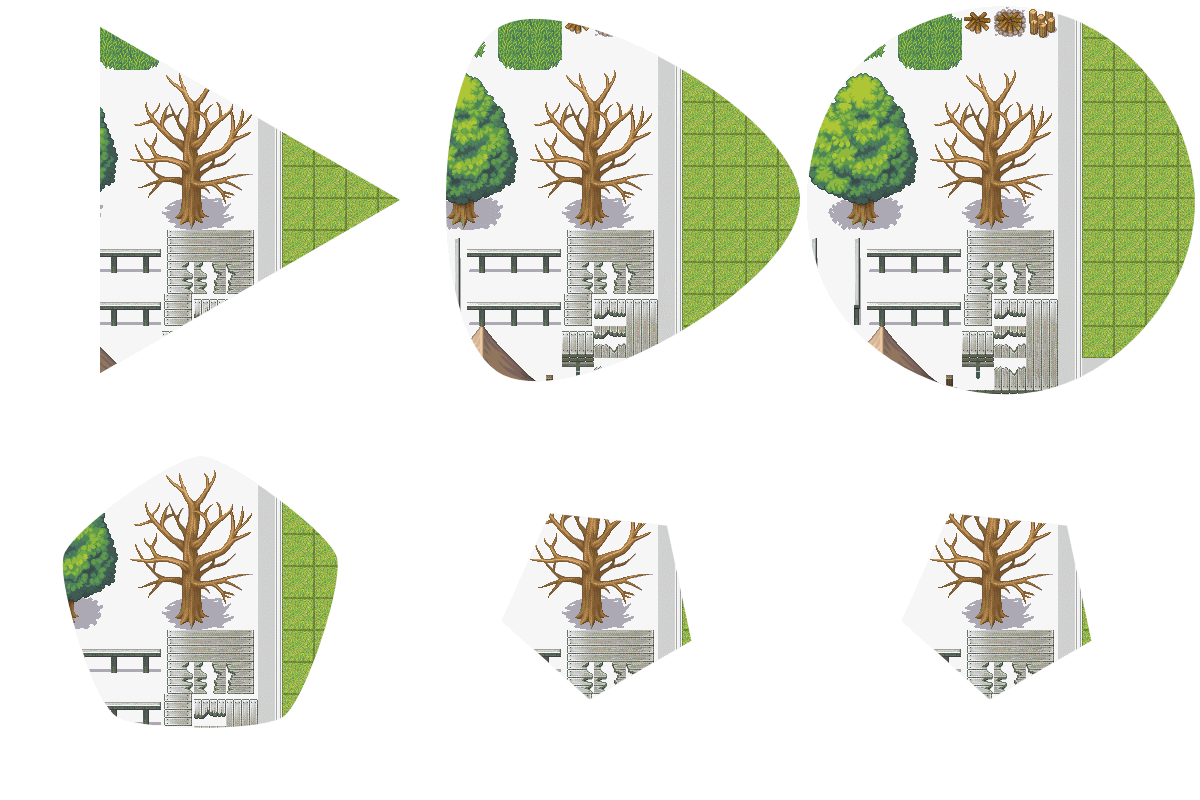
不单纯blt矩形 根据mask位图的透明度blt 直接效果图吧 比较好理解
[fold]

 [/fold]
一共是两块内容
一块是 MaskBlt
一块是 BltMask
MaskBlt :
mask_blt(x,y,src,rect,mask,opc = 255)
就是多了一个 mask 这个参数可以直接是位图 也可以是等下的 BltMask 类型
这个mask的大小必须和Rect一致 或者更大 不然会炸的 一般反正就一样就行
根据这个mask各点的透明度来进行blt操作
还有一个mask_blt_reverse 参数是一样的 就是进行了 255 - 透明度的操作
这个函数 进行了多线程加持 而且基于之前我写的很多优化 效率很高
单线程情况耗时大概是原版blt的 13/11
现在一般都有多线程了 那效率就很好henhao了
BltMask :
这块基于 agg(anti grain geometry)
是对位图进行画图的类 就是画线 画多边形 圆等的 还有作一些简单坐标变换的
初始化
[pre lang="ruby"]aa = BltMask.new(400, 400)[/pre]
会新建相应大小的位图 并进行初始化
不需要时请 aa.dispose
这个类作图的逻辑是这样的
加入点 圆 弧线等 然后渲染 渲染会清空之前的点序列
我知道这样说不太好理解 我看agg的时候开始也很迷
比分画线
[pre lang="ruby"]aa.move_to(0, 0)
aa.line_to(100, 100)
aa.draw_line[/pre]
move_to 就是移到那里
line_to 就是画过去
draw_line 就是渲染
画个实心圆
[pre lang="ruby"]aa.ellipse(200, 200, 100, 100)
aa.draw_poly[/pre]
复合也行
[pre lang="ruby"]aa.move_to(0, 0)
aa.line_to(100, 100)
aa.ellipse(200,200,100,100)
aa.line_to(400,400)
aa.draw_line[/pre]
画好了就能当mask_blt的参数 直接传 aa 进去就行
用完了记得 aa.clear 清空位图
下面是所有方法介绍
[fold=线相关]move_to(x, y)
移到那里
可以是浮点数
line_to(x, y)
画到那里
可以是浮点数
curve3(cx, cy, x, y)
贝塞尔曲线
控制点和目标点
可以是浮点数
curve4(cx1, cy1, cx2, cy2, x, y)
同上
多了个控制点
[/fold]
[fold=弧圆相关]ellipse(x, y, rx, ry, step = 0, cw = false)
坐标和半径
step是画圆内接多边形 0是圆
cw是顺时针逆时针
arc(x, y, rx, ry, a1, a2, rad = false)
画弧线
坐标和半径
然后是起始角度终止角度 顺时针
最后参数是是否为 rad 角 pi or 180 ?
默认后面[/fold]
[fold=渲染相关]draw_line(width = 0)
粗细 0为默认
可浮
draw_dash(len = 5, gap = 5, width = 0)
画虚线
实线长、线间隔、粗细
可浮
draw_poly
画实心多边形/不规则图形 无参[/fold]
[fold=坐标转换]坐标转换是这样工作的
先一系列变换 然后实的计算
相当于加点->渲染
translate(x, y)
平移
scale(x, y)
缩放 对象是坐标
也就是 x y 轴的缩放
rotate(a, rad = false)
旋转 绕 0,0
transform
进行变换
比分
aa.translate(-x,- y)
aa.rotate(80)
aa.translate(x, y)
aa.transform
是绕 x y 转了80度
trans_reset
重设转换 就是清空
每次变换完记得刷新
坐标转换在渲染前进行
是对点集进行处理的过程[/fold]
[fold=其他]end_poly
封闭图形
比分
move_to(0,0)
line_to(100,50)
line_to(50,100)
最后不需要回到0,0
end_poly 一下就行 会回到原点
clear
清空位图
dispose
释放内存[/fold]
[fold=线段衔接柔化]soft = true/false
开关
soft_value = xxx
值 默认1
会自动在渲染的时候进行操作[/fold]
如上
一般就是 设置好mask 然后mask_blt
示例没有 自己试着玩吧
下面代码
[fold=MaskBlt]
[pre lang="ruby"]Win32API.new("kernel32","LoadLibraryA","p","v").call("MaskBlt/tbb")
class Bitmap
alias initialize_maskblt initialize
attr_accessor :maskblt_addr
MASKBLT_WPMPL = Win32API.new('kernel32','WriteProcessMemory','lplll','l')
def initialize(*args)
initialize_maskblt(*args)
temp = "\0" * 4
MASKBLT_WPMPL.call(-1, temp, self.__id__*2 + 0x10, 4, 0)
MASKBLT_WPMPL.call(-1, temp, temp.unpack("l")[0] + 8, 4, 0)
MASKBLT_WPMPL.call(-1, temp, temp.unpack("l")[0] + 0x10, 4, 0)
@maskblt_addr = temp.unpack("l")[0]
end
MaskBlt = Win32API.new("MaskBlt/MaskBlt","mask_blt","llllllllllllll","v")
def mask_blt(x,y,src,rect,mask,opc = 255)
MaskBlt.call(src.maskblt_addr,src.width,src.height,rect.x,rect.y,
self.maskblt_addr,self.width,self.height,x,y,
rect.width, rect.height, opc, mask.maskblt_addr)
end
MaskBltRev = Win32API.new("MaskBlt/MaskBlt","mask_blt_reverse","llllllllllllll","v")
def mask_blt_reverse(x,y,src,rect,mask,opc = 255)
MaskBltRev.call(src.maskblt_addr,src.width,src.height,rect.x,rect.y,
self.maskblt_addr,self.width,self.height,x,y,
rect.width, rect.height, opc, mask.maskblt_addr)
end
end
[/pre]
[/fold]
[fold=BltMask]
[pre lang="ruby"]class BltMask
attr_reader :maskblt_addr
attr_accessor :soft, :soft_value
INIT = Win32API.new("MaskBlt/BltMask","init","pp","v")
def initialize(width, height)
@bitmap = Bitmap.new(width, height)
@width, @height = width, height
@maskblt_addr = @bitmap.maskblt_addr
ll = "0000"
pp = "pppp"
INIT.call(ll, pp)
@path_storage = ll.unpack("l")[0]
@trans = pp.unpack("l")[0]
@soft = false
@soft_value = 1
end
LINETO = Win32API.new("MaskBlt/BltMask","line_to","lp","v")
def line_to(x, y)
p = [x.to_f,y.to_f].pack("dd")
LINETO.call(@path_storage,p)
end
MOVETO = Win32API.new("MaskBlt/BltMask","move_to","lp","v")
def move_to(x, y)
p = [x.to_f,y.to_f].pack("dd")
MOVETO.call(@path_storage,p)
end
ELLIPSE = Win32API.new("MaskBlt/BltMask","ellipse","lpll","v")
def ellipse(x, y, rx, ry, step = 0, cw = false)
p = [x.to_f, y.to_f, rx.to_f, ry.to_f].pack("d4")
ELLIPSE.call(@path_storage, p, step, cw ? 1 : 0)
end
ARC = Win32API.new("MaskBlt/BltMask","arc","lpl","v")
def arc(x, y, rx, ry, a1, a2, rad = false)
p = [x.to_f, y.to_f, rx.to_f, ry.to_f, a1.to_f, a2.to_f].pack("d6")
ARC.call(@path_storage, p, rad ? 1 : 0)
end
DRAWLINE = Win32API.new("MaskBlt/BltMask","draw_line","llllpl","v")
def draw_line(width = 0)
DRAWLINE.call(@maskblt_addr,@width,@height,@path_storage,
[width.to_f,@soft_value.to_f].pack("dd"),
@soft ? 1 : 0)
end
DRAWDASH = Win32API.new("MaskBlt/BltMask","draw_dash","llllpl","v")
def draw_dash(len = 5, gap = 5, width = 0)
p = [width.to_f, len.to_f, gap.to_f,@soft_value.to_f].pack("d4")
DRAWDASH.call(@maskblt_addr,@width,@height,@path_storage,p,@soft ? 1 : 0)
end
ENDPOLY = Win32API.new("MaskBlt/BltMask","end_poly","l","v")
def end_poly
ENDPOLY.call(@path_storage)
end
DRAWPOLY = Win32API.new("MaskBlt/BltMask","draw_poly","lllllp","v")
def draw_poly
DRAWPOLY.call(@maskblt_addr,@width,@height,@path_storage,
@soft ? 1 : 0,[@soft_value.to_f].pack("d"))
end
CURVE3 = Win32API.new("MaskBlt/BltMask","curve3","lp","v")
def curve3(cx, cy, x, y)
p = [cx.to_f, cy.to_f, x.to_f, y.to_f].pack("d4")
CURVE3.call(@path_storage, p)
end
CURVE4 = Win32API.new("MaskBlt/BltMask","curve4","lp","v")
def curve4(cx1, cy1, cx2, cy2, x, y)
p = [cx1.to_f, cy1.to_f, cx2.to_f, cy2.to_f, x.to_f, y.to_f].pack("d6")
CURVE4.call(@path_storage, p)
end
ROTATE = Win32API.new("MaskBlt/BltMask","rotate","lpl","v")
def rotate(a, rad = false)
p = [a.to_f].pack("d")
ROTATE.call(@trans, p, rad ? 1 : 0)
end
TRANSFORM = Win32API.new("MaskBlt/BltMask","transform","ll","v")
def transform
TRANSFORM.call(@path_storage, @trans)
end
TRANSLATE = Win32API.new("MaskBlt/BltMask","translate","lp","v")
def translate(x, y)
p = [x.to_f, y.to_f].pack("d2")
TRANSLATE.call(@trans, p)
end
SCALE = Win32API.new("MaskBlt/BltMask","scale","lp","v")
def scale(x, y)
p = [x.to_f, y.to_f].pack("d2")
SCALE.call(@trans, p)
end
TRANSRESET = Win32API.new("MaskBlt/BltMask","trans_reset","l","v")
def trans_reset
TRANSRESET.call(@trans)
end
def clear
@bitmap.clear
end
DISPOSE = Win32API.new("MaskBlt/BltMask","dispose","ll","v")
def dispose
DISPOSE.call(@path_storage, @trans)
@bitmap.dispose
end
end
[/pre]
[/fold]
插到随便什么地方
 MaskBlt.zip
(236.58 KB, 下载次数: 67)
MaskBlt.zip
(236.58 KB, 下载次数: 67)
解压到文件目录
就这样 |
评分
-
查看全部评分
|


 写轮眼
写轮眼
 发表于 2019-10-25 14:57:54


 提升卡
提升卡 沉默号角
沉默号角 喧嚣号角
喧嚣号角 变色卡
变色卡 升龙剑
升龙剑


 发表于 2019-10-26 10:57:41

 RGDirect -