查看: 3673|回复: 5

[有事请教] 请问如何用脚本进入该界面(技能、装备命令的角色选择)

[复制链接]
梦石
0
星屑
470
在线时间
271 小时
注册时间
2011-10-17
回帖
70
发表于 2020-7-25 17:23:52 | 显示全部楼层 |阅读模式

加入我们,或者,欢迎回来。

您需要 登录 才可以下载或查看,没有账号?注册会员

×
起因是这样的,想用MV做安卓游戏,但是发现默认的系统菜单,用安卓操作起来太麻烦(菜单层级太多,点击的字又小)

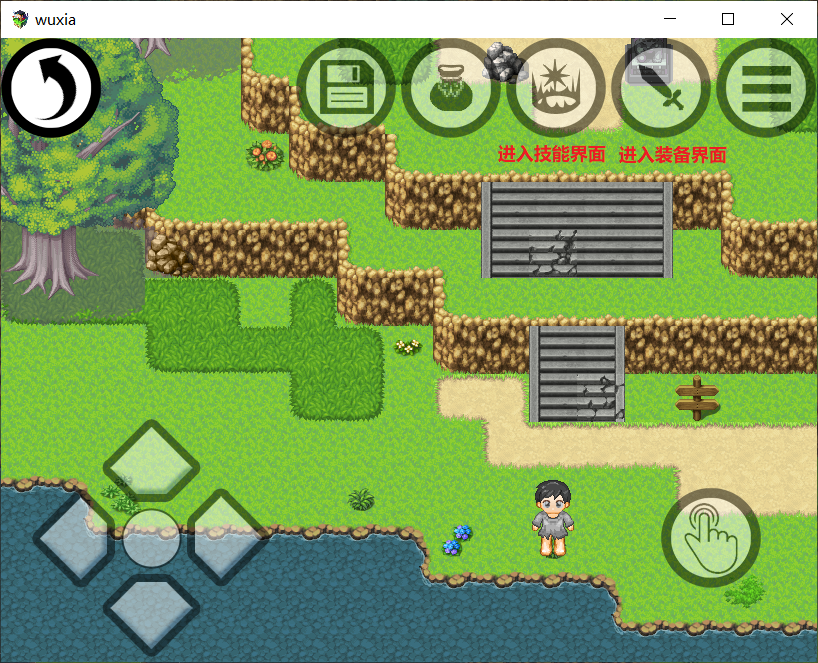
于是就用了YEP_PictureCommonEvents插件,做了这样一个UI,可以点右上方的按钮直接进入存档、道具、技能、装备等界面
无标题2.png

拿进入技能界面为例,我知道直接进入技能界面的脚本是SceneManager.push(Scene_Skill);
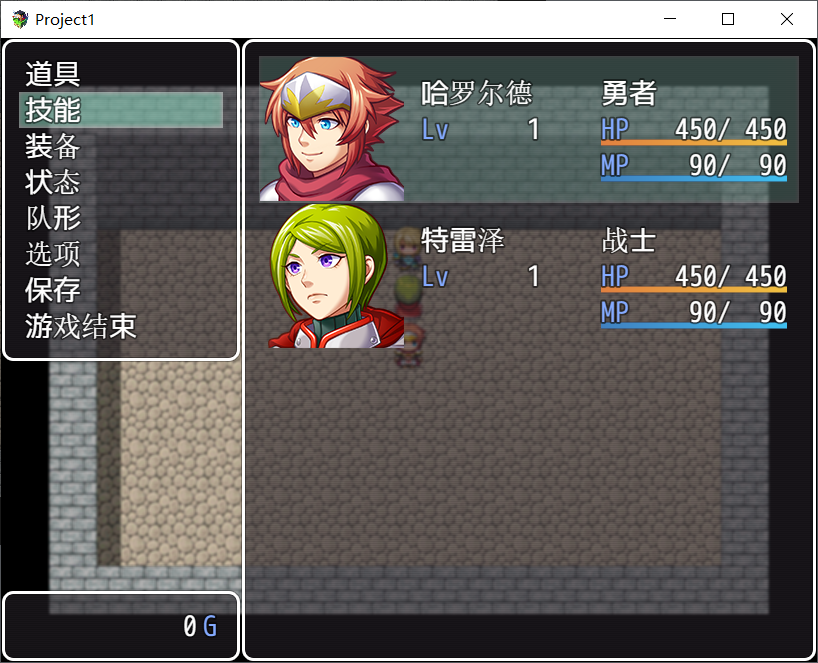
但这个脚本就是直接进入1号队友的技能了,而我不想进去这么快,想先经历一个选人的界面,如图所示

想先进入这样的界面

想先进入这样的界面


所以请问进入上图界面的脚本是什么?我能找到js文件中的脚本是这一段,但是这一个this接着一个this,实在不会改动啊

//创建命令窗口
Scene_Menu.prototype.createCommandWindow = function() {
    this._commandWindow = new Window_MenuCommand(0, 0);
    this._commandWindow.setHandler('item',      this.commandItem.bind(this));
    this._commandWindow.setHandler('skill',     this.commandPersonal.bind(this));
    this._commandWindow.setHandler('equip',     this.commandPersonal.bind(this));
    this._commandWindow.setHandler('status',    this.commandPersonal.bind(this));
    this._commandWindow.setHandler('formation', this.commandFormation.bind(this));
    this._commandWindow.setHandler('options',   this.commandOptions.bind(this));
    this._commandWindow.setHandler('save',      this.commandSave.bind(this));
    this._commandWindow.setHandler('gameEnd',   this.commandGameEnd.bind(this));
    this._commandWindow.setHandler('cancel',    this.popScene.bind(this));
    this.addWindow(this._commandWindow);
};
梦石
0
星屑
1343
在线时间
153 小时
注册时间
2020-4-26
回帖
146
发表于 2020-7-25 18:15:10 | 显示全部楼层
那你可以先到菜單的場景,然後激活選人的視窗

点评

關鍵代碼是$gameParty.targetActor()和$gameParty.setMenuActor()  发表于 2020-7-25 18:21
所以可以要直接進入技能場景時,自動觸發一個物品,並且選人,獲得選擇的人後直接進入他的技能頁面  发表于 2020-7-25 18:18
不過好像不能在前一個場景預約下一個場景要做甚麼  发表于 2020-7-25 18:16
回复

使用道具 举报

梦石
0
星屑
842
在线时间
174 小时
注册时间
2012-2-7
回帖
33
发表于 2020-10-29 15:24:31 | 显示全部楼层
在打开对应的界面前,先对人物状态窗口进行选择
Scene_Menu._statusWindow.select($gameActors.actor(1).index());
这里是选取了1号人物,index()是获得在队伍中的位置
楼主试下这个可行不
回复

使用道具 举报

您需要登录后才可以回帖 登录 | 注册会员

本版积分规则

Powered by Discuz! X5.0 © 2001-2026 Discuz! Team.

在本版发帖返回顶部