| 赞 | 29 |
| VIP | |
| 好人卡 | |
| 积分 | 34 |
| 经验 | |
| 最后登录 | 2026-9-30 |
| 在线时间 | 275 小时 |
- 梦石
- 0
- 星屑
- 3436
- 在线时间
- 275 小时
- 注册时间
- 2019-10-7
- 回帖
- 13
|
加入我们,或者,欢迎回来。
您需要 登录 才可以下载或查看,没有账号?注册会员
×
本帖最后由 硕明云书 于 2020-12-7 10:28 编辑

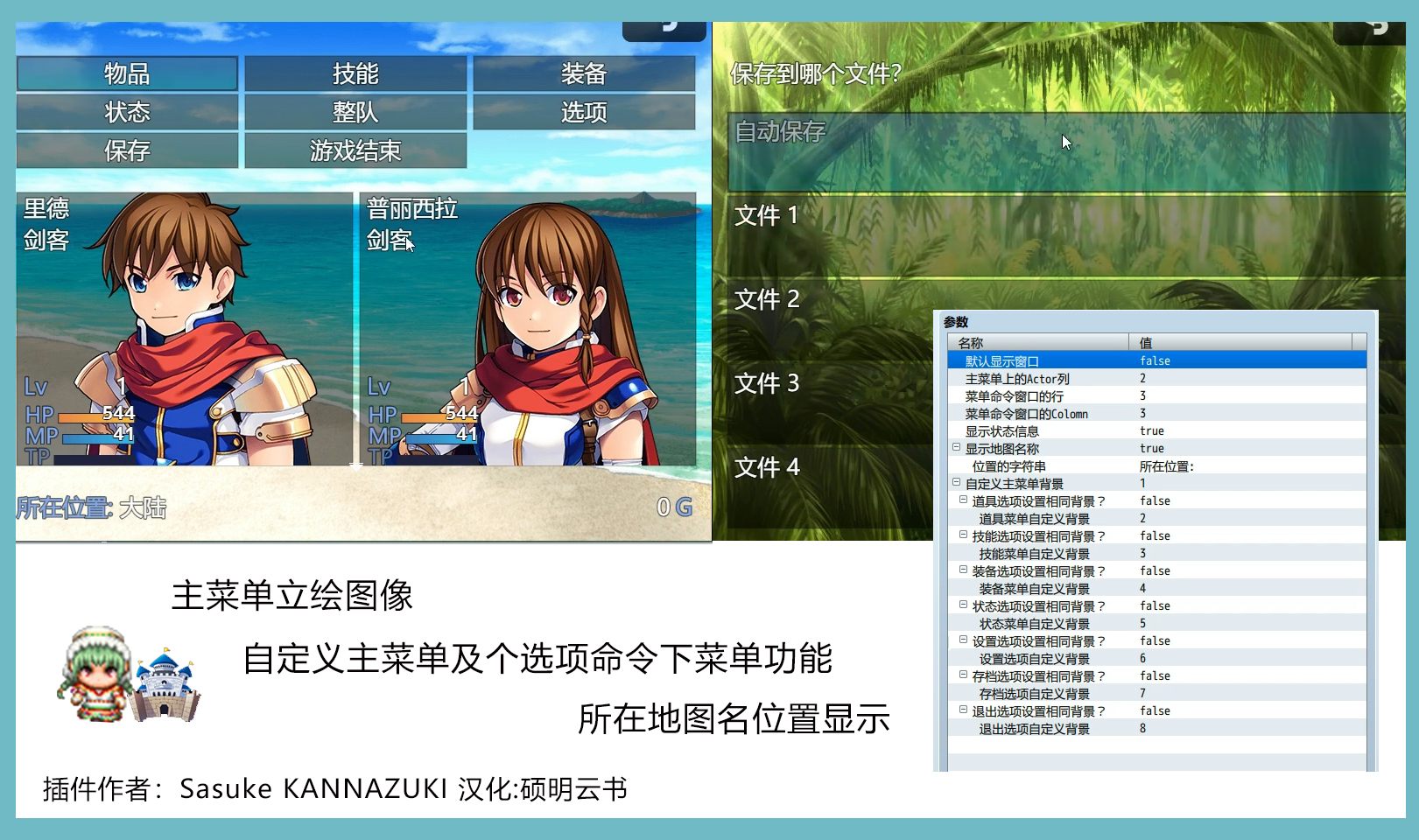
插件作者:Sasuke KANNAZUKI
插件汉化:硕明云书
插件用法:点我前往视频教程
来源说明:这个插件是AltMenuScreen3.js的MZ版本的KADOKAWA MV插件
发布声明:可用于商业用途,请注明插件作者信息,不得进行插件售卖。
插件功能:可自定义主菜单背景及命令行列和地图名主菜单显示、立绘图像显示等。
搬运声明:有侵必删,汉化分享,杜绝不和谐,缺少内容待补充。
[fold=插件代码展示][pre lang="ruby"]//=============================================================================
// Plugin for RPG Maker MZ
// AltMenuScreen2MZ.js
//=============================================================================
// Note: This Plugin is MZ version of AltMenuScreen3.js the KADOKAWA MV Plugin.
// [History of AltMenuScreen3]
// 2015.Nov.23 1.0.0 First Release
// 2018.Sep.19 1.0.1 add function to display current mapname.
// Following bugs are fixed by Triacontan:
// - The reserved actors, it doesn't display standing picture at first.
// (リザーブメンバーの立ち絵が初回表示時に正しく表示されない問題の修正)
// - At it's scrollable, arrow sprite indicates wrong direction.
// (スクロール可能であることを示す矢印スプライトの向きがおかしい問題の修正)
// [History]
// 2020.Feb.17 0.0.1 First Release on closed community
/*:
* @target MZ
* @plugindesc 横式二优菜单屏幕布局
* @author SasukeKANNAZUKI 汉化:硕明云书
*
* @param allowWindowDisp
* @text 默认显示窗口
* @desc 是否在自定义主菜单背景未设置的情况下显示默认窗口样式?
* @type boolean
* @on Yes
* @off No. Transparent
* @default true
*
* @param maxColsMenu
* @text 主菜单上的Actor列
* @desc 角色数量显示在主菜单上。
* @type number
* @min 1
* @default 4
*
* @param commandRows
* @text 菜单命令窗口的行
* @desc 命令窗口中可见的行数
* @type number
* @min 1
* @default 2
*
* @param commandCols
* @text 菜单命令窗口的Colomn
* @desc 命令窗口中的列数
* @type number
* @min 1
* @default 4
*
* @param isDisplayStatus
* @text 显示状态信息
* @desc 是否在主菜单上显示每个参与者的状态信息
* @type boolean
* @default true
*
* @param display map name
* @text 显示地图名称
* @desc 是否在主菜单上显示地图名称
* @type boolean
* @default true
*
* @param location string
* @parent display map name
* @text 位置的字符串
* @desc 映射名称的前缀。它按系统颜色绘制。
* @type string
* @default 所在位置:
*
* @param bgBitmapMenu
* @text 自定义主菜单背景
* @desc 背景位图在主菜单的所在目录,
* 主菜单推荐屏幕默认大小:814x624分辨率
* @default
* @require 1
* @dir img/pictures/
* @type file
*
* @param doesNotSetItemScene
* @parent bgBitmapMenu
* @text 道具选项设置相同背景?
* @desc 是否设置与主菜单相同的图像
* @type boolean
* @on Yes
* @off No. Set Original BG
* @default true
*
* @param bgBitmapItem
* @parent doesNotSetItemScene
* @text 道具菜单自定义背景
* @desc 背景位图文件所在项目场景位置。
* 推荐屏幕默认大小:814x624分辨率.
* @default
* @require 1
* @dir img/pictures/
* @type file
*
* @param doesNotSetSkillScene
* @parent bgBitmapMenu
* @text 技能选项设置相同背景?
* @desc 是否设置与主菜单相同的图像。
* @type boolean
* @on Yes
* @off No. Set Original BG
* @default true
*
* @param bgBitmapSkill
* @parent doesNotSetSkillScene
* @text 技能菜单自定义背景
* @desc 背景位图文件所在项目场景位置。
* 推荐屏幕默认大小:814x624分辨率.
* @default
* @require 1
* @dir img/pictures/
* @type file
*
* @param doesNotSetEquipScene
* @parent bgBitmapMenu
* @text 装备选项设置相同背景?
* @desc 是否设置与主菜单相同的图像。
* @type boolean
* @on Yes
* @off No. Set Original BG
* @default true
*
* @param bgBitmapEquip
* @text 装备菜单自定义背景
* @parent doesNotSetEquipScene
* @desc 背景位图文件所在项目场景位置。
* 推荐屏幕默认大小:814x624分辨率.
* @default
* @require 1
* @dir img/pictures/
* @type file
*
* @param doesNotSetStatusScene
* @parent bgBitmapMenu
* @text 状态选项设置相同背景?
* @desc 是否设置与主菜单相同的图像。
* @type boolean
* @on Yes
* @off No. Set Original BG
* @default true
*
* @param bgBitmapStatus
* @parent doesNotSetStatusScene
* @text 状态菜单自定义背景
* @desc 背景位图文件所在项目场景位置。
* 推荐屏幕默认大小:814x624分辨率.
* @default
* @require 1
* @dir img/pictures/
* @type file
*
* @param doesNotSetOptionScene
* @parent bgBitmapMenu
* @text 设置选项设置相同背景?
* @desc 是否设置与主菜单相同的图像。
* @type boolean
* @on Yes
* @off No. Set Original BG
* @default true
*
* @param bgBitmapOptions
* @parent doesNotSetOptionScene
* @text 设置选项自定义背景
* @desc 背景位图文件所在项目场景位置。
* 推荐屏幕默认大小:814x624分辨率.
* @default
* @require 1
* @dir img/pictures/
* @type file
*
* @param doesNotSetSaveScene
* @parent bgBitmapMenu
* @text 存档选项设置相同背景?
* @desc 是否设置与主菜单相同的图像。
* @type boolean
* @on Yes
* @off No. Set Original BG
* @default true
*
* @param bgBitmapFile
* @parent doesNotSetSaveScene
* @text 存档选项自定义背景
* @desc 背景位图文件所在项目场景位置。
* 推荐屏幕默认大小:814x624分辨率.
* @default
* @require 1
* @dir img/pictures/
* @type file
*
* @param doesNotSetEndScene
* @parent bgBitmapMenu
* @text 退出选项设置相同背景?
* @desc 是否设置与主菜单相同的图像。
* @type boolean
* @on Yes
* @off No. Set Original BG
* @default true
*
* @param bgBitmapGameEnd
* @parent doesNotSetEndScene
* @text 退出选项自定义背景
* @desc 背景位图文件所在项目场景位置。
* 推荐屏幕默认大小:814x624分辨率.
* @default
* @require 1
* @dir img/pictures/
* @type file
*
* @noteParam stand_picture
* @noteRequire 1
* @noteDir img/pictures/
* @noteType file
* @noteData actor
*
* @help
*=====================================๑乛◡乛๑
*此插件可用在商业作品中
*使用时需要注明插件作者。
*这个插件无需插件命令即可使用。
*此插件在RPG Maker MZ下运行。
*此插件由硕明云书汉化并进行注解。
*这个插件可以改变菜单的部分布局。
*=====================================๑乛◡乛๑
* 与官方自带的的AltMenuscreen.js的区别如下:
* -可以为每个角色设置立绘图像。
* -描述角色的字符如下:
* 下面这一串字符放入对应的角色备注内即可!
* <stand_picture:文件名>
* -如果你不设置图片,它会显示角色的脸。
* -可以在菜单上设置每个场景的背景图像。
* -把背景图像文件在img/pictures
* -如果你没有设置图片,场景的背景变成
*透明或显示默认窗口。
*(可选择at选项)
* -你可以通过选项改变可见角色的数量。
* -您可以选择是否显示参数。
* -在显示参数时,可以选择显示或不显示TP。
* -可以显示当前地图名称(选项)。
*角色的注意:
* 设置角色菜单上的立绘图片。
*将文件放在img/pictures。
*角色照片首选尺寸:
*宽度:174px(maxColsMenu=4), 240px(maxColsMenu=3)
*高度:408px(commandRows=2), 444px(commandRows=1)
*=====================================๑乛◡乛๑
*(许可)
*此插件在MIT许可下发布。
* http://opensource.org/licenses/mit-license.php
*感谢您使用本插件,同时此插件在哔哩哔哩上有教程提供,
*哔哩哔哩搜索“硕明云书”找到此UP发布的MZ插件推荐“二优横式菜单”
*/
/*:ja
* @target MZ
* @plugindesc レイアウトの異なるメニュー画面
* @author 神無月サスケ
*
* @param allowWindowDisp
* @text 背景未設定の時ウィンドウ表示?
* @desc
* @type boolean
* @on する
* @off しない。背景透明に
* @default true
*
* @param maxColsMenu
* @text アクター表示数
* @desc メインメニュー画面のアクター表示ウィンドウの1画面の登録最大数
* @type number
* @min 1
* @default 4
*
* @param commandRows
* @text コマンドウィンドウ行数
* @desc メインメニューのコマンドウィンドウ行数(既定値:2)
* @type number
* @min 1
* @default 2
*
* @param commandCols
* @text コマンドウィンドウ列数
* @desc コマンドウィンドウ1行に表示する要素数(既定値:4)
* @type number
* @min 1
* @default 4
*
* @param isDisplayStatus
* @text ステータス表示?
* @desc メインメニューでアクターのステータスを表示する?
* @on する
* @off しない
* @type boolean
* @default true
*
* @param display map name
* @text マップ名表示?
* @desc メインメニュー画面左下にマップ名を表示する?
* @on する
* @off しない
* @type boolean
* @default true
*
* @param location string
* @parent display map name
* @text 「現在地:」を意味するテキスト
* @desc マップ名表示の際にシステムカラーで表示される文字列
* @type string
* @default 現在地:
*
* @param bgBitmapMenu
* @text メインメニュー背景画
* @desc 背景用の一枚絵のファイル名。
* img/pictures に置いて下さい
* @default
* @require 1
* @dir img/pictures/
* @type file
*
* @param doesNotSetItemScene
* @parent bgBitmapMenu
* @text アイテム画面は同じ背景画?
* @desc メインメニューと同じ背景画?
* @type boolean
* @on 同じ背景画
* @off 別に設定
* @default true
*
* @param bgBitmapItem
* @parent doesNotSetItemScene
* @text アイテムメニュー背景画
* @desc 背景用の一枚絵のファイル名。
* img/pictures に置いて下さい
* @default
* @require 1
* @dir img/pictures/
* @type file
*
* @param doesNotSetSkillScene
* @parent bgBitmapMenu
* @text スキル画面は同じ背景画?
* @desc メインメニューと同じ背景画?
* @type boolean
* @on 同じ背景画
* @off 別に設定
* @default true
*
* @param bgBitmapSkill
* @parent doesNotSetSkillScene
* @text スキル画面背景画
* @desc 背景用の一枚絵のファイル名。
* img/pictures に置いて下さい
* @default
* @require 1
* @dir img/pictures/
* @type file
*
* @param doesNotSetEquipScene
* @parent bgBitmapMenu
* @text 装備画面は同じ背景画?
* @desc メインメニューと同じ背景画?
* @type boolean
* @on 同じ背景画
* @off 別に設定
* @default true
*
* @param bgBitmapEquip
* @parent doesNotSetEquipScene
* @text 装備画面背景画
* @desc 背景用の一枚絵のファイル名。
* img/pictures に置いて下さい
* @default
* @require 1
* @dir img/pictures/
* @type file
*
* @param doesNotSetStatusScene
* @parent bgBitmapMenu
* @text ステータス画面は同じ背景画?
* @desc メインメニューと同じ背景画?
* @type boolean
* @on 同じ背景画
* @off 別に設定
* @default true
*
* @param bgBitmapStatus
* @parent doesNotSetStatusScene
* @text ステータス画面背景画
* @desc 背景用の一枚絵のファイル名。
* img/pictures に置いて下さい
* @default
* @require 1
* @dir img/pictures/
* @type file
*
* @param doesNotSetOptionScene
* @parent bgBitmapMenu
* @text オプション画面は同じ背景画?
* @desc メインメニューと同じ背景画?
* @type boolean
* @on 同じ背景画
* @off 別に設定
* @default true
*
* @param bgBitmapOptions
* @parent doesNotSetOptionScene
* @text オプション画面背景画
* @desc 背景用の一枚絵のファイル名。
* img/pictures に置いて下さい
* @default
* @require 1
* @dir img/pictures/
* @type file
*
* @param doesNotSetSaveScene
* @parent bgBitmapMenu
* @text セーブ画面は同じ背景画?
* @desc メインメニューと同じ背景画?
* @type boolean
* @on 同じ背景画
* @off 別に設定
* @default true
*
* @param bgBitmapFile
* @parent doesNotSetSaveScene
* @text セーブ画面背景画
* @desc 背景用の一枚絵のファイル名。
* img/pictures に置いて下さい
* @default
* @require 1
* @dir img/pictures/
* @type file
*
* @param doesNotSetEndScene
* @parent bgBitmapMenu
* @text 終了画面は同じ背景画?
* @desc メインメニューと同じ背景画?
* @type boolean
* @on 同じ背景画
* @off 別に設定
* @default true
*
* @param bgBitmapGameEnd
* @parent doesNotSetEndScene
* @text 終了画面背景画
* @desc 背景用の一枚絵のファイル名。
* img/pictures に置いて下さい
* @default
* @require 1
* @dir img/pictures/
* @type file
*
* @noteParam stand_picture
* @noteRequire 1
* @noteDir img/pictures/
* @noteType file
* @noteData actor
*
* @help このプラグインにプラグインコマンドはありません。
* このプラグインは、RPGツクールMZに対応しています。
*
* このプラグインは、メニューのレイアウトを変更します。
*
* ■概要
* AltMenuScreen.js との違いは、以下の通りです。
* ・各アクターに立ち絵を表示可能
* アクターのメモ欄に次のような書式で書いてください。
* <stand_picture:ファイル名>
* ファイル名が、そのアクターの立ち絵になります。
* ファイルは img/pictures に置いてください。
* 立ち絵を表示しない場合は、アクターの顔グラフィックが表示されます。
* ・各シーン一括で、または特定のシーンにのみ、背景画を表示できます。
* 背景画を使わないシーンでは、ウィンドウを表示するか、透明にするかを
* オプションで選択可能です。
* ・1画面に表示可能な人数を設定できます。
* デフォルトでは4人ですが、3人にしたり、ふたりにしたり、
* 画面サイズを変更している場合、5人以上も有効です。
* ・オプションでマップ上の現在地も表示可能です。
*
* 望ましいアクター立ち絵のサイズ:
* 幅:3列:240px, 4列:174px
* 高さ: コマンドウィンドウ 1行:444px 2行:408px
*
* ■ライセンス表記
* このプラグインは、RPGツクールMV用準公式プラグインAltMenuScreen3.jsの
* MZ版です(2ではないことに注意)。
*
* このプラグインは MIT ライセンスで配布されます。
* ご自由にお使いください。
* http://opensource.org/licenses/mit-license.php
*/
(() => {
const pluginName = 'AltMenuScreen2MZ';
//
// process parameters
//
const parameters = PluginManager.parameters(pluginName);
const allowWindowDisp = eval(parameters['allowWindowDisp'] || 'true');
const maxColsMenuWnd = Number(parameters['maxColsMenu'] || 4);
const rowsCommandWnd = Number(parameters['commandRows'] || 2);
const colsCommandWnd = Number(parameters['commandCols'] || 4);
const isDisplayStatus = eval(parameters['isDisplayStatus'] || 'true');
const isDisplayMapName = eval(parameters['display map name'] || 'true');
const locationString = parameters['location string'] || 'Location:';
const bgBitmapMenu = parameters['bgBitmapMenu'] || '';
let bgBitmap = {};
bgBitmap['Scene_Item'] = parameters['bgBitmapItem'] || '';
bgBitmap['Scene_Skill'] = parameters['bgBitmapSkill'] || '';
bgBitmap['Scene_Equip'] = parameters['bgBitmapEquip'] || '';
bgBitmap['Scene_Status'] = parameters['bgBitmapStatus'] || '';
bgBitmap['Scene_Options'] = parameters['bgBitmapOptions'] || '';
bgBitmap['Scene_Save'] = parameters['bgBitmapFile'] || '';
bgBitmap['Scene_Load'] = bgBitmap['Scene_Save'];
bgBitmap['Scene_GameEnd'] = parameters['bgBitmapGameEnd'] || '';
let setBg = {};
setBg['Scene_Item'] = !eval(parameters['doesNotSetItemScene'] || 'true');
setBg['Scene_Skill'] = !eval(parameters['doesNotSetSkillScene'] || 'true');
setBg['Scene_Equip'] = !eval(parameters['doesNotSetEquipScene'] || 'true');
setBg['Scene_Status'] = !eval(parameters['doesNotSetStatusScene'] || 'true');
setBg['Scene_Options'] = !eval(parameters['doesNotSetOptionScene'] ||'true');
setBg['Scene_Save'] = !eval(parameters['doesNotSetSaveScene'] || 'true');
setBg['Scene_Load'] = setBg['Scene_Save'];
setBg['Scene_GameEnd'] = !eval(parameters['doesNotSetEndScene'] || 'true');
//
// set window positions (based on AltMenuScreen.js MZ ver.)
//
Scene_MenuBase.prototype.commandWindowHeight = function() {
return this.calcWindowHeight(rowsCommandWnd, true);
};
Scene_MenuBase.prototype.goldWindowHeight = function() {
return this.calcWindowHeight(1, true);
};
Scene_Menu.prototype.commandWindowRect = function() {
const ww = Graphics.boxWidth;
const wh = this.commandWindowHeight();
const wx = 0;
const wy = this.mainAreaTop();
return new Rectangle(wx, wy, ww, wh);
};
Scene_Menu.prototype.statusWindowRect = function() {
const h1 = this.commandWindowHeight();
const h2 = this.goldWindowHeight();
const ww = Graphics.boxWidth;
const wh = this.mainAreaHeight() - h1 - h2;
const wx = 0;
const wy = this.mainAreaTop() + this.commandWindowHeight();
return new Rectangle(wx, wy, ww, wh);
};
Scene_ItemBase.prototype.actorWindowRect = function() {
const rect = Scene_Menu.prototype.statusWindowRect();
rect.y = this.mainAreaBottom() - rect.height;
return rect;
};
Window_MenuCommand.prototype.maxCols = function() {
return colsCommandWnd;
};
Window_MenuCommand.prototype.numVisibleRows = function() {
return rowsCommandWnd;
};
Window_MenuStatus.prototype.maxCols = function() {
return maxColsMenuWnd;
};
Window_MenuStatus.prototype.numVisibleRows = function() {
return 1;
};
//
// process windows' opacity and background bitmap
//
const bgBitmapName = () => {
const className = SceneManager._scene.constructor.name;
const doSet = setBg[className];
return doSet ? bgBitmap[className] : bgBitmapMenu;
}
const isWindowVisible = () => allowWindowDisp && !bgBitmapName();
const _Scene_MenuBase_create = Scene_MenuBase.prototype.create;
Scene_MenuBase.prototype.create = function () {
this._allWindows = [];
_Scene_MenuBase_create.call(this);
};
const _Scene_MenuBase_start = Scene_MenuBase.prototype.start;
Scene_MenuBase.prototype.start = function() {
this._setWindowsOpacity();
_Scene_MenuBase_start.call(this);
};
const _Scene_MenuBase_addWindow = Scene_MenuBase.prototype.addWindow;
Scene_MenuBase.prototype.addWindow = function(window) {
_Scene_MenuBase_addWindow.call(this, window);
this._allWindows.push(window);
};
Scene_MenuBase.prototype._setWindowsOpacity = function () {
if (!isWindowVisible()) {
for (const window of this._allWindows) {
window.opacity = 0;
}
}
};
const _Scene_MenuBase_createBackground =
Scene_MenuBase.prototype.createBackground;
Scene_MenuBase.prototype.createBackground = function () {
const bgName = bgBitmapName();
if (bgName){
this._backgroundSprite = new Sprite();
this._backgroundSprite.bitmap = ImageManager.loadPicture(bgName);
this.addChild(this._backgroundSprite);
} else {
_Scene_MenuBase_createBackground.call(this);
}
};
//
// draw image and parameters
//
var _Window_MenuStatus_drawItem = Window_MenuStatus.prototype.drawItem;
Window_MenuStatus.prototype.drawItem = function(index) {
const actor = $gameParty.members()[index];
const bitmapName = $dataActors[actor.actorId()].meta.stand_picture;
const bitmap = bitmapName ? ImageManager.loadPicture(bitmapName) : null;
if (bitmap && !bitmap.isReady()) {
bitmap.addLoadListener(_Window_MenuStatus_drawItem.bind(this, index));
} else {
_Window_MenuStatus_drawItem.call(this, index);
}
};
const _Window_MenuStatus_drawItemImage =
Window_MenuStatus.prototype.drawItemImage;
Window_MenuStatus.prototype.drawItemImage = function(index) {
const actor = this.actor(index);
if (!actor) {
return;
}
const rect = this.itemRectWithPadding(index);
// load stand_picture
const bitmapName = $dataActors[actor.actorId()].meta.stand_picture;
const bitmap = bitmapName ? ImageManager.loadPicture(bitmapName) : null;
const w = Math.min(rect.width, (bitmapName ? bitmap.width : 144));
const h = Math.min(rect.height, (bitmapName ? bitmap.height : 144));
const lineHeight = this.lineHeight();
this.changePaintOpacity(actor.isBattleMember());
if (bitmap) {
const sx = (bitmap.width > w) ? (bitmap.width - w) / 2 : 0;
const sy = (bitmap.height > h) ? (bitmap.height - h) / 2 : 0;
const dx = (bitmap.width > rect.width) ? rect.x :
rect.x + (rect.width - bitmap.width) / 2;
const dy = (bitmap.height > rect.height) ? rect.y :
rect.y + (rect.height - bitmap.height) / 2;
this.contents.blt(bitmap, sx, sy, w, h, dx, dy);
} else { // when bitmap is not set, do the original process.
_Window_MenuStatus_drawItemImage.call(this, index);
}
this.changePaintOpacity(true);
};
Window_MenuStatus.prototype.drawItemStatus = function(index) {
if (!isDisplayStatus) {
return;
}
const actor = this.actor(index);
const rect = this.itemRectWithPadding(index);
const x = rect.x;
const y = rect.y;
const width = rect.width;
const bottom = y + rect.height;
const lineHeight = this.lineHeight();
this.drawActorName(actor, x, y + lineHeight * 0, width);
this.drawActorClass(actor, x, y + lineHeight * 1, width);
this.drawActorLevel(actor, x, bottom - lineHeight * 3, width);
this.placeBasicGauges(actor, x, bottom - lineHeight * 2, width);
this.drawActorIcons(actor, x, bottom - lineHeight * 4, width);
};
//
// display current map name
//
const mapName = () => {
const name = $gameMap.displayName();
return name ? name : $dataMapInfos[$gameMap.mapId()].name;
};
const _Scene_Menu_create = Scene_Menu.prototype.create;
Scene_Menu.prototype.create = function() {
_Scene_Menu_create.call(this);
this.createMapNameWindow();
};
Scene_Menu.prototype.createMapNameWindow = function() {
if (isDisplayMapName) {
const rect = this.mapNameAlt3WindowRect();
this._mapNameWindow = new Window_MapNameAlt3(rect);
this.addWindow(this._mapNameWindow);
}
};
const _Scene_Menu_terminate = Scene_Menu.prototype.terminate;
Scene_Menu.prototype.terminate = function () {
_Scene_Menu_terminate.call(this);
if (isDisplayMapName) {
this.removeChild(this._mapNameWindow);
}
};
Scene_Menu.prototype.mapNameAlt3WindowRect = function() {
const ww = Graphics.boxWidth - this._goldWindow.width;
const wh = this.calcWindowHeight(1, true);
const wx = 0;
const wy = this.mainAreaBottom() - wh;
return new Rectangle(wx, wy, ww, wh);
};
function Window_MapNameAlt3() {
this.initialize(...arguments);
}
Window_MapNameAlt3.prototype = Object.create(Window_MapName.prototype);
Window_MapNameAlt3.prototype.constructor = Window_MapNameAlt3;
Window_MapNameAlt3.prototype.initialize = function (rect) {
// not inherit super class, but Window_Base instead.
Window_Base.prototype.initialize.call(this, rect);
this.refresh();
};
Window_MapNameAlt3.prototype.update = function () {
// do nothing
};
Window_MapNameAlt3.prototype.refresh = function() {
// not inherit super class
this.contents.clear();
if (mapName()) {
this.changeTextColor(ColorManager.systemColor());
const textWidth = this.textWidth(locationString) + this.itemPadding();
const row = 4;
const col = 4;
this.drawText(locationString, row, col, this.width, 'left');
this.resetTextColor();
const orgX = row + textWidth;
this.drawText(mapName(), orgX, col, this.width, 'left');
}
};
})();
[/pre][/fold]
插件下载:
 【MZ插件】二代横版菜单.zip
(6.55 KB, 下载次数: 545)
【MZ插件】二代横版菜单.zip
(6.55 KB, 下载次数: 545)
|
评分
-
查看全部评分
|


 写轮眼
写轮眼
 发表于 2020-12-7 10:09:49


 提升卡
提升卡 沉默号角
沉默号角 喧嚣号角
喧嚣号角 变色卡
变色卡 升龙剑
升龙剑
 感谢大佬的分享!