| 赞 | 1 |
| VIP | |
| 好人卡 | |
| 积分 | 8 |
| 经验 | |
| 最后登录 | 2026-9-26 |
| 在线时间 | 225 小时 |
- 梦石
- 0
- 星屑
- 819
- 在线时间
- 225 小时
- 注册时间
- 2020-9-12
- 回帖
- 10
|
加入我们,或者,欢迎回来。
您需要 登录 才可以下载或查看,没有账号?注册会员
×
如果关闭菜单,我的人物会在空白区域''影分身之术''(如下图),
我的系统菜单脚本有作修改,还劳烦各位给帮忙想想办法,多谢了
图:
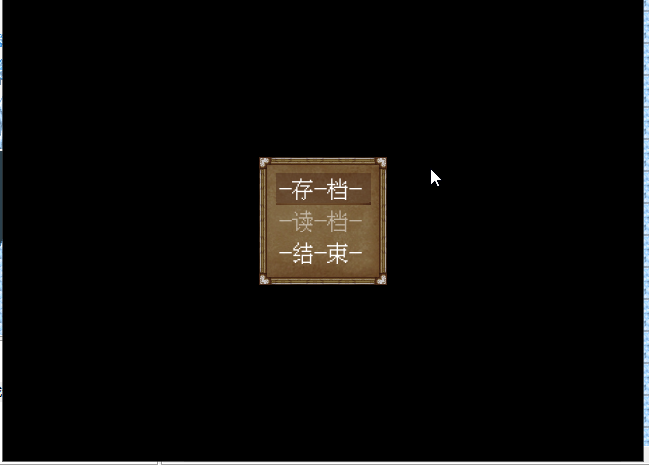
菜单界面:
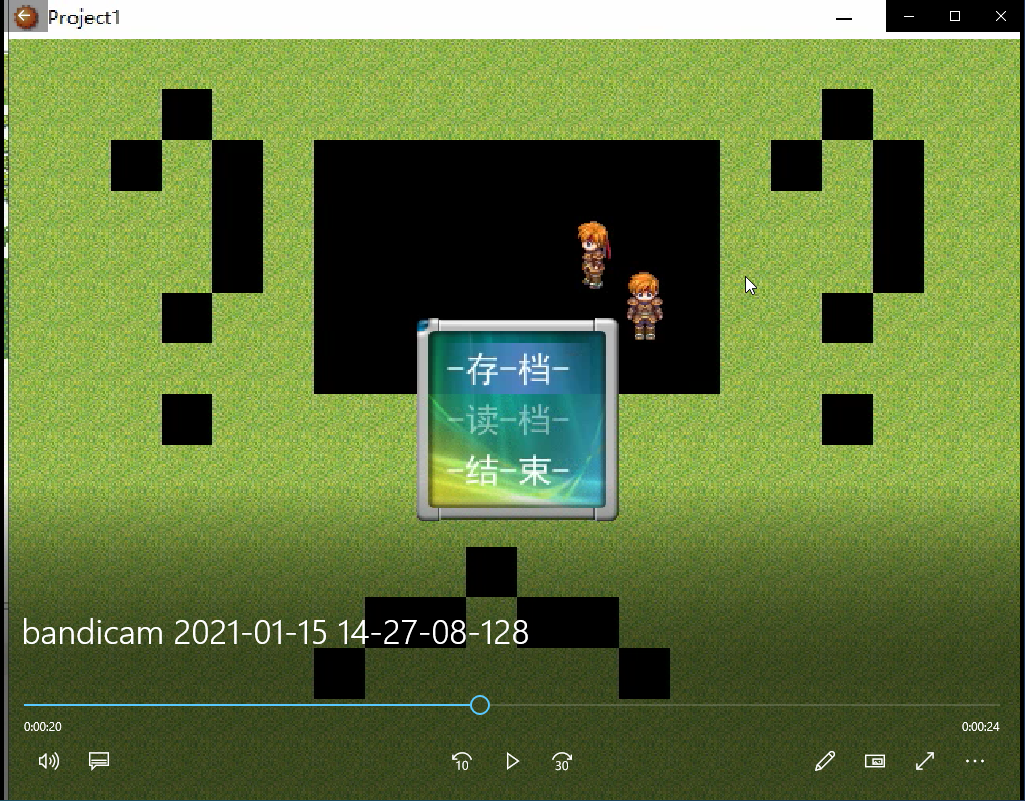
情况:
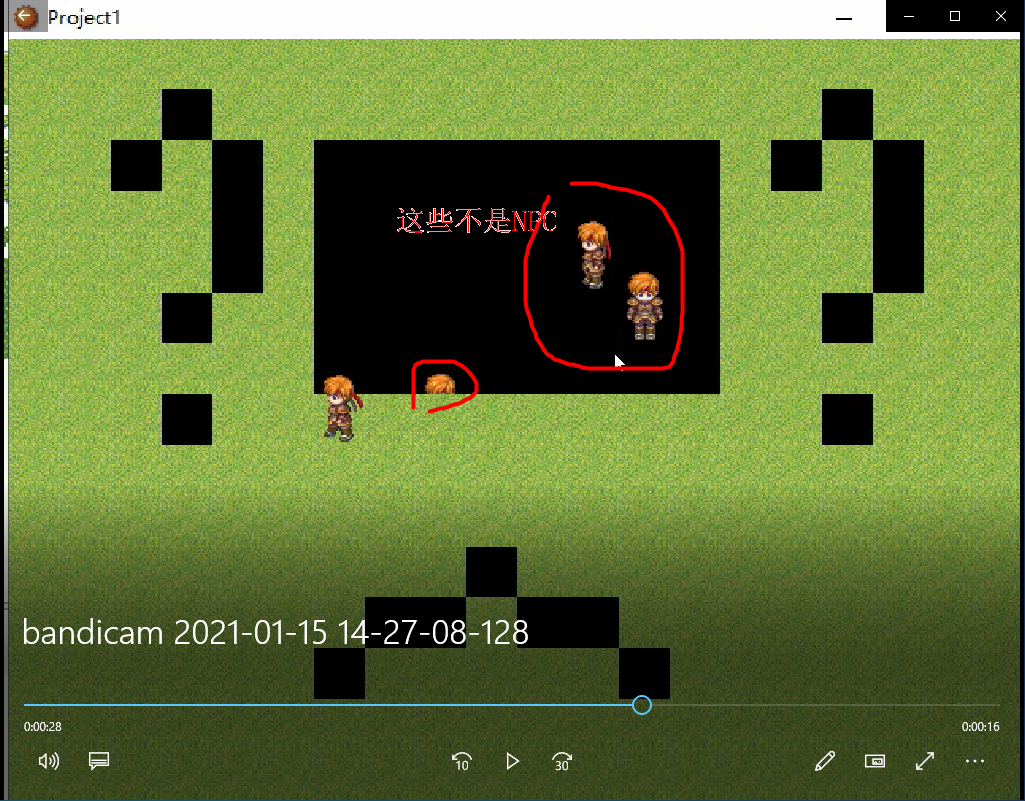
脚本:
[fold=Scene_Menu]#==============================================================================
# ■ Scene_Menu
#------------------------------------------------------------------------------
# 处理菜单画面的类。
#==============================================================================
class Scene_Menu
#--------------------------------------------------------------------------
# ● 初始化对像
# menu_index : 命令光标的初期位置
#--------------------------------------------------------------------------
def initialize(menu_index = 0)
@menu_index = menu_index
end
#--------------------------------------------------------------------------
# ● 主处理
#--------------------------------------------------------------------------
def main
@screen = Spriteset_Map.new #==== 菜单空缺显示当前地图画面 ====
# 生成命令窗口
# s1 = $data_system.words.item
# s2 = $data_system.words.skill
# s3 = $data_system.words.equip
# s4 = "状态"
s1 = "-存-档-"
s2 = "-读-档-"
s3 = "-结-束-"
@command_window = Window_Menu.new(128, [s1, s2, s3])
@command_window.index = @menu_index
# 同伴人数为 0 的情况下
if $game_party.actors.size == 0
# 物品、特技、装备、状态无效化
@command_window.disable_item(0)
@command_window.disable_item(1)
@command_window.disable_item(2)
@command_window.disable_item(3)
end
# 禁止存档的情况下
if $game_system.save_disabled
# 存档无效
@command_window.disable_item(0)
end
# 不能读档(没有存档)的情况下
for i in 0..3
if FileTest.exist?("Save#{i+1}.rxdata")
@continue_enabled = true
end
end
unless @continue_enabled
@command_window.disable_item(1)
end
# # 生成游戏时间窗口
# @playtime_window = Window_PlayTime.new
# @playtime_window.x = 0
# @playtime_window.y = 224
# # 生成步数窗口
# @steps_window = Window_Steps.new
# @steps_window.x = 0
# @steps_window.y = 320
# # 生成金钱窗口
# @gold_window = Window_Gold.new
# @gold_window.x = 0
# @gold_window.y = 416
# # 生成状态窗口
# @status_window = Window_MenuStatus.new
# @status_window.x = 160
# @status_window.y = 0
# 执行过渡
Graphics.transition
# 主循环
loop do
# 刷新游戏画面
Graphics.update
# 刷新输入信息
Input.update
# 刷新画面
update
# 如果切换画面就中断循环
if $scene != self
break
end
end
# 准备过渡
Graphics.freeze
# 释放窗口
@command_window.dispose
# @playtime_window.dispose
# @steps_window.dispose
# @gold_window.dispose
# @status_window.dispose
end
#--------------------------------------------------------------------------
# ● 刷新画面
#--------------------------------------------------------------------------
def update
# 刷新窗口
@command_window.update
# @playtime_window.update
# @steps_window.update
# @gold_window.update
# @status_window.update
# 命令窗口被激活的情况下: 调用 update_command
if @command_window.active
update_command
return
end
# 状态窗口被激活的情况下: 调用 update_status
if @status_window.active
update_status
return
end
end
#--------------------------------------------------------------------------
# ● 刷新画面 (命令窗口被激活的情况下)
#--------------------------------------------------------------------------
def update_command
# 按下 B 键的情况下
if Input.trigger?(Input::B)
# 演奏取消 SE
$game_system.se_play($data_system.cancel_se)
# 切换的地图画面
$scene = Scene_Map.new
return
end
# 按下 C 键的情况下
if Input.trigger?(Input::C)
# 同伴人数为 0、存档、游戏结束以外的场合
if $game_party.actors.size == 0 and @command_window.index < 4
# 演奏冻结 SE
$game_system.se_play($data_system.buzzer_se)
return
end
# 命令窗口的光标位置分支
case @command_window.index
# when 0 # 物品
# # 演奏确定 SE
# $game_system.se_play($data_system.decision_se)
# # 切换到物品画面
# $scene = Scene_Item.new
# when 1 # 特技
# # 演奏确定 SE
# $game_system.se_play($data_system.decision_se)
# # 激活状态窗口
# @command_window.active = false
# @status_window.active = true
# @status_window.index = 0
# when 2 # 装备
# # 演奏确定 SE
# $game_system.se_play($data_system.decision_se)
# # 激活状态窗口
# @command_window.active = false
# @status_window.active = true
# @status_window.index = 0
# when 3 # 状态
# # 演奏确定 SE
# $game_system.se_play($data_system.decision_se)
# # 激活状态窗口
# @command_window.active = false
# @status_window.active = true
# @status_window.index = 0
when 0 # 存档
# 禁止存档的情况下
if $game_system.save_disabled
# 演奏冻结 SE
$game_system.se_play($data_system.buzzer_se)
return
end
# 演奏确定 SE
$game_system.se_play($data_system.decision_se)
# 切换到存档画面
$scene = Scene_Save.new
when 1 # 读档
#判断是否允许读档
unless @continue_enabled
# 演奏无效 SE
$game_system.se_play($data_system.buzzer_se)
return
end
# 演奏确定 SE
$game_system.se_play($data_system.decision_se)
# 切换到读档画面
$loadfrommenu = 1
$scene = Scene_Load.new
when 2 # 游戏结束
# 演奏确定 SE
$game_system.se_play($data_system.decision_se)
# 切换到游戏结束画面
$scene = Scene_End.new
end
return
end
end
# #--------------------------------------------------------------------------
# # ● 刷新画面 (状态窗口被激活的情况下)
# #--------------------------------------------------------------------------
# def update_status
# # 按下 B 键的情况下
# if Input.trigger?(Input::B)
# # 演奏取消 SE
# $game_system.se_play($data_system.cancel_se)
# # 激活命令窗口
# @command_window.active = true
# @status_window.active = false
# @status_window.index = -1
# return
# end
# # 按下 C 键的情况下
# if Input.trigger?(Input::C)
# # 命令窗口的光标位置分支
# case @command_window.index
# when 1 # 特技
# # 本角色的行动限制在 2 以上的情况下
# if $game_party.actors[@status_window.index].restriction >= 2
# # 演奏冻结 SE
# $game_system.se_play($data_system.buzzer_se)
# return
# end
# # 演奏确定 SE
# $game_system.se_play($data_system.decision_se)
# # 切换到特技画面
# $scene = Scene_Skill.new(@status_window.index)
# when 2 # 装备
# # 演奏确定 SE
# $game_system.se_play($data_system.decision_se)
# # 切换的装备画面
# $scene = Scene_Equip.new(@status_window.index)
# when 3 # 状态
# # 演奏确定 SE
# $game_system.se_play($data_system.decision_se)
# # 切换到状态画面
# $scene = Scene_Status.new(@status_window.index)
# end
# return
# end
# end
end
[/fold]
[fold=Window_Menu]#==============================================================================
# ■ Window_Menu
#------------------------------------------------------------------------------
# 菜单的命令选择行窗口。
#==============================================================================
class Window_Menu < Window_Selectable
#--------------------------------------------------------------------------
# ● 初始化对像
# width : 窗口的宽
# commands : 命令字符串序列
#--------------------------------------------------------------------------
def initialize(width, commands)
# 由命令的个数计算出窗口的高
super(256, 176, width, commands.size * 32 + 32)
@item_max = commands.size
@commands = commands
self.contents = Bitmap.new(width - 32, @item_max * 32)
refresh
self.index = 0
end
#--------------------------------------------------------------------------
# ● 刷新
#--------------------------------------------------------------------------
def refresh
self.contents.clear
for i in 0...@item_max
draw_item(i, normal_color)
end
end
#--------------------------------------------------------------------------
# ● 描绘项目
# index : 项目编号
# color : 文字色
#--------------------------------------------------------------------------
def draw_item(index, color)
self.contents.font.color = color
rect = Rect.new(4, 32 * index, self.contents.width - 8, 32)
self.contents.fill_rect(rect, Color.new(0, 0, 0, 0))
self.contents.draw_text(rect, @commands[index])
end
#--------------------------------------------------------------------------
# ● 项目无效化
# index : 项目编号
#--------------------------------------------------------------------------
def disable_item(index)
draw_item(index, disabled_color)
end
end
[/fold]
|
|




 写轮眼
写轮眼
 发表于 2021-1-15 14:46:30
 提升卡
提升卡 沉默号角
沉默号角 喧嚣号角
喧嚣号角 变色卡
变色卡 升龙剑
升龙剑