以下为作者的案例
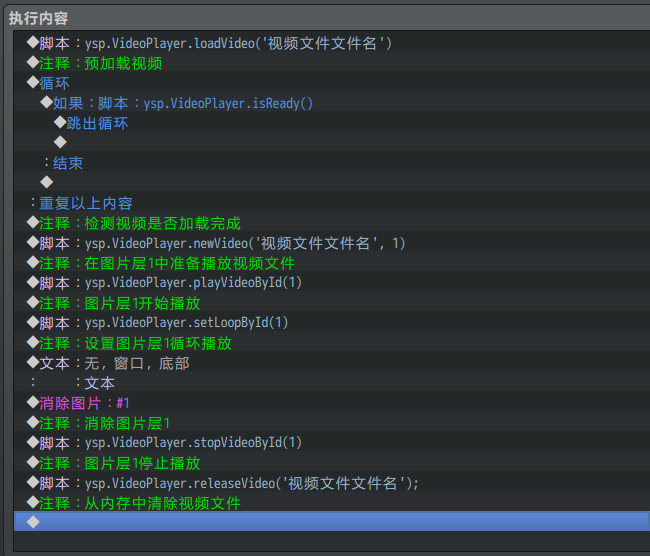
Comment:This will preload the video
: :----------------------------------------------
◆Script:ysp.VideoPlayer.loadVideo('mirror.webm')
◆Comment:This will check if the video is already in memory.
: :----------------------------------------------
◆Loop
◆If:Script:ysp.VideoPlayer.isReady()
◆Comment:This will stop the loop.
: :----------------------------------------------
◆Break Loop
◆
:End
◆
:Repeat Above
◆Fadeout Screen
◆Comment:This will set the following
: :Video ID #1 : mirror.webm'
: :Play video ID #1
: :Loop video ID #1
: :----------------------------------------------
◆Script:ysp.VideoPlayer.newVideo('mirror.webm', 1)
: :ysp.VideoPlayer.playVideoById(1)
: :ysp.VideoPlayer.setLoopById(1)
◆Fadein Screen
◆Text:None, Window, Bottom
: :Wow! We have looping videos!
: :And the text is showing!
: :\}So\{ freaking \{cool!
◆Fadeout Screen
◆Comment:Stop the video
: :----------------------------------------------
◆Script:ysp.VideoPlayer.stopVideoById(1)
◆Fadein Screen
我英语也不好,使用的时候也是百度翻译的,所以就不翻译了,
我一直显示错误···不知道为什么···大佬能讲下用法吗···
Use script call:
ysp.VideoPlayer.loadVideo(videoName) - Preload Video
ysp.VideoPlayer.releaseVideo(videoName) - Release memory for a Video
ysp.VideoPlayer.newVideo(videoName, id) - Create new Video object with id
ysp.VideoPlayer.playVideoById(id) - Play a Video object by id
ysp.VideoPlayer.stopVideoById(id) - Stop a Video object by id
ysp.VideoPlayer.setLoopById(id) - Make a Video object playing loop by id
ysp.VideoPlayer.getVideoById(id) - Get Video object by id
ysp.VideoPlayer.isReady() - Check if all videos have been loaded
Video Object is a PIXI.Sprite object, can be re-position by modifying x and y props
To preload a (or many) video(s), use loadVideo(videoName) followed by a loop in
an event, break the loop when isReady() returns true


 写轮眼
写轮眼
 发表于 2021-7-29 11:04:51

 提升卡
提升卡 沉默号角
沉默号角 喧嚣号角
喧嚣号角 变色卡
变色卡 升龙剑
升龙剑


