| 赞 | 10 |
| VIP | |
| 好人卡 | |
| 积分 | 15 |
| 经验 | |
| 最后登录 | 2026-8-9 |
| 在线时间 | 429 小时 |
- 梦石
- 0
- 星屑
- 1487
- 在线时间
- 429 小时
- 注册时间
- 2014-4-25
- 回帖
- 32
|
悬赏100星屑已解决
本帖最后由 yz3440080 于 2022-2-25 22:04 编辑
想做RPG类型的游戏,但是非常喜欢这个的档案界面,请问要如何单独把系统默认的档案界面换成这个?
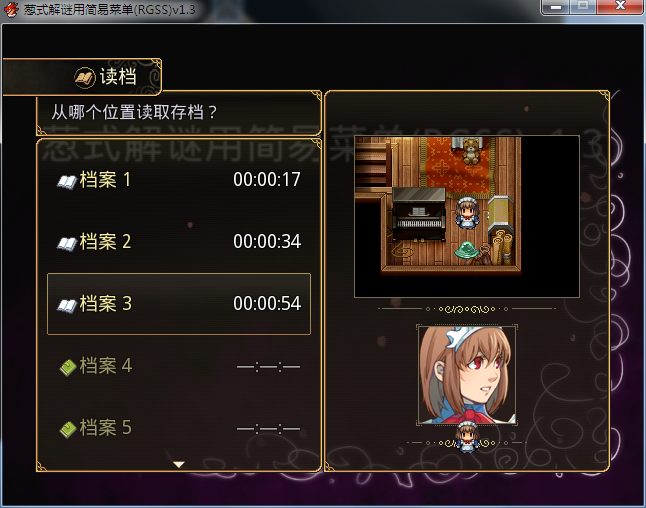
附上葱式解谜用简易菜单脚本:
[pre lang="ruby"]#encoding:utf-8
#==============================================================================
# ◇ CONG'S EASY MENU ◇ 葱式解谜用简易菜单 v1.3
#------------------------------------------------------------------------------
# By Conwsbn
# http://congrm.lofter.com/ https://rpg.blue/thread-476318-1-1.html
#==============================================================================
# 更新日志:
# v1.3 - 修改了部分写法,提高兼容性
# 增加了“立绘图片变更”功能 | 存档界面扩展
# v1.2 - 修正了存档界面的小BUG
# v1.1 - 增加了立绘、粒子、次图片的Z值设定 | 增加稳定性
#==============================================================================
$imported = {} if $imported.nil?
$imported[:congs_easy_menu] = true
#==============================================================================
# ■ Window_Base
#==============================================================================
class Window_Base < Window
#--------------------------------------------------------------------------
# ● 获取统一字体设置
#--------------------------------------------------------------------------
def easy_menu_font
contents.font.name = EASY_MENU_SET::Font_name
contents.font.size = EASY_MENU_SET::Font_size
contents.font.outline = EASY_MENU_SET::Font_outline
contents.font.shadow = EASY_MENU_SET::Font_shadow
contents.font.bold = EASY_MENU_SET::Font_bold
contents.font.italic = EASY_MENU_SET::Font_italic
#contents.font.pixel = EASY_MENU_SET::Font_pixel # RGD
end
end
#==============================================================================
# ■ Window_Help
#==============================================================================
class Window_Help < Window_Base
#--------------------------------------------------------------------------
# ● 初始化对象
#--------------------------------------------------------------------------
def initialize(line_number = 2, width = Graphics.width)
super(0, 0, width, fitting_height(line_number))
self.windowskin = Cache.system(EASY_MENU_SET::SKIN)
self.opacity = EASY_MENU_SET::HELP_opacity
end
#--------------------------------------------------------------------------
# ● 设置内容
#--------------------------------------------------------------------------
def set_text(text)
text.gsub!(/\\n/i) { "\n" }
if text != @text
@text = text
refresh
end
end
#--------------------------------------------------------------------------
# ● 清除
#--------------------------------------------------------------------------
def clear
set_text("")
end
#--------------------------------------------------------------------------
# ● 设置物品
# item : 技能、物品等
#--------------------------------------------------------------------------
def set_item(item)
set_text(item ? item.description : "")
end
#--------------------------------------------------------------------------
# ● 绘制带有控制符的文本内容
#--------------------------------------------------------------------------
def draw_text_ex(x, y, text)
reset_item_font_settings
text = convert_escape_characters(text)
pos = {:x => x, :y => y, :new_x => x, :height => calc_line_height(text)}
process_character(text.slice!(0, 1), text, pos) until text.empty?
end
#--------------------------------------------------------------------------
# ● 物品帮助字体设置
#--------------------------------------------------------------------------
def reset_item_font_settings
return if @text_line
contents.font.name = EASY_MENU_SET::HELP_name
contents.font.size = EASY_MENU_SET::HELP_size
contents.font.outline = EASY_MENU_SET::HELP_outline
contents.font.shadow = EASY_MENU_SET::HELP_shadow
contents.font.bold = EASY_MENU_SET::HELP_bold
contents.font.italic = EASY_MENU_SET::HELP_italic
#contents.font.pixel = EASY_MENU_SET::HELP_pixel # RGD
v = EASY_MENU_SET::HELP_color
change_color(Color.new(v[0], v[1], v[2]))
end
#--------------------------------------------------------------------------
# ● 获取文字颜色
#--------------------------------------------------------------------------
def text_color(n)
v = EASY_MENU_SET::HELP_color
return Color.new(v[0], v[1], v[2]) if n == 0
return windowskin.get_pixel(64 + (n % 8) * 8, 96 + (n / 8) * 8)
end
#--------------------------------------------------------------------------
# ● 处理普通文字
#--------------------------------------------------------------------------
def process_normal_character(c, pos)
if (pos[:x] + contents.text_size(c).width) > contents.width
@text_line = true
process_new_line(c, pos)
@text_line = false
pos[:height] = calc_line_height(c)
end
text_width = text_size(c).width
draw_text(pos[:x], pos[:y], text_width * 2, pos[:height], c)
pos[:x] += text_width
end
#--------------------------------------------------------------------------
# ● 刷新
#--------------------------------------------------------------------------
def refresh
contents.clear
draw_text_ex(4, 0, @text)
end
end
#==============================================================================
# ■ Window_MenuCommand
#==============================================================================
class Window_MenuCommand < Window_Command
#--------------------------------------------------------------------------
# ● 初始化指令选择位置(类方法)
#--------------------------------------------------------------------------
def self.init_command_position(type = nil)
@@last_command_symbol = type
end
#--------------------------------------------------------------------------
# ● 初始化对象
#--------------------------------------------------------------------------
def initialize(sub = false)
@sub = sub
super(-24, EASY_MENU_SET::COMMAND[1])
self.opacity = 0
self.active = false
@show = false
@move_rx = @sub_ry = 0
@last_index = @index
update_placement unless @sub
select_last
refresh
end
#--------------------------------------------------------------------------
# ● 获取标准的边距尺寸
#--------------------------------------------------------------------------
def standard_padding
return 0
end
#--------------------------------------------------------------------------
# ● 显示动画前的设定
#--------------------------------------------------------------------------
def update_placement
self.x = -24 - window_width
self.contents_opacity = 0
end
#--------------------------------------------------------------------------
# ● 获取窗口的宽度
#--------------------------------------------------------------------------
def window_width
return EASY_MENU_SET::COMMAND[2] + 24 + 24
end
#--------------------------------------------------------------------------
# ● 获取项目的宽度
#--------------------------------------------------------------------------
def item_width
width - 24
end
#--------------------------------------------------------------------------
# ● 获取间隔距离
#--------------------------------------------------------------------------
def line_spacing
return EASY_MENU_SET::COMMAND[4]
end
#--------------------------------------------------------------------------
# ● 获取行高
#--------------------------------------------------------------------------
def line_height
return EASY_MENU_SET::COMMAND[3] + line_spacing
end
#--------------------------------------------------------------------------
# ● 获取指令名称
#--------------------------------------------------------------------------
def set_command_name(v)
@name = []
for i in 0...EASY_MENU_SET::BUTTON.size
name = Vocab::item if v[4] == :item
name = Vocab::key_item if v[4] == :key_item
name = Vocab::save if v[4] == :save
name = Vocab::continue if v[4] == :continue
name = Vocab::game_end if v[4] == :game_end
@name = v[1] ? v[1] : name
end
end
#--------------------------------------------------------------------------
# ● 获取显示状态
#--------------------------------------------------------------------------
def set_command_enabled(v)
@enabled = []
for i in 0...EASY_MENU_SET::BUTTON.size
enabled = main_commands_enabled if v[4] == :item
enabled = main_commands_enabled if v[4] == :key_item
enabled = save_enabled if v[4] == :save
enabled = DataManager.save_file_exists? if v[4] == :continue
enabled = true if v[4] == :game_end
@enabled = enabled
end
end
#--------------------------------------------------------------------------
# ● 获取指令图标
#--------------------------------------------------------------------------
def set_command_icon(v)
@icon = []
for i in 0...EASY_MENU_SET::BUTTON.size
@icon = v[2] if v[2]
end
end
#--------------------------------------------------------------------------
# ● 获取选项的图标
#--------------------------------------------------------------------------
def command_icon(index)
@list[index][:ext]
end
#--------------------------------------------------------------------------
# ● 生成指令列表
#--------------------------------------------------------------------------
def make_command_list
v = EASY_MENU_SET::BUTTON
set_command_name(v)
set_command_icon(v)
set_command_enabled(v)
for i in 0...EASY_MENU_SET::BUTTON.size
add_command(@name, v[4], @enabled, @icon) if v[0] or @sub
end
end
#--------------------------------------------------------------------------
# ● 刷新
#--------------------------------------------------------------------------
def refresh
#clear_command_list
#make_command_list
create_contents
contents.clear
draw_all_items
end
#--------------------------------------------------------------------------
# ● 绘制项目
#--------------------------------------------------------------------------
def draw_item(index)
return if @sub && @index != index
easy_menu_font
rect = item_rect_for_text(index)
t_size = text_size(command_name(index))
mx = @index == index ? @sub ? 0 : @move_rx : 0
my = @sub ? @sub_ry : 0
ix = item_width - t_size.width - 28 + mx
iy = (line_height - t_size.height) / 2 + my
draw_background(index, rect, mx, my)
rect.x -= 24
rect.y -= (line_spacing / 2)
enabled = command_enabled?(index)
change_color(item_color(index), enabled)
rt = [rect.x + mx, rect.y + my, rect.width, rect.height]
draw_text(rt[0], rt[1], rt[2], rt[3], command_name(index), 2)
draw_icon(command_icon(index), rect.x + ix, rect.y + iy, enabled)
end
#--------------------------------------------------------------------------
# ● 绘制底纹
#--------------------------------------------------------------------------
def draw_background(index, rect, x, y)
lh = line_height - line_spacing
bit = Cache.system(EASY_MENU_SET::COMMAND[0])
rx = bit.width - item_width
rect1 = Rect.new(rx, 0, item_width, 12)
rect2 = Rect.new(rx, 12, item_width, 12)
rect3 = Rect.new(rx, 36 - 12, item_width, 12)
d_rect = Rect.new(rect.x + x, rect.y + 12 + y, item_width, lh - 24)
self.contents.blt(rect.x + x, rect.y + y, bit, rect1)
self.contents.stretch_blt(d_rect, bit, rect2)
self.contents.blt(rect.x + x, rect.y + lh - 12 + y, bit, rect3)
end
#--------------------------------------------------------------------------
# ● 字体颜色扩展
#--------------------------------------------------------------------------
def item_color(index)
co = EASY_MENU_SET::BUTTON[index][3]
return Color.new(co[0], co[1], co[2]) if @index == index
return Color.new(co[0], co[1], co[2], 200)
end
#--------------------------------------------------------------------------
# ● 获取项目的绘制矩形
#--------------------------------------------------------------------------
def item_rect(index)
index = 0 if @sub
rect = Rect.new
rect.width = 4
rect.height = 24
rect.x = index % col_max * (item_width + spacing) + 32
rect.y = index / col_max * item_height + 4
rect
end
#--------------------------------------------------------------------------
# ● 获取项目的绘制矩形(内容用)
#--------------------------------------------------------------------------
def item_rect_for_text(index)
index = 0 if @sub
rect = Rect.new
rect.width = item_width
rect.height = item_height
rect.x = index % col_max * (item_width + spacing)
rect.y = index / col_max * item_height
rect
end
#--------------------------------------------------------------------------
# ● 展开动画的标志
#--------------------------------------------------------------------------
def show=(show)
if @show != show
@show = show
end
end
#--------------------------------------------------------------------------
# ● 获取动画的标志
#--------------------------------------------------------------------------
def show
return @show
end
#--------------------------------------------------------------------------
# ● 更新画面
#--------------------------------------------------------------------------
def update
super
if @last_index != @index && !@show
@move_rx = 0
@last_index = @index
end
update_button if Input.dir4 > 0 or @move_rx < 24
end
#--------------------------------------------------------------------------
# ● 按钮的改变动画
#--------------------------------------------------------------------------
def update_button
@move_rx += 4 if @move_rx < 24
refresh
end
#--------------------------------------------------------------------------
# ● 按钮的还原动画
#--------------------------------------------------------------------------
def hide_button
@move_rx -= 4 if @move_rx > 0
refresh
end
#--------------------------------------------------------------------------
# ● 展开动画
#--------------------------------------------------------------------------
def open_button_window
self.x += (window_width + 24) / EASY_MENU_SET::TIME
self.contents_opacity += 255 / EASY_MENU_SET::TIME
refresh
@show = false if self.x >= -24
self.x = -24 if !@show
self.contents_opacity = 255 if !@show
end
#--------------------------------------------------------------------------
# ● 关闭动画
#--------------------------------------------------------------------------
def close_button_window
@show = false if self.contents_opacity <= 0
if @move_rx > 0
hide_button
else
self.x -= (window_width + 24) / EASY_MENU_SET::TIME
self.contents_opacity -= 255 / EASY_MENU_SET::TIME
refresh
end
end
#--------------------------------------------------------------------------
# ● 进入子菜单的关闭动画
#--------------------------------------------------------------------------
def close_window_to_sub
if @move_rx > 0
hide_button
@sub_ry = @index / col_max * item_height
else
cursor_rect.empty
@show = false if @sub_ry <= 0
@sub_ry = 0 if !@show
@sub = true
@sub_ry = [(@sub_ry - ((EASY_MENU_SET::COMMAND[3] * index)) / 6), 0].max
refresh
end
end
end
#==============================================================================
# ■ Scene_MenuBase
#==============================================================================
class Scene_MenuBase < Scene_Base
#--------------------------------------------------------------------------
# ● 结束处理
#--------------------------------------------------------------------------
alias easy_menu_terminate terminate
def terminate
easy_menu_terminate
dispose_rim
dispose_actor_cg
dispose_sub_button
end
#--------------------------------------------------------------------------
# ● 生成背景
#--------------------------------------------------------------------------
def create_background
wall = EASY_MENU_SET::WALLPAPER
co = EASY_MENU_SET::BACKGROUND
@background_sprite = Sprite.new
bitmap = wall ? Cache.system(wall) : SceneManager.background_bitmap
@background_sprite.bitmap = bitmap
@background_sprite.color.set(co[0], co[1], co[2], co[3]) unless wall
end
#--------------------------------------------------------------------------
# ● 绘制次背景图片
#--------------------------------------------------------------------------
def create_rim_background(bitmap, x, y, z = 0)
@rim_sprite = Sprite.new
@rim_sprite.bitmap = Cache.system(bitmap) if bitmap
@rim_sprite.x = x; @rim_sprite.y = y
@rim_sprite.z = z
end
#--------------------------------------------------------------------------
# ● 释放次背景图片
#--------------------------------------------------------------------------
def dispose_rim
return if !@rim_sprite
@rim_sprite.bitmap.dispose
@rim_sprite.dispose
end
#--------------------------------------------------------------------------
# ● 生成立绘精灵
#--------------------------------------------------------------------------
def create_actor_cg
va = $game_variables[EASY_MENU_SET::CG_VA]
v = EASY_MENU_SET::CG
@actor_cg = Sprite.new
@actor_cg.bitmap = v[va][0] ? Cache.system(v[va][0]) : Bitmap.new(32, 32)
@actor_cg.z = v[va][5]
@actor_cg.x = v[va][1]
@actor_cg.x -= actor_cg_xx * 6
@actor_cg.y = v[va][2]
end
#--------------------------------------------------------------------------
# ● 立绘的帧坐标x判断
#--------------------------------------------------------------------------
def actor_cg_xx
va = $game_variables[EASY_MENU_SET::CG_VA]
v = EASY_MENU_SET::CG
return (v[va][3]) if v[va][4] == :l
return -(v[va][3]) if v[va][4] == :r
return 0
end
#--------------------------------------------------------------------------
# ● 释放立绘精灵
#--------------------------------------------------------------------------
def dispose_actor_cg
return if !@actor_cg
@actor_cg.bitmap.dispose
@actor_cg.dispose
end
#--------------------------------------------------------------------------
# ● 展开动画预设
#--------------------------------------------------------------------------
def set_move_preset
@actor_cg.x += actor_cg_xx * 6
@actor_cg.x -= actor_cg_xx * EASY_MENU_SET::TIME
@actor_cg.opacity = 0
@rim_sprite.opacity = 0 if @rim_sprite
end
#--------------------------------------------------------------------------
# ● 重绘内用小标题
#--------------------------------------------------------------------------
def create_sub_button
@sub_window = Window_MenuCommand.new(true)
@sub_window.deactivate
@sub_window.z = 300
end
#--------------------------------------------------------------------------
# ● 释放内用小标题
#--------------------------------------------------------------------------
def dispose_sub_button
@sub_window.dispose if @sub_window
end
end
#==============================================================================
# ■ Scene_Menu
#==============================================================================
class Scene_Menu < Scene_MenuBase
#--------------------------------------------------------------------------
# ● 开始处理
#--------------------------------------------------------------------------
def start
super
v = EASY_MENU_SET::MENU_RIM
create_rim_background(v[0], v[1], v[2], v[3]) if v[0]
create_actor_cg
create_command_window
set_move_preset if !@sub_show
end
#--------------------------------------------------------------------------
# ● 开始后处理
#--------------------------------------------------------------------------
def post_start
super
@command_window.show = true
t = @sub_show ? 6 : EASY_MENU_SET::TIME
ot = @sub_show ? 6 : EASY_MENU_SET::TIME
begin
t -= 1 if t >= 0
@actor_cg.x += actor_cg_xx if t >= 0
@actor_cg.opacity += (255 / ot).ceil
@rim_sprite.opacity += (255 / ot).ceil if @rim_sprite
@command_window.open_button_window
Graphics.update
end until @command_window.show == false
@command_window.activate
@actor_cg.opacity = 255
@actor_cg.x = EASY_MENU_SET::CG[$game_variables[EASY_MENU_SET::CG_VA]][1]
@sub_show = false
end
#--------------------------------------------------------------------------
# ● 结束前处理
#--------------------------------------------------------------------------
def pre_terminate
super
@command_window.show = true
t = @sub_show ? 6 : EASY_MENU_SET::TIME
begin
t -= 1 if t >= 0
@actor_cg.x -= actor_cg_xx if t >= 0
if @sub_show
@command_window.close_window_to_sub
else
@actor_cg.opacity -= (255 / EASY_MENU_SET::TIME).ceil
@rim_sprite.opacity -= (255 / EASY_MENU_SET::TIME).ceil if @rim_sprite
@command_window.close_button_window
end
Graphics.update
end until @command_window.show == false
end
#--------------------------------------------------------------------------
# ● 生成指令窗口
#--------------------------------------------------------------------------
def create_command_window
v = EASY_MENU_SET::BUTTON
@command_window = Window_MenuCommand.new
for i in 0...EASY_MENU_SET::BUTTON.size
type = :command_item if v[4] == :item
type = :command_key_item if v[4] == :key_item
type = :command_save if v[4] == :save
type = :command_load if v[4] == :continue
type = :command_game_end if v[4] == :game_end
@command_window.set_handler(v[4], method(type)) if v[0]
end
@command_window.set_handler(:cancel, method(:return_scene))
end
#--------------------------------------------------------------------------
# ● 指令“物品”
#--------------------------------------------------------------------------
def command_item
@sub_show = true
SceneManager.call(Scene_Item)
SceneManager.scene.prepare(:item)
end
#--------------------------------------------------------------------------
# ● 指令“贵重物品”
#--------------------------------------------------------------------------
def command_key_item
@sub_show = true
SceneManager.call(Scene_Item)
SceneManager.scene.prepare(:key_item)
end
#--------------------------------------------------------------------------
# ● 指令“存档”
#--------------------------------------------------------------------------
def command_save
@sub_show = true
SceneManager.call(Scene_Save)
end
#--------------------------------------------------------------------------
# ● 指令“读档”
#--------------------------------------------------------------------------
def command_load
@sub_show = true
SceneManager.call(Scene_Load)
end
end
#==============================================================================
# ■ SceneManager
#==============================================================================
module SceneManager
#--------------------------------------------------------------------------
# ● 模块的实例变量
#--------------------------------------------------------------------------
@save_bitmap = nil # 存档用截图
#--------------------------------------------------------------------------
# ● 生成存档内的截图
#--------------------------------------------------------------------------
def self.snapshot_for_save_bitmap
v = EASY_MENU_SET::FILES_DETAILS_DATA
@save_bitmap.dispose if @save_bitmap
@save_bitmap = Bitmap.new(v[0][3], v[0][4])
rect = Rect.new(0, 0, v[0][3], v[0][4])
rect.x = $game_player.screen_x - rect.width / 2
rect.y = $game_player.screen_y - rect.height / 2 - 12
bitmap = Graphics.snap_to_bitmap
@save_bitmap.blt(0, 0, bitmap, rect)
bitmap.dispose
end
#--------------------------------------------------------------------------
# ● 获取存档内的截图
#--------------------------------------------------------------------------
def self.saves_bitmap
@save_bitmap
end
end
#==============================================================================
# ■ Scene_Map
#==============================================================================
class Scene_Map < Scene_Base
#--------------------------------------------------------------------------
# ● 结束处理
#--------------------------------------------------------------------------
alias cong_menu_terminate terminate
def terminate
SceneManager.snapshot_for_save_bitmap
cong_menu_terminate
end
end
#==============================================================================
# ★ 物品界面
#==============================================================================
#==============================================================================
# ■ Window_ItemList
#==============================================================================
class Window_ItemList < Window_Selectable
#--------------------------------------------------------------------------
# ● 初始化对象
#--------------------------------------------------------------------------
def initialize(x, y, width, height)
super
self.windowskin = Cache.system(EASY_MENU_SET::SKIN)
self.opacity = EASY_MENU_SET::ITEMLIST[2]
@category = :none
@data = []
end
#--------------------------------------------------------------------------
# ● 获取标准的边距尺寸
#--------------------------------------------------------------------------
def standard_padding
return 16
end
#--------------------------------------------------------------------------
# ● 获取列数
#--------------------------------------------------------------------------
def col_max
return 1
end
#--------------------------------------------------------------------------
# ● 绘制项目
#--------------------------------------------------------------------------
alias easy_menu_draw_item draw_item
def draw_item(index)
easy_menu_font
easy_menu_draw_item(index)
end
#--------------------------------------------------------------------------
# ● 绘制物品个数
#--------------------------------------------------------------------------
def draw_item_number(rect, item)
return if $game_party.item_number(item) <= 1
draw_text(rect, sprintf("%02d", $game_party.item_number(item)), 2)
end
#--------------------------------------------------------------------------
# ● 绘制物品名称
# enabled : 有效的标志。false 的时候使用半透明效果绘制
#--------------------------------------------------------------------------
def draw_item_name(item, x, y, enabled = true, width = 172)
return unless item
draw_icon(item.icon_index, x, y, enabled)
change_color(normal_color, enabled)
draw_text_ex(x + 24, y, item.name)
#draw_text(x + 24, y, width, line_height, item.name)
end
#--------------------------------------------------------------------------
# ● 重置字体设置
#--------------------------------------------------------------------------
def reset_font_settings
change_color(normal_color)
easy_menu_font
end
#--------------------------------------------------------------------------
# ● 更新帮助内容
#--------------------------------------------------------------------------
def update_help
@help_window.set_item(item)
@big_icon.set_item(item.big_icon) if EASY_MENU_SET::BIGICON[0] && item
end
#--------------------------------------------------------------------------
# ● 设置物品窗口
#--------------------------------------------------------------------------
def big_icon=(big_icon)
@big_icon = big_icon
update
end
end
#==============================================================================
# ■ BIG ICON
#==============================================================================
module Cache
def self.bigicon(filename)
load_bitmap(EASY_MENU_SET::BIGICON_Cache, filename)
end
end
#==============================================================================
# ■ RPG::BaseItem
#==============================================================================
class RPG::BaseItem
#--------------------------------------------------------------------------
# ● 获取大图标
#--------------------------------------------------------------------------
def big_icon
self.note =~ /\<BigIcon (\w+)\>/i
$1.nil? ? "" : $1
end
end
#==============================================================================
# ■ Window_Big_icon
#==============================================================================
class Window_Big_icon < Window_Base
#--------------------------------------------------------------------------
# ● 初始化对象
#--------------------------------------------------------------------------
def initialize(x, y, width, height)
super(x, y, width, height)
self.windowskin = Cache.system(EASY_MENU_SET::SKIN)
self.opacity = EASY_MENU_SET::BIGICON[6]
end
#--------------------------------------------------------------------------
# ● 设置内容
#--------------------------------------------------------------------------
def set_item(icon)
if icon != @icon
contents.clear
bitmap = Cache.bigicon(icon)
x = (contents.width - bitmap.width) / 2
y = (contents.height - bitmap.height) / 2
rect = Rect.new(0, 0, bitmap.width, bitmap.height)
contents.blt(x, y, bitmap, rect)
@icon = icon
end
end
end
#==============================================================================
# ■ Scene_ItemBase
#==============================================================================
class Scene_ItemBase < Scene_MenuBase
#--------------------------------------------------------------------------
# ● 生成角色窗口
#--------------------------------------------------------------------------
def create_actor_window
@actor_window = Window_MenuActor.new
@actor_window.set_handler(:ok, method(:on_actor_ok))
@actor_window.set_handler(:cancel, method(:on_actor_cancel))
end
#--------------------------------------------------------------------------
# ● 显示子窗口
#--------------------------------------------------------------------------
alias easy_menu_show_sub_window show_sub_window
def show_sub_window(window)
window.y = (Graphics.height - @actor_window.height) / 2
easy_menu_show_sub_window(window)
@actor_window.z = 200
end
end
#==============================================================================
# ■ Scene_Item
#==============================================================================
class Scene_Item < Scene_ItemBase
#--------------------------------------------------------------------------
# ● 预处理
#--------------------------------------------------------------------------
def prepare(mode = :item)
@mode = mode
end
#--------------------------------------------------------------------------
# ● 开始处理
#--------------------------------------------------------------------------
def start
super
v = EASY_MENU_SET::ITEM_RIM
create_rim_background(v[0], v[1], v[2], v[3]) if v[0]
create_actor_cg unless EASY_MENU_SET::BIGICON[0]
create_help_window
create_big_icon_window if EASY_MENU_SET::BIGICON[0]
create_item_window
create_sub_button
end
#--------------------------------------------------------------------------
# ● 生成物品窗口
#--------------------------------------------------------------------------
def create_item_window
sp = EASY_MENU_SET::COMMAND[1]
iy = sp + EASY_MENU_SET::COMMAND[3] - 8
ih = Graphics.height - @help_window.height - sp - iy
@item_window = Window_ItemList.new(sp, iy, @help_window.width, ih)
@item_window.category = @mode
@item_window.viewport = @viewport
@item_window.help_window = @help_window
@item_window.big_icon = @big_icon_window if EASY_MENU_SET::BIGICON[0]
@item_window.set_handler(:ok, method(:on_item_ok))
@item_window.set_handler(:cancel, method(:on_item_cancel))
@item_window.index = 0
@item_window.activate
end
#--------------------------------------------------------------------------
# ● 生成帮助窗口
#--------------------------------------------------------------------------
def create_help_window
sp = EASY_MENU_SET::COMMAND[1]
v = EASY_MENU_SET::ITEMLIST
w = v[0] > 0 ? v[0] : (Graphics.width / 2 - sp)
@help_window = Window_Help.new(v[1], w)
@help_window.viewport = @viewport
@help_window.x = sp
@help_window.y = Graphics.height - @help_window.height - sp
end
#--------------------------------------------------------------------------
# ● 生成物品大图标
#--------------------------------------------------------------------------
def create_big_icon_window
sp = EASY_MENU_SET::COMMAND[1]
v = EASY_MENU_SET::BIGICON
b = []
if v[1]
b[0] = @help_window.width + sp
b[1] = sp + EASY_MENU_SET::COMMAND[3] - 8
b[2] = Graphics.width - b[0] - sp
b[3] = Graphics.height - b[1] - sp
else
b = [v[2], v[3], v[4], v[5]]
end
@big_icon_window = Window_Big_icon.new(b[0], b[1], b[2], b[3])
@big_icon_window.viewport = @viewport
end
#--------------------------------------------------------------------------
# ● 物品“取消”
#--------------------------------------------------------------------------
def on_item_cancel
@item_window.unselect
return_scene
end
end
#==============================================================================
# ★ 存档界面
#==============================================================================
#==============================================================================
# ■ Window_SaveFileList
#------------------------------------------------------------------------------
# 存档的选项窗口(左)
#==============================================================================
class Window_SaveFileList < Window_Selectable
#--------------------------------------------------------------------------
# ● 初始化对象
#--------------------------------------------------------------------------
def initialize(x, y, width, height)
super
self.windowskin = Cache.system(EASY_MENU_SET::SKIN)
self.opacity = EASY_MENU_SET::FILESLIST[4]
@symbol = nil
refresh
activate
end
#--------------------------------------------------------------------------
# ● 获取可显示的存档数目
#--------------------------------------------------------------------------
def visible_max
return EASY_MENU_SET::FILESLIST[1]
end
#--------------------------------------------------------------------------
# ● 获取项目的高度
#--------------------------------------------------------------------------
def item_height
(height - standard_padding * 2) / visible_max
end
#--------------------------------------------------------------------------
# ● 存档数量最大值
#--------------------------------------------------------------------------
def item_max
return EASY_MENU_SET::FILES_MAX
end
#--------------------------------------------------------------------------
# ● 绘制项目
#--------------------------------------------------------------------------
def draw_item(index)
header = DataManager.load_header(index)
rect = item_rect_for_text(index)
ry = (item_height - line_height) / 2
easy_menu_font
v = EASY_MENU_SET::FILESLIST
change_color(Color.new(v[3][0][0], v[3][0][1], v[3][0][2]), header)
icon_id = header ? v[2][1] : v[2][0]
draw_icon(icon_id, rect.x + 4, rect.y + ry)
text = @symbol == :save ? EASY_MENU_SET::SAVING : EASY_MENU_SET::LOADING
ing = @index == index && @symbol
name = ing ? text : (Vocab::File + " #{index + 1}")
draw_text(rect.x + 28, rect.y + ry, rect.width, line_height, name)
change_color(Color.new(v[3][1][0], v[3][1][1], v[3][1][2]), header)
draw_playtime(header, rect.x - 4, rect.y + ry, rect.width, 2)
end
#--------------------------------------------------------------------------
# ● 绘制游戏时间
#--------------------------------------------------------------------------
def draw_playtime(header, x, y, width, align)
text = header ? header[:playtime_s] : "—:—:—"
draw_text(x, y, width, line_height, text, 2)
end
#--------------------------------------------------------------------------
# ● 设置选择状态
#--------------------------------------------------------------------------
def set_files(symbol)
@symbol = symbol
refresh
end
#--------------------------------------------------------------------------
# ● 按下确定键时的处理
#--------------------------------------------------------------------------
def process_ok
if current_item_enabled?
Input.update
deactivate
call_ok_handler
else
Sound.play_buzzer
end
end
end
#==============================================================================
# ■ Window_FilesDetails
#------------------------------------------------------------------------------
# 存档的详细窗口(右)
#==============================================================================
class Window_FilesDetails < Window_Base
#--------------------------------------------------------------------------
# ● 初始化对象
#--------------------------------------------------------------------------
def initialize(x, y, width, height)
super(x, y, width, height)
self.windowskin = Cache.system(EASY_MENU_SET::SKIN)
self.opacity = EASY_MENU_SET::FILES_DETAILS[6]
@bitmaps = []
@header = []
end
#--------------------------------------------------------------------------
# ● 释放
#--------------------------------------------------------------------------
def dispose
for bitmap in @bitmaps
next if bitmap == nil or bitmap.disposed?
bitmap.dispose
end
super
end
#--------------------------------------------------------------------------
# ● 设置选择状态
#--------------------------------------------------------------------------
def set_select(select)
return if @select == select
@select = select
refresh(@select)
end
#--------------------------------------------------------------------------
# ● 读取文件
#--------------------------------------------------------------------------
def read_save_data(index)
@header[index] = DataManager.load_header(index)
@bitmaps[index].dispose if @bitmaps[index]
return unless EASY_MENU_SET::FILES_DETAILS_DATA[0][0]
@bitmaps[index] = DataManager.load_save_bitmap(index)
end
#--------------------------------------------------------------------------
# ● 刷新
#--------------------------------------------------------------------------
def refresh(index)
contents.clear
read_save_data(index)
v = EASY_MENU_SET::FILES_DETAILS_DATA
draw_background(@header[index], v)
return unless @header[index]
draw_save_bitmap(@header[index], index, v)
draw_party_faces(@header[index], index, v)
draw_party_characters(@header[index], index, v)
end
#--------------------------------------------------------------------------
# ● 绘制 底图
#--------------------------------------------------------------------------
def draw_background(header, v)
return unless v[3][0]
return if (!header && v[3][1] == false)
bitmap = Cache.system(v[3][2])
contents.blt(v[3][3], v[3][4], bitmap, Rect.new(0, 0, v[3][5], v[3][6]))
end
#--------------------------------------------------------------------------
# ● 绘制截图
#--------------------------------------------------------------------------
def draw_save_bitmap(header, index, v)
return unless v[0][0]
bitmap = @bitmaps[index]
#bx = (width - standard_padding * 2 - bitmap.width) / 2
contents.blt(v[0][1], v[0][2], bitmap, bitmap.rect)
end
#--------------------------------------------------------------------------
# ● 绘制队伍角色行走图
#--------------------------------------------------------------------------
def draw_party_characters(header, index, v)
return unless v[1][0]
x = v[1][3] ? 0 : v[1][1]
y = v[1][2]
xx = 0 ; cw = (self.contents_width - x * 2)
pn = header[:characters].size # 队伍人数(最大4)
header[:characters].each_with_index do |data, i|
bit = Cache.character(data[0])
sign = data[0][/^[\!\$]./]
if sign && sign.include?('$')
rw = bit.width / 3 + v[1][4]
else
rw = bit.width / 12 + v[1][4]
end
xx = (cw - rw * pn) / 2 + rw / 2 if v[1][3]
draw_character(data[0], data[1], x + i * rw + xx, y)
end
end
#--------------------------------------------------------------------------
# ● 绘制队伍角色脸谱
#--------------------------------------------------------------------------
def draw_party_faces(header, index, v)
return unless v[2][0]
x = v[2][3] ? 0 : v[2][1]
y = v[2][2]
xx = 4 ; cw = (self.contents_width - x * 2)
pn = header[:characters].size # 队伍人数(最大4)
header[:characters].reverse.each_with_index do |data, i|
bit = Cache.face(data[2])
rw = (bit.width / 4 + (pn - 1) * 8)
xx = (cw - rw * pn + (pn - 1) * 8) / 2 if v[2][3] && rw * pn < cw
y_rw = ((rw * pn - cw) / pn).abs
rw = rw - y_rw - y_rw / pn if rw * pn >= cw
draw_face(data[2], data[3], x + (pn-1-i)*rw + xx, y, true, v[2][4])
end
end
#--------------------------------------------------------------------------
# ● 绘制角色肖像图
# enabled : 有效的标志。false 的时候使用半透明效果绘制
#--------------------------------------------------------------------------
def draw_face(face_name, face_index, x, y, enabled = true, bg_show)
enabled_d = enabled ? 255 : translucent_alpha
bitmap = Cache.face(face_name)
w = bitmap.width / 4
h = bitmap.height / 2
rect = Rect.new(face_index % 4 * w, face_index / 4 * h, w, h)
if bg_show
bg_bitmap = Cache.system("Files_Face_Bg")
bg_x = x - (bg_bitmap.width - w) / 2
bg_y = y - (bg_bitmap.height - h) / 2
contents.blt(bg_x, bg_y, bg_bitmap, bg_bitmap.rect, enabled_d)
bg_bitmap.dispose
end
contents.blt(x, y, bitmap, rect, enabled_d)
bitmap.dispose
end
end
#==============================================================================
# ■ Scene_File
#==============================================================================
class Scene_File < Scene_MenuBase
#--------------------------------------------------------------------------
# ● 开始处理
#--------------------------------------------------------------------------
def start
super
v = EASY_MENU_SET::FILES_RIM
create_rim_background(v[0], v[1], v[2], v[3]) if v[0]
create_actor_cg unless EASY_MENU_SET::FILES_DETAILS[0]
create_help_window if EASY_MENU_SET::FILESLIST[5]
create_savefile_windows
create_details_window if EASY_MENU_SET::FILES_DETAILS[0]
create_sub_button
init_selection
end
#--------------------------------------------------------------------------
# ● 结束处理
#--------------------------------------------------------------------------
def terminate
super
end
#--------------------------------------------------------------------------
# ● 更新画面
#--------------------------------------------------------------------------
def update
super
@details_window.set_select(@savefile_window.index) if @details_window
end
#--------------------------------------------------------------------------
# ● 生成帮助窗口
#--------------------------------------------------------------------------
def create_help_window
sp = EASY_MENU_SET::COMMAND[1]
v = EASY_MENU_SET::FILESLIST
w = v[0] > 0 ? v[0] : (Graphics.width / 2 - sp)
@help_window = Window_Help.new(1, w)
@help_window.set_text(help_window_text)
@help_window.x = sp
@help_window.y = sp + EASY_MENU_SET::COMMAND[3] - 8
end
#--------------------------------------------------------------------------
# ● 获取帮助窗口的文本
#--------------------------------------------------------------------------
def help_window_text
return ""
end
#--------------------------------------------------------------------------
# ● 生成存档文件窗口
#--------------------------------------------------------------------------
def create_savefile_windows
sp = EASY_MENU_SET::COMMAND[1]
hy = sp + EASY_MENU_SET::COMMAND[3] - 8
sy = @help_window ? (@help_window.y + @help_window.height) : hy
v = EASY_MENU_SET::FILESLIST
sw = v[0] > 0 ? v[0] : (Graphics.width / 2 - sp)
sh = Graphics.height - sy - sp
@savefile_window = Window_SaveFileList.new(sp, sy, sw, sh)
@savefile_window.set_handler(:ok, method(:on_savefile_ok))
@savefile_window.set_handler(:cancel, method(:on_savefile_cancel))
end
#--------------------------------------------------------------------------
# ● 生成详细文件窗口
#--------------------------------------------------------------------------
def create_details_window
sp = EASY_MENU_SET::COMMAND[1]
v = EASY_MENU_SET::FILES_DETAILS
d = []
if v[1]
d[0] = @savefile_window.width + sp
d[1] = @help_window.y
d[2] = Graphics.width - d[0] - sp
d[3] = Graphics.height - d[1] - sp
else
d = [v[2], v[3], v[4], v[5]]
end
@details_window = Window_FilesDetails.new(d[0], d[1], d[2], d[3])
end
#--------------------------------------------------------------------------
# ● 初始化选择状态
#--------------------------------------------------------------------------
def init_selection
index = first_savefile_index
@savefile_window.select(index)
@details_window.set_select(index) if @details_window
end
end
#==============================================================================
# ■ Scene_Save
#==============================================================================
class Scene_Save < Scene_File
#--------------------------------------------------------------------------
# ● 开始处理
#--------------------------------------------------------------------------
def start
Window_MenuCommand::init_command_position(:save)
super
end
#--------------------------------------------------------------------------
# ● 确定存档文件
#--------------------------------------------------------------------------
def on_savefile_ok
super
if DataManager.save_game(@savefile_window.index)
on_save_success
else
Sound.play_buzzer
@savefile_window.activate unless EASY_MENU_SET::FILES_RETURN
end
end
#--------------------------------------------------------------------------
# ● 存档成功时的处理
#--------------------------------------------------------------------------
def on_save_success
Sound.play_save
@savefile_window.set_files(:save)
@details_window.refresh(@savefile_window.index) if @details_window
Graphics.wait(30)
if EASY_MENU_SET::FILES_RETURN
return_scene
else
@savefile_window.set_files(nil)
@savefile_window.activate
end
end
end
#==============================================================================
# ■ Scene_Load
#==============================================================================
class Scene_Load < Scene_File
#--------------------------------------------------------------------------
# ● 开始处理
#--------------------------------------------------------------------------
def start
Window_MenuCommand::init_command_position(:continue)
super
end
#--------------------------------------------------------------------------
# ● 确定读档文件
#--------------------------------------------------------------------------
def on_savefile_ok
super
if DataManager.load_game(@savefile_window.index)
on_load_success
else
Sound.play_buzzer
@savefile_window.activate unless EASY_MENU_SET::FILES_RETURN
end
end
#--------------------------------------------------------------------------
# ● 读档成功时的处理
#--------------------------------------------------------------------------
def on_load_success
Sound.play_load
@savefile_window.set_files(:continue)
Graphics.wait(20)
fadeout_all
$game_system.on_after_load
SceneManager.goto(Scene_Map)
end
end
#==============================================================================
# ■ DataManager
#==============================================================================
module DataManager
#--------------------------------------------------------------------------
# ● 判定存档文件是否存在
#--------------------------------------------------------------------------
def self.save_file_exists?
if savefile_folder == ""
text = 'Save*.rvdata2'
else
text = savefile_folder + '/Save*.rvdata2'
end
!Dir.glob(text).empty?
end
#--------------------------------------------------------------------------
# ● 存档文件的最大数
#--------------------------------------------------------------------------
def self.savefile_max
max = EASY_MENU_SET::FILES_MAX ? EASY_MENU_SET::FILES_MAX : 16
return max
end
#--------------------------------------------------------------------------
# ● 生成父文件夹
#--------------------------------------------------------------------------
def self.savefile_folder
return EASY_MENU_SET::FILES_NAME
end
#--------------------------------------------------------------------------
# ● 生成文件名
# index : 文件索引
#--------------------------------------------------------------------------
def self.make_filename(index)
filename = sprintf("Save%02d.rvdata2", index + 1)
if savefile_folder == ""
return filename
else
return savefile_folder + "/" + filename
end
end
#--------------------------------------------------------------------------
# ● 生成截图
#--------------------------------------------------------------------------
def self.make_save_bitmap
bitmap = set_bitmap_array(SceneManager.saves_bitmap)
bitmap
end
#--------------------------------------------------------------------------
# ● 获取截图
#--------------------------------------------------------------------------
def self.load_save_bitmap(index)
begin
File.open(make_filename(index), "rb") do |file|
Marshal.load(file)
return read_bitmap_array(Marshal.load(file))
end
rescue
return nil
end
end
#--------------------------------------------------------------------------
# ● 制作截图文件 by 老鹰
#--------------------------------------------------------------------------
def self.set_bitmap_array(bitmap)
data = []
bitmap.height.times do |i| # 行号
data = []
bitmap.width.times do |j| # 列号
color = bitmap.get_pixel(j, i)
data[j] = [color.red, color.green, color.blue]
end
end
data
end
#--------------------------------------------------------------------------
# ● 获取截图文件 by 老鹰
#--------------------------------------------------------------------------
def self.read_bitmap_array(array)
h = array.size # 行数
w = array[0].size # 列数
bitmap = Bitmap.new(w, h)
h.times do |i|
w.times do |j|
data = array[j]
color = Color.new(data[0], data[1], data[2])
bitmap.set_pixel(j, i, color)
end
end
bitmap
end
#--------------------------------------------------------------------------
# ● 执行存档(没有错误处理)
#--------------------------------------------------------------------------
def self.save_game_without_rescue(index)
unless FileTest.directory?(savefile_folder)
Dir::mkdir(savefile_folder)
end
File.open(make_filename(index), "wb") do |file|
$game_system.on_before_save
Marshal.dump(make_save_header, file)
Marshal.dump(make_save_bitmap, file)
Marshal.dump(make_save_contents, file)
@last_savefile_index = index
end
return true
end
#--------------------------------------------------------------------------
# ● 执行读档(没有错误处理)
#--------------------------------------------------------------------------
def self.load_game_without_rescue(index)
File.open(make_filename(index), "rb") do |file|
Marshal.load(file)
Marshal.load(file)
extract_save_contents(Marshal.load(file))
reload_map_if_updated
@last_savefile_index = index
end
return true
end
end
#==============================================================================
# ■ Game_Party
#==============================================================================
class Game_Party < Game_Unit
#--------------------------------------------------------------------------
# ● 存档文件显示用的角色图像信息
#--------------------------------------------------------------------------
def characters_for_savefile
battle_members.collect do |actor|
[actor.character_name, actor.character_index,
actor.face_name, actor.face_index]
end
end
end
#==============================================================================
# ■ Window_MenuStatus
#==============================================================================
class Window_MenuStatus < Window_Selectable
#--------------------------------------------------------------------------
# ● 获取窗口的宽度
#--------------------------------------------------------------------------
def window_width
Graphics.width - 160 - 96
end
#--------------------------------------------------------------------------
# ● 获取窗口的高度
#--------------------------------------------------------------------------
def window_height
Graphics.height > 416 ? 416 : Graphics.height
end
end
#==============================================================================
# ■ Window_GameEnd
#==============================================================================
class Window_GameEnd < Window_Command
#--------------------------------------------------------------------------
# ● 初始化对象
#--------------------------------------------------------------------------
alias easy_menu_initialize initialize
def initialize
easy_menu_initialize
self.windowskin = Cache.system(EASY_MENU_SET::SKIN)
end
end
[/pre]
[pre lang="ruby"]#==============================================================================
# ◇ CONG'S EASY MENU ◇
#------------------------------------------------------------------------------
# ◇ 葱式解谜用简易菜单 ◇ v1.3
#==============================================================================
# By Conwsbn
# http://congrm.lofter.com/
#==============================================================================
# ■ 菜单中的各种设置项目
# · 素材文件均在 Graphics/System/下
# ☆ RGD官网:https://cirno.mist.so/archives/290
#------------------------------------------------------------------------------
# · v1.3 立绘图片使用方法变更,相见下方设置。
#==============================================================================
module EASY_MENU_SET
#----------------------------------------------------------------------------
# ● 基础设置
#----------------------------------------------------------------------------
Font_name = ["文泉驿微米黑", "黑体"] # 字体
Font_size = 22 # 字号
Font_outline = true # 描边(true / false)
Font_shadow = false # 投影(true / false)
Font_bold = false # 加粗(true / false)
Font_italic = false # 斜体(true / false)
Font_pixel = false # 像素字(true / false)
#----------------------------------------------------------------------------
# ● 帮助窗口的基础设置
#----------------------------------------------------------------------------
# · 支持自动换行,也可以用\n来强制换行。
#----------------------------------------------------------------------------
HELP_name = ["文泉驿微米黑", "黑体"] # 字体
HELP_size = 20 # 字号
HELP_color = [222, 213, 228] # 字体颜色(R, G, B)
HELP_outline = true # 描边(true / false)
HELP_shadow = false # 投影(true / false)
HELP_bold = false # 加粗(true / false)
HELP_italic = false # 斜体(true / false)
HELP_pixel = false # 像素字(true / false)
HELP_opacity = 255 # 窗口的不透明度(0~255)
#----------------------------------------------------------------------------
# ● 菜单内窗口皮肤的统一设置
#----------------------------------------------------------------------------
SKIN = "Window" # 文件名
#----------------------------------------------------------------------------
# ● 窗口动画的统一设置
#----------------------------------------------------------------------------
TIME = 14 # 动画播放的时间(帧)
#----------------------------------------------------------------------------
# ● 系统背景墙纸设置
#----------------------------------------------------------------------------
# BACKGROUND = [R, G, B, O, blur]
# R/G/B : 色值
# O : 不透明度
# blur : 是否模糊图像(true / false)
#----------------------------------------------------------------------------
BACKGROUND = [16, 16, 16, 128, true]
#----------------------------------------------------------------------------
# ● 背景墙纸设置(替代系统背景墙纸)
#----------------------------------------------------------------------------
# WALLPAPER = "name"
# name :素材文件名 当为 nil 时,不显示墙纸
#----------------------------------------------------------------------------
WALLPAPER = nil
#----------------------------------------------------------------------------
# ● 立绘图片的设置 new!!
#----------------------------------------------------------------------------
# ID => ["name", x, y, move, type, z],
# ID :变量对应的序号
# name :素材文件名
# x/y :横/纵 坐标
# move : 动画每一帧移动的距离
# type : 移入方式 :l 从左边移入 :r 从右边移入 nil 不移动
# z : 立绘图片的Z值(背景墙纸的Z值为0,窗口的Z值为100)
#----------------------------------------------------------------------------
CG_VA = 10 # 变量序号
CG = {0 => [nil, 0, 0, 2, :r, 10], # 不显示
1 => ["Menu_CG(preview)", 0, 0, 4, :r, 10],
2 => ["Menu_CG2(preview)", 310, 51, 2, :l, 10],
}
#----------------------------------------------------------------------------
# ● 菜单指令窗口设定
#----------------------------------------------------------------------------
# COMMAND = [name, y, width, height, spacing]
# name : 素材文件名
# 素材规格:三层,整体高度 36
# ┌------┐ 12(头部)
# ├ ┤ 12(中间部分根据height拉伸绘制)
# └------┘ 12(尾部)
# y : 指令窗口y轴(也是所有窗口离游戏窗口的间距)
# width : 指令窗口的宽度
# height : 指令窗口的高度
# spacing : 指令窗口的间隔距离
#----------------------------------------------------------------------------
COMMAND = ["Menu_Button", 32, 160, 40, 6]
#----------------------------------------------------------------------------
# ◎ 菜单的次背景图片
#----------------------------------------------------------------------------
# MENU_RIM = ["name", x, y, z]
# name :素材文件名 当为 nil 时,不显示图片
# x/y :横/纵 坐标
# z : 立绘图片的Z值(背景墙纸的Z值为0,窗口的Z值为100)
#----------------------------------------------------------------------------
MENU_RIM = ["Menu_Rim", 0, 0, 5]
#----------------------------------------------------------------------------
# ◎ 菜单指令内容设定
#----------------------------------------------------------------------------
# ·symbol内容请不要改动。
# ·想改变顺序,只要更改顺位的数值即可,
# 比如 2 1 0 3 4 => 实际显示:“存档”(不启用则跳过) “资料”“道具”……
# ·[名称]若为 nil 则读取默认设置 数据库用语 的内容
# ·[图标ID]若为 nil,则不显示
#----------------------------------------------------------------------------
BUTTON = {
#顺位 => [是否启用, 名称, 图标ID, 文字颜色 [R, G, B ], symbol]
0 => [true, "道具", 528, [252, 244, 202], :item],
1 => [true, "资料", 529, [252, 244, 202], :key_item],
2 => [false, "存档", 530, [252, 244, 202], :save],
3 => [true, "读档", 530, [252, 244, 202], :continue],
4 => [true, nil, 531, [252, 244, 202], :game_end]
}
#----------------------------------------------------------------------------
# ● 【物品界面】相关设定
#----------------------------------------------------------------------------
# ◎ 物品界面的次背景图片
#----------------------------------------------------------------------------
# ITEM_RIM = ["name", x, y, z]
# name :素材文件名 当为 nil 时,不显示图片
# x/y :横/纵 坐标
# z : 立绘图片的Z值(背景墙纸的Z值为0,窗口的Z值为100)
#----------------------------------------------------------------------------
ITEM_RIM = ["Menu_Rim", 0, 0, 5]
#----------------------------------------------------------------------------
# ◎ 物品窗口(左侧)
#----------------------------------------------------------------------------
# ITEMLIST = [width, line_number, opacity]
# width : 左侧窗口的宽度,小于0时使用默认设置
# line_number : 帮助窗口的最大行数
# opacity : 窗口的不透明度(0~255)
#----------------------------------------------------------------------------
ITEMLIST = [0, 4, 255]
#----------------------------------------------------------------------------
# ◎ 物品大图标窗口(右侧)
#----------------------------------------------------------------------------
# · 使用方法:在物品的备注栏写入 <BigIcon 文件名>
#----------------------------------------------------------------------------
BIGICON_Cache = "Graphics/System/Big_Icon/" # 文件夹路径
#----------------------------------------------------------------------------
# BIGICON = [type, auto, x, y, width, height, opacity]
# type : 是否启用,不启用时显示立绘(true / false)
# auto : 是否启用窗口的默认设置, 启用时后面4个的调整无效(true / false)
# x/y :横/纵 坐标
# width / height :窗口的宽度与高度
# opacity : 窗口的不透明度(0~255)
#----------------------------------------------------------------------------
BIGICON = [false, true, 330, 60, 286, 400, 0]
#----------------------------------------------------------------------------
# ● 【存档界面】相关设定
#----------------------------------------------------------------------------
FILES_NAME = "Saves" # 存放存档文件的文件夹名称
FILES_MAX = 16 # 存档数量最大值
SAVING = "储存完毕" # 存档完毕时的显示文字
LOADING = "读取完毕" # 读档完毕时的显示文字
FILES_RETURN = false # 存档完毕时是否返回地图(true / false)
#----------------------------------------------------------------------------
# ◎ 存档界面的次背景图片
#----------------------------------------------------------------------------
# FILES_RIM = ["name", x, y, z]
# name :素材文件名 当为 nil 时,不显示图片
# x/y :横/纵 坐标
# z : 立绘图片的Z值(背景墙纸的Z值为0,窗口的Z值为100)
#----------------------------------------------------------------------------
FILES_RIM = ["Menu_Rim", 0, 0, 5]
#----------------------------------------------------------------------------
# ◎ 存档选项窗口(左侧)
#----------------------------------------------------------------------------
# FILESLIST = [width, visible_max, icon, color, opacity, help]
# width : 左侧窗口的宽度,小于0时使用默认设置
# visible_max : 一页内可显示的存档数目
# icon : 图标的ID,格式:[无存档的ID, 有存档的ID]
# color : 文字的颜色 [项目名称的颜色, 时间的颜色](R, G, B)
# opacity : 窗口的不透明度(0~255)
# help : 是否显示上方的帮助窗口(true / false)
#----------------------------------------------------------------------------
FILESLIST = [0, 5, [226, 230], [[242, 234, 160], [255, 255, 255]], 255, true]
#----------------------------------------------------------------------------
# ◎ 存档详细窗口(右侧) new!!
#----------------------------------------------------------------------------
# FILES_DETAILS = [type, auto, x, y, width, height, opacity]
# type : 是否启用,不启用时显示立绘(true / false)
# auto : 是否启用窗口的默认设置, 启用时后面4个的调整无效(true / false)
# x/y :横/纵 坐标
# width / height :窗口的宽度与高度
# opacity : 窗口的不透明度(0~255)
#----------------------------------------------------------------------------
FILES_DETAILS = [true, true, 0, 0, 286, 400, 255]
#----------------------------------------------------------------------------
# · 存档详细窗口的项目设定
#----------------------------------------------------------------------------
FILES_DETAILS_DATA = {
# 0 => 存档截图
# (宽高设定最好是32的倍数&偶数, rgss版很吃效率,尺寸越大效率越低)
# [是否显示, x横坐标, y纵坐标, 宽度, 高度]
0 => [true, 20, 36, 224, 160],
# 1 => 角色行走图
# [是否显示, x横坐标, y纵坐标, 居中, 行走图间距]
1 => [true, 34, 352, true, 8],
# 2 => 角色脸谱
# [是否显示, x横坐标, y纵坐标, 居中, 是否显示脸谱底图]
2 => [true, 16, 226, true, true],
# 3 => 底图图片
# [是否显示, 无存档时也显示, 图片名称, x横坐标, y纵坐标, 宽度, 高度]
3 => [true, true, "FilesBG", 0, 0, 264, 360]
}
#----------------------------------------------------------------------------
# ● 粒子元件设置(需要<MOG_Particles>脚本)
#----------------------------------------------------------------------------
# PARTICLE = ["name", num, x, y, angle, blend, z]
# name :素材文件名 当为 nil 时,不显示粒子
# num :粒子的数量
# x/y :横向/纵向 偏移值
# angle :旋转角度 0 ~ 360
# blend :合成方式 0 = 普通, 1 = 加法, 2 = 减法
# z : 立绘图片的Z值(背景墙纸的Z值为0,窗口的Z值为100)
#----------------------------------------------------------------------------
PARTICLE = ["Menu_Particles", 10, 2, 3, 2, 1, 5]
end
[/pre] |
最佳答案
查看完整内容
最直接的思路是把菜单界面和物品界面相关的代码删掉,这样就会回到默认的设定,只留下重新设定的存档界面
不过这里面还有场景背景之类的设定可能需要小改动才能保证不报错或者达到你想要的效果
|


 写轮眼

 发表于 2022-2-25 21:54:13

 提升卡
 沉默号角
 喧嚣号角
 变色卡
 升龙剑


