| 赞 | 9 |
| VIP | |
| 好人卡 | |
| 积分 | 17 |
| 经验 | |
| 最后登录 | 2025-3-31 |
| 在线时间 | 485 小时 |
- 梦石
- 0
- 星屑
- 1748
- 在线时间
- 485 小时
- 注册时间
- 2006-1-7
- 回帖
- 996
|
 发表于 2022-4-19 01:21:52
|
显示全部楼层
发表于 2022-4-19 01:21:52
|
显示全部楼层
本帖最后由 白鬼 于 2022-4-19 01:35 编辑
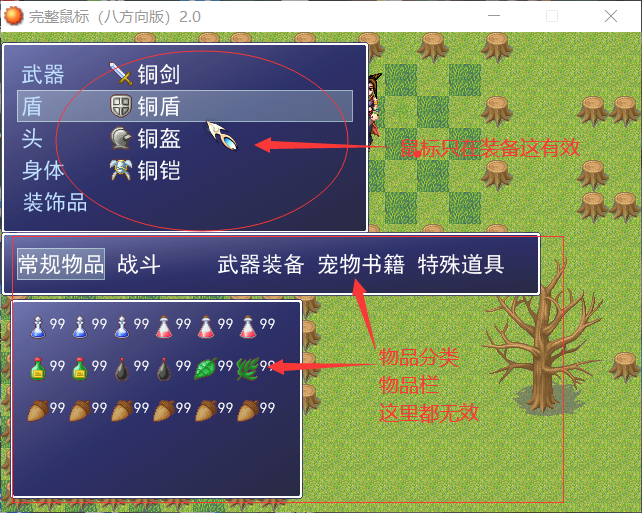
因为你的分类窗口和物品列表窗口重新定义了选择窗口的内容,且重新命名了。但是鼠标脚本里没有对新命名的选择窗口进行支持。
就按照鼠标脚本原有内容追加一下就可以了。我用两行#号圈起来了
[fold= 鼠标整合]#==============================================================================
# ■ 完整鼠标系统(八方向)
#------------------------------------------------------------------------------
# 使用时务必配合专用寻路算法
# By whbm
#==============================================================================
#下面做一下介绍与使用说明:
# 在屏幕上单击鼠标的时候,会自动进行寻路,这里为了速度更快并且为了进行迷
#宫时的难度寻路被限定在当时的屏幕内部。(否则玩家直接点到终点,呵呵....知道
#后果了吧)
# 在角色移动过程中再次单击鼠标(即双击)并在单击第二次鼠标的时候不松手,
#角色将会跟随鼠标方向移动。(这个应该好理解,不用多说吧)当角色贴着欲被启动
#的事件的时候,单击NPC即可启动事件。若未贴着,将会产生自动寻路到NPC附近的某
#点,那时在单击NPC即可。
# 当鼠标停在某些事件上时候会发现有不同的图标,设置方法为:宝箱事件请在事
#件的执行内容中添加 注释,注释内容为 Item 注意大小写。NPC事件请在事件的执行
#内容中添加 注释注释内容为 NPC 注意大小写。若不箱改变某事件的图标,则不要写
#那两个注释。
# 当把脚本转到您工程的时候千万别忘了那个寻路用的脚本。
#==============================================================================
class Game_Event
attr_accessor :flag
end
#==============================================================================
# ■ Game_Map
#------------------------------------------------------------------------------
# 处理地图的类。包含卷动以及可以通行的判断功能。
# 本类的实例请参考 $game_map 。
#==============================================================================
class Game_Map
def show_rate(event)
return 1
end
#--------------------------------------------------------------------------
# ● 检查鼠标处是否有自定义的事件并返回类型
#--------------------------------------------------------------------------
def check_event_custom(mouse_x, mouse_y)
for event in $game_map.events.values #循环所有事件检查
rate = show_rate(event)
event_width = (RPG::Cache.character(event.character_name,event.character_hue).width / $c3_每一步的帧数) * rate
event_height = (RPG::Cache.character(event.character_name,event.character_hue).height / 8) * rate
if mouse_x > event.screen_x - event_width / 2 and mouse_x < event.screen_x + event_width / 2 and mouse_y + 32 > event.screen_y + 32 - event_height and mouse_y + 32 < event.screen_y + 32
for i in 0...event.list.size
if event.list.parameters[0] == "Item" #类型判断
event.flag = 1
elsif event.list.parameters[0] == "Npc" #类型判断
event.flag = 2
else
event.flag = 0 if $game_player.get_mouse_sta != 2 #无标志
end
return event.flag #返回事件类型标志
end
end
end
return 0 if $game_player.get_mouse_sta != 2 #如果不是在跟随鼠标状态,则返回无标志
return $mouse_icon_id #使鼠标图不变化
end
#--------------------------------------------------------------------------
# ● 检查鼠标处是否有事件可以开启
#--------------------------------------------------------------------------
def check_event_custom_start(mouse_x, mouse_y)
for event in $game_map.events.values #循环所有事件检查
#事件角色图片宽度、高度
rate = show_rate(event)
event_width = (RPG::Cache.character(event.character_name,event.character_hue).width / $c3_每一步的帧数) * rate
event_height = (RPG::Cache.character(event.character_name,event.character_hue).height / 8) * rate
#判断是否鼠标在事件上
if mouse_x > event.screen_x - event_width / 2 and mouse_x < event.screen_x + event_width / 2 and mouse_y + 32 > event.screen_y + 32 - event_height and mouse_y + 32 < event.screen_y + 32
way_x = $game_player.x - event.x
way_y = $game_player.y - event.y
if [1,0,-1].include?($game_player.x-event.x) and [1,0,-1].include?($game_player.y-event.y)
for i in 0...event.list.size
if ["Item","Npc"].include?(event.list.parameters[0]) #当事件属于自定义事件
#判断主角朝向
if way_x == -1
p_direction = 3 if way_y == -1
p_direction = 6 if way_y == 0
p_direction = 9 if way_y == 1
elsif way_x == 0
p_direction = 2 if way_y == -1
p_direction = 8 if way_y == 1
else
p_direction = 1 if way_y == -1
p_direction = 4 if way_y == 0
p_direction = 7 if way_y == 1
end
event.start #开启事件
return 1, p_direction #返回即将开启事件以及角色朝向
end
end
end
end
end
return 0, 5 #返回不会开启事件以及角色朝向不变
end
#--------------------------------------------------------------------------
# ● 检查鼠标处是否存在自定义事件 for 寻路
#--------------------------------------------------------------------------
def check_event_custom_exist(mouse_x, mouse_y)
for event in $game_map.events.values #循环所有事件检查
#事件角色图片宽度、高度
rate = show_rate(event)
event_width = (RPG::Cache.character(event.character_name,event.character_hue).width / $c3_每一步的帧数) * rate
event_height = (RPG::Cache.character(event.character_name,event.character_hue).height / 8) * rate
if mouse_x > event.screen_x - event_width / 2 and mouse_x < event.screen_x + event_width / 2 and mouse_y + 32 > event.screen_y + 32 - event_height and mouse_y + 32 < event.screen_y + 32
for i in 0...event.list.size
return 1, event if ["Item", "Npc"].include?(event.list.parameters[0]) #返回存在自定义事件以及事件体
end
end
end
return 0, event #返回不存在自定义事件,以及事件体
end
end
#=================以下两个用来调整战斗时的手感问题,可以自己试试。
$敌人选框扩大 = 20
$角色选框扩大 = 30
#==============================================================================
# ● API调用
#==============================================================================
$ShowCursor = Win32API.new("user32", "ShowCursor", 'i', 'l')
$GetCursorPos = Win32API.new("user32", "GetCursorPos", 'p', 'i')
$ScreenToClient = Win32API.new("user32", "ScreenToClient", 'ip', 'i')
$GetActiveWindow = Win32API.new("user32", "GetActiveWindow", nil, 'l')
$Window_HWND = $GetActiveWindow.call
$GetKeyState = Win32API.new("user32", "GetKeyState", 'i', 'i')
module Mouse
LEFT = 0x01
RIGHT = 0x02
def self.init(sprite = nil)
$ShowCursor.call(0)
@show_cursor = false
@mouse_sprite = Sprite.new
@mouse_sprite.z = 99999
@mouse_sprite.bitmap = Bitmap.new('Graphics/Icons/木剑')
@left_press = false
@right_press = false
@left_trigger = false
@right_trigger = false
@left_repeat = false
@right_repeat = false
@click_lock = false
update
end
def self.exit
@mouse_sprite.bitmap.dispose
@mouse_sprite.dispose
@show_cursor = true
$ShowCursor.call(1)
end
def self.mouse_debug
return @mouse_debug.bitmap
end
def self.update
left_down = $GetKeyState.call(0x01)
right_down = $GetKeyState.call(0x02)
if Graphics.frame_count * 3 / Graphics.frame_rate != @total_sec
@total_sec = Graphics.frame_count * 3 / Graphics.frame_rate
@a = !@a
end
if $scene.is_a?(Scene_Map) == false
$mouse_icon_id = 0
end
if $mouse_icon_id != $mouse_icon_id_last
case $mouse_icon_id
when 1
if @a
@mouse_sprite.bitmap = Bitmap.new('Graphics/Icons/GetItem1')
else
@mouse_sprite.bitmap = Bitmap.new('Graphics/Icons/GetItem2')
end
when 2
if @a
@mouse_sprite.bitmap = Bitmap.new('Graphics/Icons/TalkTo1')
else
@mouse_sprite.bitmap = Bitmap.new('Graphics/Icons/TalkTo2')
end
when 11
@mouse_sprite.bitmap = Bitmap.new('Graphics/Icons/Mouse_LOWER_LEFT')
when 12
@mouse_sprite.bitmap = Bitmap.new('Graphics/Icons/Mouse_DOWN')
when 13
@mouse_sprite.bitmap = Bitmap.new('Graphics/Icons/Mouse_LOWER_RIGHT')
when 14
@mouse_sprite.bitmap = Bitmap.new('Graphics/Icons/Mouse_LEFT')
when 16
@mouse_sprite.bitmap = Bitmap.new('Graphics/Icons/Mouse_RIGHT')
when 17
@mouse_sprite.bitmap = Bitmap.new('Graphics/Icons/Mouse_UPPER_LEFT')
when 18
@mouse_sprite.bitmap = Bitmap.new('Graphics/Icons/Mouse_UP')
when 19
@mouse_sprite.bitmap = Bitmap.new('Graphics/Icons/Mouse_UPPER_RIGHT')
when 0
@mouse_sprite.bitmap = Bitmap.new('Graphics/Icons/木剑')
end
$mouse_icon_id_last = $mouse_icon_id
end
@click_lock = false
mouse_x, mouse_y = self.get_mouse_pos
if @mouse_sprite != nil
@mouse_sprite.x = mouse_x
@mouse_sprite.y = mouse_y
end
if left_down[7] == 1
@left_repeat = (not @left_repeat)
@left_trigger = (not @left_press)
@left_press = true
else
@left_press = false
@left_trigger = false
@left_repeat = false
end
if right_down[7] == 1
@right_repeat = (not @right_repeat)
@right_trigger = (not @right_press)
@right_press = true
else
@right_press = false
@right_trigger = false
@right_repeat = false
end
end
def self.get_mouse_pos
point_var = [0, 0].pack('ll')
if $GetCursorPos.call(point_var) != 0
if $ScreenToClient.call($Window_HWND, point_var) != 0
x, y = point_var.unpack('ll')
if (x < 0) or (x > 10000) then x = 0 end
if (y < 0) or (y > 10000) then y = 0 end
if x > 640 then x = 640 end
if y > 480 then y = 480 end
return x, y
else
return 0, 0
end
else
return 0, 0
end
end
def self.press?(mouse_code)
if mouse_code == LEFT
if @click_lock
return false
else
return @left_press
end
elsif mouse_code == RIGHT
return @right_press
else
return false
end
end
def self.trigger?(mouse_code)
if mouse_code == LEFT
if @click_lock
return false
else
return @left_trigger
end
elsif mouse_code == RIGHT
return @right_trigger
else
return false
end
end
def self.repeat?(mouse_code)
if mouse_code == LEFT
if @click_lock
return false
else
return @left_repeat
end
elsif mouse_code == RIGHT
return @right_repeat
else
return false
end
end
def self.click_lock?
return @click_lock
end
def self.click_lock
@click_lock = true
end
def self.click_unlock
@click_lock = false
end
end
module Input
if @self_update == nil
@self_update = method('update')
@self_press = method('press?')
@self_trigger = method('trigger?')
@self_repeat = method('repeat?')
end
def self.update
@self_update.call
Mouse.update
end
def self.press?(key_code)
if @self_press.call(key_code)
return true
end
if key_code == C
return Mouse.press?(Mouse::LEFT)
elsif key_code == B
return Mouse.press?(Mouse::RIGHT)
else
return @self_press.call(key_code)
end
end
def self.trigger?(key_code)
if @self_trigger.call(key_code)
return true
end
if key_code == C
return Mouse.trigger?(Mouse::LEFT)
elsif key_code == B
return Mouse.trigger?(Mouse::RIGHT)
else
return @self_trigger.call(key_code)
end
end
def self.repeat?(key_code)
if @self_repeat.call(key_code)
return true
end
if key_code == C
return Mouse.repeat?(Mouse::LEFT)
elsif key_code == B
return Mouse.repeat?(Mouse::RIGHT)
else
return @self_repeat.call(key_code)
end
end
end
class Window_Selectable
if @self_alias == nil
alias self_update update
@self_alias = true
end
def update
self_update
if self.active and @item_max > 0
index_var = @index
tp_index = @index
mouse_x, mouse_y = Mouse.get_mouse_pos
mouse_not_in_rect = true
for i in 0...@item_max
@index = i
update_cursor_rect
top_x = self.cursor_rect.x + self.x + 16
top_y = self.cursor_rect.y + self.y + 16
bottom_x = top_x + self.cursor_rect.width
bottom_y = top_y + self.cursor_rect.height
if (mouse_x > top_x) and (mouse_y > top_y) and
(mouse_x < bottom_x) and (mouse_y < bottom_y)
mouse_not_in_rect = false
if tp_index != @index
tp_index = @index
$game_system.se_play($data_system.cursor_se)
end
break
end
end
if mouse_not_in_rect
@index = index_var
update_cursor_rect
Mouse.click_lock
else
Mouse.click_unlock
end
end
end
end
##########################################################
class Window_Selectable_Item
if @self_alias == nil
alias self_update update
@self_alias = true
end
def update
self_update
if self.active and @item_max > 0
index_var = @index
tp_index = @index
mouse_x, mouse_y = Mouse.get_mouse_pos
mouse_not_in_rect = true
for i in 0...@item_max
@index = i
update_cursor_rect
top_x = self.cursor_rect.x + self.x + 16
top_y = self.cursor_rect.y + self.y + 16
bottom_x = top_x + self.cursor_rect.width
bottom_y = top_y + self.cursor_rect.height
if (mouse_x > top_x) and (mouse_y > top_y) and
(mouse_x < bottom_x) and (mouse_y < bottom_y)
mouse_not_in_rect = false
if tp_index != @index
tp_index = @index
$game_system.se_play($data_system.cursor_se)
end
break
end
end
if mouse_not_in_rect
@index = index_var
update_cursor_rect
Mouse.click_lock
else
Mouse.click_unlock
end
end
end
end
####################################################################
class Window_NameInput
if @self_alias == nil
alias self_update update
@self_alias = true
end
def update
self_update
if self.active
index_var = @index
mouse_x, mouse_y = Mouse.get_mouse_pos
mouse_not_in_rect = true
for i in (0...CHARACTER_TABLE.size).to_a.push(180)
@index = i
update_cursor_rect
top_x = self.cursor_rect.x + self.x + 16
top_y = self.cursor_rect.y + self.y + 16
bottom_x = top_x + self.cursor_rect.width
bottom_y = top_y + self.cursor_rect.height
if (mouse_x > top_x) and (mouse_y > top_y) and
(mouse_x < bottom_x) and (mouse_y < bottom_y)
mouse_not_in_rect = false
break
end
end
if mouse_not_in_rect
@index = index_var
update_cursor_rect
Mouse.click_lock
else
Mouse.click_unlock
end
end
end
end
class Window_InputNumber
if @self_alias == nil
alias self_update update
@self_alias = true
end
def update
self_update
mouse_x, mouse_y = Mouse.get_mouse_pos
if self.active and @digits_max > 0
index_var = @index
mouse_not_in_rect = true
for i in 0...@digits_max
@index = i
update_cursor_rect
top_x = self.cursor_rect.x + self.x + 16
bottom_x = top_x + self.cursor_rect.width
if (mouse_x > top_x) and (mouse_x < bottom_x)
mouse_not_in_rect = false
break
end
end
if mouse_not_in_rect
@index = index_var
update_cursor_rect
Mouse.click_lock
else
Mouse.click_unlock
end
end
if @last_mouse_y == nil
@last_mouse_y = mouse_y
end
check_pos = (@last_mouse_y - mouse_y).abs
if check_pos > 10
$game_system.se_play($data_system.cursor_se)
place = 10 ** (@digits_max - 1 - @index)
n = @number / place % 10
@number -= n * place
n = (n + 1) % 10 if mouse_y < @last_mouse_y
n = (n + 9) % 10 if mouse_y > @last_mouse_y
@number += n * place
refresh
@last_mouse_y = mouse_y
end
end
end
class Scene_File
if @self_alias == nil
alias self_update update
@self_alias = true
end
def update
mouse_x, mouse_y = Mouse.get_mouse_pos
Mouse.click_lock
idx = 0
for i in @savefile_windows
top_x = i.x + 16
top_y = i.y + 16
bottom_x = top_x + i.width
bottom_y = top_y + i.height
if (mouse_x > top_x) and (mouse_y > top_y) and
(mouse_x < bottom_x) and (mouse_y < bottom_y)
i.selected = true
if @file_index != idx
@file_index = idx
$game_system.se_play($data_system.cursor_se)
end
Mouse.click_unlock
else
i.selected = false
end
idx += 1
end
self_update
end
end
class Arrow_Enemy
if @self_alias == nil
alias self_update update
@self_alias = true
end
def update
mouse_x, mouse_y = Mouse.get_mouse_pos
idx = 0
for i in $game_troop.enemies do
if i.exist?
top_x = i.screen_x - self.ox
top_y = i.screen_y - self.oy
bottom_x = top_x + self.src_rect.width
bottom_y = top_y + self.src_rect.height
if (mouse_x > top_x - $敌人选框扩大) and (mouse_y > top_y - $敌人选框扩大) and
(mouse_x < bottom_x + $敌人选框扩大) and (mouse_y < bottom_y + $敌人选框扩大)
if @index != idx
$game_system.se_play($data_system.cursor_se)
@index = idx
end
end
end
idx += 1
end
self_update
end
end
class Arrow_Actor
if @self_alias == nil
alias self_update update
@self_alias = true
end
def update
mouse_x, mouse_y = Mouse.get_mouse_pos
idx = 0
for i in $game_party.actors do
if i.exist?
top_x = i.screen_x - self.ox
top_y = i.screen_y - self.oy
bottom_x = top_x + self.src_rect.width
bottom_y = top_y + self.src_rect.height
if (mouse_x > top_x - $角色选框扩大) and (mouse_y > top_y - $角色选框扩大) and
(mouse_x < bottom_x + $角色选框扩大) and (mouse_y < bottom_y + $角色选框扩大)
if @index != idx
$game_system.se_play($data_system.cursor_se)
@index = idx
end
end
end
idx += 1
end
self_update
end
end
#==============================================================================
# ■ Game_Player
#------------------------------------------------------------------------------
# 处理主角的类。事件启动的判定、以及地图的滚动等功能。
# 本类的实例请参考 $game_player。
# 鼠标控制角色的主程序
#==============================================================================
class Game_Player
if @self_alias == nil
alias self_update update
@self_alias = true
end
#--------------------------------------------------------------------------
# ● 得到鼠标的状态
#--------------------------------------------------------------------------
def get_mouse_sta
return @mouse_sta
end
#--------------------------------------------------------------------------
# ● 完整鼠标系统
#--------------------------------------------------------------------------
def update
mouse_x, mouse_y = Mouse.get_mouse_pos
@mtp_x = mouse_x
@mtp_y = mouse_y
unless $game_system.map_interpreter.running? and @mouse_sta == 2 #鼠标状态不为跟随状态
#得到鼠标图标方向
$mouse_icon_id = $game_map.check_event_custom(mouse_x,mouse_y) if not [11, 12, 13, 14, 16, 17, 18, 19].include?($mouse_icon_id)
else
#令鼠标图标为正常
$mouse_icon_id = 0 if @mouse_sta != 2
end
#单击鼠标时进行判断寻路或跟随
if Mouse.trigger?(Mouse::LEFT) #当点击鼠标时
unless $game_system.map_interpreter.running? or
@move_route_forcing or $game_temp.message_window_showing #各种无效情况的排除
#初始化
@mouse_sta = 1
p_direction = 5
#检查鼠标处能否开启事件
event_start,p_direction = $game_map.check_event_custom_start(mouse_x, mouse_y)
#若在移动中再次点击鼠标左键(即双击左键),则改鼠标状态为跟随状态
@mouse_sta = 2 if @paths_id != nil and @paths_id != @paths.size
if @mouse_sta != 2
#鼠标状态不为跟随状态则取数据并初始化路径
trg_x = (mouse_x + $game_map.display_x / 4) / 32
trg_y = (mouse_y + $game_map.display_y / 4) / 32
@paths = []
@paths_id = 0
if event_start == 0 #若不能开启事件
if trg_x != $game_player.x or trg_y != $game_player.y #若目标不为自身则开始寻路
find_path = Find_Path.new
@paths = find_path.find_player_short_path(trg_x, trg_y, @mtp_x, @mtp_y)
end
else #若能开启事件则改变角色朝向
@direction = p_direction
end
end
end
end
#开始移动
if @mouse_sta != nil and @mouse_sta == 1 #若鼠标状态为寻路状态
unless moving? or $game_system.map_interpreter.running? or
@move_route_forcing or $game_temp.message_window_showing #排除无效情况
if @paths_id != nil and @paths != nil and @paths_id <= @paths.size #若没有完成路径
case @paths[@paths_id] #判断路径
when 6
@last_move_x = true
move_right
@paths_id += 1
@direction = 6
when 4
@last_move_x = true
move_left
@paths_id += 1
@direction = 4
when 2
@last_move_x = false
move_down
@direction = 2
@paths_id += 1
when 8
@last_move_x = false
move_up
@direction = 8
@paths_id += 1
#斜四方向
when 1
@last_move_x = false
move_lower_left
@direction = 1
@paths_id += 1
when 3
@last_move_x = false
move_lower_right
@direction = 3
@paths_id += 1
when 7
@last_move_x = false
move_upper_left
@direction = 7
@paths_id += 1
when 9
@last_move_x = false
move_upper_right
@direction = 9
@paths_id += 1
end
end
end
elsif @paths != nil and @mouse_sta == 2 #当鼠标状态为跟随,且在移动中
if Mouse.press?(Mouse::LEFT) #持续按住鼠标
unless moving? or $game_system.map_interpreter.running? or
@move_route_forcing or $game_temp.message_window_showing #排除无效情况
#跟随方向判断并跟随
rate = $game_map.show_rate(self)
width = (RPG::Cache.character(self.character_name,self.character_hue).width / $c3_每一步的帧数) * rate
height = (RPG::Cache.character(self.character_name,self.character_hue).height / 8) * rate
self_ox = (self.screen_x - width / 2 + self.screen_x + width / 2) / 2
self_oy = (self.screen_y - height + self.screen_y) / 2
#self_ox = self.screen_x
#self_oy = self.screen_y
if (@mtp_x - self_ox)*(@mtp_x - self_ox) + (@mtp_y - self_oy)*(@mtp_y - self_oy) >= 961
if @mtp_x > self_ox
if self_oy - @mtp_y < 0.4 * (@mtp_x - self_ox) and
@mtp_y - self_oy < 0.4 * (@mtp_x - self_ox)
move_right
$mouse_icon_id = 16
@direction = 6
end
if @mtp_y - self_oy > - 0.4 * ( self_ox - @mtp_x ) and
@mtp_y - self_oy < - 2.4 * ( self_ox - @mtp_x )
move_lower_right
$mouse_icon_id = 13
@direction = 3
end
if @mtp_y - self_oy < 0.4 * ( self_ox - @mtp_x ) and
@mtp_y - self_oy > 2.4 * ( self_ox - @mtp_x )
move_upper_right
$mouse_icon_id = 19
@direction = 9
end
if @mtp_y - self_oy > 2.4 * ( @mtp_x - self_ox )
move_down
$mouse_icon_id = 12
@direction = 2
end
if @mtp_y - self_oy < - 2.4 * ( @mtp_x - self_ox )
move_up
$mouse_icon_id = 18
@direction = 8
end
end
if @mtp_x < self_ox
if @mtp_y - self_oy > - 0.4 * ( self_ox - @mtp_x ) and
@mtp_y - self_oy < 0.4 * ( self_ox - @mtp_x )
move_left
$mouse_icon_id = 14
@direction = 4
end
if @mtp_y - self_oy > 0.4 * ( self_ox - @mtp_x ) and
@mtp_y - self_oy < 2.4 * ( self_ox - @mtp_x )
move_lower_left
$mouse_icon_id = 11
@direction = 1
end
if @mtp_y - self_oy < - 0.4 * ( self_ox - @mtp_x ) and
@mtp_y - self_oy > - 2.4 * ( self_ox - @mtp_x )
move_upper_left
$mouse_icon_id = 17
@direction = 7
end
if @mtp_y - self_oy > 2.4 * ( self_ox - @mtp_x )
move_down
$mouse_icon_id = 12
@direction = 2
end
if @mtp_y - self_oy < - 2.4 * ( self_ox - @mtp_x )
move_up
$mouse_icon_id = 18
@direction = 8
end
end
end
#...................................................................
if @mtp_x > self_ox
if @mtp_y - self_oy > - 0.4 * ( @mtp_x - self_ox ) and
@mtp_y - self_oy < 0.4 * ( @mtp_x - self_ox )
$mouse_icon_id = 16
@direction = 6
end
if @mtp_y - self_oy > 0.4 * ( @mtp_x - self_ox ) and
@mtp_y - self_oy < 2.4 * ( @mtp_x - self_ox )
$mouse_icon_id = 13
@direction = 3
end
if @mtp_y - self_oy < - 0.4 * ( @mtp_x - self_ox ) and
@mtp_y - self_oy > - 2.4 * ( @mtp_x - self_ox )
$mouse_icon_id = 19
@direction = 9
end
if @mtp_y - self_oy > 2.4 * ( @mtp_x - self_ox )
$mouse_icon_id = 12
@direction = 2
end
if @mtp_y - self_oy < - 2.4 * ( @mtp_x - self_ox )
$mouse_icon_id = 18
@direction = 8
end
end
if @mtp_x < self_ox
if @mtp_y - self_oy > - 0.4 * ( self_ox - @mtp_x ) and
@mtp_y - self_oy < 0.4 * ( self_ox - @mtp_x )
$mouse_icon_id = 14
@direction = 4
end
if @mtp_y - self_oy > 0.4 * ( self_ox - @mtp_x ) and
@mtp_y - self_oy < 2.4 * ( self_ox - @mtp_x )
$mouse_icon_id = 11
@direction = 1
end
if @mtp_y - self_oy < - 0.4 * ( self_ox - @mtp_x ) and
@mtp_y - self_oy > - 2.4 * ( self_ox - @mtp_x )
$mouse_icon_id = 17
@direction = 7
end
if @mtp_y - self_oy > 2.4 * ( self_ox - @mtp_x )
$mouse_icon_id = 12
@direction = 2
end
if @mtp_y - self_oy < - 2.4 * ( self_ox - @mtp_x )
$mouse_icon_id = 18
@direction = 8
end
end
#...................................................................
end
else #没状态的情况
$mouse_icon_id = 0
@mouse_sta = 0
@paths_id = @paths.size #终止寻路移动
end
end
self_update
end
end
Mouse.init
END { Mouse.exit }[/fold]
话说你这个帖子的问题解决了没?
血条显示不同步 |
评分
-
查看全部评分
|



 写轮眼
写轮眼

 提升卡
提升卡 沉默号角
沉默号角 喧嚣号角
喧嚣号角 变色卡
变色卡 升龙剑
升龙剑