| 赞 | 86 |
| VIP | |
| 好人卡 | |
| 积分 | 235 |
| 经验 | |
| 最后登录 | 2024-1-23 |
| 在线时间 | 123 小时 |
- 梦石
- 0
- 星屑
- 23542
- 在线时间
- 123 小时
- 注册时间
- 2019-5-18
- 回帖
- 44
|
加入我们,或者,欢迎回来。
您需要 登录 才可以下载或查看,没有账号?注册会员
×
本帖最后由 xuhao1996 于 2022-8-4 01:17 编辑
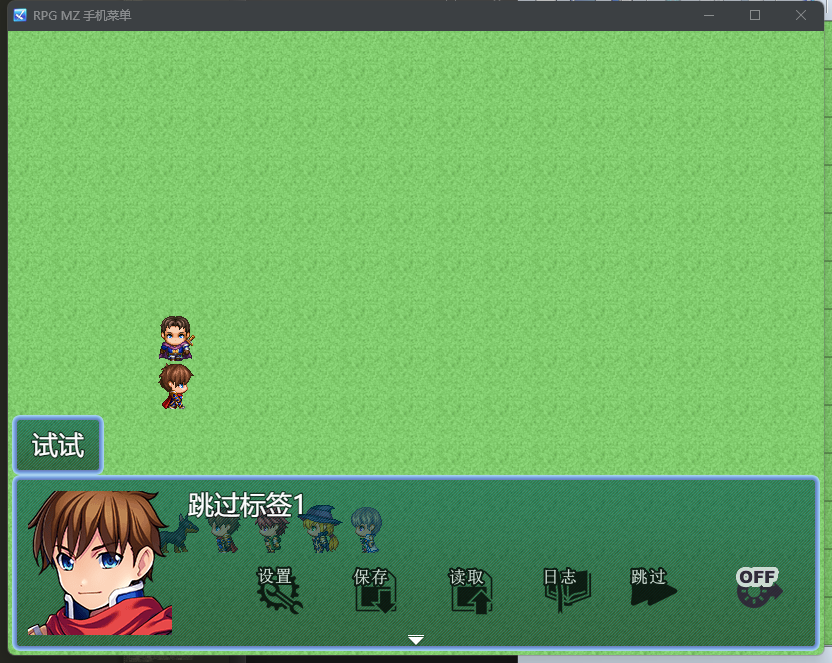
很实用的一个插件
有历史记录 日志
跳过选项
自动消息
 [fold=OptionEx.js]//=============================================================================
// RPG Maker MZ - OptionEx
//=============================================================================
/*:
* @target MZ
* @plugindesc 扩展选项场景。
* @author nz_prism
* @url https://github.com/nz-prism/RPG- ... plugins/OptionEx.js
*
* @help OptionEx.js
* ver. 1.3.1
*
* [历史]
* 2021 年 2 月 28 日 1.0.0 发布
* 03/03/2021 1.0.1 更正了默认音调故障并校准了窗口
* 高度。
* 03/05/2021 1.0.2 修复了未使用冲刺速度或快速消息时的错误。
* 04/05/2021 1.1.0 添加了开关 A/B 按钮和插件参数以禁用
* 标准项目。
* 06/22/2021 1.2.0 添加了几个参数并使其与子兼容
* 文件夹。
* 07/06/2021 1.2.1 支持 RMMZ 1.3.2 的子文件夹改进
* 02/20/2022 1.2.2 支持 NovelGameUI.js
* 2022 年 2 月 21 日 1.2.3 改进了与其他提供选项的插件的冲突。
* 2022 年 2 月 24 日 1.3.0 添加了一个插件参数以降低窗口下方
* 按钮并重写此描述。
* 03/03/2022 1.3.1 已修复以反映新游戏的默认值。
*
* 这个插件扩展了选项场景。
*功能不仅包括更改选项窗口化妆品
* 并为某些选项放置仪表,例如体积,但也添加新的
* 选项项目;
*
* 1. 切换 A/B 按钮
* 2. 快速留言
* 3. 冲刺速度
* 4. 视窗皮肤
* 5. 窗口颜色
* 6. 窗口不透明度
*
* 它还添加了一个按钮以将所有选项值重置为默认值。
* 对于数字和仪表选项,玩家可以使用向上/向下翻页按钮
*(触摸 UI 按钮可用)以极大地改变值。对于仪表,
*玩家可以拖动/滑动来更改值。
* 您可以选择是否启用每个选项。
*
* 关于尺寸/位置有几个插件参数
* 选项窗口。如果选项项目由于太多而无法放入窗口中
* 项目,尝试更改它们的值。 “选项高度”是高度
* 每个项目。通过降低该值,您可以增加可见的数量
* 项目。如果项目的文本超过矩形,降低“字体大小”,
* 也。 “默认命令偏移量”是最下方项目和最下方项目之间的距离
* 重置为默认按钮。通过设置“在按钮下放置选项窗口”
* true,窗口将放置在触摸 UI 按钮区域下方。如果是这样,则
* 窗口高度会变小。然后,尝试将上面的参数降低到
* 使所有项目可见。
*
* 如果设置了插件参数“Hide Touch UI Option for Mobile Devices”
* true(默认为true),“Touch UI”选项不会出现在
* 平板电脑/智能手机。它可以防止玩家无意中出现的问题
* 将选项设置为 OFF,菜单按钮消失,需要 2 指点击
* 调用菜单,这对玩家来说并不出名。
*
* 1. 切换 A/B 按钮
* 如果打开,游戏手柄的 OK/Cancel 按钮将被交换。如果插件
* 参数“如果游戏手柄未连接,则隐藏开关 A/B 按钮”设置为 true
*(默认为true),未连接游戏手柄时不会出现此选项。
*
* 2. 快速留言
* 如果打开,文本会立即出现在消息窗口中。
*
* 3. 冲刺速度
* 可以选择 3 种速度。 “1”与 MZ 默认速度相同。
*
* 4. 视窗皮肤
* 提供替代的windowskins。要使用此选项,请添加窗口图像
* 文件(最初是“Window.png”,但任何文件名都可以接受)到
* img/系统文件夹。然后,将它们添加到插件参数“Windowskin
* Images"。如果参数只有一个图像文件,则该选项项没有
* 出现。
*
* 5. 窗口颜色
* 改变窗户的色调。仪表已放置,玩家可以
*拖动/滑动仪表。
*
* 6. 窗口不透明度
* 更改窗口的不透明度。仪表已放置,玩家可以
*拖动/滑动仪表。
*
*
* 这个插件是在 MIT 许可下发布的。
* https://opensource.org/licenses/mit-license.php
*
*
* @param placeWindowUnderButtonArea
* @text 在按钮下放置选项窗口
* @desc 指定选项窗口是否放置在 UI 按钮下方。
* @default false
* @type boolean
*
* @param windowWidth
* @text 选项窗口宽度
* @desc 指定选项窗口的宽度。
* @default 560
* @type number
* @min 400
* @Max 3840
*
* @param itemHeight
* @text 选项项目高度
* @desc 指定各个选项的高度。
* @default 28
* @type number
* @min 8
* @Max 64
*
* @param fontSize
* @text 字体大小
* @desc 指定选项窗口的字体大小。
* @default 23
* @type number
* @min 8
* @max 48
*
* @param defaultCommandOffset
* @text 默认命令偏移
* @desc 指定要重置为默认值的命令的 Y 轴偏移量。
* @default 12
* @type number
* @min 0
* @max 36
*
* @param titleColor
* @text 选项名称颜色
* @desc 为每个选项名称指定颜色。
* @default 6
* @type number
* @min 0
* @max 31
*
* @param alwaysDash
* @text 总是冲刺
* @desc 总是冲刺 选项的设置。
*
* @param useAlwaysDash
* @text 使用总是冲刺
* @desc 指定以启用切换自动总是冲刺的选项。
* @parent alwaysDash
* @default true
* @type boolean
*
* @param defaultAlwaysDash
* @text 默认总是冲刺
* @desc 总是冲刺 选项的默认值。
* @parent alwaysDash
* @default false
* @type boolean
*
* @param commandRemember
* @text 命令记住
* @desc 命令记住选项的设置。
*
* @param useCommandRemember
* @text 使用命令记住
* @desc 指定启用切换命令记住的选项。
* @parent commandRemember
* @default true
* @type boolean
*
* @param defaultCommandRemember
* @text 默认命令记住
* @desc 命令记住选项的默认值。
* @parent commandRemember
* @default false
* @type boolean
*
* @param touchUI
* @text 触控界面
* @desc 触控界面 选项的设置。
*
* @param useTouchUI
* @text 使用触控 UI
* @desc 指定以启用切换触摸 UI 的选项。
* @parent touchUI
* @default true
* @type boolean
*
* @param hideTouchUIForMobiles
* @text 隐藏移动设备的触控 UI 选项
* @desc 如果玩家使用智能手机或平板电脑,指定隐藏“触摸 UI”选项。
* @parent touchUI
* @default true
* @type boolean
*
* @param defaultTouchUI
* @text 默认触控 UI
* @desc 触摸 UI 选项的默认值。
* @parent touchUI
* @default true
* @type boolean
*
* @param volumes
* @text 音量选项
* @desc 音量选项的设置。
*
* @param useBgmVolume
* @text 使用BGM音量
* @desc 指定启用选项以调整 BGM 音量。
* @parent volumes
* @default true
* @type boolean
*
* @param useBgsVolume
* @text 使用 BGS 音量
* @desc 指定启用选项以调整 BGS 音量。
* @parent volumes
* @default true
* @type boolean
*
* @param useMeVolume
* @text 使用 ME 音量
* @desc 指定启用选项以调整 ME 音量。
* @parent volumes
* @default true
* @type boolean
*
* @param useSeVolume
* @text 使用 SE 音量
* @desc 指定启用选项以调整 SE 音量。
* @parent volumes
* @default true
* @type boolean
*
* @param defaultVolume
* @text 默认音量
* @desc 指定 BGM、BGS、ME 和 SE 的默认音量。
* @parent volumes
* @default 75
* @type number
* @min 0
* @max 100
*
* @param switchABButtons
* @text 切换 A/B 按钮
* @desc 切换 A/B 按钮 选项的设置。
*
* @param useSwitchABButtons
* @text 使用切换 A/B 按钮
* @desc 指定以启用切换 A/B 按钮的选项。
* @parent switchABButtons
* @default true
* @type boolean
*
* @param hideSwitchABButtonsIfGamepadUnconnected
* @text 如果游戏手柄未连接,则隐藏开关 A/B 按钮
* @desc 指定在未连接游戏手柄时隐藏切换 A/B 按钮的选项。
* @parent switchABButtons
* @default true
* @type boolean
*
* @param switchABButtonsName
* @text 切换 A/B 按钮名称
* @desc 指定切换 A/B 按钮的选项名称。
* @parent switchABButtons
* @default Switch A/B Buttons
* @type string
*
* @param defaultSwitchABButtons
* @text 默认切换 A/B 按钮
* @desc 切换 A/B 按钮选项的默认值。
* @parent switchABButtons
* @default false
* @type boolean
*
* @param fastMessage
* @text 快速发送消息
* @desc 快速消息选项的设置。
*
* @param useFastMessage
* @text 使用快速消息
* @desc 指定启用选项以立即显示消息。
* @parent fastMessage
* @default true
* @type boolean
*
* @param fastMessageName
* @text 快速消息名称
* @desc 指定选项的名称以立即显示消息。
* @parent fastMessage
* @default 快速信息
* @type string
*
* @param defaultFastMessage
* @text 默认快速消息
* @desc 快速消息选项的默认值。
* @parent fastMessage
* @default false
* @type boolean
*
* @param dashSpeed
* @text 移动速度
* @desc Dash Speed 选项的设置。
*
* @param useDashSpeed
* @text 使用移动速度
* @desc 指定以启用更改玩家冲刺速度的选项。
* @parent dashSpeed
* @default true
* @type boolean
*
* @param dashSpeedName
* @text 冲刺速度名称
* @desc 指定选项名称以更改玩家冲刺速度。
* @parent dashSpeed
* @default 冲刺速度
* @type string
*
* @param defaultDashSpeed
* @text 默认速度
* @desc 指定 dash-speed (0-2) 的默认值。 请注意,它在屏幕上显示为 +1。
* @parent dashSpeed
* @default 0
* @type number
* @min 0
* @max 2
*
* @param windowskin
* @text 视窗皮肤
* @desc Windowskin 选项的设置。
*
* @param useWindowskin
* @text 使用 视窗皮肤
* @desc 指定以启用更改窗口皮肤的选项。
* @parent windowskin
* @default true
* @type boolean
*
* @param windowskinName
* @text 视窗名称
* @desc 指定更改窗口皮肤的选项的名称。
* @parent windowskin
* @default Windowskin
* @type string
*
* @param windowskins
* @text 视窗皮肤图像
* @desc 添加您希望用户选择的任意数量的 windowskin 文件。
* @parent windowskin
* @default ["Window"]
* @type file[]
* @dir img/system
*
* @param windowTone
* @text 窗口颜色
* @desc 窗口颜色选项的设置。
*
* @param useWindowTone
* @text 使用窗口颜色
* @desc 指定启用选项以更改窗口色调。
* @parent windowTone
* @default true
* @type boolean
*
* @param windowToneRedName
* @text 窗口颜色 红色 名称
* @desc 指定选项名称以更改窗口的红色值。
* @parent windowTone
* @default 窗口颜色 R
* @type string
*
* @param windowToneGreenName
* @text 窗口颜色 绿色 名称
* @desc 指定选项名称以更改窗口的绿色值。
* @parent windowTone
* @default 窗口颜色 G
* @type string
*
* @param windowToneBlueName
* @text 窗口颜色 蓝色 名称
* @desc 指定选项名称以更改窗口的蓝色值。
* @parent windowTone
* @default 窗口颜色 B
* @type string
*
* @param windowOpacity
* @text 窗口不透明度
* @desc 窗口不透明度选项的设置。
*
* @param useWindowOpacity
* @text 使用窗口不透明度
* @desc 指定以启用更改窗口不透明度的选项。
* @parent windowOpacity
* @default true
* @type boolean
*
* @param windowOpacityName
* @text 窗口不透明度名称
* @desc 指定用于更改窗口不透明度的选项的名称。
* @parent windowOpacity
* @default 窗口不透明度
* @type string
*
* @param defaultWindowOpacity
* @text 默认窗口不透明度
* @desc 窗口不透明度的默认值。 如果您的 RMMV 版本是 1.3.0 或更高版本,则不必指定它。
* @parent windowOpacity
* @default 195
* @type number
* @min 0
* @max 255
*
* @param defaultCommandName
* @text 默认命令名称
* @desc 指定要重置为默认值的命令的名称。
* @default 重置为默认
* @type string
*
*/
/*:ja
* @target MZ
* @plugindesc オプション画面を拡張します。
* @author nz_prism
* @url https://github.com/nz-prism/RPG- ... plugins/OptionEx.js
*
* @help OptionEx.js
* ver. 1.3.1
*
* [バージョン履歴]
* 2021/02/28 1.0.0 リリース
* 2021/03/03 1.0.1 Wカラーデフォルト値に関するバグ修正、ウィンドウ高さの微調整
* 2021/03/05 1.0.2 ダッシュ速度やメッセージ瞬間表示が不使用の場合のバグを修正
* 2021/04/05 1.1.0 A/Bボタン入れ替え機能、標準項目不使用設定追加
* 2021/06/22 1.2.0 プラグインパラメータ多数追加、本体バージョン1.3.0以降のサブ
* フォルダへの格納に対応
* 2021/07/06 1.2.1 本体バージョン1.3.2のサブフォルダ機能改善に対応
* 2022/02/20 1.2.2 NovelGameUI.jsに対応
* 2022/02/21 1.2.3 オプション系他プラグインとの競合回避を強化
* 2022/02/24 1.3.0 ボタンよりも下にウィンドウを配置するプラグインパラメータを
* 追加、説明文追記
* 2022/03/03 1.3.1 ニューゲームにデフォルト値を反映するように修正
*
* このプラグインは、オプション画面にさまざまな機能を追加します。
* オプション画面の外観の変更や音量等のオプションに対するゲージの描画だけでな
* く、以下のオプション項目の追加機能もあります。
*
* 1. A/Bボタン入れ替え
* 2. メッセージ瞬間表示
* 3. ダッシュ速度
* 4. ウィンドウスキン
* 5. ウィンドウカラー
* 6. ウィンドウ不透明度
*
* すべてのオプション項目の値をデフォルト値に戻すボタンも追加されます。
* 数値・ゲージ系項目ではPageup・Pagedownボタンで大きく値を変更できます(タッチ
* UI用ボタンも用意されています)。またゲージ系項目では、マウスでドラッグ、ある
* いはスワイプ操作でも値を操作できます。
* すべてのオプション項目は使用するかどうかを個別に設定できます。
*
* ウィンドウの大きさや配置に関するプラグインパラメータが多数用意されています。
* 数が多すぎる等の理由でウィンドウ内に項目が収まらない場合、これらのパラメータ
* を調整してみてください。「オプション項目高さ」は項目ごとの高さです。この値を
* 小さくすることにより、ウィンドウ内に描画される項目の数を増やすことができま
* す。この値を下げたことにより文字がはみ出してしまう場合、「フォントサイズ」の
* 値も下げてください。「デフォルトコマンドオフセット」はデフォルト値に戻すボ
* タンを一番下のオプションから下に離す距離です。「オプションウィンドウをボタン
* より下に配置」はタッチUI用のキャンセルボタン等のボタンが描画される領域よりも
* ウィンドウの位置を下げるかどうかのオプションです。これをオンにするとウィンド
* ウ高さがその分小さくなるので、上記パラメータの値を下げて調整してください。
*
* プラグインパラメータ「タッチデバイスでのタッチUIオプションの非表示」をオンに
* すると(デフォルトはオンです)、タブレットやスマートフォンなどのデバイスでの
* 実行時「タッチUI」オプションが表示されなくなります。これは誤ってこのオプショ
* ンをオフにしてしまうと、二本指タップでしかメニューが表示できなくなってしまう
* ことを防ぐための機能です。
*
* 1. A/Bボタン入れ替え
* オンにするとゲームパッドの決定ボタンとキャンセルボタンの割り当てが入れ替わり
* ます。プラグインパラメータ「ゲームパッド未接続時ABボタン入れ替えオプションの
* 非表示」をオンにすると(デフォルトはオンです)ゲームパッド未接続時、このオプ
* ション項目が表示されなくなります。
*
* 2. メッセージ瞬間表示
* オンにするとメッセージが瞬間的に表示されるようになります。
*
* 3. ダッシュ速度
* ダッシュ時の速度を3段階から選択できます。「1」がツクールデフォルトと同じ速
* 度です。
*
* 4. ウィンドウスキン
* 別のウィンドウスキンに変更することができるオプションです。使用するにはまず
* img/systemフォルダにウィンドウ画像(Window.png)を追加してください(ファイル
* 名は任意)。続いてファイルプラグインパラメータ「ウィンドウスキン画像」にそれ
* らの画像を追加してください。なおこのオプションは上記パラメータに2つ以上の画
* 像ファイルが追加されていない場合表示されません。
*
* 5. ウィンドウカラー
* ウィンドウの色調を変更するためのオプションです。ゲージが表示され、ドラッグや
* スワイプでゲージ操作が可能です。
*
* 6. ウィンドウ不透明度
* ウィンドウの不透明度を変更するためのオプションです。ゲージが表示され、ドラッ
* グやスワイプでゲージ操作が可能です。
*
*
* このプラグインはMITライセンスにてリリースされています。
* https://opensource.org/licenses/mit-license.php
*
*
* @param placeWindowUnderButtonArea
* @text オプションウィンドウをボタンより下に配置
* @desc UIボタン類よりも下にオプションウィンドウを配置するかどうかを設定してください。
* @default false
* @type boolean
*
* @param windowWidth
* @text オプションウィンドウ幅
* @desc オプションウィンドウの幅を設定してください。
* @default 560
* @type number
* @min 400
* @max 3840
*
* @param itemHeight
* @text オプション項目高さ
* @desc オプション項目の高さを設定してください。
* @default 28
* @type number
* @min 8
* @max 64
*
* @param fontSize
* @text フォントサイズ
* @desc オプション画面のフォントサイズを設定してください。
* @default 23
* @type number
* @min 8
* @max 48
*
* @param defaultCommandOffset
* @text デフォルトコマンドオフセット
* @desc デフォルトに戻すコマンドをY座標にずらす値を設定してください。
* @default 12
* @type number
* @min 0
* @max 36
*
* @param titleColor
* @text 項目名文字色
* @desc オプションの項目名を描画する色番号を設定してください。
* @default 6
* @type number
* @min 0
* @max 31
*
* @param alwaysDash
* @text 常時ダッシュ
* @desc 常時ダッシュオプションに関する設定です。
*
* @param useAlwaysDash
* @text 常時ダッシュの使用
* @desc 常時ダッシュオプションを使用するかどうかを設定してください。
* @parent alwaysDash
* @default true
* @type boolean
*
* @param defaultAlwaysDash
* @text デフォルト常時ダッシュ
* @desc 常時ダッシュのデフォルト値です。
* @parent alwaysDash
* @default false
* @type boolean
*
* @param commandRemember
* @text コマンド記憶
* @desc コマンド記憶オプションに関する設定です。
*
* @param useCommandRemember
* @text コマンド記憶の使用
* @desc コマンド記憶オプションを使用するかどうかを設定してください。
* @parent commandRemember
* @default true
* @type boolean
*
* @param defaultCommandRemember
* @text デフォルトコマンド記憶
* @desc コマンド記憶のデフォルト値です。
* @parent commandRemember
* @default false
* @type boolean
*
* @param touchUI
* @text タッチUI
* @desc タッチUIオプションに関する設定です。
*
* @param useTouchUI
* @text タッチUIの使用
* @desc タッチUIオプションを使用するかどうかを設定してください。
* @parent touchUI
* @default true
* @type boolean
*
* @param hideTouchUIForMobiles
* @text タッチデバイスでのタッチUIオプションの非表示
* @desc タッチUIオプションをスマートフォンやタブレットにて非表示にするかどうかを設定してください。
* @parent touchUI
* @default true
* @type boolean
*
* @param defaultTouchUI
* @text デフォルトタッチUI
* @desc タッチUIのデフォルト値です。
* @parent touchUI
* @default true
* @type boolean
*
* @param volumes
* @text 音量
* @desc 音量オプションに関する設定です。
*
* @param useBgmVolume
* @text BGM音量の使用
* @desc BGM音量オプションを使用するかどうかを設定してください。
* @parent volumes
* @default true
* @type boolean
*
* @param useBgsVolume
* @text BGS音量の使用
* @desc BGS音量オプションを使用するかどうかを設定してください。
* @parent volumes
* @default true
* @type boolean
*
* @param useMeVolume
* @text ME音量の使用
* @desc ME音量オプションを使用するかどうかを設定してください。
* @parent volumes
* @default true
* @type boolean
*
* @param useSeVolume
* @text SE音量の使用
* @desc SE音量オプションを使用するかどうかを設定してください。
* @parent volumes
* @default true
* @type boolean
*
* @param defaultVolume
* @text デフォルト音量
* @desc 音量のデフォルト値です。BGM、BGS、ME、SE全て共通です。
* @parent volumes
* @default 75
* @type number
* @min 0
* @max 100
*
* @param switchABButtons
* @text A/Bボタン入れ替え
* @desc A/Bボタン入れ替えオプションに関する設定です。
*
* @param useSwitchABButtons
* @text A/Bボタン入れ替えの使用
* @desc A/Bボタン入れ替えオプションを使用するかどうかを設定してください。
* @parent switchABButtons
* @default true
* @type boolean
*
* @param hideSwitchABButtonsIfGamepadUnconnected
* @text ゲームパッド未接続時ABボタン入れ替えオプションの非表示
* @desc ゲームパッド未接続時、ABボタン入れ替えオプションを非表示にするかどうかを設定してください。
* @parent switchABButtons
* @default true
* @type boolean
*
* @param switchABButtonsName
* @text A/Bボタン入れ替え名
* @desc A/Bボタン入れ替えの表示名を設定してください。
* @parent switchABButtons
* @default A/Bボタン入れ替え
* @type string
*
* @param defaultSwitchABButtons
* @text デフォルトA/Bボタン入れ替え
* @desc A/Bボタン入れ替えのデフォルト値です。
* @parent switchABButtons
* @default false
* @type boolean
*
* @param fastMessage
* @text メッセージ瞬間表示
* @desc メッセージ瞬間表示オプションに関する設定です。
*
* @param useFastMessage
* @text メッセージ瞬間表示の使用
* @desc メッセージ瞬間表示オプションを使用するかどうかを設定してください。
* @parent fastMessage
* @default true
* @type boolean
*
* @param fastMessageName
* @text メッセージ瞬間表示名
* @desc メッセージ瞬間表示の表示名を設定してください。
* @parent fastMessage
* @default メッセージ瞬間表示
* @type string
*
* @param defaultFastMessage
* @text デフォルトメッセージ瞬間表示
* @desc メッセージ瞬間表示のデフォルト値です。
* @parent fastMessage
* @default false
* @type boolean
*
* @param dashSpeed
* @text ダッシュ速度
* @desc ダッシュ速度オプションに関する設定です。
*
* @param useDashSpeed
* @text ダッシュ速度の使用
* @desc ダッシュ速度オプションを使用するかどうかを設定してください。
* @parent dashSpeed
* @default true
* @type boolean
*
* @param dashSpeedName
* @text ダッシュ速度名
* @desc ダッシュ速度の表示名を設定してください。
* @parent dashSpeed
* @default ダッシュ速度
* @type string
*
* @param defaultDashSpeed
* @text デフォルトダッシュ速度
* @desc ダッシュ速度のデフォルト値(0〜2)です。ゲーム内表示では +1 される点にご注意ください。
* @parent dashSpeed
* @default 0
* @type number
* @min 0
* @max 2
*
* @param windowskin
* @text ウィンドウスキン
* @desc ウィンドウスキンオプションに関する設定です。
*
* @param useWindowskin
* @text ウィンドウスキンの使用
* @desc ウィンドウスキンオプションを使用するかどうかを設定してください。
* @parent windowskin
* @default true
* @type boolean
*
* @param windowskinName
* @text ウィンドウスキン名
* @desc ウィンドウスキンの表示名を設定してください。
* @parent windowskin
* @default ウィンドウスキン
* @type string
*
* @param windowskins
* @text ウィンドウスキン画像
* @desc オプションで選択可能にするウィンドウスキンを必要なだけ追加してください。一番上のものがデフォルトです。
* @parent windowskin
* @default ["Window"]
* @type file[]
* @dir img/system
*
* @param windowTone
* @text ウィンドウカラー
* @desc ウィンドウカラーオプションに関する設定です。
* @default true
* @type boolean
*
* @param useWindowTone
* @text ウィンドウカラーの使用
* @desc ウィンドウカラーオプションを使用するかどうかを設定してください。
* @parent windowTone
* @default true
* @type boolean
*
* @param windowToneRedName
* @text ウィンドウカラー(赤)名
* @desc ウィンドウカラー(赤)の表示名を設定してください。
* @parent windowTone
* @default ウィンドウカラーR
* @type string
*
* @param windowToneGreenName
* @text ウィンドウカラー(緑)名
* @desc ウィンドウカラー(緑)の表示名を設定してください。
* @parent windowTone
* @default ウィンドウカラーG
* @type string
*
* @param windowToneBlueName
* @text ウィンドウカラー(青)名
* @desc ウィンドウカラー(青)の表示名を設定してください。
* @parent windowTone
* @default ウィンドウカラーB
* @type string
*
* @param windowOpacity
* @text ウィンドウ不透明度
* @desc ウィンドウ不透明度オプションに関する設定です。
*
* @param useWindowOpacity
* @text ウィンドウ不透明度の使用
* @desc ウィンドウ不透明度オプションを使用するかどうかを設定してください。
* @parent windowOpacity
* @default true
* @type boolean
*
* @param windowOpacityName
* @text ウィンドウ不透明度名
* @desc ウィンドウ不透明度の表示名を設定してください(高いほど透明でなくなることに注意)。
* @parent windowOpacity
* @default ウィンドウ透明度
* @type string
*
* @param defaultWindowOpacity
* @text デフォルトウィンドウ不透明度
* @desc ウィンドウ不透明度のデフォルト値です。本体バージョン1.3.0以降の場合設定不要です。
* @parent windowOpacity
* @default 195
* @type number
* @min 0
* @max 255
*
* @param defaultCommandName
* @text デフォルトコマンド名
* @desc 全てをデフォルト値に戻すコマンドの名前を設定してください。
* @default すべてデフォルトに戻す
* @type string
*
*/
(() => {
'use strict';
const PLUGIN_NAME = "OptionEx";
const pluginParams = PluginManager.parameters(PLUGIN_NAME);
const PLACE_WINDOW_UNDER_BUTTON_AREA = pluginParams.placeWindowUnderButtonArea === "true";
const WINDOW_WIDTH = Number(pluginParams.windowWidth);
const ITEM_HEIGHT = Number(pluginParams.itemHeight);
const FONT_SIZE = Number(pluginParams.fontSize);
const DEFAULT_COMMAND_OFFSET = Number(pluginParams.defaultCommandOffset);
const TITLE_COLOR = Number(pluginParams.titleColor);
const HIDE_TOUCH_UI_FOR_MOBILES = pluginParams.hideTouchUIForMobiles === "true";
const HIDE_SWITCH_AB_BUTTONS_IF_GAMEPAD_UNCONNECTED = pluginParams.hideSwitchABButtonsIfGamepadUnconnected === "true";
const WINDOWSKINS = JSON.parse(pluginParams.windowskins);
const USE_ALWAYS_DASH = pluginParams.useAlwaysDash === "true";
const USE_COMMAND_REMEMBER = pluginParams.useCommandRemember === "true";
const USE_TOUCH_UI = pluginParams.useTouchUI === "true";
const USE_BGM_VOLUME = pluginParams.useBgmVolume === "true";
const USE_BGS_VOLUME = pluginParams.useBgsVolume === "true";
const USE_ME_VOLUME = pluginParams.useMeVolume === "true";
const USE_SE_VOLUME = pluginParams.useSeVolume === "true";
const USE_SWITCH_AB_BUTTONS = pluginParams.useSwitchABButtons === "true";
const USE_FAST_MESSAGE = pluginParams.useFastMessage === "true";
const USE_DASH_SPEED = pluginParams.useDashSpeed === "true";
const USE_WINDOWSKIN = pluginParams.useWindowskin === "true";
const USE_WINDOW_TONE = pluginParams.useWindowTone === "true";
const USE_WINDOW_OPACITY = pluginParams.useWindowOpacity === "true";
const SWITCH_AB_BUTTONS_NAME = pluginParams.switchABButtonsName;
const FAST_MESSAGE_NAME = pluginParams.fastMessageName;
const DASH_SPEED_NAME = pluginParams.dashSpeedName;
const WINDOWSKIN_NAME = pluginParams.windowskinName;
const WINDOW_TONE_RED_NAME = pluginParams.windowToneRedName;
const WINDOW_TONE_GREEN_NAME = pluginParams.windowToneGreenName;
const WINDOW_TONE_BLUE_NAME = pluginParams.windowToneBlueName;
const WINDOW_OPACITY_NAME = pluginParams.windowOpacityName;
const DEFAULT_COMMAND_NAME = pluginParams.defaultCommandName;
const DEFAULT_VOLUME = Number(pluginParams.defaultVolume);
const DEFAULT_ALWAYS_DASH = pluginParams.defaultAlwaysDash === "true";
const DEFAULT_COMMAND_REMEMBER = pluginParams.defaultCommandRemember === "true";
const DEFAULT_TOUCH_UI = pluginParams.defaultTouchUI === "true";
const DEFAULT_SWITCH_AB_BUTTONS = pluginParams.defaultSwitchABButtons === "true";
const DEFAULT_FAST_MESSAGE = pluginParams.defaultFastMessage === "true";
const DEFAULT_DASH_SPEED = Number(pluginParams.defaultDashSpeed);
const DEFAULT_WINDOW_OPACITY = Number(pluginParams.defaultWindowOpacity);
ConfigManager.switchABButtons = false;
ConfigManager.fastMessage = false;
ConfigManager.dashSpeed = 0;
ConfigManager.windowskin = 0;
ConfigManager.windowToneRed = 0;
ConfigManager.windowToneGreen = 0;
ConfigManager.windowToneBlue = 0;
ConfigManager.windowOpacity = 195;
ConfigManager.load = function() {
StorageManager.loadObject("config")
.then(config => this.applyData(config || {}))
.catch(() => {
this.applyData({});
return 0;
})
.then(() => {
this._isLoaded = true;
return 0;
})
.catch(() => 0);
};
const _ConfigManager_makeData = ConfigManager.makeData;
ConfigManager.makeData = function() {
const config = _ConfigManager_makeData.call(this);
config.switchABButtons = this.switchABButtons;
config.fastMessage = this.fastMessage;
config.dashSpeed = this.dashSpeed;
config.windowskin = this.windowskin;
config.windowToneRed = this.windowToneRed;
config.windowToneGreen = this.windowToneGreen;
config.windowToneBlue = this.windowToneBlue;
config.windowOpacity = this.windowOpacity;
return config;
};
const _ConfigManager_applyData = ConfigManager.applyData;
ConfigManager.applyData = function(config) {
_ConfigManager_applyData.call(this, config);
const tone = $dataSystem.windowTone;
const opacity = $dataSystem.advanced.windowOpacity ?? DEFAULT_WINDOW_OPACITY;
this.alwaysDash = this.readFlag(config, "alwaysDash", DEFAULT_ALWAYS_DASH);
this.commandRemember = this.readFlag(config, "commandRemember", DEFAULT_COMMAND_REMEMBER);
this.touchUI = this.readFlag(config, "touchUI", DEFAULT_TOUCH_UI);
this.switchABButtons = this.readFlag(config, "switchABButtons", DEFAULT_SWITCH_AB_BUTTONS);
this.fastMessage = this.readFlag(config, "fastMessage", DEFAULT_FAST_MESSAGE);
this.dashSpeed = this.readNumber(config, "dashSpeed", 2, DEFAULT_DASH_SPEED);
this.windowskin = this.readNumber(config, "windowskin", WINDOWSKINS.length-1, 0);
this.windowToneRed = this.readTone(config, "windowToneRed", tone[0]);
this.windowToneGreen = this.readTone(config, "windowToneGreen", tone[1]);
this.windowToneBlue = this.readTone(config, "windowToneBlue", tone[2]);
this.windowOpacity = this.readNumber(config, "windowOpacity", 255, opacity);
};
ConfigManager.readNumber = function(config, name, maxValue, defaultValue) {
if (name in config) {
return Number(config[name]).clamp(0, maxValue);
} else {
return defaultValue;
}
};
ConfigManager.readTone = function(config, name, defaultValue) {
if (name in config) {
return Number(config[name]).clamp(-255, 255);
} else {
return defaultValue;
}
};
ConfigManager.readVolume = function(config, name) {
if (name in config) {
return Number(config[name]).clamp(0, 100);
} else {
return DEFAULT_VOLUME;
}
};
ConfigManager.windowTone = function() {
return [this.windowToneRed, this.windowToneGreen, this.windowToneBlue, 0];
};
ConfigManager.useTouchUI = function() {
return USE_TOUCH_UI && (!HIDE_TOUCH_UI_FOR_MOBILES || !Utils.isMobileDevice())
};
ConfigManager.useSwitchABButtons = function() {
return USE_SWITCH_AB_BUTTONS && (!HIDE_SWITCH_AB_BUTTONS_IF_GAMEPAD_UNCONNECTED || Input.isAnyGamepadConnected());
};
ConfigManager.useWindowskin = function() {
return WINDOWSKINS.length > 1;
};
const defaultGamepadMapper = {...Input.gamepadMapper};
const switchedGamepadMapper = {...Input.gamepadMapper};
defaultGamepadMapper[0] = "ok";
defaultGamepadMapper[1] = "cancel";
switchedGamepadMapper[0] = "cancel";
switchedGamepadMapper[1] = "ok";
Input.defaultGamepadMapper = defaultGamepadMapper;
Input.switchedGamepadMapper = switchedGamepadMapper;
Object.defineProperty(Input, "gamepadMapper", {
get: function() {
return (USE_SWITCH_AB_BUTTONS && ConfigManager.switchABButtons) ? this.switchedGamepadMapper : this.defaultGamepadMapper;
},
set: function(value) {
this.defaultGamepadMapper = value;
},
});
Input.isAnyGamepadConnected = function() {
if (navigator.getGamepads) {
const gamepads = navigator.getGamepads();
if (gamepads) return Object.values(gamepads).some(gamepad => gamepad && gamepad.connected);
}
};
const _Game_System_prototype_windowTone = Game_System.prototype.windowTone;
Game_System.prototype.windowTone = function() {
if (USE_WINDOW_TONE) {
if (!this._windowTone) {
const tone = $dataSystem.windowTone;
const red = ConfigManager.windowToneRed ?? tone[0];
const green = ConfigManager.windowToneGreen ?? tone[1];
const blue = ConfigManager.windowToneBlue ?? tone[2];
this._windowTone = [red, green, blue, tone[3]];
}
return this._windowTone;
} else {
return _Game_System_prototype_windowTone.call(this);
}
};
const _Game_Player_prototype_realMoveSpeed = Game_Player.prototype.realMoveSpeed;
Game_Player.prototype.realMoveSpeed = function() {
if (USE_DASH_SPEED) {
if (this.isDashing()) {
const speed = ConfigManager.dashSpeed;
return this._moveSpeed + (speed ? speed + 1 : 1);
} else {
return this._moveSpeed;
}
} else {
return _Game_Player_prototype_realMoveSpeed.call(this);
}
};
Scene_Options.prototype.optionsWindowRect = function() {
const n = Math.min(this.maxCommands(), this.maxVisibleCommands());
const ww = WINDOW_WIDTH;
const wh = this.calcWindowHeight(n) + DEFAULT_COMMAND_OFFSET;
const wx = (Graphics.boxWidth - ww) / 2;
const wy = PLACE_WINDOW_UNDER_BUTTON_AREA ? this.mainAreaTop() : (Graphics.boxHeight - wh) / 2;
return new Rectangle(wx, wy, ww, wh);
};
Scene_Options.prototype.calcWindowHeight = function(numLines) {
return Window_Options.prototype.fittingHeight(numLines);
};
const _Scene_Options_prototype_maxCommands = Scene_Options.prototype.maxCommands;
Scene_Options.prototype.maxCommands = function() {
let result = _Scene_Options_prototype_maxCommands.call(this) + 1;
if (!USE_ALWAYS_DASH) result--;
if (!USE_COMMAND_REMEMBER) result--;
if (!ConfigManager.useTouchUI()) result--;
if (!USE_BGM_VOLUME) result--;
if (!USE_BGS_VOLUME) result--;
if (!USE_ME_VOLUME) result--;
if (!USE_SE_VOLUME) result--;
if (ConfigManager.useSwitchABButtons()) result++;
if (USE_FAST_MESSAGE) result++;
if (USE_DASH_SPEED) result++;
if (ConfigManager.useWindowskin()) result++;
if (USE_WINDOW_TONE) result += 3;
if (USE_WINDOW_OPACITY) result++;
return result;
};
Scene_Options.prototype.maxVisibleCommands = function() {
let height = Graphics.boxHeight - (DEFAULT_COMMAND_OFFSET + $gameSystem.windowPadding() * 2);
if (PLACE_WINDOW_UNDER_BUTTON_AREA) height -= (this.buttonAreaHeight() + 4);
return Math.floor(height / Window_Options.prototype.itemHeight());
};
Scene_Options.prototype.needsPageButtons = function() {
return true;
};
Scene_Options.prototype.createPageButtons = function() {
this._pageupButton = new Sprite_Button("pageup");
this._pageupButton.x = 4;
this._pageupButton.y = this.buttonY();
const pageupRight = this._pageupButton.x + this._pageupButton.width;
this._pagedownButton = new Sprite_Button("pagedown");
this._pagedownButton.x = pageupRight + 4;
this._pagedownButton.y = this.buttonY();
this.addWindow(this._pageupButton);
this.addWindow(this._pagedownButton);
this._pageupButton.setClickHandler(this.cursorPageup.bind(this));
this._pagedownButton.setClickHandler(this.cursorPagedown.bind(this));
};
Scene_Options.prototype.cursorPageup = function() {
this._optionsWindow.cursorPageup();
};
Scene_Options.prototype.cursorPagedown = function() {
this._optionsWindow.cursorPagedown();
};
const _Window_Base_prototype_loadWindowskin = Window_Base.prototype.loadWindowskin;
Window_Base.prototype.loadWindowskin = function() {
if (USE_WINDOWSKIN) {
const index = ConfigManager.windowskin ?? 0;
this.windowskin = ImageManager.loadSystem(WINDOWSKINS[index]);
} else {
_Window_Base_prototype_loadWindowskin.call(this);
}
};
const _Window_Base_prototype_updateBackOpacity = Window_Base.prototype.updateBackOpacity;
Window_Base.prototype.updateBackOpacity = function() {
if (USE_WINDOW_OPACITY) {
this.backOpacity = ConfigManager.windowOpacity ?? $dataSystem.advanced.windowOpacity ?? DEFAULT_WINDOW_OPACITY;
} else {
_Window_Base_prototype_updateBackOpacity.call(this);
}
};
const _Window_Message_prototype_shouldBreakHere = Window_Message.prototype.shouldBreakHere;
Window_Message.prototype.shouldBreakHere = function(textState) {
if (USE_FAST_MESSAGE) {
if (this.canBreakHere(textState)) {
if (!(this._showFast || this._lineShowFast || ConfigManager.fastMessage)) {
return true;
}
if (this.pause || this._waitCount > 0) {
return true;
}
}
return false;
} else {
return _Window_Message_prototype_shouldBreakHere.call(this, textState);
}
};
const _Window_Options_prototype_initialize = Window_Options.prototype.initialize;
Window_Options.prototype.initialize = function(rect) {
_Window_Options_prototype_initialize.call(this, rect);
this._touchX = 0;
this._canRepeat = false;
};
Window_Options.prototype.itemWidth = function() {
return this.contentsWidth() / 2;
};
Window_Options.prototype.lineHeight = function() {
return ITEM_HEIGHT;
};
Window_Options.prototype.overallHeight = function() {
return Window_Selectable.prototype.overallHeight.call(this) + DEFAULT_COMMAND_OFFSET;
};
Window_Options.prototype.ensureCursorVisible = function(smooth) {
if (this._cursorAll) {
this.scrollTo(0, 0);
} else if (this.innerHeight > 0 && this.row() >= 0) {
const defaultOffset = this.isDefaultSymbol(this.currentSymbol()) ? DEFAULT_COMMAND_OFFSET : 0;
const scrollY = this.scrollY();
const itemTop = this.row() * this.itemHeight() + defaultOffset;
const itemBottom = itemTop + this.itemHeight() + defaultOffset;
const scrollMin = itemBottom - this.innerHeight;
if (scrollY > itemTop) {
if (smooth) {
this.smoothScrollTo(0, itemTop);
} else {
this.scrollTo(0, itemTop);
}
} else if (scrollY < scrollMin) {
if (smooth) {
this.smoothScrollTo(0, scrollMin);
} else {
this.scrollTo(0, scrollMin);
}
}
}
};
Window_Options.prototype.gaugeValueWidth = function() {
return this.textWidth("100%");
};
Window_Options.prototype.addGeneralOptions = function() {
this.addBooleanOptions();
this.addNumericOptions();
this.addGaugeOptions();
};
Window_Options.prototype.addBooleanOptions = function() {
if (USE_ALWAYS_DASH) this.addCommand(TextManager.alwaysDash, "alwaysDash");
if (USE_COMMAND_REMEMBER) this.addCommand(TextManager.commandRemember, "commandRemember");
if (ConfigManager.useTouchUI()) this.addCommand(TextManager.touchUI, "touchUI");
if (ConfigManager.useSwitchABButtons()) this.addCommand(SWITCH_AB_BUTTONS_NAME, "switchABButtons");
if (USE_FAST_MESSAGE) this.addCommand(FAST_MESSAGE_NAME, "fastMessage");
};
Window_Options.prototype.addNumericOptions = function() {
if (USE_DASH_SPEED) this.addCommand(DASH_SPEED_NAME, "dashSpeed");
if (ConfigManager.useWindowskin()) this.addCommand(WINDOWSKIN_NAME, "windowskin");
};
Window_Options.prototype.addGaugeOptions = function() {
if (USE_WINDOW_TONE) {
this.addCommand(WINDOW_TONE_RED_NAME, "windowToneRed");
this.addCommand(WINDOW_TONE_GREEN_NAME, "windowToneGreen");
this.addCommand(WINDOW_TONE_BLUE_NAME, "windowToneBlue");
}
if (USE_WINDOW_OPACITY) this.addCommand(WINDOW_OPACITY_NAME, "windowOpacity");
};
Window_Options.prototype.addVolumeOptions = function() {
if (USE_BGM_VOLUME) this.addCommand(TextManager.bgmVolume, "bgmVolume");
if (USE_BGS_VOLUME) this.addCommand(TextManager.bgsVolume, "bgsVolume");
if (USE_ME_VOLUME) this.addCommand(TextManager.meVolume, "meVolume");
if (USE_SE_VOLUME) this.addCommand(TextManager.seVolume, "seVolume");
};
const _Window_Options_prototype_makeCommandList = Window_Options.prototype.makeCommandList;
Window_Options.prototype.makeCommandList = function() {
_Window_Options_prototype_makeCommandList.call(this);
this.addExtraOptions();
};
Window_Options.prototype.addExtraOptions = function() {
this.addCommand(DEFAULT_COMMAND_NAME, "defaultCommand");
};
Window_Options.prototype.drawGauge = function(x, y, width, rate, color1, color2) {
const fillW = Math.floor(width * rate);
this.contents.fillRect(x, y, width, 8, ColorManager.gaugeBackColor());
this.contents.gradientFillRect(x, y, fillW, 8, color1, color2);
};
const _Window_Options_prototype_statusText = Window_Options.prototype.statusText;
Window_Options.prototype.statusText = function(index) {
const symbol = this.commandSymbol(index);
const value = this.getConfigValue(symbol);
switch (symbol) {
case "dashSpeed":
case "windowskin":
return this.numericStatusText(value, true);
case "windowToneRed":
case "windowToneGreen":
case "windowToneBlue":
case "windowOpacity":
return this.numericStatusText(value, false);
default:
return _Window_Options_prototype_statusText.call(this, index);
}
};
Window_Options.prototype.gaugeColor1 = function(symbol) {
if (this.isVolumeSymbol(symbol)) {
return ColorManager.powerDownColor();
} else {
switch (symbol) {
case "windowToneRed":
return "#640000";
case "windowToneGreen":
return "#006400";
case "windowToneBlue":
return "#000064";
default:
return "#646464";
}
}
};
Window_Options.prototype.gaugeColor2 = function(symbol) {
if (this.isVolumeSymbol(symbol)) {
return ColorManager.powerUpColor();
} else {
switch (symbol) {
case "windowToneRed":
return "#ff6464";
case "windowToneGreen":
return "#64ff64";
case "windowToneBlue":
return "#6464ff";
default:
return "#ffffff";
}
}
};
Window_Options.prototype.numericStatusText = function(value, countFromOne) {
const result = countFromOne ? value + 1 : value;
return String(result);
};
Window_Options.prototype.isGaugeSymbol = function(symbol) {
return symbol === "windowOpacity" || this.isVolumeSymbol(symbol) || this.isToneSymbol(symbol);
};
Window_Options.prototype.isToneSymbol = function(symbol) {
return symbol.includes("windowTone");
};
Window_Options.prototype.isBooleanSymbol = function(symbol) {
return ["alwaysDash", "commandRemember", "touchUI", "switchABButtons", "fastMessage"].includes(symbol);
};
Window_Options.prototype.isNumericSymbol = function(symbol) {
return ["dashSpeed", "windowskin"].includes(symbol);
};
Window_Options.prototype.isDefaultSymbol = function(symbol) {
return symbol === "defaultCommand";
};
const _Window_Options_prototype_select = Window_Options.prototype.select;
Window_Options.prototype.select = function(index) {
_Window_Options_prototype_select.call(this, index);
this._touchX = TouchInput.x;
};
const _Window_Options_prototype_itemRect = Window_Options.prototype.itemRect;
Window_Options.prototype.itemRect = function(index, forStatus=true) {
const rect = _Window_Options_prototype_itemRect.call(this, index);
if (this.isDefaultSymbol(this.commandSymbol(index))) {
rect.y += DEFAULT_COMMAND_OFFSET;
rect.width *= 2;
} else {
if (forStatus) rect.x += rect.width;
}
return rect;
};
Window_Options.prototype.itemRectWithPadding = function(index, forStatus=true) {
const rect = this.itemRect(index, forStatus);
const padding = this.itemPadding();
rect.x += padding;
rect.width -= padding * 2;
return rect;
};
Window_Options.prototype.itemLineRect = function(index, forStatus=true) {
const rect = this.itemRectWithPadding(index, forStatus);
const padding = (rect.height - this.lineHeight()) / 2;
rect.y += padding;
rect.height -= padding * 2;
return rect;
};
Window_Options.prototype.drawItem = function(index) {
const symbol = this.commandSymbol(index);
const title = this.commandName(index);
const tRect = this.itemLineRect(index, false);
this.contents.fontSize = FONT_SIZE;
if (this.isDefaultSymbol(symbol)) {
this.drawText(title, tRect.x, tRect.y, tRect.width, "center");
} else {
const status = this.statusText(index);
const sRect = this.itemLineRect(index, true);
this.changeTextColor(ColorManager.textColor(TITLE_COLOR));
this.changePaintOpacity(this.isCommandEnabled(index));
this.drawText(title, tRect.x, tRect.y, tRect.width, "left");
this.resetTextColor();
if (this.isGaugeSymbol(symbol)) {
const value = this.getConfigValue(symbol);
let rate;
if (this.isVolumeSymbol(symbol)) {
rate = value / 100;
} else if (this.isToneSymbol(symbol)) {
rate = (value + 255) / 510;
} else {
rate = value / 255;
}
const gaugeValueWidth = this.gaugeValueWidth();
const gaugeWidth = sRect.width - gaugeValueWidth;
const gaugeY = sRect.y + sRect.height / 2 - 4;
const c1 = this.gaugeColor1(symbol);
const c2 = this.gaugeColor2(symbol);
this.drawText(status, sRect.x, sRect.y, gaugeValueWidth, "right");
this.drawGauge(sRect.x + gaugeValueWidth + 4, gaugeY, gaugeWidth, rate, c1, c2);
} else {
this.drawText(status, sRect.x, sRect.y, sRect.width, "center");
}
}
};
const _Window_Options_prototype_clearItem = Window_Options.prototype.clearItem;
Window_Options.prototype.clearItem = function(index) {
_Window_Options_prototype_clearItem.call(this, index);
const rect = this.itemRect(index, false);
this.contents.clearRect(rect.x, rect.y, rect.width, rect.height);
this.contentsBack.clearRect(rect.x, rect.y, rect.width, rect.height);
};
Window_Options.prototype.changeValue = function(symbol, value) {
const lastValue = this.getConfigValue(symbol);
if (lastValue !== value) {
this.setConfigValue(symbol, value);
switch (symbol) {
case "windowskin":
this.loadWindowskin();
break;
case "windowToneRed":
case "windowToneGreen":
case "windowToneBlue":
$gameSystem.setWindowTone(ConfigManager.windowTone());
this.updateTone();
break;
case "windowOpacity":
this.updateBackOpacity();
break;
}
this.redrawItem(this.findSymbol(symbol));
this.playCursorSound();
}
};
Window_Options.prototype.changeNumberBySymbol = function(symbol, forward, skip, wrap, offsetValue=null) {
let offset, max, min;
switch (symbol) {
case "dashSpeed":
offset = offsetValue ?? (skip ? 2 : 1);
max = 2;
min = 0;
break;
case "windowskin":
offset = offsetValue ?? (skip ? 5 : 1);
max = WINDOWSKINS.length - 1;
min = 0;
break;
case "windowToneRed":
case "windowToneGreen":
case "windowToneBlue":
offset = offsetValue ?? (skip ? 50 : 5);
max = 255;
min = -255;
break;
case "windowOpacity":
offset = offsetValue ?? (skip ? 50 : 5);
max = 255;
min = 0;
break;
default:
offset = offsetValue ?? (skip ? this.volumeOffset() : 5);
max = 100;
min = 0;
}
if (!offsetValue && !forward) offset *= -1;
this.changeNumber(symbol, offset, max, min, wrap);
};
Window_Options.prototype.changeNumber = function(symbol, offset, max, min, wrap) {
const lastValue = this.getConfigValue(symbol);
const value = lastValue + offset;
if (value > max && wrap) {
this.changeValue(symbol, min);
} else if (value < min && wrap) {
this.changeValue(symbol, max);
} else {
this.changeValue(symbol, value.clamp(min, max));
}
};
const _Window_Options_prototype_processCursorMove = Window_Options.prototype.processCursorMove;
Window_Options.prototype.processCursorMove = function() {
_Window_Options_prototype_processCursorMove.call(this);
if (TouchInput.isPressed() && TouchInput.isMoved()) this.touchMove();
};
const _Window_Options_prototype_processOk = Window_Options.prototype.processOk;
Window_Options.prototype.processOk = function() {
const index = this.index();
const symbol = this.commandSymbol(index);
if (this.isDefaultSymbol(symbol)) {
SoundManager.playOk();
this.restoreDefaultValues();
$gameSystem.setWindowTone(ConfigManager.windowTone());
this.loadWindowskin();
this.updateTone();
this.updateBackOpacity();
this.refresh();
} else if (this.isGaugeSymbol(symbol) || this.isNumericSymbol(symbol)) {
this.changeNumberBySymbol(symbol, true, false, true);
} else {
_Window_Options_prototype_processOk.call(this);
}
};
const _Window_Options_prototype_cursorRight = Window_Options.prototype.cursorRight;
Window_Options.prototype.cursorRight = function(wrap) {
const index = this.index();
const symbol = this.commandSymbol(index);
if (!this.isDefaultSymbol(symbol)) {
if (this.isBooleanSymbol(symbol)) {
this.changeValue(symbol, true);
} else if (this.isGaugeSymbol(symbol) || this.isNumericSymbol(symbol)) {
this.changeNumberBySymbol(symbol, true, false, wrap);
} else {
_Window_Options_prototype_cursorRight.call(this);
}
}
};
const _Window_Options_prototype_cursorLeft = Window_Options.prototype.cursorLeft;
Window_Options.prototype.cursorLeft = function(wrap) {
const index = this.index();
const symbol = this.commandSymbol(index);
if (!this.isDefaultSymbol(symbol)) {
if (this.isBooleanSymbol(symbol)) {
this.changeValue(symbol, false);
} else if (this.isGaugeSymbol(symbol) || this.isNumericSymbol(symbol)) {
this.changeNumberBySymbol(symbol, false, false, wrap);
} else {
_Window_Options_prototype_cursorLeft.call(this);
}
}
};
const _Window_Options_prototype_cursorPagedown = Window_Options.prototype.cursorPagedown;
Window_Options.prototype.cursorPagedown = function() {
const index = this.index();
const symbol = this.commandSymbol(index);
if (!this.isDefaultSymbol(symbol)) {
if (this.isBooleanSymbol(symbol)) {
this.changeValue(symbol, true);
} else if (this.isGaugeSymbol(symbol) || this.isNumericSymbol(symbol)) {
this.changeNumberBySymbol(symbol, true, true, false);
} else {
_Window_Options_prototype_cursorPagedown.call(this);
}
}
};
const _Window_Options_prototype_cursorPageup = Window_Options.prototype.cursorPageup;
Window_Options.prototype.cursorPageup = function() {
const index = this.index();
const symbol = this.commandSymbol(index);
if (!this.isDefaultSymbol(symbol)) {
if (this.isBooleanSymbol(symbol)) {
this.changeValue(symbol, false);
} else if (this.isGaugeSymbol(symbol) || this.isNumericSymbol(symbol)) {
this.changeNumberBySymbol(symbol, false, true, false);
} else {
_Window_Options_prototype_cursorPageup.call(this);
}
}
};
Window_Options.prototype.touchMove = function() {
const index = this.index();
const symbol = this.commandSymbol(index);
if (this.isGaugeSymbol(symbol)) {
const touchX = TouchInput.x;
if (this._touchX !== touchX) {
const lastX = this._touchX;
const diff = touchX - lastX;
this._touchX = touchX;
this.changeNumberBySymbol(symbol, false, false, false, diff - diff % 5);
}
}
};
Window_Options.prototype.restoreDefaultValues = function() {
const tone = $dataSystem.windowTone;
ConfigManager["alwaysDash"] = DEFAULT_ALWAYS_DASH;
ConfigManager["commandRemember"] = DEFAULT_COMMAND_REMEMBER;
ConfigManager["touchUI"] = DEFAULT_TOUCH_UI;
ConfigManager["switchABButtons"] = DEFAULT_SWITCH_AB_BUTTONS;
ConfigManager["fastMessage"] = DEFAULT_FAST_MESSAGE;
ConfigManager["dashSpeed"] = DEFAULT_DASH_SPEED;
ConfigManager["windowskin"] = 0;
ConfigManager["windowToneRed"] = tone[0];
ConfigManager["windowToneGreen"] = tone[1];
ConfigManager["windowToneBlue"] = tone[2];
ConfigManager["windowOpacity"] = $dataSystem.advanced.windowOpacity ?? DEFAULT_WINDOW_OPACITY;
ConfigManager["bgmVolume"] = DEFAULT_VOLUME;
ConfigManager["bgsVolume"] = DEFAULT_VOLUME;
ConfigManager["meVolume"] = DEFAULT_VOLUME;
ConfigManager["seVolume"] = DEFAULT_VOLUME;
};
})();[/fold]
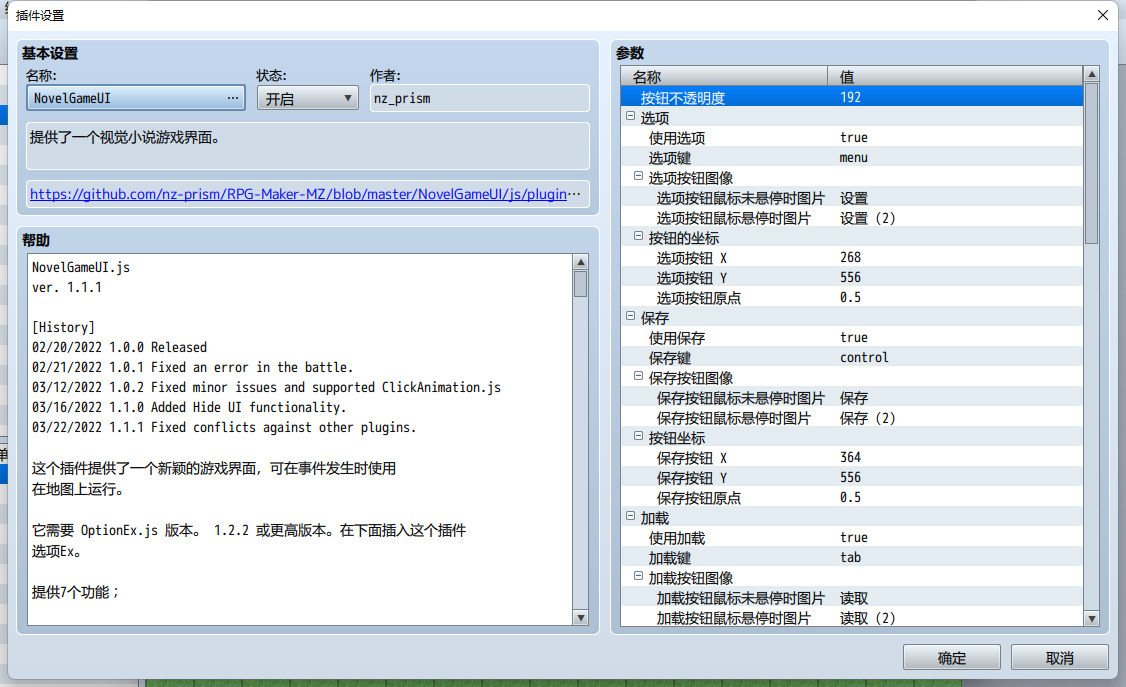
[fold=NovelGameUI.js]//=============================================================================
// RPG Maker MZ - NovelGameUI
//=============================================================================
/*:
* @target MZ
* @plugindesc 提供了一个视觉小说游戏界面。
* @author nz_prism
* @url https://github.com/nz-prism/RPG- ... gins/NovelGameUI.js
* @base OptionEx
* @orderAfter OptionEx
*
* @help NovelGameUI.js
* ver. 1.1.1
*
* [History]
* 02/20/2022 1.0.0 Released
* 02/21/2022 1.0.1 Fixed an error in the battle.
* 03/12/2022 1.0.2 Fixed minor issues and supported ClickAnimation.js
* 03/16/2022 1.1.0 Added Hide UI functionality.
* 03/22/2022 1.1.1 Fixed conflicts against other plugins.
*
* 这个插件提供了一个新颖的游戏界面,可在事件发生时使用
*在地图上运行。
*
* 它需要 OptionEx.js 版本。 1.2.2 或更高版本。在下面插入这个插件
* 选项Ex。
*
* 提供7个功能;
*
* 1. 选项
* 2. 保存
* 3. 加载
* 4. 日志
* 5. 跳过
* 6.自动
* 7. 隐藏用户界面
*
* 您可以选择游戏使用的功能。例如,你
* 可以设置为只使用Log。
*
* 每个功能对应于屏幕上显示的一个按钮。那些
* 按钮仅在显示消息窗口时出现。通过点击或单击
* 按钮,将调用相应的功能。此外,您还可以
*将键盘的按键和游戏手柄的按钮分配给功能
* 用于通过按下来调用它们。
* 如果启用此插件,玩家可以使用 LT/RT/Menu 按钮(如 Xbox
* 控制器)的游戏手柄,MZ 默认基本禁用。 LT
* 按钮用作 Tab 键,RT 用作控制键,Menu 用作 alt 键。所以,
* 您可以将功能分配给 7 个按钮; X、Y、LB、RB、LT、RT、
* 和 Menu 使用插件参数。
* 注意当显示消息窗口时,玩家通常可以继续消息
* 按确定或取消按钮。但是,如果启用此插件,
* 只能使用 OK 按钮。感谢您的理解!
*
* 通过执行插件命令“禁用控制按钮”,这些按钮
* 会消失。相应的键/按钮也不起作用。
* 通过执行插件命令“启用控制按钮”,按钮将
* 出现,相应的键/按钮将再次起作用。
*
* 您可以为每个按钮设置图片。 2个模式,选择和
* 未选中的按钮,可以设置。
*
*
* 1. 选项
* 将调用选项场景。
*
*
* 2. 保存
* 即使事件正在运行,也会调用保存场景。注意是否保存
* 访问被禁用,保存场景不会被调用,蜂鸣器 SE 将
* 玩过。
*
*
* 3. 加载
* 即使事件正在运行,也会调用加载场景。
*
*
* 4. 日志
* 将调用积压场景。如果设置了插件参数“使用日志”
* true,事件命令“显示文本”和“显示滚动”显示的文本
* 文本”将被存储。日志场景将显示所有存储的文本。此外,通过
* 设置插件参数“添加日志命令”,可以调用日志场景
* 来自菜单,让玩家即使在事件结束后也能看到日志
* 跑步。由于要保存存储的文本,因此即使在之后也可以看到它们
* 加载。使用插件命令“删除日志”删除日志,用于日志
* 不会自动删除。即使日志可以无限存储,
* 建议定期删除以节省保存文件的体积。
*
* 通过使用插件命令“禁用日志记录”,文本将不会被存储
* 此后。通过使用插件命令“启用日志记录”,它可以恢复
*默认行为和文本将再次存储。
*
* 您可以控制正在显示的文本是否会出现在日志场景中
* 通过设置插件参数“排除正在显示的文本”。
*
* 如果没有存储日志,则无法调用日志场景,并会发出蜂鸣器 SE
* 被播放。菜单上的日志命令也被禁用。请注意,如果“排除
* Text Being Shown" 为真,这将在显示第一条消息时发生。
*
*
* 5. 跳过
* 可以跳过某个范围内的事件命令。要使用此功能,您
* 必须设置事件命令“标签”。要为其使用标签,标签名称
* 必须是唯一的数字。首先,设置一个整数名称更大的标签事件
* 以0为起点,如“1”。您可以设置任何事件命令,
* 像 Show Text 一样,在它下面被跳过。在它们下面,将标签事件设置为
* 以整数名称为起点+1的结束pont,如
*“2”。我将起点和终点之间的事件命令称为“标签
*三明治”。由于标签三明治可以被玩家跳过,你不应该
* 设置游戏流程所需的事件命令,例如控制开关。如果
* 一个事件有 2 个标签三明治,您想设置所需的事件命令
* 用于三明治之间的游戏流程;
*
* 标签:1
* 文本:Reid、Actor1(0)、窗口、底部
* :你好!
* 标签:2
* 文本:Priscilla,Actor1(1),Window,Bottom
* :(太重要的消息不能跳过)
* 控制开关:#0001 = ON
* 标签:3
* 文本:Gale、Actor1(2)、Window、Bottom
* :你好,里德,普莉希拉!
* 标签:4
*
* 我将第一个标签三明治称为“A”,第二个称为“B”。终点
*A的*是“2”,B的起点是“3”。事件命令
* A 和 B 之间,文本和控制开关,可以跳过标签
* 名称是连续数字。让他们无法跳过;
*
* 标签:1
* 文本:Reid、Actor1(0)、窗口、底部
* :你好!
* 标签:2
* 文本:Priscilla,Actor1(1),Window,Bottom
* :(一团糟圣人太重要了,不能跳过)
* 控制开关:#0001 = ON
* 标签:4
* 文本:Gale、Actor1(2)、Window、Bottom
* :你好,里德,普莉希拉!
* 标签:5
*
* 在这种情况下,不能跳过命令,因为 A 和 B 不是连续的
* 位数。
*
* 默认情况下,只有在活动内容已经完成的情况下,玩家才能跳过
* 见过。如果终点标签已被标记,则将它们视为“已看到”
* 通过。由于它使用标签名称,因此可以跳过某些事件命令
* 无意中如果有重复的标签名称。我建议你采取
* 已使用标签名称的注意事项不要再次使用它们!
*
* 如果插件参数“Make Master Save File”设置为true(true by
* 默认),它会创建一个新的保存文件“master.rmmzsave”,其中存储通过
* 标签名称。要共享传递的标志,它将加载任何保存槽
* 已加载,或开始新游戏。
*
* 如上所述,玩家只能默认跳过已看到的事件。然而,
* 如果选项“Only Seen Events Skippable”设置为OFF,他们可以跳过
*甚至看不见的事件。通过设置插件参数“Use Only Seen Events
* Skippable" true(默认为true),选项项将添加到
*选项场景。如果您不希望玩家跳过看不见的事件,请将
* 参数 false 以不添加命令。另外,设置插件
* 参数“默认只看到事件可跳过”真(默认为真)。
*
* 如果正在运行的事件命令不可跳过,则“禁用”按钮
* 图片将显示,而“启用”图片将出现,如果它是
* 可跳过。它们在视觉上帮助玩家查看它是否可以跳过。
*
*
* 6.自动
* 如果调用此功能,消息窗口将向前移动
* 自动地。它不会在文本和控件的末尾暂停
* 特点 ”\!”但等待指定的帧。您可以指定框架
* 通过插件参数“暂停帧”。
*
* 如果 Auto 开启,则显示“On”按钮图片,而“Off”图片将显示
* 如果自动关闭,将出现。它们在视觉上帮助玩家查看 auto 是否
* 切换。
*
*
* 7. 隐藏用户界面
* 如果调用此功能,则 UI 组件,例如 windows 或
* 控制按钮,将不可见并且消息停止。如果玩家
* 左/右键单击或按确定/取消按钮,将显示 UI 组件
* 并且消息再次继续。
*
*
*
*
*
*
*
*
*
* This plugin provides a novel-game like interface usable when an event is
* running on a map.
*
* It requires OptionEx.js ver. 1.2.2 or later. Insert this plugin under
* OptionEx.
*
* It provides 7 functionalities;
*
* 1. Options
* 2. Save
* 3. Load
* 4. Log
* 5. Skip
* 6. Auto
* 7. Hide UI
*
* You can select which functionality to use for the game. For example, you
* can set it up to use only Log.
*
* Each functionality corresponds to a button shown on the screen. Those
* buttons appear only when the message window is shown. By tapping or clicking
* the button, the corresponding functionality will be invoked. Also, you can
* assign keys of a keyboard and buttons of a gamepad to the functionalities
* to be used to invoke them by pressing.
* If this plugin is enabled, players can use LT/RT/Menu buttons (as in XBox
* controller) of a gamepad, which are basically disabled by MZ default. LT
* button is used as tab key, RT as control key and Menu as alt key. Therefore,
* you can assign the functionalities to the 7 buttons; X, Y, LB, RB, LT, RT,
* and Menu by using the plugin parameters.
* Note when a message window is shown, players can usually proceed the message
* by pressing either OK or Cancel button. However, if this plugin is enabled,
* only OK button can be used for it. Thank you for your understanding!
*
* By executing the plugin command "Disable Control Buttons", those buttons
* will disappear. The corresponding keys/buttons will not work, either.
* By executing the plugin command "Enable Control Buttons", the buttons will
* appear and the corresponding keys/buttons will work again.
*
* You can set pictures to each of the buttons. 2 patterns, selected and
* unselected buttons, can be set.
*
*
* 1. Options
* The option scene will be invoked.
*
*
* 2. Save
* The save scene will be invoked even if an event is running. Note if save
* access is disabled, the save scene won't be called and the buzzer SE will be
* played.
*
*
* 3. Load
* The load scene will be invoked even if an event is running.
*
*
* 4. Log
* A back log scene will be invoked. If the plugin parameter "Use Log" is set
* true, the texts shown by the event commands "Show Text" and "Show Scrolling
* Text" will be stored. The log scene will show all the stored texts. Also, by
* setting the plugin parameter "Add Log Command", the log scene can be invoked
* from the menu, which enables players to see the log even after events finish
* running. Since the stored texts are to be saved, they can be seen even after
* loading. Delete logs by using the plugin command "Delete Logs", for the logs
* are not autmatically deleted. Even though logs can be stored unlimitedly,
* periodical delete is recommended to save save files' volume.
*
* By using the plugin command "Disable Logging", texts will not be stored
* thereafter. By using the plugin command "Enable Logging", it restores the
* default behavior and texts will be stored again.
*
* You can control whether the text being shown will be appear on the log scene
* by setting the plugin parameter "Exclude Text Being Shown".
*
* If no logs are stored, the log scene can't be invoked and a buzzer SE will
* be played. The log command on the menu is also disabled. Note if "Exclude
* Text Being Shown" is true, this will happen when the first message is shown.
*
*
* 5. Skip
* Event commands at a range can be skipped. To use this functionality, you
* have to set an event command "Label". To use labels for it, the label names
* must be unique digits. First, set a label event with an integer name greater
* than 0 as a starting point, such as "1". You can set any event commands,
* like Show Text, to be skipped under it. Under them, set a label event as an
* ending pont with a name of an integer for the starting point + 1, such as
* "2". I call the event commands between the starting and ending points "Label
* Sandwich". Since label sandwiches can be skipped by players, you shouldn't
* set event commands required for the game flow, such as Control Switches. If
* an event has 2 label sandwiches and you want to set event commands required
* for the game flow between the sandwiches;
*
* Label:1
* Text:Reid, Actor1(0), Window, Bottom
* :Hello!
* Label:2
* Text:Priscilla, Actor1(1), Window, Bottom
* :(A message too important to be skipped)
* Control Switches:#0001 = ON
* Label:3
* Text:Gale, Actor1(2), Window, Bottom
* :Hello, Reid, Priscilla!
* Label:4
*
* I call the first label sandwich "A" and the second "B". The ending point
* of A is "2" and the starting point of B is "3". The event commands
* between A and B, Text and Control Switches, can be skkiped since the label
* names are sequential digits. To make them unskippable;
*
* Label:1
* Text:Reid, Actor1(0), Window, Bottom
* :Hello!
* Label:2
* Text:Priscilla, Actor1(1), Window, Bottom
* :(A message too important to be skipped)
* Control Switches:#0001 = ON
* Label:4
* Text:Gale, Actor1(2), Window, Bottom
* :Hello, Reid, Priscilla!
* Label:5
*
* In this case, the commands can't be skipped since A and B aren't sequential
* digits.
*
* By default, players can skip only if the event contents have already been
* seen. It regards them as "already seen" if the ending point label has been
* passed. Since it uses the label names, some event commands can be skipped
* unintentionally if there are duplicate label names. I recommend you to take
* notes for used label names not to use them again!
*
* If the plugin parameter "Make Master Save File" is set true (true by
* default), it creates a new save file "master.rmmzsave", which stores passed
* label names. To share passed flags, it will be loaded whichever save slot is
* loaded, or a new game is started.
*
* As mentioned above, players can skip only seen events by deafult. However,
* if the option item "Only Seen Events Skippable" is set OFF, they can skip
* even unseen events. By setting the plugin parameter "Use Only Seen Events
* Skippable" true (true by default), the option item will be added to the
* option scene. If you wouldn't like players to skip unseen events, set the
* parameter false in order not to add the command. Plus, set the plugin
* parameter "Default Only Seen Events Skippable" true (true by default).
*
* If an event command being running is unskippable, the "Disabled" button
* pictures will be shown while "Enabled" picture will appear if it's
* skippable. They visually help players to see if it's skippable.
*
*
* 6. Auto
* If this functionality is invoked, the message window will move forward
* automatically. It will not pause at the end of text and the control
* character "\!" but wait for a specified frames. You can specify the frames
* by the plugin parameter "Pause Frames".
*
* If Auto is on, the "On" button picture will be shown while "Off" picture
* will appear if auto is off. They visually help players to see if auto is
* toggled.
*
*
* 7. Hide UI
* If this functionality is invoked, the UI components, such as windows or
* control buttons, will be invisible and the message stops. If players
* left/right-click or press OK/Cancel button, the UI components will be shown
* and the message continues again.
*
*
* This plugin is released under MIT license.
* https://opensource.org/licenses/mit-license.php
*
*
* @param buttonOpacity
* @text 按钮不透明度
* @desc 每个控制按钮的不透明度。
* @type number
* @default 192
*
* @param options
* @text 选项
* @desc 选项的设置。
*
* @param useOptions
* @text 使用选项
* @desc 如果为真,则可以使用选项功能。
* @parent options
* @type boolean
* @default true
*
* @param optionsKey
* @text 选项键
* @desc 分配给选项的键盘按键和游戏手柄按钮。
* @parent options
* @default menu
* @type select
* @option shift键/X 按钮
* @value shift
* @option X键 / Y 按钮
* @value menu
* @option pageup键/LB 按钮
* @value pageup
* @option pagedown按键 / RB 按钮
* @value pagedown
* @option tab键/LT 按钮
* @value tab
* @option control按键/RT按钮
* @value control
* @option alt键/菜单按钮
* @value alt
*
* @param optionsButtonImages
* @text 选项按钮图像
* @desc 选项按钮的图像设置。
* @parent options
*
* @param optionsButtonUnselectedImageName
* @text 选项按钮鼠标未悬停时图片
* @desc 选项按钮鼠标未悬停时图片
* @parent optionsButtonImages
* @type file
* @dir img/system
*
* @param optionsButtonSelectedImageName
* @text 选项按钮鼠标悬停时图片
* @desc 选项按钮鼠标悬停时图片
* @parent optionsButtonImages
* @type file
* @dir img/system
*
* @param optionsButtonCoordinates
* @text 按钮的坐标
* @desc 选项按钮的坐标设置。
* @parent options
*
* @param optionsButtonX
* @text 选项按钮 X
* @desc 选项按钮的 X 坐标。
* @parent optionsButtonCoordinates
* @type number
* @default 268
*
* @param optionsButtonY
* @text 选项按钮 Y
* @desc 选项按钮的 Y 坐标。
* @parent optionsButtonCoordinates
* @type number
* @default 556
*
* @param optionsButtonOrigin
* @text 选项按钮原点
* @desc 选项按钮的原点。
* @parent optionsButtonCoordinates
* @default 0.5
* @type select
* @option 左上
* @value 0
* @option 中央
* @value 0.5
*
*
*
*
*
*
* @param save
* @text 保存
* @desc 保存的设置。
*
* @param useSave
* @text 使用保存
* @desc 如果为 true,则可以使用 Save 功能。
* @parent save
* @type boolean
* @default true
*
* @param saveKey
* @text 保存键
* @desc 分配给保存的键盘按键和游戏手柄按钮。
* @parent save
* @default control
* @type select
* @option shift键/X 按钮
* @value shift
* @option X键 / Y 按钮
* @value menu
* @option pageup键/LB 按钮
* @value pageup
* @option pagedown按键 / RB 按钮
* @value pagedown
* @option tab键/LT 按钮
* @value tab
* @option control按键/RT按钮
* @value control
* @option alt键/菜单按钮
* @value alt
*
* @param saveButtonImages
* @text 保存按钮图像
* @desc 保存按钮的图像设置。
* @parent save
*
* @param saveButtonUnselectedImageName
* @text 保存按钮鼠标未悬停时图片
* @desc 保存按钮鼠标未悬停时图片
* @parent saveButtonImages
* @type file
* @dir img/system
*
* @param saveButtonSelectedImageName
* @text 保存按钮鼠标悬停时图片
* @desc 保存按钮鼠标悬停时图片
* @parent saveButtonImages
* @type file
* @dir img/system
*
* @param saveButtonCoordinates
* @text 按钮坐标
* @desc 保存按钮的坐标设置。
* @parent save
*
* @param saveButtonX
* @text 保存按钮 X
* @desc 保存按钮的 X 坐标。
* @parent saveButtonCoordinates
* @type number
* @default 364
*
* @param saveButtonY
* @text 保存按钮 Y
* @desc 保存按钮的 Y 坐标。
* @parent saveButtonCoordinates
* @type number
* @default 556
*
* @param saveButtonOrigin
* @text 保存按钮原点
* @desc 保存按钮的原点。
* @parent saveButtonCoordinates
* @default 0.5
* @type select
* @option 左上
* @value 0
* @option 中央
* @value 0.5
*
* @param load
* @text 加载
* @desc 加载的设置。
*
* @param useLoad
* @text 使用加载
* @desc 如果为 true,则可以使用加载功能。
* @parent load
* @type boolean
* @default true
*
* @param loadKey
* @text 加载键
* @desc 分配给加载的键盘按键和游戏手柄按钮。
* @parent load
* @default tab
* @type select
* @option shift键/X 按钮
* @value shift
* @option X键 / Y 按钮
* @value menu
* @option pageup键/LB 按钮
* @value pageup
* @option pagedown按键 / RB 按钮
* @value pagedown
* @option tab键/LT 按钮
* @value tab
* @option control按键/RT按钮
* @value control
* @option alt键/菜单按钮
* @value alt
*
* @param loadButtonImages
* @text 加载按钮图像
* @desc 加载按钮的图像设置。
* @parent load
*
* @param loadButtonUnselectedImageName
* @text 加载按钮鼠标未悬停时图片
* @desc 加载按钮鼠标未悬停时图片
* @parent loadButtonImages
* @type file
* @dir img/system
*
* @param loadButtonSelectedImageName
* @text 加载按钮鼠标悬停时图片
* @desc 加载按钮鼠标悬停时图片
* @parent loadButtonImages
* @type file
* @dir img/system
*
* @param loadButtonCoordinates
* @text 加载按钮坐标
* @desc 加载按钮的坐标设置。
* @parent load
*
* @param loadButtonX
* @text 加载按钮 X
* @desc 加载按钮的 X 坐标。
* @parent loadButtonCoordinates
* @type number
* @default 460
*
* @param loadButtonY
* @text 加载按钮 Y
* @desc 加载按钮的 Y 坐标。
* @parent loadButtonCoordinates
* @type number
* @default 556
*
* @param loadButtonOrigin
* @text 加载按钮原点
* @desc 加载按钮的原点。
* @parent loadButtonCoordinates
* @default 0.5
* @type select
* @option 左上
* @value 0
* @option 中央
* @value 0.5
*
* @param log
* @text 日志
* @desc 日志的设置。
*
* @param useLog
* @text 使用日志
* @desc 如果为真,则可以使用日志功能。
* @parent log
* @type boolean
* @default true
*
* @param logKey
* @text 日志键
* @desc 分配给 Log 的键盘按键和游戏手柄按钮。
* @parent log
* @default pageup
* @type select
* @option shift键/X 按钮
* @value shift
* @option X键 / Y 按钮
* @value menu
* @option pageup键/LB 按钮
* @value pageup
* @option pagedown按键 / RB 按钮
* @value pagedown
* @option tab键/LT 按钮
* @value tab
* @option control按键/RT按钮
* @value control
* @option alt键/菜单按钮
* @value alt
*
* @param excludeCurrentMessage
* @text 排除显示的文本
* @desc 如果为 true,所显示的文本将不会添加到日志场景中。
* @parent log
* @type boolean
* @default true
*
* @param logSpeakerNameHeader
* @text 发言人姓名标题字符串
* @desc 在扬声器名称之前添加的字符串可用于更改字体的大小/颜色。
* @parent log
* @type string
* @default \C[14]\FS[20]
*
* @param logMessagePads
* @text 文本缩进空格
* @desc 在每个 lne 之前添加的空格数。 如果扬声器名称为空,则不会添加任何内容。
* @parent log
* @type number
* @default 2
* @min 0
*
* @param addLogCommand
* @text 添加日志命令
* @desc 将日志命令添加到菜单。
* @parent log
* @type boolean
* @default true
*
* @param logCommandName
* @text 日志命令名称
* @desc 调用 Log 场景的命令的名称。
* @parent addLogCommand
* @type string
* @default Back Log
*
* @param logButtonImages
* @text 日志按钮图像
* @desc 日志按钮的设置。
* @parent log
*
* @param logButtonUnselectedImageName
* @text 日志按钮鼠标未悬停时图片
* @desc 未选择的日志按钮的图像。
* @parent logButtonImages
* @type file
* @dir img/system
*
* @param logButtonSelectedImageName
* @text 日志按钮鼠标悬停时图片
* @desc 所选日志按钮的图像。
* @parent logButtonImages
* @type file
* @dir img/system
*
* @param logButtonCoordinates
* @text 日志按钮坐标
* @desc 日志按钮的坐标设置。
* @parent log
*
* @param logButtonX
* @text 日志按钮 X
* @desc 日志按钮的 X 坐标。
* @parent logButtonCoordinates
* @type number
* @default 556
*
* @param logButtonY
* @text 日志按钮 Y
* @desc 日志按钮的 Y 坐标。
* @parent logButtonCoordinates
* @type number
* @default 556
*
* @param logButtonOrigin
* @text 日志按钮原点
* @desc 日志按钮的原点。
* @parent logButtonCoordinates
* @default 0.5
* @type select
* @option 左上
* @value 0
* @option 中央
* @value 0.5
*
* @param skip
* @text 跳过
* @desc 跳过的设置。
*
* @param useSkip
* @text 使用跳过
* @desc 如果为真,则可以使用跳过功能。
* @parent skip
* @type boolean
* @default true
*
* @param skipKey
* @text 跳过键
* @desc 分配给 Skip 的键盘按键和游戏手柄按钮。
* @parent skip
* @default pagedown
* @type select
* @option shift键/X 按钮
* @value shift
* @option X键 / Y 按钮
* @value menu
* @option pageup键/LB 按钮
* @value pageup
* @option pagedown按键 / RB 按钮
* @value pagedown
* @option tab键/LT 按钮
* @value tab
* @option control按键/RT按钮
* @value control
* @option alt键/菜单按钮
* @value alt
*
* @param makeMasterInfo
* @text 制作主保存文件
* @desc 创建一个主保存文件以共享看到的事件信息。
* @parent skip
* @default true
* @type boolean
*
* @param skipButtonImages
* @text 跳过按钮图像
* @desc 跳过按钮的图像设置。
* @parent skip
*
* @param skipButtonUnselectedDisabledImageName
* @text 跳过(OFF)鼠标未悬停时图片
* @desc 跳过(OFF)鼠标未悬停时图片
* @parent skipButtonImages
* @type file
* @dir img/system
*
* @param skipButtonSelectedDisabledImageName
* @text 跳过(OFF)鼠标悬停时图片
* @desc 跳过(OFF)鼠标悬停时图片
* @parent skipButtonImages
* @type file
* @dir img/system
*
* @param skipButtonUnselectedEnabledImageName
* @text 跳过按钮(ON)鼠标未悬停时图片
* @desc 跳过按钮(ON)鼠标未悬停时图片
* @parent skipButtonImages
* @type file
* @dir img/system
*
* @param skipButtonSelectedEnabledImageName
* @text 跳过(ON)鼠标悬停时图片
* @desc 跳过(ON)鼠标悬停时图片
* @parent skipButtonImages
* @type file
* @dir img/system
*
* @param skipButtonCoordinates
* @text 跳过按钮坐标
* @desc 跳过按钮的坐标设置。
* @parent skip
*
* @param skipButtonX
* @text 跳过按钮 X
* @desc 跳过按钮的 X 坐标。
* @parent skipButtonCoordinates
* @type number
* @default 642
*
* @param skipButtonY
* @text 跳过按钮 Y
* @desc 跳过按钮的 Y 坐标。
* @parent skipButtonCoordinates
* @type number
* @default 556
*
* @param skipButtonOrigin
* @text 跳过按钮原点
* @desc 跳过按钮的原点。
* @parent skipButtonCoordinates
* @default 0.5
* @type select
* @option 左上
* @value 0
* @option 中央
* @value 0.5
*
* @param skipOptions
* @text 跳过选项
* @desc 跳过选项的设置。
* @parent skip
*
* @param useLimitSkip
* @text 仅使用可跳过的可见事件
* @desc 如果为 true,则只会将可跳过的事件选项添加到选项场景中。
* @parent skipOptions
* @default true
* @type boolean
*
* @param limitSkipName
* @text 只看到事件可跳过的名称
* @desc “只看到可跳过的事件”选项的名称。
* @default 看过的事件可跳过
* @parent skipOptions
* @type string
*
* @param defaultLimitSkip
* @text 默认只看到事件可跳过
* @desc “只看到可跳过的事件”选项的默认值。
* @parent skipOptions
* @default true
* @type boolean
*
* @param auto
* @text 自动
* @desc Auto 的设置。
*
* @param useAuto
* @text 使用自动
* @desc 如果为 true,则可以使用 自动 功能。
* @parent auto
* @type boolean
* @default true
*
* @param autoKey
* @text 自动键
* @desc 分配给自动的键盘按键和游戏手柄按钮。
* @parent auto
* @default shift
* @type select
* @option shift键/X 按钮
* @value shift
* @option X键 / Y 按钮
* @value menu
* @option pageup键/LB 按钮
* @value pageup
* @option pagedown按键 / RB 按钮
* @value pagedown
* @option tab键/LT 按钮
* @value tab
* @option control按键/RT按钮
* @value control
* @option alt键/菜单按钮
* @value alt
*
* @param autoPauseFrames
* @text 暂停帧
* @desc 消息窗口要等待的帧。
* @parent auto
* @type number
* @default 30
*
* @param autoButtonImages
* @text 自动按钮图像
* @desc 自动按钮的图像设置。
* @parent auto
*
* @param autoButtonUnselectedOffImageName
* @text 自动(OFF)鼠标未悬停时图片
* @desc 自动(OFF)鼠标未悬停时图片
* @parent autoButtonImages
* @type file
* @dir img/system
*
* @param autoButtonSelectedOffImageName
* @text 自动(OFF)鼠标悬停时图片
* @desc 自动(OFF)鼠标悬停时图片
* @parent autoButtonImages
* @type file
* @dir img/system
*
* @param autoButtonUnselectedOnImageName
* @text 自动(ON)鼠标未悬停时图片
* @desc 自动(ON)鼠标未悬停时图片
* @parent autoButtonImages
* @type file
* @dir img/system
*
* @param autoButtonSelectedOnImageName
* @text 自动(ON)鼠标悬停时图片
* @desc 自动(ON)鼠标悬停时图片
* @parent autoButtonImages
* @type file
* @dir img/system
*
* @param autoButtonCoordinates
* @text 自动按钮坐标
* @desc 自动按钮的坐标设置。
* @parent auto
*
* @param autoButtonX
* @text 自动按钮 X
* @desc 自动按钮的 X 坐标。
* @parent autoButtonCoordinates
* @type number
* @default 748
*
* @param autoButtonY
* @text 自动按钮 Y
* @desc 自动按钮的 Y 坐标。
* @parent autoButtonCoordinates
* @type number
* @default 556
*
* @param autoButtonOrigin
* @text 自动按钮原点
* @desc 自动按钮的原点。
* @parent autoButtonCoordinates
* @default 0.5
* @type select
* @option 左上
* @value 0
* @option 中央
* @value 0.5
*
* @param hideUi
* @text 隐藏 UI
* @desc 隐藏 UI 的设置。
*
* @param useHideUi
* @text 使用隐藏用户界面
* @desc 如果为 true,则可以使用隐藏 UI 功能。
* @parent hideUi
* @type boolean
* @default true
*
* @param hideUiKey
* @text 隐藏 UI 键
* @desc 分配给隐藏 UI 的键盘按键和游戏手柄按钮。
* @parent hideUi
* @default alt
* @type select
* @option shift键/X 按钮
* @value shift
* @option X键 / Y 按钮
* @value menu
* @option pageup键/LB 按钮
* @value pageup
* @option pagedown按键 / RB 按钮
* @value pagedown
* @option tab键/LT 按钮
* @value tab
* @option control按键/RT按钮
* @value control
* @option alt键/菜单按钮
* @value alt
*
* @param hideUiButtonImages
* @text 按钮图像
* @desc 隐藏 UI 按钮的图像设置。
* @parent hideUi
*
* @param hideUiButtonUnselectedImageName
* @text 隐藏 UI 按钮鼠标未悬停时图片
* @desc 未选中的隐藏 UI 按钮的图像。
* @parent hideUiButtonImages
* @type file
* @dir img/system
*
* @param hideUiButtonSelectedImageName
* @text 隐藏 UI 按钮鼠标悬停时图片
* @desc 所选隐藏 UI 按钮的图像。
* @parent hideUiButtonImages
* @type file
* @dir img/system
*
* @param hideUiButtonCoordinates
* @text 隐藏 UI按钮坐标
* @desc 隐藏 UI 按钮的坐标设置。
* @parent hideUi
*
* @param hideUiButtonX
* @text 隐藏 UI 按钮的 X 坐标。
* @desc 隐藏 UI 按钮的 X 坐标。
* @parent hideUiButtonCoordinates
* @type number
* @default 172
*
* @param hideUiButtonY
* @text 隐藏 UI 按钮的 Y 坐标。
* @desc 隐藏 UI 按钮的 Y 坐标。
* @parent hideUiButtonCoordinates
* @type number
* @default 556
*
* @param hideUiButtonOrigin
* @text 隐藏 UI 按钮原点
* @desc 隐藏 UI 按钮的原点。
* @parent hideUiButtonCoordinates
* @default 0.5
* @type select
* @option 左上
* @value 0
* @option 中央
* @value 0.5
*
* @command enableControlButtons
* @text 启用控制按钮
* @desc 启用每个控制按钮。
*
* @command disableControlButtons
* @text 禁用控制按钮
* @desc 禁用每个控制按钮。
*
* @command enableLogging
* @text 启用日志记录
* @desc 文本将被存储。
*
* @command disableLogging
* @text 禁用日志记录
* @desc 在启用日志记录之前不会存储文本。
*
* @command clearBackLogs
* @text 删除日志
* @desc 删除所有存储的日志。
*
*/
/*:ja
* @target MZ
* @plugindesc ノベルゲーム風インターフェースを提供します。
* @author nz_prism
* @url https://github.com/nz-prism/RPG- ... gins/NovelGameUI.js
* @base OptionEx
* @orderAfter OptionEx
*
* @help NovelGameUI.js
* ver. 1.1.1
*
* [バージョン履歴]
* 2022/02/20 1.0.0 リリース
* 2022/02/21 1.0.1 戦闘に入るとエラーになる問題を修正
* 2022/03/12 1.0.2 微バグの修正およびClickAnimation.jsに対応
* 2022/03/16 1.1.0 UI非表示機能を追加
* 2022/03/22 1.1.1 他のプラグインとの競合対策を強化
*
* このプラグインは、マップでのイベント実行中に使用可能なノベルゲーム風インター
* フェースを提供します。
*
* 本プラグインは「オプション拡張(OptionEx.js)」プラグインのバージョン1.2.2
* (以降)の導入が前提となります。OptionExよりも後に配置してください。
*
* 以下の7種類の機能が利用できます。
*
* 1. オプション
* 2. セーブ
* 3. ロード
* 4. ログ
* 5. スキップ
* 6. オート
* 7. UI非表示
*
* 上記機能はいずれも使用するかどうかを個別に選択できます。例えばログ機能だけを
* 使用する、といったことも可能です。
*
* いずれの機能もそれを呼び出すためのボタンを画面上に表示することができます。こ
* れらのボタンが表示されるのはメッセージイベント表示時のみであるという点にご注
* 意ください。ボタンをタップやクリックすることで、対応する上記機能が実行されま
* す。また、各機能にはキーボードやゲームパッドのキーを割り当てることが可能であ
* り、それらを押下することでも対応機能を実行できます。
* なお本プラグインを導入すると、MZデフォルトでは何も機能が割り当てられていない
* ボタンであるゲームパッドのLT・RT・メニューボタン(XBoxコントローラーにおけ
* る名称)にそれぞれ機能が割り当てられます。LTボタンにはtabキーが、RTボタンに
* はcontrolキーが、メニューボタンにはaltキーが割り当てられます。それらを含め
* X・Y・LB・RB・LT・RT・メニューの7つのボタンにそれぞれ割り当てることが可能で
* す。実際のキー割り当てにはプラグインパラメータを使用します。
* MZデフォルトではメッセージ表示時、決定ボタンだけでなくキャンセルボタンで
* もメッセージ送りができますが、本プラグインを導入するとキャンセルボタンでは
* メッセージ送りができなくなります。あらかじめご了承ください。
*
* プラグインコマンド「制御ボタンの無効化」を使用すると、上記ボタンがすべて表示
* されなくなります。対応するキー/ボタンを押下してもその機能は実行されません。
* プラグインコマンド「制御ボタンの有効化」を使用することで再びボタンが表示さ
* れ、対応キーに反応するようになります。
*
* 各ボタンには専用の画像を設定することができます。選択(マウスオーバーされてい
* る)時と未選択時とで別々の画像を設定することができます。
*
*
* 1. オプション
* オプション画面を呼び出すことができます。
*
*
* 2. セーブ
* セーブ画面を呼び出すことができます。イベントの実行中であってもセーブ可能で
* す。なおイベントによってセーブが禁止されている場合、セーブ不可になります。
* その状態でこのボタンを押すとブザー音が演奏されます。
*
*
* 3. ロード
* ロード画面を呼び出すことができます。イベントの実行中であってもロード可能で
* す。
*
*
* 4. ログ
* バックログ画面を呼び出すことができます。ログを有効にすると「文章の表示」お
* よび「文章のスクロール表示」で表示された文章がすべて保存されるようになりま
* す。バックログ画面では保存された文章を一覧表示できます。また、プラグインパ
* ラメータ「ログコマンドの追加」をオンにすることでバックログ画面をメニューか
* ら呼び出すためのコマンドを追加することが可能です。これにより、イベントが終
* 了してもログを閲覧できます。保存された文章はセーブ対象ですので、ロードすれ
* ば再度表示できます。ログが自動的に消去されることはありませんので、プラグイ
* ンコマンド「ログの消去」を適切なタイミングで実行して消去してください。保存
* できるログの量に制限はありませんが、あまりにも溜まりすぎるとセーブデータ容
* 量が肥大化します。
*
* プラグインコマンド「ログ保存の無効化」を使用すると、以降のイベントにてログ
* が保存されなくなります。プラグインコマンド「ログ保存の有効化」を使用するこ
* とで元に戻り、ログが再び保存されるようになります。
*
* いま表示されているメッセージもログに含めるかどうかは、プラグインパラメータ
* 「表示中メッセージをログから除外」によって設定できます。
*
* ログが一つも保存されていない状態では、ログボタンを押してもログ画面が開かれ
* ず、ブザー音が演奏されます。また、メニューのバックログコマンドもグレーアウ
* トされます。「表示中メッセージをログから除外」がオンの場合、初回メッセージ
* 表示中はこのような状態になるという点にご注意ください。
*
*
* 5. スキップ
* ある一定範囲のイベントコマンドの実行をスキップすることができます。この機能
* を使用するには、イベントにイベントコマンド「ラベル」を設定する必要がありま
* す。ラベルには本来どんな名前でもつけることができますが、この機能を利用する
* ためにはラベル名を1以上の整数を表す、一意の半角数字にする必要があります。
* 設定するには、まずスキップの開始地点となる場所に半角数字の名前を持つラベル
* を設定します(例えば「1」)。その下にスキップ対象となるイベント(文章表示
* など)を任意の数だけ設定します。その下に、スキップ終了地点を表すラベルを配
* 置します。このラベルの名前は、必ず始点ラベル名 +1 にする必要があります
* (上記例では「2」にします)。この始点・終点ラベルに挟まれたイベントコマンド
* 群を「ラベルサンドイッチ」と呼称します。ラベルサンドイッチはプレイヤーによっ
* てスキップされる可能性のあるイベントですので、ゲームの進行に必須のイベント
* (スイッチの操作など)を配置すべきではありません。あるイベントにラベルサンド
* イッチが2回登場し、それらの間にゲーム進行に必須のイベントを配置したいとしま
* す。例えば以下のような内容です。
*
* ラベル:1
* 文章:リード, Actor1(0), ウィンドウ, 下
* :おはよう
* ラベル:2
* 文章:プリシア, Actor1(1), ウィンドウ, 下
* :(重要なのでスキップされたくないセリフ)
* スイッチの操作:#0001 = ON
* ラベル:3
* 文章:ゲイル, Actor1(2), ウィンドウ, 下
* :おはよう、リード、プリシア
* ラベル:4
*
* 最初のラベルサンドイッチをA、次のサンドイッチをBとします。Aの終点であるラベ
* ル名は「2」ですが、Bの始点は「3」です。これらの名前は連番なので、間にある文
* 章表示とスイッチ操作はスキップされてしまう可能性があります。これを防ぐために
* は、ラベルサンドイッチBのラベル名を以下のようにしてください。
*
* ラベル:1
* 文章:リード, Actor1(0), ウィンドウ, 下
* :おはよう
* ラベル:2
* 文章:プリシア, Actor1(1), ウィンドウ, 下
* :(重要なのでスキップされたくないセリフ)
* スイッチの操作:#0001 = ON
* ラベル:4
* 文章:ゲイル, Actor1(2), ウィンドウ, 下
* :おはよう、リード、プリシア
* ラベル:5
*
* この場合、AとBは連番でないのでそれらの間のイベントコマンドはスキップ不可にす
* ることができます。
*
* デフォルトではスキップ可能なのは既読イベントのみです。あるラベルサンドイッチ
* が「既読」であるかどうかは、そのサンドイッチの終点ラベルを一度でも通過したこ
* とがあるかどうかによって判定されます。通過済みラベル名はセーブデータに保存さ
* れます。通過済みであるかどうかはラベル名によって判定されるので、ラベル名が重
* 複すると未読なのに既読とみなされてしまいます。そのため一度使用したラベル名は
* メモを取るなどして、ゲーム全体を通して2回以上使うことがないようにしてくださ
* い。
*
* プラグインパラメータ「マスターセーブファイルの作成」をオンにすると(デフォル
* トはオンです)、既読フラグを格納する「master.rmmzsave」というセーブファイ
* ルが新たに作成されるようになります。これはどのセーブスロットをロードしたとし
* ても、あるいはニューゲームから始めたとしても、ゲーム開始時に読み込まれます。
* つまり既読フラグをセーブデータをまたいで持ち越すことが可能になります。
*
* 上記のように通常は既読イベントしかスキップできませんが、「既読のみスキップ可
* 能」というオプションをオフにすると未読イベントもスキップできるようになりま
* す。このオプションはプラグインパラメータ「既読のみスキップ可能の使用」をオン
* にする(デフォルトはオンです)ことでオプション画面に追加されます。プレイヤー
* に未読イベントをスキップさせたくない場合、このパラメータをオフにしてくださ
* い。またプラグインパラメータ「デフォルト既読のみスキップ可能」をオンにしてく
* ださい(デフォルトはオンです)。このように設定することでゲーム中に設定が変更
* されなくなり、既読しかスキップできない状態に固定できます。
*
* いま実行されているイベントが未読であるなどによりスキップできない場合、ボタン
* 画像が「スキップ不可」として設定したものになります。スキップ可能である場合は
* 「スキップ可」として設定した画像が表示されます。これにより、スキップ可能かど
* うかを視覚的に表現できます。
*
*
* 6. オート
* メッセージ送りが自動的に行われるようになります。メッセージの最後や制御文字
* 「\!」による入力待ちが行われなくなり、代わりにウェイトします。ウェイトする時
* 間はプラグインパラメータ「ポーズフレーム数」により指定できます。
*
* オートがオンになっている場合、「オン」として設定した画像が表示されます。オフ
* の場合は「オフ」として設定した画像が表示されます。これにより、オートのオンオ
* フを視覚的に表現できます。
*
*
* 7. UI非表示
* ウィンドウや制御ボタンといったUI要素が非表示になり、メッセージは一時停止しま
* す。タップや左/右クリック、決定ボタンやキャンセルボタンの押下により元に戻り
* ます。
*
*
* このプラグインはMITライセンスにてリリースされています。
* https://opensource.org/licenses/mit-license.php
*
*
* @param buttonOpacity
* @text ボタン不透明度
* @desc 各制御ボタンの不透明度です。
* @type number
* @default 192
*
* @param options
* @text オプション
* @desc オプションに関する設定です。
*
* @param useOptions
* @text オプション有効化
* @desc オンにするとオプションが使用可能になります。
* @parent options
* @type boolean
* @default true
*
* @param optionsKey
* @text オプションキー
* @desc オプションに割り当てるキーボード/ゲームパッドのキー/ボタンです。
* @parent options
* @default menu
* @type select
* @option shift键/X 按钮
* @value shift
* @option X键 / Y 按钮
* @value menu
* @option pageup键/LB 按钮
* @value pageup
* @option pagedown按键 / RB 按钮
* @value pagedown
* @option tab键/LT 按钮
* @value tab
* @option control按键/RT按钮
* @value control
* @option alt键/菜单按钮
* @value alt
*
* @param optionsButtonImages
* @text ボタン画像
* @desc オプションボタンの画像に関する設定です。
* @parent options
*
* @param optionsButtonUnselectedImageName
* @text オプションボタン未選択画像
* @desc 未選択状態のオプションボタンの画像です。
* @parent optionsButtonImages
* @type file
* @dir img/system
*
* @param optionsButtonSelectedImageName
* @text オプションボタン選択画像
* @desc 選択状態のオプションボタンの画像です。
* @parent optionsButtonImages
* @type file
* @dir img/system
*
* @param optionsButtonCoordinates
* @text ボタン座標
* @desc オプションボタンの座標に関する設定です。
* @parent options
*
* @param optionsButtonX
* @text オプションボタンX座標
* @desc オプションボタンのX座標です。
* @parent optionsButtonCoordinates
* @type number
* @default 268
*
* @param optionsButtonY
* @text オプションボタンY座標
* @desc オプションボタンのY座標です。
* @parent optionsButtonCoordinates
* @type number
* @default 556
*
* @param optionsButtonOrigin
* @text オプションボタン原点
* @desc オプションボタンの原点です。
* @parent optionsButtonCoordinates
* @default 0.5
* @type select
* @option 左上
* @value 0
* @option 中央
* @value 0.5
*
* @param save
* @text セーブ
* @desc セーブに関する設定です。
*
* @param useSave
* @text セーブ有効化
* @desc オンにするとセーブが使用可能になります。
* @parent save
* @type boolean
* @default true
*
* @param saveKey
* @text セーブキー
* @desc セーブに割り当てるキーボード/ゲームパッドのキー/ボタンです。
* @parent save
* @default control
* @type select
* @option shiftキー/Xボタン
* @value shift
* @option Xキー/Yボタン
* @value menu
* @option pageupキー/LBボタン
* @value pageup
* @option pagedownキー/RBボタン
* @value pagedown
* @option tabキー/LTボタン
* @value tab
* @option controlキー/RTボタン
* @value control
* @option altキー/メニューボタン
* @value alt
*
* @param saveButtonImages
* @text ボタン画像
* @desc セーブボタンの画像に関する設定です。
* @parent save
*
* @param saveButtonUnselectedImageName
* @text セーブボタン未選択画像
* @desc 未選択状態のセーブボタンの画像です。
* @parent saveButtonImages
* @type file
* @dir img/system
*
* @param saveButtonSelectedImageName
* @text セーブボタン選択画像
* @desc 選択状態のセーブボタンの画像です。
* @parent saveButtonImages
* @type file
* @dir img/system
*
* @param saveButtonCoordinates
* @text ボタン座標
* @desc セーブボタンの座標に関する設定です。
* @parent save
*
* @param saveButtonX
* @text セーブボタンX座標
* @desc セーブボタンのX座標です。
* @parent saveButtonCoordinates
* @type number
* @default 364
*
* @param saveButtonY
* @text セーブボタンY座標
* @desc セーブボタンのY座標です。
* @parent saveButtonCoordinates
* @type number
* @default 556
*
* @param saveButtonOrigin
* @text セーブボタン原点
* @desc セーブボタンの原点です。
* @parent saveButtonCoordinates
* @default 0.5
* @type select
* @option 左上
* @value 0
* @option 中央
* @value 0.5
*
* @param load
* @text ロード
* @desc ロードに関する設定です。
*
* @param useLoad
* @text ロード有効化
* @desc オンにするとロードが使用可能になります。
* @parent load
* @type boolean
* @default true
*
* @param loadKey
* @text ロードキー
* @desc ロードに割り当てるキーボード/ゲームパッドのキー/ボタンです。
* @parent load
* @default tab
* @type select
* @option shiftキー/Xボタン
* @value shift
* @option Xキー/Yボタン
* @value menu
* @option pageupキー/LBボタン
* @value pageup
* @option pagedownキー/RBボタン
* @value pagedown
* @option tabキー/LTボタン
* @value tab
* @option controlキー/RTボタン
* @value control
* @option altキー/メニューボタン
* @value alt
*
* @param loadButtonImages
* @text ボタン画像
* @desc ロードボタンの画像に関する設定です。
* @parent load
*
* @param loadButtonUnselectedImageName
* @text ロードボタン未選択画像
* @desc 未選択状態のロードボタンの画像です。
* @parent loadButtonImages
* @type file
* @dir img/system
*
* @param loadButtonSelectedImageName
* @text ロードボタン選択画像
* @desc 選択状態のロードボタンの画像です。
* @parent loadButtonImages
* @type file
* @dir img/system
*
* @param loadButtonCoordinates
* @text ボタン座標
* @desc ロードボタンの座標に関する設定です。
* @parent load
*
* @param loadButtonX
* @text ロードボタンX座標
* @desc ロードボタンのX座標です。
* @parent loadButtonCoordinates
* @type number
* @default 460
*
* @param loadButtonY
* @text ロードボタンY座標
* @desc ロードボタンのY座標です。
* @parent loadButtonCoordinates
* @type number
* @default 556
*
* @param loadButtonOrigin
* @text ロードボタン原点
* @desc ロードボタンの原点です。
* @parent loadButtonCoordinates
* @default 0.5
* @type select
* @option 左上
* @value 0
* @option 中央
* @value 0.5
*
* @param log
* @text ログ
* @desc ログに関する設定です。
*
* @param useLog
* @text ログ有効化
* @desc オンにするとログが使用可能になります。
* @parent log
* @type boolean
* @default true
*
* @param logKey
* @text ログキー
* @desc ログに割り当てるキーボード/ゲームパッドのキー/ボタンです。
* @parent log
* @default pageup
* @type select
* @option shiftキー/Xボタン
* @value shift
* @option Xキー/Yボタン
* @value menu
* @option pageupキー/LBボタン
* @value pageup
* @option pagedownキー/RBボタン
* @value pagedown
* @option tabキー/LTボタン
* @value tab
* @option controlキー/RTボタン
* @value control
* @option altキー/メニューボタン
* @value alt
*
* @param excludeCurrentMessage
* @text 表示中メッセージをログから除外
* @desc 現在表示されているメッセージをログから除外します。
* @parent log
* @type boolean
* @default true
*
* @param logSpeakerNameHeader
* @text メッセージ話者名先頭付加文字列
* @desc フォントの色やサイズの変更などに利用する、メッセージの話者名の先頭に付加する文字列です。
* @parent log
* @type string
* @default \C[14]\FS[20]
*
* @param logMessagePads
* @text メッセージ本文行頭スペース数
* @desc 字下げのためにメッセージ本文の各行頭に付加する半角スペースの数です。話者名が空欄の場合、付加されません。
* @parent log
* @type number
* @default 2
* @min 0
*
* @param addLogCommand
* @text ログコマンドの追加
* @desc メニュー画面にログ閲覧用コマンドを追加します。
* @parent log
* @type boolean
* @default true
*
* @param logCommandName
* @text ログコマンド名
* @desc ログ閲覧用コマンドの表示名です。
* @parent addLogCommand
* @type string
* @default バックログ
*
* @param logButtonImages
* @text ボタン画像
* @desc ログボタンの画像に関する設定です。
* @parent log
*
* @param logButtonUnselectedImageName
* @text ログボタン未選択画像
* @desc 未選択状態のログボタンの画像です。
* @parent logButtonImages
* @type file
* @dir img/system
*
* @param logButtonSelectedImageName
* @text ログボタン選択画像
* @desc 選択状態のログボタンの画像です。
* @parent logButtonImages
* @type file
* @dir img/system
*
* @param logButtonCoordinates
* @text ボタン座標
* @desc ログボタンの座標に関する設定です。
* @parent log
*
* @param logButtonX
* @text ログボタンX座標
* @desc ログボタンのX座標です。
* @parent logButtonCoordinates
* @type number
* @default 556
*
* @param logButtonY
* @text ログボタンY座標
* @desc ログボタンのY座標です。
* @parent logButtonCoordinates
* @type number
* @default 556
*
* @param logButtonOrigin
* @text ログボタン原点
* @desc ログボタンの原点です。
* @parent logButtonCoordinates
* @default 0.5
* @type select
* @option 左上
* @value 0
* @option 中央
* @value 0.5
*
* @param skip
* @text スキップ
* @desc スキップに関する設定です。
*
* @param useSkip
* @text スキップ有効化
* @desc オンにするとスキップが使用可能になります。
* @parent skip
* @type boolean
* @default true
*
* @param skipKey
* @text スキップキー
* @desc スキップに割り当てるキーボード/ゲームパッドのキー/ボタンです。
* @parent skip
* @default pagedown
* @type select
* @option shiftキー/Xボタン
* @value shift
* @option Xキー/Yボタン
* @value menu
* @option pageupキー/LBボタン
* @value pageup
* @option pagedownキー/RBボタン
* @value pagedown
* @option tabキー/LTボタン
* @value tab
* @option controlキー/RTボタン
* @value control
* @option altキー/メニューボタン
* @value alt
*
* @param makeMasterInfo
* @text マスターセーブファイルの作成
* @desc ニューゲームにも既読情報を反映するための、既読情報が含まれるマスターセーブファイルを作成します。
* @parent skip
* @default true
* @type boolean
*
* @param skipButtonImages
* @text ボタン画像
* @desc スキップボタンの画像に関する設定です。
* @parent skip
*
* @param skipButtonUnselectedDisabledImageName
* @text スキップボタン(スキップ不可)未選択画像
* @desc 未選択かつスキップ不可状態のスキップボタンの画像です。
* @parent skipButtonImages
* @type file
* @dir img/system
*
* @param skipButtonSelectedDisabledImageName
* @text スキップボタン(スキップ不可)選択画像
* @desc 選択かつスキップ不可状態のスキップボタンの画像です。
* @parent skipButtonImages
* @type file
* @dir img/system
*
* @param skipButtonUnselectedEnabledImageName
* @text スキップボタン(スキップ可)未選択画像
* @desc 未選択かつスキップ可能状態のスキップボタンの画像です。
* @parent skipButtonImages
* @type file
* @dir img/system
*
* @param skipButtonSelectedEnabledImageName
* @text スキップボタン(スキップ可)選択画像
* @desc 選択かつスキップ可能状態のスキップボタンの画像です。
* @parent skipButtonImages
* @type file
* @dir img/system
*
* @param skipButtonCoordinates
* @text ボタン座標
* @desc スキップボタンの座標に関する設定です。
* @parent skip
*
* @param skipButtonX
* @text スキップボタンX座標
* @desc スキップボタンのX座標です。
* @parent skipButtonCoordinates
* @type number
* @default 642
*
* @param skipButtonY
* @text スキップボタンY座標
* @desc スキップボタンのY座標です。
* @parent skipButtonCoordinates
* @type number
* @default 556
*
* @param skipButtonOrigin
* @text スキップボタン原点
* @desc スキップボタンの原点です。
* @parent skipButtonCoordinates
* @default 0.5
* @type select
* @option 左上
* @value 0
* @option 中央
* @value 0.5
*
* @param skipOptions
* @text オプション
* @desc スキップに関するオプション画面の設定です。
* @parent skip
*
* @param useLimitSkip
* @text 既読のみスキップ可能の使用
* @desc 既読のみスキップ可能オプションを使用するかどうかを設定してください。
* @parent skipOptions
* @default true
* @type boolean
*
* @param limitSkipName
* @text 既読のみスキップ可能表示名
* @desc 既読のみスキップ可能の表示名を設定してください。
* @default 既読のみスキップ可能
* @parent skipOptions
* @type string
*
* @param defaultLimitSkip
* @text デフォルト既読のみスキップ可能
* @desc 既読のみスキップ可能のデフォルト値です。
* @parent skipOptions
* @default true
* @type boolean
*
* @param auto
* @text オート
* @desc オートに関する設定です。
*
* @param useAuto
* @text オート有効化
* @desc オンにするとオートが使用可能になります。
* @parent auto
* @type boolean
* @default true
*
* @param autoKey
* @text オートキー
* @desc オートに割り当てるキーボード/ゲームパッドのキー/ボタンです。
* @parent auto
* @default shift
* @type select
* @option shiftキー/Xボタン
* @value shift
* @option Xキー/Yボタン
* @value menu
* @option pageupキー/LBボタン
* @value pageup
* @option pagedownキー/RBボタン
* @value pagedown
* @option tabキー/LTボタン
* @value tab
* @option controlキー/RTボタン
* @value control
* @option altキー/メニューボタン
* @value alt
*
* @param autoPauseFrames
* @text ポーズフレーム数
* @desc ポーズ状態でのウェイトフレーム数です。
* @parent auto
* @type number
* @default 30
*
* @param autoButtonImages
* @text ボタン画像
* @desc オートボタンの画像に関する設定です。
* @parent auto
*
* @param autoButtonUnselectedOffImageName
* @text オートボタン(オフ)未選択画像
* @desc 未選択かつオフ状態のオートボタンの画像です。
* @parent autoButtonImages
* @type file
* @dir img/system
*
* @param autoButtonSelectedOffImageName
* @text オートボタン(オフ)選択画像
* @desc 選択かつオフ状態のオートボタンの画像です。
* @parent autoButtonImages
* @type file
* @dir img/system
*
* @param autoButtonUnselectedOnImageName
* @text オートボタン(オン)未選択画像
* @desc 未選択かつオン状態のオートボタンの画像です。
* @parent autoButtonImages
* @type file
* @dir img/system
*
* @param autoButtonSelectedOnImageName
* @text オートボタン(オン)選択画像
* @desc 選択かつオン状態のオートボタンの画像です。
* @parent autoButtonImages
* @type file
* @dir img/system
*
* @param autoButtonCoordinates
* @text ボタン座標
* @desc オートボタンの座標に関する設定です。
* @parent auto
*
* @param autoButtonX
* @text オートボタンX座標
* @desc オートボタンのX座標です。
* @parent autoButtonCoordinates
* @type number
* @default 748
*
* @param autoButtonY
* @text オートボタンY座標
* @desc オートボタンのY座標です。
* @parent autoButtonCoordinates
* @type number
* @default 556
*
* @param autoButtonOrigin
* @text オートボタン原点
* @desc オートボタンの原点です。
* @parent autoButtonCoordinates
* @default 0.5
* @type select
* @option 左上
* @value 0
* @option 中央
* @value 0.5
*
* @param hideUi
* @text UI非表示
* @desc UI非表示に関する設定です。
*
* @param useHideUi
* @text UI非表示有効化
* @desc オンにするとUI非表示が使用可能になります。
* @parent hideUi
* @type boolean
* @default true
*
* @param hideUiKey
* @text UI非表示キー
* @desc UI非表示に割り当てるキーボード/ゲームパッドのキー/ボタンです。
* @parent hideUi
* @default alt
* @type select
* @option shiftキー/Xボタン
* @value shift
* @option Xキー/Yボタン
* @value menu
* @option pageupキー/LBボタン
* @value pageup
* @option pagedownキー/RBボタン
* @value pagedown
* @option tabキー/LTボタン
* @value tab
* @option controlキー/RTボタン
* @value control
* @option altキー/メニューボタン
* @value alt
*
* @param hideUiButtonImages
* @text ボタン画像
* @desc UI非表示ボタンの画像に関する設定です。
* @parent hideUi
*
* @param hideUiButtonUnselectedImageName
* @text UI非表示ボタン未選択画像
* @desc 未選択状態のUI非表示ボタンの画像です。
* @parent hideUiButtonImages
* @type file
* @dir img/system
*
* @param hideUiButtonSelectedImageName
* @text UI非表示ボタン選択画像
* @desc 選択状態のUI非表示ボタンの画像です。
* @parent hideUiButtonImages
* @type file
* @dir img/system
*
* @param hideUiButtonCoordinates
* @text ボタン座標
* @desc UI非表示ボタンの座標に関する設定です。
* @parent hideUi
*
* @param hideUiButtonX
* @text UI非表示ボタンX座標
* @desc UI非表示ボタンのX座標です。
* @parent hideUiButtonCoordinates
* @type number
* @default 172
*
* @param hideUiButtonY
* @text UI非表示ボタンY座標
* @desc UI非表示ボタンのY座標です。
* @parent hideUiButtonCoordinates
* @type number
* @default 556
*
* @param hideUiButtonOrigin
* @text UI非表示ボタン原点
* @desc UI非表示ボタンの原点です。
* @parent hideUiButtonCoordinates
* @default 0.5
* @type select
* @option 左上
* @value 0
* @option 中央
* @value 0.5
*
*
* @command enableControlButtons
* @text 制御ボタンの有効化
* @desc 各制御ボタンを有効化します。
*
* @command disableControlButtons
* @text 制御ボタンの無効化
* @desc 各制御ボタンを無効化します。
*
* @command enableLogging
* @text ログ保存の有効化
* @desc ログが保存されるようになります。
*
* @command disableLogging
* @text ログ保存の無効化
* @desc ログ保存を有効化するまでログを保存しないようになります。
*
* @command clearBackLogs
* @text ログの消去
* @desc 保存されているすべてのログを消去します。
*
*/
(() => {
'use strict';
const PLUGIN_NAME = "NovelGameUI";
const pluginParams = PluginManager.parameters(PLUGIN_NAME);
const BUTTON_OPACITY = Number(pluginParams.buttonOpacity);
const USE_OPTIONS = pluginParams.useOptions === "true";
const OPTIONS_KEY = pluginParams.optionsKey;
const OPTIONS_BUTTON_UNSELECTED_IMAGE_NAME = pluginParams.optionsButtonUnselectedImageName;
const OPTIONS_BUTTON_SELECTED_IMAGE_NAME = pluginParams.optionsButtonSelectedImageName;
const OPTIONS_BUTTON_X = Number(pluginParams.optionsButtonX);
const OPTIONS_BUTTON_Y = Number(pluginParams.optionsButtonY);
const OPTIONS_BUTTON_ORIGIN = Number(pluginParams.optionsButtonOrigin);
const USE_SAVE = pluginParams.useSave === "true";
const SAVE_KEY = pluginParams.saveKey;
const SAVE_BUTTON_UNSELECTED_IMAGE_NAME = pluginParams.saveButtonUnselectedImageName;
const SAVE_BUTTON_SELECTED_IMAGE_NAME = pluginParams.saveButtonSelectedImageName;
const SAVE_BUTTON_X = Number(pluginParams.saveButtonX);
const SAVE_BUTTON_Y = Number(pluginParams.saveButtonY);
const SAVE_BUTTON_ORIGIN = Number(pluginParams.saveButtonOrigin);
const USE_LOAD = pluginParams.useLoad === "true";
const LOAD_KEY = pluginParams.loadKey;
const LOAD_BUTTON_UNSELECTED_IMAGE_NAME = pluginParams.loadButtonUnselectedImageName;
const LOAD_BUTTON_SELECTED_IMAGE_NAME = pluginParams.loadButtonSelectedImageName;
const LOAD_BUTTON_X = Number(pluginParams.loadButtonX);
const LOAD_BUTTON_Y = Number(pluginParams.loadButtonY);
const LOAD_BUTTON_ORIGIN = Number(pluginParams.loadButtonOrigin);
const USE_LOG = pluginParams.useLog === "true";
const LOG_KEY = pluginParams.logKey;
const EXCLUDE_CURRENT_MESSAGE = pluginParams.excludeCurrentMessage === "true";
const LOG_SPEAKER_NAME_HEADER = pluginParams.logSpeakerNameHeader;
const LOG_MESSAGE_PADS = Number(pluginParams.logMessagePads);
const ADD_LOG_COMMAND = pluginParams.addLogCommand === "true";
const LOG_COMMAND_NAME = pluginParams.logCommandName;
const LOG_BUTTON_UNSELECTED_IMAGE_NAME = pluginParams.logButtonUnselectedImageName;
const LOG_BUTTON_SELECTED_IMAGE_NAME = pluginParams.logButtonSelectedImageName;
const LOG_BUTTON_X = Number(pluginParams.logButtonX);
const LOG_BUTTON_Y = Number(pluginParams.logButtonY);
const LOG_BUTTON_ORIGIN = Number(pluginParams.logButtonOrigin);
const USE_SKIP = pluginParams.useSkip === "true";
const SKIP_KEY = pluginParams.skipKey;
const MAKE_MASTER_INFO = pluginParams.makeMasterInfo === "true";
const SKIP_BUTTON_UNSELECTED_DISABLED_IMAGE_NAME = pluginParams.skipButtonUnselectedDisabledImageName;
const SKIP_BUTTON_SELECTED_DISABLED_IMAGE_NAME = pluginParams.skipButtonSelectedDisabledImageName;
const SKIP_BUTTON_UNSELECTED_ENABLED_IMAGE_NAME = pluginParams.skipButtonUnselectedEnabledImageName;
const SKIP_BUTTON_SELECTED_ENABLED_IMAGE_NAME = pluginParams.skipButtonSelectedEnabledImageName;
const SKIP_BUTTON_X = Number(pluginParams.skipButtonX);
const SKIP_BUTTON_Y = Number(pluginParams.skipButtonY);
const SKIP_BUTTON_ORIGIN = Number(pluginParams.skipButtonOrigin);
const USE_LIMIT_SKIP = pluginParams.useLimitSkip === "true";
const LIMIT_SKIP_NAME = pluginParams.limitSkipName;
const DEFAULT_LIMIT_SKIP = pluginParams.defaultLimitSkip === "true";
const USE_AUTO = pluginParams.useAuto === "true";
const AUTO_KEY = pluginParams.autoKey;
const AUTO_PAUSE_FRAMES = Number(pluginParams.autoPauseFrames);
const AUTO_BUTTON_UNSELECTED_OFF_IMAGE_NAME = pluginParams.autoButtonUnselectedOffImageName;
const AUTO_BUTTON_SELECTED_OFF_IMAGE_NAME = pluginParams.autoButtonSelectedOffImageName;
const AUTO_BUTTON_UNSELECTED_ON_IMAGE_NAME = pluginParams.autoButtonUnselectedOnImageName;
const AUTO_BUTTON_SELECTED_ON_IMAGE_NAME = pluginParams.autoButtonSelectedOnImageName;
const AUTO_BUTTON_X = Number(pluginParams.autoButtonX);
const AUTO_BUTTON_Y = Number(pluginParams.autoButtonY);
const AUTO_BUTTON_ORIGIN = Number(pluginParams.autoButtonOrigin);
const USE_HIDE_UI = pluginParams.useHideUi === "true";
const HIDE_UI_KEY = pluginParams.hideUiKey;
const HIDE_UI_BUTTON_UNSELECTED_IMAGE_NAME = pluginParams.hideUiButtonUnselectedImageName;
const HIDE_UI_BUTTON_SELECTED_IMAGE_NAME = pluginParams.hideUiButtonSelectedImageName;
const HIDE_UI_BUTTON_X = Number(pluginParams.hideUiButtonX);
const HIDE_UI_BUTTON_Y = Number(pluginParams.hideUiButtonY);
const HIDE_UI_BUTTON_ORIGIN = Number(pluginParams.hideUiButtonOrigin);
const LOG_FOOTER = "\\C[0]\\FS[%1]";
PluginManager.registerCommand(PLUGIN_NAME, "enableControlButtons", args => {
$gameSystem.enableControlButtons();
});
PluginManager.registerCommand(PLUGIN_NAME, "disableControlButtons", args => {
$gameSystem.disableControlButtons();
});
PluginManager.registerCommand(PLUGIN_NAME, "enableLogging", args => {
$gameSystem.enableLogging();
});
PluginManager.registerCommand(PLUGIN_NAME, "disableLogging", args => {
$gameSystem.disableLogging();
});
PluginManager.registerCommand(PLUGIN_NAME, "clearBackLogs", args => {
$gameSystem.clearBackLogs();
});
ConfigManager.limitSkip = false;
const _ConfigManager_makeData = ConfigManager.makeData;
ConfigManager.makeData = function() {
const config = _ConfigManager_makeData.call(this);
config.limitSkip = this.limitSkip;
return config;
};
const _ConfigManager_applyData = ConfigManager.applyData;
ConfigManager.applyData = function(config) {
_ConfigManager_applyData.call(this, config);
this.limitSkip = this.readFlag(config, "limitSkip", DEFAULT_LIMIT_SKIP);
};
const _DataManager_setupNewGame = DataManager.setupNewGame;
DataManager.setupNewGame = function() {
_DataManager_setupNewGame.call(this);
if (USE_SKIP && MAKE_MASTER_INFO) this.applyMasterInfo();
};
const _DataManager_extractSaveContents = DataManager.extractSaveContents;
DataManager.extractSaveContents = function(contents) {
_DataManager_extractSaveContents.call(this, contents);
if (USE_SKIP && MAKE_MASTER_INFO) this.applyMasterInfo();
};
const _DataManager_saveGame = DataManager.saveGame;
DataManager.saveGame = function(savefileId) {
return _DataManager_saveGame.call(this, savefileId).then(() => {
if (USE_SKIP && MAKE_MASTER_INFO) {
this._masterInfo = this.makeMasterInfo();
this.saveMasterInfo();
}
return 0;
});
};
DataManager.makeMasterInfo = function() {
return {passedLabelIndexes: $gameSystem.passedLabelIndexes().clone()};
};
DataManager.saveMasterInfo = function() {
return StorageManager.saveObject("master", this._masterInfo);
};
DataManager.loadMasterInfo = function() {
return StorageManager.loadObject("master")
.then(masterInfo => {
this._masterInfo = masterInfo;
})
.catch(() => {
this._masterInfo = null;
});
};
DataManager.applyMasterInfo = function() {
const info = this._masterInfo;
if (info) $gameSystem.intersectPassedLabelIndexes(info.passedLabelIndexes);
};
Input.keyMapper[18] = "alt";
Input.defaultGamepadMapper[6] = "tab";
Input.defaultGamepadMapper[7] = "control";
Input.defaultGamepadMapper[9] = "alt";
Input.switchedGamepadMapper[6] = "tab";
Input.switchedGamepadMapper[7] = "control";
Input.switchedGamepadMapper[9] = "alt";
const _Game_Temp_prototype_initialize = Game_Temp.prototype.initialize;
Game_Temp.prototype.initialize = function() {
_Game_Temp_prototype_initialize.call(this);
this._skippableLabelIndex = -1;
};
Game_Temp.prototype.requestQuitMessage = function() {
this._quitMessageRequested = true;
};
Game_Temp.prototype.isQuitMessageRequested = function() {
return this._quitMessageRequested;
};
Game_Temp.prototype.clearQuitMessageRequest = function() {
this._quitMessageRequested = false;
};
Game_Temp.prototype.requestOptionsScene = function() {
this._optionsSceneRequested = true;
};
Game_Temp.prototype.isOptionsSceneRequested = function() {
return this._optionsSceneRequested;
};
Game_Temp.prototype.clearOptionsSceneRequest = function() {
this._optionsSceneRequested = false;
};
Game_Temp.prototype.requestSaveScene = function() {
this._saveSceneRequested = true;
};
Game_Temp.prototype.isSaveSceneRequested = function() {
return this._saveSceneRequested;
};
Game_Temp.prototype.clearSaveSceneRequest = function() {
this._saveSceneRequested = false;
};
Game_Temp.prototype.requestLoadScene = function() {
this._loadSceneRequested = true;
};
Game_Temp.prototype.isLoadSceneRequested = function() {
return this._loadSceneRequested;
};
Game_Temp.prototype.clearLoadSceneRequest = function() {
this._loadSceneRequested = false;
};
Game_Temp.prototype.requestLogScene = function() {
this._logSceneRequested = true;
};
Game_Temp.prototype.isLogSceneRequested = function() {
return this._logSceneRequested;
};
Game_Temp.prototype.clearLogSceneRequest = function() {
this._logSceneRequested = false;
};
Game_Temp.prototype.requestToggleAuto = function() {
this._toggleAutoRequested = true;
};
Game_Temp.prototype.isToggleAutoRequested = function() {
return this._toggleAutoRequested;
};
Game_Temp.prototype.clearToggleAutoRequest = function() {
this._toggleAutoRequested = false;
};
Game_Temp.prototype.requestToggleHideUi = function() {
this._toggleHideUiRequested = true;
};
Game_Temp.prototype.isToggleHideUiRequested = function() {
return this._toggleHideUiRequested;
};
Game_Temp.prototype.clearToggleHideUiRequest = function() {
this._toggleHideUiRequested = false;
};
Game_Temp.prototype.setSkippableLabelIndex = function(index) {
this._skippableLabelIndex = index;
};
Game_Temp.prototype.skippableLabelIndex = function() {
return this._skippableLabelIndex;
};
const _Game_System_prototype_initialize = Game_System.prototype.initialize;
Game_System.prototype.initialize = function() {
_Game_System_prototype_initialize.call(this);
this._controlButtonsEnabled = true;
this._loggingEnabled = true;
this._backLogs = [];
this._passedLabelIndexes = [];
};
Game_System.prototype.enableControlButtons = function() {
this._controlButtonsEnabled = true;
};
Game_System.prototype.disableControlButtons = function() {
this._controlButtonsEnabled = false;
};
Game_System.prototype.areControlButtonsEnabled = function() {
return this._controlButtonsEnabled && !$gameParty.inBattle() && $gameMessage.isBusy();
};
Game_System.prototype.passedLabelIndexes = function() {
return this._passedLabelIndexes;
};
Game_System.prototype.passLabelIndex = function(labelIndex) {
if (!this._passedLabelIndexes.includes(labelIndex)) this._passedLabelIndexes.push(labelIndex);
};
Game_System.prototype.intersectPassedLabelIndexes = function(indexes) {
const result = this._passedLabelIndexes.concat(indexes);
this._passedLabelIndexes = Array.from(new Set(result));
};
Game_System.prototype.isLabelIndexPassed = function(labelIndex) {
return !ConfigManager.limitSkip || this._passedLabelIndexes.includes(labelIndex);
};
Game_System.prototype.enableLogging = function() {
this._loggingEnabled = true;
};
Game_System.prototype.disableLogging = function() {
this._loggingEnabled = false;
};
Game_System.prototype.isLoggingEnabled = function() {
return this._loggingEnabled;
};
Game_System.prototype.addBackLogs = function(texts) {
this._backLogs.push(texts);
};
Game_System.prototype.backLogs = function(excludeLast=false) {
const ary = this._backLogs;
const texts = excludeLast ? ary.slice(0, ary.length-1) : ary;
return texts.flat();
};
Game_System.prototype.isBackLogEmpty = function(excludeLast=false) {
return this._backLogs.length <= (excludeLast ? 1 : 0);
};
Game_System.prototype.clearBackLogs = function() {
this._backLogs = [];
};
const _Game_Message_prototype_initialize = Game_Message.prototype.initialize;
Game_Message.prototype.initialize = function() {
_Game_Message_prototype_initialize.call(this);
this._autoMode = false;
this._hideUiMode = false;
};
Game_Message.prototype.toggleAutoMode = function() {
this._autoMode = !this._autoMode;
};
Game_Message.prototype.isAutoMode = function() {
return this._autoMode && !$gameParty.inBattle();
};
Game_Message.prototype.toggleHideUiMode = function() {
this._hideUiMode = !this._hideUiMode;
};
Game_Message.prototype.isHideUiMode = function() {
return this._hideUiMode && !$gameParty.inBattle();
};
Game_Message.prototype.textsForBackLog = function() {
const logs = [];
const logFooter = LOG_FOOTER.format($gameSystem.mainFontSize());
const speakerName = this._speakerName;
if (speakerName) logs.push(LOG_SPEAKER_NAME_HEADER + speakerName + logFooter);
this._texts.forEach(text => logs.push(speakerName ? text.padStart(text.length + LOG_MESSAGE_PADS) : text));
logs.push(logFooter);
return logs;
};
Game_Interpreter.prototype.update = function() {
while (this.isRunning()) {
const isDescendant = !this._childInterpreter;
if (isDescendant && !$gameMessage.isHideUiMode() && $gameSystem.areControlButtonsEnabled() && this.updateInput()) break;
if (this.updateChild() || this.updateWait()) break;
if (SceneManager.isSceneChanging()) break;
if (this.executeCommand()) {
if (isDescendant) $gameTemp.setSkippableLabelIndex(this.skippableLabelIndex());
} else {
break;
}
if (this.checkFreeze()) break;
}
};
Game_Interpreter.prototype.updateInput = function() {
if (USE_OPTIONS && Input.isTriggered(OPTIONS_KEY) && this.jumpBackToMessageTop()) {
$gameTemp.requestQuitMessage();
$gameTemp.requestOptionsScene();
SoundManager.playOk();
return true;
}
if (USE_SAVE && Input.isTriggered(SAVE_KEY)) {
if ($gameSystem.isSaveEnabled()) {
if (this.jumpBackToMessageTop()) {
$gameTemp.requestQuitMessage();
$gameTemp.requestSaveScene();
SoundManager.playOk();
return true;
}
} else {
SoundManager.playBuzzer();
}
}
if (USE_LOAD && Input.isTriggered(LOAD_KEY) && this.jumpBackToMessageTop()) {
$gameTemp.requestQuitMessage();
$gameTemp.requestLoadScene();
SoundManager.playOk();
return true;
}
if (USE_LOG && Input.isTriggered(LOG_KEY)) {
if (!$gameSystem.isBackLogEmpty(EXCLUDE_CURRENT_MESSAGE)) {
if (this.jumpBackToMessageTop()) {
$gameTemp.requestQuitMessage();
$gameTemp.requestLogScene();
SoundManager.playOk();
return true;
}
} else {
SoundManager.playBuzzer();
}
}
if (USE_SKIP && Input.isTriggered(SKIP_KEY)) {
if (this.jumpToSkippableLabel()) {
$gameTemp.requestQuitMessage();
SoundManager.playOk();
return true;
} else {
SoundManager.playBuzzer();
}
}
if (USE_AUTO && Input.isTriggered(AUTO_KEY)) {
$gameTemp.requestToggleAuto();
SoundManager.playOk();
return true;
}
if (USE_HIDE_UI && Input.isTriggered(HIDE_UI_KEY)) {
$gameTemp.requestToggleHideUi();
SoundManager.playOk();
return true;
}
return false;
};
Game_Interpreter.prototype.jumpBackToMessageTop = function() {
const list = this._list;
if (list) {
for (let i=this._index-1; i>=0; i--) {
if ([101, 105].includes(list.code)) {
this._skipLogging = true;
this.jumpTo(i);
return true;
}
}
}
return false;
};
Game_Interpreter.prototype.skippableLabelIndex = function() {
const list = this._list;
if (list) {
const currentLabelIndex = this._labelIndex;
if (currentLabelIndex) {
const nextLabelIndex = currentLabelIndex + 1;
if ($gameSystem.isLabelIndexPassed(nextLabelIndex)) {
for (let i=this._index; i<list.length; i++) {
const command = list;
if (command.code === 118 && Number(command.parameters[0]) === nextLabelIndex) return i;
}
}
}
}
return -1;
};
Game_Interpreter.prototype.jumpToSkippableLabel = function() {
const index = $gameTemp.skippableLabelIndex();
if (index >= 0) {
this.jumpTo(index);
return true;
} else {
return false;
}
};
Game_Interpreter.prototype.isLoggingEnabled = function() {
return USE_LOG && !this._skipLogging && $gameSystem.isLoggingEnabled();
};
const _Game_Interpreter_prototype_command101 = Game_Interpreter.prototype.command101;
Game_Interpreter.prototype.command101 = function(params) {
if (_Game_Interpreter_prototype_command101.call(this, params)) {
if (this.isLoggingEnabled()) $gameSystem.addBackLogs($gameMessage.textsForBackLog());
this._skipLogging = false;
return true;
} else {
return false;
}
};
const _Game_Interpreter_prototype_command105 = Game_Interpreter.prototype.command105;
Game_Interpreter.prototype.command105 = function(params) {
if (_Game_Interpreter_prototype_command105.call(this, params)) {
if (this.isLoggingEnabled()) $gameSystem.addBackLogs($gameMessage.textsForBackLog());
this._skipLogging = false;
return true;
} else {
return false;
}
};
const _Game_Interpreter_prototype_command118 = Game_Interpreter.prototype.command118;
Game_Interpreter.prototype.command118 = function() {
const labelIndex = Number(this.currentCommand().parameters[0]);
if (labelIndex) {
this._labelIndex = labelIndex;
$gameSystem.passLabelIndex(labelIndex);
}
return _Game_Interpreter_prototype_command118.call(this);
};
const _Scene_Boot_prototype_loadSystemImages = Scene_Boot.prototype.loadSystemImages;
Scene_Boot.prototype.loadSystemImages = function() {
_Scene_Boot_prototype_loadSystemImages.call(this);
if (USE_OPTIONS) {
ImageManager.loadSystem(OPTIONS_BUTTON_UNSELECTED_IMAGE_NAME);
ImageManager.loadSystem(OPTIONS_BUTTON_SELECTED_IMAGE_NAME);
}
if (USE_SAVE) {
ImageManager.loadSystem(SAVE_BUTTON_UNSELECTED_IMAGE_NAME);
ImageManager.loadSystem(SAVE_BUTTON_SELECTED_IMAGE_NAME);
}
if (USE_LOAD) {
ImageManager.loadSystem(LOAD_BUTTON_UNSELECTED_IMAGE_NAME);
ImageManager.loadSystem(LOAD_BUTTON_SELECTED_IMAGE_NAME);
}
if (USE_LOG) {
ImageManager.loadSystem(LOG_BUTTON_UNSELECTED_IMAGE_NAME);
ImageManager.loadSystem(LOG_BUTTON_SELECTED_IMAGE_NAME);
}
if (USE_SKIP) {
ImageManager.loadSystem(SKIP_BUTTON_UNSELECTED_DISABLED_IMAGE_NAME);
ImageManager.loadSystem(SKIP_BUTTON_SELECTED_DISABLED_IMAGE_NAME);
ImageManager.loadSystem(SKIP_BUTTON_UNSELECTED_ENABLED_IMAGE_NAME);
ImageManager.loadSystem(SKIP_BUTTON_SELECTED_ENABLED_IMAGE_NAME);
}
if (USE_AUTO) {
ImageManager.loadSystem(AUTO_BUTTON_UNSELECTED_OFF_IMAGE_NAME);
ImageManager.loadSystem(AUTO_BUTTON_SELECTED_OFF_IMAGE_NAME);
ImageManager.loadSystem(AUTO_BUTTON_UNSELECTED_ON_IMAGE_NAME);
ImageManager.loadSystem(AUTO_BUTTON_SELECTED_ON_IMAGE_NAME);
}
if (USE_HIDE_UI) {
ImageManager.loadSystem(HIDE_UI_BUTTON_UNSELECTED_IMAGE_NAME);
ImageManager.loadSystem(HIDE_UI_BUTTON_SELECTED_IMAGE_NAME);
}
};
const _Scene_Boot_prototype_loadPlayerData = Scene_Boot.prototype.loadPlayerData;
Scene_Boot.prototype.loadPlayerData = function() {
DataManager.loadMasterInfo();
_Scene_Boot_prototype_loadPlayerData.call(this);
};
const _Scene_Menu_prototype_createCommandWindow = Scene_Menu.prototype.createCommandWindow;
Scene_Menu.prototype.createCommandWindow = function() {
_Scene_Menu_prototype_createCommandWindow.call(this);
if (USE_LOG && ADD_LOG_COMMAND) this._commandWindow.setHandler("backLog", this.commandBackLog.bind(this));
};
Scene_Menu.prototype.commandBackLog = function() {
SceneManager.push(Scene_BackLog);
};
const _Scene_Map_prototype_createButtons = Scene_Map.prototype.createButtons;
Scene_Map.prototype.createButtons = function() {
_Scene_Map_prototype_createButtons.call(this);
const buttons = [];
if (USE_OPTIONS) buttons.push(this.createOptionsButton());
if (USE_SAVE) buttons.push(this.createSaveButton());
if (USE_LOAD) buttons.push(this.createLoadButton());
if (USE_LOG) buttons.push(this.createLogButton());
if (USE_SKIP) buttons.push(this.createSkipButton());
if (USE_AUTO) buttons.push(this.createAutoButton());
if (USE_HIDE_UI) buttons.push(this.createHideUiButton());
this._messageWindow.setControlButtons(buttons);
};
Scene_Map.prototype.createOptionsButton = function() {
const button = new Sprite_ControlButton(OPTIONS_KEY);
button.x = OPTIONS_BUTTON_X;
button.y = OPTIONS_BUTTON_Y;
button.anchor.x = OPTIONS_BUTTON_ORIGIN;
button.anchor.y = OPTIONS_BUTTON_ORIGIN;
button.visible = false;
this.addWindow(button);
return button;
};
Scene_Map.prototype.createSaveButton = function() {
const button = new Sprite_ControlButton(SAVE_KEY);
button.x = SAVE_BUTTON_X;
button.y = SAVE_BUTTON_Y;
button.anchor.x = SAVE_BUTTON_ORIGIN;
button.anchor.y = SAVE_BUTTON_ORIGIN;
button.visible = false;
this.addWindow(button);
return button;
};
Scene_Map.prototype.createLoadButton = function() {
const button = new Sprite_ControlButton(LOAD_KEY);
button.x = LOAD_BUTTON_X;
button.y = LOAD_BUTTON_Y;
button.anchor.x = LOAD_BUTTON_ORIGIN;
button.anchor.y = LOAD_BUTTON_ORIGIN;
button.visible = false;
this.addWindow(button);
return button;
};
Scene_Map.prototype.createLogButton = function() {
const button = new Sprite_ControlButton(LOG_KEY);
button.x = LOG_BUTTON_X;
button.y = LOG_BUTTON_Y;
button.anchor.x = LOG_BUTTON_ORIGIN;
button.anchor.y = LOG_BUTTON_ORIGIN;
button.visible = false;
this.addWindow(button);
return button;
};
Scene_Map.prototype.createSkipButton = function() {
const button = new Sprite_ControlButton(SKIP_KEY);
button.x = SKIP_BUTTON_X;
button.y = SKIP_BUTTON_Y;
button.anchor.x = SKIP_BUTTON_ORIGIN;
button.anchor.y = SKIP_BUTTON_ORIGIN;
button.visible = false;
this.addWindow(button);
return button;
};
Scene_Map.prototype.createAutoButton = function() {
const button = new Sprite_ControlButton(AUTO_KEY);
button.x = AUTO_BUTTON_X;
button.y = AUTO_BUTTON_Y;
button.anchor.x = AUTO_BUTTON_ORIGIN;
button.anchor.y = AUTO_BUTTON_ORIGIN;
button.visible = false;
this.addWindow(button);
return button;
};
Scene_Map.prototype.createHideUiButton = function() {
const button = new Sprite_ControlButton(HIDE_UI_KEY);
button.x = HIDE_UI_BUTTON_X;
button.y = HIDE_UI_BUTTON_Y;
button.anchor.x = HIDE_UI_BUTTON_ORIGIN;
button.anchor.y = HIDE_UI_BUTTON_ORIGIN;
button.visible = false;
this.addWindow(button);
return button;
};
const _Scene_Map_prototype_update = Scene_Map.prototype.update;
Scene_Map.prototype.update = function() {
this.updateInput();
_Scene_Map_prototype_update.call(this);
this.updateWindowLayer();
};
Scene_Map.prototype.updateInput = function() {
if ($gameMessage.isHideUiMode()) {
if (
Input.isTriggered("ok") || Input.isTriggered("cancel") || Input.isTriggered("alt") ||
TouchInput.isClicked() || TouchInput.isCancelled()
) {
$gameTemp.requestToggleHideUi();
SoundManager.playOk();
}
}
};
Scene_Map.prototype.updateWindowLayer = function() {
const windowLayer = this._windowLayer;
if ($gameMessage.isHideUiMode()) {
if (windowLayer.visible) windowLayer.visible = false;
} else {
if (!windowLayer.visible) windowLayer.visible = true;
}
};
const _Scene_Map_prototype_updateMainMultiply = Scene_Map.prototype.updateMainMultiply;
Scene_Map.prototype.updateMainMultiply = function() {
_Scene_Map_prototype_updateMainMultiply.call(this);
if ($gameTemp.isQuitMessageRequested()) {
$gameTemp.clearQuitMessageRequest();
this._messageWindow.quitMessage();
}
if ($gameTemp.isOptionsSceneRequested()) {
$gameTemp.clearOptionsSceneRequest();
SceneManager.push(Scene_Options);
} else if ($gameTemp.isSaveSceneRequested()) {
$gameTemp.clearSaveSceneRequest();
SceneManager.push(Scene_Save);
} else if ($gameTemp.isLoadSceneRequested()) {
$gameTemp.clearLoadSceneRequest();
SceneManager.push(Scene_Load);
} else if ($gameTemp.isLogSceneRequested()) {
$gameTemp.clearLogSceneRequest();
SceneManager.push(Scene_BackLog);
} else if ($gameTemp.isToggleAutoRequested()) {
$gameTemp.clearToggleAutoRequest();
$gameMessage.toggleAutoMode();
} else if ($gameTemp.isToggleHideUiRequested()) {
$gameTemp.clearToggleHideUiRequest();
$gameMessage.toggleHideUiMode();
}
};
const _Scene_Options_prototype_maxCommands = Scene_Options.prototype.maxCommands;
Scene_Options.prototype.maxCommands = function() {
return _Scene_Options_prototype_maxCommands.call(this) + (USE_SKIP && USE_LIMIT_SKIP ? 1 : 0);
};
const _Window_Message_prototype_initialize = Window_Message.prototype.initialize;
Window_Message.prototype.initialize = function(rect) {
this._controlButtons = [];
_Window_Message_prototype_initialize.call(this, rect);
};
Window_Message.prototype.setControlButtons = function(buttons) {
this._controlButtons = buttons;
};
Window_Message.prototype.isAnyButtonTouched = function() {
return this._controlButtons.some(button => button.isBeingTouched());
};
Window_Message.prototype.updateControlButtons = function() {
const visible = $gameSystem.areControlButtonsEnabled();
if (visible !== this._controButtonsVisible) {
this._controButtonsVisible = visible;
this._controlButtons.forEach(button => button.visible = visible);
}
};
Window_Message.prototype.quitMessage = function() {
this.pause = false;
this._waitCount = 0;
this._textState = null;
this.clearFlags();
this.terminateMessage();
};
Window_Message.prototype.update = function() {
if (!$gameMessage.isHideUiMode()) {
this.checkToNotClose();
this.updateControlButtons();
Window_Base.prototype.update.call(this);
this.synchronizeNameBox();
while (!this.isOpening() && !this.isClosing()) {
if (this.updateWait()) {
if (this._waitForTerminate && this._waitCount === 0) {
this._waitForTerminate = false;
this.terminateMessage();
}
return;
} else if (this.updateLoading()) {
return;
} else if (this.updateInput()) {
return;
} else if (this.updateMessage()) {
return;
} else if (this.canStart()) {
this.startMessage();
} else {
this.startInput();
return;
}
}
}
};
Window_Message.prototype.onEndOfText = function() {
if (!this.startInput()) {
if ($gameMessage.isAutoMode() && !this._waitForTerminate) {
this._waitForTerminate = true;
this.startWait(AUTO_PAUSE_FRAMES);
} else if (!this._pauseSkip) {
this.startPause();
} else {
this.terminateMessage();
}
}
this._textState = null;
};
const _Window_Message_prototype_processEscapeCharacter = Window_Message.prototype.processEscapeCharacter;
Window_Message.prototype.processEscapeCharacter = function(code, textState) {
if (code === "!" && $gameMessage.isAutoMode()) {
this.startWait(AUTO_PAUSE_FRAMES);
} else {
_Window_Message_prototype_processEscapeCharacter.call(this, code, textState);
}
};
Window_Message.prototype.isTriggered = function() {
return !this.isAnyButtonTouched() && (Input.isRepeated("ok") || TouchInput.isRepeated());
};
const _Window_MenuCommand_prototype_addOriginalCommands = Window_MenuCommand.prototype.addOriginalCommands;
Window_MenuCommand.prototype.addOriginalCommands = function() {
_Window_MenuCommand_prototype_addOriginalCommands.call(this);
if (USE_LOG && ADD_LOG_COMMAND) this.addCommand(LOG_COMMAND_NAME, "backLog", !$gameSystem.isBackLogEmpty());
};
const _Window_Options_prototype_addBooleanOptions = Window_Options.prototype.addBooleanOptions;
Window_Options.prototype.addBooleanOptions = function() {
_Window_Options_prototype_addBooleanOptions.call(this);
if (USE_SKIP && USE_LIMIT_SKIP) this.addCommand(LIMIT_SKIP_NAME, "limitSkip");
};
const _Window_Options_prototype_isBooleanSymbol = Window_Options.prototype.isBooleanSymbol;
Window_Options.prototype.isBooleanSymbol = function(symbol) {
return symbol === "limitSkip" || _Window_Options_prototype_isBooleanSymbol.call(this, symbol);
};
const _Window_Options_prototype_restoreDefaultValues = Window_Options.prototype.restoreDefaultValues;
Window_Options.prototype.restoreDefaultValues = function() {
_Window_Options_prototype_restoreDefaultValues.call(this);
ConfigManager["limitSkip"] = DEFAULT_LIMIT_SKIP;
};
function Sprite_ControlButton() {
this.initialize(...arguments);
}
Sprite_ControlButton.prototype = Object.create(Sprite_Clickable.prototype);
Sprite_ControlButton.prototype.constructor = Sprite_ControlButton;
Sprite_ControlButton.prototype.initialize = function(buttonType) {
Sprite_Clickable.prototype.initialize.call(this);
this._buttonType = buttonType;
this.setupFrame();
};
Sprite_ControlButton.prototype.setupFrame = function() {
this.updateBitmap();
const bitmap = this.bitmap;
this.setFrame(0, 0, bitmap.width, bitmap.height);
this.updateOpacity();
};
Sprite_ControlButton.prototype.update = function() {
Sprite_Clickable.prototype.update.call(this);
this.updateBitmap();
this.updateOpacity();
this.processTouch();
};
Sprite_ControlButton.prototype.bitmapName = function() {
switch (this._buttonType) {
case OPTIONS_KEY:
return this._hovered ? OPTIONS_BUTTON_SELECTED_IMAGE_NAME : OPTIONS_BUTTON_UNSELECTED_IMAGE_NAME;
case SAVE_KEY:
return this._hovered ? SAVE_BUTTON_SELECTED_IMAGE_NAME : SAVE_BUTTON_UNSELECTED_IMAGE_NAME;
case LOAD_KEY:
return this._hovered ? LOAD_BUTTON_SELECTED_IMAGE_NAME : LOAD_BUTTON_UNSELECTED_IMAGE_NAME;
case LOG_KEY:
return this._hovered ? LOG_BUTTON_SELECTED_IMAGE_NAME : LOG_BUTTON_UNSELECTED_IMAGE_NAME;
case SKIP_KEY:
if ($gameTemp.skippableLabelIndex() >= 0) {
return this._hovered ? SKIP_BUTTON_SELECTED_ENABLED_IMAGE_NAME : SKIP_BUTTON_UNSELECTED_ENABLED_IMAGE_NAME;
} else {
return this._hovered ? SKIP_BUTTON_SELECTED_DISABLED_IMAGE_NAME : SKIP_BUTTON_UNSELECTED_DISABLED_IMAGE_NAME;
}
case AUTO_KEY:
if ($gameMessage.isAutoMode()) {
return this._hovered ? AUTO_BUTTON_SELECTED_ON_IMAGE_NAME : AUTO_BUTTON_UNSELECTED_ON_IMAGE_NAME;
} else {
return this._hovered ? AUTO_BUTTON_SELECTED_OFF_IMAGE_NAME : AUTO_BUTTON_UNSELECTED_OFF_IMAGE_NAME;
}
case HIDE_UI_KEY:
return this._hovered ? HIDE_UI_BUTTON_SELECTED_IMAGE_NAME : HIDE_UI_BUTTON_UNSELECTED_IMAGE_NAME;
}
};
Sprite_ControlButton.prototype.updateBitmap = function() {
const bitmapName = this.bitmapName();
if (this._bitmapName !== bitmapName) {
this._bitmapName = bitmapName;
this.bitmap = ImageManager.loadSystem(bitmapName);
}
};
Sprite_ControlButton.prototype.updateOpacity = function() {
this.opacity = this._pressed ? 255 : BUTTON_OPACITY;
};
Sprite_ControlButton.prototype.onClick = function() {
Sprite_Clickable.prototype.onClick.call(this);
Input.virtualClick(this._buttonType);
};
function Scene_BackLog() {
this.initialize(...arguments);
}
Scene_BackLog.prototype = Object.create(Scene_MenuBase.prototype);
Scene_BackLog.prototype.constructor = Scene_BackLog;
Scene_BackLog.prototype.initialize = function() {
Scene_MenuBase.prototype.initialize.call(this);
};
Scene_BackLog.prototype.create = function() {
this._calledFromMap = SceneManager.isPreviousScene(Scene_Map);
Scene_MenuBase.prototype.create.call(this);
this.createBackLogWindow();
};
Scene_BackLog.prototype.createBackground = function() {
if (this._calledFromMap) {
this._backgroundFilter = null;
this._backgroundSprite = new Sprite();
this._backgroundSprite.bitmap = SceneManager.backgroundBitmap();
this.addChild(this._backgroundSprite);
} else {
Scene_MenuBase.prototype.createBackground.call(this);
}
};
Scene_BackLog.prototype.createPageButtons = function() {
this._pageupButton = new Sprite_Button("pageup");
this._pageupButton.x = 4;
this._pageupButton.y = this.buttonY();
const pageupRight = this._pageupButton.x + this._pageupButton.width;
this._pagedownButton = new Sprite_Button("pagedown");
this._pagedownButton.x = pageupRight + 4;
this._pagedownButton.y = this.buttonY();
this.addWindow(this._pageupButton);
this.addWindow(this._pagedownButton);
};
Scene_BackLog.prototype.createBackLogWindow = function() {
const window = new Window_BackLog(this.backLogWindowRect());
window.setHandler("cancel", this.popScene.bind(this));
window.setTexts($gameSystem.backLogs(EXCLUDE_CURRENT_MESSAGE && this._calledFromMap));
window.activate();
this._backLogWindow = window;
this.addWindow(window);
};
Scene_BackLog.prototype.backLogWindowRect = function() {
const buttonAreaHeight = this.buttonAreaHeight();
const wx = 0;
const wy = buttonAreaHeight;
const ww = Graphics.boxWidth;
const wh = Graphics.boxHeight - buttonAreaHeight;
return new Rectangle(wx, wy, ww, wh);
};
Scene_BackLog.prototype.needsPageButtons = function() {
return true;
};
function Window_BackLog() {
this.initialize(...arguments);
}
Window_BackLog.prototype = Object.create(Window_Selectable.prototype);
Window_BackLog.prototype.constructor = Window_BackLog;
Window_BackLog.prototype.initialize = function(rect) {
Window_Selectable.prototype.initialize.call(this, rect);
this.clearText();
this.setBackgroundType(1);
};
Window_BackLog.prototype.clearScrollStatus = function() {
Window_Selectable.prototype.clearScrollStatus.call(this);
this._inputCount = 0;
};
Window_BackLog.prototype.setTexts = function(texts) {
this._text = texts.join("\n");
this.refresh();
};
Window_BackLog.prototype.clearText = function() {
this._text = "";
};
Window_BackLog.prototype.refresh = function() {
this.clearScrollStatus();
this._allTextHeight = this.textSizeEx(this._text).height;
this.createContents();
this.scrollTo(0, this.maxScrollY());
const rect = this.baseTextRect();
this.drawTextEx(this._text, rect.x, rect.y, rect.width);
};
Window_BackLog.prototype.contentsHeight = function() {
return Math.max(this._allTextHeight, 1);
};
Window_BackLog.prototype.overallHeight = function() {
return this.contentsHeight();
};
Window_BackLog.prototype.isScrollEnabled = function() {
return this.active;
};
Window_BackLog.prototype.updateOrigin = function() {
this.origin.x = this._scrollX;
this.origin.y = this._scrollY;
};
Window_BackLog.prototype.processWheelScroll = function() {
if (this.isWheelScrollEnabled() && this.isTouchedInsideFrame()) {
const threshold = 20;
const wheelY = TouchInput.wheelY;
if (Math.abs(wheelY) >= threshold) this.smoothScrollBy(0, wheelY);
}
};
Window_BackLog.prototype.processCursorMove = function() {
if (this.isScrollEnabled()) {
if (Input.isRepeated("pagedown")) {
this.smoothScrollBy(0, this.innerHeight);
return;
}
if (Input.isRepeated("pageup")) {
this.smoothScrollBy(0, -this.innerHeight);
return;
}
const lastInput = this._lastInput;
let sign;
if (Input.isRepeated("down")) {
this._lastInput = "down";
sign = 1;
}
if (Input.isRepeated("up")) {
this._lastInput = "up";
sign = -1;
}
if (sign) {
this._inputCount = (this._lastInput === lastInput) ? this._inputCount + 1 : 0;
this.smoothScrollBy(0, sign * (this._inputCount+1) * 10);
} else if (!Input.isPressed(lastInput)) {
this._lastInput = "";
}
}
};
})();[/fold]
 视觉小说UI.zip
(68.94 KB, 下载次数: 404, 售价: 5 星屑)
视觉小说UI.zip
(68.94 KB, 下载次数: 404, 售价: 5 星屑)
|
|


 写轮眼
写轮眼
 发表于 2022-8-4 01:13:15
 提升卡
提升卡 沉默号角
沉默号角 喧嚣号角
喧嚣号角 变色卡
变色卡 升龙剑
升龙剑