| 赞 | 3 |
| VIP | |
| 好人卡 | |
| 积分 | 14 |
| 经验 | |
| 最后登录 | 2025-11-21 |
| 在线时间 | 181 小时 |
- 梦石
- 0
- 星屑
- 1445
- 在线时间
- 181 小时
- 注册时间
- 2022-9-17
- 回帖
- 99
|
加入我们,或者,欢迎回来。
您需要 登录 才可以下载或查看,没有账号?注册会员
×
我使用了一个AltSaveScreen.js插件,这个插件的代码如下:
[pre lang="js"]//=============================================================================
// RPG Maker MZ - Alternative Save Screen
//=============================================================================
/*:
* @target MZ
* @plugindesc Alternative save/load screen layout.
* @author Yoji Ojima
*
* @help AltSaveScreen.js
*
* This plugin changes the layout of the save/load screen.
* It puts the file list on the top and the details on the bottom.
*
* It does not provide plugin commands.
*/
/*:ja
* @target MZ
* @plugindesc セーブ/ロード画面のレイアウトを変更します。
* @author Yoji Ojima
*
* @help AltSaveScreen.js
*
* このプラグインは、セーブ/ロード画面のレイアウトを変更します。
* ファイル一覧を上側に、詳細を下側に配置します。
*
* プラグインコマンドはありません。
*/
(() => {
const _Scene_File_create = Scene_File.prototype.create;
Scene_File.prototype.create = function() {
_Scene_File_create.apply(this, arguments);
this._listWindow.height = this._listWindow.fittingHeight(3);
const x = 0;
const y = this._listWindow.y + this._listWindow.height;
const width = Graphics.boxWidth;
const height = Graphics.boxHeight - y;
const rect = new Rectangle(x, y, width, height);
const statusWindow = new Window_SavefileStatus(rect);
this._listWindow.mzkp_statusWindow = statusWindow;
this.addWindow(statusWindow);
};
const _Scene_File_start = Scene_File.prototype.start;
Scene_File.prototype.start = function() {
_Scene_File_start.apply(this, arguments);
this._listWindow.ensureCursorVisible();
this._listWindow.callUpdateHelp();
};
Window_SavefileList.prototype.windowWidth = function() {
return Graphics.boxWidth;
};
Window_SavefileList.prototype.maxCols = function() {
return 4;
};
Window_SavefileList.prototype.itemHeight = function() {
return this.lineHeight() * 2 + 16;
};
const _Window_SavefileList_callUpdateHelp =
Window_SavefileList.prototype.callUpdateHelp;
Window_SavefileList.prototype.callUpdateHelp = function() {
_Window_SavefileList_callUpdateHelp.apply(this, arguments);
if (this.active && this.mzkp_statusWindow) {
this.mzkp_statusWindow.setSavefileId(this.savefileId());
}
};
function Window_SavefileStatus() {
this.initialize.apply(this, arguments);
}
Window_SavefileStatus.prototype = Object.create(Window_Base.prototype);
Window_SavefileStatus.prototype.constructor = Window_SavefileStatus;
Window_SavefileStatus.prototype.initialize = function(rect) {
Window_Base.prototype.initialize.call(this, rect);
this._savefileId = 1;
};
Window_SavefileStatus.prototype.setSavefileId = function(id) {
this._savefileId = id;
this.refresh();
};
Window_SavefileStatus.prototype.refresh = function() {
const info = DataManager.savefileInfo(this._savefileId);
const rect = this.contents.rect;
this.contents.clear();
this.resetTextColor();
this.drawTitle(this._savefileId, rect.x, rect.y);
if (info) {
this.drawContents(info, rect);
}
};
Window_SavefileStatus.prototype.drawTitle = function(savefileId, x, y) {
if (savefileId === 0) {
this.drawText(TextManager.autosave, x, y, 180);
} else {
this.drawText(TextManager.file + " " + savefileId, x, y, 180);
}
};
Window_SavefileStatus.prototype.drawContents = function(info, rect) {
const bottom = rect.y + rect.height;
const playtimeY = bottom - this.lineHeight();
this.drawText(info.title, rect.x + 192, rect.y, rect.width - 192);
this.drawText("处于第" + $gameVariables.value(1) +"层", rect.x + 330, rect.y, rect.width - 192);
this.drawPartyfaces(info.faces, rect.x, bottom - 144);
this.drawText(info.playtime, rect.x, playtimeY, rect.width, "right");
};
Window_SavefileStatus.prototype.drawPartyfaces = function(faces, x, y) {
if (faces) {
for (let i = 0; i < faces.length; i++) {
const data = faces;
this.drawFace(data[0], data[1], x + i * 150, y);
}
}
};
})();
[/pre]
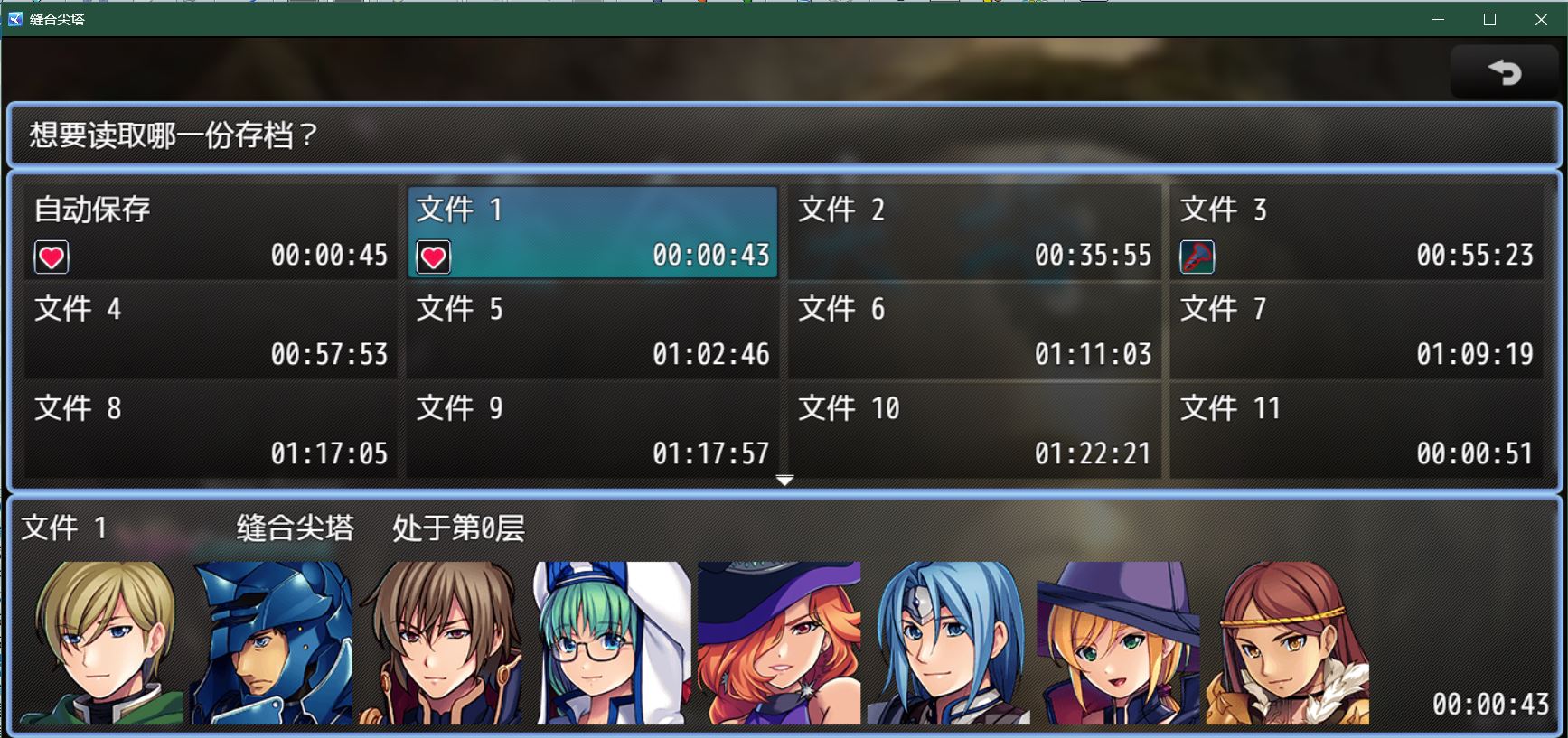
我想在存档中显示一个表示层数的变量。
[pre lang="js"]this.drawText("处于第" + $gameVariables.value(1) +"层", rect.x + 330, rect.y, rect.width - 192)[/pre]
但这么做很明显,无法显示每一个存档中存储到的1号变量。当前如图所示,显示的全是初始状态下的数字0。
请问应该如何修改?
|
|


 写轮眼
写轮眼
 发表于 2022-10-12 13:02:54
 提升卡
提升卡 沉默号角
沉默号角 喧嚣号角
喧嚣号角 变色卡
变色卡 升龙剑
升龙剑