查看: 3369|回复: 14

[有事请教] 请问如何修改装备名字显示长度

[复制链接]
梦石
0
星屑
2197
在线时间
225 小时
注册时间
2018-4-23
回帖
83
发表于 2022-11-6 22:18:14 | 显示全部楼层 |阅读模式
悬赏20星屑已解决
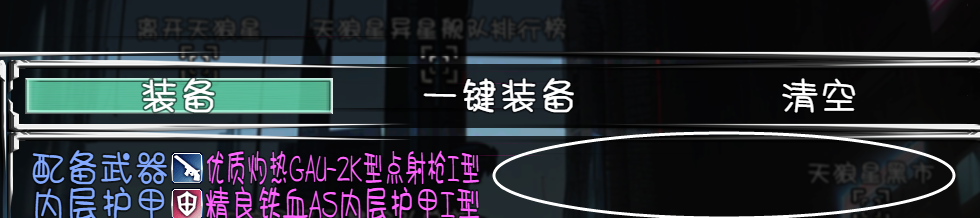
请问如何修改装备名字显示长度 装备名字显示长度.png 如图所示 装备名字长度没有显示到屏幕最右边就被挤压字体了 可否用脚本修改显示长度呢?

最佳答案

查看完整内容

———————————————————————————————— 【使用说明】把上述代码复制到任意插件的最下面即可。 PS:不建议楼主直接修改MV的底层插件哦 (rpg_windows、rpg_scenes之类的)。
梦石
0
星屑
4649
在线时间
570 小时
注册时间
2018-11-12
回帖
120
发表于 2022-11-6 22:18:15 | 显示全部楼层
pajiman1999 发表于 2022-11-7 03:51
同样在这个文档里找到以下字段:
Window_Base.prototype.drawItemName = function(item, x, y, width) {
   ...
  1. Window_EquipSlot.prototype.drawItem = function(index) {
  2.     if (this._actor) {
  3.         var rect = this.itemRectForText(index);
  4.         this.changeTextColor(this.systemColor());
  5.         this.changePaintOpacity(this.isEnabled(index));
  6.         this.drawText(this.slotName(index), rect.x, rect.y, 138, this.lineHeight());
  7.         this.drawItemName(this._actor.equips()[index], rect.x + 138, rect.y, rect.width);
  8.         this.changePaintOpacity(true);
  9.     }
  10. };
复制代码


————————————————————————————————
【使用说明】把上述代码复制到任意插件的最下面即可。
PS:不建议楼主直接修改MV的底层插件哦 (rpg_windows、rpg_scenes之类的)。
回复

使用道具 举报

梦石
0
星屑
1910
在线时间
106 小时
注册时间
2010-12-22
回帖
218
发表于 2022-11-6 22:57:45 | 显示全部楼层
打开系统脚本“rpg_windows.js”,找到以下字段:
Window_EquipStatus.prototype.drawItem = function(x, y, paramId) {
    this.drawParamName(x + this.textPadding(), y, paramId);
    if (this._actor) {
        this.drawCurrentParam(x + 140, y, paramId);
    }
    this.drawRightArrow(x + 188, y);
    if (this._tempActor) {
        this.drawNewParam(x + 222, y, paramId);
    }
};

Window_EquipStatus.prototype.drawParamName = function(x, y, paramId) {
    this.changeTextColor(this.systemColor());
    this.drawText(TextManager.param(paramId), x, y, 120);
};

在这段两个字段中间加一段文本框的字节宽度的代码:
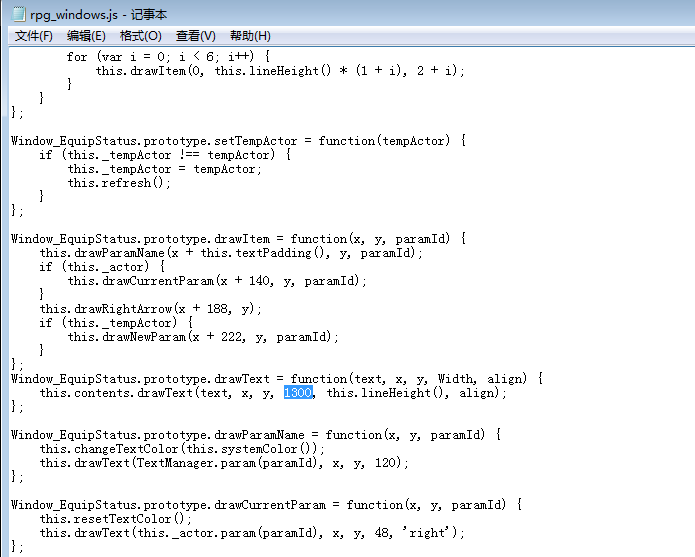
Window_EquipStatus.prototype.drawText = function(text, x, y, Width, align) {
    this.contents.drawText(text, x, y, 300, this.lineHeight(), align);
};
300这个位子自行修改,如果不够长,就继续改长一点。

但是要注意哦,一但字符宽度放大了,字体确实不会被压缩,但有可能就超出显示框,导致文本显示不全,记得要调整窗体以及文本框的宽度。
回复

使用道具 举报

梦石
0
星屑
2197
在线时间
225 小时
注册时间
2018-4-23
回帖
83
 楼主| 发表于 2022-11-6 23:20:39 | 显示全部楼层
loveinyou200 发表于 2022-11-6 22:57
打开系统脚本“rpg_windows.js”,找到以下字段:
Window_EquipStatus.prototype.drawItem = function(x, y ...

大哥 我按照你这个操作了 显示没有变化
回复

使用道具 举报

梦石
0
星屑
2197
在线时间
225 小时
注册时间
2018-4-23
回帖
83
 楼主| 发表于 2022-11-6 23:25:36 | 显示全部楼层
1.png
回复

使用道具 举报

梦石
0
星屑
1910
在线时间
106 小时
注册时间
2010-12-22
回帖
218
发表于 2022-11-6 23:42:27 | 显示全部楼层
pajiman1999 发表于 2022-11-6 23:20
大哥 我按照你这个操作了 显示没有变化

不好意思,看错信息了,以为是后面的属性值字节过长的问题,那就更简单了。

同样在这个文档里找到以下字段:
Window_Base.prototype.drawItemName = function(item, x, y, width) {
    width = width || 312;
    if (item) {
        var iconBoxWidth = Window_Base._iconWidth + 4;
        this.resetTextColor();
        this.drawIcon(item.iconIndex, x + 2, y + 2);
        this.drawText(item.name, x + iconBoxWidth, y, width - iconBoxWidth);
    }
};
把里面的312改大就行了。
回复

使用道具 举报

梦石
0
星屑
2197
在线时间
225 小时
注册时间
2018-4-23
回帖
83
 楼主| 发表于 2022-11-7 03:49:24 | 显示全部楼层
loveinyou200 发表于 2022-11-6 23:42
不好意思,看错信息了,以为是后面的属性值字节过长的问题,那就更简单了。

同样在这个文档里找到以下字 ...

大哥 好像还是不行 .......
回复

使用道具 举报

梦石
0
星屑
2197
在线时间
225 小时
注册时间
2018-4-23
回帖
83
 楼主| 发表于 2022-11-7 03:51:19 | 显示全部楼层
同样在这个文档里找到以下字段:
Window_Base.prototype.drawItemName = function(item, x, y, width) {
    width = width || 624;
    if (item) {
        var iconBoxWidth = Window_Base._iconWidth + 4;
        this.resetTextColor();
        this.drawIcon(item.iconIndex, x + 2, y + 2);
        this.drawText(item.name, x + iconBoxWidth, y, width - iconBoxWidth);
    }
};
把里面的312改大就行了。 按照这个操作了 改成了624无效 不知道为什么截图无法上传 我只能文字描述一下了
回复

使用道具 举报

梦石
0
星屑
2197
在线时间
225 小时
注册时间
2018-4-23
回帖
83
 楼主| 发表于 2022-11-7 14:09:42 | 显示全部楼层
cenhangkai 发表于 2022-11-7 13:32
————————————————————————————————
【使用说明】把上述代码复制到任 ...

谢谢大哥 解决了
回复

使用道具 举报

梦石
0
星屑
2197
在线时间
225 小时
注册时间
2018-4-23
回帖
83
 楼主| 发表于 2022-11-7 14:11:24 | 显示全部楼层
loveinyou200 发表于 2022-11-6 23:42
不好意思,看错信息了,以为是后面的属性值字节过长的问题,那就更简单了。

同样在这个文档里找到以下字 ...

也谢谢 这位大哥的解答 虽然没解决问题 但是您愿意抽出时间帮助我 我也是铭记在心的
回复

使用道具 举报

您需要登录后才可以回帖 登录 | 注册会员

本版积分规则

Powered by Discuz! X5.0 © 2001-2026 Discuz! Team.

在本版发帖返回顶部