查看: 2760|回复: 16

[已经解决] 窗口独立显示

[复制链接]
梦石
0
星屑
3850
在线时间
1899 小时
注册时间
2010-6-19
回帖
917
发表于 2022-11-16 17:57:57 | 显示全部楼层 |阅读模式

加入我们,或者,欢迎回来。

您需要 登录 才可以下载或查看,没有账号?注册会员

×
本帖最后由 黑米馒头 于 2022-11-17 22:51 编辑

试着弄了个提示窗口

先生成窗口
    $tip_window = Window_Help.new
    $tip_window.width = 300
    $tip_window.x = (640-$tip_window.width)/2
    $tip_window.visible = false
    @wait_count = 40

  def wait_count
    if @wait_count > 0
      @wait_count -= 1
    elsif @wait_count == 0
      $tip_window.visible = false
      @wait_count = 40
    end
  end  

然后刷新窗口
    # 刷新全局提示窗口
    $tip_window.update
    wait_count


测试的时候在事件输入
$tip_window.set_text("窗口提示")

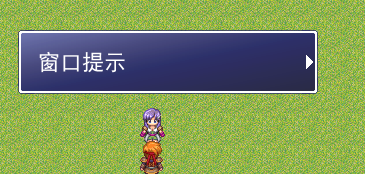
效果如下
3.png

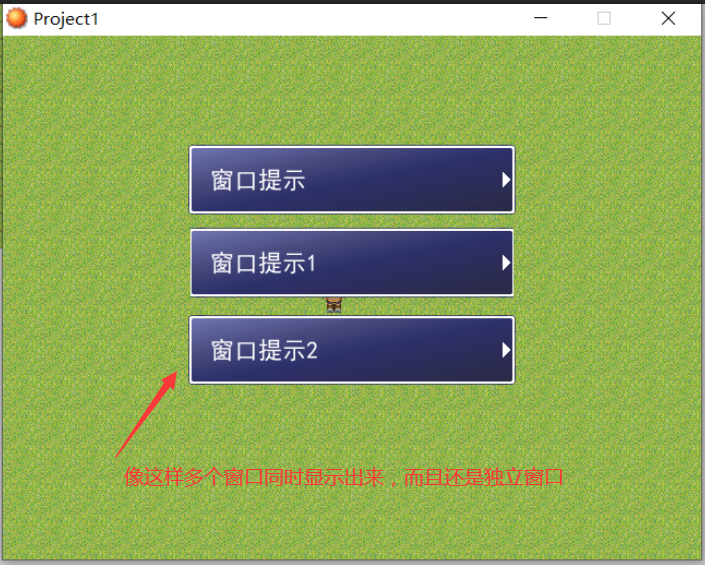
但是有个问题,就是比如我设置了多个文本的话,
文本是直接显示最后一个的,应该是把前面的文本给覆盖了,
要如何设置,让同个窗口可以实现多个文本独立的显示出来

4.png


[fold=多功能文本]#===========================================================================
#  *  draw_text必备扩展
#===========================================================================
=begin

  !c[n]       #改用n号颜色 *注 颜色在color处自定
  !s[n]       #改用n号大小
  !n[name]    #改用名称为name的字体
  !b0         #关闭粗体
  !b1         #开启粗体
  !i0         #关闭斜体
  !i1         #开启斜体
  
  i[n]        #描绘id为n的物品的图标
  s[n]        #描绘id为n的特技的图标
  w[n]        #描绘id为n的武器的图标
  a[n]        #描绘id为n的防具的图标
  l[filename] #描绘文件名为filename的图标
  
  \\n         #手动换行
  
  其他功能——
  *投影
  *自动换行

=end
class Bitmap
  def dl_draw_text(x, y, text)
    #记录bitmap数据
    name_copy = self.font.name
    size_copy = self.font.size
    bold_copy = self.font.bold
    italic_copy = self.font.italic
    color_copy = self.font.color.clone
    #初始数据
    text_copy = text
    tx,ty = x,y
    rect = Rect.new(0, 0, 24, 24)
    #字体
    text_copy.gsub!(/!c\[([0-9]+)\]/) { "\001[#{$1}]" }
    text_copy.gsub!(/!s\[([0-9]+)\]/) { "\002[#{$1}]" }
    text_copy.gsub!(/!n\[(.+)\]/) { "\003[#{$1}]" }
    text_copy.gsub!(/!b0/) { "\004" }
    text_copy.gsub!(/!b1/) { "\005" }
    text_copy.gsub!(/!i0/) { "\006" }
    text_copy.gsub!(/!i1/) { "\007" }
    #图标
    text_copy.gsub!(/i\[([0-9]+)\]/) { "\020[#{$1}]" }
    text_copy.gsub!(/s\[([0-9]+)\]/) { "\021[#{$1}]" }
    text_copy.gsub!(/w\[([0-9]+)\]/) { "\022[#{$1}]" }
    text_copy.gsub!(/a\[([0-9]+)\]/) { "\023[#{$1}]" }
    text_copy.gsub!(/l\[(.+)\]/) { "\025[#{$1}]" }
    #其他
    text_copy.gsub!(/v\[([0-9]+)\]/) { $game_variables[$1.to_i] }
    text_copy.gsub!(/\\n/) { "\030" }
    #颜色
    color = []
    color[0] = Color.new(255, 255, 255, 255)#白
    color[1] = Color.new(128, 128, 255, 255)#蓝
    color[2] = Color.new(255, 0, 0, 255)#(255, 0, 80, 255)   #红
    color[3] = Color.new(128, 255, 128, 255)#绿
    color[4] = Color.new(128, 255, 255, 255)#青
    color[5] = Color.new(255, 128, 255, 255)#粉红
    color[6] = Color.new(255, 255, 128, 255)#黄
    color[7] = Color.new(192, 192, 192, 255)#灰
    color[8] = Color.new(255, 195, 105, 255)#桔色
    color[9] = Color.new(207, 212, 241, 255)#紫色

    while ((c = text_copy.slice!(/./m)) != nil)
      #====================================
      #设置字体
      #====================================
      #颜色
      if c == "\001"
        text_copy.sub!(/\[([0-9]+)\]/, "")
        next if color[$1.to_i].nil?
        self.font.color = color[$1.to_i]
        next
      end
      #大小
      if c == "\002"
        text_copy.sub!(/\[([0-9]+)\]/, "")
        self.font.size = $1.to_i
        next
      end
      #名称
      if c == "\003"
        text_copy.sub!(/\[(.+)\]/, "")
        self.font.name = $1 if Font.exist?($1)
        next
      end
      #粗体关
      if c == "\004"
        self.font.bold = false
        next
      end
      #粗体开
      if c == "\005"
        self.font.bold = true
        next
      end
      #斜体关
      if c == "\006"
        self.font.italic = false
        next
      end
      #斜体开
      if c == "\007"
        self.font.italic = true
        next
      end
      #====================================
      #描绘图标
      #====================================
      #物品
      if c == "\020"
        text_copy.sub!(/\[([0-9]+)\]/, "")
        if !$data_items[$1.to_i].nil? and $data_items[$1.to_i].icon_name != ""
          next if tx + 24 > self.width - 32
          bitmap = RPG::Cache.icon($data_items[$1.to_i].icon_name)
          self.blt(tx, ty, bitmap, rect)
          tx += 24
        end
        next
      end
      #特技
      if c == "\021"
        text_copy.sub!(/\[([0-9]+)\]/, "")
        if !$data_skills[$1.to_i].nil? and $data_skills[$1.to_i].icon_name != ""
          next if tx + 24 > self.width - 32
          bitmap = RPG::Cache.icon($data_skills[$1.to_i].icon_name)
          self.blt(tx, ty, bitmap, rect)
          tx += 24
        end
        next
      end
      #武器
      if c == "\022"
        text_copy.sub!(/\[([0-9]+)\]/, "")
        if !$data_weapons[$1.to_i].nil? and $data_weapons[$1.to_i].icon_name != ""
          next if tx + 24 > self.width - 32
          bitmap = RPG::Cache.icon($data_weapons[$1.to_i].icon_name)
          self.blt(tx, ty, bitmap, rect)
          tx += 24
        end
        next
      end
      #防具
      if c == "\023"
        text_copy.sub!(/\[([0-9]+)\]/, "")
        if !$data_armors[$1.to_i].nil? and $data_armors[$1.to_i].icon_name != ""
          next if tx + 24 > self.width - 32
          bitmap = RPG::Cache.icon($data_armors[$1.to_i].icon_name)
          self.blt(tx, ty, bitmap, rect)
          tx += 24
        end
        next
      end
      #自定
      if c == "\025"
        text_copy.sub!(/\[(.+)\]/, "")
        if $1 != ""
          next if tx + 24 > self.width - 32
          bitmap = RPG::Cache.icon($1)
          self.blt(tx, ty, bitmap, rect)
          tx += 24
        end
        next
      end
      #====================================
      #其他
      #====================================
      #换行
      if c == "\030"
        ty += self.font.size
        next
      end
      cx = self.text_size(c).width
      #投影
      #dl_color_copy = self.font.color.clone
      #self.font.color.set(0, 0, 0)
      #self.draw_text(tx+1, ty+1, cx, self.font.size, c)
      #self.draw_text(tx-1, ty+1, cx, self.font.size, c)
      #self.draw_text(tx+1, ty-1, cx, self.font.size, c)
      #self.draw_text(tx-1, ty-1, cx, self.font.size, c)
      #self.font.color = dl_color_copy
      self.draw_text(tx, ty, cx, self.font.size, c)
      tx += cx
      #自动换行
      if tx >= self.width
        tx = 0
        ty += self.font.size
      end
    end
    #恢复调整
    self.font.name = name_copy
    self.font.size = size_copy
    self.font.bold = bold_copy
    self.font.italic = italic_copy
    self.font.color = color_copy
  end
end[/fold]
梦石
0
星屑
2821
在线时间
585 小时
注册时间
2022-7-13
回帖
81
发表于 2022-11-16 19:32:56 | 显示全部楼层
本帖最后由 我为鱼肉 于 2022-11-18 12:58 编辑

做了个简单的范例 网游式全场景提示窗口.zip (986.41 KB, 下载次数: 7)
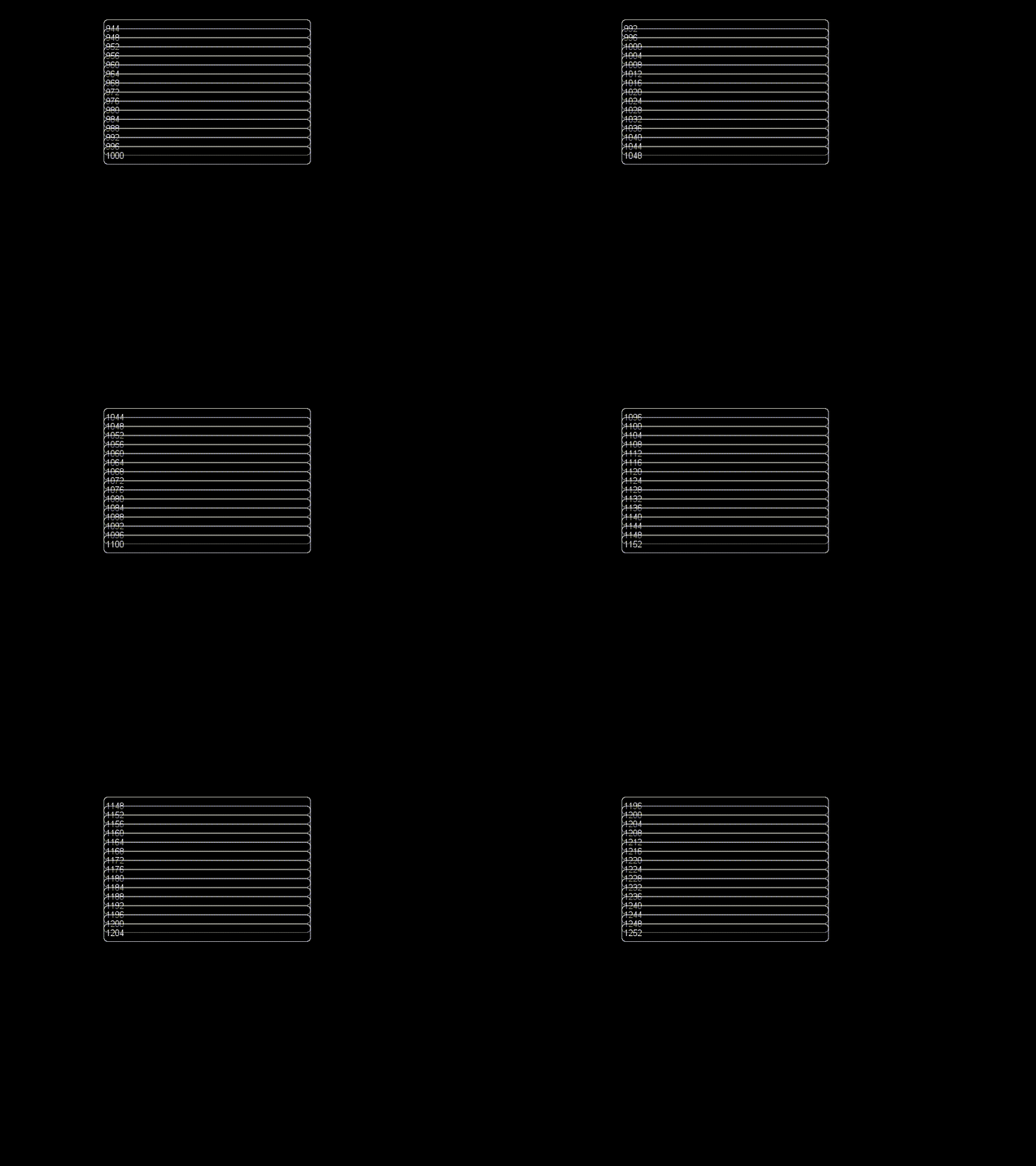
[fold=GIF预览] 网游式全场景提示窗口-39-FPS-2022-11-16-22-47-12.gif [/fold]
[fold=代码][pre lang="ruby"]#==============================================================================
# ** RPG::Cache 高速缓存UI
#==============================================================================
module RPG::Cache
  def self.ui(filename)
    self.load_bitmap("Graphics/UI/", filename)
  end
end
#==============================================================================
# ** Bitmap 拓展
#==============================================================================
class Bitmap
  #--------------------------------------------------------------------------
  # * draw_windowskin 描绘窗口皮肤
  # window_x      窗口X坐标  默认0
  # window_Y      窗口Y坐标  默认0
  # window_width  窗口width  默认self.width
  # window_height 窗口height 默认self.height
  #--------------------------------------------------------------------------
  def draw_windowskin(window_x = 0, window_y = 0, window_width = self.width, window_height = self.height)
    src_bitmap = RPG::Cache.ui("帮助窗口背景.png")
    src_rect = Rect.new(0, 0, 0, 0)
    dest_rect = Rect.new(0, 0, 0, 0)
    #上
    src_rect.set(0, 0, 5, 5)
    self.blt(window_x, window_y, src_bitmap, src_rect)
    src_rect.set(6, 0, 5, 5)
    self.blt(window_x + window_width - 5, window_y, src_bitmap, src_rect)
    dest_rect.set(window_x + 5, window_y, window_width - 10, 5)
    src_rect.set(5, 0, 1, 5)
    self.stretch_blt(dest_rect, src_bitmap, src_rect)
    #下
    src_rect.set(0, 6, 5, 5)
    self.blt(window_x, window_y + window_height - 5, src_bitmap, src_rect)
    src_rect.set(6, 6, 5, 5)
    self.blt(window_x + window_width - 5, window_y + window_height - 5, src_bitmap, src_rect)
    dest_rect.set(window_x + 5, window_y + window_height - 5, window_width - 10, 5)
    src_rect.set(5, 6, 1, 5)
    self.stretch_blt(dest_rect, src_bitmap, src_rect)
    #其余
    dest_rect.set(window_x, window_y + 5, 5, window_height - 10)
    src_rect.set(0, 5, 5, 1)
    self.stretch_blt(dest_rect, src_bitmap, src_rect)
    dest_rect.set(window_x + window_width - 5, window_y + 5, 5, window_height - 10)
    src_rect.set(6, 5, 5, 1)
    self.stretch_blt(dest_rect, src_bitmap, src_rect)
    dest_rect.set(window_x + 5, window_y + 5, window_width - 10, window_height - 10)
    src_rect.set(5, 5, 1, 1)
    self.stretch_blt(dest_rect, src_bitmap, src_rect)
  end
end
#bitmap.draw_windowskin描绘测试
#sprite = Sprite.new
#sprite.bitmap = Bitmap.new(640, 480)
#sprite.bitmap.draw_windowskin(160, 226, 320, 28)
#loop do
#  Graphics.update
#end
#==============================================================================
# ** Sprite 提示窗口
#==============================================================================
class Wwyr_Tips < Sprite
  #--------------------------------------------------------------------------
  # * initialize 初始化
  # x        X坐标
  # y        Y坐标
  # text     文本
  # viewport 视口  默认nil
  #--------------------------------------------------------------------------
  def initialize(x, y, text, viewport = nil)
    super(viewport)
    self.z = 99999
    self.x = x
    self.y = y
    self.bitmap = Bitmap.new(320, 28) ##窗口大小
    self.bitmap.font.size = 16 ##字体大小
    self.bitmap.draw_windowskin
    self.bitmap.draw_text(4, 0, self.bitmap.width, self.bitmap.height, text)
    @count = 60 ##提示窗口展示的时间(刷新次数)
  end
  #--------------------------------------------------------------------------
  # * update 刷新
  #--------------------------------------------------------------------------
  def update
    if @count > 0
      @count -= 1
    else
      self.visible = false
    end
    super
  end
end
#==============================================================================
# ** Graphics 提示窗口《操作库》
#==============================================================================
class << Graphics
  #--------------------------------------------------------------------------
  # * tip_init 初始化
  #--------------------------------------------------------------------------
  def tip_init
    @tips = [] ##精灵
    @text = [] ##tips文本的数组
    @count = 0 ##tips计数
  end
  #--------------------------------------------------------------------------
  # * tip 提示(单个)
  # text 文本
  #--------------------------------------------------------------------------
  def tip(text)
    for i in 0...@tips.size
      @tips.y = 226 - (@tips.size - i) * 14
    end
    tip = Wwyr_Tips.new(160, 226, text)
    @tips.push(tip)
  end
  #--------------------------------------------------------------------------
  # * tips 提示(同时、多个)
  # text  文本数组
  # frame 间隔帧数 默认4
  #--------------------------------------------------------------------------
  def tips(text, frame = 4)
    @text = @text | text
    @count = 0
    @frame = frame
  end
  #--------------------------------------------------------------------------
  # * update 刷新
  #--------------------------------------------------------------------------
  alias wwyralias_update_for_tips update unless method_defined? :wwyralias_update_for_tips
  def update
    if @text.size > 0
      if @count == 0
        text = @text.shift
        tip(text)
        @count = @frame
      else
        @count -= 1
      end
    end
    clear_data = false
    for i in 0...@tips.size
      @tips.update
      unless @tips.visible
        @tips.dispose
        @tips = nil
        clear_data = true
      end
    end
    @tips.compact! if clear_data
    wwyralias_update_for_tips
  end
end
Graphics.tip_init
#代码测试
loop do
  Graphics.tips(["0", "1", "2"]) if Graphics.frame_count % 9 == 0
  #Graphics.tip(Graphics.frame_count.to_s) if Graphics.frame_count % 4 == 0
  Graphics.update
end[/pre][/fold]

点评

大佬,能不能弄一个开关,当开关打开的时候提示窗口只有1个,提示更新的时候只刷新文本内容,就和默认的1个窗口一样。  发表于 2022-11-19 19:27
感谢!  发表于 2022-11-18 10:14
再把宽度高度参数删除掉  发表于 2022-11-17 22:58
78行draw_text改为dl_draw_text就行了  发表于 2022-11-17 22:57
大佬能帮我把主楼的多功能文本整合进去吗  发表于 2022-11-17 22:52

评分

参与人数 1星屑 +100 赞 +1 收起 理由
RyanBern + 100 + 1 认可答案

查看全部评分

回复

使用道具 举报

您需要登录后才可以回帖 登录 | 注册会员

本版积分规则

Powered by Discuz! X5.0 © 2001-2026 Discuz! Team.

在本版发帖返回顶部