| 赞 | 5 |
| VIP | |
| 好人卡 | |
| 积分 | 73 |
| 经验 | |
| 最后登录 | 2026-7-13 |
| 在线时间 | 1244 小时 |
- 梦石
- 0
- 星屑
- 7296
- 在线时间
- 1244 小时
- 注册时间
- 2015-8-15
- 回帖
- 473
|
加入我们,或者,欢迎回来。
您需要 登录 才可以下载或查看,没有账号?注册会员
×
本帖最后由 金芒芒 于 2023-4-20 11:11 编辑
[pre lang="ruby"]#==============================================================================
# ■ Window_Item
#------------------------------------------------------------------------------
# 显示可以装备的回路。
#==============================================================================
class Window_Troops_List< Window_Base
def blue_color
return Color.new(141,157,180)
end
#--------------------------------------------------------------------------
# ● 定义实例变量
#--------------------------------------------------------------------------
attr_reader :index # 光标位置
attr_reader :help_window # 帮助窗口
attr_reader :type # 种类
attr_reader :able # 暗色
def type=(type)
@type = type
end
def type
return @type
end
#--------------------------------------------------------------------------
# ● 设置光标的位置
# index : 新的光标位置
#--------------------------------------------------------------------------
def index=(index)
@index = index
@column_max = 4
# 刷新帮助文本 (update_help 定义了继承目标)
if self.active and @help_window != nil
update_help
end
# 刷新光标矩形
update_cursor_rect
end
#--------------------------------------------------------------------------
# ● 获取行数
#--------------------------------------------------------------------------
def row_max
# 由项目数和列数计算出行数
return @item_max
end
#--------------------------------------------------------------------------
# ● 获取开头行
#--------------------------------------------------------------------------
def top_row
# 将窗口内容的传送源 Y 坐标、1 行的高 32 等分
return self.oy / 32
end
#--------------------------------------------------------------------------
# ● 设置开头行
# row : 显示开头的行
#--------------------------------------------------------------------------
def top_row=(row)
# row 未满 0 的场合更正为 0
if row < 0
row = 0
end
# row 超过 row_max - 1 的情况下更正为 row_max - 1
if row > row_max - 1
row = row_max - 1
end
# row 1 行高的 32 倍、窗口内容的传送源 Y 坐标
self.oy = row * 32
end
#--------------------------------------------------------------------------
# ● 获取 1 页可以显示的行数
#--------------------------------------------------------------------------
def page_row_max
# 窗口的高度,设置画面的高度减去 32 ,除以 1 行的高度 32
return 14
end
#--------------------------------------------------------------------------
# ● 初始化对像
# actor : 角色
#--------------------------------------------------------------------------
def initialize(type = 0,player_or_enermy = 0)
@all_fighters = Figter_data::ALL_SOLDIER #所有士兵
#右侧滚动条
@right_back = Bar_Right.new("right_back", origin_x+172, origin_y+12, 20*14)
@right_back.visible = false
@right = Bar_Right.new("right", origin_x+170, origin_y+12, 0)
@right.visible = false
#变量更新
@type = 0
@index = 0
#背景
@back = Sprite.new
@back.bitmap = RPG::Cache.menu("troopList-base")
# @back.x = origin_x
# @back.y = origin_y
@help_window = Window_Troop_Info.new
@item_icon = []
@item_icon[0] = Sprite.new
#初始化
super(origin_x,origin_y,1200,600)
# super(origin_x,origin_y,287/2+32,14*20+32)
self.windowskin = RPG::Cache.menu("Blue")
self.opacity = 0
self.active = false
#刷新
refresh(type)
refresh(type)
update_help
end
#--------------------------------------------------------------------------
# ● 活动窗口用原始x y坐标
#--------------------------------------------------------------------------
def origin_x
return 28
end
def origin_y
return 108
end
#--------------------------------------------------------------------------
# ● 定义用选择状态决定窗口颜色
#--------------------------------------------------------------------------
def able=(able)
@able=able
@right_back.able = able
@right.able = able
if active
@back.color = Color.new(255,255,255,0)
else
@back.color = Color.new(0,0,0,128)
end
refresh
end
#--------------------------------------------------------------------------
# ● 更新光标矩形
#--------------------------------------------------------------------------
def update_cursor_rect
#@back.bitmap = RPG::Cache.menu("item_command"+type.to_s)
# 光标位置不满 0 的情况下
if @index < 0
self.cursor_rect.empty
return
end
# 获取当前的行
row = @index / @column_max
# 当前行被显示开头行前面的情况下
if row < self.top_row
# 从当前行向开头行滚动
self.top_row = row
end
# 当前行被显示末尾行之后的情况下
if row > self.top_row + (self.page_row_max - 1)
# 从当前行向末尾滚动
self.top_row = row - (self.page_row_max - 1)
end
i = @index
#cursor_width = 240
self.cursor_rect.set(i%4*84,(i/4-self.oy/120)*120-1,84,120)
end
def top_row
return self.oy / 120
end
def page_row_max
return (self.height - 120) / 120
end
# 计算光标的宽度
# 计算光标坐标
# x = 8
# y = @index*20 - self.oy-1
# 更新光标矩形
# self.cursor_rect.set(x, y, cursor_width, 22)
#end
#--------------------------------------------------------------------------
# ● 一些方法的重载
#--------------------------------------------------------------------------
def active=(active)
if active
if @item_max <= 0
self.index = -1
else
self.index = 0
end
else
self.index = -1
end
@ajsdgfshfajklshfa = nil
@help_window.set_text( nil ) if @help_window != nil
super(active)
end
def dispose
@back.dispose
@right_back.dispose
@right.dispose
for i in 0...@item_icon.size
@item_icon.dispose
end
@help_window.dispose
super
end
def x=(x)
@back.x = x-origin_x #+ 15
@right_back.x = x+172 #+30
@right.x = x+170 #+30
for i in 0...@item_icon.size
@item_icon.x = 500+self.x+x - self.index%4 * (66 + 5) #14
end
super(x-16)
end
def x
return super+16
end
def y=(y)
@back.y = y-origin_y# + 60
@right_back.y = y+12 #+ origin_y
@right.y = y+12 #+ origin_y
for i in 0...@item_icon.size
@item_icon.y= 110+ self.x+x - self.index/4 * (66 + 5)#16 # + origin_y #+ 25 #14
end
super(y)
end
def z=(z)
@back.z=z-5
@right_back.z=z+3
@right.z=z+4
for i in 0...@item_icon.size
@item_icon.z=z+2
end
super(z)
end
def visible=(visible)
@back.visible=visible
@right_back.visible=visible
@right.visible=visible
# @help_window.visible=visible
super(visible)
end
def contents_opacity=(opacity)
@back.opacity=opacity
@right_back.opacity=opacity
@right.opacity=opacity
# @help_window.opacity=opacity
super(opacity)
end
def oy=(oy)
#缩放图标时只显示当前页的项目
for i in 0...@item_icon.size
@item_icon.y = 16+20*i+self.y-oy
if @item_icon.y < self.y or @item_icon.y > self.y+20*self.page_row_max
@item_icon.visible = false
else
@item_icon.visible = true
end
end
super(oy)
end
#--------------------------------------------------------------------------
# ● 获取物品
#--------------------------------------------------------------------------
def item
return @all_fighters[self.index]
end
#--------------------------------------------------------------------------
# ● 刷新
#--------------------------------------------------------------------------
def refresh(type=@type)#all,1,2,3,4,5,6,7 RPPG::ARMOR_BEGIN
if self.contents != nil
self.contents.dispose
self.contents = nil
end
for i in 0...@item_icon.size
@item_icon.dispose
end
@item_icon = []
@item_icon[0] = Sprite.new
for i in 0...@all_fighters.size
@item_icon = Sprite.new
name = Figter_data::CHARACTER_NAME[@all_fighters]
@item_icon.bitmap = RPG::Cache.icon(name) if name != nil
end
@item_max = @all_fighters.size
#下标超过范围的时候往回退一格
if self.top_row > @item_max-self.page_row_max
self.top_row = @item_max-self.page_row_max
end
if self.index >= @item_max
self.index = @item_max-1
end
#右侧滚动条显示
if @item_max > self.page_row_max
@right_back.visible = true
@right.visible = true
else
@right_back.visible = false
@right.visible = false
end
#滚动条的更新
if @right.visible
@right.height = (14*20)*(14*20)/(@item_max.to_f*20)-24.0 > 0 ? (14*20)*(14*20)/(@item_max.to_f*20)-24.0 : 0
end
# 如果项目数不是 0 就生成位图、描绘全部项目
if @item_max > 0
self.contents = Bitmap.new(width - 32, @item_max*20)
for i in 0...@item_max
draw_item(i, 12, i*20)
end
else
self.contents = Bitmap.new(width - 32, 20)
end
#缩放图标时只显示当前页的项目
for i in 0...@item_icon.size
@item_icon.y = 20*i+self.y-oy+16
if @item_icon.y < self.y or @item_icon.y > self.y+20*self.page_row_max
@item_icon.visible = false
else
@item_icon.visible = true
end
end
#update_help
end
#--------------------------------------------------------------------------
# ● 描绘物品
#--------------------------------------------------------------------------
def draw_item(index, x, y)
item = @all_fighters[index]
self.contents.font.size = 12
# x = 4 + index % 4 * 37
# y = index / 4 * 37
#图标缩放显示专用
icon_size = 100#图片缩放大小
# row = @item_icon[index]/@column_max
@item_icon[index].x = 500+self.x+x - self.index%4 * (66 + 5)# self.x%4*84
@item_icon[index].y = 110+ self.x+x - self.index/4 * (66 + 5)
@item_icon[index].zoom_x = icon_size.to_f/@item_icon[index].bitmap.width
@item_icon[index].zoom_y = icon_size.to_f/@item_icon[index].bitmap.height
@item_icon[index].z = self.z+2
@item_icon[index].color = self.contents.font.color==normal_color ? Color.new(255,255,255,0):Color.new(0,0,0,128)
#self.contents.font.color = Color.new(128,193,125,0)
name = Figter_data::THE_NAME[item]
self.contents.draw_text(x + icon_size.to_f, y + 4, 184, self.contents.font.size, name)
end
#--------------------------------------------------------------------------
# ● 帮助窗口的设置
# help_window : 新的帮助窗口
#--------------------------------------------------------------------------
def help_window=(help_window)
@help_window = help_window
# 刷新帮助文本 (update_help 定义了继承目标)
if self.active and @help_window != nil
update_help
end
end
#--------------------------------------------------------------------------
# ● 刷新画面
#--------------------------------------------------------------------------
def update
super
# 可以移动光标的情况下
if self.active and @item_max >= 0 and @index >= 0
# 方向键下被按下的情况下
if Input.repeat?(Input::DOWN)
# 光标向下移动
$game_system.se_play($data_system.cursor_se)
@index = (@index+1+@item_max) % @item_max if @item_max != 0
update_help
end
# 方向键上被按下的情况下
if Input.repeat?(Input::UP)
# 光标向上移动
$game_system.se_play($data_system.cursor_se)
@index = (@index-1+@item_max) % @item_max if @item_max != 0
update_help
end
end
# 刷新帮助文本 (update_help 定义了继承目标)
if @help_window != nil and @ajsdgfshfajklshfa == nil
update_help
update_help
@ajsdgfshfajklshfa = true
end
# 刷新光标矩形
update_cursor_rect
end
def now_selected_troop
return @all_fighters[@index]
end
#--------------------------------------------------------------------------
# ● 刷新帮助文本
#--------------------------------------------------------------------------
def update_help
#鲜辣煎鱼
@help_window.set_text( @index>-1 ? self.item : nil )
end
end[/pre] |
-
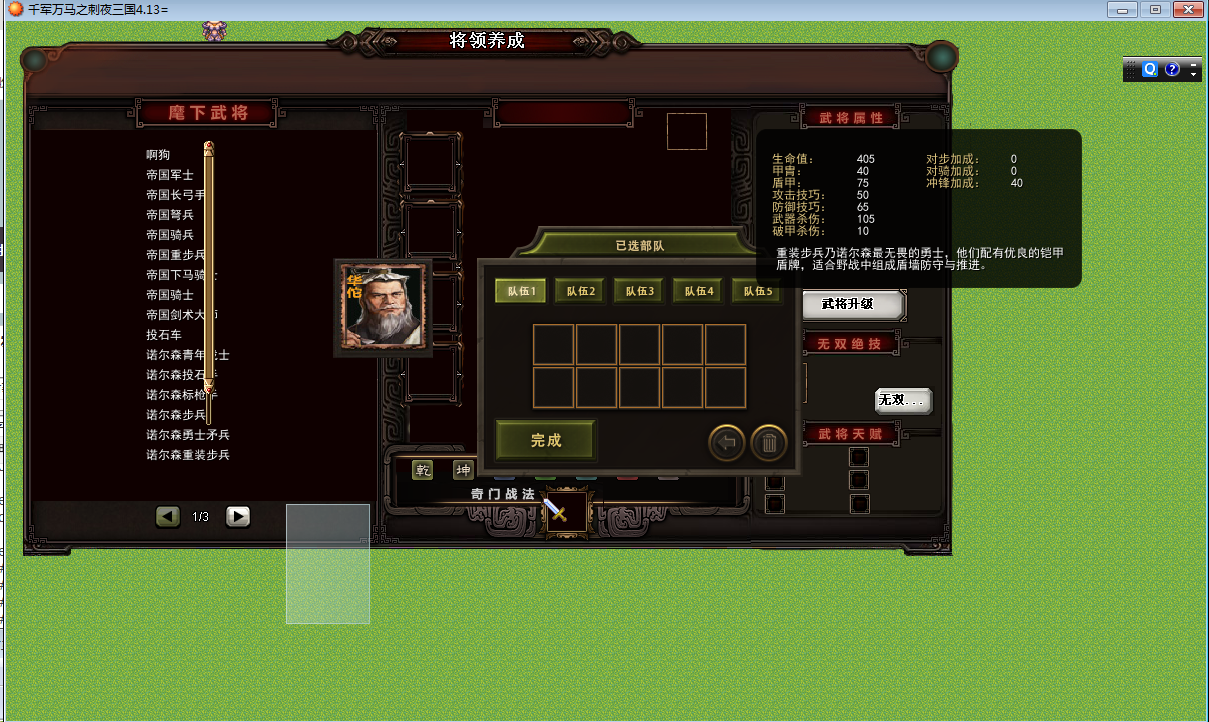
重叠了
-
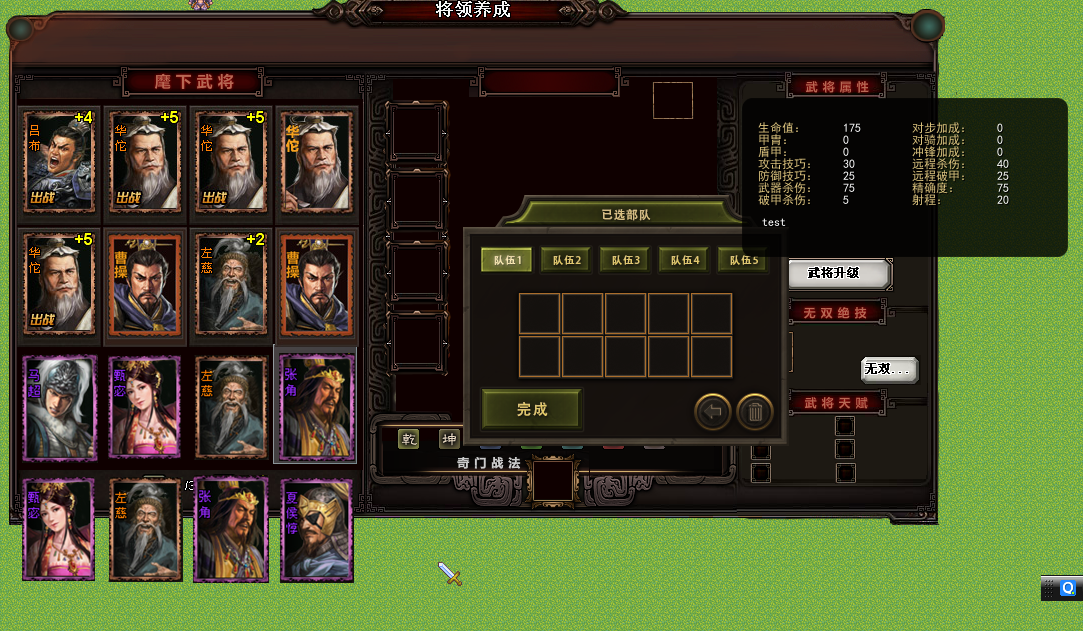
以前的
|



 写轮眼
写轮眼
 发表于 2023-4-14 10:27:52
 提升卡
提升卡 沉默号角
沉默号角 喧嚣号角
喧嚣号角 变色卡
变色卡 升龙剑
升龙剑


 x%4 y/4 这个也是属于包裹问题