| 赞 | 0 |
| VIP | |
| 好人卡 | |
| 积分 | 17 |
| 经验 | |
| 最后登录 | 2025-7-4 |
| 在线时间 | 123 小时 |
- 梦石
- 0
- 星屑
- 1737
- 在线时间
- 123 小时
- 注册时间
- 2023-12-26
- 回帖
- 184
|
 发表于 2024-4-27 07:19:31
|
显示全部楼层
发表于 2024-4-27 07:19:31
|
显示全部楼层
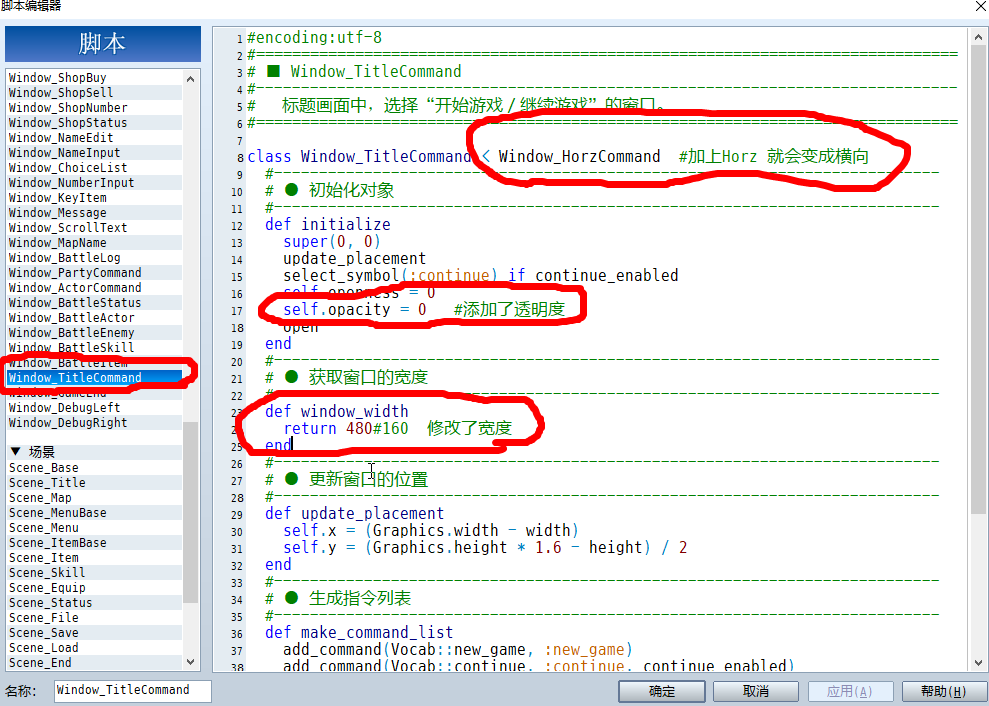
感谢感谢,。不过,,在这个脚本里修改后,会出错,这个脚本还带一些小玩意的,我发给你看。很多人用这个脚本 ..
[pre lang="ruby"]#==============================================================================
# +++ MOG - Animated Title A (v1.1) +++
#==============================================================================
# By Moghunter
# http://www.atelier-rgss.com/
#==============================================================================
# Tela de titulo animado, com logo, imagens aleatórias e outros efeitos visuais.
#==============================================================================
# Nota - Serão necessários as seguintes imagens na pasta Graphics/Titles2/
#
#
# Firefly.png
# Logo.jpg (Opcional - Caso for usar o efeito logo.)
#
#==============================================================================
# Para definir a imagem de texto basta selecionar no banco de dados
# a imagem do titulo numero 2 (Segunda camada)
#
#==============================================================================
# 1.1 - Opção de pular o logo ao apertar alguma tecla.
# - Adição de comandos em pictures.
# - Adição de cursor de comando.
#==============================================================================
module MOG_SCENE_TITLE_A
#Definição das pictures.
RANDOM_PICTURES = ["画面1","画面2","画面3","画面4","画面5","画面6"]#,"liubei","攻城","guanyu","zhangfei","赵云","马超","黄忠","诸葛亮"]
#Tempo de duração para ativar a troca de imagens.
RANDOM_PICTURES_DURATION = 6#(sec)
#Seleção aleatória.
RAMDOM_SELECTION = true
#Posição do comando.
COMMANDS_POS =[160+60 , 250+60] #[220+150 , 280+50]
#Ativar Particulas.
FIREFLY = true
#Definição da posição do cursor.(Para ajustes)
CURSOR_POS = [-40+25,-5]
end
#==============================================================================
# ■ Window TitleCommand
#==============================================================================
class Window_TitleCommand < Window_Command
attr_reader :list
end
#==============================================================================
# ■ FireFly
#==============================================================================
class Firefly < Sprite
#--------------------------------------------------------------------------
# ● Initialize
#--------------------------------------------------------------------------
def initialize(viewport = nil)
super(viewport)
self.bitmap = Cache.title2("Firefly")
reset_setting
end
#--------------------------------------------------------------------------
# ● Reset Setting
#--------------------------------------------------------------------------
def reset_setting
zoom = (50 + rand(100)) / 100.1
self.zoom_x = zoom
self.zoom_y = zoom
self.x = rand(640)
self.y = rand(480 + self.bitmap.height)
self.opacity = 0
self.angle = rand(360+200)
self.blend_type = 1
@speed_x = 0
@speed_y = [[rand(4), 4].min, 1].max
@speed_a = rand(3)
end
#--------------------------------------------------------------------------
# ● Dispose
#--------------------------------------------------------------------------
def dispose
super
self.bitmap.dispose
end
#--------------------------------------------------------------------------
# ● Update
#--------------------------------------------------------------------------
def update
super
self.x += @speed_x
self.y -= @speed_y
self.angle += @speed_a
self.opacity += 5
reset_setting if self.y < 0
end
end
#==============================================================================
# ■ Scene Title
#==============================================================================
class Scene_Title < Scene_Base
include MOG_SCENE_TITLE_A
#--------------------------------------------------------------------------
# ● Start
#--------------------------------------------------------------------------
def start
super
SceneManager.clear
@phase = 1
@phase_time = -1
# 为了第一阶段计时,只要是负的,多少无所谓,在update_initial_animation的时候会设置为15
# 如果是0则第一阶段直接结束进入第二阶段,所以图片不会显示,因为此时图片还在-100
# 如果为正,则会马上开始第一阶段计时,负数则会先重置为正再计时
create_command_window
create_commands
create_background
create_light
create_cursor
play_title_music
end
#--------------------------------------------------------------------------
# ● Create_cursor
#--------------------------------------------------------------------------
def create_cursor
@cursor = Sprite.new #生成cursor的位图
@cursor.bitmap = Cache.title2("Cursor")
@cursor.opacity = 0 #设置cursor开始状态为透明
@cursor.z = 99 #设置cursor的Z坐标
@cursor_position = [0,0] #设置cussor的坐标
@mx = [0,0,0] #还没搞清楚这个是什么????
end
#--------------------------------------------------------------------------
# ● Create Commands
#--------------------------------------------------------------------------
def create_commands
@command_window.visible = false # close command windows
@commands_index_old = -1 # 设置一个旧索引代新索引参考
@commands = [] # 把命令清空
@commands_shake_duration = 0 # 设置先不抖动
index = 0 # 设置索引位置
for com in @command_window.list # 遍历command_window.list里面的所有命令
sprite = Sprite.new # 和下一句一起生成位图
sprite.bitmap = Cache.title2(com[:name].to_s) rescue nil
if sprite.bitmap == nil # 这一段,如果没能生成位图,则生成文字
sprite.bitmap = Bitmap.new(200,32)
sprite.bitmap.font.size = 24
sprite.bitmap.font.bold = true
sprite.bitmap.font.italic = true
sprite.bitmap.draw_text(0, 0, 200, 32, com[:name].to_s,1)
end
sprite.x = COMMANDS_POS[0] - 100 - (index * 20) #生成命令位图X坐标,-100是为了能移动,-index*20 是为了让每个命令有斜度
sprite.y = index * sprite.bitmap.height + COMMANDS_POS[1] #生成命令位图Y坐标
sprite.z = 100 + index #设置命令的Z轴
sprite.opacity = 0 #设置位图初始为透明状态
index += 1 #索引+1,准备生成下一个命令相关参数
@commands.push(sprite) #把命令赋予位图,这个就是把命令和图片联系起来 #到这一步之后可以返回至第一步,直接所有命令生成完毕
end
@command_max = index #获取命令数,生成到几个索引就意味着有几个命令数
end
#--------------------------------------------------------------------------
# ● create_background
#--------------------------------------------------------------------------
def create_background
@rand_title_duration = 120
@old_back_index = 0
@sprite1 = Plane.new
@sprite1.opacity = 0
if RAMDOM_SELECTION
execute_random_picture(false)
else
execute_random_picture(true)
end
@sprite2 = Plane.new
@sprite2.bitmap = Cache.title2($data_system.title2_name)
@sprite2.z = 100
@sprite2.opacity = 0
end
#--------------------------------------------------------------------------
# ● Create Light
#--------------------------------------------------------------------------
def create_light
return unless FIREFLY
@light_viewport = Viewport.new(-32, -32, 800, 480)
@light_bitmap =[]
for i in 0...20
@light_bitmap.push(Firefly.new(@light_viewport))
end
end
#--------------------------------------------------------------------------
# ● dispose Background1
#--------------------------------------------------------------------------
def dispose_background1
@sprite1.bitmap.dispose
@sprite1.bitmap = nil
@sprite1.dispose
@sprite1 = nil
end
#--------------------------------------------------------------------------
# ● Dispose Background2
#--------------------------------------------------------------------------
def dispose_background2
if @sprite2.bitmap != nil
@sprite2.bitmap.dispose
@sprite2.bitmap = nil
@sprite2.dispose
@sprite2 = nil
end
end
#--------------------------------------------------------------------------
# ● Dispose Light
#--------------------------------------------------------------------------
def dispose_light
return unless FIREFLY
if @light_bitmap != nil
for i in @light_bitmap
i.dispose
end
@light_viewport.dispose
@light_bitmap = nil
end
end
#--------------------------------------------------------------------------
# ● Terminate
#--------------------------------------------------------------------------
def terminate
super
dispose_background1
dispose_background2
dispose_light
@cursor.bitmap.dispose
@cursor.dispose
for com in @commands
com.bitmap.dispose
com.dispose
end
end
#--------------------------------------------------------------------------
# ● Update
#--------------------------------------------------------------------------
def update
super
update_initial_animation # 第一阶段update,第一阶段结束后不会再执行
update_command # 上面第一阶段结束后就会进行此第二阶段update
update_background
update_light
end
#--------------------------------------------------------------------------
# ● Update Cursor Position
#--------------------------------------------------------------------------
def update_cursor_position
@cursor.opacity += 5
execute_animation_s
execute_cursor_move(0,@cursor.x,@cursor_position[0] + @mx[1])
execute_cursor_move(1,@cursor.y,@cursor_position[1])
end
#--------------------------------------------------------------------------
# ● Execute Animation S
#--------------------------------------------------------------------------
def execute_animation_s
@mx[2] += 1
return if @mx[2] < 4
@mx[2] = 0
@mx[0] += 1
case @mx[0]
when 1..7; @mx[1] += 1
when 8..14; @mx[1] -= 1
else
@mx[0] = 0
@mx[1] = 0
end
end
#--------------------------------------------------------------------------
# ● Execute Cursor Move
#--------------------------------------------------------------------------
def execute_cursor_move(type,cp,np)
sp = 5 + ((cp - np).abs / 5)
if cp > np
cp -= sp
cp = np if cp < np
elsif cp < np
cp += sp
cp = np if cp > np
end
@cursor.x = cp if type == 0
@cursor.y = cp if type == 1
end
#--------------------------------------------------------------------------
# ● Update Background
#--------------------------------------------------------------------------
def update_background
@sprite2.opacity += 1
return if RANDOM_PICTURES.size == 1
@rand_title_duration -= 1
if @rand_title_duration <= 0
@sprite1.opacity -= 1
else
@sprite1.opacity += 1
end
return if @sprite1.opacity != 0
execute_random_picture
end
#--------------------------------------------------------------------------
# ● Execute Random Picture
#--------------------------------------------------------------------------
def execute_random_picture(initial = false)
@rand_title_duration = [[60 * RANDOM_PICTURES_DURATION, 9999].min, 60].max
if @sprite1.bitmap != nil
@sprite1.bitmap.dispose
@sprite1.bitmap = nil
end
if RAMDOM_SELECTION
rand_pic = rand(RANDOM_PICTURES.size)
if rand_pic == @old_back_index
rand_pic += 1
rand_pic = 0 if rand_pic >= RANDOM_PICTURES.size
end
@old_back_index = rand_pic
else
@old_back_index += 1 unless initial
@old_back_index = 0 if @old_back_index >= RANDOM_PICTURES.size
end
pic = RANDOM_PICTURES[@old_back_index]
@sprite1.bitmap = Cache.title1(pic)
end
#--------------------------------------------------------------------------
# ● Update Light
#--------------------------------------------------------------------------
def update_light
return unless FIREFLY
if @light_bitmap != nil
for i in @light_bitmap
i.update
end
end
end
#--------------------------------------------------------------------------
# ● Update Initial Animation
#--------------------------------------------------------------------------
def update_initial_animation
return if @phase != 1
# 判断是否初始阶段,初始阶段需要把菜单从左往右移动显示在窗口中间
# 如果不是初始阶段,那么以下的这一段把菜单从左往右移动的命令就不需要再执行
@phase_time -= 1 if @phase_time > 0 # 如果@phase_time>0,就会-1以计时此阶段
if @phase_time == 0 # 直到@phase_time==0,就是此阶段结束进入
@phase = 2 # 进入@phase = 2阶段
@phase_time = 30 # 同时@phase_time 重新计时
end
for i in @commands
index = 0
if i.x < COMMANDS_POS[0] # 判断命令是否在设定的X坐标的左边
i.x += 5 + (2 * index) # 如果是则会以+5的速度往右移动
i.opacity += 10 # 同时透明度会增加
if i.x >= COMMANDS_POS[0] # 如果命令移动到设定的坐标或右边
i.x = COMMANDS_POS[0] # 则把命令固定
i.opacity = 255 # 同时透明度提到最高
if @phase_time < 15 / 2 # 如果阶段时间小于15/2,就重置@phase_time
@phase_time = 15 # 即重新定义,或说是设置第一阶段持续的时间
end
end
end
index += 1 #索引+?然后循环的时候又置0?没懂
end
end
# 以上这个update做完一帧之后,就会接行下面这个 update_command
#--------------------------------------------------------------------------
# ● Update Command
#--------------------------------------------------------------------------
def update_command
return if @phase != 2
# 如果不是第二阶段就返回空值,那就会继续去做第一阶段的update,也就是上面那个update_initial_animation
update_command_slide
update_cursor_position
end
#--------------------------------------------------------------------------
# ● Update Command Slide
#--------------------------------------------------------------------------
def update_command_slide
if @commands_index_old != @command_window.index # create_commands预设了@commands_index_old = -1
@commands_index_old = @command_window.index # 如果预设索引和当前索引不一样,则设为一样
@commands_shake_duration = 30 # 并且设置抖动持续时间 30
end
#以上,也就意味着,如果预设的和最新的索引相同,就不再抖动了
return if @commands_shake_duration == 0 # 如果持续时间为0,返回空值
@commands_shake_duration -= 1 if @commands_shake_duration > 0 # 如果持续时间>0,刚减1
for i in @commands # create_commands预设的Z坐标是 sprite.z = 100 + index
if (i.z - 100) == @command_window.index # 所分别是101,102,103,i.z是否与当前的命令索引相同
i.opacity += 10 # 如果是当前命令,则透明度+10
@cursor_position = [COMMANDS_POS[0] + CURSOR_POS[0],i.y + CURSOR_POS[1]] # 移动光标至当命令的坐标
i.x = COMMANDS_POS[0] + rand(@commands_shake_duration) #设置当前命令位图向右随机抖动坐标
else
i.opacity -= 7 if i.opacity > 100 # 如果i不是当前命令,则会变透明
i.x = COMMANDS_POS[0] # 设置X坐标
end
end
end
end
$mog_rgss3_animated_title_a = true
[/pre] |
|


 写轮眼
写轮眼
 提升卡
提升卡 沉默号角
沉默号角 喧嚣号角
喧嚣号角 变色卡
变色卡 升龙剑
升龙剑