| 赞 | 12 |
| VIP | |
| 好人卡 | |
| 积分 | 13 |
| 经验 | |
| 最后登录 | 2024-7-16 |
| 在线时间 | 471 小时 |
- 梦石
- 0
- 星屑
- 1333
- 在线时间
- 471 小时
- 注册时间
- 2012-4-8
- 回帖
- 314
|
 发表于 2024-6-8 19:34:01
|
显示全部楼层
发表于 2024-6-8 19:34:01
|
显示全部楼层
本帖最后由 505681468 于 2024-6-8 19:50 编辑
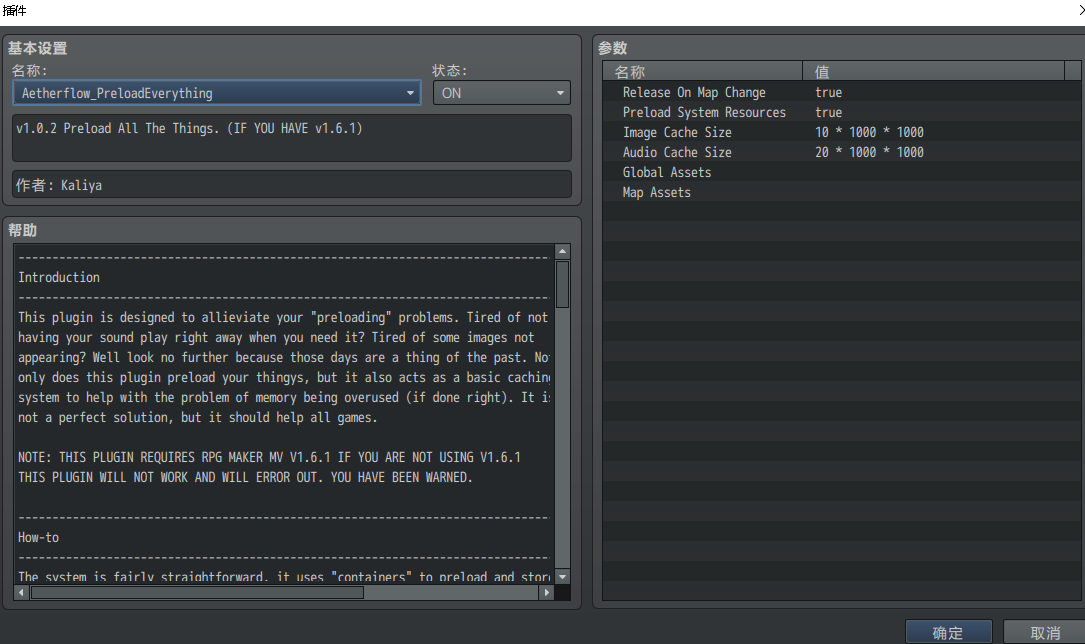
[pre lang="javascript"]/*
* ---------------------------------------------------------------------------------
* Containers
* ---------------------------------------------------------------------------------
* For those users who are more hands on, the caching system has a type of object
* known as a "Container". Think of this as a group of objects, that can all be cached
* together and then can all be purged together at the same time, for easy cleanup and
* management. These are not the same as containers you setup in the plugin parameters.
* These containers are only accessed and used via code.
*
* Various function exists to help with the ease and usage of containers. They are
* all well documented throughout the plugin but a brief overview of them is as follows:
*
* ImageManager/AudioManager.addContainer("containerName"): Adds a container to the
* specified resource cache for that type.
*
* ImageManager/AudioManager.addContainerItem("containerName", "itemKey"): Adds an item
* to the container. NOTE: It only adds a key to look up the item in the cache for purging,
* it does not preload or load an item for you, you will need to do that prior to adding it
* to a container.
*
* ImageManager/AudioManager.releaseContainer("containerName"): Releases all objects
* within the specified container from the cache.
*
* ImageManager/AudioManager.releaseContainerItem("containerName", "itemKey"): Releases
* the specified item from the specified container if it exists, freeing it from the
* cache.
*/[/pre]
ImageManager.addContainer("containerName")
ImageManager.addContainerItem("containerName", "itemKey")
是直接调用代码的行为,不建议新手使用 |
|


 写轮眼
写轮眼

 提升卡
提升卡 沉默号角
沉默号角 喧嚣号角
喧嚣号角 变色卡
变色卡 升龙剑
升龙剑