| 赞 | 0 |
| VIP | |
| 好人卡 | |
| 积分 | 7 |
| 经验 | |
| 最后登录 | 2026-8-2 |
| 在线时间 | 105 小时 |
- 梦石
- 0
- 星屑
- 678
- 在线时间
- 105 小时
- 注册时间
- 2022-8-14
- 回帖
- 0
|
加入我们,或者,欢迎回来。
您需要 登录 才可以下载或查看,没有账号?注册会员
×
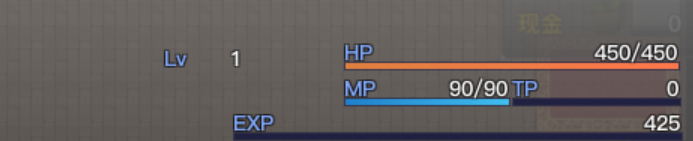
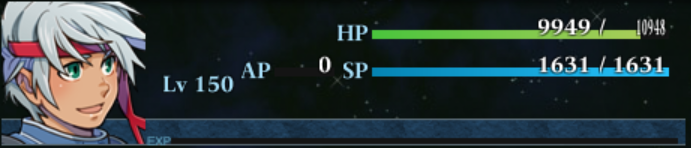
图一使用了Yanfly的菜单脚本,包括技能、状态等界面在内,角色的HP/MP是以值槽右侧对其来显示的,也不存在如图二所示因为数字位数过长导致字体被严重压缩的情况
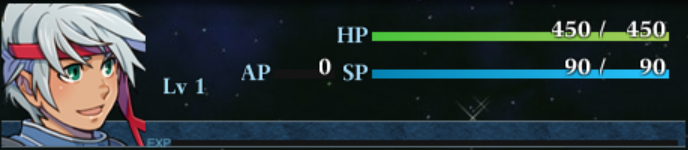
图三则是使用了如下所示的 Galv's Menu Themes Engine 菜单主题脚本,当前值/最大值的位置如默认排版一样位于固定位置,因数字位数过长被压缩。
特来请教一下如何在Galv的菜单脚本下实现这种右对齐的排版样式?
另附galv的脚本:
[pre lang="ruby" line="1"]#------------------------------------------------------------------------------#
# Galv's Menu Themes Engine
#------------------------------------------------------------------------------#
# For: RPGMAKER VX ACE
# Version 1.6
#------------------------------------------------------------------------------#
# NOTICE: This script is NOT free for commercial use.
# Contact Galv via PM at one of the following forums:
# http://www.rpgmakervxace.net/
# http://forums.rpgmakerweb.com/
#------------------------------------------------------------------------------#
#------------------------------------------------------------------------------#
# 2013-06-27 - Version 1.6 - compatibility fix for xp rate
# 2013-06-11 - Version 1.5 - bug fixed with help menu text on incorrect menu
# 2013-06-09 - Version 1.4 - bug missed with last fix... now fixed. I hope.
# 2013-06-08 - Version 1.3 - fixed bug with hidden menu items
# - made disabled buttons text transparent
# 2013-04-16 - Version 1.2 - fixed a graphic object bug. Also included
# - Killozappit's Cache Back script in the demo to
# - help with lag on slower computers.
# 2013-04-15 - Version 1.1 - fixed a bug with using items/skills on actors
# 2013-04-15 - Version 1.0 - release
#------------------------------------------------------------------------------#
# This script replaces the default menu and thus will not be compatible with
# other scripts that do the same. The new changes to the menu offer a few
# things such as:
# - Image controlled menu scenes (including moving backgrounds)
# - 'Themes' allow you to customize the look of the menu and change it in game
# - Other scenes can change with theme (eg. item, equip, custom scenes, etc.)
# - Customisable menu commands (icons, visibility switches, order, vocab)
# - Animated (sliding) commands
# - Help window for selected command
# - Information bar with gold, current location and play time
# - Modified actor status to include exp and tp (for actors with preserve tp)
#------------------------------------------------------------------------------#
#-------------------------------------------------------------------------------
# SCRIPT CALL
#-------------------------------------------------------------------------------
#
# theme("Theme_Name") # Changes your menu theme to use the specified one.
#
#-------------------------------------------------------------------------------
($imported ||= {})["Galv_Menu_Themes"] = true
module GMENU
COMMAND_LIST = [ # don't touch
#-------------------------------------------------------------------------------
#
# * MENU - COMMAND SETUP
#
#-------------------------------------------------------------------------------
# Below list is your in-game menu commands. This replaces the database vocab
# names and adds more control over customizing your game menu.
#-------------------------------------------------------------------------------
# ["Menu Text", :command_type, :Scene, switch1, switch2, help txt, icon]
["Items", :cmd, :Scene_Item, 0, 0, "View or use items from your inventory.",270],
["Skills", :sel, :Scene_Skill, 0, 0, "View or use character skills.",112],
["Equip", :sel, :Scene_Equip, 0, 0, "Equip your characters with weapons and armor.",170],
["Status", :sel, :Scene_Status, 0, 0, "View status of your characters.",117],
["Formation", :sel, :Formation, 0, 0, "Change your character order",121],
["Save", :cmd, :Scene_Save, 0, 0, "Record your game progress.",224],
["Game End", :cmd, :Scene_End, 0, 0, "End or restart the game.",6],
["Example1",:cmd, 1, 0, 0, "Example command - calls common event 1",278],
["Example2",:cmd, 1, 0, 0, "Example command - calls common event 1",278],
# Here are examples of adding functionality via script. The script code for
# these examples is in the "Example Script Commands" script in the list.
#["Gold!", :cmd, :custom1, 0, 0, "Scripted custom symbol example",280],
#["Levelup!", :sel, :custom2, 0, 0, "Scripted custom symbol on actor select example",290],
#-------------------------------------------------------------------------------
] # don't touch
#-------------------------------------------------------------------------------
# INSTRUCTIONS
#-------------------------------------------------------------------------------
# "Menu Text"........ the text used for the menu item
# :command_type...... :cmd - goes to the scene when menu item accessed.
# :sel - select actor before going to the scene.
# scene.............. name of the scene as a symbol. eg. :Scene_Item (*)
# make this a number instead to call a common event.
# switch1............ if switch is OFF, item is disabled. 0 to not use
# switch2............ if switch is OFF, item will not appear. 0 to not use
# help txt........... text that appears at the top of the menu screen
# icon............... the icon id to use an icon next to your menu command
#-------------------------------------------------------------------------------
# (*) Scripters can use a custom symbol here to do other functions by aliasing
# or overwriting methods found on
#-------------------------------------------------------------------------------
#-------------------------------------------------------------------------------
#
# * MENU SETTINGS
#
#-------------------------------------------------------------------------------
SHOW_TP = true # Show TP if actor has 'preserve tp' feature true or false
ACTORS_SHOWN = 4 # Number of actors visible in the menu before scrolling
DEFAULT_THEME = "Theme_Default" # The theme your game will use to begin.
#-------------------------------------------------------------------------------
# THEME SETUP - DEFAULT THEME
#-------------------------------------------------------------------------------
module Theme_Default
# Gerenal Options
FONT = "Arial" # Font used throughout theme.
FONT_SIZE = 21 # Font size used throughout theme.
WINDOW_TONE = [22,52,72,0] # Color tone of scenes that use windowskins
# Background
BACK1_XY = [1,1] # X,Y movement for background1 (default stars)
BACK1_OPACITY = 190 # Background opacity
BACK2_XY = [0,0] # X,Y movement for background2 (default top bar)
BACK2_OPACITY = 255 # Background opacity
BACK3_XY = [0,0] # X,Y movement for background2 (default bottom bar)
BACK3_OPACITY = 255 # Background opacity
SCENE_BACK_OPACITY = 255 # Background opacity for other scene background
# Command Menu
MENU_FONT = "Arial" # Different font used for the menu text
MENU_FONT_SIZE = 21 # Size of menu text
MENU_TXT_COLOR = Color.new(255, 255, 255, 255) # Color of menu text
MENU_TXT_OUT = Color.new(27, 57, 97, 255) # Color of menu text outline
MENU_TXT_XY = [0,-2] # X,Y offset for text in command menu
MENU_ICON_XY = [35,1] # X,Y offset for icons in command menu
SLIDE_ICON = true # true or false to slide icon with menu text
SLIDE_SPEED = 5 # Speed the menu buttons slide in and out
SLIDE_OFF = -30 # X Position of button when cursor not on it
SLIDE_ON = 0 # X Position of button when cursor is on it
MENU_Y_OFFSET = 45 # Distance Y from top of screen
MENU_WIDTH = 170 # Width reserved for the main menu.
# Help Window
HELP_XY = [44,2] # X,Y offset for help text
HELP_TEXT_COLOR = Color.new(200, 235, 255, 255) # Color of help text
# Game Info Window
INFO_XY = [0,0] # X,Y offset for info text
GAME_INFO_TXT_COLOR = Color.new(200, 235, 255, 255) # Game Info text color
CURRENCY_ICON = 262 # Icon used instead of currency vocab. 0 = vocab
# Actor Status
STAT_COLOR = Color.new(167, 223, 248, 255) # Color used for lvl,hp,mp
GAUGEB_COLOR = Color.new(20, 20, 20, 255) # Color of gauge backs
HP_COLOR1 = Color.new(74, 197, 61, 255) # Color for hp gauge gradient
HP_COLOR2 = Color.new(169, 206, 89, 255)# Color for hp gauge gradient
MP_COLOR1 = Color.new(5, 132, 179, 255) # Color for mp gauge gradient
MP_COLOR2 = Color.new(40, 197, 255, 255)# Color for mp gauge gradient
XP_COLOR1 = Color.new(88, 147, 174, 255) # Color for xp gauge gradient
XP_COLOR2 = Color.new(133, 181, 203, 255)# Color for xp gauge gradient
TP_COLOR1 = Color.new(255, 166, 12, 255) # Color for tp gauge gradient
TP_COLOR2 = Color.new(255, 126, 12, 255)# Color for tp gauge gradient
GAUGE_FONT = "VL Gothic Regular" # Font used for hp/mp and amounts.
end
#-------------------------------------------------------------------------------
# CUSTOM THEMES
#-------------------------------------------------------------------------------
# You can make your own custom menu themes and swap between them during the
# game or make them available for others to use. Each theme has it's own folder
# in your project located in /Graphics/GMenu/Theme_Name/
# For example the default theme is:
# /Graphics/GMenu/Theme_Default/
#
# HOW TO MAKE A THEME:
# 1. Make a duplicate of the /Theme_Default/ folder and rename it.
# 2. Modify the graphics how you see fit, using the default as templates
# 3. (Optional) You can use the theme_settings.txt file found in the template
# folder to create new settings for the theme. Copy the script from the
# file and paste it a new script position below this menu script. Change
# "Theme_Default" at the top to the name of your theme's folder.
# 4. If you did that right, now in your game, you can use the script call:
# theme("Theme_Name")
# To change your menu theme during the game to any theme you have installed.
#
# If you do not create your own settings script (step 3) for your custom theme,
# it will use the settings from Theme_Default.
#-------------------------------------------------------------------------------
#-------------------------------------------------------------------------------
# THEME SETUP - INNER SCENES
#-------------------------------------------------------------------------------
# Inner scenes (such as item, equip, skills etc) can use the same Background
# (using BACK1 setting) as well as windowskin used in the current theme.
# List scenes below that you wish for this to occur.
#-------------------------------------------------------------------------------
SCENE_THEMES = [ # don't touch
#-------------------------------------------------------------------------------
"Scene_Item",
"Scene_Skill",
"Scene_Equip",
"Scene_Status",
"Scene_Save",
"Scene_End",
"Scene_Party",
"Scene_System",
"Scene_Load",
#"Scene_File",
#"Scene_Load",
#"Scene_Shop",
#"Scene_Name",
#"Scene_Gameover",
#"Scene_Title",
#-------------------------------------------------------------------------------
] # don't touch
#-------------------------------------------------------------------------------
# In addition to this, the script will check the theme folder for any images.
# with the scene name (above) followed by "_Background" and "_Background2".
# For example if the following file is found in the theme folder:
# Scene_Item_Background.png (or jpg)
# It will use that image INSTEAD of Background.jpg for Background1. It will
# also look for Scene_Item_Background2.png (or jpg) which will appear above
# the first background. This background is static and does not move.
#-------------------------------------------------------------------------------
#-------------------------------------------------------------------------------
#
# * END SETTINGS
#
#-------------------------------------------------------------------------------
end # GMENU
module Check_Theme
def mtheme
Object.const_get("GMENU").const_get($game_system.menu_theme) rescue
GMENU::Theme_Default
end
end # Check_Theme
#----------------------#
#---| GAME_INTERPERTER |----------------------------------------------------
#----------------------#
class Game_Interpreter
def theme(name)
$game_system.menu_theme = name
end
end # Game_Interpreter
#-----------#
#---| CACHE |---------------------------------------------------------------
#-----------#
module Cache
def self.gmenu(filename,theme)
load_bitmap("Graphics/GMenu/" + theme + "/", filename)
end
end # Cache
#-----------------#
#---| GAME_SYSTEM |---------------------------------------------------------
#-----------------#
class Game_System
attr_accessor :menu_theme
alias gmenu_engine_gs_initialize initialize
def initialize
@menu_theme = GMENU::DEFAULT_THEME
gmenu_engine_gs_initialize
end
end # Game_System
#---------------#
#---| GAME_TEMP |-----------------------------------------------------------
#---------------#
class Game_Temp
attr_accessor :themed_scene
attr_accessor :menuindexes
alias gmenu_engine_gt_initialize initialize
def initialize
@themed_scene = false
gmenu_engine_gt_initialize
end
end # Game_Temp
#----------------#
#---| GAME_ACTOR |----------------------------------------------------------
#----------------#
class Game_Actor < Game_Battler
def xp_rate
a = (exp.to_f - current_level_exp.to_f)
b = (next_level_exp.to_f - current_level_exp.to_f)
if exp > 0 && b > 0
return a / b
else
return 0
end
end
end # Game_Actor < Game_Battler
#----------------#
#---| SCENE_MENU |----------------------------------------------------------
#----------------#
class Scene_Menu < Scene_MenuBase
attr_accessor :command_window
include Check_Theme
# OVERWRITE
def start
super
create_graphics
create_help_window
create_new_command_window
create_gameinfo_window
create_status_window
end
#---| CREATE WINDOWS |
def create_help_window
@help_window = Window_MenuHelp.new
end
# OVERWRITE
def create_status_window
@status_window = Window_MainMenuStatus.new(@command_window.width,
@help_window.height,Graphics.height - @help_window.height -
@gameinfo_window.height)
end
# OVERWRITE
def create_new_command_window
@command_window = Window_MenuCommand.new(0,@help_window.height)
@command_window.help_window = @help_window
menu_array = Array.new(GMENU::COMMAND_LIST)
menu_array.each { |cmd|
handle = cmd[0].delete(' ').downcase.to_sym
@command_window.set_handler(handle, method(cmd[1]))
}
@command_window.set_handler(:cancel, method(:return_scene))
end
def create_gameinfo_window
@gameinfo_window = Window_GameInfo.new
@gameinfo_window.x = 0
@gameinfo_window.y = Graphics.height - @gameinfo_window.height
end
#---| CREATE GRAPHICS |
def create_graphics
create_background2
create_background3
end
def create_background2
@background2 = Plane.new
@background2.bitmap = Cache.gmenu("Background2",$game_system.menu_theme)
@background2.opacity = mtheme::BACK2_OPACITY
end
def create_background3
@background3 = Plane.new
@background3.bitmap = Cache.gmenu("Background3",$game_system.menu_theme)
@background3.opacity = mtheme::BACK3_OPACITY
@background3.oy = -Graphics.height
end
#---| UPDATING |
def update
super
update_background2
update_background3
update_gameinfo
end
def update_background2
@background2.ox -= mtheme::BACK2_XY[0]
@background2.oy -= mtheme::BACK2_XY[1]
end
def update_background3
@background3.ox -= mtheme::BACK3_XY[0]
@background3.oy -= mtheme::BACK3_XY[1]
end
def update_gameinfo
@gameinfo_window.refresh
end
#---| FUNCTIONALITY |
alias gmenu_engine_sm_dispose_background dispose_background
def dispose_background
gmenu_engine_sm_dispose_background
if @background2
@background2.bitmap.dispose
@background2.dispose
end
if @background3
@background3.bitmap.dispose
@background3.dispose
end
end
def cmd
cmd = $game_temp.menuindexes[@command_window.index]
symbol = GMENU::COMMAND_LIST[cmd][2]
if GMENU::COMMAND_LIST[cmd][2].is_a?(Integer)
common_event_command(GMENU::COMMAND_LIST[cmd][2])
elsif custom_symbol(symbol)
custom_on_command_ok(symbol)
else
SceneManager.call(GMENU::COMMAND_LIST[cmd][2])
end
end
def common_event_command(id)
$game_temp.reserve_common_event(id)
SceneManager.return
end
def sel
command_personal
end
# OVERWRITE
def command_personal
@status_window.select_last
@status_window.activate
@status_window.set_handler(:ok, method(:on_personal_ok))
@status_window.set_handler(:cancel, method(:on_personal_cancel))
end
# OVERWRITE
def on_personal_ok
cmd = $game_temp.menuindexes[@command_window.index]
symbol = GMENU::COMMAND_LIST[cmd][2]
if symbol == :Formation
on_formation_ok
elsif custom_symbol(symbol)
custom_on_personal_ok(symbol)
else
SceneManager.call(symbol)
end
end
def custom_symbol(symbol)
# Alias/overwrite this method for custom symbols.
# Make this method return true if symbol equals your custom symbol.
end
def custom_on_command_ok(symbol)
# Alias/overwrite this method for custom symbols. (For 'ok' on command)
# Add your functionality here including if symbol equals your custom symbol.
end
def custom_on_personal_ok(symbol)
# Alias/overwrite this method for custom symbols. (For 'ok' on actor)
# Add your functionality here including if symbol equals your custom symbol.
end
def custom_on_personal_cancel(symbol)
# Alias/overwrite this method for custom symbols. (Cancelling on actor)
# Add your cancel code here including if symbol equals your custom symbol.
end
# OVERWRITE
def on_personal_cancel
cmd = @command_window.index
symbol = GMENU::COMMAND_LIST[cmd][2]
if symbol == :Formation
on_formation_cancel
elsif custom_symbol(symbol)
custom_on_personal_cancel(symbol)
else
@status_window.unselect
@command_window.activate
end
end
end # Scene_Menu < Scene_MenuBase
#------------------------#
#---| WINDOW_MENUCOMMAND |--------------------------------------------------
#------------------------#
class Window_MenuCommand < Window_Command
#OVERWRITE
def initialize(x,y)
@menu_buttons = []
super(x, y)
select_last
self.opacity = 0
end
def draw_item(index)
@menu_buttons << MenuBtn.new(@viewport,index)
end
def visible_line_number
item_max
end
def window_width
return mtheme::MENU_WIDTH
end
def update
super
@menu_buttons.each { |btn| btn.update(index) }
end
def dispose
@menu_buttons.each { |btn| btn.dispose }
super
end
def update_cursor
if @cursor_all
cursor_rect.empty
self.top_row = 0
elsif @index < 0
cursor_rect.empty
else
ensure_cursor_visible
cursor_rect.empty
end
end
def add_new_main_commands
$game_temp.menuindexes = []
menu_array = Array.new(GMENU::COMMAND_LIST)
menu_array.each_with_index { |cmd,i|
next if cmd[4] > 0 && !$game_switches[cmd[4]]
$game_temp.menuindexes << i
text = cmd[0]
active = get_active(cmd[2],cmd[3])
handle = cmd[0].delete(' ').downcase.to_sym
add_command(text, handle, active)
}
end
def get_active(symbol,switch)
return false if switch > 0 && !$game_switches[switch]
case symbol
when :Formation
formation_enabled
when :Scene_Save
save_enabled
else
main_commands_enabled
end
end
def make_command_list
add_new_main_commands
end
end # Window_MenuCommand < Window_Command
#----------------------#
#---| WINDOW_MENUSTATUS |----------------------------------------------------
#----------------------#
class Window_MainMenuStatus < Window_MenuStatus
include Check_Theme
def initialize(x, y, h = 0)
@height = h
super(x, y)
self.opacity = 0
end
def window_width
Graphics.width - mtheme::MENU_WIDTH
end
def standard_padding
return 6
end
def window_height
@height
end
def item_height
(@height - 12) / GMENU::ACTORS_SHOWN
end
def draw_item(index)
actor = $game_party.members[index]
enabled = $game_party.battle_members.include?(actor)
rect = item_rect(index)
draw_item_background(index)
draw_back_graphics(index,item_height,item_width,enabled)
draw_gface(actor.face_name,actor.face_index,rect.x + 1,rect.y + 1,
item_height - 2,enabled)
draw_gsimple_status(actor, rect.x + 108, rect.y, item_height)
end
end
#--------------------#
#---| WINDOW_MENUHELP |------------------------------------------------------
#--------------------#
class Window_MenuHelp < Window_Help
include Check_Theme
def initialize
super(1)
self.opacity = 0
end
def standard_padding
return 6
end
def clear
ind = $game_temp.menuindexes[SceneManager.scene.command_window.index]
set_text(GMENU::COMMAND_LIST[ind][5])
end
def refresh
contents.clear
draw_text_ex(mtheme::HELP_XY[0], mtheme::HELP_XY[1], @text)
end
def draw_text_ex(x, y, text)
reset_font_settings
change_color(mtheme::HELP_TEXT_COLOR)
self.contents.font.name = mtheme::FONT
self.contents.font.size = mtheme::FONT_SIZE
text = convert_escape_characters(text)
pos = {:x => x, :y => y, :new_x => x, :height => calc_line_height(text)}
process_character(text.slice!(0, 1), text, pos) until text.empty?
end
end
#---------------------#
#---| WINDOW_GAMEINFO |-----------------------------------------------------
#---------------------#
class Window_GameInfo < Window_Base
include Check_Theme
def initialize
super(0, 0, Graphics.width, fitting_height(1))
self.opacity = 0
refresh
end
def standard_padding
return 6
end
def refresh
contents.clear
self.contents.font.name = mtheme::FONT
self.contents.font.size = mtheme::FONT_SIZE
draw_gld
draw_location
draw_playtime
end
def draw_gld
value = $game_party.gold
if mtheme::CURRENCY_ICON > 0
i = draw_icon(mtheme::CURRENCY_ICON, contents.width / 4 - 43, -1, true)
draw_currency_value(value,i,tx+4,ty,contents.width / 4 - 45)
else
draw_currency_value(value,Vocab::currency_unit,tx+4,ty,contents.width / 4 - 18)
end
end
def tx
mtheme::INFO_XY[0]
end
def ty
mtheme::INFO_XY[1]
end
def draw_location
change_color(mtheme::GAME_INFO_TXT_COLOR)
draw_text(tx,ty,Graphics.width,line_height,$game_map.display_name,1)
end
def draw_playtime
draw_text(tx,ty,Graphics.width - 20,line_height,time_text,2)
end
def time_text
sprintf("%02d:%02d:%02d", (Graphics.frame_count / 60**2) / 60,
Graphics.frame_count / 60**2 % 60,
Graphics.frame_count / 60 % 60)
end
def draw_currency_value(value, unit, x, y, width)
cx = text_size(unit).width
change_color(mtheme::GAME_INFO_TXT_COLOR)
draw_text(x, y, width - cx - 2, line_height, value, 2)
change_color(system_color)
draw_text(x, y, width, line_height, unit, 2)
end
def open
refresh
super
end
end
#-----------------#
#---| WINDOW_BASE |---------------------------------------------------------
#-----------------#
class Window_Base < Window
include Check_Theme
alias galv_gmenu_engine_wb_initialize initialize
def initialize(x, y, width, height)
galv_gmenu_engine_wb_initialize(x, y, width, height)
if $game_temp.themed_scene
self.windowskin = Cache.gmenu("Windowskin",$game_system.menu_theme) rescue
Cache.system("Window")
set_theme_tone
end
end
alias galv_gmenu_engine_wb_system_color system_color
def system_color
if $game_temp.themed_scene
mtheme::STAT_COLOR
else
galv_gmenu_engine_wb_system_color
end
end
alias galv_gmenu_engine_wb_gauge_back_color gauge_back_color
def gauge_back_color
if $game_temp.themed_scene
mtheme::GAUGEB_COLOR
else
galv_gmenu_engine_wb_gauge_back_color
end
end
def set_theme_tone
a,b,c,d = mtheme::WINDOW_TONE
self.tone.set(a,b,c,d)
end
alias galv_gmenu_engine_wb_update_tone update_tone
def update_tone
if $game_temp.themed_scene
set_theme_tone
else
galv_gmenu_engine_wb_update_tone
end
end
def draw_back_graphics(ind,height,width,enabled = true)
if enabled
bitmap = Cache.gmenu("ActorBackground",$game_system.menu_theme)
else
bitmap = Cache.gmenu("ActorBackgroundDisabled",$game_system.menu_theme)
end
rect = Rect.new(1,0,width - 2,bitmap.height + 2)
y = (rect.y + height) * ind - (bitmap.height - height) - 2
contents.blt(rect.x, y, bitmap, rect, 255)
bitmap.dispose
end
def draw_gsimple_status(actor, x, y, height)
contents.font.name = mtheme::FONT
contents.font.size = mtheme::FONT_SIZE
draw_actor_name(actor, x, y + height - 30)
draw_glevel(actor, x, y + height - 30 - line_height * 1)
draw_gicons(actor, x - 108, y + line_height * 2 + 3)
draw_gclass(actor, x, y + height - 30)
contents.font.size = 20
contents.font.name = mtheme::GAUGE_FONT
w = contents.width - 260
h = (height - 80) / 2
draw_ghp(actor, x + 140, y + h / 2 , w)
draw_gmp(actor, x + 140, y + line_height - 4 + h,w)
if actor.preserve_tp? && GMENU::SHOW_TP
draw_gtp(actor, x + 75, y + line_height - 4 + h,40)
end
draw_gxp(actor, x + 6, y + height - 23, contents.width - 120)
end
def draw_gtp(actor, x, y, width = 124)
draw_gauge(x, y, width, actor.tp_rate,mtheme::TP_COLOR1,mtheme::TP_COLOR1)
change_color(system_color)
draw_text(x - 30, y + 7, 30, line_height, Vocab::tp_a,2)
change_color(tp_color(actor))
draw_text(x + width - 42, y + 3, 42, line_height, actor.tp.to_i, 2)
end
def draw_gxp(actor,x,y,width = 124)
draw_xpgauge(x, y, width, actor.xp_rate, mtheme::XP_COLOR1, mtheme::XP_COLOR2)
end
def draw_xpgauge(x, y, width, rate, color1, color2)
fill_w = (width * rate).to_i
gauge_y = y + line_height - 8
contents.fill_rect(x, gauge_y, width, 4, gauge_back_color)
contents.gradient_fill_rect(x, gauge_y, fill_w, 4, color1, color2)
end
def draw_ghp(actor, x, y, width = 124)
draw_gauge(x, y, width, actor.hp_rate, mtheme::HP_COLOR1, mtheme::HP_COLOR2)
change_color(system_color)
draw_text(x - 30, y + 7, 30, line_height, Vocab::hp_a,2)
draw_current_and_max_values(x, y + 3, width, actor.hp, actor.mhp,
hp_color(actor), normal_color)
end
def draw_gmp(actor, x, y, width = 124)
draw_gauge(x, y, width, actor.mp_rate, mtheme::MP_COLOR1, mtheme::MP_COLOR2)
change_color(system_color)
draw_text(x - 30, y + 7, 30, line_height, Vocab::mp_a,2)
draw_current_and_max_values(x, y + 3, width, actor.mp, actor.mmp,
mp_color(actor), normal_color)
end
def draw_gicons(actor, x, y, width = 96)
icons = (actor.state_icons + actor.buff_icons)[0, width / 24]
icons.each_with_index {|n, i| draw_icon(n, x, y - 16 * i) }
end
def draw_gface(face_name, face_index, x, y, height, enabled = true)
bitmap = Cache.face(face_name)
h = [height,96].min - 1
y_offset = GMENU::ACTORS_SHOWN > 4 ? 1.25 : 1
h2 = 96 - h * y_offset
rect = Rect.new(face_index % 4 * 96, face_index / 4 * 96 + h2, 96, h)
contents.blt(x, y, bitmap, rect, enabled ? 255 : translucent_alpha)
bitmap.dispose
end
def draw_glevel(actor, x, y)
wid = Graphics.width - 300
change_color(system_color)
draw_text(x, y, wid, line_height, Vocab::level_a + " " + actor.level.to_s, 0)
end
def draw_gclass(actor, x, y)
change_color(normal_color)
draw_text(x, y, Graphics.width - 290, line_height, actor.class.name,2)
end
end # Window_Base < Window
#-----------------#
#---| SCENEMANAGER |---------------------------------------------------------
#-----------------#
module SceneManager
class << self
alias gmenu_engine_sm_call call
end
def self.call(scene_class)
if scene_class.is_a?(Symbol)
@stack.push(@scene)
@scene = Kernel.const_get(scene_class).new
else
gmenu_engine_sm_call(scene_class)
end
end
def self.themed_scene
array = ["Scene_Menu"] + GMENU::SCENE_THEMES
return true if array.include?(@scene.name)
return false
end
end # SceneManager
class Scene_MenuBase < Scene_Base
include Check_Theme
alias gmenu_engine_sb_start start
def start
gmenu_engine_sb_start
if SceneManager.themed_scene
$game_temp.themed_scene = true
create_theme_backgrounds
end
end
def create_theme_backgrounds
create_background1
create_themebg2
end
def create_background1
@background1 = Plane.new
@background1.bitmap = Cache.gmenu(name + "_Background",$game_system.menu_theme) rescue
Cache.gmenu("Background",$game_system.menu_theme)
@background1.opacity = mtheme::BACK1_OPACITY
@background1.z = -1
@background_sprite.z = -2
end
def create_themebg2
@themebg2 = Sprite.new
if !SceneManager.scene_is?(Scene_Menu)
@themebg2.bitmap = Cache.gmenu(name + "_Background2",$game_system.menu_theme) rescue
Cache.gmenu("Scene_Generic_Background2",$game_system.menu_theme) rescue
nil
end
@themebg2.opacity = mtheme::SCENE_BACK_OPACITY
if @themebg2.bitmap
@themebg2.x = [(Graphics.width - @themebg2.bitmap.width) / 2,0].max
end
@themebg2.z = 0
end
alias gmenu_engine_sb_update update
def update
gmenu_engine_sb_update
if @background1
@background1.ox -= mtheme::BACK1_XY[0]
@background1.oy -= mtheme::BACK1_XY[1]
end
end
alias gmenu_engine_sb_terminate terminate
def terminate
gmenu_engine_sb_terminate
$game_temp.themed_scene = false
@background1.dispose if @background1
@themebg2.dispose if @themebg2
end
def name
if self.to_s =~ /#<(.*):/i
return $1
else
return ""
end
end
end # Scene_Base
#--------------------#
#---| SPRITE_MENUBTN |------------------------------------------------------
#--------------------#
class MenuBtn
include Check_Theme
def initialize(viewport,index)
@index1 = index
@index = 0
create_bitmap
create_text
create_icon
end
def dispose
@text.dispose
@icon.dispose
@btn.dispose
@text.bitmap.dispose
@icon.bitmap.dispose
@btn.bitmap.dispose
end
def update(index)
@index = $game_temp.menuindexes[index]
update_position
end
def menuitem
GMENU::COMMAND_LIST[$game_temp.menuindexes[@index1]]
end
def create_bitmap
if SceneManager.scene.command_window
cmd_index = SceneManager.scene.command_window.index
else
cmd_index = 0
end
@btn = Sprite.new
@btn.bitmap = Cache.gmenu("MenuButton",$game_system.menu_theme)
@btn.y = mtheme::MENU_Y_OFFSET + @index1 * @btn.bitmap.height
@btn.x = @index1 == cmd_index ? mtheme::SLIDE_ON : mtheme::SLIDE_OFF
@btn.opacity = @index1 == cmd_index ? 255 : 160
end
def create_icon
@icon = Sprite.new
@icon.bitmap = Bitmap.new(800,800)
@tempicon = Sprite.new
@tempicon.bitmap = Cache.system("Iconset")
icon_index = menuitem[6]
rect = Rect.new(icon_index % 16 * 24, icon_index / 16 * 24, 24, 24)
@icon.bitmap.blt(mtheme::MENU_ICON_XY[0], mtheme::MENU_ICON_XY[1],
@tempicon.bitmap, rect, 255)
@tempicon.bitmap.dispose if @tempicon.bitmap
@tempicon.dispose
@icon.x = @btn.x if mtheme::SLIDE_ICON
@icon.y = @btn.y
@icon.z = 100
end
def create_text
@text = Sprite.new
@text.bitmap = Bitmap.new(180,35)
@text.bitmap.font.name = mtheme::MENU_FONT
@text.bitmap.font.color = mtheme::MENU_TXT_COLOR
@text.bitmap.font.out_color = mtheme::MENU_TXT_OUT
@text.bitmap.font.size = mtheme::MENU_FONT_SIZE
text = menuitem[0]
@text.bitmap.draw_text(mtheme::MENU_TXT_XY[0],
mtheme::MENU_TXT_XY[1],150,35, text,2)
@text.x = @btn.x
@text.y = @btn.y
@text.opacity = 100 if menuitem[3] > 0 && !$game_switches[menuitem[3]]
end
def update_position
if $game_temp.menuindexes[@index1] == @index
@btn.opacity = 255
return if @btn.x >= mtheme::SLIDE_ON
@btn.x += mtheme::SLIDE_SPEED
@text.x += mtheme::SLIDE_SPEED
@icon.x += mtheme::SLIDE_SPEED if mtheme::SLIDE_ICON
else
@btn.opacity = 160
return if @btn.x <= mtheme::SLIDE_OFF
@btn.x -= mtheme::SLIDE_SPEED
@text.x -= mtheme::SLIDE_SPEED
@icon.x -= mtheme::SLIDE_SPEED if mtheme::SLIDE_ICON
end
end
end # Sprite_MenuBtn < Sprite_Base[/pre] |
-
Yanfly的菜单中数值的样式
-
五位数导致的字体被压缩
-
Galv的菜单中数值的样式
|



 写轮眼
写轮眼
 发表于 2026-1-7 14:03:14
 提升卡
提升卡 沉默号角
沉默号角 喧嚣号角
喧嚣号角 变色卡
变色卡 升龙剑
升龙剑