| 赞 | 0 |
| VIP | |
| 好人卡 | |
| 积分 | 1 |
| 经验 | |
| 最后登录 | 2026-3-16 |
| 在线时间 | 16 小时 |
- 梦石
- 0
- 星屑
- 109
- 在线时间
- 16 小时
- 注册时间
- 2026-2-18
- 回帖
- 2
|
加入我们,或者,欢迎回来。
您需要 登录 才可以下载或查看,没有账号?注册会员
×
本帖最后由 莱纳嘤狐 于 2026-2-20 01:24 编辑
一开始对mv底层框架不太熟悉,就先后尝试使用html5 canvas和webgl绘制图像,结果总是一点反应也没有orz
后面经历了多次搜集资料和对框架核心源码的解读(这个过程真的很痛苦啊啊啊)就明白了其中的原理:mv里的许多东西都是对PIXI库里的东西的一层层封装,我们的游戏实质上就是一个巨大的PIXI容器(Container对象),里面的许多UI元素(如Sprite、Scene、Window等)都需要被add到里面去。
但是绘制这种圆弧形状用canvas2dContext的方法会更方便,因为用picture实在是不现实。然后我就发现,Bitmap里就封装了context对象,于是乎我就捣鼓出了下面的代码:
[pre lang="javascript" line="1"]
Bitmap.prototype.drawArc = function(x, y, radius, startAngle, endAngle, lineWidth, color) {
var context = this._context;
context.clearRect(0, 0, Graphics.boxWidth, Graphics.boxHeight);
context.beginPath();
context.arc(x, y, radius, startAngle, endAngle, true);
context.strokeStyle = color;
context.lineWidth = lineWidth;
context.stroke();
context.save();
this._setDirty();
};
[/pre]
自己为Bitmap定义一个新的绘制圆弧的方法,毕竟直接在外部对Bitmap操作很可能行不通(因为_context是Bitmap的私有成员,不向外提供)。
紧接着在反复测试中我还学习到,Bitmap不能直接显示在游戏画面上,还需要封装在Sprite对象中,并被add到PIXI容器里面,放在当前场景上,由SceneManager.update去负责倒计时动画的更新。
完整源码我贴在下面了,还有一些示例截图,欢迎交流,有需改进之处麻烦大佬指出了,非常感谢!!!!新人rm开发者感谢支持!!!
[pre lang="javascript" line="1" file="L_CircleGaugeUI.js"]//=============================================================================
// L_CircleGaugeUI.js
//=============================================================================
/*:
* @target MV
* @plugindesc 自制UI:圆圈形的倒计时进度条
* @author レナ
* @help L_CircleGaugeUI.js
*
* 插件命令([]括号为可选项):
* · L_CircleGaugeUI start 倒计时 圆圈半径 [中心X] [中心Y]
* 开启倒计时。
* · L_CircleGaugeUI stop
* 停止倒计时。
*
* ◆注意:为保证插件正常使用,请先指定一张空png图片!
*
* 使用条款:完全免费使用,可随意更改,允许二次发布,无任何版权限制。
*
* ◆◆◆◆◆◆◆◆◆◆◆◆◆◆◆◆◆◆◆◆◆◆◆◆◆◆◆◆◆◆◆◆◆◆◆◆◆◆◆◆◆◆◆◆◆◆◆◆◆◆
*
* @param duration
* @text 持续时间
* @type number
* @min 1
* @max 300
* @default 10
* @desc 默认倒计时,单位为秒。
*
* @param radius
* @text 圆圈半径
* @type number
* @min 50
* @max 300
* @default 200
* @desc 默认圆圈半径,单位为像素。
*
* @param centerX
* @text 圆圈中心X
* @type number
* @min 0
* @max 816
* @desc 默认圆圈中心(X坐标),单位为像素。
*
* @param centerXVariableId
* @parent centerX
* @text 变量id
* @type number
* @desc 绑定到的变量id。
*
* @param centerY
* @text 圆圈中心Y
* @type number
* @min 0
* @max 624
* @desc 默认圆圈中心(Y坐标),单位为像素。
*
* @param centerYVariableId
* @parent centerY
* @text 变量id
* @type number
* @desc 绑定到的变量id。
*
* @param picName
* @text 图片
* @type file
* @dir img/pictures/
* @default 0
*/
(function() {
Bitmap.prototype.drawArc = function(x, y, radius, startAngle, endAngle, lineWidth, color) {
var context = this._context;
context.clearRect(0, 0, Graphics.boxWidth, Graphics.boxHeight);
context.beginPath();
context.arc(x, y, radius, startAngle, endAngle, true);
context.strokeStyle = color;
context.lineWidth = lineWidth;
context.stroke();
context.save();
this._setDirty();
};
var pluginName = 'L_CircleGaugeUI';
var params = PluginManager.parameters(pluginName);
var duration = Number(params['duration']) || 10;
var radius = Number(params['radius']) || 50;
var centerXVariableId = Number(params['centerXVariableId']) || 0;
var centerYVariableId = Number(params['centerYVariableId']) || 0;
var centerX = Number(params['centerX']) || Graphics.boxWidth / 2;
var centerY = Number(params['centerY']) || Graphics.boxHeight / 2;
var picName = params['picName'] || '0';
var strokeWidth = 15; // 圆环宽度(粗细)
var isCounting = false;
var bgColor = '#999999';
var gaugeColor = '#ffffff';
var bgCircle = null;
var gaugeCircle = null;
var gaugeContainer = null;
function draw(percent) {
if (percent >= 0) {
// 计算对应角度(100%=360°, 0%=0°)
var startAngle = -Math.PI / 2;
var endAngle = percent * 2 * Math.PI - Math.PI / 2;
gaugeCircle.drawArc(centerX, centerY, radius, startAngle, endAngle, strokeWidth, gaugeColor);
}
}
// 倒计时启动方法
Game_Temp.prototype.startCountdown = function(time, radius, startCallback, endCallback, okCallback) {
if (startCallback) startCallback();
// 若已有倒计时,先停止
if (isCounting) this.stopCountdown();
isCounting = true;
var totalMillis = time * 1000;
var elapsedMillis = 0;
var startTime = Date.now();
if (!gaugeContainer) {
gaugeContainer = new PIXI.Container();
SceneManager._scene.addChild(gaugeContainer);
}
bgCircle = ImageManager.loadPicture(picName);
gaugeCircle = ImageManager.loadPicture(picName);
// 绘制底层灰色时间条
bgCircle.drawArc(centerX, centerY, radius, 0, 2 * Math.PI, strokeWidth, bgColor);
var bgCircleSprite = new Sprite(bgCircle);
gaugeContainer.addChild(bgCircleSprite);
// 绘制白色时间条
var gaugeCircleSprite = new Sprite(gaugeCircle);
gaugeContainer.addChild(gaugeCircleSprite);
// 动画更新逻辑
function update() {
if (!isCounting) return;
elapsedMillis = Date.now() - startTime;
var progress = Math.max(0, 1 - (elapsedMillis / totalMillis));
draw(progress);
gaugeContainer.addChild(gaugeCircleSprite);
// 倒计时结束
if (progress <= 0) {
$gameTemp.stopCountdown();
if (endCallback) endCallback();
return;
}
animationId = requestAnimationFrame(update);
}
// 启动动画
update();
// 监听确定键
function okHandler() {
if (isCounting) {
//alert('按下了确定键');
$gameTemp.stopCountdown();
if (okCallback) okCallback();
}
}
this._countdownOkHandler = okHandler;
};
// 停止倒计时方法
Game_Temp.prototype.stopCountdown = function() {
if (!isCounting) return;
// 停止动画、清空容器
cancelAnimationFrame(animationId);
if (gaugeContainer) {
gaugeContainer.removeChildren();
//SceneManager._scene.removeChild(gaugeContainer);
}
// 清除确定键监听、重置状态
this._countdownOkHandler = null;
isCounting = false;
elapsedMillis = 0;
};
/* 这个暂时没啥用
// 监听确定键
var _Scene_Base_updateInput = Scene_Base.prototype.updateInput;
Scene_Base.prototype.updateInput = function() {
_Scene_Base_updateInput.call(this);
// 按下确定键且有倒计时时触发回调
if (Input.isTriggered('ok') && $gameTemp._countdownOkHandler) {
$gameTemp._countdownOkHandler();
}
};
*/
var _Game_Interpreter_pluginCommand = Game_Interpreter.prototype.pluginCommand;
Game_Interpreter.prototype.pluginCommand = function(command, args) {
_Game_Interpreter_pluginCommand.call(this, command, args);
if (command === pluginName) {
switch(args[0]) {
case 'start':
duration = Number(args[1]) || duration;
radius = Number(args[2]) || radius;
centerX = Number(args[3]) || Number($gameVariables.value(centerXVariableId)) || centerX || Graphics.boxWidth / 2;
centerY = Number(args[4]) || Number($gameVariables.value(centerYVariableId)) || centerY || Graphics.boxHeight / 2;
// ◆开启倒计时
$gameTemp.startCountdown(duration, radius);
break;
case 'stop':
// ◆停止倒计时
$gameTemp.stopCountdown();
break;
}
}
};
})();[/pre]
 L_CircleGaugeUI.zip
(2.4 KB, 下载次数: 4, 售价: 1 星屑)
L_CircleGaugeUI.zip
(2.4 KB, 下载次数: 4, 售价: 1 星屑)
测试事件
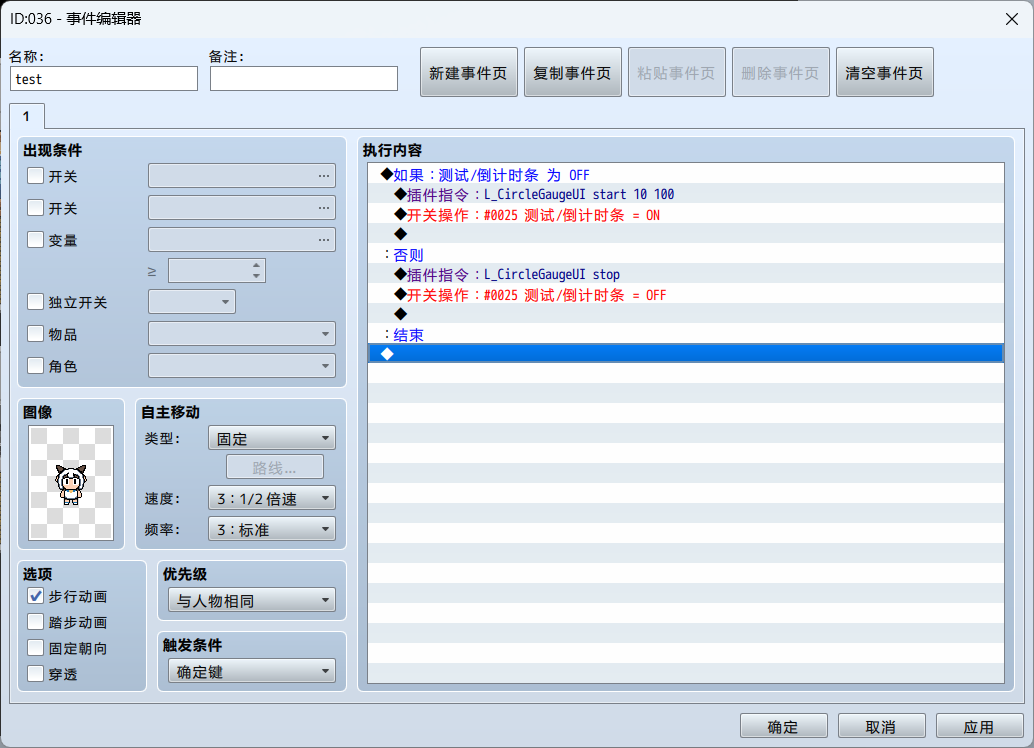
测试截图
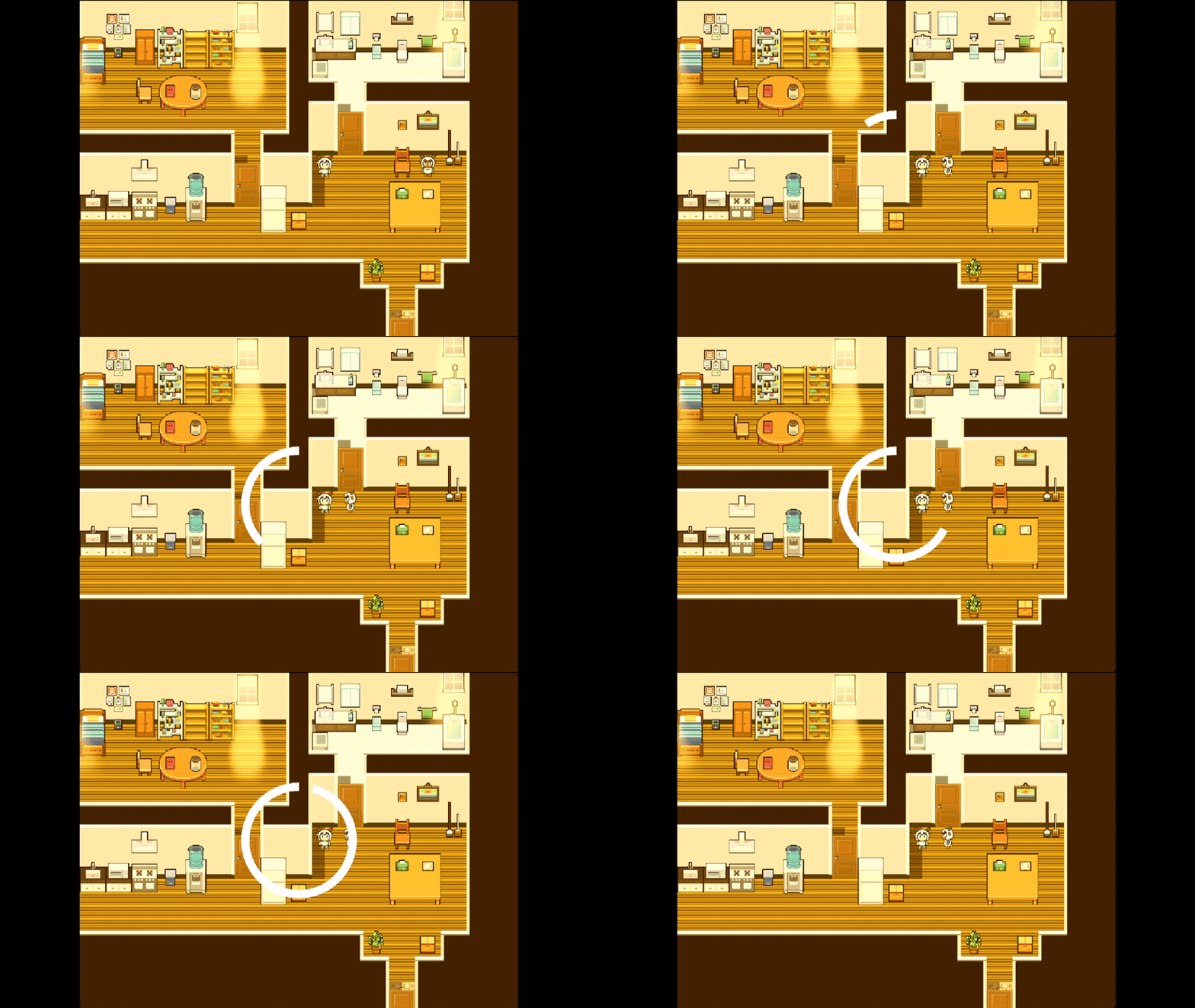
(感谢论坛某个像素画大佬做的图块素材嘿嘿嘿!!!游戏都还没开始写,时间全花在魔改引擎和ui设计上了orz)
|
|


 写轮眼
写轮眼
 发表于 2026-2-20 01:24:30
 提升卡
提升卡 沉默号角
沉默号角 喧嚣号角
喧嚣号角 变色卡
变色卡 升龙剑
升龙剑