| 赞 | 0 |
| VIP | |
| 好人卡 | |
| 积分 | 1 |
| 经验 | |
| 最后登录 | 2016-11-13 |
| 在线时间 | 135 小时 |
- 梦石
- 0
- 星屑
- 52
- 在线时间
- 135 小时
- 注册时间
- 2011-11-5
- 回帖
- 49
|
加入我们,或者,欢迎回来。
您需要 登录 才可以下载或查看,没有账号?注册会员
×
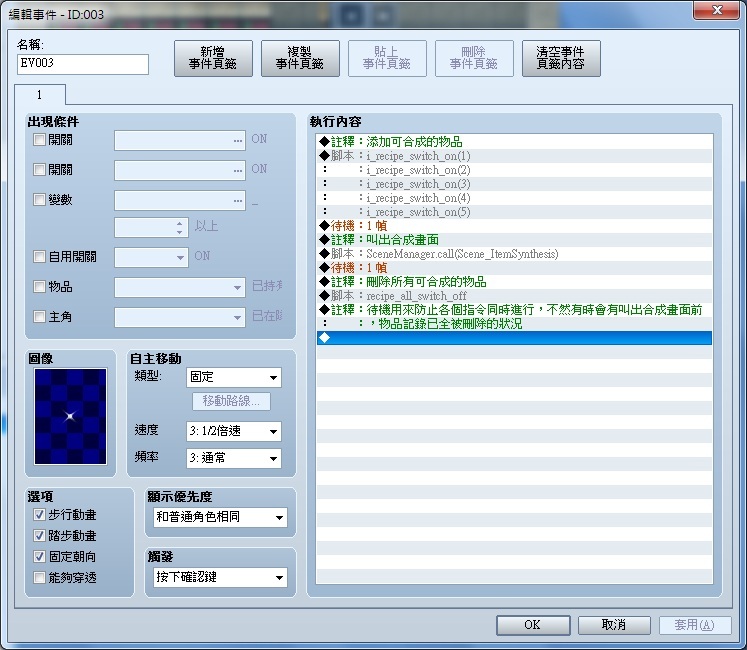
1.合成腳本商店化
因為不同的事件(NPC)可合成的物品不同
所以想把合成腳本改成像「商店處理」一樣,可以選擇合成物品
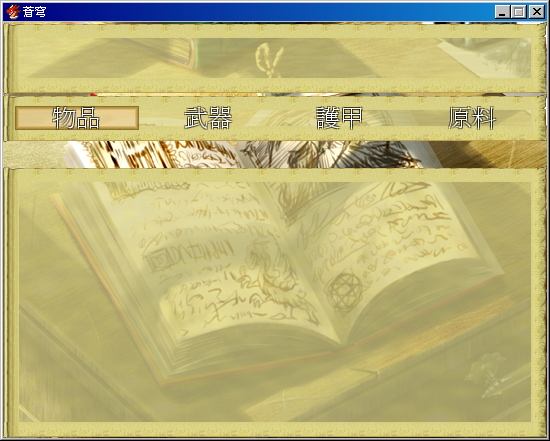
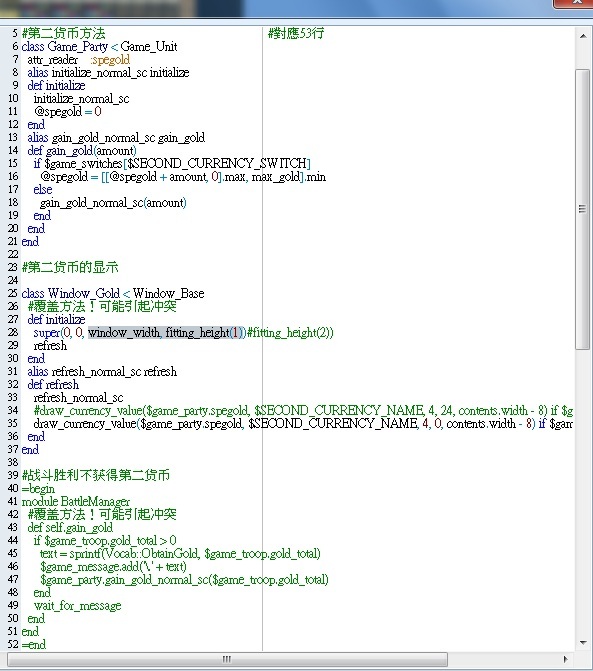
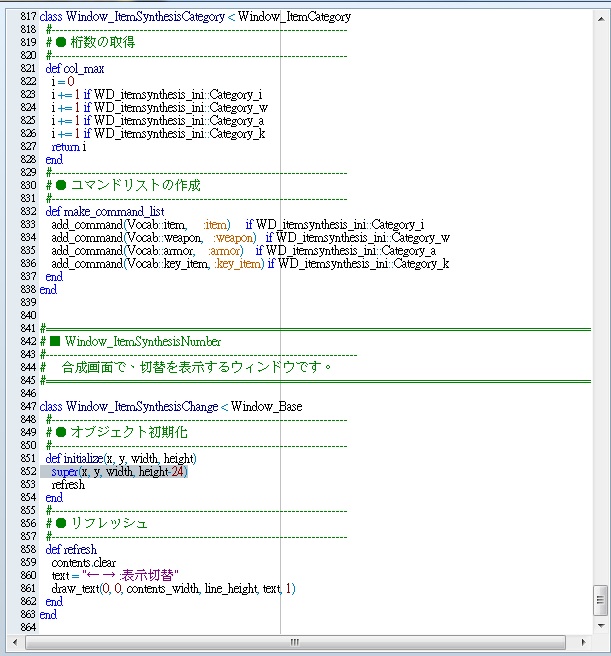
2.因為我有用第二貨幣的腳本,所以在合成物品時,會擋到視窗,想更改視窗的大小,請問要怎麼更改
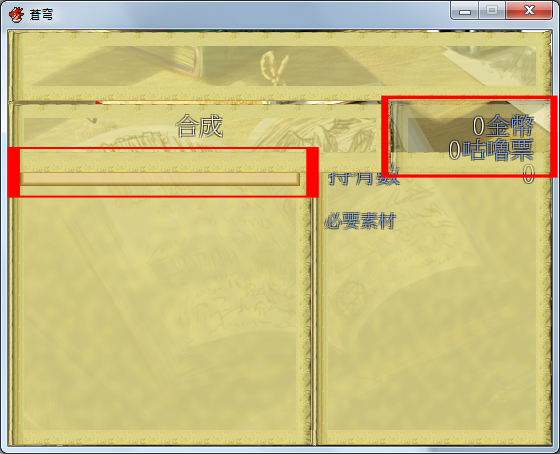
腳本如下
[pre lang="ruby" line="1"]# ★ 初期設定。
# 設置合成配方
#--------------------------------------------------------------------------
module WD_itemsynthesis_ini
Cost_view = true #費用(G)の表示(合成の費用が全て0Gの場合はfalseを推■)
Category_i = true #查看項目“項目”類別中的窗口
Category_w = true #查看項目類別窗口中的“武器”
Category_a = true #查看項目類別窗口中的“鎧甲”
Category_k = true #查看項目類別窗口中的“重要的東西”
I_recipe = [] #この行は削除しないこと
W_recipe = [] #この行は削除しないこと
A_recipe = [] #この行は削除しないこと
#以下、合成レシピ。
#例: I_recipe[3] = [100, ["I",1,1], ["W",2,1], ["A",2,2], ["A",3,1]]
#と記載した場合、ID3のアイテムの合成必要は、100G。
#必要な素材は、ID1のアイテム1個、ID2の武器1個、ID2の防具2個、ID3の防具1個
#となる。
#物品合成
I_recipe[58] = [50, ["I",53,5], ["I",55,5]]
I_recipe[60] = [50, ["I",52,5], ["I",54,7]]
I_recipe[61] = [50, ["I",52,3], ["I",54,3]]
I_recipe[62] = [50, ["I",53,10], ["I",55,7]]
I_recipe[64] = [50, ["I",52,13], ["I",53,10]]
I_recipe[65] = [50, ["I",53,19], ["I",56,16]]
I_recipe[67] = [50, ["I",52,14], ["I",54,18]]
I_recipe[70] = [50, ["I",58,20], ["I",59,18]]
I_recipe[71] = [50, ["I",58,21], ["I",59,16]]
I_recipe[72] = [50, ["I",60,14], ["I",61,22]]
I_recipe[73] = [50, ["I",61,17], ["I",62,19]]
I_recipe[78] = [50, ["I",66,24], ["I",67,26]]
I_recipe[79] = [50, ["I",64,27], ["I",65,25]]
#I_recipe[3] = [100, ["I",1,1], ["I",2,1]]
#I_recipe[17] = [500, ["I",1,10]]
#武器合成
#W_recipe[6] = [600, ["W",3,1], ["I",17,0]]
#防具合成
#A_recipe[5] = [400, ["A",2,1], ["W",2,2], ["I",17,0]]
end
#==============================================================================
# ■ WD_itemsynthesis
#------------------------------------------------------------------------------
# アイテム合成用の共通メソッドです。
#==============================================================================
module WD_itemsynthesis
def i_recipe_switch_on(id)
$game_system.i_rcp_sw = [] if $game_system.i_rcp_sw == nil
$game_system.i_rcp_sw[id] = false if $game_system.i_rcp_sw[id] == nil
$game_system.i_rcp_sw[id] = true
end
def i_recipe_switch_off(id)
$game_system.i_rcp_sw = [] if $game_system.i_rcp_sw == nil
$game_system.i_rcp_sw[id] = false if $game_system.i_rcp_sw[id] == nil
$game_system.i_rcp_sw[id] = false
end
def i_recipe_switch_on?(id)
$game_system.i_rcp_sw = [] if $game_system.i_rcp_sw == nil
$game_system.i_rcp_sw[id] = false if $game_system.i_rcp_sw[id] == nil
return $game_system.i_rcp_sw[id]
end
def i_recipe_all_switch_on
for i in 1..$data_items.size
i_recipe_switch_on(i)
end
end
def i_recipe_all_switch_off
for i in 1..$data_items.size
i_recipe_switch_off(i)
end
end
def w_recipe_switch_on(id)
$game_system.w_rcp_sw = [] if $game_system.w_rcp_sw == nil
$game_system.w_rcp_sw[id] = false if $game_system.w_rcp_sw[id] == nil
$game_system.w_rcp_sw[id] = true
end
def w_recipe_switch_off(id)
$game_system.w_rcp_sw = [] if $game_system.w_rcp_sw == nil
$game_system.w_rcp_sw[id] = false if $game_system.w_rcp_sw[id] == nil
$game_system.w_rcp_sw[id] = false
end
def w_recipe_switch_on?(id)
$game_system.w_rcp_sw = [] if $game_system.w_rcp_sw == nil
$game_system.w_rcp_sw[id] = false if $game_system.w_rcp_sw[id] == nil
return $game_system.w_rcp_sw[id]
end
def w_recipe_all_switch_on
for i in 1..$data_weapons.size
w_recipe_switch_on(i)
end
end
def w_recipe_all_switch_off
for i in 1..$data_weapons.size
w_recipe_switch_off(i)
end
end
def a_recipe_switch_on(id)
$game_system.a_rcp_sw = [] if $game_system.a_rcp_sw == nil
$game_system.a_rcp_sw[id] = false if $game_system.a_rcp_sw[id] == nil
$game_system.a_rcp_sw[id] = true
end
def a_recipe_switch_off(id)
$game_system.a_rcp_sw = [] if $game_system.a_rcp_sw == nil
$game_system.a_rcp_sw[id] = false if $game_system.a_rcp_sw[id] == nil
$game_system.a_rcp_sw[id] = false
end
def a_recipe_switch_on?(id)
$game_system.a_rcp_sw = [] if $game_system.a_rcp_sw == nil
$game_system.a_rcp_sw[id] = false if $game_system.a_rcp_sw[id] == nil
return $game_system.a_rcp_sw[id]
end
def a_recipe_all_switch_on
for i in 1..$data_armors.size
a_recipe_switch_on(i)
end
end
def a_recipe_all_switch_off
for i in 1..$data_armors.size
a_recipe_switch_off(i)
end
end
def recipe_all_switch_on
i_recipe_all_switch_on
w_recipe_all_switch_on
a_recipe_all_switch_on
end
def recipe_all_switch_off
i_recipe_all_switch_off
w_recipe_all_switch_off
a_recipe_all_switch_off
end
end
class Game_Interpreter
include WD_itemsynthesis
end
class Game_System
#--------------------------------------------------------------------------
# ● 公開インスタンス■數
#--------------------------------------------------------------------------
attr_accessor :i_rcp_sw
attr_accessor :w_rcp_sw
attr_accessor :a_rcp_sw
#--------------------------------------------------------------------------
# ● オブジェクト初期化
#--------------------------------------------------------------------------
alias wd_orig_initialize004 initialize
def initialize
wd_orig_initialize004
@i_rcp_sw = []
@w_rcp_sw = []
@a_rcp_sw = []
end
end
#==============================================================================
# ■ Scene_ItemSynthesis
#------------------------------------------------------------------------------
# 合成畫面■管理
#==============================================================================
class Scene_ItemSynthesis < Scene_MenuBase
#--------------------------------------------------------------------------
# ● 開始管理
#--------------------------------------------------------------------------
def start
super
create_help_window
create_dummy_window
create_number_window
create_status_window
create_material_window
create_list_window
create_category_window
create_gold_window
create_change_window
end
#--------------------------------------------------------------------------
# ● ゴールドウィンドウの作成
#--------------------------------------------------------------------------
def create_gold_window
@gold_window = Window_Gold.new
@gold_window.viewport = @viewport
@gold_window.x = Graphics.width - @gold_window.width
@gold_window.y = @help_window.height
@gold_window.hide
end
#--------------------------------------------------------------------------
# ● 切り替え表示ウィンドウの作成
#--------------------------------------------------------------------------
def create_change_window
wx = 0
wy = @gold_window.y
ww = Graphics.width - @gold_window.width
wh = @gold_window.height
@change_window = Window_ItemSynthesisChange.new(wx, wy, ww, wh)
@change_window.viewport = @viewport
@change_window.hide
end
#--------------------------------------------------------------------------
# ● ダミーウィンドウの作成
#--------------------------------------------------------------------------
def create_dummy_window
wy = @help_window.y + @help_window.height + 48
wh = Graphics.height - wy
@dummy_window = Window_Base.new(0, wy, Graphics.width, wh)
@dummy_window.viewport = @viewport
end
#--------------------------------------------------------------------------
# ● 創建切換顯示窗口
#--------------------------------------------------------------------------
def create_number_window
wy = @dummy_window.y
wh = @dummy_window.height
@number_window = Window_ItemSynthesisNumber.new(0, wy, wh)
@number_window.viewport = @viewport
@number_window.hide
@number_window.set_handler(:ok, method(:on_number_ok))
@number_window.set_handler(:cancel, method(:on_number_cancel))
end
#--------------------------------------------------------------------------
# ● ステータスウィンドウの作成
#--------------------------------------------------------------------------
def create_status_window
wx = @number_window.width
wy = @dummy_window.y
ww = Graphics.width - wx
wh = @dummy_window.height
@status_window = Window_ShopStatus.new(wx, wy, ww, wh)
@status_window.viewport = @viewport
@status_window.hide
end
#--------------------------------------------------------------------------
# ● 創建一個狀態窗口
#--------------------------------------------------------------------------
def create_material_window
wx = @number_window.width
wy = @dummy_window.y
ww = Graphics.width - wx
wh = @dummy_window.height
@material_window = Window_ItemSynthesisMaterial.new(wx, wy, ww, wh)
@material_window.viewport = @viewport
@material_window.hide
@number_window.material_window = @material_window
end
#--------------------------------------------------------------------------
# ● 創建一個合成項目列表窗口
#--------------------------------------------------------------------------
def create_list_window
wy = @dummy_window.y
wh = @dummy_window.height
@list_window = Window_ItemSynthesisList.new(0, wy, wh)
@list_window.viewport = @viewport
@list_window.help_window = @help_window
@list_window.status_window = @status_window
@list_window.material_window = @material_window
@list_window.hide
@list_window.set_handler(:ok, method(:on_list_ok))
@list_window.set_handler(:cancel, method(:on_list_cancel))
@list_window.set_handler(:change_window, method(:on_change_window))
end
#--------------------------------------------------------------------------
# ● 創建類別窗口
#--------------------------------------------------------------------------
def create_category_window
@category_window = Window_ItemSynthesisCategory.new
@category_window.viewport = @viewport
@category_window.help_window = @help_window
@category_window.y = @help_window.height
@category_window.activate
@category_window.item_window = @list_window
@category_window.set_handler(:ok, method(:on_category_ok))
@category_window.set_handler(:cancel, method(:return_scene))
end
#--------------------------------------------------------------------------
# ● 合成アイテムリストウィンドウのアクティブ化
#--------------------------------------------------------------------------
def activate_list_window
@list_window.money = money
@list_window.show.activate
end
#--------------------------------------------------------------------------
# ● 合成[決定]
#--------------------------------------------------------------------------
def on_list_ok
@item = @list_window.item
@list_window.hide
@number_window.set(@item, max_buy, buying_price, currency_unit)
@number_window.show.activate
end
#--------------------------------------------------------------------------
# ● 合成[キャンセル]
#--------------------------------------------------------------------------
def on_list_cancel
@category_window.activate
@category_window.show
@dummy_window.show
@list_window.hide
@status_window.hide
@status_window.item = nil
@material_window.hide
@material_window.set(nil, nil)
@gold_window.hide
@change_window.hide
@help_window.clear
end
#--------------------------------------------------------------------------
# ● 表示切替
#--------------------------------------------------------------------------
def on_change_window
if @status_window.visible
@status_window.hide
@material_window.show
else
@status_window.show
@material_window.hide
end
end
#--------------------------------------------------------------------------
# ● カテゴリ[決定]
#--------------------------------------------------------------------------
def on_category_ok
activate_list_window
@gold_window.show
@change_window.show
@material_window.show
@category_window.hide
@list_window.select(0)
end
#--------------------------------------------------------------------------
# ● 個數入力[決定]
#--------------------------------------------------------------------------
def on_number_ok
Sound.play_shop
do_syntetic(@number_window.number)
end_number_input
@gold_window.refresh
end
#--------------------------------------------------------------------------
# ● 個數入力[キャンセル]
#--------------------------------------------------------------------------
def on_number_cancel
Sound.play_cancel
end_number_input
end
#--------------------------------------------------------------------------
# ● 合成の■行
#--------------------------------------------------------------------------
def do_syntetic(number)
$game_party.lose_gold(number * buying_price)
$game_party.gain_item(@item, number)
@recipe = @list_window.recipe(@item)
for i in 1...@recipe.size
kind = @recipe[0]
id = @recipe[1]
num = @recipe[2]
if kind == "I"
item = $data_items[id]
elsif kind == "W"
item = $data_weapons[id]
elsif kind == "A"
item = $data_armors[id]
end
$game_party.lose_item(item, num*number)
end
end
#--------------------------------------------------------------------------
# ● 個數入力の終了
#--------------------------------------------------------------------------
def end_number_input
@number_window.hide
activate_list_window
end
#--------------------------------------------------------------------------
# ● 最大購入可能個數の取得
#--------------------------------------------------------------------------
def max_buy
max = $game_party.max_item_number(@item) - $game_party.item_number(@item)
@recipe = @list_window.recipe(@item)
for i in 1...@recipe.size
kind = @recipe[0]
id = @recipe[1]
num = @recipe[2]
if kind == "I"
item = $data_items[id]
elsif kind == "W"
item = $data_weapons[id]
elsif kind == "A"
item = $data_armors[id]
end
if num > 0
max_buf = $game_party.item_number(item)/num
else
max_buf = 999
end
max = [max, max_buf].min
end
buying_price == 0 ? max : [max, money / buying_price].min
end
#--------------------------------------------------------------------------
# ● 所持金の取得
#--------------------------------------------------------------------------
def money
@gold_window.value
end
#--------------------------------------------------------------------------
# ● 通貨單位の取得
#--------------------------------------------------------------------------
def currency_unit
@gold_window.currency_unit
end
#--------------------------------------------------------------------------
# ● 合成費用の取得
#--------------------------------------------------------------------------
def buying_price
@list_window.price(@item)
end
end
#==============================================================================
# ■ Window_ItemSynthesisList
#------------------------------------------------------------------------------
# 合成畫面で、合成可能なアイテムの一■を表示するウィンドウです。
#==============================================================================
class Window_ItemSynthesisList < Window_Selectable
include WD_itemsynthesis
#--------------------------------------------------------------------------
# ● 公開インスタンス■數
#--------------------------------------------------------------------------
attr_reader :status_window # ステータスウィンドウ
#--------------------------------------------------------------------------
# ● オブジェクト初期化
#--------------------------------------------------------------------------
def initialize(x, y, height)
super(x, y, window_width, height)
@shop_goods = []
@shop_recipes = []
for i in 1..WD_itemsynthesis_ini::I_recipe.size
recipe = WD_itemsynthesis_ini::I_recipe
if recipe
good = [0, i, recipe[0]]
if i_recipe_switch_on?(i)
@shop_goods.push(good)
@shop_recipes.push(recipe)
end
end
end
for i in 1..WD_itemsynthesis_ini::W_recipe.size
recipe = WD_itemsynthesis_ini::W_recipe
if recipe
good = [1, i, recipe[0]]
if w_recipe_switch_on?(i)
@shop_goods.push(good)
@shop_recipes.push(recipe)
end
end
end
for i in 1..WD_itemsynthesis_ini::A_recipe.size
recipe = WD_itemsynthesis_ini::A_recipe
if recipe
good = [2, i, recipe[0]]
if a_recipe_switch_on?(i)
@shop_goods.push(good)
@shop_recipes.push(recipe)
end
end
end
@Money = 0
refresh
select(0)
end
#--------------------------------------------------------------------------
# ● ウィンドウ幅の取得
#--------------------------------------------------------------------------
def window_width
return 304
end
#--------------------------------------------------------------------------
# ● 項目數の取得
#--------------------------------------------------------------------------
def item_max
@data ? @data.size : 1
end
#--------------------------------------------------------------------------
# ● アイテムの取得
#--------------------------------------------------------------------------
def item
@data[index]
end
#--------------------------------------------------------------------------
# ● 所持金の設定
#--------------------------------------------------------------------------
def money=(money)
@money = money
refresh
end
#--------------------------------------------------------------------------
# ● 選■項目の有■狀態を取得
#--------------------------------------------------------------------------
def current_item_enabled?
enable?(@data[index])
end
#--------------------------------------------------------------------------
# ● 合成費用を取得
#--------------------------------------------------------------------------
def price(item)
@price[item]
end
#--------------------------------------------------------------------------
# ● 合成可否を取得
#--------------------------------------------------------------------------
def enable?(item)
@makable[item]
end
#--------------------------------------------------------------------------
# ● レシピを取得
#--------------------------------------------------------------------------
def recipe(item)
@recipe[item]
end
#--------------------------------------------------------------------------
# ● アイテムを許可狀態で表示するかどうか
#--------------------------------------------------------------------------
def have_mat?(recipe)
flag = true
if @money >= recipe[0]
for i in 1...recipe.size
kind = recipe[0]
id = recipe[1]
num = recipe[2]
if kind == "I"
item = $data_items[id]
elsif kind == "W"
item = $data_weapons[id]
elsif kind == "A"
item = $data_armors[id]
end
if $game_party.item_number(item) < [num, 1].max
flag = false
end
end
else
flag = false
end
return flag
end
#--------------------------------------------------------------------------
# ● カテゴリの設定
#--------------------------------------------------------------------------
def category=(category)
return if @category == category
@category = category
refresh
end
#--------------------------------------------------------------------------
# ● リフレッシュ
#--------------------------------------------------------------------------
def refresh
make_item_list
create_contents
draw_all_items
end
#--------------------------------------------------------------------------
# ● アイテムをリストに含めるかどうか
#--------------------------------------------------------------------------
def include?(item)
case @category
when :item
item.is_a?(RPG::Item) && !item.key_item?
when :weapon
item.is_a?(RPG::Weapon)
when :armor
item.is_a?(RPG::Armor)
when :key_item
item.is_a?(RPG::Item) && item.key_item?
else
false
end
end
#--------------------------------------------------------------------------
# ● アイテムリストの作成
#--------------------------------------------------------------------------
def make_item_list
@data = []
@price = {}
@makable = {}
@recipe = {}
for i in 0...@shop_goods.size
goods = @shop_goods
recipe = @shop_recipes
case goods[0]
when 0; item = $data_items[goods[1]]
when 1; item = $data_weapons[goods[1]]
when 2; item = $data_armors[goods[1]]
end
if item
if include?(item)
@data.push(item)
@price[item] = goods[2]
@makable[item] = have_mat?(recipe)
@recipe[item] = recipe
end
end
end
end
#--------------------------------------------------------------------------
# ● 項目の描畫
#--------------------------------------------------------------------------
def draw_item(index)
item = @data[index]
rect = item_rect(index)
draw_item_name(item, rect.x, rect.y, enable?(item))
rect.width -= 4
draw_text(rect, price(item), 2) if WD_itemsynthesis_ini::Cost_view
end
#--------------------------------------------------------------------------
# ● ステータスウィンドウの設定
#--------------------------------------------------------------------------
def status_window=(status_window)
@status_window = status_window
call_update_help
end
#--------------------------------------------------------------------------
# ● 素材ウィンドウの設定
#--------------------------------------------------------------------------
def material_window=(material_window)
@material_window = material_window
call_update_help
end
#--------------------------------------------------------------------------
# ● ヘルプテキスト更新
#--------------------------------------------------------------------------
def update_help
@help_window.set_item(item) if @help_window
@status_window.item = item if @status_window
@material_window.set(item, recipe(item)) if @material_window
end
#--------------------------------------------------------------------------
# ● ←→ ボタン(表示切替)が押されたときの■理
#--------------------------------------------------------------------------
def process_change_window
Sound.play_cursor
Input.update
call_handler(:change_window)
end
#--------------------------------------------------------------------------
# ● 決定やキャンセルなどのハンドリング■理
#--------------------------------------------------------------------------
def process_handling
super
if active
return process_change_window if handle?(:change_window) && Input.trigger?(:X)
return process_change_window if handle?(:change_window) && Input.trigger?(:Y)
end
end
end
#==============================================================================
# ■ Window_ItemSynthesisMaterial
#------------------------------------------------------------------------------
# 合成畫面で、合成に必要な素材を表示するウィンドウです。
#==============================================================================
class Window_ItemSynthesisMaterial < Window_Base
#--------------------------------------------------------------------------
# ● オブジェクト初期化
#--------------------------------------------------------------------------
def initialize(x, y, width, height)
super(x, y, width, height)
@item = nil
refresh
end
#--------------------------------------------------------------------------
# ● リフレッシュ
#--------------------------------------------------------------------------
def refresh
contents.clear
draw_possession(4, 0)
draw_material_info(0, line_height * 2)
end
#--------------------------------------------------------------------------
# ● アイテムの設定
#--------------------------------------------------------------------------
def set(item, recipe)
@item = item
@recipe = recipe
@make_number = 1
refresh
end
#--------------------------------------------------------------------------
# ● 作成個數の設定
#--------------------------------------------------------------------------
def set_num(make_number)
@make_number = make_number
refresh
end
#--------------------------------------------------------------------------
# ● 所持數の描畫
#--------------------------------------------------------------------------
def draw_possession(x, y)
rect = Rect.new(x, y, contents.width - 4 - x, line_height)
change_color(system_color)
draw_text(rect, Vocab::Possession)
change_color(normal_color)
draw_text(rect, $game_party.item_number(@item), 2)
end
#--------------------------------------------------------------------------
# ● 素材情報の描畫
#--------------------------------------------------------------------------
def draw_material_info(x, y)
rect = Rect.new(x, y, contents.width, line_height)
change_color(system_color)
contents.font.size = 18
draw_text(rect, "必要素材", 0)
if @recipe
for i in 1...@recipe.size
kind = @recipe[0]
id = @recipe[1]
num = @recipe[2]
if kind == "I"
item = $data_items[id]
elsif kind == "W"
item = $data_weapons[id]
elsif kind == "A"
item = $data_armors[id]
end
rect = Rect.new(x, y + line_height*i, contents.width, line_height)
enabled = true
enabled = false if [num*@make_number, 1].max > $game_party.item_number(item)
draw_item_name(item, rect.x, rect.y, enabled)
change_color(normal_color, enabled)
if num > 0
draw_text(rect, "#{num*@make_number}/#{$game_party.item_number(item)}", 2)
end
end
end
change_color(normal_color)
contents.font.size = 24
end
end
#==============================================================================
# ■ Window_ItemSynthesisNumber
#------------------------------------------------------------------------------
# 合成畫面で、合成するアイテムの個數を入力するウィンドウです。
#==============================================================================
class Window_ItemSynthesisNumber < Window_ShopNumber
#--------------------------------------------------------------------------
# ● リフレッシュ
#--------------------------------------------------------------------------
def refresh
contents.clear
draw_item_name(@item, 0, item_y)
draw_number
draw_total_price if WD_itemsynthesis_ini::Cost_view
end
#--------------------------------------------------------------------------
# ● オブジェクト初期化
#--------------------------------------------------------------------------
def material_window=(material_window)
@material_window = material_window
call_update_help
end
#--------------------------------------------------------------------------
# ● 作成個數の■更
#--------------------------------------------------------------------------
def change_number(amount)
@number = [[@number + amount, @max].min, 1].max
call_update_help #追加
end
#--------------------------------------------------------------------------
# ● ヘルプテキスト更新
#--------------------------------------------------------------------------
def call_update_help
@material_window.set_num(@number) if @material_window
end
end
#==============================================================================
# ■ Window_ItemSynthesisCategory
#------------------------------------------------------------------------------
# 合成畫面で、通常アイテムや裝備品の分類を選■するウィンドウです。
#==============================================================================
class Window_ItemSynthesisCategory < Window_ItemCategory
#--------------------------------------------------------------------------
# ● 桁數の取得
#--------------------------------------------------------------------------
def col_max
i = 0
i += 1 if WD_itemsynthesis_ini::Category_i
i += 1 if WD_itemsynthesis_ini::Category_w
i += 1 if WD_itemsynthesis_ini::Category_a
i += 1 if WD_itemsynthesis_ini::Category_k
return i
end
#--------------------------------------------------------------------------
# ● コマンドリストの作成
#--------------------------------------------------------------------------
def make_command_list
add_command(Vocab::item, :item) if WD_itemsynthesis_ini::Category_i
add_command(Vocab::weapon, :weapon) if WD_itemsynthesis_ini::Category_w
add_command(Vocab::armor, :armor) if WD_itemsynthesis_ini::Category_a
add_command(Vocab::key_item, :key_item) if WD_itemsynthesis_ini::Category_k
end
end
#==============================================================================
# ■ Window_ItemSynthesisNumber
#------------------------------------------------------------------------------
# 合成畫面で、切替を表示するウィンドウです。
#==============================================================================
class Window_ItemSynthesisChange < Window_Base
#--------------------------------------------------------------------------
# ● オブジェクト初期化
#--------------------------------------------------------------------------
def initialize(x, y, width, height)
super(x, y, width, height)
refresh
end
#--------------------------------------------------------------------------
# ● リフレッシュ
#--------------------------------------------------------------------------
def refresh
contents.clear
text = "合成"
draw_text(0, 0, contents_width, line_height, text, 1)
end
end
[/pre]
|
|


 写轮眼
写轮眼
 发表于 2013-8-15 16:05:09

 提升卡
提升卡 沉默号角
沉默号角 喧嚣号角
喧嚣号角 变色卡
变色卡 升龙剑
升龙剑