| 赞 | 168 |
| VIP | |
| 好人卡 | |
| 积分 | 229 |
| 经验 | |
| 最后登录 | 2025-4-1 |
| 在线时间 | 8598 小时 |
- 梦石
- 0
- 星屑
- 22879
- 在线时间
- 8598 小时
- 注册时间
- 2011-12-31
- 回帖
- 3270
|
 发表于 2015-6-8 08:50:39
|
显示全部楼层
发表于 2015-6-8 08:50:39
|
显示全部楼层
本帖最后由 tseyik 于 2015-6-8 08:55 编辑
Advanced AI Conditions
Version 1.0c
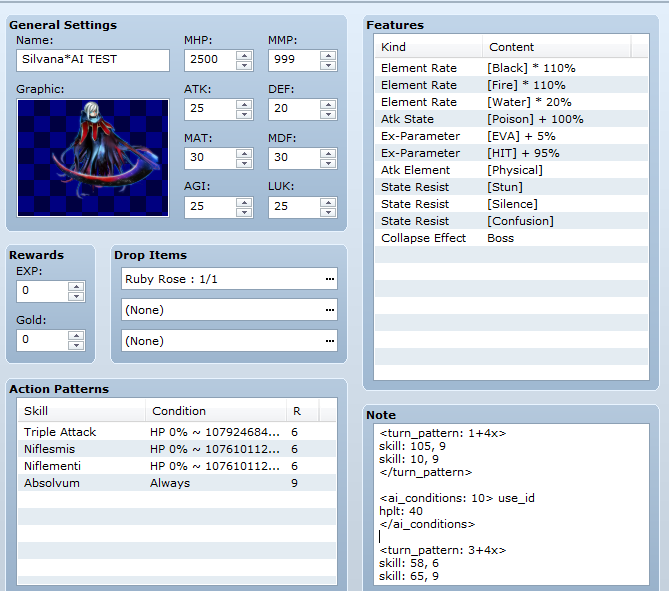
這個可設定针对技能设计
也可针对每个怪物设计(僵先比技能高)
http://forums.rpgmakerweb.com/in ... nced-ai-conditions/
設定方法Notetags explanation:
<ai_conditions>
Explanation: You always start the block with this one.
target_hpgt: n
Explanation: The target HP must be greater or equal to n%.
target_hplt: n
Explanation: The target HP must be lesser or equal to n%.
target_states: n, n...
Explanation: The target must have the specified states already inflicted.
target_states_not: n, n...
Explanation: The target must NOT have the specified states already inflicted.
only_if_target
Explanation: If no suitable target is found, the skill won't be used AT ALL.
</ai_conditions>
Explanation: You always end the block with this one.
PART 2: ENEMY AI CONFIGURATION
On top on a default AI, you can setup individual AI conditions for every different enemy. In case of conflict with the default targeting AI, these settings will take precedence.
All these settings make use of the enemy's notebox.
NOTE: the term "action index" refers to the order of the action pattern you enter for enemies in the database. For instance, if your list is like this:
Attack
Fire II
Poison
Attack will be index 1, Fire II will be index 2 and Poison index 3. And so on.
Notetags explanation:
<ai_conditions: n, n...>
Explanation: One way of starting an AI block. n must be an action index and if you put more than one (separated by comma), the conditions will be applied to each of them.
<ai_conditions: n, n...> use_id
Explanation: Same as above, but instead of the action index, the skill ID will be used. n must be a valid skill ID in this case.
switches: n, n...
Condition: designated switches are ON.
variables: x, y, x, y...
Condition: the variables x have the value y.
states: n, n...
Condition: acting enemy is under the every of the designated states.
hpgt: n
Condition: acting enemy has hp greater or equal than n%.
hplt: n
Condition: acting enemy has hp lesser or equal than n%.
mpgt: n
Condition: acting enemy has mp greater or equal than n%.
mplt: n
Condition: acting enemy has mp lesser or equal than n%.
party_level: n
Condition: party level is greater than n.
turns_order: a+bx
Condition: it's exactly like in the database condition for turns.
target_hpgt: n
Condition: The target HP must be greater or equal to n%.
target_hplt: n
Condition: The target HP must be lesser or equal to n%.
target_states: n, n...
Condition: The target must have the specified states already inflicted.
target_states_not: n, n...
Condition: The target must NOT have the specified states already inflicted.
only_if_target
Condition: If no suitable target is found, the skill won't be used AT ALL.
</ai_conditions>
Explanation: You must end the block with this one.
- Creating Turn Patterns
Turn patterns is a special AI setting which completely replace an action pattern with another one at the designated turns. During a turn pattern, the "normal" actions (the ones you entered into the database) won't be taken into consideration, ever. You need to create another block to make a Turn Pattern.
<turn_pattern: a+bx>
Used to define the pattern. a is the first turn and b the number of turns after the first.
skill: a, b
a is the skill id and b the rating.
</turn_pattern>
End the pattern. |
评分
-
查看全部评分
|




 写轮眼
写轮眼
 提升卡
提升卡 沉默号角
沉默号角 喧嚣号角
喧嚣号角 变色卡
变色卡 升龙剑
升龙剑


