查看: 6098|回复: 14

[已经解决] 请问如何在脚本中设定开关呢?

[复制链接]
梦石
0
星屑
785
在线时间
351 小时
注册时间
2013-8-5
回帖
62
发表于 2013-12-14 22:43:54 | 显示全部楼层 |阅读模式

加入我们,或者,欢迎回来。

您需要 登录 才可以下载或查看,没有账号?注册会员

×
本帖最后由 mileo 于 2013-12-19 12:16 编辑


if $game_switches[1518]
   
   self.contents.draw_text(580,0 , 534, 24, "血#{ $game_variables[334]}")
   self.contents.draw_text(580,20 , 534, 24, "攻#{ $game_variables[332]}")
   self.contents.draw_text(580,40 , 534, 24, "防#{ $game_variables[333]}")

   end


if $game_switches[1519]   

   self.contents.draw_text(580,100 , 534, 24, "血#{ $game_variables[344]}")
   self.contents.draw_text(580,120 , 534, 24, "攻#{ $game_variables[342]}")
   self.contents.draw_text(580,140 , 534, 24, "防#{ $game_variables[343]}")
   
   end


  end
end


请问一下如果要在脚本里面设开关

开关开启时决定某部分显示的开启

上面自己的写法有错

请问要怎么改呢?

谢谢~~


我用的是http://rpg.blue/thread-217052-2-1.html
16楼雪流星的脚本
我是直接在后面end前增加上述的内容

只是目前不知道如何设定开关

谢谢了


梦石
1
星屑
23241
在线时间
9564 小时
注册时间
2012-6-19
回帖
7018

开拓者短篇九导演组冠军

发表于 2013-12-14 23:07:20 | 显示全部楼层
不知道你说的有错是指什么……我只看到你给的代码中多了两个end………………

如果你是希望开关开启关闭时随时刷新的话最好是写到update里面不要写进refresh里面
回复

使用道具 举报

梦石
0
星屑
785
在线时间
351 小时
注册时间
2013-8-5
回帖
62
 楼主| 发表于 2013-12-14 23:15:43 | 显示全部楼层
本帖最后由 mileo 于 2013-12-14 23:23 编辑

谢谢


目前主要想问的是~~

1518开关开启时:
在地图上显示以下内容
   self.contents.draw_text(580,0 , 534, 24, "血#{ $game_variables[334]}")
   self.contents.draw_text(580,20 , 534, 24, "攻#{ $game_variables[332]}")
   self.contents.draw_text(580,40 , 534, 24, "防#{ $game_variables[333]}")


1519开关开启时:
在地图上显示以下内容
   self.contents.draw_text(580,100 , 534, 24, "血#{ $game_variables[344]}")
   self.contents.draw_text(580,120 , 534, 24, "攻#{ $game_variables[342]}")
   self.contents.draw_text(580,140 , 534, 24, "防#{ $game_variables[343]}")


这边不知道要怎么设定
让各别开关开启各自的内容

让数值随时刷新的问题已经得到解决
目前主要是想在脚本中设定开关决定显示的内容是否显示


谢谢~~

回复

使用道具 举报

梦石
0
星屑
100
在线时间
211 小时
注册时间
2011-8-16
回帖
246
发表于 2013-12-15 00:18:01 | 显示全部楼层
楼主的意思我明白,其实多此一举了。
$actor_data_open 要比 $game_switches[1518] 方便多了。
RPGMaker 脚本/学习交流群:143356012
回复

使用道具 举报

梦石
1
星屑
23241
在线时间
9564 小时
注册时间
2012-6-19
回帖
7018

开拓者短篇九导演组冠军

发表于 2013-12-15 00:20:08 | 显示全部楼层
自己试试看有没有什么问题……
  1. class Scene_Map < Scene_Base
  2.   alias map_windpwz_start start
  3.   def start
  4.     map_windpwz_start
  5.     @mapz_window = Window_MapZ.new(0, 0)
  6.   end
  7. end
  8. class Window_MapZ < Window_Base
  9.   def initialize(x,y)
  10.     super(x, y, Graphics.width+16 ,Graphics.height+16)
  11.     self.opacity = 0
  12.     refresh
  13.   end
  14.   def update
  15.     refresh if need_refresh?
  16.   end  
  17.   def need_refresh?
  18.     return true if @state1 != $game_switches[1518]
  19.     return true if @state2 != $game_switches[1519]
  20.     return true if @xue != $game_variables[334]
  21.     return true if [url=home.php?mod=space&uid=123094]@gong[/url] != $game_variables[332]
  22.     return true if [url=home.php?mod=space&uid=13441]@fang[/url] != $game_variables[333]
  23.     return true if @xue2 != $game_variables[344]
  24.     return true if @gong2 != $game_variables[342]
  25.     @fang2 != $game_variables[343]
  26.   end
  27.   def refresh
  28.     self.contents.clear
  29.     refresh1 if $game_switches[1518]
  30.     refresh2 if $game_switches[1519]
  31.     @xue = $game_variables[334]
  32.     @gong = $game_variables[332]
  33.     @fang = $game_variables[333]
  34.     @xue2 = $game_variables[344]
  35.     @gong2 = $game_variables[342]
  36.     @fang2 = $game_variables[343]
  37.     @state1 = $game_switches[1518]
  38.     @state2 = $game_switches[1519]
  39.   end  
  40.   def refresh1
  41.     self.contents.draw_text(580,0 , 534, 24, "血#{ $game_variables[334]}")
  42.     self.contents.draw_text(580,20 , 534, 24, "攻#{ $game_variables[332]}")
  43.     self.contents.draw_text(580,40 , 534, 24, "防#{ $game_variables[333]}")   
  44.   end  
  45.   def refresh2   
  46.     self.contents.draw_text(580,100 , 534, 24, "血#{ $game_variables[344]}")
  47.     self.contents.draw_text(580,120 , 534, 24, "攻#{ $game_variables[342]}")
  48.     self.contents.draw_text(580,140 , 534, 24, "防#{ $game_variables[343]}")   
  49.   end
  50. end
复制代码

点评

THX 喵呜喵5   发表于 2013-12-15 01:17
21、22行把论坛添加的url代码删掉,改成这样的形式:return true if @gong != $game_variables[332]  发表于 2013-12-15 00:21
回复

使用道具 举报

梦石
0
星屑
785
在线时间
351 小时
注册时间
2013-8-5
回帖
62
 楼主| 发表于 2013-12-15 00:42:31 | 显示全部楼层
谢谢~~

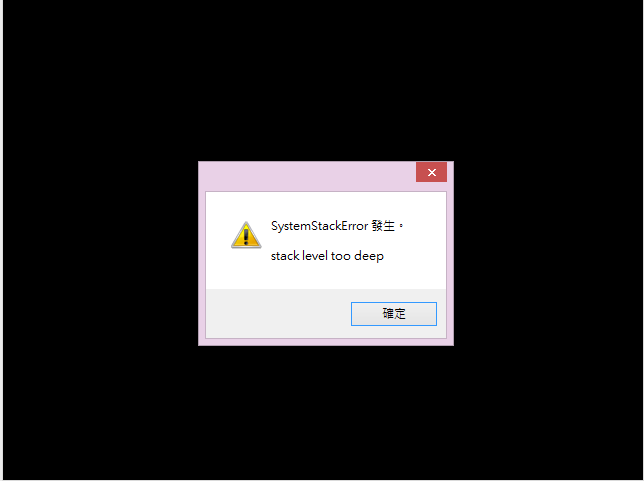
不知道为什么进游戏显示这个呢?

SystemStackError 发生

stack level too deep
未命名.png

点评

原来那个旧的脚本你是不是还留着了?删掉它  发表于 2013-12-15 02:37
回复

使用道具 举报

梦石
0
星屑
785
在线时间
351 小时
注册时间
2013-8-5
回帖
62
 楼主| 发表于 2013-12-15 01:16:46 | 显示全部楼层
[pre lang="ruby" line="1"]#============================================================================
#  〇 地图显示血条魔条
#                   ——By.冰舞蝶恋
#----------------------------------------------------------------------------
#     说明:显示的文字可自由更动来达到游戏需要的效果。
#----------------------------------------------------------------------------
#     以下是作者的白痴留言,尽管无视吧!
#     啊哈哈!这可是咱第一个独立完成的脚本吖!!
#     一时无聊做的……兴许可以用在ARPG之类的地方吧。偶然看到有不少人在拿RM做
#     ARPG,又发现似乎没有(除了邪恶的fux2字眼的那个- -||b),做了个比较完善
#     的……排版不是很好看,坐标可以自己调整。
#============================================================================
#   ○ACE移植
#                   ——By.米酒獭酱
#只是把这个脚本移植到了ACE上,因为找不到ACE代表魔攻魔防的系统变量所以舍去了,
#若大家找到了也可以加上~
#总之这个脚本就是集显示图片显示头像显示变量显示金钱什么的为一体的脚本~
#(话说本人也是第一次弄脚本竟然就移植成功了)
# 坐标可以自由调整+1~

$LBA = 1517  # 当这个开挂开启时,地图状态才显示。

#==============================================================================
# ■ Scene_Map
#------------------------------------------------------------------------------
#  处理地图划面的类。
#==============================================================================
class Scene_Map < Scene_Base
  #--------------------------------------------------------------------------
  # ● 开始处理
  #--------------------------------------------------------------------------
  alias map_windpwz_start start
  def start
    map_windpwz_start
    @mapz_window = Window_MapZ.new(0, 0)
    @mapz_window.refresh
    @mapz_window.hide
  end
  alias map_windpwz_update update
  def update
    map_windpwz_update
    @mapz_window.visible = $game_switches[$LBA]
    @mapz_window.refresh if check_update_mapz
  end
  def check_update_mapz
    actor = $game_party.leader
    # 变量变化时刷新
    if @show_actor_var != $game_variables[330]
      @show_actor_var = $game_variables[330]
      return true
    end
   
    # 血量变化时刷新
    if @show_actor_hp != actor.hp
      @show_actor_hp = actor.hp
      return true
    end
   
    # 金钱变化时刷新
    if @show_actor_gold != $game_party.gold
      @show_actor_gold = $game_party.gold
      return true
    end
    # 领队换人时刷新
    if @show_actor != actor
      @show_actor = actor
      return true
    end
    # 等级变化时刷新
    if @show_actor_lv != actor.level
      @show_actor_lv = actor.level
      return true
    end
    # 攻击变化时刷新
    if @show_actor_atk != actor.atk
      @show_actor_atk = actor.atk
      return true
    end
    # 防御变化时刷新
    if @show_actor_def != actor.def
      @show_actor_def = actor.def
      return true
    end
    return false
  end  
end
class Window_MapZ < Window_Base
  #--------------------------------------------------------------------------
  # ● 初始化对像
  #--------------------------------------------------------------------------
  def initialize(x,y)
    super(x-8, y-8, Graphics.width+16 ,Graphics.height+16)
    self.opacity = 0
    update
  end
  #--------------------------------------------------------------------------
  # ● 刷新
  #--------------------------------------------------------------------------
  def refresh
   self.contents.clear
   actor = $game_party.leader
   fw = 100 # 获取角色头像+空格
   lh = line_height # 获取行高
   gw = Graphics.width # 获取游戏视窗宽度
   gh = Graphics.height # 获取游戏视窗高度
   
   # 绘制领队角色头像、体力和魔力
   draw_actor_face(actor,0 ,0 )
   draw_actor_hp(actor, fw, 4 , 160)
   draw_actor_mp(actor, fw, lh+4, 160)
   
   # 绘制标题
   change_color(system_color)
   contents.draw_text(fw+170, 4   , gw, lh, "攻:")
   contents.draw_text(fw+170, lh+4  , gw, lh, "防:")
   gold_text = "所持金钱:"
   contents.draw_text(fw+170, lh*2+4, gw, lh, gold_text)
   gdx = text_size(gold_text).width
   cudx = gdx + text_size($game_party.gold).width
   contents.draw_text(fw+176+cudx, lh*2+4, gw, lh, Vocab.currency_unit)
   
   # 绘制文字
   change_color(normal_color)
   lv_text = "#{actor.name} #{Vocab.level_a} #{actor.level}"
   contents.draw_text(fw, lh*2+4, gw, lh, lv_text)
   contents.draw_text(fw+lh*2+170, 4, gw, lh, actor.atk)
   contents.draw_text(fw+lh*2+170, lh+4, gw, lh, actor.def)
   contents.draw_text(fw+176+gdx, lh*2+4, gw, lh, $game_party.gold)


   # 绘制要显示的系统变量
   change_color(text_color(30)) #改颜色什么的~
   var_id =330
   var_text = "#{ $game_variables[330]} #{$data_system.variables[330]}"
   contents.draw_text(0, gh-lh-8 , 534, lh, var_text)
    self.contents.draw_text(25,125 , 534, 24, "#{ $game_variables[349]}")
    self.contents.draw_text(25,157 , 534, 24, "#{ $game_variables[350]}")
    self.contents.draw_text(25,188 , 534, 24, "#{ $game_variables[351]}")
    self.contents.draw_text(25,221 , 534, 24, "#{ $game_variables[352]}")


      # 绘制要显示的系统变量
   change_color(text_color(30)) #改颜色什么的~
   var_id =341
   var_text = "#{$data_system.variables[341]} #{ $game_variables[341]} "
   contents.draw_text(550, 60 , 534,  lh, var_text)
    self.contents.draw_text(580,0 , 534, 24, "血#{ $game_variables[334]}")
    self.contents.draw_text(580,20 , 534, 24, "攻#{ $game_variables[332]}")
    self.contents.draw_text(580,40 , 534, 24, "防#{ $game_variables[333]}")   


      # 绘制要显示的系统变量
   change_color(text_color(30)) #改颜色什么的~
   var_id =348
   var_text = "#{$data_system.variables[348]} #{ $game_variables[348]} "
   contents.draw_text(550, 160 , 534,  lh, var_text)
    self.contents.draw_text(580,100 , 534, 24, "血#{ $game_variables[344]}")
    self.contents.draw_text(580,120 , 534, 24, "攻#{ $game_variables[342]}")
    self.contents.draw_text(580,140 , 534, 24, "防#{ $game_variables[343]}")


  end
end
[/pre]


介个是全部的脚本~~


想用开关控制:


[pre lang="ruby" line="1"]   # 绘制要显示的系统变量
   change_color(text_color(30)) #改颜色什么的~
   var_id =330
   var_text = "#{ $game_variables[330]} #{$data_system.variables[330]}"
   contents.draw_text(0, gh-lh-8 , 534, lh, var_text)
    self.contents.draw_text(25,125 , 534, 24, "#{ $game_variables[349]}")
    self.contents.draw_text(25,157 , 534, 24, "#{ $game_variables[350]}")
    self.contents.draw_text(25,188 , 534, 24, "#{ $game_variables[351]}")
    self.contents.draw_text(25,221 , 534, 24, "#{ $game_variables[352]}")[/pre]


[pre lang="ruby" line="1"]      # 绘制要显示的系统变量
   change_color(text_color(30)) #改颜色什么的~
   var_id =341
   var_text = "#{$data_system.variables[341]} #{ $game_variables[341]} "
   contents.draw_text(550, 60 , 534,  lh, var_text)
    self.contents.draw_text(580,0 , 534, 24, "血#{ $game_variables[334]}")
    self.contents.draw_text(580,20 , 534, 24, "攻#{ $game_variables[332]}")
    self.contents.draw_text(580,40 , 534, 24, "防#{ $game_variables[333]}")   [/pre]

[pre lang="ruby" line="1"]      # 绘制要显示的系统变量
   change_color(text_color(30)) #改颜色什么的~
   var_id =348
   var_text = "#{$data_system.variables[348]} #{ $game_variables[348]} "
   contents.draw_text(550, 160 , 534,  lh, var_text)
    self.contents.draw_text(580,100 , 534, 24, "血#{ $game_variables[344]}")
    self.contents.draw_text(580,120 , 534, 24, "攻#{ $game_variables[342]}")
    self.contents.draw_text(580,140 , 534, 24, "防#{ $game_variables[343]}") [/pre]


想用3个开关分别 [开启/关闭] 这3个部分在地图上显示

因为之后还会再加上新的内容,所以会需要再加上新的开关

想请问一下~~有办法在上述的脚本直接加上开关,[开启or关闭]各自内容的显示吗?

谢谢~~

是做魔塔类的

所以在地图上显示怪物的数值

怪物同种类消失后,要让这种怪物的数值消失

进入下一层后
会有新的怪物
所以数值要让它消失,换成另一个怪的数值的显示

谢谢了

非常感谢!!


回复

使用道具 举报

梦石
1
星屑
23241
在线时间
9564 小时
注册时间
2012-6-19
回帖
7018

开拓者短篇九导演组冠军

发表于 2013-12-15 10:18:07 | 显示全部楼层
直接拿我修改好的脚本来说
在refresh里用refresh1、2、3描绘你要求的三个窗口
描绘结束后记录窗口当前的数据

在need_refresh?里面判断窗口当前数据和游戏数值是否不同,不同的话执行refresh

原来的那个脚本太蛋疼了,update的位置相当奇怪所以我个人是建议把原来那个脚本完全删掉
回复

使用道具 举报

梦石
0
星屑
785
在线时间
351 小时
注册时间
2013-8-5
回帖
62
 楼主| 发表于 2013-12-15 10:44:55 | 显示全部楼层


请问有没有比较简单的方法呢?

因为我觉得它在地图上显示脚色能力个人是蛮喜欢

还是说要设开关,全部东西要重做?

谢谢


另外,想请问一下
如果只改原脚本:
[pre lang="ruby" line="1"]#============================================================================
#  〇 地图显示血条魔条
#                   ——By.冰舞蝶恋
#----------------------------------------------------------------------------
#     说明:显示的文字可自由更动来达到游戏需要的效果。
#----------------------------------------------------------------------------
#     以下是作者的白痴留言,尽管无视吧!
#     啊哈哈!这可是咱第一个独立完成的脚本吖!!
#     一时无聊做的……兴许可以用在ARPG之类的地方吧。偶然看到有不少人在拿RM做
#     ARPG,又发现似乎没有(除了邪恶的fux2字眼的那个- -||b),做了个比较完善
#     的……排版不是很好看,坐标可以自己调整。
#============================================================================
#   ○ACE移植
#                   ——By.米酒獭酱
#只是把这个脚本移植到了ACE上,因为找不到ACE代表魔攻魔防的系统变量所以舍去了,
#若大家找到了也可以加上~
#总之这个脚本就是集显示图片显示头像显示变量显示金钱什么的为一体的脚本~
#(话说本人也是第一次弄脚本竟然就移植成功了)
# 坐标可以自由调整+1~

$LBA = 20  # 当这个开挂开启时,地图状态才显示。
$display_var_id = 13 # 要顯示的變量ID

#==============================================================================
# ■ Scene_Map
#------------------------------------------------------------------------------
#  处理地图画面的类。
#==============================================================================
class Scene_Map < Scene_Base
  #--------------------------------------------------------------------------
  # ● 開始処理
  #--------------------------------------------------------------------------
  alias map_windpwz_start start
  def start
    map_windpwz_start
    @mapz_window = Window_MapZ.new(0, 0)
    @mapz_window.refresh
    @mapz_window.hide
  end
  alias map_windpwz_update update
  def update
    map_windpwz_update
    @mapz_window.visible = $game_switches[$LBA]
    @mapz_window.refresh if check_update_mapz
  end
  def check_update_mapz
    actor = $game_party.leader
    # 變量變化時刷新
    if @show_actor_var != $game_variables[$display_var_id]
      @show_actor_var = $game_variables[$display_var_id]
      return true
    end
    # 金錢變化時刷新
    if @show_actor_gold != $game_party.gold
      @show_actor_gold = $game_party.gold
      return true
    end
    # 領隊換人時刷新
    if @show_actor != actor
      @show_actor = actor
      return true
    end
    # 等級變化時刷新
    if @show_actor_lv != actor.level
      @show_actor_lv = actor.level
      return true
    end
    # 攻擊變化時刷新
    if @show_actor_atk != actor.atk
      @show_actor_atk = actor.atk
      return true
    end
    # 防禦變化時刷新
    if @show_actor_def != actor.def
      @show_actor_def = actor.def
      return true
    end
    return false
  end
end
class Window_MapZ < Window_Base
  #--------------------------------------------------------------------------
  # ● 初始化对像
  #--------------------------------------------------------------------------
  def initialize(x,y)
    super(x-8, y-8, Graphics.width+16 ,Graphics.height+16)
    self.opacity = 0
    update
  end
  #--------------------------------------------------------------------------
  # ● 刷新
  #--------------------------------------------------------------------------
  def refresh
   self.contents.clear
   actor = $game_party.leader
   draw_pict_name = "Leaves" # 要顯示的圖片名
   contents.blt(0, 0, Cache.picture(draw_pict_name), contents.rect)
   fw = 100 # 獲取角色頭像+空格
   lh = line_height # 獲取行高
   gw = Graphics.width # 獲取遊戲窗口寬度
   gh = Graphics.height # 獲取遊戲窗口高度
   
   # 繪製領隊角色頭像、體力和魔力
   draw_actor_face(actor,0 ,0 )
   draw_actor_hp(actor, fw, 4 , 160)
   draw_actor_mp(actor, fw, lh+4, 160)
   
   # 繪製標題
   change_color(system_color)
   contents.draw_text(fw+170, 4   , gw, lh, "攻:")
   contents.draw_text(fw+170, lh+4  , gw, lh, "防:")
   gold_text = "所持金钱:"
   contents.draw_text(fw+170, lh*2+4, gw, lh, gold_text)
   gdx = text_size(gold_text).width
   cudx = gdx + text_size($game_party.gold).width
   contents.draw_text(fw+176+cudx, lh*2+4, gw, lh, Vocab.currency_unit)
   
   # 繪製文字
   change_color(normal_color)
   lv_text = "#{actor.name} #{Vocab.level_a} #{actor.level}"
   contents.draw_text(fw, lh*2+4, gw, lh, lv_text)
   contents.draw_text(fw+lh*2+170, 4, gw, lh, actor.atk)
   contents.draw_text(fw+lh*2+170, lh+4, gw, lh, actor.def)
   contents.draw_text(fw+176+gdx, lh*2+4, gw, lh, $game_party.gold)
   
   # 繪製要顯示的系統變量
   change_color(text_color(5)) #改颜色什么的~
   var_id = $display_var_id
   var_text = "#{$data_system.variables[var_id]}:#{ $game_variables[var_id]}"
   contents.draw_text(0, gh-lh-8 , 534, lh, var_text)
  end
end[/pre]

想在地图上加入一个新的数值和文字的显示

想在这个脚本里面加多个开关
[开启/关闭]多个内容
以后可以再加开关
这样要怎么改呢?

谢谢

(还是说有更好的写法呢?)


点评

显示角色的能力全在原脚本的refresh里面,直接复制过去再改改就一模一样了......不过既然你希望简单干净粗暴直接用就能完美符合你要求那我也无能为力   发表于 2013-12-15 11:41
回复

使用道具 举报

梦石
1
星屑
23241
在线时间
9564 小时
注册时间
2012-6-19
回帖
7018

开拓者短篇九导演组冠军

发表于 2013-12-15 12:35:32 | 显示全部楼层
本帖最后由 喵呜喵5 于 2013-12-15 16:08 编辑
mileo 发表于 2013-12-15 10:44
请问有没有比较简单的方法呢?

因为我觉得它在地图上显示脚色能力个人是蛮喜欢
  1. module M5Hud
  2.   
  3.   SWI = [1,2,3]
  4.   
  5.   #这里设置打开/关闭三个窗口所要使用的开关ID
  6.   
  7. end
  8. class Scene_Map < Scene_Base
  9.   alias m5_map_window_start start
  10.   def start
  11.     m5_map_window_start
  12.     @m5_map_window = Window_M5Hud.new
  13.   end
  14. end
  15. class Window_M5Hud < Window_Base  
  16.   include M5Hud  
  17.   def initialize
  18.     super(0, 0, Graphics.width+16 ,Graphics.height+16)
  19.     self.opacity = 0
  20.     [url=home.php?mod=space&uid=362762]@Flag[/url] = []
  21.     refresh
  22.   end
  23.   
  24.   def update
  25.     refresh if need_refresh?
  26.   end
  27.   
  28.   def need_refresh?
  29.     3.times do |i|
  30.       if $game_switches[SWI[i]] != @flag[i]
  31.         return true
  32.       end
  33.     end
  34.     13.times do |i|
  35.       if $game_variables[@varlist[i]] != @flag[i+3]               
  36.         return true        
  37.       end
  38.     end
  39.     actor = $game_party.leader
  40.     6.times do |i|
  41.       if eval(@datelist[i]) != @flag[i+16]
  42.         return true        
  43.       end
  44.     end
  45.     false
  46.   end
  47.   
  48.   def refresh
  49.    
  50.     self.contents.clear
  51.    
  52.     actor = $game_party.leader
  53.     fw = 100 # 获取角色头像+空格
  54.     lh = line_height # 获取行高
  55.     gw = Graphics.width # 获取游戏视窗宽度
  56.     gh = Graphics.height # 获取游戏视窗高度
  57.    
  58.     refresh0(actor,fw,lh,gw,gh)
  59.     refresh1(actor,fw,lh,gw,gh) if $game_switches[SWI[0]]
  60.     refresh2(actor,fw,lh,gw,gh) if $game_switches[SWI[1]]
  61.     refresh3(actor,fw,lh,gw,gh) if $game_switches[SWI[2]]
  62.    
  63.     @flag = [$game_switches[SWI[0]],$game_switches[SWI[1]],$game_switches[SWI[2]]]   
  64.     @varlist = [330,332,333,334,341,342,343,344,348,1,350,351,352]
  65.     @datelist = ["actor.hp","$game_party.gold","actor","actor.level",
  66.     "actor.atk","actor.def"]
  67.     @varlist.each {|date| @flag.push $game_variables[date]}   
  68.     @datelist.each {|date| @flag.push eval(date)}
  69.    
  70.     p "done"
  71.    
  72.   end
  73.   
  74.   def refresh0(actor,fw,lh,gw,gh)

  75.     # 绘制领队角色头像、体力和魔力
  76.     draw_actor_face(actor,0 ,0 )
  77.     draw_actor_hp(actor, fw, 4 , 160)
  78.     draw_actor_mp(actor, fw, lh+4, 160)

  79.     # 绘制标题
  80.     change_color(system_color)
  81.     contents.draw_text(fw+170, 4   , gw, lh, "攻:")
  82.     contents.draw_text(fw+170, lh+4  , gw, lh, "防:")
  83.     gold_text = "所持金钱:"
  84.     contents.draw_text(fw+170, lh*2+4, gw, lh, gold_text)
  85.     gdx = text_size(gold_text).width
  86.     cudx = gdx + text_size($game_party.gold).width
  87.     contents.draw_text(fw+176+cudx, lh*2+4, gw, lh, Vocab.currency_unit)

  88.     # 绘制文字
  89.     change_color(normal_color)
  90.     lv_text = "#{actor.name} #{Vocab.level_a} #{actor.level}"
  91.     contents.draw_text(fw, lh*2+4, gw, lh, lv_text)
  92.     contents.draw_text(fw+lh*2+170, 4, gw, lh, actor.atk)
  93.     contents.draw_text(fw+lh*2+170, lh+4, gw, lh, actor.def)
  94.     contents.draw_text(fw+176+gdx, lh*2+4, gw, lh, $game_party.gold)
  95.   end

  96.   def refresh1(actor,fw,lh,gw,gh)
  97.     change_color(text_color(30)) #改颜色什么的~
  98.     var_id =330
  99.     var_text = "#{ $game_variables[330]} #{$data_system.variables[330]}"
  100.     contents.draw_text(0, gh-lh-8 , 534, lh, var_text)
  101.     self.contents.draw_text(25,125 , 534, 24, "#{ $game_variables[1]}")
  102.     self.contents.draw_text(25,157 , 534, 24, "#{ $game_variables[350]}")
  103.     self.contents.draw_text(25,188 , 534, 24, "#{ $game_variables[351]}")
  104.     self.contents.draw_text(25,221 , 534, 24, "#{ $game_variables[352]}")  
  105.   end
  106.   
  107.   def refresh2(actor,fw,lh,gw,gh)
  108.     change_color(text_color(30)) #改颜色什么的~
  109.     var_id =341
  110.     var_text = "#{$data_system.variables[341]} #{ $game_variables[341]} "
  111.     contents.draw_text(550, 60 , 534,  lh, var_text)
  112.     self.contents.draw_text(580,0 , 534, 24, "血#{ $game_variables[334]}")
  113.     self.contents.draw_text(580,20 , 534, 24, "攻#{ $game_variables[332]}")
  114.     self.contents.draw_text(580,40 , 534, 24, "防#{ $game_variables[333]}")
  115.   end
  116.   
  117.   def refresh3(actor,fw,lh,gw,gh)
  118.     change_color(text_color(30)) #改颜色什么的~
  119.     var_id =348
  120.     var_text = "#{$data_system.variables[348]} #{ $game_variables[348]} "
  121.     contents.draw_text(550, 160 , 534,  lh, var_text)
  122.     self.contents.draw_text(580,100 , 534, 24, "血#{ $game_variables[344]}")
  123.     self.contents.draw_text(580,120 , 534, 24, "攻#{ $game_variables[342]}")
  124.     self.contents.draw_text(580,140 , 534, 24, "防#{ $game_variables[343]}")  
  125.   end
  126.   
  127. end
复制代码

点评

推荐回答 (感谢用心的喵喵  发表于 2013-12-19 12:21
谢谢~~  发表于 2013-12-15 13:10
60行改成 @flag = [SWI[0],SWI[1],SWI[2]]  发表于 2013-12-15 12:36
回复

使用道具 举报

您需要登录后才可以回帖 登录 | 注册会员

本版积分规则

Powered by Discuz! X5.0 © 2001-2026 Discuz! Team.

在本版发帖返回顶部