| 赞 | 2 |
| VIP | |
| 好人卡 | |
| 积分 | 1 |
| 经验 | |
| 最后登录 | 2020-7-27 |
| 在线时间 | 1379 小时 |
- 梦石
- 0
- 星屑
- 76
- 在线时间
- 1379 小时
- 注册时间
- 2012-7-5
- 回帖
- 1643

|
加入我们,或者,欢迎回来。
您需要 登录 才可以下载或查看,没有账号?注册会员
×
本帖最后由 kuerlulu 于 2015-6-22 19:58 编辑
[fold=前版]
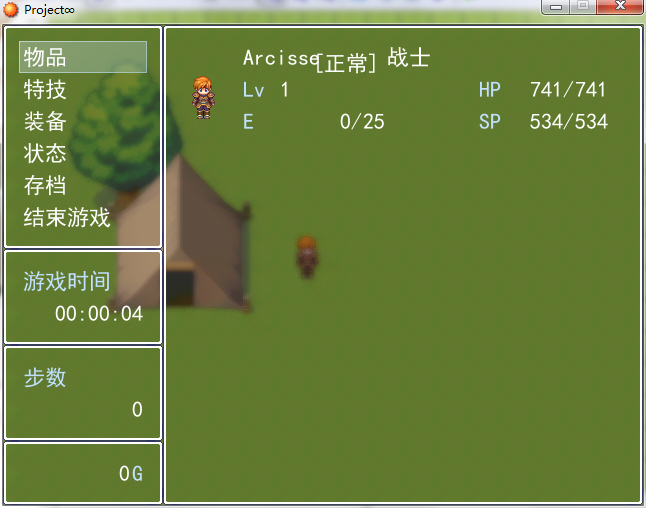
组合技说明(都是已有脚本):
免dll截图 + 免dll(高斯)模糊算法 + 半透明窗口(主站已有) = XP用菜单界面模糊地图背景
个人修改:
VX中, 生成菜单背景的方法照抄到XP
半透明窗口原本的背景为地图, 修改成模糊的背景(连别名都没改我真是太懒了)
前版范例
 Project∞.rar
(189.16 KB, 下载次数: 216)
Project∞.rar
(189.16 KB, 下载次数: 216)
前版BUG说明:
[截图]功能为调用系统API, 原理是将屏幕指定区域的bmp内存传递给rm, 因此如果游戏窗口上方有什么东西的话也会被截进去, 比如360流量悬浮窗OeO
打开游戏菜单时第一次调用API, 此1秒内如果屏幕获取不到焦点(即不在桌面所有窗口的最上层)有一定几率触发异常, 截图矩形会始终为玩家屏幕左上角一块矩形区域
[/fold]
无bug最终版(整合兰触的xp用真截图)
(开袋即食)
[fold=代码如下]
[pre lang="ruby" file="MenuBack.txt"]#--------------------------------------------------------------------------
# ● 紫苏前辈的获取窗口句柄
# 部分细节已修改( by 晴兰 )
#--------------------------------------------------------------------------
module Kernel
#--------------------------------------------------------------------------
# ● 需要的 Windows API 函数
#--------------------------------------------------------------------------
GetWindowThreadProcessId = Win32API.new("user32", "GetWindowThreadProcessId", "LP", "L")
GetWindow = Win32API.new("user32", "GetWindow", "LL", "L")
GetClassName = Win32API.new("user32", "GetClassName", "LPL", "L")
GetCurrentThreadId = Win32API.new("kernel32", "GetCurrentThreadId", "V", "L")
GetForegroundWindow = Win32API.new("user32", "GetForegroundWindow", "V", "L")
#--------------------------------------------------------------------------
# ● 获取窗口句柄
#--------------------------------------------------------------------------
def hwnd
# 获取调用线程(RM 的主线程)的进程标识
threadID = GetCurrentThreadId.call
# 获取 Z 次序中最靠前的窗口
hWnd = GetWindow.call(GetForegroundWindow.call, 0)
# 枚举所有窗口
while hWnd != 0
# 如果创建该窗口的线程标识匹配本线程标识
if threadID == GetWindowThreadProcessId.call(hWnd, 0)
# 分配一个 12 个字节的缓冲区
className = " " * 12 # ●
# 获取该窗口的类名
GetClassName.call(hWnd, className, 12) # ●
# 如果匹配 RGSS Player 则跳出循环
break if className[0, 11] == "RGSS Player"
end
# 获取下一个窗口
hWnd = GetWindow.call(hWnd, 2)
end
return hWnd
end
end
HWND = hwnd
#--------------------------------------------------------------------------
# ● RMXP用 Graphics.snap_to_bitmap
# 就算窗口被遮盖或者显示不全也可以正常截图
# 附赠: Graphics.snap_to_clipboard
# 截图到剪贴板
# ● 作者:晴兰 @ rpg.blue
# 使用到紫苏前辈的获取窗口句柄脚本,其他部分为原创
#--------------------------------------------------------------------------
module SAFX
module_function
class ::Integer; def pack; self; end; def to_param; 'i'; end; def ord; self; end; end
class ::String;def pack; [self].pack('p').unpack('L').first; end; def to_param; 'p'; end; end
def api(dll,func)
lambda{|*args|
Win32API.new(dll,func,args.map{|x|x.to_param}, 'i').call *args
}
end
def callproc(addr, type = :cdecl)
stdcall = type == :stdcall
raise "addr == 0 " if addr.pack == 0
apicall = api('user32', 'CallWindowProcW')
lambda{|*args|apicall.call((code=[0x55,0xe589].pack('CS')+args.map{|x| [0x68, x.pack].pack('CL')}.reverse.join+[0xb8, addr.pack, 0xD0FF, 0xc481, (stdcall ? 0 : args.length*4) , 0x10c2c9].pack('CLSSLL')),0,0,0,0)}
end
LL = api("kernel32", "LoadLibrary")
GPA = api("kernel32", "GetProcAddress")
def funcaddr(dll, func)
x = GPA.call(LL.call(dll), func)
x == 0 ? nil : x
end
def readmem(start, len)
api('kernel32', 'RtlMoveMemory').call buf = "\0"*len, start, len
buf
end
def writemem(start, len, value)
api('kernel32', 'RtlMoveMemory').call start, value, [len, value.length].min
end
end
class << Graphics
SetWindowPos = SAFX.api("user32", "SetWindowPos")
GetSystemMetrics = SAFX.api("user32", "GetSystemMetrics")
CAPTION_HEIGHT = GetSystemMetrics.call(4)
CX_FRAME, CY_FRAME = GetSystemMetrics.call(32), GetSystemMetrics.call(33)
SIZE = {:width => 640, :height => 480}
def resize_screen(width, height)
SetWindowPos.call(HWND, 0, 0, 0,
width + CX_FRAME - 2, height + CAPTION_HEIGHT + CY_FRAME - 1, 2)
SIZE[:width], SIZE[:height] = width, height
end
def width
SIZE[:width]
end
def height
SIZE[:height]
end
def do_screen_stuff
hwnd = self.hwnd
src = SAFX.api('user32', 'GetDC').call(hwnd)
memdc = SAFX.api('gdi32', 'CreateCompatibleDC').call(src)
hb = SAFX.api('gdi32', 'CreateCompatibleBitmap').call(src, width, height)
ho = SAFX.api('gdi32', 'SelectObject').call(memdc, hb)
bp = SAFX.funcaddr("user32", "GetDC")
ov = "\0"*4
str = [0xb8, memdc, 0xc2, 0x04, 0x00].pack("CLC*") # magic, touch
SAFX.api('Kernel32', 'VirtualProtect').call(bp, str.length, 0x40, ov)
oldstr = SAFX.readmem(bp, str.length)
SAFX.writemem bp, str.length, str
SAFX.api('user32', 'UpdateWindow').call(hwnd)
Graphics.update
SAFX.writemem bp, str.length, oldstr
yield hb
ensure
SAFX.api('user32', 'ReleaseDC').call(hwnd, src)
hb = SAFX.api('gdi32', 'SelectObject').call(memdc, ho)
SAFX.api('gdi32', 'DeleteObject').call(ho)
SAFX.api('gdi32', 'DeleteDC').call(memdc)
end
def snap_to_bitmap
bm = Bitmap.new(width, height)
addr = bm.object_id * 2
addr, = SAFX.readmem(addr + 16, 4).unpack("L")
addr, = SAFX.readmem(addr + 8, 4).unpack("L")
addr, = SAFX.readmem(addr + 16, 4).unpack("L")
do_screen_stuff do |hb|
bits = "\0"*(width * height * 4)
SAFX.api('gdi32', 'GetBitmapBits').call(hb, bits.length, bits)
r = SAFX.api('kernel32', 'RtlMoveMemory')
a = bits.pack
stride = width * 4
h = height
(h-1).downto(0){|i|
r.call addr + i * stride, a + (h - i - 1)*stride, stride
}
bm
end
end
def snap_to_clipboard
return false if SAFX.api('user32', 'OpenClipboard').call(hwnd) == 0
do_screen_stuff do |hb|
SAFX.api('user32', 'SetClipboardData').call(2, hb)
SAFX.api('user32', 'CloseClipboard').call
true
end
end
end
#==============================================================================
# ■ Bitmap
#------------------------------------------------------------------------------
# 位图的类。所谓位图即表示图像其本身。
#==============================================================================
class Bitmap
def blur(str = 3, rect = Rect.new(0, 0, self.width, self.height))
if str < 1
str = 1
elsif str > 5
str = 5
end
for x in -str..str
for y in -str..str
next if x == 0 and y == 0
self.blt(x + rect.x, y + rect.y, self, Rect.new(rect.x, rect.y, rect.width - x, rect.height - y), 10)
end
end
return self
end
end
#==============================================================================
# ■ Game_Temp
#------------------------------------------------------------------------------
# 在没有存档的情况下,处理临时数据的类。这个类的实例请参考
# $game_temp 。
#==============================================================================
class Game_Temp
#--------------------------------------------------------------------------
# ● 定义实例变量
#--------------------------------------------------------------------------
attr_accessor :background_bitmap # 画面背景
#--------------------------------------------------------------------------
# ● 初始化对象
#--------------------------------------------------------------------------
alias ori_init initialize
def initialize
ori_init
@background_bitmap = Bitmap.new(640, 480) # Graphics.snap_to_bitmap
end
end
#==============================================================================
# ■ Scene_Map
#------------------------------------------------------------------------------
# 处理地图画面的类。
#==============================================================================
class Scene_Map
#--------------------------------------------------------------------------
# ● 调用菜单
#--------------------------------------------------------------------------
alias ori_call_menu call_menu
def call_menu
# 生成菜单画面背景
$game_temp.background_bitmap.dispose
$game_temp.background_bitmap = Graphics.snap_to_bitmap
$game_temp.background_bitmap.blur
# 继续原有处理
ori_call_menu
end
end
#==============================================================================
# ■ Window_Base
#==============================================================================
class Window_Base < Window
alias xxx_initialize initialize
def initialize(x, y, width, height)
xxx_initialize(x, y, width, height)
if $scene.is_a?(Scene_Menu) or
$scene.is_a?(Scene_Item) or
$scene.is_a?(Scene_Skill) or
$scene.is_a?(Scene_Equip) or
$scene.is_a?(Scene_Status) or
$scene.is_a?(Scene_Save) or
$scene.is_a?(Scene_End)
self.back_opacity = 160 #————这个数值可调,为透明程度
end
end
end
module XXX
#--------------------------------------------------------------------------
# ● 生成菜单画面背景
#--------------------------------------------------------------------------
def create_menu_background
@menuback_sprite = Sprite.new
@menuback_sprite.bitmap = $game_temp.background_bitmap
@menuback_sprite.color.set(16, 16, 16, 64)
end
#--------------------------------------------------------------------------
# ● 释放菜单画面背景
#--------------------------------------------------------------------------
def dispose_menu_background
@menuback_sprite.dispose
end
end
class Scene_Menu
include XXX
alias xxx_main main
def main
create_menu_background
xxx_main
dispose_menu_background
end
end
class Scene_Item
include XXX
alias xxx_main main
def main
create_menu_background
xxx_main
dispose_menu_background
end
end
class Scene_Skill
include XXX
alias xxx_main main
def main
create_menu_background
xxx_main
dispose_menu_background
end
end
class Scene_Equip
include XXX
alias xxx_main main
def main
create_menu_background
xxx_main
dispose_menu_background
end
end
class Scene_Status
include XXX
alias xxx_main main
def main
create_menu_background
xxx_main
dispose_menu_background
end
end
class Scene_Save
include XXX
alias xxx_main main
def main
create_menu_background
xxx_main
dispose_menu_background
end
end
class Scene_End
include XXX
alias xxx_main main
def main
create_menu_background
xxx_main
dispose_menu_background
end
end
#==============================================================================
# 本脚本来自 rm.66RPG.com,使用和转载请保留此信息
#==============================================================================
[/pre]
[/fold] |
评分
-
查看全部评分
|
 -azogi:



 写轮眼
写轮眼
 发表于 2014-7-31 14:24:46


 提升卡
提升卡 沉默号角
沉默号角 喧嚣号角
喧嚣号角 变色卡
变色卡 升龙剑
升龙剑

 发表于 2014-7-31 14:27:21





 好用!
好用!