| 赞 | 0 |
| VIP | |
| 好人卡 | |
| 积分 | 1 |
| 经验 | |
| 最后登录 | 2022-8-24 |
| 在线时间 | 41 小时 |
- 梦石
- 0
- 星屑
- 69
- 在线时间
- 41 小时
- 注册时间
- 2015-4-6
- 回帖
- 0
|
加入我们,或者,欢迎回来。
您需要 登录 才可以下载或查看,没有账号?注册会员
×
請問一下,我使用的臉圖戰鬥腳本,在使用物品時,右邊跳出的是人物的名字來做選擇,而不是人物圖片,像是原本預設的系統一樣
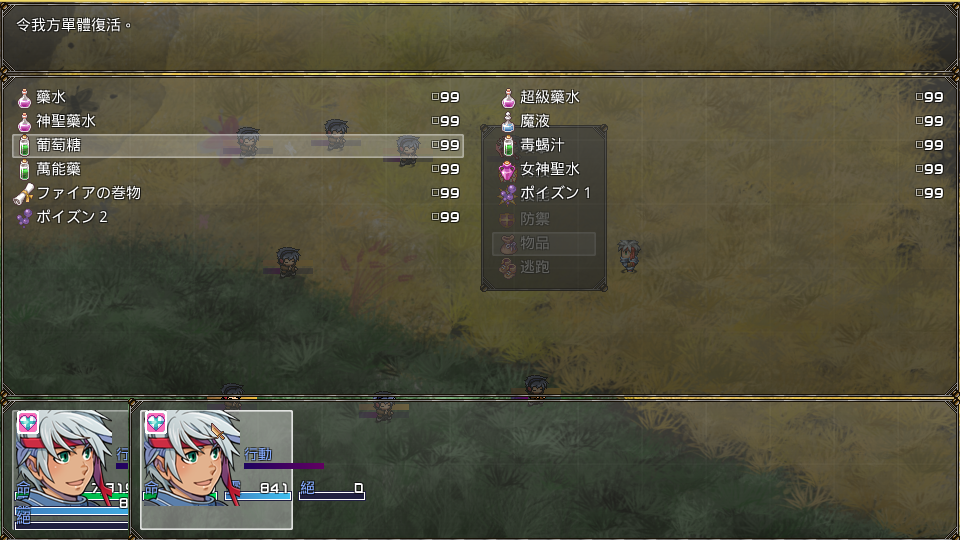
感謝!各位~
附上腳本
[pre lang="ruby"]#==============================================================================
# ■ VXAce-RGSS3-10 フロントビュー改 [Ver.1.0.0] by Claimh
#------------------------------------------------------------------------------
# ・戦闘画面を顔グラフィック表示に変更します。
# ・エネミー選択ウィンドウで残HPを表示します。
#==============================================================================
#==============================================================================
# ■ Window_BattleStatus
#==============================================================================
class Window_BattleStatus < Window_Selectable
#--------------------------------------------------------------------------
# ● HP/MP/TPの行の高さ取得
#--------------------------------------------------------------------------
def gauge_line_height
return 15
end
#--------------------------------------------------------------------------
# ● 桁数の取得
#--------------------------------------------------------------------------
def col_max
return [item_max, 5].max
end
#--------------------------------------------------------------------------
# ● 横に項目が並ぶときの空白の幅を取得
#--------------------------------------------------------------------------
def spacing
return 0
end
#--------------------------------------------------------------------------
# ● 項目を描画する矩形の取得
#--------------------------------------------------------------------------
def item_rect(index)
rect = Rect.new
rect.width = item_width
rect.height = contents_height
rect.x = index % col_max * (item_width + spacing)
rect.y = index / col_max * contents_height
rect
end
#--------------------------------------------------------------------------
# ● 基本エリアの矩形を取得
#--------------------------------------------------------------------------
def basic_area_rect(index)
rect = item_rect_for_text(index)
rect.height -= gauge_area_height
rect
end
#--------------------------------------------------------------------------
# ● ゲージエリアの矩形を取得
#--------------------------------------------------------------------------
def gauge_area_rect(index)
rect = item_rect_for_text(index)
rect.y += contents_height - gauge_area_height - 8
rect.height = gauge_area_height
rect
end
#--------------------------------------------------------------------------
# ● ゲージエリアの高さを取得
#--------------------------------------------------------------------------
def gauge_area_height
return (gauge_line_height * ($data_system.opt_display_tp ? 3 : 2))
end
#--------------------------------------------------------------------------
# ● 基本エリアの描画
#--------------------------------------------------------------------------
def draw_basic_area(rect, actor)
# draw_actor_name(actor, rect.x, rect.y, 100)
draw_actor_face(actor, rect.x, rect.y, !actor.dead?)
draw_actor_icons(actor, rect.x, rect.y, rect.width+8)
end
#--------------------------------------------------------------------------
# ● ゲージエリアの描画(TP あり)
#--------------------------------------------------------------------------
def draw_gauge_area_with_tp(rect, actor)
draw_actor_hp(actor, rect.x, rect.y + gauge_line_height * 0, rect.width)
draw_actor_mp(actor, rect.x, rect.y + gauge_line_height * 1, rect.width)
draw_actor_tp(actor, rect.x, rect.y + gauge_line_height * 2, rect.width)
end
#--------------------------------------------------------------------------
# ● ゲージエリアの描画(TP なし)
#--------------------------------------------------------------------------
def draw_gauge_area_without_tp(rect, actor)
draw_actor_hp(actor, rect.x, rect.y + gauge_line_height * 1, rect.width)
draw_actor_mp(actor, rect.x, rect.y + gauge_line_height * 2, rect.width)
end
end
#==============================================================================
# ■ Window_BattleEnemy
#==============================================================================
class Window_BattleEnemy < Window_Selectable
#--------------------------------------------------------------------------
# ● 項目の描画
#--------------------------------------------------------------------------
alias draw_item_fv draw_item
def draw_item(index)
draw_hp(index)
draw_item_fv(index)
end
#--------------------------------------------------------------------------
# ● HPの描画
#--------------------------------------------------------------------------
def draw_hp(index)
rect = item_rect_for_text(index)
w = rect.width - 60
x = rect.x + 30
hp = $game_troop.alive_members[index].hp_rate
draw_gauge(x, rect.y, w, hp, hp_gauge_color1, hp_gauge_color2)
end
end[/pre]
|
|


 写轮眼
写轮眼
 发表于 2015-5-12 18:28:50

 提升卡
提升卡 沉默号角
沉默号角 喧嚣号角
喧嚣号角 变色卡
变色卡 升龙剑
升龙剑