| 赞 | 56 |
| VIP | |
| 好人卡 | |
| 积分 | 37 |
| 经验 | |
| 最后登录 | 2025-9-3 |
| 在线时间 | 4468 小时 |
- 梦石
- 0
- 星屑
- 3677
- 在线时间
- 4468 小时
- 注册时间
- 2008-6-12
- 回帖
- 776
|
加入我们,或者,欢迎回来。
您需要 登录 才可以下载或查看,没有账号?注册会员
×
本帖最后由 过眼云烟 于 2015-11-21 20:11 编辑
没错,我又回来了,发布新的插件。基本算是日更了,哈哈哈。
这次是模仿碧轨,或者说模仿Va中大家喜闻乐见经常用的仿碧轨血条,不过我并没有像VA大神那样直接用默认图片生成。
用法的话需要各位自己处理,然后放到Faces目录下,不过也很简单,附件中有一个PSD文件,只需要把图片进行简单处理即可。
图片大小为72*72。在地图有对话发生和打开你的默认开关的时候,血条会消失。后续版本我会完善更多功能的,enjoy it~~
(附件包括四个猪角头像文件,插件,和PSD图层)
效果如下:
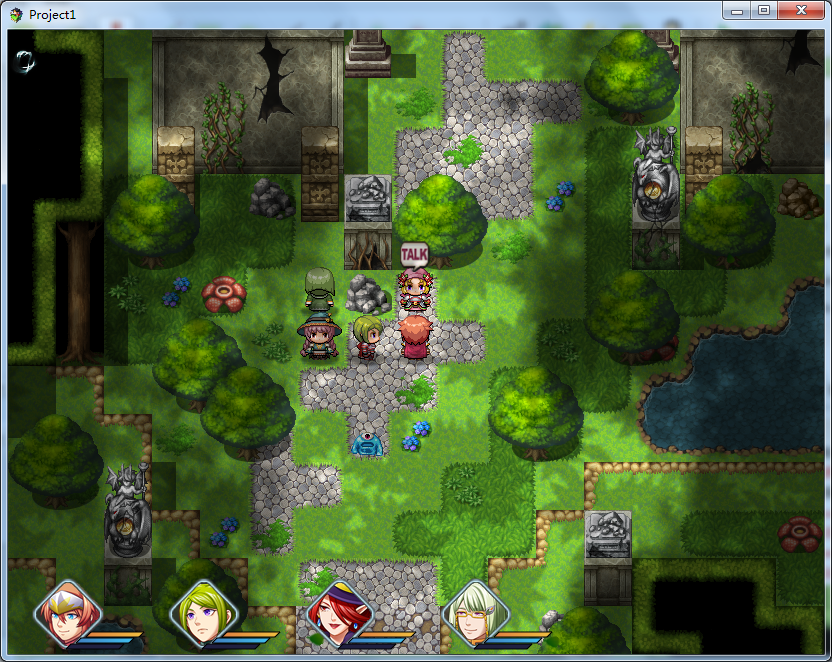
图片样式:(参考)

注意:我的插件你可以随意用在非商业游戏中,如果需要用在商业游戏,需要联系我。
如果我的插件用在您的游戏中,请在致谢名单中提及,谢谢!
[pre lang="javascript" file="MrLiu_MapStatus"]//=============================================================================
// MrLiu_MapStatus.js
//=============================================================================
/*:
* @plugindesc 在RMMV游戏的题图界面中显示仿空轨人物血条.
* @author MrLiu-过眼云烟
* @param NotShowSwitch
* @desc 开启此开关则不显示地图血条,多用于剧情等特殊场景。
* @default 50
*
* @help 这是我开发的第四个或者说第五个MV插件,本来程序可以实现自动切图功能
* 但是切图之后,在菜单界面下的人物图片也会被切割,所以只能麻烦您自行提供素材了。
* 请讲您的游戏中想显示在地图上的人物图片放到Faces目录下,请以Actor1_face.png
* 格式命名,其中1代表1号角色,其他的您不需要改变。在插件中您可以自动设置的开关,
* 可以在一些特殊剧情的时候打开这个开关,地图血条将自动关闭。后续版本我会考虑陆续
* 增添功能的。Enjoy it~~支持我就多回帖多送糖吧。
*/
Window_Base.prototype.drawGauge = function(x, y, width, rate, color1, color2) {
var fillW = Math.floor(width * rate);
var gaugeY = y + this.lineHeight() - 8;
this.contents.fillRect(x, gaugeY, width, 6, this.gaugeBackColor());
this.contents.gradientFillRect(x, gaugeY, fillW, 6, color1, color2);
};
Bitmap.prototype.outlineTrap1 = function(x, y, width, height, color1, color2) {
var context = this._context;
var grad = context.createLinearGradient(x, y, x + width, y);
var startCoords = [];
grad.addColorStop(0, color1);
grad.addColorStop(1, color2);
context.save();
context.beginPath();
startCoords = [x, y + height]
context.moveTo(x, y + height)
context.lineTo(x + height, y)
context.lineTo(x + width, y)
context.lineTo(x + width - height, y + height)
context.lineTo(startCoords[0], startCoords[1])
context.strokeStyle = grad;
context.stroke();
context.restore();
this._setDirty();
};
Bitmap.prototype.fillTrap = function(x, y, width, widthpart, height, color1, color2) {
var context = this._context;
var grad = context.createLinearGradient(x, y, x + width, y);
grad.addColorStop(0, color1);
grad.addColorStop(1, color2);
context.save();
context.beginPath();
context.moveTo(x, y + height)
context.lineTo(x + height, y)
context.lineTo(x + width, y)
context.lineTo(x + width - height, y + height)
context.clip();
context.fillStyle = grad;
context.fillRect(x, y, widthpart, height);
context.restore();
this._setDirty();
}
Bitmap.prototype.outlineTrap = function(x, y, width, height, color1, color2) {
var context = this._context;
var grad = context.createLinearGradient(x, y, x + width, y);
var startCoords = [];
grad.addColorStop(0, color1);
grad.addColorStop(1, color2);
context.save();
context.beginPath();
startCoords = [x, y + height]
context.moveTo(x, y + height)
context.lineTo(x + height, y)
context.lineTo(x + width, y)
context.lineTo(x + width - height, y + height)
context.lineTo(startCoords[0], startCoords[1])
context.strokeStyle = grad;
context.stroke();
context.restore();
this._setDirty();
}
function Window_MapStatus() {
this.initialize.apply(this, arguments);
}
var parameters = PluginManager.parameters('MrLiu_MapStatus');
var notShowSwitch = Number(parameters['NotShowSwitch']);
Window_MapStatus.prototype = Object.create(Window_Selectable.prototype);
Window_MapStatus.prototype.constructor = Window_MapStatus;
Window_MapStatus.prototype.initialize = function(x, y) {
var width = this.windowWidth();
var height = this.windowHeight();
Window_Selectable.prototype.initialize.call(this, x, y, width, height);
this._formationMode = false;
this._pendingIndex = -1;
this.loadImages();
this._last_hps = new Array();
this._last_mps = new Array();
this._last_tps = new Array();
this._hps = new Array();
this._mps = new Array();
this._tps = new Array();
this.refresh();
};
Window_MapStatus.prototype.drawGauge= function(x, y, width, rate, color1, color2) {
var fillW = Math.floor(width * rate);
var gaugeY = y + this.lineHeight() - 12;
this.contents.fillTrap(x, gaugeY, width, width, 5, this.textColor(19), this.textColor(19));
this.contents.fillTrap(x, gaugeY, width, fillW, 5, color1, color2);
this.contents.outlineTrap1(x, gaugeY, width, 5, "#000000", "#000000");
};
Window_MapStatus.prototype.maxItems = function() {
return $gameParty.size();
};
Window_MapStatus.prototype.itemHeight = function() {
var clientHeight = this.height - this.padding * 2;
return Math.floor(clientHeight / this.numVisibleRows());
};
Window_MapStatus.prototype.loadImages = function() {
$gameParty.members().forEach(function(actor) {
ImageManager.loadFace(actor.faceName());
}, this);
};
Window_MapStatus.prototype.drawItem = function(index) {
this.drawItemBackground(index);
this.drawItemImage(index);
this.drawItemStatus(index);
};
Window_MapStatus.prototype.drawItemBackground = function(index) {
if (index === this._pendingIndex) {
var rect = this.itemRect(index);
var color = this.pendingColor();
this.changePaintOpacity(false);
this.contents.fillRect(rect.x, rect.y, rect.width, rect.height, color);
this.changePaintOpacity(true);
}
};
Window_MapStatus.prototype.processOk = function() {
Window_Selectable.prototype.processOk.call(this);
$gameParty.setMenuActor($gameParty.members()[this.index()]);
};
Window_MapStatus.prototype.isCurrentItemEnabled = function() {
if (this._formationMode) {
var actor = $gameParty.members()[this.index()];
return actor && actor.isFormationChangeOk();
} else {
return true;
}
};
Window_MapStatus.prototype.selectLast = function() {
this.select($gameParty.menuActor().index() || 0);
};
Window_MapStatus.prototype.formationMode = function() {
return this._formationMode;
};
Window_MapStatus.prototype.setFormationMode = function(formationMode) {
this._formationMode = formationMode;
};
Window_MapStatus.prototype.pendingIndex = function() {
return this._pendingIndex;
};
Window_MapStatus.prototype.setPendingIndex = function(index) {
var lastPendingIndex = this._pendingIndex;
this._pendingIndex = index;
this.redrawItem(this._pendingIndex);
this.redrawItem(lastPendingIndex);
};
Window_MapStatus.prototype.windowWidth = function() {
return Graphics.boxWidth * 0.7;
};
Window_MapStatus.prototype.windowHeight = function() {
var h1 = this.fittingHeight(1);
var h2 = this.fittingHeight(2);
return Graphics.boxHeight - h1 - h2;
};
Window_MapStatus.prototype.maxCols = function() {
return 4;
};
Window_MapStatus.prototype.numVisibleRows = function() {
return 1;
};
Window_MapStatus.prototype.drawItemImage = function(index) {
var actor = $gameParty.members()[index];
var rect = this.itemRectForText(index);
var w = Math.min(rect.width, 144);
var h = Math.min(rect.height, 144);
var lineHeight = this.lineHeight();
this.changePaintOpacity(actor.isBattleMember());
this.drawActorFace1(actor, rect.x, 380, w, h);//(actor, rect.x, rect.y + lineHeight * 2.5, w, h);
this.changePaintOpacity(true);
};
Window_MapStatus.prototype.drawActorFace1 = function(actor, x, y, width, height) {
this.drawFace1(actor._actorId, x, y, width, height);
};
ImageManager.loadFace1 = function(filename, hue) {
return this.loadBitmap('img/faces/', 'Actor'+filename+'_face', hue, true);
};
Window_MapStatus.prototype.drawFace1 = function(faceName, x, y, width, height) {
width = width || Window_Base._faceWidth;
height = height || Window_Base._faceHeight;
var bitmap1 = ImageManager.loadFace1(faceName);
var dx = Math.floor(x + Math.max(width - 144, 0) / 2);
var dy = Math.floor(y + Math.max(height - 144, 0) / 2);
this.contents.blt(bitmap1, 0, 0, 72, 72, dx, dy,72,72);//gradientFillRect ( x , y , width , height , color1 , color2 , vertical )
};
Window_MapStatus.prototype.drawActorFace = function(actor, x, y, width, height) {
this.drawFace(actor.faceName(), actor.faceIndex(), x, y, width, height);
};
Window_MapStatus.prototype.drawFace = function(faceName, faceIndex, x, y, width, height) {
width = width || Window_Base._faceWidth;
height = height || Window_Base._faceHeight;
var bitmap1 = ImageManager.loadFace(faceName);
var pw = Window_Base._faceWidth;
var ph = Window_Base._faceHeight;
var sw = Math.min(width, pw);
var sh = Math.min(height, ph);
var dx = Math.floor(x + Math.max(width - pw, 0) / 2);
var dy = Math.floor(y + Math.max(height - ph, 0) / 2);
var sx = faceIndex % 4 * pw + (pw - sw) / 2;
var sy = Math.floor(faceIndex / 4) * ph + (ph - sh) / 2;
this.contents.blt(bitmap1, sx, sy, sw, sh, dx, dy,72,72);
this.clear_edge(bitmap1,sx,sy);
};
Window_MapStatus.prototype.clear_edge = function(bitmap,sx,sy) {
for(var i=0 ;i<=72;i++){
bitmap.clearRect (sx, i+sy, 72 - i, 1);//72
bitmap.clearRect (sx+74 + i, i+sy, 72 - i, 1);
bitmap.clearRect (sx, i + 74+sy, i, 1);
bitmap.clearRect (sx+144 - i, i + 74+sy, i, 1);
}
};
Window_MapStatus.prototype.drawItemStatus = function(index) {
var actor = $gameParty.members()[index];
var rect = this.itemRectForText(index);
var x = rect.x;
var y = rect.y;
var width = rect.width;
var bottom = y + rect.height-40;
var lineHeight = this.lineHeight();
this.drawActorHp(actor, x, bottom - lineHeight * 3, width);
this.drawActorMp(actor, x, bottom - lineHeight * 2, width);
this.drawActorTp(actor, x, bottom - lineHeight * 1, width);
};
Window_MapStatus.prototype.lineHeight = function() {
return 6;
};
Window_MapStatus.prototype.drawActorHp = function(actor, x, y, width) {
width = width || 186;
var color1 = this.hpGaugeColor1();
var color2 = this.hpGaugeColor2();
this.drawGauge(x+54, y, width-54, actor.hpRate(), color1, color2);
};
Window_MapStatus.prototype.drawActorMp = function(actor, x, y, width) {
width = width || 186;
var color1 = this.mpGaugeColor1();
var color2 = this.mpGaugeColor2();
this.drawGauge(x+44, y, width-54, actor.mpRate(), color1, color2);
};
Window_MapStatus.prototype.drawActorTp = function(actor, x, y, width) {
width = width || 96;
var color1 = this.tpGaugeColor1();
var color2 = this.tpGaugeColor2();
this.drawGauge(x+34, y, width-54, actor.tpRate(), color1, color2);
};
Window_MapStatus.prototype.update = function() {
Window_Base.prototype.update.call(this);
this._hps.length = 0;
this._mps.length = 0;
this._tps.length = 0;
for(var el=0;el<$gameParty.size();el++){
this._hps.push($gameParty.members()[el].hpRate());
this._mps.push($gameParty.members()[el].mpRate());
this._tps.push($gameParty.members()[el].tpRate());
}
for(var i=0;i<this._hps.length;i++){
if (this._hps != this._last_hps){
this.refresh();
break;
}
if (this._mps != this._last_mps){
this.refresh();
break;
}
if (this._tps != this._last_tps){
this.refresh();
break;
}
}
};
Window_MapStatus.prototype.refresh = function() {
this.contents.clear();
this.drawAllItems();
this._last_hps.length = 0;
this._last_mps.length = 0;
this._last_tps.length = 0;
};
Window_MapStatus.prototype.drawAllItems = function() {
var topIndex = this.topIndex();
for (var i = 0; i < this.maxPageItems(); i++) {
var index = topIndex + i;
if (index < this.maxItems()) {
this.drawItem(index);
}
}
for(var el=0;el<$gameParty.size();el++){
this._last_hps.push($gameParty.members()[el].hpRate());
this._last_mps.push($gameParty.members()[el].mpRate());
this._last_tps.push($gameParty.members()[el].tpRate());
}
};
var _Scene_Map_createMapStatusWindow = Scene_Map.prototype.createDisplayObjects;
Scene_Map.prototype.createDisplayObjects = function() {
_Scene_Map_createMapStatusWindow.call(this);
this._mapStatusWindow = new Window_MapStatus();
this._mapStatusWindow.opacity = 0;
this._mapStatusWindow.y = 150;
this.addWindow(this._mapStatusWindow);
};
var _Scene_Map_updateMapStatusWindow1 = Scene_Map.prototype.update;
Scene_Map.prototype.update = function() {
_Scene_Map_updateMapStatusWindow1.call(this);////gameSwitches.value(dataId)
if(($gameMap._interpreter.isRunning()) || ($gameSwitches.value(notShowSwitch) == true)){
this._mapStatusWindow.close();
}
else{
this._mapStatusWindow.open();
}
};
[/pre] |
评分
-
查看全部评分
|





 写轮眼
写轮眼
 发表于 2015-11-21 20:15:30


 提升卡
提升卡 沉默号角
沉默号角 喧嚣号角
喧嚣号角 变色卡
变色卡 升龙剑
升龙剑
 云烟君真是勤奋的劳模,继续支持


 正好可以学习学习。最近做的那个HUD简直糟糕,只能绘制出位图,但是血蓝条却没有实际功能。


