| 赞 | 2 |
| VIP | |
| 好人卡 | |
| 积分 | 1 |
| 经验 | |
| 最后登录 | 2017-11-7 |
| 在线时间 | 388 小时 |
- 梦石
- 0
- 星屑
- 55
- 在线时间
- 388 小时
- 注册时间
- 2009-8-4
- 回帖
- 212
|
加入我们,或者,欢迎回来。
您需要 登录 才可以下载或查看,没有账号?注册会员
×
本帖最后由 andrewx 于 2015-12-13 09:30 编辑
在MV自带的Kadokawa插件里有一款叫OverpassTile.js的插件,该插件可以使指定区域id的图块变成可以双层行走的图块,即角色可以从桥上方行走,也可以从桥底下通过,从桥上不能直接下至地面,反之亦然。
然而该脚本只提供了通行和遮挡的判定,还有些细节没有顾及。本插件在该插件基础之上进行了如下修正:
- 被放置在overpass区域的事件或角色将被默认放在上层
- 碰撞检测:不同层的事件和角色互不影响,同层的事件和角色的碰撞与原有优先度设置一致
- 事件触发检测:角色不能触发不同层的事件,同层的事件触发与原有优先度设置一致
- (可选)伤害地形及草丛效果不影响高层的角色
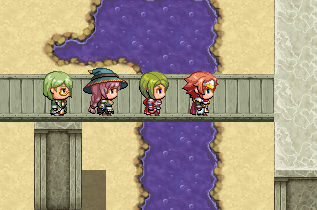
截图说明:
桥上的事件不会阻挡桥下的主角队,反之亦然,事件的移动路线也不会受到影响
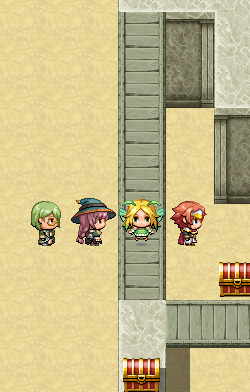
在桥上无法触发桥下的宝箱,但在桥下的同一图块则可以触发
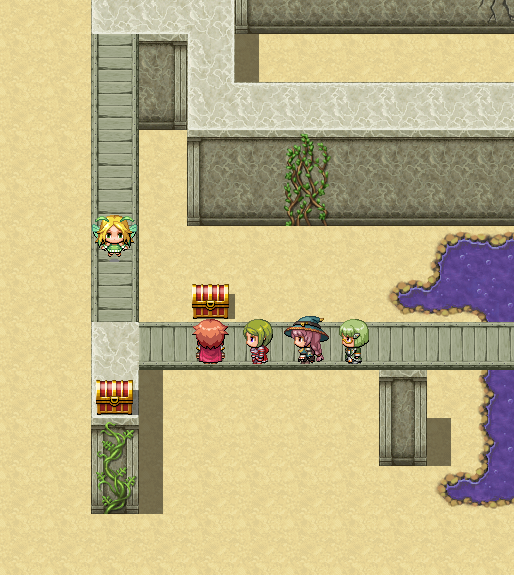
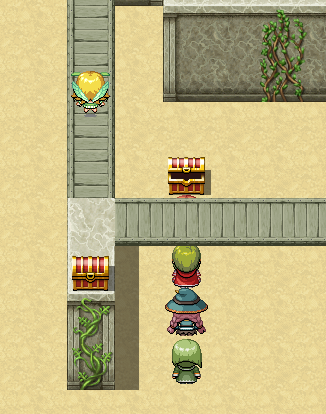
桥上的角色不会受到毒沼的伤害(及草丛效果),而桥下依然会
食用方法:
插件管理器安装,根据需求设置功能开关:
- Disable Damage Floor:当为ON时,角色处于伤害地形的上层则不会受到伤害。默认OFF
- Disable Bush Effect:当为ON时,角色处于草丛地形的上层则不会出现草丛效果。默认OFF
注意事项:
- 本插件必须和OverpassTile.js共同使用
- OverpassTile.js的层次判定方法为:角色或事件处于gateway区域则判定为上层,一旦进入非overpass区域则判定为下层
- 事件触发和碰撞检测的修正只会作用在主角和事件处于不同的层级上,处于同层则与默认RM处理方式一致,请根据上面一条辨别角色和事件所在层次
- 当事件处于gateway区域附近,会出现由于处在层级判定临界点而产生的穿透和无法触发事件的情况,请尽量避免这样的设置
- 当启用伤害地形和草丛效果屏蔽功能时,只要角色处于上层,这两种效果就不会生效,处于下层依然会生效。因此无法做出上层的毒沼扣血这种效果
插件内容:
Ver 0.10
- //=============================================================================
- // AndrewX - OverpassTileFix
- // AndrewX_OverpassTileFix.js
- //=============================================================================
- var AndrewX = AndrewX || {};
- AndrewX.OTF = AndrewX.OTF || {};
- //=============================================================================
- /*:
- * @plugindesc v0.10 Add collision & trigger check and initial layers for events when using OverpassTile.js and more.
- * @author AndrewX
- *
- * @param Disable Damage Floor
- * @desc While ON, character will not get damaged if they are on higher level of damage floor. (Default: OFF)
- * @default OFF
- *
- * @param Disable Bush Effect
- * @desc While ON, bush tile will not affect character on higher level. (Default: OFF)
- * @default OFF
- *
- * @help
- * ============================================================================
- * Introduction and Instructions
- * ============================================================================
- * The Kadokawa OverpassTile plugin does not support the collision judgment
- * modification between characters who are in different floors. This plugin
- * provides:
- *
- * If a character or event is initially placed on a overpass tile, it will
- * automatically be put on the top of the tile.
- *
- * Characters and events on different levels does not collide with each other.
- *
- * Character cannot trigger events in a different level.
- *
- * (Optional) Bush tile and damage floor will not affect character that on
- * higher level.
- *
- *
- * Note:
- * Make sure this plugin is used together with OverpassTile.js by Kadokawa.
- *
- * As defined in OverpassTile.js, if a character or event is in gateway
- * region, it is set on higher level. Once it enters a non-overpass region,
- * it is set to be on lower level.
- *
- * Event trigger level check fix will not work if the event and character are
- * on the same level.
- *
- * If an event is placed between edge of higher and lower level (i.e. around
- * the gateway tile), level collision check might go wrong. Please be careful
- * with this situation.
- *
- * If Disable Damage Floor and Disable Bush Effect functions are ON, for
- * overpass and gateway regions, damage floor and bush effort will ALWAYS be
- * ignored if the character is on higher level, and will still be valid if
- * character is on lower level. So you cannot make them affect character that
- * on higher level.
- *
- * ============================================================================
- * Changelog
- * ============================================================================
- *
- * Version 0.10:
- * - Finished prototype
- *
- * ============================================================================
- * Term of Use
- * ============================================================================
- *
- * Free for use in non-commercial or commercial RMMV projects
- * Please credit AndrewX
- *
- */
- //=============================================================================
- (function() {
- var parameters = PluginManager.parameters('AndrewX_OverpassTileFix');
- var disableDamage = parameters['Disable Damage Floor'];
- var disableBush = parameters['Disable Bush Effect'];
- AndrewX.OTF.isCollidedWithEvents = Game_CharacterBase.prototype.isCollidedWithEvents;
- Game_CharacterBase.prototype.isCollidedWithEvents = function(x, y) {
- var events = $gameMap.eventsXyNt(x, y);
- var higher = this._higherLevel;
- return events.some(function(event) {
- if (!event.isNormalPriority()) {
- return false
- }
- if (event._higherLevel != higher) {
- return false;
- }
- return true;
- });
- };
- AndrewX.OTF.refreshBushDepth = Game_CharacterBase.prototype.refreshBushDepth;
- Game_CharacterBase.prototype.refreshBushDepth = function() {
- AndrewX.OTF.refreshBushDepth.call(this);
- if (this._higherLevel === undefined) {
- this._higherLevel = true;
- }
- if (disableBush === "ON" && this._higherLevel === true) {
- this._bushDepth = 0;
- }
- };
- AndrewX.OTF.isCollidedWithPlayerCharacters = Game_Event.prototype.isCollidedWithPlayerCharacters;
- Game_Event.prototype.isCollidedWithPlayerCharacters = function(x, y) {
- if (this._higherLevel != $gamePlayer._higherLevel) {
- return false;
- }
- return AndrewX.OTF.isCollidedWithPlayerCharacters.call(this, x, y);
- };
- AndrewX.OTF.startMapEvent = Game_Player.prototype.startMapEvent;
- Game_Player.prototype.startMapEvent = function(x, y, triggers, normal) {
- if (!$gameMap.isEventRunning()) {
- $gameMap.eventsXy(x, y).forEach(function(event) {
- if (event.isTriggerIn(triggers) && event.isNormalPriority() === normal) {
- if (event._higherLevel === $gamePlayer._higherLevel) {
- event.start();
- }
- }
- });
- }
- };
- AndrewX.OTF.isOnDamageFloor = Game_Player.prototype.isOnDamageFloor;
- Game_Player.prototype.isOnDamageFloor = function() {
- if (disableDamage === "ON" && this._higherLevel === true) {
- return false;
- }
- return $gameMap.isDamageFloor(this.x, this.y) && !this.isInAirship();
- };
- })();
|
评分
-
查看全部评分
|



 写轮眼

 发表于 2015-12-12 23:50:22


 提升卡
 沉默号角
 喧嚣号角
 变色卡
 升龙剑


 发表于 2015-12-13 06:21:17


