| 赞 | 168 |
| VIP | |
| 好人卡 | |
| 积分 | 229 |
| 经验 | |
| 最后登录 | 2025-4-1 |
| 在线时间 | 8598 小时 |
- 梦石
- 0
- 星屑
- 22879
- 在线时间
- 8598 小时
- 注册时间
- 2011-12-31
- 回帖
- 3270
|
 发表于 2015-12-26 23:32:09
|
显示全部楼层
发表于 2015-12-26 23:32:09
|
显示全部楼层
サーバーRTP
http://hikimoki.sakura.ne.jp/plugin/plugin_system.html
[fold=伺服器RTP]//=============================================================================
// TMVplugin - サーバーRTP
// 作者: tomoaky (http://hikimoki.sakura.ne.jp/)
// Version: 1.0
// 最終更新日: 2015/11/19
//=============================================================================
/*:
* @plugindesc ひとつ上の階層にある audio, img を参照することで、
* 複数のプロジェクトで画像、音声ファイルを共用します。
*
* @author tomoaky (http://hikimoki.sakura.ne.jp/)
*
* @help ブラウザ版としてサーバーにプロジェクトをアップロードするたびに
* 画像、音声ファイルを転送する手間を省くことができます。
*
* 使用方法:
* このプラグインを有効にしたプロジェクトをアップロード(audio, img以外)し、
* audio, img フォルダをプロジェクトフォルダと同じ階層に用意してください。
* 以後新たにプロジェクトをアップロードする際は audio, img フォルダを
* 用意する必要がなくなります。
*
* audio
* img
* project1
* project2
* project3
*
* 上記のようなフォルダ構成になります。
*
* 使用上の注意:
* 複数のプロジェクトで画像と音声を共用するため、これらのファイルを
* 編集した場合、すべてのプロジェクトに影響が出ます。
* このため、プロジェクト専用に新しい画像を追加するような場合は
* 他のプロジェクトと重複しないファイル名をつけてください。
*
* 元々の階層にある audio, img フォルダは完全に無視されます、
* ファイルが見つからない場合でも探しにいきません。
*
* ローカル環境ではエディタの都合上、元々の階層にも audio, img フォルダが
* 必要になります。開発作業中はこのプラグインを OFF にしてください。
*
* プラグインコマンドはありません。
*/
var Imported = Imported || {};
Imported.TMServerRTP = true;
(function() {
var parameters = PluginManager.parameters('TMServerRTP');
ImageManager.loadAnimation = function(filename, hue) {
return this.loadBitmap('../img/animations/', filename, hue, true);
};
ImageManager.loadBattleback1 = function(filename, hue) {
return this.loadBitmap('../img/battlebacks1/', filename, hue, true);
};
ImageManager.loadBattleback2 = function(filename, hue) {
return this.loadBitmap('../img/battlebacks2/', filename, hue, true);
};
ImageManager.loadEnemy = function(filename, hue) {
return this.loadBitmap('../img/enemies/', filename, hue, true);
};
ImageManager.loadCharacter = function(filename, hue) {
return this.loadBitmap('../img/characters/', filename, hue, false);
};
ImageManager.loadFace = function(filename, hue) {
return this.loadBitmap('../img/faces/', filename, hue, true);
};
ImageManager.loadParallax = function(filename, hue) {
return this.loadBitmap('../img/parallaxes/', filename, hue, true);
};
ImageManager.loadPicture = function(filename, hue) {
return this.loadBitmap('../img/pictures/', filename, hue, true);
};
ImageManager.loadSvActor = function(filename, hue) {
return this.loadBitmap('../img/sv_actors/', filename, hue, false);
};
ImageManager.loadSvEnemy = function(filename, hue) {
return this.loadBitmap('../img/sv_enemies/', filename, hue, true);
};
ImageManager.loadSystem = function(filename, hue) {
return this.loadBitmap('../img/system/', filename, hue, false);
};
ImageManager.loadTileset = function(filename, hue) {
return this.loadBitmap('../img/tilesets/', filename, hue, false);
};
ImageManager.loadTitle1 = function(filename, hue) {
return this.loadBitmap('../img/titles1/', filename, hue, true);
};
ImageManager.loadTitle2 = function(filename, hue) {
return this.loadBitmap('../img/titles2/', filename, hue, true);
};
AudioManager._path = '../audio/';
SceneManager.initGraphics = function() {
var type = this.preferableRendererType();
Graphics.initialize(this._screenWidth, this._screenHeight, type);
Graphics.boxWidth = this._boxWidth;
Graphics.boxHeight = this._boxHeight;
Graphics.setLoadingImage('../img/system/Loading.png');
if (Utils.isOptionValid('showfps')) {
Graphics.showFps();
}
if (type === 'webgl') {
this.checkWebGL();
}
};
})();
[/fold] |
|



 写轮眼
写轮眼

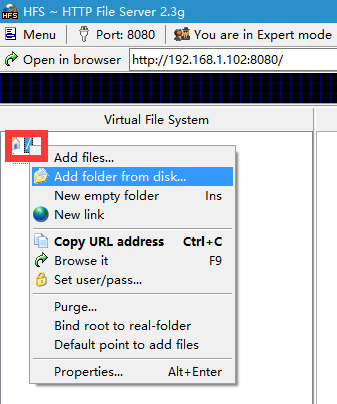
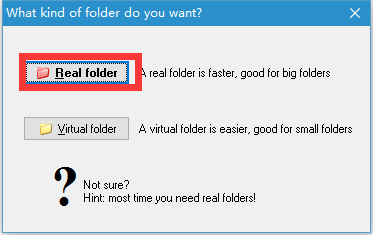
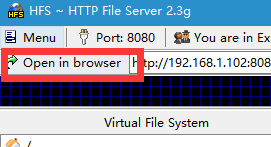


 提升卡
提升卡 沉默号角
沉默号角 喧嚣号角
喧嚣号角 变色卡
变色卡 升龙剑
升龙剑


 大神,我服务器搭建完了,怎么给别人玩啊。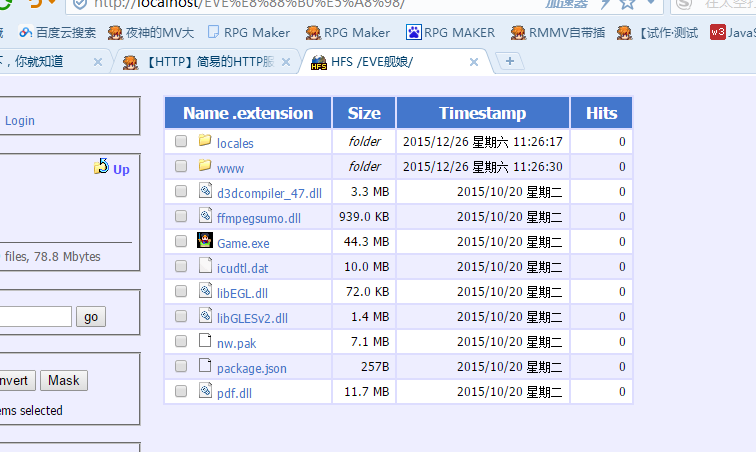

 大神你这个我压根看不懂


 求大神给静态建站的教程,本人小白啊。文字方面除了英语其他基本看不懂,,,而且术语性的英语也基本需要查看,,,

 发表于 2015-12-27 10:57:27
 大神出个教程吧,你到底是怎么让别人也能在网上玩的游戏。