查看: 3568|回复: 1

[已经解决] 请教一个有关icon的问题

[复制链接]
梦石
0
星屑
100
在线时间
268 小时
注册时间
2010-12-22
回帖
17
发表于 2016-2-21 00:30:42 | 显示全部楼层 |阅读模式

加入我们,或者,欢迎回来。

您需要 登录 才可以下载或查看,没有账号?注册会员

×
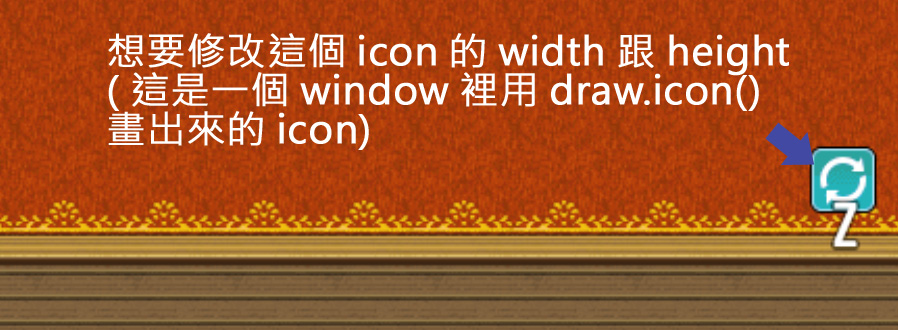
最近在做自己的UI介面, 并建了一个windows 用来贴icon , 我想改变这个icon的比例却苦苦找不到他的参数在哪, 希望各位大大可以替我解答,请观看图片

問題

問題
梦石
0
星屑
647
在线时间
165 小时
注册时间
2012-4-18
回帖
237
发表于 2016-2-21 11:13:01 | 显示全部楼层
YEP_Itmecore。里面有一段关于在道具界面显示道具详情时,绘制一个超大的图标的代码,可惜我也没有解析成功,贴给你看看,希望能够帮助你。
  1. Window_ItemStatus.prototype.drawLargeIcon = function() {
  2.     var iconIndex = this._item.iconIndex;
  3.     var bitmap = ImageManager.loadSystem('IconSet');
  4.     var pw = Window_Base._iconWidth;
  5.     var ph = Window_Base._iconHeight;
  6.     var sx = iconIndex % 16 * pw;
  7.     var sy = Math.floor(iconIndex / 16) * ph;
  8.     var dw = Yanfly.Param.ItemIconSize;
  9.     var dh = Yanfly.Param.ItemIconSize;
  10.     var dx = (Window_Base._faceWidth - dw) / 2;
  11.     var dy = (Window_Base._faceHeight - dh) / 2;
  12.     this.contents._context.imageSmoothingEnabled = false;
  13.     this.contents.blt(bitmap, sx, sy, pw, ph, dx, dy, dw, dh);
  14.     this.contents._context.imageSmoothingEnabled = true;
  15. };
复制代码

点评

不客气,能够帮助你我也很高兴。  发表于 2016-2-22 22:08
感謝 我找到改法了this.contents.blt(bitmap, sx, sy, pw, ph, dx, dy, dw, dh); dw , dh 參數加上去就會改變了  发表于 2016-2-21 15:55

评分

参与人数 1星屑 +166 收起 理由
余烬之中 + 166 认可答案

查看全部评分

回复

使用道具 举报

您需要登录后才可以回帖 登录 | 注册会员

本版积分规则

Powered by Discuz! X5.0 © 2001-2026 Discuz! Team.

在本版发帖返回顶部