| 赞 | 0 |
| VIP | |
| 好人卡 | |
| 积分 | 1 |
| 经验 | |
| 最后登录 | 2025-5-12 |
| 在线时间 | 73 小时 |
- 梦石
- 0
- 星屑
- 75
- 在线时间
- 73 小时
- 注册时间
- 2015-7-10
- 回帖
- 26
|
加入我们,或者,欢迎回来。
您需要 登录 才可以下载或查看,没有账号?注册会员
×
我希望插件可以用代码调用,来在战斗图上显示多种文字特效
例:
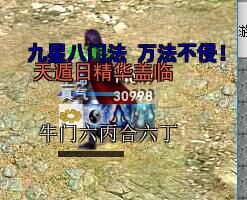
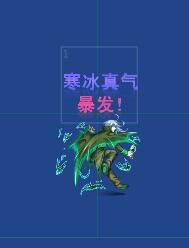
蓝色等颜色的跳出文字、显示在战斗图的上方、
向上浮动的蓝色等颜色的文字,在战斗图上方出现向上浮动
白色或者金色的文字出现在战斗图中央、不浮动
绿色、红色、蓝色 的文字出现在战斗图中央、然后向上浮动,
白色、金色、等文字出现在战斗图下方,不浮动
如果可以,希望还能设置渐变的颜色,不同的文字运动轨迹、自定义文字大小,自动转行等功能。
这些自定义的文字,希望可以引用 “伤害值”、变量、计算公式、技能名称等。
最好能搭配♦ YEP_BuffsStatesCore.js 这个插件中的自定义状态、技能等特殊效果使用,在技能或状态的注释栏中用代码调用 自定义文字显示 功能
以下是一个用来在战斗中显示攻击获取1EXP,同时在角色战斗图上显示“1+exp”文字的插件,或许能提供个例子。
- /*:
- -------------------------------------------------------------------------------
- @title Battle Action Exp
- @author Hime --> HimeWorks ([url]http://himeworks.com[/url])
- @version 1.1
- @date Feb 25, 2016
- @filename HIME_BattleExpPopup.js
- @url
- If you enjoy my work, consider supporting me on Patreon!
- * [url]https://www.patreon.com/himeworks[/url]
- If you have any questions or concerns, you can contact me at any of
- the following sites:
- * Main Website: [url]http://himeworks.com[/url]
- * Facebook: [url]https://www.facebook.com/himeworkscom/[/url]
- * Twitter: [url]https://twitter.com/HimeWorks[/url]
- * Youtube: [url]https://www.youtube.com/c/HimeWorks[/url]
- * Tumblr: [url]http://himeworks.tumblr.com/[/url]
- -------------------------------------------------------------------------------
- @plugindesc v1.1 - Gain Exp after performing an action, instead of at the end
- of battle.
- @help
- -------------------------------------------------------------------------------
- == Description ==
- Example plugin that demonstrates how you could show an exp popup over the
- battler's head.
- Requires Battle Action Exp plugin to be installed.
- == Terms of Use ==
- - Free for use in non-commercial projects with credits
- - Free for use in commercial projects, but it would be nice to let me know
- - Please provide credits to HimeWorks
- == Change Log ==
- 1.0 - Feb 25, 2016
- * initial release
- == Usage ==
- Plug and play
- -------------------------------------------------------------------------------
- -------------------------------------------------------------------------------
- */
- var Imported = Imported || {} ;
- var TH = TH || {};
- Imported.TH_BattleExpPopup = 1;
- TH.BattleExpPopup = TH.BattleExpPopup || {};
- (function ($) {
- var TH_GameActionResult_clear = Game_ActionResult.prototype.clear;
- Game_ActionResult.prototype.clear = function() {
- TH_GameActionResult_clear.call(this);
- this.expPopupChecked = false;
- };
- var TH_SpriteBattler_initMembers = Sprite_Battler.prototype.initMembers;
- Sprite_Battler.prototype.initMembers = function() {
- TH_SpriteBattler_initMembers.call(this);
- this._expPopups = [];
- }
-
- var TH_SpriteBattler_update = Sprite_Battler.prototype.update;
- Sprite_Battler.prototype.update = function() {
- TH_SpriteBattler_update.call(this);
- if (this._battler && this._battler.isSpriteVisible()) {
- this.updateExpPopup();
- }
- }
-
- Sprite_Battler.prototype.setupExpPopup = function() {
- var result = this._battler.result();
- if (!result.expPopupChecked && result.gainedExp > 0) {
- result.expPopupChecked = true;
- var spr = new Sprite_ExpPopup();
- spr.setup(this._battler);
- spr.x = this.x + this.damageOffsetX() - 20;
- spr.y = this.y + this.damageOffsetY() - 140;
- this._expPopups.push(spr);
- this.parent.addChild(spr);
- }
- };
-
- Sprite_Battler.prototype.updateExpPopup = function() {
- this.setupExpPopup();
- if (this._expPopups.length > 0) {
- for (var i = 0; i < this._expPopups.length; i++) {
- this._expPopups[i].update();
- }
- if (!this._expPopups[0].isPlaying()) {
- this.parent.removeChild(this._expPopups[0]);
- this._expPopups.shift();
- }
- }
- };
-
- function Sprite_ExpPopup() {
- this.initialize.apply(this, arguments);
- }
- Sprite_ExpPopup.prototype = Object.create(Sprite_Base.prototype);
- Sprite_ExpPopup.prototype.constructor = Sprite_ExpPopup;
-
- Sprite_ExpPopup.prototype.initialize = function() {
- Sprite_Base.prototype.initialize.call(this);
- this._duration = 90;
- };
-
- Sprite_ExpPopup.prototype.setup = function(battler) {
- this._battler = battler;
- this.bitmap = new Bitmap(100, 200);
- this.bitmap.textColor = "rgb(0, 255, 0)";
- this.bitmap.fontSize = 20;
- this.bitmap.drawText(battler.result().gainedExp + " exp", 0, 0, 100, 200, 'center');
- };
-
- Sprite_ExpPopup.prototype.update = function() {
- if (this._duration > 30) {
- this.y -= 0.5;
- }
- if (this._duration > 0) {
- this._duration -= 1
- }
- };
-
- Sprite_ExpPopup.prototype.isPlaying = function() {
- return this._duration > 0;
- };
- })(TH.BattleExpPopup);
|
|


 写轮眼

 发表于 2016-3-20 16:30:58
 提升卡
 沉默号角
 喧嚣号角
 变色卡
 升龙剑


